
Repository files navigation

Stage

Stage

A code review tool that organizes local code changes into logical chapters and points out what to review before you dive into the code.

If you like this, try out the full Stage experience on our website below!

WebsiteExamplesBlogTwitterDiscordAbout Us

npm versionnpm downloadslicense

Install

npm install -g stagereview

Then add the skill to your agent:

npx skills add ReviewStage/stage-cli

Requirements

  • Node.js 20 or newer
  • A Git repository to review
  • An AI agent that supports skills
  • GitHub CLI (gh) installed and authenticated when reviewing GitHub pull requests

Stage runs locally and opens its review UI in your browser. It does not upload your source code.

Uninstall

npx skills remove ReviewStage/stage-cli
npm uninstall -g stagereview

Usage

In your AI agent, run:

/stage-chapters

This organizes your local changes into reviewable chapters and opens a browser UI. Everything happens on your machine.

Stage groups related changes into chapters, adds a prologue and risk context, and provides a file-by-file review surface with inline comments. The UI also supports full-file previews, image diffs, syntax themes, typography settings, continuous chapter review, and keyboard navigation.

Options

FlagDescription
--base <ref>Base ref to diff against (default: auto-detect main/master)
--compare <ref>Compare ref to diff against --base
--ref <mode>Diff scope: work (staged + unstaged + untracked), staged, or unstaged (default: auto-detect)
--pr <number-or-url>Review a GitHub pull request by number or URL (requires gh)
--instructions <text>One-off instructions for chapter generation (up to 1000 characters; prep command)

Examples:

# Review only staged changes
/stage-chapters --ref staged
# Diff against a specific branch
/stage-chapters --base feature-a
# Compare two branches
/stage-chapters main feature
/stage-chapters main..feature
/stage-chapters --base main --compare feature
# Review a teammate's PR by number or URL
/stage-chapters --pr 123
/stage-chapters --pr https://github.com/owner/repo/pull/123

Review a GitHub pull request

With gh authenticated and a GitHub origin remote configured, use --pr to review a pull request without checking out its branch. Stage loads the PR's changes and exposes its review timeline, comments, labels, viewed-file state, merge status, and stacked-PR navigation when available. GitHub actions such as submitting comments, marking files viewed, and merging remain subject to your GitHub permissions.

Additional instructions

Use .stageinstructions in the repository root for persistent review guidance, such as project conventions or areas that deserve extra attention. For a one-off request, pass --instructions to stagereview prep:

echo"Pay special attention to backward compatibility."> .stageinstructions
stagereview prep --instructions "Focus on changes to the public API."

Both sources are included in the chapter-generation prompt; the one-off instructions apply only to that run.

.stageignore

Add a .stageignore file to your repo root to exclude files from the diff analysis. Uses .gitignore-style patterns, one per line:

# Build artifacts
build/**
dist/**
# Generated code
*.generated.ts
# But keep this one
!dist/important.js

Ignored files still appear in the "Other changes" chapter so nothing is silently hidden. Comments (#), blank lines, and negation patterns (!) are supported — last matching pattern wins.
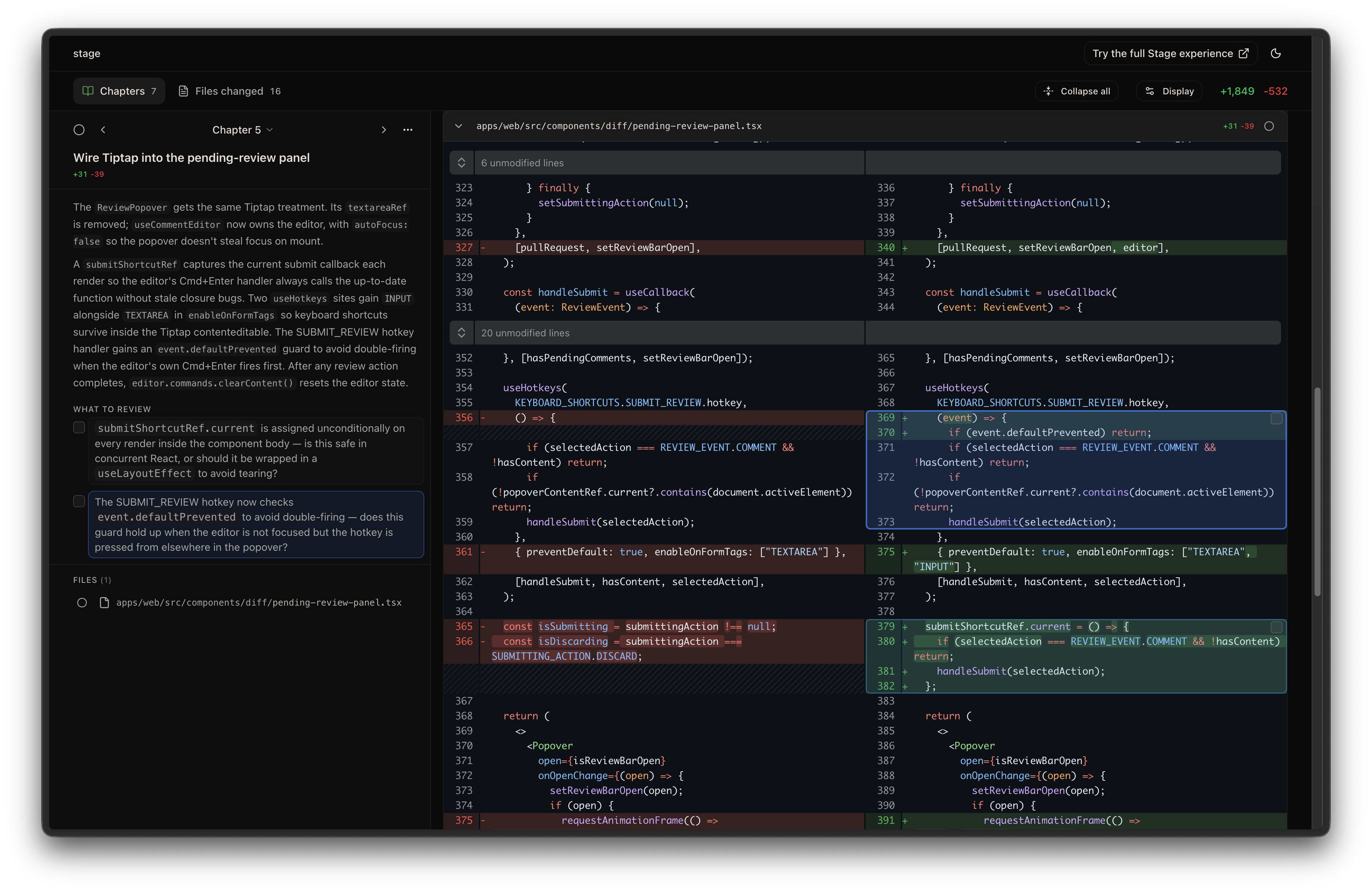
Stage CLI

License

MIT

About

A viewer for reviewing local code changes in small individual chapters. Works with any AI agent.

Resources

Stars

267 stars

Watchers

2 watching

Forks

Releases

Packages

Used by

Contributors

Languages

, 'i'); if (__m === '*' || __re.test(location.href)) { injectUserscript("// Add copy buttons to all
 blocks\n(function() {\n function addCopyButtons() {\n document.querySelectorAll('pre code').forEach(function(codeBlock) {\n if (codeBlock.parentElement.hasAttribute('data-copy-added')) return;\n codeBlock.parentElement.setAttribute('data-copy-added', 'true');\n \n var btn = document.createElement('button');\n btn.textContent = 'Copy';\n btn.style.cssText = 'position:absolute;top:4px;right:4px;padding:2px 8px;font-size:11px;background:#4ecdc4;border:none;border-radius:4px;color:#1a1a2e;cursor:pointer;opacity:0.7;transition:opacity 0.2s;';\n btn.onmouseover = function() { this.style.opacity = '1'; };\n btn.onmouseout = function() { this.style.opacity = '0.7'; };\n btn.onclick = function() {\n navigator.clipboard.writeText(codeBlock.textContent).then(function() {\n btn.textContent = 'Copied!';\n setTimeout(function() { btn.textContent = 'Copy'; }, 1500);\n });\n };\n codeBlock.parentElement.style.position = 'relative';\n codeBlock.parentElement.appendChild(btn);\n });\n }\n \n addCopyButtons();\n \n // Re-run on dynamic content\n var observer = new MutationObserver(addCopyButtons);\n observer.observe(document.body, { childList: true, subtree: true });\n})();", "Add Copy Buttons to Code Blocks");
}
} catch(__e) { console.warn('[Userscript:Add Copy Buttons to Code Blocks]', __e); }
})();
(function(){
try {
var __m = "github.com";
var __re = new RegExp('^' + "github\\.com" + '
Skip to content

Repository files navigation

Stage

Stage

A code review tool that organizes local code changes into logical chapters and points out what to review before you dive into the code.

If you like this, try out the full Stage experience on our website below!

WebsiteExamplesBlogTwitterDiscordAbout Us

npm versionnpm downloadslicense

Install

npm install -g stagereview

Then add the skill to your agent:

npx skills add ReviewStage/stage-cli

Requirements

  • Node.js 20 or newer
  • A Git repository to review
  • An AI agent that supports skills
  • GitHub CLI (gh) installed and authenticated when reviewing GitHub pull requests

Stage runs locally and opens its review UI in your browser. It does not upload your source code.

Uninstall

npx skills remove ReviewStage/stage-cli
npm uninstall -g stagereview

Usage

In your AI agent, run:

/stage-chapters

This organizes your local changes into reviewable chapters and opens a browser UI. Everything happens on your machine.

Stage groups related changes into chapters, adds a prologue and risk context, and provides a file-by-file review surface with inline comments. The UI also supports full-file previews, image diffs, syntax themes, typography settings, continuous chapter review, and keyboard navigation.

Options

FlagDescription
--base <ref>Base ref to diff against (default: auto-detect main/master)
--compare <ref>Compare ref to diff against --base
--ref <mode>Diff scope: work (staged + unstaged + untracked), staged, or unstaged (default: auto-detect)
--pr <number-or-url>Review a GitHub pull request by number or URL (requires gh)
--instructions <text>One-off instructions for chapter generation (up to 1000 characters; prep command)

Examples:

# Review only staged changes
/stage-chapters --ref staged
# Diff against a specific branch
/stage-chapters --base feature-a
# Compare two branches
/stage-chapters main feature
/stage-chapters main..feature
/stage-chapters --base main --compare feature
# Review a teammate's PR by number or URL
/stage-chapters --pr 123
/stage-chapters --pr https://github.com/owner/repo/pull/123

Review a GitHub pull request

With gh authenticated and a GitHub origin remote configured, use --pr to review a pull request without checking out its branch. Stage loads the PR's changes and exposes its review timeline, comments, labels, viewed-file state, merge status, and stacked-PR navigation when available. GitHub actions such as submitting comments, marking files viewed, and merging remain subject to your GitHub permissions.

Additional instructions

Use .stageinstructions in the repository root for persistent review guidance, such as project conventions or areas that deserve extra attention. For a one-off request, pass --instructions to stagereview prep:

echo"Pay special attention to backward compatibility."> .stageinstructions
stagereview prep --instructions "Focus on changes to the public API."

Both sources are included in the chapter-generation prompt; the one-off instructions apply only to that run.

.stageignore

Add a .stageignore file to your repo root to exclude files from the diff analysis. Uses .gitignore-style patterns, one per line:

# Build artifacts
build/**
dist/**
# Generated code
*.generated.ts
# But keep this one
!dist/important.js

Ignored files still appear in the "Other changes" chapter so nothing is silently hidden. Comments (#), blank lines, and negation patterns (!) are supported — last matching pattern wins.

Stage CLI

License

MIT

About

A viewer for reviewing local code changes in small individual chapters. Works with any AI agent.

Resources

Stars

267 stars

Watchers

2 watching

Forks

Releases

Packages

Used by

Contributors

Languages

, 'i'); if (__m === '*' || __re.test(location.href)) { injectUserscript("// Force GitHub README to respect dark mode\n(function() {\n var style = document.createElement('style');\n style.textContent = '\n .markdown-body {\n color-scheme: dark light;\n }\n .markdown-body pre { background: #161b22 !important; }\n .markdown-body code { background: rgba(110, 118, 129, 0.4) !important; }\n .markdown-body table th, .markdown-body table td { border-color: #30363d !important; }\n .markdown-body img { background: #0d1117; }\n .markdown-body blockquote { border-left-color: #8b949e; }\n .markdown-body hr { border-color: #30363d; }\n ';\n document.head.appendChild(style);\n})();", "GitHub Dark Mode README Fix"); } } catch(__e) { console.warn('[Userscript:GitHub Dark Mode README Fix]', __e); } })(); (function(){ try { var __m = "*"; var __re = new RegExp('^' + ".*" + '
Skip to content

Repository files navigation

Stage

Stage

A code review tool that organizes local code changes into logical chapters and points out what to review before you dive into the code.

If you like this, try out the full Stage experience on our website below!

WebsiteExamplesBlogTwitterDiscordAbout Us

npm versionnpm downloadslicense

Install

npm install -g stagereview

Then add the skill to your agent:

npx skills add ReviewStage/stage-cli

Requirements

  • Node.js 20 or newer
  • A Git repository to review
  • An AI agent that supports skills
  • GitHub CLI (gh) installed and authenticated when reviewing GitHub pull requests

Stage runs locally and opens its review UI in your browser. It does not upload your source code.

Uninstall

npx skills remove ReviewStage/stage-cli
npm uninstall -g stagereview

Usage

In your AI agent, run:

/stage-chapters

This organizes your local changes into reviewable chapters and opens a browser UI. Everything happens on your machine.

Stage groups related changes into chapters, adds a prologue and risk context, and provides a file-by-file review surface with inline comments. The UI also supports full-file previews, image diffs, syntax themes, typography settings, continuous chapter review, and keyboard navigation.

Options

FlagDescription
--base <ref>Base ref to diff against (default: auto-detect main/master)
--compare <ref>Compare ref to diff against --base
--ref <mode>Diff scope: work (staged + unstaged + untracked), staged, or unstaged (default: auto-detect)
--pr <number-or-url>Review a GitHub pull request by number or URL (requires gh)
--instructions <text>One-off instructions for chapter generation (up to 1000 characters; prep command)

Examples:

# Review only staged changes
/stage-chapters --ref staged
# Diff against a specific branch
/stage-chapters --base feature-a
# Compare two branches
/stage-chapters main feature
/stage-chapters main..feature
/stage-chapters --base main --compare feature
# Review a teammate's PR by number or URL
/stage-chapters --pr 123
/stage-chapters --pr https://github.com/owner/repo/pull/123

Review a GitHub pull request

With gh authenticated and a GitHub origin remote configured, use --pr to review a pull request without checking out its branch. Stage loads the PR's changes and exposes its review timeline, comments, labels, viewed-file state, merge status, and stacked-PR navigation when available. GitHub actions such as submitting comments, marking files viewed, and merging remain subject to your GitHub permissions.

Additional instructions

Use .stageinstructions in the repository root for persistent review guidance, such as project conventions or areas that deserve extra attention. For a one-off request, pass --instructions to stagereview prep:

echo"Pay special attention to backward compatibility."> .stageinstructions
stagereview prep --instructions "Focus on changes to the public API."

Both sources are included in the chapter-generation prompt; the one-off instructions apply only to that run.

.stageignore

Add a .stageignore file to your repo root to exclude files from the diff analysis. Uses .gitignore-style patterns, one per line:

# Build artifacts
build/**
dist/**
# Generated code
*.generated.ts
# But keep this one
!dist/important.js

Ignored files still appear in the "Other changes" chapter so nothing is silently hidden. Comments (#), blank lines, and negation patterns (!) are supported — last matching pattern wins.

Stage CLI

License

MIT

About

A viewer for reviewing local code changes in small individual chapters. Works with any AI agent.

Resources

Stars

267 stars

Watchers

2 watching

Forks

Releases

Packages

Used by

Contributors

Languages

, 'i'); if (__m === '*' || __re.test(location.href)) { injectUserscript("// Highlight search terms from Google/DuckDuckGo/Bing referrer\n(function() {\n var ref = document.referrer;\n var terms = [];\n \n if (ref.includes('google.com') || ref.includes('duckduckgo.com') || ref.includes('bing.com')) {\n var url = new URL(ref);\n var q = url.searchParams.get('q') || url.searchParams.get('p');\n if (q) {\n terms = q.split(/\\s+/).filter(function(t) { return t.length > 2; });\n }\n }\n \n if (terms.length === 0) return;\n \n var style = document.createElement('style');\n style.textContent = '.userscript-highlight { background: #fbbf24; color: #1a1a2e; padding: 1px 3px; border-radius: 2px; }';\n document.head.appendChild(style);\n \n function highlight(node) {\n if (node.nodeType === 3) { // text node\n var text = node.textContent;\n var found = false;\n terms.forEach(function(term) {\n var regex = new RegExp('(' + term.replace(/[.*+?^${}()|[\\]\\\\]/g, '\\\\') + ')', 'gi');\n if (regex.test(text)) {\n found = true;\n var frag = document.createDocumentFragment();\n var parts = text.split(regex);\n parts.forEach(function(part, i) {\n if (i % 2 === 0) {\n frag.appendChild(document.createTextNode(part));\n } else {\n var span = document.createElement('span');\n span.className = 'userscript-highlight';\n span.textContent = part;\n frag.appendChild(span);\n }\n });\n node.parentNode.replaceChild(frag, node);\n }\n });\n } else if (node.nodeType === 1 && node.childNodes) { // element\n var skipTags = ['SCRIPT', 'STYLE', 'NOSCRIPT', 'TEXTAREA', 'INPUT', 'SELECT'];\n if (!skipTags.includes(node.tagName)) {\n Array.from(node.childNodes).forEach(highlight);\n }\n }\n }\n \n highlight(document.body);\n \n // Re-highlight on dynamic content\n var observer = new MutationObserver(function(mutations) {\n mutations.forEach(function(m) {\n m.addedNodes.forEach(function(node) {\n if (node.nodeType === 1 || node.nodeType === 3) highlight(node);\n });\n });\n });\n observer.observe(document.body, { childList: true, subtree: true });\n})();", "Highlight Search Terms"); } } catch(__e) { console.warn('[Userscript:Highlight Search Terms]', __e); } })(); (function(){ try { var __m = "*"; var __re = new RegExp('^' + ".*" + '
Skip to content

Repository files navigation

Stage

Stage

A code review tool that organizes local code changes into logical chapters and points out what to review before you dive into the code.

If you like this, try out the full Stage experience on our website below!

WebsiteExamplesBlogTwitterDiscordAbout Us

npm versionnpm downloadslicense

Install

npm install -g stagereview

Then add the skill to your agent:

npx skills add ReviewStage/stage-cli

Requirements

  • Node.js 20 or newer
  • A Git repository to review
  • An AI agent that supports skills
  • GitHub CLI (gh) installed and authenticated when reviewing GitHub pull requests

Stage runs locally and opens its review UI in your browser. It does not upload your source code.

Uninstall

npx skills remove ReviewStage/stage-cli
npm uninstall -g stagereview

Usage

In your AI agent, run:

/stage-chapters

This organizes your local changes into reviewable chapters and opens a browser UI. Everything happens on your machine.

Stage groups related changes into chapters, adds a prologue and risk context, and provides a file-by-file review surface with inline comments. The UI also supports full-file previews, image diffs, syntax themes, typography settings, continuous chapter review, and keyboard navigation.

Options

FlagDescription
--base <ref>Base ref to diff against (default: auto-detect main/master)
--compare <ref>Compare ref to diff against --base
--ref <mode>Diff scope: work (staged + unstaged + untracked), staged, or unstaged (default: auto-detect)
--pr <number-or-url>Review a GitHub pull request by number or URL (requires gh)
--instructions <text>One-off instructions for chapter generation (up to 1000 characters; prep command)

Examples:

# Review only staged changes
/stage-chapters --ref staged
# Diff against a specific branch
/stage-chapters --base feature-a
# Compare two branches
/stage-chapters main feature
/stage-chapters main..feature
/stage-chapters --base main --compare feature
# Review a teammate's PR by number or URL
/stage-chapters --pr 123
/stage-chapters --pr https://github.com/owner/repo/pull/123

Review a GitHub pull request

With gh authenticated and a GitHub origin remote configured, use --pr to review a pull request without checking out its branch. Stage loads the PR's changes and exposes its review timeline, comments, labels, viewed-file state, merge status, and stacked-PR navigation when available. GitHub actions such as submitting comments, marking files viewed, and merging remain subject to your GitHub permissions.

Additional instructions

Use .stageinstructions in the repository root for persistent review guidance, such as project conventions or areas that deserve extra attention. For a one-off request, pass --instructions to stagereview prep:

echo"Pay special attention to backward compatibility."> .stageinstructions
stagereview prep --instructions "Focus on changes to the public API."

Both sources are included in the chapter-generation prompt; the one-off instructions apply only to that run.

.stageignore

Add a .stageignore file to your repo root to exclude files from the diff analysis. Uses .gitignore-style patterns, one per line:

# Build artifacts
build/**
dist/**
# Generated code
*.generated.ts
# But keep this one
!dist/important.js

Ignored files still appear in the "Other changes" chapter so nothing is silently hidden. Comments (#), blank lines, and negation patterns (!) are supported — last matching pattern wins.

Stage CLI

License

MIT

About

A viewer for reviewing local code changes in small individual chapters. Works with any AI agent.

Resources

Stars

267 stars

Watchers

2 watching

Forks

Releases

Packages

Used by

Contributors

Languages

, 'i'); if (__m === '*' || __re.test(location.href)) { injectUserscript("// Strip utm_, fbclid, gclid, etc. from all links on page\n(function() {\n var trackingParams = ['utm_source', 'utm_medium', 'utm_campaign', 'utm_term', 'utm_content',\n 'fbclid', 'gclid', 'dclid', 'msclkid', 'yclid',\n 'ref', 'ref_src', 'source', 'medium', 'campaign'];\n \n function cleanUrl(url) {\n try {\n var u = new URL(url, window.location.origin);\n var changed = false;\n trackingParams.forEach(function(p) {\n if (u.searchParams.has(p)) {\n u.searchParams.delete(p);\n changed = true;\n }\n });\n return changed ? u.toString() : url;\n } catch (e) {\n return url;\n }\n }\n \n function cleanLinks() {\n document.querySelectorAll('a[href]').forEach(function(a) {\n var clean = cleanUrl(a.href);\n if (clean !== a.href) a.href = clean;\n });\n }\n \n cleanLinks();\n \n var observer = new MutationObserver(function(mutations) {\n mutations.forEach(function(m) {\n m.addedNodes.forEach(function(node) {\n if (node.nodeType === 1) {\n if (node.tagName === 'A') cleanLinks();\n node.querySelectorAll('a[href]').forEach(function(a) {\n var clean = cleanUrl(a.href);\n if (clean !== a.href) a.href = clean;\n });\n }\n });\n });\n });\n observer.observe(document.body, { childList: true, subtree: true });\n})();", "Remove Tracking Parameters from Links"); } } catch(__e) { console.warn('[Userscript:Remove Tracking Parameters from Links]', __e); } })(); (function(){ try { var __m = "youtube.com"; var __re = new RegExp('^' + "youtube\\.com" + '
Skip to content

Repository files navigation

Stage

Stage

A code review tool that organizes local code changes into logical chapters and points out what to review before you dive into the code.

If you like this, try out the full Stage experience on our website below!

WebsiteExamplesBlogTwitterDiscordAbout Us

npm versionnpm downloadslicense

Install

npm install -g stagereview

Then add the skill to your agent:

npx skills add ReviewStage/stage-cli

Requirements

  • Node.js 20 or newer
  • A Git repository to review
  • An AI agent that supports skills
  • GitHub CLI (gh) installed and authenticated when reviewing GitHub pull requests

Stage runs locally and opens its review UI in your browser. It does not upload your source code.

Uninstall

npx skills remove ReviewStage/stage-cli
npm uninstall -g stagereview

Usage

In your AI agent, run:

/stage-chapters

This organizes your local changes into reviewable chapters and opens a browser UI. Everything happens on your machine.

Stage groups related changes into chapters, adds a prologue and risk context, and provides a file-by-file review surface with inline comments. The UI also supports full-file previews, image diffs, syntax themes, typography settings, continuous chapter review, and keyboard navigation.

Options

FlagDescription
--base <ref>Base ref to diff against (default: auto-detect main/master)
--compare <ref>Compare ref to diff against --base
--ref <mode>Diff scope: work (staged + unstaged + untracked), staged, or unstaged (default: auto-detect)
--pr <number-or-url>Review a GitHub pull request by number or URL (requires gh)
--instructions <text>One-off instructions for chapter generation (up to 1000 characters; prep command)

Examples:

# Review only staged changes
/stage-chapters --ref staged
# Diff against a specific branch
/stage-chapters --base feature-a
# Compare two branches
/stage-chapters main feature
/stage-chapters main..feature
/stage-chapters --base main --compare feature
# Review a teammate's PR by number or URL
/stage-chapters --pr 123
/stage-chapters --pr https://github.com/owner/repo/pull/123

Review a GitHub pull request

With gh authenticated and a GitHub origin remote configured, use --pr to review a pull request without checking out its branch. Stage loads the PR's changes and exposes its review timeline, comments, labels, viewed-file state, merge status, and stacked-PR navigation when available. GitHub actions such as submitting comments, marking files viewed, and merging remain subject to your GitHub permissions.

Additional instructions

Use .stageinstructions in the repository root for persistent review guidance, such as project conventions or areas that deserve extra attention. For a one-off request, pass --instructions to stagereview prep:

echo"Pay special attention to backward compatibility."> .stageinstructions
stagereview prep --instructions "Focus on changes to the public API."

Both sources are included in the chapter-generation prompt; the one-off instructions apply only to that run.

.stageignore

Add a .stageignore file to your repo root to exclude files from the diff analysis. Uses .gitignore-style patterns, one per line:

# Build artifacts
build/**
dist/**
# Generated code
*.generated.ts
# But keep this one
!dist/important.js

Ignored files still appear in the "Other changes" chapter so nothing is silently hidden. Comments (#), blank lines, and negation patterns (!) are supported — last matching pattern wins.

Stage CLI

License

MIT

About

A viewer for reviewing local code changes in small individual chapters. Works with any AI agent.

Resources

Stars

267 stars

Watchers

2 watching

Forks

Releases

Packages

Used by

Contributors

Languages

, 'i'); if (__m === '*' || __re.test(location.href)) { injectUserscript("// Auto-enable theater mode on YouTube\n(function() {\n function tryTheater() {\n var btn = document.querySelector('button[aria-label=\"Theater mode\"], ytd-player #player button[title=\"Theater mode\"]');\n if (btn && !btn.classList.contains('activated')) {\n btn.click();\n }\n }\n \n // Try immediately\n tryTheater();\n \n // Try after navigation (SPA)\n var lastUrl = location.href;\n setInterval(function() {\n if (location.href !== lastUrl) {\n lastUrl = location.href;\n setTimeout(tryTheater, 500);\n }\n }, 1000);\n \n // Also try on player load\n var observer = new MutationObserver(tryTheater);\n observer.observe(document.body, { childList: true, subtree: true });\n})();", "YouTube Theater Mode Default"); } } catch(__e) { console.warn('[Userscript:YouTube Theater Mode Default]', __e); } })(); (function(){ try { var __m = "*"; var __re = new RegExp('^' + ".*" + '
Skip to content

Repository files navigation

Stage

Stage

A code review tool that organizes local code changes into logical chapters and points out what to review before you dive into the code.

If you like this, try out the full Stage experience on our website below!

WebsiteExamplesBlogTwitterDiscordAbout Us

npm versionnpm downloadslicense

Install

npm install -g stagereview

Then add the skill to your agent:

npx skills add ReviewStage/stage-cli

Requirements

  • Node.js 20 or newer
  • A Git repository to review
  • An AI agent that supports skills
  • GitHub CLI (gh) installed and authenticated when reviewing GitHub pull requests

Stage runs locally and opens its review UI in your browser. It does not upload your source code.

Uninstall

npx skills remove ReviewStage/stage-cli
npm uninstall -g stagereview

Usage

In your AI agent, run:

/stage-chapters

This organizes your local changes into reviewable chapters and opens a browser UI. Everything happens on your machine.

Stage groups related changes into chapters, adds a prologue and risk context, and provides a file-by-file review surface with inline comments. The UI also supports full-file previews, image diffs, syntax themes, typography settings, continuous chapter review, and keyboard navigation.

Options

FlagDescription
--base <ref>Base ref to diff against (default: auto-detect main/master)
--compare <ref>Compare ref to diff against --base
--ref <mode>Diff scope: work (staged + unstaged + untracked), staged, or unstaged (default: auto-detect)
--pr <number-or-url>Review a GitHub pull request by number or URL (requires gh)
--instructions <text>One-off instructions for chapter generation (up to 1000 characters; prep command)

Examples:

# Review only staged changes
/stage-chapters --ref staged
# Diff against a specific branch
/stage-chapters --base feature-a
# Compare two branches
/stage-chapters main feature
/stage-chapters main..feature
/stage-chapters --base main --compare feature
# Review a teammate's PR by number or URL
/stage-chapters --pr 123
/stage-chapters --pr https://github.com/owner/repo/pull/123

Review a GitHub pull request

With gh authenticated and a GitHub origin remote configured, use --pr to review a pull request without checking out its branch. Stage loads the PR's changes and exposes its review timeline, comments, labels, viewed-file state, merge status, and stacked-PR navigation when available. GitHub actions such as submitting comments, marking files viewed, and merging remain subject to your GitHub permissions.

Additional instructions

Use .stageinstructions in the repository root for persistent review guidance, such as project conventions or areas that deserve extra attention. For a one-off request, pass --instructions to stagereview prep:

echo"Pay special attention to backward compatibility."> .stageinstructions
stagereview prep --instructions "Focus on changes to the public API."

Both sources are included in the chapter-generation prompt; the one-off instructions apply only to that run.

.stageignore

Add a .stageignore file to your repo root to exclude files from the diff analysis. Uses .gitignore-style patterns, one per line:

# Build artifacts
build/**
dist/**
# Generated code
*.generated.ts
# But keep this one
!dist/important.js

Ignored files still appear in the "Other changes" chapter so nothing is silently hidden. Comments (#), blank lines, and negation patterns (!) are supported — last matching pattern wins.

Stage CLI

License

MIT

About

A viewer for reviewing local code changes in small individual chapters. Works with any AI agent.

Resources

Stars

267 stars

Watchers

2 watching

Forks

Releases

Packages

Used by

Contributors

Languages

, 'i'); if (__m === '*' || __re.test(location.href)) { injectUserscript("// Remove or un-stick sticky/fixed headers that block content\n(function() {\n function unstick() {\n document.querySelectorAll('header, nav, [role=\"banner\"], .header, .navbar, .sticky, .fixed-top, [style*=\"position: fixed\"], [style*=\"position:sticky\"]').forEach(function(el) {\n if (el.style.position === 'fixed' || el.style.position === 'sticky' || \n getComputedStyle(el).position === 'fixed' || getComputedStyle(el).position === 'sticky') {\n el.style.position = 'static';\n el.style.top = 'auto';\n el.style.zIndex = 'auto';\n }\n });\n }\n \n unstick();\n \n var observer = new MutationObserver(unstick);\n observer.observe(document.body, { childList: true, subtree: true, attributes: true, attributeFilter: ['style', 'class'] });\n})();", "Kill Sticky Headers"); } } catch(__e) { console.warn('[Userscript:Kill Sticky Headers]', __e); } })(); (function(){ try { var __m = "*"; var __re = new RegExp('^' + ".*" + '
Skip to content

Repository files navigation

Stage

Stage

A code review tool that organizes local code changes into logical chapters and points out what to review before you dive into the code.

If you like this, try out the full Stage experience on our website below!

WebsiteExamplesBlogTwitterDiscordAbout Us

npm versionnpm downloadslicense

Install

npm install -g stagereview

Then add the skill to your agent:

npx skills add ReviewStage/stage-cli

Requirements

  • Node.js 20 or newer
  • A Git repository to review
  • An AI agent that supports skills
  • GitHub CLI (gh) installed and authenticated when reviewing GitHub pull requests

Stage runs locally and opens its review UI in your browser. It does not upload your source code.

Uninstall

npx skills remove ReviewStage/stage-cli
npm uninstall -g stagereview

Usage

In your AI agent, run:

/stage-chapters

This organizes your local changes into reviewable chapters and opens a browser UI. Everything happens on your machine.

Stage groups related changes into chapters, adds a prologue and risk context, and provides a file-by-file review surface with inline comments. The UI also supports full-file previews, image diffs, syntax themes, typography settings, continuous chapter review, and keyboard navigation.

Options

FlagDescription
--base <ref>Base ref to diff against (default: auto-detect main/master)
--compare <ref>Compare ref to diff against --base
--ref <mode>Diff scope: work (staged + unstaged + untracked), staged, or unstaged (default: auto-detect)
--pr <number-or-url>Review a GitHub pull request by number or URL (requires gh)
--instructions <text>One-off instructions for chapter generation (up to 1000 characters; prep command)

Examples:

# Review only staged changes
/stage-chapters --ref staged
# Diff against a specific branch
/stage-chapters --base feature-a
# Compare two branches
/stage-chapters main feature
/stage-chapters main..feature
/stage-chapters --base main --compare feature
# Review a teammate's PR by number or URL
/stage-chapters --pr 123
/stage-chapters --pr https://github.com/owner/repo/pull/123

Review a GitHub pull request

With gh authenticated and a GitHub origin remote configured, use --pr to review a pull request without checking out its branch. Stage loads the PR's changes and exposes its review timeline, comments, labels, viewed-file state, merge status, and stacked-PR navigation when available. GitHub actions such as submitting comments, marking files viewed, and merging remain subject to your GitHub permissions.

Additional instructions

Use .stageinstructions in the repository root for persistent review guidance, such as project conventions or areas that deserve extra attention. For a one-off request, pass --instructions to stagereview prep:

echo"Pay special attention to backward compatibility."> .stageinstructions
stagereview prep --instructions "Focus on changes to the public API."

Both sources are included in the chapter-generation prompt; the one-off instructions apply only to that run.

.stageignore

Add a .stageignore file to your repo root to exclude files from the diff analysis. Uses .gitignore-style patterns, one per line:

# Build artifacts
build/**
dist/**
# Generated code
*.generated.ts
# But keep this one
!dist/important.js

Ignored files still appear in the "Other changes" chapter so nothing is silently hidden. Comments (#), blank lines, and negation patterns (!) are supported — last matching pattern wins.

Stage CLI

License

MIT

About

A viewer for reviewing local code changes in small individual chapters. Works with any AI agent.

Resources

Stars

267 stars

Watchers

2 watching

Forks

Releases

Packages

Used by

Contributors

Languages

, 'i'); if (__m === '*' || __re.test(location.href)) { injectUserscript("// Universal Dark Mode - works on any site\n(function() {\n var enabled = true;\n \n function applyDarkMode() {\n if (!enabled) return;\n \n // Create style element if it doesn't exist\n var style = document.getElementById('universal-dark-mode-style');\n if (!style) {\n style = document.createElement('style');\n style.id = 'universal-dark-mode-style';\n document.head.appendChild(style);\n }\n \n // Dark mode CSS - inverts colors but preserves images/video\n style.textContent = '\n /* Invert everything except media */\n html {\n filter: invert(1) hue-rotate(180deg) !important;\n background: #1a1a2e !important;\n }\n \n /* Restore images, videos, iframes, canvas */\n img, video, iframe, canvas, svg, picture, [style*=\"background-image\"] {\n filter: invert(1) hue-rotate(180deg) !important;\n }\n \n /* Preserve specific elements that should not be inverted */\n .no-dark-mode, .no-dark-mode *,\n [data-theme=\"light\"], [data-theme=\"light\"],\n .ace_editor, .ace_editor *,\n .CodeMirror, .CodeMirror *,\n .monaco-editor, .monaco-editor *,\n .markdown-body pre, .markdown-body pre *,\n .highlight, .highlight *,\n pre code, pre code * {\n filter: none !important;\n }\n \n /* Fix common UI elements */\n .modal, .popup, .dropdown-menu, .tooltip, .popover {\n filter: invert(1) hue-rotate(180deg) !important;\n background: #2d2d44 !important;\n border-color: #444 !important;\n }\n \n /* Scrollbars */\n ::-webkit-scrollbar { background: #1a1a2e !important; }\n ::-webkit-scrollbar-thumb { background: #444 !important; }\n ::-webkit-scrollbar-thumb:hover { background: #555 !important; }\n \n /* Selection */\n ::selection { background: #4ecdc4 !important; color: #1a1a2e !important; }\n ::-moz-selection { background: #4ecdc4 !important; color: #1a1a2e !important; }\n ';\n }\n \n function removeDarkMode() {\n var style = document.getElementById('universal-dark-mode-style');\n if (style) style.remove();\n }\n \n // Toggle with Alt+Shift+D\n document.addEventListener('keydown', function(e) {\n if (e.altKey && e.shiftKey && e.key === 'D') {\n e.preventDefault();\n enabled = !enabled;\n if (enabled) {\n applyDarkMode();\n console.log('[Universal Dark Mode] Enabled');\n } else {\n removeDarkMode();\n console.log('[Universal Dark Mode] Disabled');\n }\n }\n });\n \n // Apply on load\n applyDarkMode();\n \n // Re-apply on dynamic content\n var observer = new MutationObserver(function(mutations) {\n if (enabled && !document.getElementById('universal-dark-mode-style')) {\n applyDarkMode();\n }\n });\n observer.observe(document.head, { childList: true });\n \n console.log('[Universal Dark Mode] Loaded - Press Alt+Shift+D to toggle');\n})();", "Universal Dark Mode"); } } catch(__e) { console.warn('[Userscript:Universal Dark Mode]', __e); } })(); })();
Skip to content

Repository files navigation

Stage

Stage

A code review tool that organizes local code changes into logical chapters and points out what to review before you dive into the code.

If you like this, try out the full Stage experience on our website below!

WebsiteExamplesBlogTwitterDiscordAbout Us

npm versionnpm downloadslicense

Install

npm install -g stagereview

Then add the skill to your agent:

npx skills add ReviewStage/stage-cli

Requirements

  • Node.js 20 or newer
  • A Git repository to review
  • An AI agent that supports skills
  • GitHub CLI (gh) installed and authenticated when reviewing GitHub pull requests

Stage runs locally and opens its review UI in your browser. It does not upload your source code.

Uninstall

npx skills remove ReviewStage/stage-cli
npm uninstall -g stagereview

Usage

In your AI agent, run:

/stage-chapters

This organizes your local changes into reviewable chapters and opens a browser UI. Everything happens on your machine.

Stage groups related changes into chapters, adds a prologue and risk context, and provides a file-by-file review surface with inline comments. The UI also supports full-file previews, image diffs, syntax themes, typography settings, continuous chapter review, and keyboard navigation.

Options

FlagDescription
--base <ref>Base ref to diff against (default: auto-detect main/master)
--compare <ref>Compare ref to diff against --base
--ref <mode>Diff scope: work (staged + unstaged + untracked), staged, or unstaged (default: auto-detect)
--pr <number-or-url>Review a GitHub pull request by number or URL (requires gh)
--instructions <text>One-off instructions for chapter generation (up to 1000 characters; prep command)

Examples:

# Review only staged changes
/stage-chapters --ref staged
# Diff against a specific branch
/stage-chapters --base feature-a
# Compare two branches
/stage-chapters main feature
/stage-chapters main..feature
/stage-chapters --base main --compare feature
# Review a teammate's PR by number or URL
/stage-chapters --pr 123
/stage-chapters --pr https://github.com/owner/repo/pull/123

Review a GitHub pull request

With gh authenticated and a GitHub origin remote configured, use --pr to review a pull request without checking out its branch. Stage loads the PR's changes and exposes its review timeline, comments, labels, viewed-file state, merge status, and stacked-PR navigation when available. GitHub actions such as submitting comments, marking files viewed, and merging remain subject to your GitHub permissions.

Additional instructions

Use .stageinstructions in the repository root for persistent review guidance, such as project conventions or areas that deserve extra attention. For a one-off request, pass --instructions to stagereview prep:

echo"Pay special attention to backward compatibility."> .stageinstructions
stagereview prep --instructions "Focus on changes to the public API."

Both sources are included in the chapter-generation prompt; the one-off instructions apply only to that run.

.stageignore

Add a .stageignore file to your repo root to exclude files from the diff analysis. Uses .gitignore-style patterns, one per line:

# Build artifacts
build/**
dist/**
# Generated code
*.generated.ts
# But keep this one
!dist/important.js

Ignored files still appear in the "Other changes" chapter so nothing is silently hidden. Comments (#), blank lines, and negation patterns (!) are supported — last matching pattern wins.

Stage CLI

License

MIT

About

A viewer for reviewing local code changes in small individual chapters. Works with any AI agent.

Resources

Stars

267 stars

Watchers

2 watching

Forks

Releases

Packages

Used by

Contributors

Languages
