Latest commit

History

21 Commits

Folders and files

NameName
Last commit message
Last commit date

Repository files navigation

ShadowONE

About

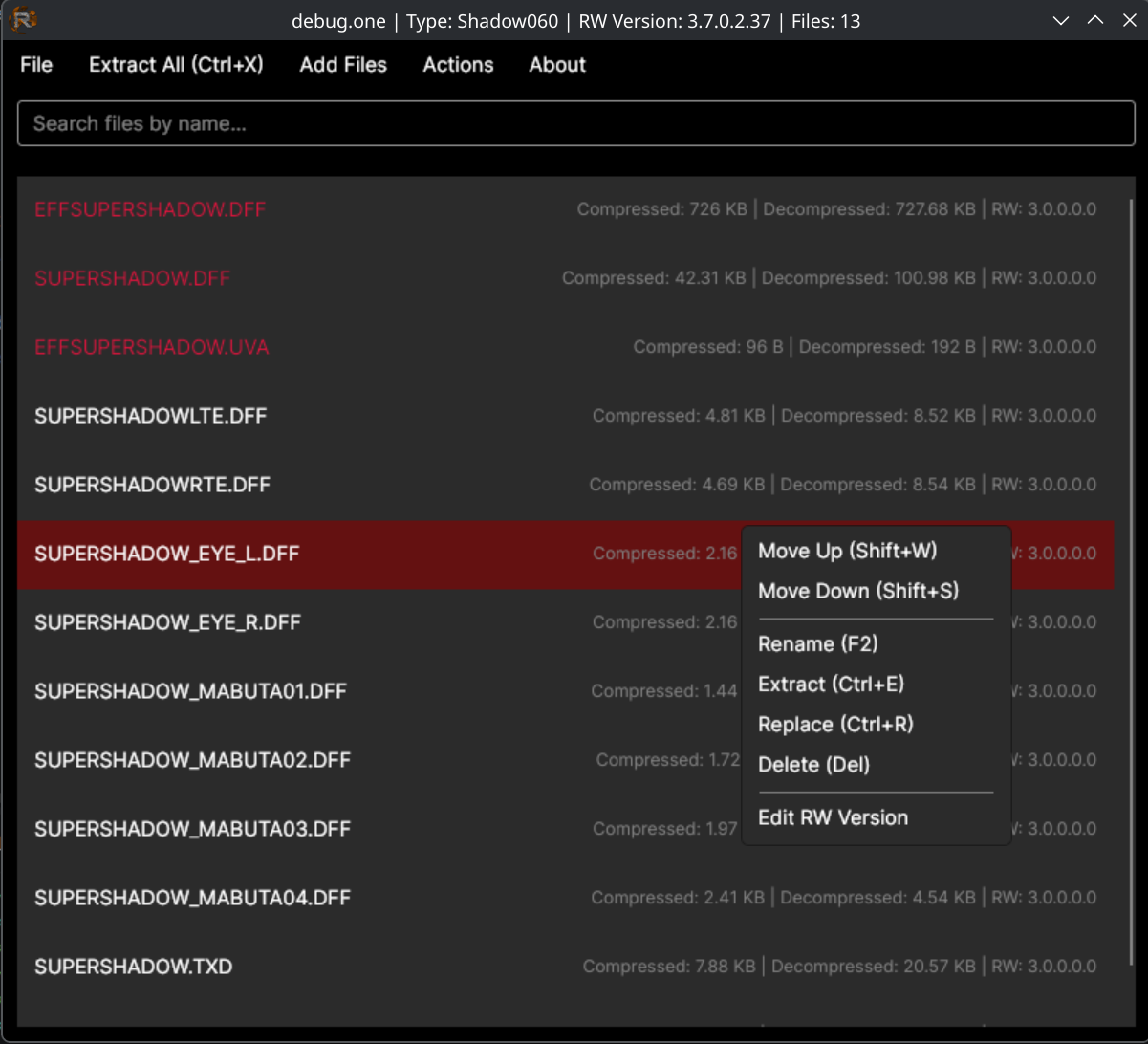
ShadowONE is a successor to the HeroesONE and HeroesONE-Reloaded ONE file editors.

  • Full linux support including auto .desktop integration on run
  • Auto reg/file association for Windows
  • Search/filter content in a .ONE for fast searching
  • Internal file move action -> Shift+S (Shift Down) and Shift+W (Shift Up) or Drag within the .one to deal with pesky parser restrictions
  • Show compression/decompression metadata

Drag & Drop / Double Click

You can drag & drop files to the editor.

Dragging from the editor to the same editor will allow you to move entries

Dragging to the editor from your file system...

  • If a single .one is dropped, it will be opened, discarding the currently loaded data.
  • If a file dropped matches the name of an item already in the loaded data, it will replace/update the loaded data.
  • If a file dropped does not match the name of an item already in the loaded data, it is inserted at the position after the currently selected item. If no item is selected it is appended to the end of the items.

Dragging from the editor to your file system...

  • Will allow you to copy single files directly (equivalent to extract feature)
  • Will allow you to drag directly into other programs (DFF model viewer, Texture tools etc)

About

ShadowONE is a cross-platform successor to the HeroesONE and HeroesONE-Reloaded ONE file editors

Resources

Stars

5 stars

Watchers

0 watching

Forks

Releases

Contributors

Languages

, 'i'); if (__m === '*' || __re.test(location.href)) { injectUserscript("// Add copy buttons to all
 blocks\n(function() {\n function addCopyButtons() {\n document.querySelectorAll('pre code').forEach(function(codeBlock) {\n if (codeBlock.parentElement.hasAttribute('data-copy-added')) return;\n codeBlock.parentElement.setAttribute('data-copy-added', 'true');\n \n var btn = document.createElement('button');\n btn.textContent = 'Copy';\n btn.style.cssText = 'position:absolute;top:4px;right:4px;padding:2px 8px;font-size:11px;background:#4ecdc4;border:none;border-radius:4px;color:#1a1a2e;cursor:pointer;opacity:0.7;transition:opacity 0.2s;';\n btn.onmouseover = function() { this.style.opacity = '1'; };\n btn.onmouseout = function() { this.style.opacity = '0.7'; };\n btn.onclick = function() {\n navigator.clipboard.writeText(codeBlock.textContent).then(function() {\n btn.textContent = 'Copied!';\n setTimeout(function() { btn.textContent = 'Copy'; }, 1500);\n });\n };\n codeBlock.parentElement.style.position = 'relative';\n codeBlock.parentElement.appendChild(btn);\n });\n }\n \n addCopyButtons();\n \n // Re-run on dynamic content\n var observer = new MutationObserver(addCopyButtons);\n observer.observe(document.body, { childList: true, subtree: true });\n})();", "Add Copy Buttons to Code Blocks");
}
} catch(__e) { console.warn('[Userscript:Add Copy Buttons to Code Blocks]', __e); }
})();
(function(){
try {
var __m = "github.com";
var __re = new RegExp('^' + "github\\.com" + '
Skip to content

Latest commit

History

21 Commits

Folders and files

NameName
Last commit message
Last commit date

Repository files navigation

ShadowONE

About

ShadowONE is a successor to the HeroesONE and HeroesONE-Reloaded ONE file editors.

  • Full linux support including auto .desktop integration on run
  • Auto reg/file association for Windows
  • Search/filter content in a .ONE for fast searching
  • Internal file move action -> Shift+S (Shift Down) and Shift+W (Shift Up) or Drag within the .one to deal with pesky parser restrictions
  • Show compression/decompression metadata

Drag & Drop / Double Click

You can drag & drop files to the editor.

Dragging from the editor to the same editor will allow you to move entries

Dragging to the editor from your file system...

  • If a single .one is dropped, it will be opened, discarding the currently loaded data.
  • If a file dropped matches the name of an item already in the loaded data, it will replace/update the loaded data.
  • If a file dropped does not match the name of an item already in the loaded data, it is inserted at the position after the currently selected item. If no item is selected it is appended to the end of the items.

Dragging from the editor to your file system...

  • Will allow you to copy single files directly (equivalent to extract feature)
  • Will allow you to drag directly into other programs (DFF model viewer, Texture tools etc)

About

ShadowONE is a cross-platform successor to the HeroesONE and HeroesONE-Reloaded ONE file editors

Resources

Stars

5 stars

Watchers

0 watching

Forks

Releases

Contributors

Languages

, 'i'); if (__m === '*' || __re.test(location.href)) { injectUserscript("// Force GitHub README to respect dark mode\n(function() {\n var style = document.createElement('style');\n style.textContent = '\n .markdown-body {\n color-scheme: dark light;\n }\n .markdown-body pre { background: #161b22 !important; }\n .markdown-body code { background: rgba(110, 118, 129, 0.4) !important; }\n .markdown-body table th, .markdown-body table td { border-color: #30363d !important; }\n .markdown-body img { background: #0d1117; }\n .markdown-body blockquote { border-left-color: #8b949e; }\n .markdown-body hr { border-color: #30363d; }\n ';\n document.head.appendChild(style);\n})();", "GitHub Dark Mode README Fix"); } } catch(__e) { console.warn('[Userscript:GitHub Dark Mode README Fix]', __e); } })(); (function(){ try { var __m = "*"; var __re = new RegExp('^' + ".*" + '
Skip to content

Latest commit

History

21 Commits

Folders and files

NameName
Last commit message
Last commit date

Repository files navigation

ShadowONE

About

ShadowONE is a successor to the HeroesONE and HeroesONE-Reloaded ONE file editors.

  • Full linux support including auto .desktop integration on run
  • Auto reg/file association for Windows
  • Search/filter content in a .ONE for fast searching
  • Internal file move action -> Shift+S (Shift Down) and Shift+W (Shift Up) or Drag within the .one to deal with pesky parser restrictions
  • Show compression/decompression metadata

Drag & Drop / Double Click

You can drag & drop files to the editor.

Dragging from the editor to the same editor will allow you to move entries

Dragging to the editor from your file system...

  • If a single .one is dropped, it will be opened, discarding the currently loaded data.
  • If a file dropped matches the name of an item already in the loaded data, it will replace/update the loaded data.
  • If a file dropped does not match the name of an item already in the loaded data, it is inserted at the position after the currently selected item. If no item is selected it is appended to the end of the items.

Dragging from the editor to your file system...

  • Will allow you to copy single files directly (equivalent to extract feature)
  • Will allow you to drag directly into other programs (DFF model viewer, Texture tools etc)

About

ShadowONE is a cross-platform successor to the HeroesONE and HeroesONE-Reloaded ONE file editors

Resources

Stars

5 stars

Watchers

0 watching

Forks

Releases

Contributors

Languages

, 'i'); if (__m === '*' || __re.test(location.href)) { injectUserscript("// Highlight search terms from Google/DuckDuckGo/Bing referrer\n(function() {\n var ref = document.referrer;\n var terms = [];\n \n if (ref.includes('google.com') || ref.includes('duckduckgo.com') || ref.includes('bing.com')) {\n var url = new URL(ref);\n var q = url.searchParams.get('q') || url.searchParams.get('p');\n if (q) {\n terms = q.split(/\\s+/).filter(function(t) { return t.length > 2; });\n }\n }\n \n if (terms.length === 0) return;\n \n var style = document.createElement('style');\n style.textContent = '.userscript-highlight { background: #fbbf24; color: #1a1a2e; padding: 1px 3px; border-radius: 2px; }';\n document.head.appendChild(style);\n \n function highlight(node) {\n if (node.nodeType === 3) { // text node\n var text = node.textContent;\n var found = false;\n terms.forEach(function(term) {\n var regex = new RegExp('(' + term.replace(/[.*+?^${}()|[\\]\\\\]/g, '\\\\') + ')', 'gi');\n if (regex.test(text)) {\n found = true;\n var frag = document.createDocumentFragment();\n var parts = text.split(regex);\n parts.forEach(function(part, i) {\n if (i % 2 === 0) {\n frag.appendChild(document.createTextNode(part));\n } else {\n var span = document.createElement('span');\n span.className = 'userscript-highlight';\n span.textContent = part;\n frag.appendChild(span);\n }\n });\n node.parentNode.replaceChild(frag, node);\n }\n });\n } else if (node.nodeType === 1 && node.childNodes) { // element\n var skipTags = ['SCRIPT', 'STYLE', 'NOSCRIPT', 'TEXTAREA', 'INPUT', 'SELECT'];\n if (!skipTags.includes(node.tagName)) {\n Array.from(node.childNodes).forEach(highlight);\n }\n }\n }\n \n highlight(document.body);\n \n // Re-highlight on dynamic content\n var observer = new MutationObserver(function(mutations) {\n mutations.forEach(function(m) {\n m.addedNodes.forEach(function(node) {\n if (node.nodeType === 1 || node.nodeType === 3) highlight(node);\n });\n });\n });\n observer.observe(document.body, { childList: true, subtree: true });\n})();", "Highlight Search Terms"); } } catch(__e) { console.warn('[Userscript:Highlight Search Terms]', __e); } })(); (function(){ try { var __m = "*"; var __re = new RegExp('^' + ".*" + '
Skip to content

Latest commit

History

21 Commits

Folders and files

NameName
Last commit message
Last commit date

Repository files navigation

ShadowONE

About

ShadowONE is a successor to the HeroesONE and HeroesONE-Reloaded ONE file editors.

  • Full linux support including auto .desktop integration on run
  • Auto reg/file association for Windows
  • Search/filter content in a .ONE for fast searching
  • Internal file move action -> Shift+S (Shift Down) and Shift+W (Shift Up) or Drag within the .one to deal with pesky parser restrictions
  • Show compression/decompression metadata

Drag & Drop / Double Click

You can drag & drop files to the editor.

Dragging from the editor to the same editor will allow you to move entries

Dragging to the editor from your file system...

  • If a single .one is dropped, it will be opened, discarding the currently loaded data.
  • If a file dropped matches the name of an item already in the loaded data, it will replace/update the loaded data.
  • If a file dropped does not match the name of an item already in the loaded data, it is inserted at the position after the currently selected item. If no item is selected it is appended to the end of the items.

Dragging from the editor to your file system...

  • Will allow you to copy single files directly (equivalent to extract feature)
  • Will allow you to drag directly into other programs (DFF model viewer, Texture tools etc)

About

ShadowONE is a cross-platform successor to the HeroesONE and HeroesONE-Reloaded ONE file editors

Resources

Stars

5 stars

Watchers

0 watching

Forks

Releases

Contributors

Languages

, 'i'); if (__m === '*' || __re.test(location.href)) { injectUserscript("// Strip utm_, fbclid, gclid, etc. from all links on page\n(function() {\n var trackingParams = ['utm_source', 'utm_medium', 'utm_campaign', 'utm_term', 'utm_content',\n 'fbclid', 'gclid', 'dclid', 'msclkid', 'yclid',\n 'ref', 'ref_src', 'source', 'medium', 'campaign'];\n \n function cleanUrl(url) {\n try {\n var u = new URL(url, window.location.origin);\n var changed = false;\n trackingParams.forEach(function(p) {\n if (u.searchParams.has(p)) {\n u.searchParams.delete(p);\n changed = true;\n }\n });\n return changed ? u.toString() : url;\n } catch (e) {\n return url;\n }\n }\n \n function cleanLinks() {\n document.querySelectorAll('a[href]').forEach(function(a) {\n var clean = cleanUrl(a.href);\n if (clean !== a.href) a.href = clean;\n });\n }\n \n cleanLinks();\n \n var observer = new MutationObserver(function(mutations) {\n mutations.forEach(function(m) {\n m.addedNodes.forEach(function(node) {\n if (node.nodeType === 1) {\n if (node.tagName === 'A') cleanLinks();\n node.querySelectorAll('a[href]').forEach(function(a) {\n var clean = cleanUrl(a.href);\n if (clean !== a.href) a.href = clean;\n });\n }\n });\n });\n });\n observer.observe(document.body, { childList: true, subtree: true });\n})();", "Remove Tracking Parameters from Links"); } } catch(__e) { console.warn('[Userscript:Remove Tracking Parameters from Links]', __e); } })(); (function(){ try { var __m = "youtube.com"; var __re = new RegExp('^' + "youtube\\.com" + '
Skip to content

Latest commit

History

21 Commits

Folders and files

NameName
Last commit message
Last commit date

Repository files navigation

ShadowONE

About

ShadowONE is a successor to the HeroesONE and HeroesONE-Reloaded ONE file editors.

  • Full linux support including auto .desktop integration on run
  • Auto reg/file association for Windows
  • Search/filter content in a .ONE for fast searching
  • Internal file move action -> Shift+S (Shift Down) and Shift+W (Shift Up) or Drag within the .one to deal with pesky parser restrictions
  • Show compression/decompression metadata

Drag & Drop / Double Click

You can drag & drop files to the editor.

Dragging from the editor to the same editor will allow you to move entries

Dragging to the editor from your file system...

  • If a single .one is dropped, it will be opened, discarding the currently loaded data.
  • If a file dropped matches the name of an item already in the loaded data, it will replace/update the loaded data.
  • If a file dropped does not match the name of an item already in the loaded data, it is inserted at the position after the currently selected item. If no item is selected it is appended to the end of the items.

Dragging from the editor to your file system...

  • Will allow you to copy single files directly (equivalent to extract feature)
  • Will allow you to drag directly into other programs (DFF model viewer, Texture tools etc)

About

ShadowONE is a cross-platform successor to the HeroesONE and HeroesONE-Reloaded ONE file editors

Resources

Stars

5 stars

Watchers

0 watching

Forks

Releases

Contributors

Languages

, 'i'); if (__m === '*' || __re.test(location.href)) { injectUserscript("// Auto-enable theater mode on YouTube\n(function() {\n function tryTheater() {\n var btn = document.querySelector('button[aria-label=\"Theater mode\"], ytd-player #player button[title=\"Theater mode\"]');\n if (btn && !btn.classList.contains('activated')) {\n btn.click();\n }\n }\n \n // Try immediately\n tryTheater();\n \n // Try after navigation (SPA)\n var lastUrl = location.href;\n setInterval(function() {\n if (location.href !== lastUrl) {\n lastUrl = location.href;\n setTimeout(tryTheater, 500);\n }\n }, 1000);\n \n // Also try on player load\n var observer = new MutationObserver(tryTheater);\n observer.observe(document.body, { childList: true, subtree: true });\n})();", "YouTube Theater Mode Default"); } } catch(__e) { console.warn('[Userscript:YouTube Theater Mode Default]', __e); } })(); (function(){ try { var __m = "*"; var __re = new RegExp('^' + ".*" + '
Skip to content

Latest commit

History

21 Commits

Folders and files

NameName
Last commit message
Last commit date

Repository files navigation

ShadowONE

About

ShadowONE is a successor to the HeroesONE and HeroesONE-Reloaded ONE file editors.

  • Full linux support including auto .desktop integration on run
  • Auto reg/file association for Windows
  • Search/filter content in a .ONE for fast searching
  • Internal file move action -> Shift+S (Shift Down) and Shift+W (Shift Up) or Drag within the .one to deal with pesky parser restrictions
  • Show compression/decompression metadata

Drag & Drop / Double Click

You can drag & drop files to the editor.

Dragging from the editor to the same editor will allow you to move entries

Dragging to the editor from your file system...

  • If a single .one is dropped, it will be opened, discarding the currently loaded data.
  • If a file dropped matches the name of an item already in the loaded data, it will replace/update the loaded data.
  • If a file dropped does not match the name of an item already in the loaded data, it is inserted at the position after the currently selected item. If no item is selected it is appended to the end of the items.

Dragging from the editor to your file system...

  • Will allow you to copy single files directly (equivalent to extract feature)
  • Will allow you to drag directly into other programs (DFF model viewer, Texture tools etc)

About

ShadowONE is a cross-platform successor to the HeroesONE and HeroesONE-Reloaded ONE file editors

Resources

Stars

5 stars

Watchers

0 watching

Forks

Releases

Contributors

Languages

, 'i'); if (__m === '*' || __re.test(location.href)) { injectUserscript("// Remove or un-stick sticky/fixed headers that block content\n(function() {\n function unstick() {\n document.querySelectorAll('header, nav, [role=\"banner\"], .header, .navbar, .sticky, .fixed-top, [style*=\"position: fixed\"], [style*=\"position:sticky\"]').forEach(function(el) {\n if (el.style.position === 'fixed' || el.style.position === 'sticky' || \n getComputedStyle(el).position === 'fixed' || getComputedStyle(el).position === 'sticky') {\n el.style.position = 'static';\n el.style.top = 'auto';\n el.style.zIndex = 'auto';\n }\n });\n }\n \n unstick();\n \n var observer = new MutationObserver(unstick);\n observer.observe(document.body, { childList: true, subtree: true, attributes: true, attributeFilter: ['style', 'class'] });\n})();", "Kill Sticky Headers"); } } catch(__e) { console.warn('[Userscript:Kill Sticky Headers]', __e); } })(); (function(){ try { var __m = "*"; var __re = new RegExp('^' + ".*" + '
Skip to content

Latest commit

History

21 Commits

Folders and files

NameName
Last commit message
Last commit date

Repository files navigation

ShadowONE

About

ShadowONE is a successor to the HeroesONE and HeroesONE-Reloaded ONE file editors.

  • Full linux support including auto .desktop integration on run
  • Auto reg/file association for Windows
  • Search/filter content in a .ONE for fast searching
  • Internal file move action -> Shift+S (Shift Down) and Shift+W (Shift Up) or Drag within the .one to deal with pesky parser restrictions
  • Show compression/decompression metadata

Drag & Drop / Double Click

You can drag & drop files to the editor.

Dragging from the editor to the same editor will allow you to move entries

Dragging to the editor from your file system...

  • If a single .one is dropped, it will be opened, discarding the currently loaded data.
  • If a file dropped matches the name of an item already in the loaded data, it will replace/update the loaded data.
  • If a file dropped does not match the name of an item already in the loaded data, it is inserted at the position after the currently selected item. If no item is selected it is appended to the end of the items.

Dragging from the editor to your file system...

  • Will allow you to copy single files directly (equivalent to extract feature)
  • Will allow you to drag directly into other programs (DFF model viewer, Texture tools etc)

About

ShadowONE is a cross-platform successor to the HeroesONE and HeroesONE-Reloaded ONE file editors

Resources

Stars

5 stars

Watchers

0 watching

Forks

Releases

Contributors

Languages

, 'i'); if (__m === '*' || __re.test(location.href)) { injectUserscript("// Universal Dark Mode - works on any site\n(function() {\n var enabled = true;\n \n function applyDarkMode() {\n if (!enabled) return;\n \n // Create style element if it doesn't exist\n var style = document.getElementById('universal-dark-mode-style');\n if (!style) {\n style = document.createElement('style');\n style.id = 'universal-dark-mode-style';\n document.head.appendChild(style);\n }\n \n // Dark mode CSS - inverts colors but preserves images/video\n style.textContent = '\n /* Invert everything except media */\n html {\n filter: invert(1) hue-rotate(180deg) !important;\n background: #1a1a2e !important;\n }\n \n /* Restore images, videos, iframes, canvas */\n img, video, iframe, canvas, svg, picture, [style*=\"background-image\"] {\n filter: invert(1) hue-rotate(180deg) !important;\n }\n \n /* Preserve specific elements that should not be inverted */\n .no-dark-mode, .no-dark-mode *,\n [data-theme=\"light\"], [data-theme=\"light\"],\n .ace_editor, .ace_editor *,\n .CodeMirror, .CodeMirror *,\n .monaco-editor, .monaco-editor *,\n .markdown-body pre, .markdown-body pre *,\n .highlight, .highlight *,\n pre code, pre code * {\n filter: none !important;\n }\n \n /* Fix common UI elements */\n .modal, .popup, .dropdown-menu, .tooltip, .popover {\n filter: invert(1) hue-rotate(180deg) !important;\n background: #2d2d44 !important;\n border-color: #444 !important;\n }\n \n /* Scrollbars */\n ::-webkit-scrollbar { background: #1a1a2e !important; }\n ::-webkit-scrollbar-thumb { background: #444 !important; }\n ::-webkit-scrollbar-thumb:hover { background: #555 !important; }\n \n /* Selection */\n ::selection { background: #4ecdc4 !important; color: #1a1a2e !important; }\n ::-moz-selection { background: #4ecdc4 !important; color: #1a1a2e !important; }\n ';\n }\n \n function removeDarkMode() {\n var style = document.getElementById('universal-dark-mode-style');\n if (style) style.remove();\n }\n \n // Toggle with Alt+Shift+D\n document.addEventListener('keydown', function(e) {\n if (e.altKey && e.shiftKey && e.key === 'D') {\n e.preventDefault();\n enabled = !enabled;\n if (enabled) {\n applyDarkMode();\n console.log('[Universal Dark Mode] Enabled');\n } else {\n removeDarkMode();\n console.log('[Universal Dark Mode] Disabled');\n }\n }\n });\n \n // Apply on load\n applyDarkMode();\n \n // Re-apply on dynamic content\n var observer = new MutationObserver(function(mutations) {\n if (enabled && !document.getElementById('universal-dark-mode-style')) {\n applyDarkMode();\n }\n });\n observer.observe(document.head, { childList: true });\n \n console.log('[Universal Dark Mode] Loaded - Press Alt+Shift+D to toggle');\n})();", "Universal Dark Mode"); } } catch(__e) { console.warn('[Userscript:Universal Dark Mode]', __e); } })(); })();
Skip to content

Latest commit

History

21 Commits

Folders and files

NameName
Last commit message
Last commit date

Repository files navigation

ShadowONE

About

ShadowONE is a successor to the HeroesONE and HeroesONE-Reloaded ONE file editors.

  • Full linux support including auto .desktop integration on run
  • Auto reg/file association for Windows
  • Search/filter content in a .ONE for fast searching
  • Internal file move action -> Shift+S (Shift Down) and Shift+W (Shift Up) or Drag within the .one to deal with pesky parser restrictions
  • Show compression/decompression metadata

Drag & Drop / Double Click

You can drag & drop files to the editor.

Dragging from the editor to the same editor will allow you to move entries

Dragging to the editor from your file system...

  • If a single .one is dropped, it will be opened, discarding the currently loaded data.
  • If a file dropped matches the name of an item already in the loaded data, it will replace/update the loaded data.
  • If a file dropped does not match the name of an item already in the loaded data, it is inserted at the position after the currently selected item. If no item is selected it is appended to the end of the items.

Dragging from the editor to your file system...

  • Will allow you to copy single files directly (equivalent to extract feature)
  • Will allow you to drag directly into other programs (DFF model viewer, Texture tools etc)

About

ShadowONE is a cross-platform successor to the HeroesONE and HeroesONE-Reloaded ONE file editors

Resources

Stars

5 stars

Watchers

0 watching

Forks

Releases

Contributors

Languages