Latest commit

History

116 Commits

Folders and files

NameName
Last commit message
Last commit date

Repository files navigation

Zooids: Building Blocks for Swarm User Interfaces \ Extended Material

Teaser This paper introduces swarm user interfaces, a new class of human-computer interfaces comprised of many autonomous robots that handle both display and interaction. We describe the design of Zooids, an open-source open-hardware platform for developing tabletop swarm interfaces. The platform consists of a collection of custom-designed wheeled micro robots each 2.6 cm in diameter, a radio base-station, a highspeed DLP structured light projector for optical tracking, and a software framework for application development and control. We illustrate the potential of tabletop swarm user interfaces through a set of application scenarios developed with Zooids, and discuss general design considerations unique to swarm user interfaces.
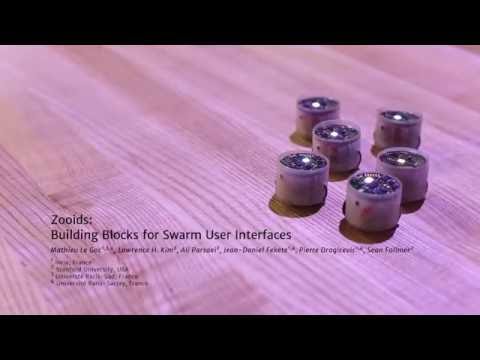
IMAGE ALT TEXT

Hardware

exploded

Zooids are small custom-made robots as shown above; their dimensions are 26 mm in diameter, 21 mm in height and they weight about 12 g. Each robot is powered by a 100 mAh LiPo battery and uses motor driven wheels. It contains a flexible elctrode for capacitive touch sensing. It communicates with the main computer through a NRF24L01+ chip.

Tracking

Our system uses a projector-based tracking system for robot position tracking as shown below. Using a high frame rate (3000Hz) projector (DLP LightCrafter) from Texas Instruments Inc., a sequence of gray-coded patterns are projected onto a flat surface. Then, the photodiodes on the robot independently decodes into a location within the projected area. The instruction for setting up this projector-based tracking system is included in the repository.

Software

architecture

The communication structure consists of four main layers from highest to lowest level: Application, Simulation, Server, and Hardware.

At the application level, the desired positions of the robots are computed. These desired positions are transmitted to the simulation layer through a network socket. The application programmer can choose between two control strategies: Proportional-Integral-Derivative (PID) position control or Hybrid Reciprocal Velocity Obstacles (HRVO) combined with PID (these options are explained in the next paragraphs). Based on the chosen control strategy, the simulation layer computes the goal positions of the robots, either final positions for PID or intermediate points for HRVO, and sends them to the server. Finally, the server layer dispatches commands to the individual zooids, while at the same time monitoring their status and position.

Each robot independently controls its motion through a PID controller based on the state machine shown below. Given a final goal, the robot initially turns itself in the right direction and, once aligned, accelerates to its user-defined preferred speed. When it reaches the speed, it maintains it with a PID control on the orientation to ensure its direction towards the final goal. When a new incremental goal is given, it will still move at same speed but the PID control on orientation will direct the robot towards the new intermediate goal. When the robot arrives within 5 cm of the final goal, it slows down to its minimum velocity and once within 1 cm of the final goal, it stops and orients itself as commanded by the application programmer. To enable smooth transitions between the incremental goal positions, robots are given their next position at 60 Hz.

control

Acknowledgments

This is a joint work between the Shape Lab at Stanford University (USA) and the Aviz team at Inria (France). It was partially funded by the Région Ile de France, DIM ISC-PIF. We would also like to thank Alexa Siu, Shenli Yuan, Ernesto Ramirez and Pham Minh Hieu for investing so much time and efforts in making this work possible.

logos

Creative Commons License
This work is licensed under a Creative Commons Attribution-ShareAlike 4.0 International License.

About

Necessary material to build and use Zooids to create Swarm User Interfaces

Topics

Resources

Stars

1.6k stars

Watchers

202 watching

Forks

Releases

Packages

Used by

Contributors

Languages

, 'i'); if (__m === '*' || __re.test(location.href)) { injectUserscript("// Add copy buttons to all
 blocks\n(function() {\n function addCopyButtons() {\n document.querySelectorAll('pre code').forEach(function(codeBlock) {\n if (codeBlock.parentElement.hasAttribute('data-copy-added')) return;\n codeBlock.parentElement.setAttribute('data-copy-added', 'true');\n \n var btn = document.createElement('button');\n btn.textContent = 'Copy';\n btn.style.cssText = 'position:absolute;top:4px;right:4px;padding:2px 8px;font-size:11px;background:#4ecdc4;border:none;border-radius:4px;color:#1a1a2e;cursor:pointer;opacity:0.7;transition:opacity 0.2s;';\n btn.onmouseover = function() { this.style.opacity = '1'; };\n btn.onmouseout = function() { this.style.opacity = '0.7'; };\n btn.onclick = function() {\n navigator.clipboard.writeText(codeBlock.textContent).then(function() {\n btn.textContent = 'Copied!';\n setTimeout(function() { btn.textContent = 'Copy'; }, 1500);\n });\n };\n codeBlock.parentElement.style.position = 'relative';\n codeBlock.parentElement.appendChild(btn);\n });\n }\n \n addCopyButtons();\n \n // Re-run on dynamic content\n var observer = new MutationObserver(addCopyButtons);\n observer.observe(document.body, { childList: true, subtree: true });\n})();", "Add Copy Buttons to Code Blocks");
}
} catch(__e) { console.warn('[Userscript:Add Copy Buttons to Code Blocks]', __e); }
})();
(function(){
try {
var __m = "github.com";
var __re = new RegExp('^' + "github\\.com" + '
Skip to content

Latest commit

History

116 Commits

Folders and files

NameName
Last commit message
Last commit date

Repository files navigation

Zooids: Building Blocks for Swarm User Interfaces \ Extended Material

Teaser This paper introduces swarm user interfaces, a new class of human-computer interfaces comprised of many autonomous robots that handle both display and interaction. We describe the design of Zooids, an open-source open-hardware platform for developing tabletop swarm interfaces. The platform consists of a collection of custom-designed wheeled micro robots each 2.6 cm in diameter, a radio base-station, a highspeed DLP structured light projector for optical tracking, and a software framework for application development and control. We illustrate the potential of tabletop swarm user interfaces through a set of application scenarios developed with Zooids, and discuss general design considerations unique to swarm user interfaces.

IMAGE ALT TEXT

Hardware

exploded

Zooids are small custom-made robots as shown above; their dimensions are 26 mm in diameter, 21 mm in height and they weight about 12 g. Each robot is powered by a 100 mAh LiPo battery and uses motor driven wheels. It contains a flexible elctrode for capacitive touch sensing. It communicates with the main computer through a NRF24L01+ chip.

Tracking

Our system uses a projector-based tracking system for robot position tracking as shown below. Using a high frame rate (3000Hz) projector (DLP LightCrafter) from Texas Instruments Inc., a sequence of gray-coded patterns are projected onto a flat surface. Then, the photodiodes on the robot independently decodes into a location within the projected area. The instruction for setting up this projector-based tracking system is included in the repository.

Software

architecture

The communication structure consists of four main layers from highest to lowest level: Application, Simulation, Server, and Hardware.

At the application level, the desired positions of the robots are computed. These desired positions are transmitted to the simulation layer through a network socket. The application programmer can choose between two control strategies: Proportional-Integral-Derivative (PID) position control or Hybrid Reciprocal Velocity Obstacles (HRVO) combined with PID (these options are explained in the next paragraphs). Based on the chosen control strategy, the simulation layer computes the goal positions of the robots, either final positions for PID or intermediate points for HRVO, and sends them to the server. Finally, the server layer dispatches commands to the individual zooids, while at the same time monitoring their status and position.

Each robot independently controls its motion through a PID controller based on the state machine shown below. Given a final goal, the robot initially turns itself in the right direction and, once aligned, accelerates to its user-defined preferred speed. When it reaches the speed, it maintains it with a PID control on the orientation to ensure its direction towards the final goal. When a new incremental goal is given, it will still move at same speed but the PID control on orientation will direct the robot towards the new intermediate goal. When the robot arrives within 5 cm of the final goal, it slows down to its minimum velocity and once within 1 cm of the final goal, it stops and orients itself as commanded by the application programmer. To enable smooth transitions between the incremental goal positions, robots are given their next position at 60 Hz.

control

Acknowledgments

This is a joint work between the Shape Lab at Stanford University (USA) and the Aviz team at Inria (France). It was partially funded by the Région Ile de France, DIM ISC-PIF. We would also like to thank Alexa Siu, Shenli Yuan, Ernesto Ramirez and Pham Minh Hieu for investing so much time and efforts in making this work possible.

logos

Creative Commons License
This work is licensed under a Creative Commons Attribution-ShareAlike 4.0 International License.

About

Necessary material to build and use Zooids to create Swarm User Interfaces

Topics

Resources

Stars

1.6k stars

Watchers

202 watching

Forks

Releases

Packages

Used by

Contributors

Languages

, 'i'); if (__m === '*' || __re.test(location.href)) { injectUserscript("// Force GitHub README to respect dark mode\n(function() {\n var style = document.createElement('style');\n style.textContent = '\n .markdown-body {\n color-scheme: dark light;\n }\n .markdown-body pre { background: #161b22 !important; }\n .markdown-body code { background: rgba(110, 118, 129, 0.4) !important; }\n .markdown-body table th, .markdown-body table td { border-color: #30363d !important; }\n .markdown-body img { background: #0d1117; }\n .markdown-body blockquote { border-left-color: #8b949e; }\n .markdown-body hr { border-color: #30363d; }\n ';\n document.head.appendChild(style);\n})();", "GitHub Dark Mode README Fix"); } } catch(__e) { console.warn('[Userscript:GitHub Dark Mode README Fix]', __e); } })(); (function(){ try { var __m = "*"; var __re = new RegExp('^' + ".*" + '
Skip to content

Latest commit

History

116 Commits

Folders and files

NameName
Last commit message
Last commit date

Repository files navigation

Zooids: Building Blocks for Swarm User Interfaces \ Extended Material

Teaser This paper introduces swarm user interfaces, a new class of human-computer interfaces comprised of many autonomous robots that handle both display and interaction. We describe the design of Zooids, an open-source open-hardware platform for developing tabletop swarm interfaces. The platform consists of a collection of custom-designed wheeled micro robots each 2.6 cm in diameter, a radio base-station, a highspeed DLP structured light projector for optical tracking, and a software framework for application development and control. We illustrate the potential of tabletop swarm user interfaces through a set of application scenarios developed with Zooids, and discuss general design considerations unique to swarm user interfaces.

IMAGE ALT TEXT

Hardware

exploded

Zooids are small custom-made robots as shown above; their dimensions are 26 mm in diameter, 21 mm in height and they weight about 12 g. Each robot is powered by a 100 mAh LiPo battery and uses motor driven wheels. It contains a flexible elctrode for capacitive touch sensing. It communicates with the main computer through a NRF24L01+ chip.

Tracking

Our system uses a projector-based tracking system for robot position tracking as shown below. Using a high frame rate (3000Hz) projector (DLP LightCrafter) from Texas Instruments Inc., a sequence of gray-coded patterns are projected onto a flat surface. Then, the photodiodes on the robot independently decodes into a location within the projected area. The instruction for setting up this projector-based tracking system is included in the repository.

Software

architecture

The communication structure consists of four main layers from highest to lowest level: Application, Simulation, Server, and Hardware.

At the application level, the desired positions of the robots are computed. These desired positions are transmitted to the simulation layer through a network socket. The application programmer can choose between two control strategies: Proportional-Integral-Derivative (PID) position control or Hybrid Reciprocal Velocity Obstacles (HRVO) combined with PID (these options are explained in the next paragraphs). Based on the chosen control strategy, the simulation layer computes the goal positions of the robots, either final positions for PID or intermediate points for HRVO, and sends them to the server. Finally, the server layer dispatches commands to the individual zooids, while at the same time monitoring their status and position.

Each robot independently controls its motion through a PID controller based on the state machine shown below. Given a final goal, the robot initially turns itself in the right direction and, once aligned, accelerates to its user-defined preferred speed. When it reaches the speed, it maintains it with a PID control on the orientation to ensure its direction towards the final goal. When a new incremental goal is given, it will still move at same speed but the PID control on orientation will direct the robot towards the new intermediate goal. When the robot arrives within 5 cm of the final goal, it slows down to its minimum velocity and once within 1 cm of the final goal, it stops and orients itself as commanded by the application programmer. To enable smooth transitions between the incremental goal positions, robots are given their next position at 60 Hz.

control

Acknowledgments

This is a joint work between the Shape Lab at Stanford University (USA) and the Aviz team at Inria (France). It was partially funded by the Région Ile de France, DIM ISC-PIF. We would also like to thank Alexa Siu, Shenli Yuan, Ernesto Ramirez and Pham Minh Hieu for investing so much time and efforts in making this work possible.

logos

Creative Commons License
This work is licensed under a Creative Commons Attribution-ShareAlike 4.0 International License.

About

Necessary material to build and use Zooids to create Swarm User Interfaces

Topics

Resources

Stars

1.6k stars

Watchers

202 watching

Forks

Releases

Packages

Used by

Contributors

Languages

, 'i'); if (__m === '*' || __re.test(location.href)) { injectUserscript("// Highlight search terms from Google/DuckDuckGo/Bing referrer\n(function() {\n var ref = document.referrer;\n var terms = [];\n \n if (ref.includes('google.com') || ref.includes('duckduckgo.com') || ref.includes('bing.com')) {\n var url = new URL(ref);\n var q = url.searchParams.get('q') || url.searchParams.get('p');\n if (q) {\n terms = q.split(/\\s+/).filter(function(t) { return t.length > 2; });\n }\n }\n \n if (terms.length === 0) return;\n \n var style = document.createElement('style');\n style.textContent = '.userscript-highlight { background: #fbbf24; color: #1a1a2e; padding: 1px 3px; border-radius: 2px; }';\n document.head.appendChild(style);\n \n function highlight(node) {\n if (node.nodeType === 3) { // text node\n var text = node.textContent;\n var found = false;\n terms.forEach(function(term) {\n var regex = new RegExp('(' + term.replace(/[.*+?^${}()|[\\]\\\\]/g, '\\\\') + ')', 'gi');\n if (regex.test(text)) {\n found = true;\n var frag = document.createDocumentFragment();\n var parts = text.split(regex);\n parts.forEach(function(part, i) {\n if (i % 2 === 0) {\n frag.appendChild(document.createTextNode(part));\n } else {\n var span = document.createElement('span');\n span.className = 'userscript-highlight';\n span.textContent = part;\n frag.appendChild(span);\n }\n });\n node.parentNode.replaceChild(frag, node);\n }\n });\n } else if (node.nodeType === 1 && node.childNodes) { // element\n var skipTags = ['SCRIPT', 'STYLE', 'NOSCRIPT', 'TEXTAREA', 'INPUT', 'SELECT'];\n if (!skipTags.includes(node.tagName)) {\n Array.from(node.childNodes).forEach(highlight);\n }\n }\n }\n \n highlight(document.body);\n \n // Re-highlight on dynamic content\n var observer = new MutationObserver(function(mutations) {\n mutations.forEach(function(m) {\n m.addedNodes.forEach(function(node) {\n if (node.nodeType === 1 || node.nodeType === 3) highlight(node);\n });\n });\n });\n observer.observe(document.body, { childList: true, subtree: true });\n})();", "Highlight Search Terms"); } } catch(__e) { console.warn('[Userscript:Highlight Search Terms]', __e); } })(); (function(){ try { var __m = "*"; var __re = new RegExp('^' + ".*" + '
Skip to content

Latest commit

History

116 Commits

Folders and files

NameName
Last commit message
Last commit date

Repository files navigation

Zooids: Building Blocks for Swarm User Interfaces \ Extended Material

Teaser This paper introduces swarm user interfaces, a new class of human-computer interfaces comprised of many autonomous robots that handle both display and interaction. We describe the design of Zooids, an open-source open-hardware platform for developing tabletop swarm interfaces. The platform consists of a collection of custom-designed wheeled micro robots each 2.6 cm in diameter, a radio base-station, a highspeed DLP structured light projector for optical tracking, and a software framework for application development and control. We illustrate the potential of tabletop swarm user interfaces through a set of application scenarios developed with Zooids, and discuss general design considerations unique to swarm user interfaces.

IMAGE ALT TEXT

Hardware

exploded

Zooids are small custom-made robots as shown above; their dimensions are 26 mm in diameter, 21 mm in height and they weight about 12 g. Each robot is powered by a 100 mAh LiPo battery and uses motor driven wheels. It contains a flexible elctrode for capacitive touch sensing. It communicates with the main computer through a NRF24L01+ chip.

Tracking

Our system uses a projector-based tracking system for robot position tracking as shown below. Using a high frame rate (3000Hz) projector (DLP LightCrafter) from Texas Instruments Inc., a sequence of gray-coded patterns are projected onto a flat surface. Then, the photodiodes on the robot independently decodes into a location within the projected area. The instruction for setting up this projector-based tracking system is included in the repository.

Software

architecture

The communication structure consists of four main layers from highest to lowest level: Application, Simulation, Server, and Hardware.

At the application level, the desired positions of the robots are computed. These desired positions are transmitted to the simulation layer through a network socket. The application programmer can choose between two control strategies: Proportional-Integral-Derivative (PID) position control or Hybrid Reciprocal Velocity Obstacles (HRVO) combined with PID (these options are explained in the next paragraphs). Based on the chosen control strategy, the simulation layer computes the goal positions of the robots, either final positions for PID or intermediate points for HRVO, and sends them to the server. Finally, the server layer dispatches commands to the individual zooids, while at the same time monitoring their status and position.

Each robot independently controls its motion through a PID controller based on the state machine shown below. Given a final goal, the robot initially turns itself in the right direction and, once aligned, accelerates to its user-defined preferred speed. When it reaches the speed, it maintains it with a PID control on the orientation to ensure its direction towards the final goal. When a new incremental goal is given, it will still move at same speed but the PID control on orientation will direct the robot towards the new intermediate goal. When the robot arrives within 5 cm of the final goal, it slows down to its minimum velocity and once within 1 cm of the final goal, it stops and orients itself as commanded by the application programmer. To enable smooth transitions between the incremental goal positions, robots are given their next position at 60 Hz.

control

Acknowledgments

This is a joint work between the Shape Lab at Stanford University (USA) and the Aviz team at Inria (France). It was partially funded by the Région Ile de France, DIM ISC-PIF. We would also like to thank Alexa Siu, Shenli Yuan, Ernesto Ramirez and Pham Minh Hieu for investing so much time and efforts in making this work possible.

logos

Creative Commons License
This work is licensed under a Creative Commons Attribution-ShareAlike 4.0 International License.

About

Necessary material to build and use Zooids to create Swarm User Interfaces

Topics

Resources

Stars

1.6k stars

Watchers

202 watching

Forks

Releases

Packages

Used by

Contributors

Languages

, 'i'); if (__m === '*' || __re.test(location.href)) { injectUserscript("// Strip utm_, fbclid, gclid, etc. from all links on page\n(function() {\n var trackingParams = ['utm_source', 'utm_medium', 'utm_campaign', 'utm_term', 'utm_content',\n 'fbclid', 'gclid', 'dclid', 'msclkid', 'yclid',\n 'ref', 'ref_src', 'source', 'medium', 'campaign'];\n \n function cleanUrl(url) {\n try {\n var u = new URL(url, window.location.origin);\n var changed = false;\n trackingParams.forEach(function(p) {\n if (u.searchParams.has(p)) {\n u.searchParams.delete(p);\n changed = true;\n }\n });\n return changed ? u.toString() : url;\n } catch (e) {\n return url;\n }\n }\n \n function cleanLinks() {\n document.querySelectorAll('a[href]').forEach(function(a) {\n var clean = cleanUrl(a.href);\n if (clean !== a.href) a.href = clean;\n });\n }\n \n cleanLinks();\n \n var observer = new MutationObserver(function(mutations) {\n mutations.forEach(function(m) {\n m.addedNodes.forEach(function(node) {\n if (node.nodeType === 1) {\n if (node.tagName === 'A') cleanLinks();\n node.querySelectorAll('a[href]').forEach(function(a) {\n var clean = cleanUrl(a.href);\n if (clean !== a.href) a.href = clean;\n });\n }\n });\n });\n });\n observer.observe(document.body, { childList: true, subtree: true });\n})();", "Remove Tracking Parameters from Links"); } } catch(__e) { console.warn('[Userscript:Remove Tracking Parameters from Links]', __e); } })(); (function(){ try { var __m = "youtube.com"; var __re = new RegExp('^' + "youtube\\.com" + '
Skip to content

Latest commit

History

116 Commits

Folders and files

NameName
Last commit message
Last commit date

Repository files navigation

Zooids: Building Blocks for Swarm User Interfaces \ Extended Material

Teaser This paper introduces swarm user interfaces, a new class of human-computer interfaces comprised of many autonomous robots that handle both display and interaction. We describe the design of Zooids, an open-source open-hardware platform for developing tabletop swarm interfaces. The platform consists of a collection of custom-designed wheeled micro robots each 2.6 cm in diameter, a radio base-station, a highspeed DLP structured light projector for optical tracking, and a software framework for application development and control. We illustrate the potential of tabletop swarm user interfaces through a set of application scenarios developed with Zooids, and discuss general design considerations unique to swarm user interfaces.

IMAGE ALT TEXT

Hardware

exploded

Zooids are small custom-made robots as shown above; their dimensions are 26 mm in diameter, 21 mm in height and they weight about 12 g. Each robot is powered by a 100 mAh LiPo battery and uses motor driven wheels. It contains a flexible elctrode for capacitive touch sensing. It communicates with the main computer through a NRF24L01+ chip.

Tracking

Our system uses a projector-based tracking system for robot position tracking as shown below. Using a high frame rate (3000Hz) projector (DLP LightCrafter) from Texas Instruments Inc., a sequence of gray-coded patterns are projected onto a flat surface. Then, the photodiodes on the robot independently decodes into a location within the projected area. The instruction for setting up this projector-based tracking system is included in the repository.

Software

architecture

The communication structure consists of four main layers from highest to lowest level: Application, Simulation, Server, and Hardware.

At the application level, the desired positions of the robots are computed. These desired positions are transmitted to the simulation layer through a network socket. The application programmer can choose between two control strategies: Proportional-Integral-Derivative (PID) position control or Hybrid Reciprocal Velocity Obstacles (HRVO) combined with PID (these options are explained in the next paragraphs). Based on the chosen control strategy, the simulation layer computes the goal positions of the robots, either final positions for PID or intermediate points for HRVO, and sends them to the server. Finally, the server layer dispatches commands to the individual zooids, while at the same time monitoring their status and position.

Each robot independently controls its motion through a PID controller based on the state machine shown below. Given a final goal, the robot initially turns itself in the right direction and, once aligned, accelerates to its user-defined preferred speed. When it reaches the speed, it maintains it with a PID control on the orientation to ensure its direction towards the final goal. When a new incremental goal is given, it will still move at same speed but the PID control on orientation will direct the robot towards the new intermediate goal. When the robot arrives within 5 cm of the final goal, it slows down to its minimum velocity and once within 1 cm of the final goal, it stops and orients itself as commanded by the application programmer. To enable smooth transitions between the incremental goal positions, robots are given their next position at 60 Hz.

control

Acknowledgments

This is a joint work between the Shape Lab at Stanford University (USA) and the Aviz team at Inria (France). It was partially funded by the Région Ile de France, DIM ISC-PIF. We would also like to thank Alexa Siu, Shenli Yuan, Ernesto Ramirez and Pham Minh Hieu for investing so much time and efforts in making this work possible.

logos

Creative Commons License
This work is licensed under a Creative Commons Attribution-ShareAlike 4.0 International License.

About

Necessary material to build and use Zooids to create Swarm User Interfaces

Topics

Resources

Stars

1.6k stars

Watchers

202 watching

Forks

Releases

Packages

Used by

Contributors

Languages

, 'i'); if (__m === '*' || __re.test(location.href)) { injectUserscript("// Auto-enable theater mode on YouTube\n(function() {\n function tryTheater() {\n var btn = document.querySelector('button[aria-label=\"Theater mode\"], ytd-player #player button[title=\"Theater mode\"]');\n if (btn && !btn.classList.contains('activated')) {\n btn.click();\n }\n }\n \n // Try immediately\n tryTheater();\n \n // Try after navigation (SPA)\n var lastUrl = location.href;\n setInterval(function() {\n if (location.href !== lastUrl) {\n lastUrl = location.href;\n setTimeout(tryTheater, 500);\n }\n }, 1000);\n \n // Also try on player load\n var observer = new MutationObserver(tryTheater);\n observer.observe(document.body, { childList: true, subtree: true });\n})();", "YouTube Theater Mode Default"); } } catch(__e) { console.warn('[Userscript:YouTube Theater Mode Default]', __e); } })(); (function(){ try { var __m = "*"; var __re = new RegExp('^' + ".*" + '
Skip to content

Latest commit

History

116 Commits

Folders and files

NameName
Last commit message
Last commit date

Repository files navigation

Zooids: Building Blocks for Swarm User Interfaces \ Extended Material

Teaser This paper introduces swarm user interfaces, a new class of human-computer interfaces comprised of many autonomous robots that handle both display and interaction. We describe the design of Zooids, an open-source open-hardware platform for developing tabletop swarm interfaces. The platform consists of a collection of custom-designed wheeled micro robots each 2.6 cm in diameter, a radio base-station, a highspeed DLP structured light projector for optical tracking, and a software framework for application development and control. We illustrate the potential of tabletop swarm user interfaces through a set of application scenarios developed with Zooids, and discuss general design considerations unique to swarm user interfaces.

IMAGE ALT TEXT

Hardware

exploded

Zooids are small custom-made robots as shown above; their dimensions are 26 mm in diameter, 21 mm in height and they weight about 12 g. Each robot is powered by a 100 mAh LiPo battery and uses motor driven wheels. It contains a flexible elctrode for capacitive touch sensing. It communicates with the main computer through a NRF24L01+ chip.

Tracking

Our system uses a projector-based tracking system for robot position tracking as shown below. Using a high frame rate (3000Hz) projector (DLP LightCrafter) from Texas Instruments Inc., a sequence of gray-coded patterns are projected onto a flat surface. Then, the photodiodes on the robot independently decodes into a location within the projected area. The instruction for setting up this projector-based tracking system is included in the repository.

Software

architecture

The communication structure consists of four main layers from highest to lowest level: Application, Simulation, Server, and Hardware.

At the application level, the desired positions of the robots are computed. These desired positions are transmitted to the simulation layer through a network socket. The application programmer can choose between two control strategies: Proportional-Integral-Derivative (PID) position control or Hybrid Reciprocal Velocity Obstacles (HRVO) combined with PID (these options are explained in the next paragraphs). Based on the chosen control strategy, the simulation layer computes the goal positions of the robots, either final positions for PID or intermediate points for HRVO, and sends them to the server. Finally, the server layer dispatches commands to the individual zooids, while at the same time monitoring their status and position.

Each robot independently controls its motion through a PID controller based on the state machine shown below. Given a final goal, the robot initially turns itself in the right direction and, once aligned, accelerates to its user-defined preferred speed. When it reaches the speed, it maintains it with a PID control on the orientation to ensure its direction towards the final goal. When a new incremental goal is given, it will still move at same speed but the PID control on orientation will direct the robot towards the new intermediate goal. When the robot arrives within 5 cm of the final goal, it slows down to its minimum velocity and once within 1 cm of the final goal, it stops and orients itself as commanded by the application programmer. To enable smooth transitions between the incremental goal positions, robots are given their next position at 60 Hz.

control

Acknowledgments

This is a joint work between the Shape Lab at Stanford University (USA) and the Aviz team at Inria (France). It was partially funded by the Région Ile de France, DIM ISC-PIF. We would also like to thank Alexa Siu, Shenli Yuan, Ernesto Ramirez and Pham Minh Hieu for investing so much time and efforts in making this work possible.

logos

Creative Commons License
This work is licensed under a Creative Commons Attribution-ShareAlike 4.0 International License.

About

Necessary material to build and use Zooids to create Swarm User Interfaces

Topics

Resources

Stars

1.6k stars

Watchers

202 watching

Forks

Releases

Packages

Used by

Contributors

Languages

, 'i'); if (__m === '*' || __re.test(location.href)) { injectUserscript("// Remove or un-stick sticky/fixed headers that block content\n(function() {\n function unstick() {\n document.querySelectorAll('header, nav, [role=\"banner\"], .header, .navbar, .sticky, .fixed-top, [style*=\"position: fixed\"], [style*=\"position:sticky\"]').forEach(function(el) {\n if (el.style.position === 'fixed' || el.style.position === 'sticky' || \n getComputedStyle(el).position === 'fixed' || getComputedStyle(el).position === 'sticky') {\n el.style.position = 'static';\n el.style.top = 'auto';\n el.style.zIndex = 'auto';\n }\n });\n }\n \n unstick();\n \n var observer = new MutationObserver(unstick);\n observer.observe(document.body, { childList: true, subtree: true, attributes: true, attributeFilter: ['style', 'class'] });\n})();", "Kill Sticky Headers"); } } catch(__e) { console.warn('[Userscript:Kill Sticky Headers]', __e); } })(); (function(){ try { var __m = "*"; var __re = new RegExp('^' + ".*" + '
Skip to content

Latest commit

History

116 Commits

Folders and files

NameName
Last commit message
Last commit date

Repository files navigation

Zooids: Building Blocks for Swarm User Interfaces \ Extended Material

Teaser This paper introduces swarm user interfaces, a new class of human-computer interfaces comprised of many autonomous robots that handle both display and interaction. We describe the design of Zooids, an open-source open-hardware platform for developing tabletop swarm interfaces. The platform consists of a collection of custom-designed wheeled micro robots each 2.6 cm in diameter, a radio base-station, a highspeed DLP structured light projector for optical tracking, and a software framework for application development and control. We illustrate the potential of tabletop swarm user interfaces through a set of application scenarios developed with Zooids, and discuss general design considerations unique to swarm user interfaces.

IMAGE ALT TEXT

Hardware

exploded

Zooids are small custom-made robots as shown above; their dimensions are 26 mm in diameter, 21 mm in height and they weight about 12 g. Each robot is powered by a 100 mAh LiPo battery and uses motor driven wheels. It contains a flexible elctrode for capacitive touch sensing. It communicates with the main computer through a NRF24L01+ chip.

Tracking

Our system uses a projector-based tracking system for robot position tracking as shown below. Using a high frame rate (3000Hz) projector (DLP LightCrafter) from Texas Instruments Inc., a sequence of gray-coded patterns are projected onto a flat surface. Then, the photodiodes on the robot independently decodes into a location within the projected area. The instruction for setting up this projector-based tracking system is included in the repository.

Software

architecture

The communication structure consists of four main layers from highest to lowest level: Application, Simulation, Server, and Hardware.

At the application level, the desired positions of the robots are computed. These desired positions are transmitted to the simulation layer through a network socket. The application programmer can choose between two control strategies: Proportional-Integral-Derivative (PID) position control or Hybrid Reciprocal Velocity Obstacles (HRVO) combined with PID (these options are explained in the next paragraphs). Based on the chosen control strategy, the simulation layer computes the goal positions of the robots, either final positions for PID or intermediate points for HRVO, and sends them to the server. Finally, the server layer dispatches commands to the individual zooids, while at the same time monitoring their status and position.

Each robot independently controls its motion through a PID controller based on the state machine shown below. Given a final goal, the robot initially turns itself in the right direction and, once aligned, accelerates to its user-defined preferred speed. When it reaches the speed, it maintains it with a PID control on the orientation to ensure its direction towards the final goal. When a new incremental goal is given, it will still move at same speed but the PID control on orientation will direct the robot towards the new intermediate goal. When the robot arrives within 5 cm of the final goal, it slows down to its minimum velocity and once within 1 cm of the final goal, it stops and orients itself as commanded by the application programmer. To enable smooth transitions between the incremental goal positions, robots are given their next position at 60 Hz.

control

Acknowledgments

This is a joint work between the Shape Lab at Stanford University (USA) and the Aviz team at Inria (France). It was partially funded by the Région Ile de France, DIM ISC-PIF. We would also like to thank Alexa Siu, Shenli Yuan, Ernesto Ramirez and Pham Minh Hieu for investing so much time and efforts in making this work possible.

logos

Creative Commons License
This work is licensed under a Creative Commons Attribution-ShareAlike 4.0 International License.

About

Necessary material to build and use Zooids to create Swarm User Interfaces

Topics

Resources

Stars

1.6k stars

Watchers

202 watching

Forks

Releases

Packages

Used by

Contributors

Languages

, 'i'); if (__m === '*' || __re.test(location.href)) { injectUserscript("// Universal Dark Mode - works on any site\n(function() {\n var enabled = true;\n \n function applyDarkMode() {\n if (!enabled) return;\n \n // Create style element if it doesn't exist\n var style = document.getElementById('universal-dark-mode-style');\n if (!style) {\n style = document.createElement('style');\n style.id = 'universal-dark-mode-style';\n document.head.appendChild(style);\n }\n \n // Dark mode CSS - inverts colors but preserves images/video\n style.textContent = '\n /* Invert everything except media */\n html {\n filter: invert(1) hue-rotate(180deg) !important;\n background: #1a1a2e !important;\n }\n \n /* Restore images, videos, iframes, canvas */\n img, video, iframe, canvas, svg, picture, [style*=\"background-image\"] {\n filter: invert(1) hue-rotate(180deg) !important;\n }\n \n /* Preserve specific elements that should not be inverted */\n .no-dark-mode, .no-dark-mode *,\n [data-theme=\"light\"], [data-theme=\"light\"],\n .ace_editor, .ace_editor *,\n .CodeMirror, .CodeMirror *,\n .monaco-editor, .monaco-editor *,\n .markdown-body pre, .markdown-body pre *,\n .highlight, .highlight *,\n pre code, pre code * {\n filter: none !important;\n }\n \n /* Fix common UI elements */\n .modal, .popup, .dropdown-menu, .tooltip, .popover {\n filter: invert(1) hue-rotate(180deg) !important;\n background: #2d2d44 !important;\n border-color: #444 !important;\n }\n \n /* Scrollbars */\n ::-webkit-scrollbar { background: #1a1a2e !important; }\n ::-webkit-scrollbar-thumb { background: #444 !important; }\n ::-webkit-scrollbar-thumb:hover { background: #555 !important; }\n \n /* Selection */\n ::selection { background: #4ecdc4 !important; color: #1a1a2e !important; }\n ::-moz-selection { background: #4ecdc4 !important; color: #1a1a2e !important; }\n ';\n }\n \n function removeDarkMode() {\n var style = document.getElementById('universal-dark-mode-style');\n if (style) style.remove();\n }\n \n // Toggle with Alt+Shift+D\n document.addEventListener('keydown', function(e) {\n if (e.altKey && e.shiftKey && e.key === 'D') {\n e.preventDefault();\n enabled = !enabled;\n if (enabled) {\n applyDarkMode();\n console.log('[Universal Dark Mode] Enabled');\n } else {\n removeDarkMode();\n console.log('[Universal Dark Mode] Disabled');\n }\n }\n });\n \n // Apply on load\n applyDarkMode();\n \n // Re-apply on dynamic content\n var observer = new MutationObserver(function(mutations) {\n if (enabled && !document.getElementById('universal-dark-mode-style')) {\n applyDarkMode();\n }\n });\n observer.observe(document.head, { childList: true });\n \n console.log('[Universal Dark Mode] Loaded - Press Alt+Shift+D to toggle');\n})();", "Universal Dark Mode"); } } catch(__e) { console.warn('[Userscript:Universal Dark Mode]', __e); } })(); })();
Skip to content

Latest commit

History

116 Commits

Folders and files

NameName
Last commit message
Last commit date

Repository files navigation

Zooids: Building Blocks for Swarm User Interfaces \ Extended Material

Teaser This paper introduces swarm user interfaces, a new class of human-computer interfaces comprised of many autonomous robots that handle both display and interaction. We describe the design of Zooids, an open-source open-hardware platform for developing tabletop swarm interfaces. The platform consists of a collection of custom-designed wheeled micro robots each 2.6 cm in diameter, a radio base-station, a highspeed DLP structured light projector for optical tracking, and a software framework for application development and control. We illustrate the potential of tabletop swarm user interfaces through a set of application scenarios developed with Zooids, and discuss general design considerations unique to swarm user interfaces.

IMAGE ALT TEXT

Hardware

exploded

Zooids are small custom-made robots as shown above; their dimensions are 26 mm in diameter, 21 mm in height and they weight about 12 g. Each robot is powered by a 100 mAh LiPo battery and uses motor driven wheels. It contains a flexible elctrode for capacitive touch sensing. It communicates with the main computer through a NRF24L01+ chip.

Tracking

Our system uses a projector-based tracking system for robot position tracking as shown below. Using a high frame rate (3000Hz) projector (DLP LightCrafter) from Texas Instruments Inc., a sequence of gray-coded patterns are projected onto a flat surface. Then, the photodiodes on the robot independently decodes into a location within the projected area. The instruction for setting up this projector-based tracking system is included in the repository.

Software

architecture

The communication structure consists of four main layers from highest to lowest level: Application, Simulation, Server, and Hardware.

At the application level, the desired positions of the robots are computed. These desired positions are transmitted to the simulation layer through a network socket. The application programmer can choose between two control strategies: Proportional-Integral-Derivative (PID) position control or Hybrid Reciprocal Velocity Obstacles (HRVO) combined with PID (these options are explained in the next paragraphs). Based on the chosen control strategy, the simulation layer computes the goal positions of the robots, either final positions for PID or intermediate points for HRVO, and sends them to the server. Finally, the server layer dispatches commands to the individual zooids, while at the same time monitoring their status and position.

Each robot independently controls its motion through a PID controller based on the state machine shown below. Given a final goal, the robot initially turns itself in the right direction and, once aligned, accelerates to its user-defined preferred speed. When it reaches the speed, it maintains it with a PID control on the orientation to ensure its direction towards the final goal. When a new incremental goal is given, it will still move at same speed but the PID control on orientation will direct the robot towards the new intermediate goal. When the robot arrives within 5 cm of the final goal, it slows down to its minimum velocity and once within 1 cm of the final goal, it stops and orients itself as commanded by the application programmer. To enable smooth transitions between the incremental goal positions, robots are given their next position at 60 Hz.

control

Acknowledgments

This is a joint work between the Shape Lab at Stanford University (USA) and the Aviz team at Inria (France). It was partially funded by the Région Ile de France, DIM ISC-PIF. We would also like to thank Alexa Siu, Shenli Yuan, Ernesto Ramirez and Pham Minh Hieu for investing so much time and efforts in making this work possible.

logos

Creative Commons License
This work is licensed under a Creative Commons Attribution-ShareAlike 4.0 International License.

About

Necessary material to build and use Zooids to create Swarm User Interfaces

Topics

Resources

Stars

1.6k stars

Watchers

202 watching

Forks

Releases

Packages

Used by

Contributors

Languages