


English | 日本語
Turn runes into commands.
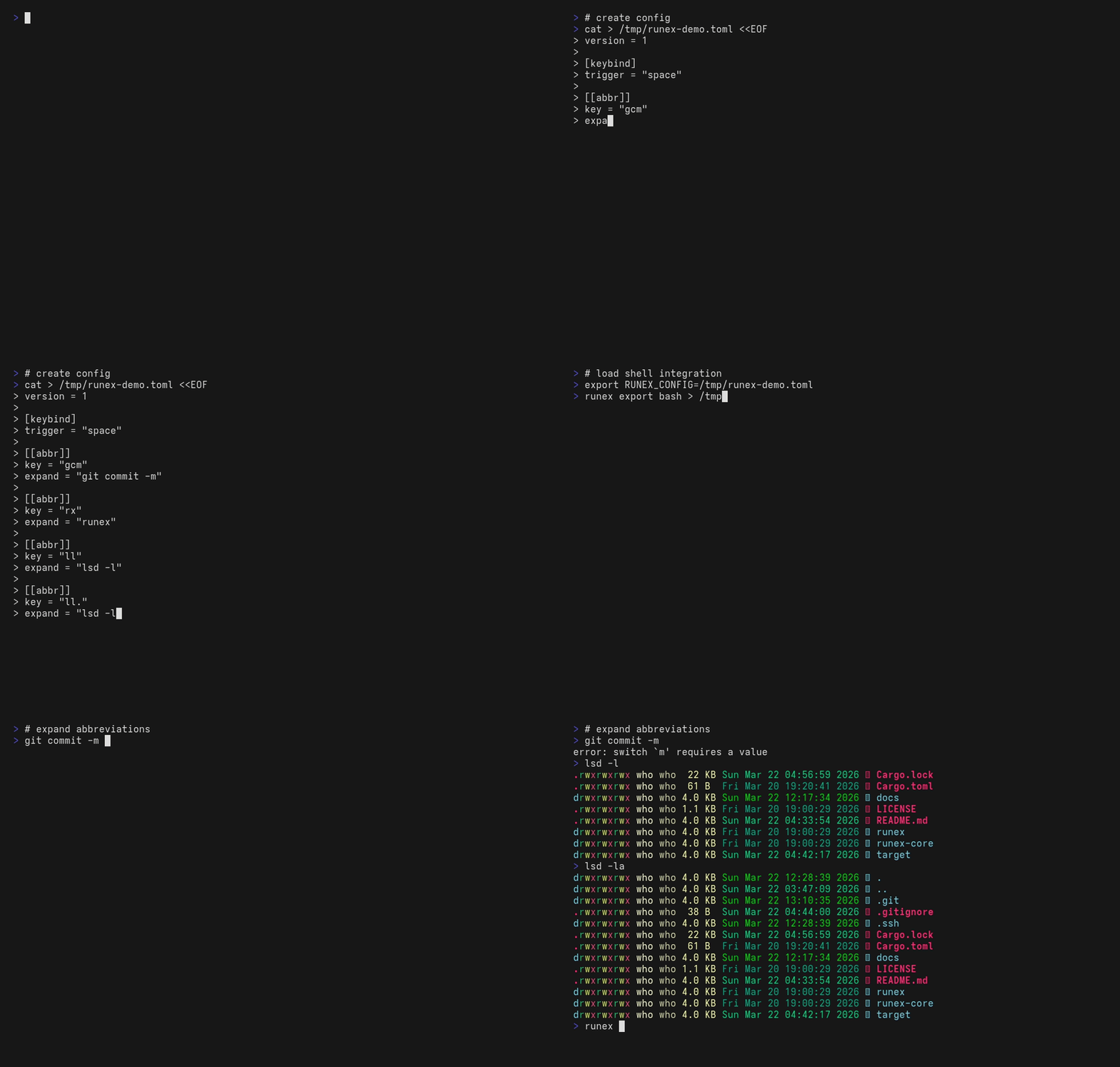
runex expands a short token into a full command as you type, in bash, zsh, PowerShell, cmd (via Clink) and Nushell, from one config file.
| Goal | Read |
|---|---|
| Install and try it | This README, then Install and Setup |
| Find a config snippet for a scenario | docs/recipes.md |
| Look up a field's exact meaning | docs/config-reference.md |
| Diagnose "I configured it but nothing happens" | docs/setup.md, Troubleshooting |
| Contribute or cut a release | CONTRIBUTING.md |
runex treats a short input as a rune and expands it into the full cast when you press the trigger key.
gcm␣ → git commit -m
ls␣  → lsd
The expansion happens in the line editor before the command runs, so you see and can edit the full command.
- One
config.tomldrives bash, zsh, pwsh, clink and nu. - Expansion happens on a trigger key you choose (Space by default).
- A rule can require commands to exist (
when_command_exists), solsbecomeslsdonly on machines that havelsd. - Rules with the same key form a fallback chain, evaluated in order.
runex which <token> --whyexplains why a token did or did not expand.
cargo install runex                # 1. install
runex init                         # 2. create config + hook into your shell
                                   #    (asks before touching your rcfile)
exec $SHELL                        # 3. fresh shell so the integration loads
gst<Space>                         # 4. expands to: git status
The config written by runex init contains one sample rule, gst to git status. Replace it with your own rules; docs/recipes.md has copy-pasteable patterns.
cargo install runex                       # Rust toolchain
brew install shortarrow/runex/runex       # macOS / Linux
paru -S runex-bin                         # Arch Linux (AUR)
winget install ShortArrow.runex           # Windows
mise, release archives and the full target list are in docs/install.md.
runex init creates the config, writes a shell integration file under your cache directory, and appends one source line to your rc file. It asks before each write:
$ runex init
Create config at ~/.config/runex/config.toml? [y/N] y
Created: ~/.config/runex/config.toml
Install shell integration (cache at ~/.cache/runex/integration.bash, source line in ~/.bashrc)? [y/N] y
Wrote integration cache to ~/.cache/runex/integration.bash
Appended source line to ~/.bashrc
Existing lines in the rc file are never modified. Pass -y to skip the prompts, or name a shell (runex init pwsh) to skip detection. The guarantees and the per-shell details are in docs/setup.md.
The config lives at $XDG_CONFIG_HOME/runex/config.toml, or ~/.config/runex/config.toml when that variable is unset, on every platform. RUNEX_CONFIG or --config <path> overrides it.
version = 1

[keybind.trigger]
default = "space"

[[abbr]]
key    = "ls"
expand = "lsd"
when_command_exists = ["lsd"]

[[abbr]]
key    = "gcm"
expand = "git commit -m"

[[abbr]]
key    = "gcam"
expand = "git commit -am '{}'"   # {} = cursor stays here after expansion
Without a [keybind] table no key is bound. The config seeded by runex init binds Space.
runex add and runex remove edit the file and refresh the shell integration. After editing the file by hand, run runex config reload so the integration picks up the change.
The field reference, evaluation order and limits are in docs/config-reference.md. Scenario-based snippets are in docs/recipes.md.
The subcommands you will reach for daily:
runex init [shell]               Create config + install shell integration (asks before each write)
runex doctor                     Check config, command resolution and shell integration
runex add <key> <expand>         Add a rule to the config file
runex remove <key>               Remove a rule from the config file
runex which <token> --why        Explain whether a token expands and why
runex config reload              Regenerate the shell integration after editing config.toml by hand
runex --help lists every subcommand, and runex <subcommand> --help its flags. The global flags --config, --path-prepend and --json are accepted everywhere. --json produces structured output for list, doctor, version, expand, which, timings and config where.
With trigger = "space", a token in command position expands on every Space. Ways around it:
- In bash and zsh, prefix the token with
\(\ls) or usecommand ls. - In PowerShell,
\lsis a different token, so it does not expand. For a built-in alias, type the full command name (Get-ChildItem).
A second key can insert a plain space without expanding:
[keybind.trigger]
default = "space"

[keybind.self_insert]
default = "shift-space"   # pwsh/nu: Shift+Space inserts a space without expanding
# default = "alt-space" # all shells including bash/zsh| Value | bash | zsh | pwsh | nu |
|---|---|---|---|---|
"alt-space" |
yes | yes | yes | yes |
"shift-space" |
no | no | yes | yes |
| Feature | alias | runex |
|---|---|---|
| Cross-shell | No | Yes |
| Real-time expand | No | Yes |
| Conditional rules | No | Yes |
An alias substitutes at execution time, so the history keeps the short form and the expansion differs per shell. runex rewrites the line before it runs, so the history keeps the full command and one config serves every shell.
The roadmap lives in docs/PRD.md. Ideas not yet scheduled: fuzzy suggestions, an interactive picker, editor integrations, and cargo-binstall metadata.
- run (execute)
- ex (expand / execute)
- rune (compressed command)
- run + ex = expand / execute / express / extract / explode
- rune x (like 7z's "x" for extract)
- rune +x (like chmod's "+x" execute)
runex is inspired by fish shell's abbreviation system and zsh-abbr. Real-time token expansion originated there; runex brings it to every shell with a single config file.
Dual-licensed under either of MIT or Apache-2.0 at your option. Unless explicitly stated otherwise, any contribution intentionally submitted for inclusion in this work by you shall be dual-licensed as above, without any additional terms or conditions.
Third-party dependency licenses are documented in THIRD_PARTY_LICENSES.md.