
implements CMD+L for windows enthusiasts To be more precise, it puts display to sleep.
To lock your computer, you need to have System Preferences > Security & Privacy > Require the password Immediately after sleep saver begins, and a password set.
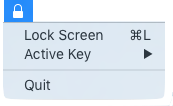
(Hi, Cédric!)
- Because Keychain Access' menubar introduce the question: "Why lock keychain?"
- Because ctrl+shift+power/eject can become halt or reboot if user is not careful
- Because Hot Corners are not loved by everyone (and they only start screensaver)
This app uses Cocoapods. Please first install it (usually with sudo gem install cocoapods).
Then follow this:
git clone https://github.com/ftiff/MenuLock.gitcd MenuLockpod installopen MenuLock.xcworkspace/
Then go to Product > Scheme > Edit Scheme… and make sure Run > Executable is set to "MenuLock.app".
- Modify APP_VERSION in Build Settings (see https://ftiff.wordpress.com/2016/04/01/xcode-automatically-sign-and-build-package/)
- In Terminal.app, navigate to the MenuLock directory
xcodebuild -workspace MenuLock.xcworkspace -scheme MenuLock install
sudo installer -target / -pkg /tmp/MenuLock-1.1.pkgsudo launchctl load /Library/LaunchAgents/io.fti.MenuLock.plist
let keyMask: NSEventModifierFlags = [ .AlternateKeyMask, .ShiftKeyMask]
| event modifier flag | Description |
|---|---|
| AlphaShiftKeyMask | Caps Lock |
| ShiftKeyMask | Shift |
| ControlKeyMask | Control |
| AlternateKeyMask | Alt |
| CommandKeyMask | Command |
| NumericPadKeyMask | Set if any key in the numeric keypad is pressed (and arrows) |
| HelpKeyMask | Help Key (does this still exists?) |
| FunctionKeyMask | The function keys include the F keys at the top of most keyboards (F1, F2, and so on) and the navigation keys in the center of most keyboards (Help, Forward Delete, Home, End, Page Up, Page Down, and the arrow keys). |
let keyCode = UInt(0x25)
These are defined in /System/Library/Frameworks/Carbon.framework/Versions/A/Frameworks/HIToolbox.framework/Versions/A/Headers/Events.h. Be careful these work for US Keyboards. I'd love to learn a better way to do this.
| Key Code | Hex Equivalent |
|---|---|
| A | 0x00 |
| S | 0x01 |
| D | 0x02 |
| F | 0x03 |
| H | 0x04 |
| G | 0x05 |
| Z | 0x06 |
| X | 0x07 |
| C | 0x08 |
| V | 0x09 |
| B | 0x0B |
| Q | 0x0C |
| W | 0x0D |
| E | 0x0E |
| R | 0x0F |
| Y | 0x10 |
| T | 0x11 |
| 1 | 0x12 |
| 2 | 0x13 |
| 3 | 0x14 |
| 4 | 0x15 |
| 6 | 0x16 |
| 5 | 0x17 |
| Equal | 0x18 |
| 9 | 0x19 |
| 7 | 0x1A |
| Minus | 0x1B |
| 8 | 0x1C |
| 0 | 0x1D |
| RightBracket | 0x1E |
| O | 0x1F |
| U | 0x20 |
| LeftBracket | 0x21 |
| I | 0x22 |
| P | 0x23 |
| L | 0x25 |
| J | 0x26 |
| Quote | 0x27 |
| K | 0x28 |
| Semicolon | 0x29 |
| Backslash | 0x2A |
| Comma | 0x2B |
| Slash | 0x2C |
| N | 0x2D |
| M | 0x2E |
| Period | 0x2F |
| Grave | 0x32 |
| KeypadDecimal | 0x41 |
| KeypadMultiply | 0x43 |
| KeypadPlus | 0x45 |
| KeypadClear | 0x47 |
| KeypadDivide | 0x4B |
| KeypadEnter | 0x4C |
| KeypadMinus | 0x4E |
| KeypadEquals | 0x51 |
| Keypad0 | 0x52 |
| Keypad1 | 0x53 |
| Keypad2 | 0x54 |
| Keypad3 | 0x55 |
| Keypad4 | 0x56 |
| Keypad5 | 0x57 |
| Keypad6 | 0x58 |
| Keypad7 | 0x59 |
| Keypad8 | 0x5B |
| Keypad9 | 0x5C |
| Return | 0x24 |
| Tab | 0x30 |
| Space | 0x31 |
| Delete | 0x33 |
| Escape | 0x35 |
| Command | 0x37 |
| Shift | 0x38 |
| CapsLock | 0x39 |
| Option | 0x3A |
| Control | 0x3B |
| RightShift | 0x3C |
| RightOption | 0x3D |
| RightControl | 0x3E |
| Function | 0x3F |
| F17 | 0x40 |
| VolumeUp | 0x48 |
| VolumeDown | 0x49 |
| Mute | 0x4A |
| F18 | 0x4F |
| F19 | 0x50 |
| F20 | 0x5A |
| F5 | 0x60 |
| F6 | 0x61 |
| F7 | 0x62 |
| F3 | 0x63 |
| F8 | 0x64 |
| F9 | 0x65 |
| F11 | 0x67 |
| F13 | 0x69 |
| F16 | 0x6A |
| F14 | 0x6B |
| F10 | 0x6D |
| F12 | 0x6F |
| F15 | 0x71 |
| Help | 0x72 |
| Home | 0x73 |
| PageUp | 0x74 |
| ForwardDelete | 0x75 |
| F4 | 0x76 |
| End | 0x77 |
| F2 | 0x78 |
| PageDown | 0x79 |
| F1 | 0x7A |
| LeftArrow | 0x7B |
| RightArrow | 0x7C |
| DownArrow | 0x7D |
| UpArrow | 0x7E |