








A simple native WYSIWYG/Rich Text editor for Angular 6-10+
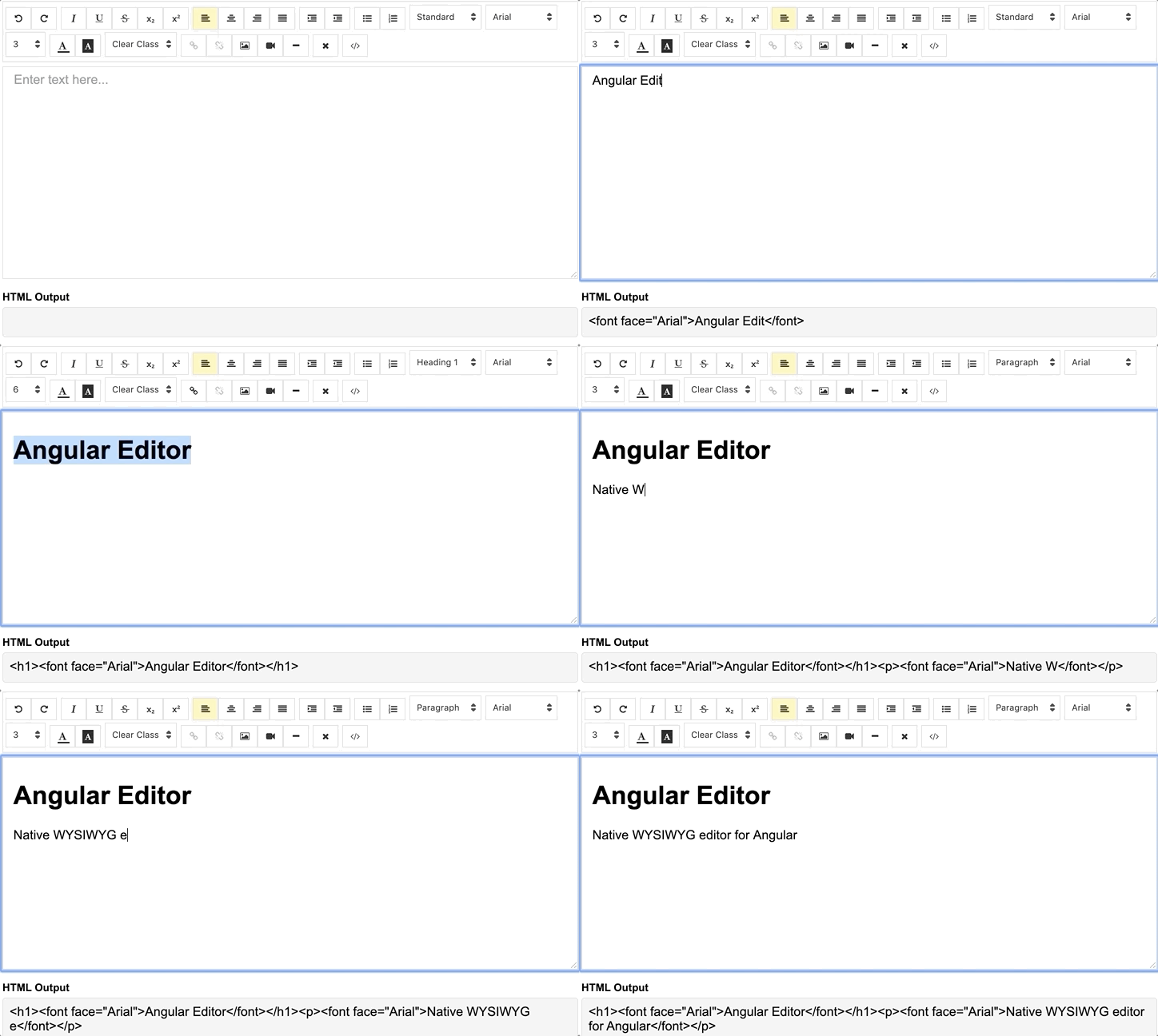
demo | See the code in StackBlitz.
Install via npm package manager
npm install @kolkov/angular-editor --save1.0.0 and above - for Angular v8.x.x and above
0.18.4 and above - for Angular v7.x.x
0.15.x - for Angular v6.x.x
Import angular-editor module
import{HttpClientModule}from'@angular/common/http';import{AngularEditorModule}from'@kolkov/angular-editor';
@NgModule({imports: [HttpClientModule,AngularEditorModule]})
Then in HTML
<angular-editor[placeholder]="'Enter text here...'" [(ngModel)]="htmlContent"></angular-editor>or for usage with reactive forms
<angular-editorformControlName="htmlContent" [config]="editorConfig"></angular-editor>if you using more than one editor on same page set id property
<angular-editorid="editor1" formControlName="htmlContent1" [config]="editorConfig"></angular-editor><angular-editorid="editor2" formControlName="htmlContent2" [config]="editorConfig"></angular-editor>where
import{AngularEditorConfig}from'@kolkov/angular-editor';
editorConfig: AngularEditorConfig={editable: true,spellcheck: true,height: 'auto',minHeight: '0',maxHeight: 'auto',width: 'auto',minWidth: '0',translate: 'yes',enableToolbar: true,showToolbar: true,placeholder: 'Enter text here...',defaultParagraphSeparator: '',defaultFontName: '',defaultFontSize: '',fonts: [{class: 'arial',name: 'Arial'},{class: 'times-new-roman',name: 'Times New Roman'},{class: 'calibri',name: 'Calibri'},{class: 'comic-sans-ms',name: 'Comic Sans MS'}],customClasses: [{name: 'quote',class: 'quote',},{name: 'redText',class: 'redText'},{name: 'titleText',class: 'titleText',tag: 'h1',},],uploadUrl: 'v1/image',uploadWithCredentials: false,sanitize: true,toolbarPosition: 'top',toolbarHiddenButtons: [['bold','italic'],['fontSize']]};
For ngModel to work, you must import FormsModule from @angular/forms, or for formControlName, you must import ReactiveFormsModule from @angular/forms
| Input | Type | Default | Required | Description |
|---|---|---|---|---|
| id | string | - | no | Id property when multiple editor used on same page |
| [config] | AngularEditorConfig | default config | no | config for the editor |
| placeholder | string | - | no | Set custom placeholder for input area |
| tabIndex | number | - | no | Set Set tabindex on angular-editor |
| Output | Description |
|---|---|
| (html) | Output html |
| (viewMode) | Fired when switched visual and html source mode |
| (blur) | Fired when editor blur |
| (focus) | Fired when editor focus |
| Name | Description |
|---|---|
| focus | Focuses the editor element |
| Name | Type | Description |
|---|---|---|
| AngularEditorConfig | configuration | Configuration for the AngularEditor component. |
| Input | Type | Default | Required | Description |
|---|---|---|---|---|
| editable | bolean | true | no | Set editing enabled or not |
| spellcheck | bolean | true | no | Set spellchecking enabled or not |
| translate | sting | yes | no | Set translating enabled or not |
| sanitize | bolean | true | no | Set DOM sanitizing enabled or not |
| height | string | auto | no | Set height of the editor |
| minHeight | string | 0 | no | Set minimum height of the editor |
| maxHeight | string | auto | no | Set maximum height of the editor |
| width | string | auto | no | Set width of the editor |
| minWidth | string | 0 | no | Set minimum width of the editor |
| enableToolbar | bolean | true | no | Set toolbar enabled or not |
| showToolbar | bolean | true | no | Set toolbar visible or not |
| toolbarPosition | string | top | no | Set toolbar position top or bottom |
| placeholder | string | - | no | Set placeholder text |
| defaultParagraphSeparator | string | - | no | Set default paragraph separator such as p |
| defaultFontName | string | - | no | Set default font such as Comic Sans MS |
| defaultFontSize | string | - | no | Set default font size such as 1 - 7 |
| uploadUrl | string | - | no | Set image upload endpoint https://api.exapple.com/v1/image/upload |
| uploadWithCredentials | bolean | false | no | Set passing or not credentials in the image upload call |
| fonts | Font[] | - | no | Set array of available fonts [{name, class},...] |
| customClasses | CustomClass[] | - | no | Set array of available fonts [{name, class, tag},...] |
| outline | bolean | true | no | Set outline of the editor if in focus |
| toolbarHiddenButtons | string[][] | - | no | Set of the array of button names or elements to hide |
toolbarHiddenButtons: [['undo','redo','bold','italic','underline','strikeThrough','subscript','superscript','justifyLeft','justifyCenter','justifyRight','justifyFull','indent','outdent','insertUnorderedList','insertOrderedList','heading','fontName'],['fontSize','textColor','backgroundColor','customClasses','link','unlink','insertImage','insertVideo','insertHorizontalRule','removeFormat','toggleEditorMode']]Within the download you'll find the following directories and files. You'll see something like this:
angular-editor/
└── projects/
├── angular-editor/
└── angular-editor-app/
angular-editor/ - library
angular-editor-app/ - demo application
The documentation for the AngularEditor is hosted at our website AngularEditor
Please read through our contributing guidelines. Included are directions for opening issues, coding standards, and notes on development.
Editor preferences are available in the editor config for easy use in common text editors. Read more and download plugins at http://editorconfig.org.
For a transparency into our release cycle and in striving to maintain backward compatibility, AngularEditor is maintained under the Semantic Versioning guidelines.
See the Releases section of our project for changelogs for each release version.
Andrey Kolkov
If you like my work and I save your time you can buy me a 🍺 or 🍕