This repository hosts a Text Preprocessing Toolkit, a set of tools designed to facilitate common text preprocessing tasks. It's especially tailored for individuals working on Natural Language Processing (NLP) or text analytics projects.
These instructions will help you set up the Text Preprocessing Toolkit on your local machine for development and testing purposes.
- Clone the Repository Start by cloning the repository to your local machine:
git clone https://github.com/Snafkin547/text_preprocessing.git
Install Dependencies Ensure that you have all the necessary dependencies installed by running the installation command specific to your environment. Dependencies may include libraries like NLTK, NumPy, or Pandas, though they are not explicitly listed here.
Import the Toolkit Once the repository is cloned and dependencies are installed, you can import the text preprocessing functionality as follows:
from text_preprocessing import text_preprocessing
The toolkit provides an interface to preprocess textual data in a dataframe. This includes functionality such as regex-based cleaning, stop words removal, and lemmatization.
To preprocess your text data:
Input Parameters
- input: Your dataframe containing text data.
- col: The name of the column in the dataframe that you want to preprocess.
Code Example
Here is how you can use the toolkit to preprocess text data in a dataframe:
df = text_preprocessing.preprocess(input_dataframe=df, target_column="your_column_name")
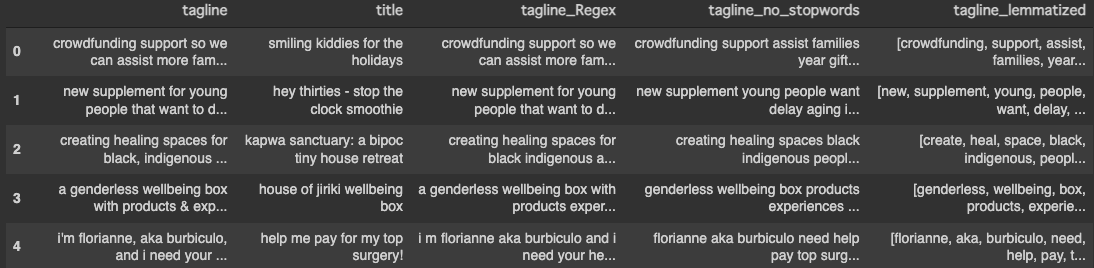
The preprocessing function will return a dataframe with the following:
- Original columns preserved.
- The target column processed with regex to clean unwanted characters.
- The target column stripped of stop words.
- The target column lemmatized to reduce words to their base or root form.
For a demonstration, preprocess the 'tagline' column in your dataframe as follows:
df = text_preprocessing.preprocess(df, "tagline")
df.head()
Below is an example of what the output might look like after preprocessing:
By following these steps, you should be able to use the Text Preprocessing Toolkit to clean and prepare your text data for further analysis or machine learning tasks.