
UNIVERSITY OF WEST ATTICA
SCHOOL OF ENGINEERING
DEPARTMENT OF COMPUTER ENGINEERING AND INFORMATICS
University of West Attica · Department of Computer Engineering and Informatics
Software Development Methodologies
Vasileios Evangelos Athanasiou
Student ID: 19390005
Supervision
Supervisor: Georgios Prezerakos, Professor
Co-supervisor: Angelos Georgoulas, Assistant Professor
Athens, April 2023
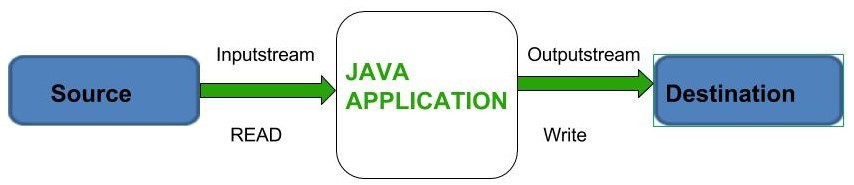
The purpose of this exercise set is to practice core Java Input/Output (I/O) operations, file handling, and basic programming structures.
It covers reading from standard input, file manipulation (reading/writing), and exception handling.
| Section | Folder/File | Description |
|---|---|---|
| 1 | INSTALL.md | Installation and execution instructions |
| 2 | README.md | Project overview and usage guide |
| 3 | assign/ | Assignment description documents |
| 3.1 | assign/SDM Exercise 2 (Input & Output).pdf | Assignment description (English) |
| 3.2 | assign/ΜΑΕ Ασκήση 2 (Input & Output).pdf | Assignment description (Greek) |
| 4 | src/ | Java source code projects demonstrating input/output operations |
| 4.1 | src/CopyFiles/ | Java project for copying the contents of files |
| 4.1.1 | src/CopyFiles/build/ | Compiled build output |
| 4.1.2 | src/CopyFiles/build.xml | Apache Ant build configuration |
| 4.1.3 | src/CopyFiles/manifest.mf | Application manifest file |
| 4.1.4 | src/CopyFiles/myfile.txt | Example input file |
| 4.1.5 | src/CopyFiles/myfile2.txt | Example output/second file |
| 4.1.6 | src/CopyFiles/nbproject/ | NetBeans project configuration files |
| 4.1.7 | src/CopyFiles/src/copyfiles/ | Java source code package |
| 4.2 | src/CountStatistics/ | Java project that calculates statistics from file data |
| 4.2.1 | src/CountStatistics/build/ | Compiled build output |
| 4.2.2 | src/CountStatistics/build.xml | Apache Ant build configuration |
| 4.2.3 | src/CountStatistics/manifest.mf | Application manifest file |
| 4.2.4 | src/CountStatistics/myfile.txt | Example input file |
| 4.2.5 | src/CountStatistics/nbproject/ | NetBeans project configuration files |
| 4.2.6 | src/CountStatistics/src/countstatistics/ | Java source code package |
| 4.3 | src/Fibonacci/ | Java project that generates Fibonacci numbers and writes them to a file |
| 4.3.1 | src/Fibonacci/build/ | Compiled build output |
| 4.3.2 | src/Fibonacci/build.xml | Apache Ant build configuration |
| 4.3.3 | src/Fibonacci/manifest.mf | Application manifest file |
| 4.3.4 | src/Fibonacci/fib50.txt | Example file containing Fibonacci numbers |
| 4.3.5 | src/Fibonacci/nbproject/ | NetBeans project configuration files |
| 4.3.6 | src/Fibonacci/src/fibonacci/ | Java source code package |
| 4.4 | src/ScannerExercise/ | Java project demonstrating the use of the Scanner class |
| 4.4.1 | src/ScannerExercise/build/ | Compiled build output |
| 4.4.2 | src/ScannerExercise/build.xml | Apache Ant build configuration |
| 4.4.3 | src/ScannerExercise/manifest.mf | Application manifest file |
| 4.4.4 | src/ScannerExercise/nbproject/ | NetBeans project configuration files |
| 4.4.5 | src/ScannerExercise/src/scannerexercise/ | Java source code package |
- Data Reading: Handling bytes and characters from standard input.
- File Streams: Utilizing
FileStreamsfor read/write operations. - Exception Handling: Managing runtime errors using
try-catchblocks. - Logic Structures: Implementing
if-elseandwhileloops. - String & Scanner: String manipulation and using the
Scannerclass.
Create a console program that calculates the average grade for students based on standard input.
- Student registration number followed by pairs of:
[Course Name] [Grade]
- Enter
endto finish entering grades for a specific student. - Enter
000000as a registration number to exit the program.
- Prints the student registration number and their calculated average grade.
Develop a program that copies the contents of one text file to another.
- The user provides:
- The full path of the source file
- The destination (copy) file path
- Use
FileWriterandFileReaderwrapped in Buffered Streams for better efficiency.
- Use
try-catchblocks to handle:- Invalid file paths
- Missing files
- Read/write errors
A program that reads a text file, displays its content, and calculates specific character statistics.
Greek characters:
- Alpha (Α, α)
- Gamma (Γ, γ)
- Omega (Ω, ω)
Odd digits:
1, 3, 5, 7, 9
Use the read() method to process the file character by character.
This program calculates the first 50 terms of the Fibonacci sequence and saves them to a text file.
Each term should appear on a new line:
F(0) = 0
F(1) = 1
F(2) = 1
...Include an additional method that:
- Reads the generated Fibonacci file.
- Prints only the numerical values to the console.