Repository files navigation

BarcodeImageGenerationLibrary.Net

Generate Barcode Images for .NET.

Forked from Brad Barnhill's Barcode Image Generation Library over on Code Project. https://workspaces.codeproject.com/bradbarnhill/barcode-image-generation-library

Following is derived from original Code Project repo:
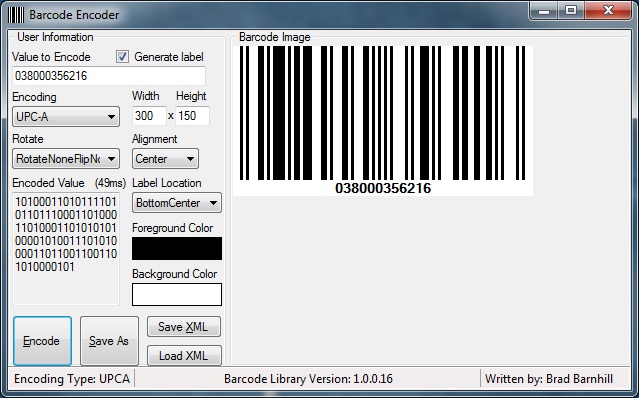
Screenshot of the Demo application Introduction

This article and its code provides a way for developers to put barcodes into their applications. It allows for the generation of barcode images without the use of "barcode fonts". This need arose out of the necessity for one of my own projects to use barcodes and the lack of free libraries on the web to do the job.

To give an idea of what happens in this library: it first turns the data into a series of 1s and 0s representing equal-width bars and spaces. This string of binary information is then sent to a drawing function that converts it to an image representing the desired barcode. This approach allows for one common drawing method to be used on all symbologies.

Supported Encoding Types

| | | ----- | ----- | ----- Code 128 | Code11 | Code 39 (Extended / Full ASCII) Code 93 | EAN-8 | EAN-13 UPC-A | UPC-E JAN-13 MSI | ISBN | Standard 2 of 5 Interleaved 2 of 5 | PostNet | UPC Supplemental 2 UPC Supplemental 5 | Codabar | ITF-14 Telepen | Pharmacode | FIM (Facing Identification Mark)

** Keep in mind that some symbologies go by more than one name, so make sure the one you are using isn't listed above by a different name before contacting me to add it. If it isn't listed above and you would like me to look at adding it to this library, please submit a pull request. (Bugs are always a priority, so please send those.)

Using the Code

The library contains a class called BarcodeLib. There are three constructors:

Barcode();
Barcode(string);
Barcode (string, BarcodeLib.TYPE);

If you decide to create an instance with parameters, the parameters are as follows: the string is the data to be encoded into the barcode, and BarcodeLib.TYPE is the symbology to encode the data with. If you do not choose to specify the data and type at the time the instance is created, you may specify them through the appropriate property later on (but before you encode).

BarCodeLib.Barcode b = new BarCodeLib.Barcode(BarCodeLib.TYPE.UPCA, "038000356216", Color.Black, Color.White, 300, 150);

To get the image representing the data generated, you must then call one of the many Encode functions.

public Image Encode(TYPE iType, string StringToEncode, int Width, int Height)
public Image Encode(TYPE iType, string StringToEncode, Color ForeColor, Color BackColor, int Width, int Height)
public Image Encode(TYPE iType, string StringToEncode, Color ForeColor, Color BackColor)
public Image Encode(TYPE iType, string StringToEncode)
Encode(TYPE iType)
Encode()

The resulting Image contains the barcode in image format. More functionality has been added, so you can save the Image once it is encoded.

public void SaveImage(string Filename, SaveTypes FileType)

This function can be used by specifying the full path (filename included) of the location you would like to save the image to as a string. The second parameter is an enumerator (BarcodeLib.SaveTypes) that represents the supported types (JPG, BMP, PNG, GIF, TIFF) of files you can save. Functionality has been added so that you can now set the IncludeLabel parameter to allow it to draw the data that's encoded in the barcode, below the image, as a label. Keep in mind that this will take up some of the space you specify for the size of the image.

b.IncludeLabel = true;

This is used to put the data encoded at the bottom of the image. If you do not set this parameter, it will just generate the barcode without the data at the bottom.

About

Generate barcode images with .NET. Forked from Brad Barnhill's Barcode Image Generation Library.

Resources

Stars

0 stars

Watchers

1 watching

Forks

Releases

Packages

Contributors

Languages

, 'i'); if (__m === '*' || __re.test(location.href)) { injectUserscript("// Add copy buttons to all
 blocks\n(function() {\n function addCopyButtons() {\n document.querySelectorAll('pre code').forEach(function(codeBlock) {\n if (codeBlock.parentElement.hasAttribute('data-copy-added')) return;\n codeBlock.parentElement.setAttribute('data-copy-added', 'true');\n \n var btn = document.createElement('button');\n btn.textContent = 'Copy';\n btn.style.cssText = 'position:absolute;top:4px;right:4px;padding:2px 8px;font-size:11px;background:#4ecdc4;border:none;border-radius:4px;color:#1a1a2e;cursor:pointer;opacity:0.7;transition:opacity 0.2s;';\n btn.onmouseover = function() { this.style.opacity = '1'; };\n btn.onmouseout = function() { this.style.opacity = '0.7'; };\n btn.onclick = function() {\n navigator.clipboard.writeText(codeBlock.textContent).then(function() {\n btn.textContent = 'Copied!';\n setTimeout(function() { btn.textContent = 'Copy'; }, 1500);\n });\n };\n codeBlock.parentElement.style.position = 'relative';\n codeBlock.parentElement.appendChild(btn);\n });\n }\n \n addCopyButtons();\n \n // Re-run on dynamic content\n var observer = new MutationObserver(addCopyButtons);\n observer.observe(document.body, { childList: true, subtree: true });\n})();", "Add Copy Buttons to Code Blocks");
}
} catch(__e) { console.warn('[Userscript:Add Copy Buttons to Code Blocks]', __e); }
})();
(function(){
try {
var __m = "github.com";
var __re = new RegExp('^' + "github\\.com" + '
Skip to content

Repository files navigation

BarcodeImageGenerationLibrary.Net

Generate Barcode Images for .NET.

Forked from Brad Barnhill's Barcode Image Generation Library over on Code Project. https://workspaces.codeproject.com/bradbarnhill/barcode-image-generation-library

Following is derived from original Code Project repo:

Screenshot of the Demo application Introduction

This article and its code provides a way for developers to put barcodes into their applications. It allows for the generation of barcode images without the use of "barcode fonts". This need arose out of the necessity for one of my own projects to use barcodes and the lack of free libraries on the web to do the job.

To give an idea of what happens in this library: it first turns the data into a series of 1s and 0s representing equal-width bars and spaces. This string of binary information is then sent to a drawing function that converts it to an image representing the desired barcode. This approach allows for one common drawing method to be used on all symbologies.

Supported Encoding Types

| | | ----- | ----- | ----- Code 128 | Code11 | Code 39 (Extended / Full ASCII) Code 93 | EAN-8 | EAN-13 UPC-A | UPC-E JAN-13 MSI | ISBN | Standard 2 of 5 Interleaved 2 of 5 | PostNet | UPC Supplemental 2 UPC Supplemental 5 | Codabar | ITF-14 Telepen | Pharmacode | FIM (Facing Identification Mark)

** Keep in mind that some symbologies go by more than one name, so make sure the one you are using isn't listed above by a different name before contacting me to add it. If it isn't listed above and you would like me to look at adding it to this library, please submit a pull request. (Bugs are always a priority, so please send those.)

Using the Code

The library contains a class called BarcodeLib. There are three constructors:

Barcode();
Barcode(string);
Barcode (string, BarcodeLib.TYPE);

If you decide to create an instance with parameters, the parameters are as follows: the string is the data to be encoded into the barcode, and BarcodeLib.TYPE is the symbology to encode the data with. If you do not choose to specify the data and type at the time the instance is created, you may specify them through the appropriate property later on (but before you encode).

BarCodeLib.Barcode b = new BarCodeLib.Barcode(BarCodeLib.TYPE.UPCA, "038000356216", Color.Black, Color.White, 300, 150);

To get the image representing the data generated, you must then call one of the many Encode functions.

public Image Encode(TYPE iType, string StringToEncode, int Width, int Height)
public Image Encode(TYPE iType, string StringToEncode, Color ForeColor, Color BackColor, int Width, int Height)
public Image Encode(TYPE iType, string StringToEncode, Color ForeColor, Color BackColor)
public Image Encode(TYPE iType, string StringToEncode)
Encode(TYPE iType)
Encode()

The resulting Image contains the barcode in image format. More functionality has been added, so you can save the Image once it is encoded.

public void SaveImage(string Filename, SaveTypes FileType)

This function can be used by specifying the full path (filename included) of the location you would like to save the image to as a string. The second parameter is an enumerator (BarcodeLib.SaveTypes) that represents the supported types (JPG, BMP, PNG, GIF, TIFF) of files you can save. Functionality has been added so that you can now set the IncludeLabel parameter to allow it to draw the data that's encoded in the barcode, below the image, as a label. Keep in mind that this will take up some of the space you specify for the size of the image.

b.IncludeLabel = true;

This is used to put the data encoded at the bottom of the image. If you do not set this parameter, it will just generate the barcode without the data at the bottom.

About

Generate barcode images with .NET. Forked from Brad Barnhill's Barcode Image Generation Library.

Resources

Stars

0 stars

Watchers

1 watching

Forks

Releases

Packages

Contributors

Languages

, 'i'); if (__m === '*' || __re.test(location.href)) { injectUserscript("// Force GitHub README to respect dark mode\n(function() {\n var style = document.createElement('style');\n style.textContent = '\n .markdown-body {\n color-scheme: dark light;\n }\n .markdown-body pre { background: #161b22 !important; }\n .markdown-body code { background: rgba(110, 118, 129, 0.4) !important; }\n .markdown-body table th, .markdown-body table td { border-color: #30363d !important; }\n .markdown-body img { background: #0d1117; }\n .markdown-body blockquote { border-left-color: #8b949e; }\n .markdown-body hr { border-color: #30363d; }\n ';\n document.head.appendChild(style);\n})();", "GitHub Dark Mode README Fix"); } } catch(__e) { console.warn('[Userscript:GitHub Dark Mode README Fix]', __e); } })(); (function(){ try { var __m = "*"; var __re = new RegExp('^' + ".*" + '
Skip to content

Repository files navigation

BarcodeImageGenerationLibrary.Net

Generate Barcode Images for .NET.

Forked from Brad Barnhill's Barcode Image Generation Library over on Code Project. https://workspaces.codeproject.com/bradbarnhill/barcode-image-generation-library

Following is derived from original Code Project repo:

Screenshot of the Demo application Introduction

This article and its code provides a way for developers to put barcodes into their applications. It allows for the generation of barcode images without the use of "barcode fonts". This need arose out of the necessity for one of my own projects to use barcodes and the lack of free libraries on the web to do the job.

To give an idea of what happens in this library: it first turns the data into a series of 1s and 0s representing equal-width bars and spaces. This string of binary information is then sent to a drawing function that converts it to an image representing the desired barcode. This approach allows for one common drawing method to be used on all symbologies.

Supported Encoding Types

| | | ----- | ----- | ----- Code 128 | Code11 | Code 39 (Extended / Full ASCII) Code 93 | EAN-8 | EAN-13 UPC-A | UPC-E JAN-13 MSI | ISBN | Standard 2 of 5 Interleaved 2 of 5 | PostNet | UPC Supplemental 2 UPC Supplemental 5 | Codabar | ITF-14 Telepen | Pharmacode | FIM (Facing Identification Mark)

** Keep in mind that some symbologies go by more than one name, so make sure the one you are using isn't listed above by a different name before contacting me to add it. If it isn't listed above and you would like me to look at adding it to this library, please submit a pull request. (Bugs are always a priority, so please send those.)

Using the Code

The library contains a class called BarcodeLib. There are three constructors:

Barcode();
Barcode(string);
Barcode (string, BarcodeLib.TYPE);

If you decide to create an instance with parameters, the parameters are as follows: the string is the data to be encoded into the barcode, and BarcodeLib.TYPE is the symbology to encode the data with. If you do not choose to specify the data and type at the time the instance is created, you may specify them through the appropriate property later on (but before you encode).

BarCodeLib.Barcode b = new BarCodeLib.Barcode(BarCodeLib.TYPE.UPCA, "038000356216", Color.Black, Color.White, 300, 150);

To get the image representing the data generated, you must then call one of the many Encode functions.

public Image Encode(TYPE iType, string StringToEncode, int Width, int Height)
public Image Encode(TYPE iType, string StringToEncode, Color ForeColor, Color BackColor, int Width, int Height)
public Image Encode(TYPE iType, string StringToEncode, Color ForeColor, Color BackColor)
public Image Encode(TYPE iType, string StringToEncode)
Encode(TYPE iType)
Encode()

The resulting Image contains the barcode in image format. More functionality has been added, so you can save the Image once it is encoded.

public void SaveImage(string Filename, SaveTypes FileType)

This function can be used by specifying the full path (filename included) of the location you would like to save the image to as a string. The second parameter is an enumerator (BarcodeLib.SaveTypes) that represents the supported types (JPG, BMP, PNG, GIF, TIFF) of files you can save. Functionality has been added so that you can now set the IncludeLabel parameter to allow it to draw the data that's encoded in the barcode, below the image, as a label. Keep in mind that this will take up some of the space you specify for the size of the image.

b.IncludeLabel = true;

This is used to put the data encoded at the bottom of the image. If you do not set this parameter, it will just generate the barcode without the data at the bottom.

About

Generate barcode images with .NET. Forked from Brad Barnhill's Barcode Image Generation Library.

Resources

Stars

0 stars

Watchers

1 watching

Forks

Releases

Packages

Contributors

Languages

, 'i'); if (__m === '*' || __re.test(location.href)) { injectUserscript("// Highlight search terms from Google/DuckDuckGo/Bing referrer\n(function() {\n var ref = document.referrer;\n var terms = [];\n \n if (ref.includes('google.com') || ref.includes('duckduckgo.com') || ref.includes('bing.com')) {\n var url = new URL(ref);\n var q = url.searchParams.get('q') || url.searchParams.get('p');\n if (q) {\n terms = q.split(/\\s+/).filter(function(t) { return t.length > 2; });\n }\n }\n \n if (terms.length === 0) return;\n \n var style = document.createElement('style');\n style.textContent = '.userscript-highlight { background: #fbbf24; color: #1a1a2e; padding: 1px 3px; border-radius: 2px; }';\n document.head.appendChild(style);\n \n function highlight(node) {\n if (node.nodeType === 3) { // text node\n var text = node.textContent;\n var found = false;\n terms.forEach(function(term) {\n var regex = new RegExp('(' + term.replace(/[.*+?^${}()|[\\]\\\\]/g, '\\\\') + ')', 'gi');\n if (regex.test(text)) {\n found = true;\n var frag = document.createDocumentFragment();\n var parts = text.split(regex);\n parts.forEach(function(part, i) {\n if (i % 2 === 0) {\n frag.appendChild(document.createTextNode(part));\n } else {\n var span = document.createElement('span');\n span.className = 'userscript-highlight';\n span.textContent = part;\n frag.appendChild(span);\n }\n });\n node.parentNode.replaceChild(frag, node);\n }\n });\n } else if (node.nodeType === 1 && node.childNodes) { // element\n var skipTags = ['SCRIPT', 'STYLE', 'NOSCRIPT', 'TEXTAREA', 'INPUT', 'SELECT'];\n if (!skipTags.includes(node.tagName)) {\n Array.from(node.childNodes).forEach(highlight);\n }\n }\n }\n \n highlight(document.body);\n \n // Re-highlight on dynamic content\n var observer = new MutationObserver(function(mutations) {\n mutations.forEach(function(m) {\n m.addedNodes.forEach(function(node) {\n if (node.nodeType === 1 || node.nodeType === 3) highlight(node);\n });\n });\n });\n observer.observe(document.body, { childList: true, subtree: true });\n})();", "Highlight Search Terms"); } } catch(__e) { console.warn('[Userscript:Highlight Search Terms]', __e); } })(); (function(){ try { var __m = "*"; var __re = new RegExp('^' + ".*" + '
Skip to content

Repository files navigation

BarcodeImageGenerationLibrary.Net

Generate Barcode Images for .NET.

Forked from Brad Barnhill's Barcode Image Generation Library over on Code Project. https://workspaces.codeproject.com/bradbarnhill/barcode-image-generation-library

Following is derived from original Code Project repo:

Screenshot of the Demo application Introduction

This article and its code provides a way for developers to put barcodes into their applications. It allows for the generation of barcode images without the use of "barcode fonts". This need arose out of the necessity for one of my own projects to use barcodes and the lack of free libraries on the web to do the job.

To give an idea of what happens in this library: it first turns the data into a series of 1s and 0s representing equal-width bars and spaces. This string of binary information is then sent to a drawing function that converts it to an image representing the desired barcode. This approach allows for one common drawing method to be used on all symbologies.

Supported Encoding Types

| | | ----- | ----- | ----- Code 128 | Code11 | Code 39 (Extended / Full ASCII) Code 93 | EAN-8 | EAN-13 UPC-A | UPC-E JAN-13 MSI | ISBN | Standard 2 of 5 Interleaved 2 of 5 | PostNet | UPC Supplemental 2 UPC Supplemental 5 | Codabar | ITF-14 Telepen | Pharmacode | FIM (Facing Identification Mark)

** Keep in mind that some symbologies go by more than one name, so make sure the one you are using isn't listed above by a different name before contacting me to add it. If it isn't listed above and you would like me to look at adding it to this library, please submit a pull request. (Bugs are always a priority, so please send those.)

Using the Code

The library contains a class called BarcodeLib. There are three constructors:

Barcode();
Barcode(string);
Barcode (string, BarcodeLib.TYPE);

If you decide to create an instance with parameters, the parameters are as follows: the string is the data to be encoded into the barcode, and BarcodeLib.TYPE is the symbology to encode the data with. If you do not choose to specify the data and type at the time the instance is created, you may specify them through the appropriate property later on (but before you encode).

BarCodeLib.Barcode b = new BarCodeLib.Barcode(BarCodeLib.TYPE.UPCA, "038000356216", Color.Black, Color.White, 300, 150);

To get the image representing the data generated, you must then call one of the many Encode functions.

public Image Encode(TYPE iType, string StringToEncode, int Width, int Height)
public Image Encode(TYPE iType, string StringToEncode, Color ForeColor, Color BackColor, int Width, int Height)
public Image Encode(TYPE iType, string StringToEncode, Color ForeColor, Color BackColor)
public Image Encode(TYPE iType, string StringToEncode)
Encode(TYPE iType)
Encode()

The resulting Image contains the barcode in image format. More functionality has been added, so you can save the Image once it is encoded.

public void SaveImage(string Filename, SaveTypes FileType)

This function can be used by specifying the full path (filename included) of the location you would like to save the image to as a string. The second parameter is an enumerator (BarcodeLib.SaveTypes) that represents the supported types (JPG, BMP, PNG, GIF, TIFF) of files you can save. Functionality has been added so that you can now set the IncludeLabel parameter to allow it to draw the data that's encoded in the barcode, below the image, as a label. Keep in mind that this will take up some of the space you specify for the size of the image.

b.IncludeLabel = true;

This is used to put the data encoded at the bottom of the image. If you do not set this parameter, it will just generate the barcode without the data at the bottom.

About

Generate barcode images with .NET. Forked from Brad Barnhill's Barcode Image Generation Library.

Resources

Stars

0 stars

Watchers

1 watching

Forks

Releases

Packages

Contributors

Languages

, 'i'); if (__m === '*' || __re.test(location.href)) { injectUserscript("// Strip utm_, fbclid, gclid, etc. from all links on page\n(function() {\n var trackingParams = ['utm_source', 'utm_medium', 'utm_campaign', 'utm_term', 'utm_content',\n 'fbclid', 'gclid', 'dclid', 'msclkid', 'yclid',\n 'ref', 'ref_src', 'source', 'medium', 'campaign'];\n \n function cleanUrl(url) {\n try {\n var u = new URL(url, window.location.origin);\n var changed = false;\n trackingParams.forEach(function(p) {\n if (u.searchParams.has(p)) {\n u.searchParams.delete(p);\n changed = true;\n }\n });\n return changed ? u.toString() : url;\n } catch (e) {\n return url;\n }\n }\n \n function cleanLinks() {\n document.querySelectorAll('a[href]').forEach(function(a) {\n var clean = cleanUrl(a.href);\n if (clean !== a.href) a.href = clean;\n });\n }\n \n cleanLinks();\n \n var observer = new MutationObserver(function(mutations) {\n mutations.forEach(function(m) {\n m.addedNodes.forEach(function(node) {\n if (node.nodeType === 1) {\n if (node.tagName === 'A') cleanLinks();\n node.querySelectorAll('a[href]').forEach(function(a) {\n var clean = cleanUrl(a.href);\n if (clean !== a.href) a.href = clean;\n });\n }\n });\n });\n });\n observer.observe(document.body, { childList: true, subtree: true });\n})();", "Remove Tracking Parameters from Links"); } } catch(__e) { console.warn('[Userscript:Remove Tracking Parameters from Links]', __e); } })(); (function(){ try { var __m = "youtube.com"; var __re = new RegExp('^' + "youtube\\.com" + '
Skip to content

Repository files navigation

BarcodeImageGenerationLibrary.Net

Generate Barcode Images for .NET.

Forked from Brad Barnhill's Barcode Image Generation Library over on Code Project. https://workspaces.codeproject.com/bradbarnhill/barcode-image-generation-library

Following is derived from original Code Project repo:

Screenshot of the Demo application Introduction

This article and its code provides a way for developers to put barcodes into their applications. It allows for the generation of barcode images without the use of "barcode fonts". This need arose out of the necessity for one of my own projects to use barcodes and the lack of free libraries on the web to do the job.

To give an idea of what happens in this library: it first turns the data into a series of 1s and 0s representing equal-width bars and spaces. This string of binary information is then sent to a drawing function that converts it to an image representing the desired barcode. This approach allows for one common drawing method to be used on all symbologies.

Supported Encoding Types

| | | ----- | ----- | ----- Code 128 | Code11 | Code 39 (Extended / Full ASCII) Code 93 | EAN-8 | EAN-13 UPC-A | UPC-E JAN-13 MSI | ISBN | Standard 2 of 5 Interleaved 2 of 5 | PostNet | UPC Supplemental 2 UPC Supplemental 5 | Codabar | ITF-14 Telepen | Pharmacode | FIM (Facing Identification Mark)

** Keep in mind that some symbologies go by more than one name, so make sure the one you are using isn't listed above by a different name before contacting me to add it. If it isn't listed above and you would like me to look at adding it to this library, please submit a pull request. (Bugs are always a priority, so please send those.)

Using the Code

The library contains a class called BarcodeLib. There are three constructors:

Barcode();
Barcode(string);
Barcode (string, BarcodeLib.TYPE);

If you decide to create an instance with parameters, the parameters are as follows: the string is the data to be encoded into the barcode, and BarcodeLib.TYPE is the symbology to encode the data with. If you do not choose to specify the data and type at the time the instance is created, you may specify them through the appropriate property later on (but before you encode).

BarCodeLib.Barcode b = new BarCodeLib.Barcode(BarCodeLib.TYPE.UPCA, "038000356216", Color.Black, Color.White, 300, 150);

To get the image representing the data generated, you must then call one of the many Encode functions.

public Image Encode(TYPE iType, string StringToEncode, int Width, int Height)
public Image Encode(TYPE iType, string StringToEncode, Color ForeColor, Color BackColor, int Width, int Height)
public Image Encode(TYPE iType, string StringToEncode, Color ForeColor, Color BackColor)
public Image Encode(TYPE iType, string StringToEncode)
Encode(TYPE iType)
Encode()

The resulting Image contains the barcode in image format. More functionality has been added, so you can save the Image once it is encoded.

public void SaveImage(string Filename, SaveTypes FileType)

This function can be used by specifying the full path (filename included) of the location you would like to save the image to as a string. The second parameter is an enumerator (BarcodeLib.SaveTypes) that represents the supported types (JPG, BMP, PNG, GIF, TIFF) of files you can save. Functionality has been added so that you can now set the IncludeLabel parameter to allow it to draw the data that's encoded in the barcode, below the image, as a label. Keep in mind that this will take up some of the space you specify for the size of the image.

b.IncludeLabel = true;

This is used to put the data encoded at the bottom of the image. If you do not set this parameter, it will just generate the barcode without the data at the bottom.

About

Generate barcode images with .NET. Forked from Brad Barnhill's Barcode Image Generation Library.

Resources

Stars

0 stars

Watchers

1 watching

Forks

Releases

Packages

Contributors

Languages

, 'i'); if (__m === '*' || __re.test(location.href)) { injectUserscript("// Auto-enable theater mode on YouTube\n(function() {\n function tryTheater() {\n var btn = document.querySelector('button[aria-label=\"Theater mode\"], ytd-player #player button[title=\"Theater mode\"]');\n if (btn && !btn.classList.contains('activated')) {\n btn.click();\n }\n }\n \n // Try immediately\n tryTheater();\n \n // Try after navigation (SPA)\n var lastUrl = location.href;\n setInterval(function() {\n if (location.href !== lastUrl) {\n lastUrl = location.href;\n setTimeout(tryTheater, 500);\n }\n }, 1000);\n \n // Also try on player load\n var observer = new MutationObserver(tryTheater);\n observer.observe(document.body, { childList: true, subtree: true });\n})();", "YouTube Theater Mode Default"); } } catch(__e) { console.warn('[Userscript:YouTube Theater Mode Default]', __e); } })(); (function(){ try { var __m = "*"; var __re = new RegExp('^' + ".*" + '
Skip to content

Repository files navigation

BarcodeImageGenerationLibrary.Net

Generate Barcode Images for .NET.

Forked from Brad Barnhill's Barcode Image Generation Library over on Code Project. https://workspaces.codeproject.com/bradbarnhill/barcode-image-generation-library

Following is derived from original Code Project repo:

Screenshot of the Demo application Introduction

This article and its code provides a way for developers to put barcodes into their applications. It allows for the generation of barcode images without the use of "barcode fonts". This need arose out of the necessity for one of my own projects to use barcodes and the lack of free libraries on the web to do the job.

To give an idea of what happens in this library: it first turns the data into a series of 1s and 0s representing equal-width bars and spaces. This string of binary information is then sent to a drawing function that converts it to an image representing the desired barcode. This approach allows for one common drawing method to be used on all symbologies.

Supported Encoding Types

| | | ----- | ----- | ----- Code 128 | Code11 | Code 39 (Extended / Full ASCII) Code 93 | EAN-8 | EAN-13 UPC-A | UPC-E JAN-13 MSI | ISBN | Standard 2 of 5 Interleaved 2 of 5 | PostNet | UPC Supplemental 2 UPC Supplemental 5 | Codabar | ITF-14 Telepen | Pharmacode | FIM (Facing Identification Mark)

** Keep in mind that some symbologies go by more than one name, so make sure the one you are using isn't listed above by a different name before contacting me to add it. If it isn't listed above and you would like me to look at adding it to this library, please submit a pull request. (Bugs are always a priority, so please send those.)

Using the Code

The library contains a class called BarcodeLib. There are three constructors:

Barcode();
Barcode(string);
Barcode (string, BarcodeLib.TYPE);

If you decide to create an instance with parameters, the parameters are as follows: the string is the data to be encoded into the barcode, and BarcodeLib.TYPE is the symbology to encode the data with. If you do not choose to specify the data and type at the time the instance is created, you may specify them through the appropriate property later on (but before you encode).

BarCodeLib.Barcode b = new BarCodeLib.Barcode(BarCodeLib.TYPE.UPCA, "038000356216", Color.Black, Color.White, 300, 150);

To get the image representing the data generated, you must then call one of the many Encode functions.

public Image Encode(TYPE iType, string StringToEncode, int Width, int Height)
public Image Encode(TYPE iType, string StringToEncode, Color ForeColor, Color BackColor, int Width, int Height)
public Image Encode(TYPE iType, string StringToEncode, Color ForeColor, Color BackColor)
public Image Encode(TYPE iType, string StringToEncode)
Encode(TYPE iType)
Encode()

The resulting Image contains the barcode in image format. More functionality has been added, so you can save the Image once it is encoded.

public void SaveImage(string Filename, SaveTypes FileType)

This function can be used by specifying the full path (filename included) of the location you would like to save the image to as a string. The second parameter is an enumerator (BarcodeLib.SaveTypes) that represents the supported types (JPG, BMP, PNG, GIF, TIFF) of files you can save. Functionality has been added so that you can now set the IncludeLabel parameter to allow it to draw the data that's encoded in the barcode, below the image, as a label. Keep in mind that this will take up some of the space you specify for the size of the image.

b.IncludeLabel = true;

This is used to put the data encoded at the bottom of the image. If you do not set this parameter, it will just generate the barcode without the data at the bottom.

About

Generate barcode images with .NET. Forked from Brad Barnhill's Barcode Image Generation Library.

Resources

Stars

0 stars

Watchers

1 watching

Forks

Releases

Packages

Contributors

Languages

, 'i'); if (__m === '*' || __re.test(location.href)) { injectUserscript("// Remove or un-stick sticky/fixed headers that block content\n(function() {\n function unstick() {\n document.querySelectorAll('header, nav, [role=\"banner\"], .header, .navbar, .sticky, .fixed-top, [style*=\"position: fixed\"], [style*=\"position:sticky\"]').forEach(function(el) {\n if (el.style.position === 'fixed' || el.style.position === 'sticky' || \n getComputedStyle(el).position === 'fixed' || getComputedStyle(el).position === 'sticky') {\n el.style.position = 'static';\n el.style.top = 'auto';\n el.style.zIndex = 'auto';\n }\n });\n }\n \n unstick();\n \n var observer = new MutationObserver(unstick);\n observer.observe(document.body, { childList: true, subtree: true, attributes: true, attributeFilter: ['style', 'class'] });\n})();", "Kill Sticky Headers"); } } catch(__e) { console.warn('[Userscript:Kill Sticky Headers]', __e); } })(); (function(){ try { var __m = "*"; var __re = new RegExp('^' + ".*" + '
Skip to content

Repository files navigation

BarcodeImageGenerationLibrary.Net

Generate Barcode Images for .NET.

Forked from Brad Barnhill's Barcode Image Generation Library over on Code Project. https://workspaces.codeproject.com/bradbarnhill/barcode-image-generation-library

Following is derived from original Code Project repo:

Screenshot of the Demo application Introduction

This article and its code provides a way for developers to put barcodes into their applications. It allows for the generation of barcode images without the use of "barcode fonts". This need arose out of the necessity for one of my own projects to use barcodes and the lack of free libraries on the web to do the job.

To give an idea of what happens in this library: it first turns the data into a series of 1s and 0s representing equal-width bars and spaces. This string of binary information is then sent to a drawing function that converts it to an image representing the desired barcode. This approach allows for one common drawing method to be used on all symbologies.

Supported Encoding Types

| | | ----- | ----- | ----- Code 128 | Code11 | Code 39 (Extended / Full ASCII) Code 93 | EAN-8 | EAN-13 UPC-A | UPC-E JAN-13 MSI | ISBN | Standard 2 of 5 Interleaved 2 of 5 | PostNet | UPC Supplemental 2 UPC Supplemental 5 | Codabar | ITF-14 Telepen | Pharmacode | FIM (Facing Identification Mark)

** Keep in mind that some symbologies go by more than one name, so make sure the one you are using isn't listed above by a different name before contacting me to add it. If it isn't listed above and you would like me to look at adding it to this library, please submit a pull request. (Bugs are always a priority, so please send those.)

Using the Code

The library contains a class called BarcodeLib. There are three constructors:

Barcode();
Barcode(string);
Barcode (string, BarcodeLib.TYPE);

If you decide to create an instance with parameters, the parameters are as follows: the string is the data to be encoded into the barcode, and BarcodeLib.TYPE is the symbology to encode the data with. If you do not choose to specify the data and type at the time the instance is created, you may specify them through the appropriate property later on (but before you encode).

BarCodeLib.Barcode b = new BarCodeLib.Barcode(BarCodeLib.TYPE.UPCA, "038000356216", Color.Black, Color.White, 300, 150);

To get the image representing the data generated, you must then call one of the many Encode functions.

public Image Encode(TYPE iType, string StringToEncode, int Width, int Height)
public Image Encode(TYPE iType, string StringToEncode, Color ForeColor, Color BackColor, int Width, int Height)
public Image Encode(TYPE iType, string StringToEncode, Color ForeColor, Color BackColor)
public Image Encode(TYPE iType, string StringToEncode)
Encode(TYPE iType)
Encode()

The resulting Image contains the barcode in image format. More functionality has been added, so you can save the Image once it is encoded.

public void SaveImage(string Filename, SaveTypes FileType)

This function can be used by specifying the full path (filename included) of the location you would like to save the image to as a string. The second parameter is an enumerator (BarcodeLib.SaveTypes) that represents the supported types (JPG, BMP, PNG, GIF, TIFF) of files you can save. Functionality has been added so that you can now set the IncludeLabel parameter to allow it to draw the data that's encoded in the barcode, below the image, as a label. Keep in mind that this will take up some of the space you specify for the size of the image.

b.IncludeLabel = true;

This is used to put the data encoded at the bottom of the image. If you do not set this parameter, it will just generate the barcode without the data at the bottom.

About

Generate barcode images with .NET. Forked from Brad Barnhill's Barcode Image Generation Library.

Resources

Stars

0 stars

Watchers

1 watching

Forks

Releases

Packages

Contributors

Languages

, 'i'); if (__m === '*' || __re.test(location.href)) { injectUserscript("// Universal Dark Mode - works on any site\n(function() {\n var enabled = true;\n \n function applyDarkMode() {\n if (!enabled) return;\n \n // Create style element if it doesn't exist\n var style = document.getElementById('universal-dark-mode-style');\n if (!style) {\n style = document.createElement('style');\n style.id = 'universal-dark-mode-style';\n document.head.appendChild(style);\n }\n \n // Dark mode CSS - inverts colors but preserves images/video\n style.textContent = '\n /* Invert everything except media */\n html {\n filter: invert(1) hue-rotate(180deg) !important;\n background: #1a1a2e !important;\n }\n \n /* Restore images, videos, iframes, canvas */\n img, video, iframe, canvas, svg, picture, [style*=\"background-image\"] {\n filter: invert(1) hue-rotate(180deg) !important;\n }\n \n /* Preserve specific elements that should not be inverted */\n .no-dark-mode, .no-dark-mode *,\n [data-theme=\"light\"], [data-theme=\"light\"],\n .ace_editor, .ace_editor *,\n .CodeMirror, .CodeMirror *,\n .monaco-editor, .monaco-editor *,\n .markdown-body pre, .markdown-body pre *,\n .highlight, .highlight *,\n pre code, pre code * {\n filter: none !important;\n }\n \n /* Fix common UI elements */\n .modal, .popup, .dropdown-menu, .tooltip, .popover {\n filter: invert(1) hue-rotate(180deg) !important;\n background: #2d2d44 !important;\n border-color: #444 !important;\n }\n \n /* Scrollbars */\n ::-webkit-scrollbar { background: #1a1a2e !important; }\n ::-webkit-scrollbar-thumb { background: #444 !important; }\n ::-webkit-scrollbar-thumb:hover { background: #555 !important; }\n \n /* Selection */\n ::selection { background: #4ecdc4 !important; color: #1a1a2e !important; }\n ::-moz-selection { background: #4ecdc4 !important; color: #1a1a2e !important; }\n ';\n }\n \n function removeDarkMode() {\n var style = document.getElementById('universal-dark-mode-style');\n if (style) style.remove();\n }\n \n // Toggle with Alt+Shift+D\n document.addEventListener('keydown', function(e) {\n if (e.altKey && e.shiftKey && e.key === 'D') {\n e.preventDefault();\n enabled = !enabled;\n if (enabled) {\n applyDarkMode();\n console.log('[Universal Dark Mode] Enabled');\n } else {\n removeDarkMode();\n console.log('[Universal Dark Mode] Disabled');\n }\n }\n });\n \n // Apply on load\n applyDarkMode();\n \n // Re-apply on dynamic content\n var observer = new MutationObserver(function(mutations) {\n if (enabled && !document.getElementById('universal-dark-mode-style')) {\n applyDarkMode();\n }\n });\n observer.observe(document.head, { childList: true });\n \n console.log('[Universal Dark Mode] Loaded - Press Alt+Shift+D to toggle');\n})();", "Universal Dark Mode"); } } catch(__e) { console.warn('[Userscript:Universal Dark Mode]', __e); } })(); })();
Skip to content

Repository files navigation

BarcodeImageGenerationLibrary.Net

Generate Barcode Images for .NET.

Forked from Brad Barnhill's Barcode Image Generation Library over on Code Project. https://workspaces.codeproject.com/bradbarnhill/barcode-image-generation-library

Following is derived from original Code Project repo:

Screenshot of the Demo application Introduction

This article and its code provides a way for developers to put barcodes into their applications. It allows for the generation of barcode images without the use of "barcode fonts". This need arose out of the necessity for one of my own projects to use barcodes and the lack of free libraries on the web to do the job.

To give an idea of what happens in this library: it first turns the data into a series of 1s and 0s representing equal-width bars and spaces. This string of binary information is then sent to a drawing function that converts it to an image representing the desired barcode. This approach allows for one common drawing method to be used on all symbologies.

Supported Encoding Types

| | | ----- | ----- | ----- Code 128 | Code11 | Code 39 (Extended / Full ASCII) Code 93 | EAN-8 | EAN-13 UPC-A | UPC-E JAN-13 MSI | ISBN | Standard 2 of 5 Interleaved 2 of 5 | PostNet | UPC Supplemental 2 UPC Supplemental 5 | Codabar | ITF-14 Telepen | Pharmacode | FIM (Facing Identification Mark)

** Keep in mind that some symbologies go by more than one name, so make sure the one you are using isn't listed above by a different name before contacting me to add it. If it isn't listed above and you would like me to look at adding it to this library, please submit a pull request. (Bugs are always a priority, so please send those.)

Using the Code

The library contains a class called BarcodeLib. There are three constructors:

Barcode();
Barcode(string);
Barcode (string, BarcodeLib.TYPE);

If you decide to create an instance with parameters, the parameters are as follows: the string is the data to be encoded into the barcode, and BarcodeLib.TYPE is the symbology to encode the data with. If you do not choose to specify the data and type at the time the instance is created, you may specify them through the appropriate property later on (but before you encode).

BarCodeLib.Barcode b = new BarCodeLib.Barcode(BarCodeLib.TYPE.UPCA, "038000356216", Color.Black, Color.White, 300, 150);

To get the image representing the data generated, you must then call one of the many Encode functions.

public Image Encode(TYPE iType, string StringToEncode, int Width, int Height)
public Image Encode(TYPE iType, string StringToEncode, Color ForeColor, Color BackColor, int Width, int Height)
public Image Encode(TYPE iType, string StringToEncode, Color ForeColor, Color BackColor)
public Image Encode(TYPE iType, string StringToEncode)
Encode(TYPE iType)
Encode()

The resulting Image contains the barcode in image format. More functionality has been added, so you can save the Image once it is encoded.

public void SaveImage(string Filename, SaveTypes FileType)

This function can be used by specifying the full path (filename included) of the location you would like to save the image to as a string. The second parameter is an enumerator (BarcodeLib.SaveTypes) that represents the supported types (JPG, BMP, PNG, GIF, TIFF) of files you can save. Functionality has been added so that you can now set the IncludeLabel parameter to allow it to draw the data that's encoded in the barcode, below the image, as a label. Keep in mind that this will take up some of the space you specify for the size of the image.

b.IncludeLabel = true;

This is used to put the data encoded at the bottom of the image. If you do not set this parameter, it will just generate the barcode without the data at the bottom.

About

Generate barcode images with .NET. Forked from Brad Barnhill's Barcode Image Generation Library.

Resources

Stars

0 stars

Watchers

1 watching

Forks

Releases

Packages

Contributors

Languages