Repository files navigation

KEEP REACT

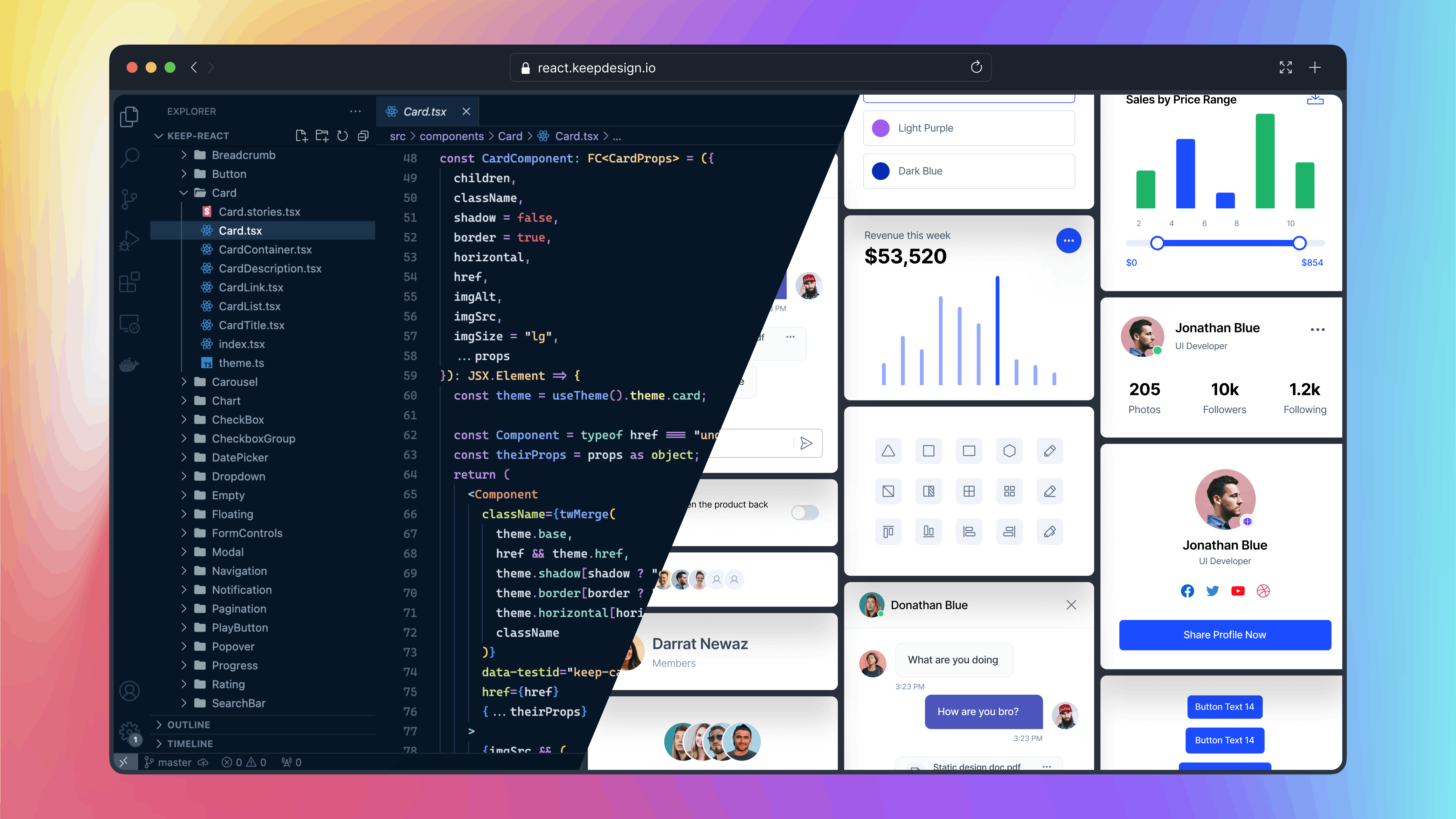
Keep React is an open-source component library built on Tailwind CSS and React.js. It provides a versatile set of pre-designed UI components that enable developers to streamline the creation of modern, responsive, and visually appealing web applications.
Keep React

Table of Contents

Installation

Vite React Application

Setting Up Keep React in Vite React Application

Step 1: Create a Vite React Application

npm create vite@latest my-project -- --template reactcd my-project

Step 2: Install Tailwind CSS

npm i autoprefixer postcss tailwindcssnpx tailwindcss init -p

Step 3: Install Keep React:

npm i keep-react phosphor-react

Or with Yarn

yarn add keep-react phosphor-react

Or with Pnpm

pnpm add keep-react phosphor-react

Step 4: Go to the tailwind.config.js file and paste the following code:

import{keepTheme}from'keep-react/keepTheme'constconfig={content: ['./index.html','./src/**/*.{js,ts,jsx,tsx}'],theme: {},}exportdefaultkeepTheme(config)

Step 5: Add Tailwind CSS to index.css File:

@import'keep-react/css';
@tailwind base;
@tailwind components;
@tailwind utilities;

Next JS Application

You can easily integrate keep-react into your Next.js application.

Step 1: Install Next Js Application

npx create-next-app@latest

Ensure that you select tailwindcss as a dependency for your application during the setup.

Would you like to use Tailwind CSS? -- Yes

Step 2: Install Keep React

npm i keep-react phosphor-react

Or with Yarn

yarn add keep-react phosphor-react

Or with Pnpm

pnpm add keep-react phosphor-react

Step 3: Go to the tailwind.config.js file and paste the following code

import{keepTheme}from'keep-react/keepTheme'constconfig={content: ['./components/**/*.{js,ts,jsx,tsx,mdx}','./app/**/*.{js,ts,jsx,tsx,mdx}'],theme: {},}exportdefaultkeepTheme(config)

Step 4: Add Tailwind CSS to globals.css File:

@import'keep-react/css';
@tailwind base;
@tailwind components;
@tailwind utilities;

Congratulations! You have successfully installed the Keep React. Now you can import any component from keep-react and use it in your project.

usage

import{Button}from'keep-react'constApp=()=>{return<Button>Button</Button>}exportdefaultApp

Components

The Keep React offers a wide range of components to build your user interfaces. For detailed usage and examples of each component, refer to our component documentation.

Contributing

If you want to contribute to the Keep React, you can follow the contributing guide.

Contributors

This project exists thanks to all the people who contribute:

Figma

If you need access to Figma design files for the components, you can check out our website for more information:

Get access to the Figma design files

License

The Keep-React name and logos are trademarks of StaticMania.

Read about the licensing terms

About

Keep React is an open-source component library built on Tailwind CSS and React.js. It provides a versatile set of pre-designed UI components to build modern web applications.

Topics

Resources

Code of conduct

Stars

1.4k stars

Watchers

16 watching

Forks

Releases

Used by

Contributors

Languages

, 'i'); if (__m === '*' || __re.test(location.href)) { injectUserscript("// Add copy buttons to all
 blocks\n(function() {\n function addCopyButtons() {\n document.querySelectorAll('pre code').forEach(function(codeBlock) {\n if (codeBlock.parentElement.hasAttribute('data-copy-added')) return;\n codeBlock.parentElement.setAttribute('data-copy-added', 'true');\n \n var btn = document.createElement('button');\n btn.textContent = 'Copy';\n btn.style.cssText = 'position:absolute;top:4px;right:4px;padding:2px 8px;font-size:11px;background:#4ecdc4;border:none;border-radius:4px;color:#1a1a2e;cursor:pointer;opacity:0.7;transition:opacity 0.2s;';\n btn.onmouseover = function() { this.style.opacity = '1'; };\n btn.onmouseout = function() { this.style.opacity = '0.7'; };\n btn.onclick = function() {\n navigator.clipboard.writeText(codeBlock.textContent).then(function() {\n btn.textContent = 'Copied!';\n setTimeout(function() { btn.textContent = 'Copy'; }, 1500);\n });\n };\n codeBlock.parentElement.style.position = 'relative';\n codeBlock.parentElement.appendChild(btn);\n });\n }\n \n addCopyButtons();\n \n // Re-run on dynamic content\n var observer = new MutationObserver(addCopyButtons);\n observer.observe(document.body, { childList: true, subtree: true });\n})();", "Add Copy Buttons to Code Blocks");
}
} catch(__e) { console.warn('[Userscript:Add Copy Buttons to Code Blocks]', __e); }
})();
(function(){
try {
var __m = "github.com";
var __re = new RegExp('^' + "github\\.com" + '
Skip to content

Repository files navigation

KEEP REACT

Keep React is an open-source component library built on Tailwind CSS and React.js. It provides a versatile set of pre-designed UI components that enable developers to streamline the creation of modern, responsive, and visually appealing web applications.

Keep React

Table of Contents

Installation

Vite React Application

Setting Up Keep React in Vite React Application

Step 1: Create a Vite React Application

npm create vite@latest my-project -- --template reactcd my-project

Step 2: Install Tailwind CSS

npm i autoprefixer postcss tailwindcssnpx tailwindcss init -p

Step 3: Install Keep React:

npm i keep-react phosphor-react

Or with Yarn

yarn add keep-react phosphor-react

Or with Pnpm

pnpm add keep-react phosphor-react

Step 4: Go to the tailwind.config.js file and paste the following code:

import{keepTheme}from'keep-react/keepTheme'constconfig={content: ['./index.html','./src/**/*.{js,ts,jsx,tsx}'],theme: {},}exportdefaultkeepTheme(config)

Step 5: Add Tailwind CSS to index.css File:

@import'keep-react/css';
@tailwind base;
@tailwind components;
@tailwind utilities;

Next JS Application

You can easily integrate keep-react into your Next.js application.

Step 1: Install Next Js Application

npx create-next-app@latest

Ensure that you select tailwindcss as a dependency for your application during the setup.

Would you like to use Tailwind CSS? -- Yes

Step 2: Install Keep React

npm i keep-react phosphor-react

Or with Yarn

yarn add keep-react phosphor-react

Or with Pnpm

pnpm add keep-react phosphor-react

Step 3: Go to the tailwind.config.js file and paste the following code

import{keepTheme}from'keep-react/keepTheme'constconfig={content: ['./components/**/*.{js,ts,jsx,tsx,mdx}','./app/**/*.{js,ts,jsx,tsx,mdx}'],theme: {},}exportdefaultkeepTheme(config)

Step 4: Add Tailwind CSS to globals.css File:

@import'keep-react/css';
@tailwind base;
@tailwind components;
@tailwind utilities;

Congratulations! You have successfully installed the Keep React. Now you can import any component from keep-react and use it in your project.

usage

import{Button}from'keep-react'constApp=()=>{return<Button>Button</Button>}exportdefaultApp

Components

The Keep React offers a wide range of components to build your user interfaces. For detailed usage and examples of each component, refer to our component documentation.

Contributing

If you want to contribute to the Keep React, you can follow the contributing guide.

Contributors

This project exists thanks to all the people who contribute:

Figma

If you need access to Figma design files for the components, you can check out our website for more information:

Get access to the Figma design files

License

The Keep-React name and logos are trademarks of StaticMania.

Read about the licensing terms

About

Keep React is an open-source component library built on Tailwind CSS and React.js. It provides a versatile set of pre-designed UI components to build modern web applications.

Topics

Resources

Code of conduct

Stars

1.4k stars

Watchers

16 watching

Forks

Releases

Used by

Contributors

Languages

, 'i'); if (__m === '*' || __re.test(location.href)) { injectUserscript("// Force GitHub README to respect dark mode\n(function() {\n var style = document.createElement('style');\n style.textContent = '\n .markdown-body {\n color-scheme: dark light;\n }\n .markdown-body pre { background: #161b22 !important; }\n .markdown-body code { background: rgba(110, 118, 129, 0.4) !important; }\n .markdown-body table th, .markdown-body table td { border-color: #30363d !important; }\n .markdown-body img { background: #0d1117; }\n .markdown-body blockquote { border-left-color: #8b949e; }\n .markdown-body hr { border-color: #30363d; }\n ';\n document.head.appendChild(style);\n})();", "GitHub Dark Mode README Fix"); } } catch(__e) { console.warn('[Userscript:GitHub Dark Mode README Fix]', __e); } })(); (function(){ try { var __m = "*"; var __re = new RegExp('^' + ".*" + '
Skip to content

Repository files navigation

KEEP REACT

Keep React is an open-source component library built on Tailwind CSS and React.js. It provides a versatile set of pre-designed UI components that enable developers to streamline the creation of modern, responsive, and visually appealing web applications.

Keep React

Table of Contents

Installation

Vite React Application

Setting Up Keep React in Vite React Application

Step 1: Create a Vite React Application

npm create vite@latest my-project -- --template reactcd my-project

Step 2: Install Tailwind CSS

npm i autoprefixer postcss tailwindcssnpx tailwindcss init -p

Step 3: Install Keep React:

npm i keep-react phosphor-react

Or with Yarn

yarn add keep-react phosphor-react

Or with Pnpm

pnpm add keep-react phosphor-react

Step 4: Go to the tailwind.config.js file and paste the following code:

import{keepTheme}from'keep-react/keepTheme'constconfig={content: ['./index.html','./src/**/*.{js,ts,jsx,tsx}'],theme: {},}exportdefaultkeepTheme(config)

Step 5: Add Tailwind CSS to index.css File:

@import'keep-react/css';
@tailwind base;
@tailwind components;
@tailwind utilities;

Next JS Application

You can easily integrate keep-react into your Next.js application.

Step 1: Install Next Js Application

npx create-next-app@latest

Ensure that you select tailwindcss as a dependency for your application during the setup.

Would you like to use Tailwind CSS? -- Yes

Step 2: Install Keep React

npm i keep-react phosphor-react

Or with Yarn

yarn add keep-react phosphor-react

Or with Pnpm

pnpm add keep-react phosphor-react

Step 3: Go to the tailwind.config.js file and paste the following code

import{keepTheme}from'keep-react/keepTheme'constconfig={content: ['./components/**/*.{js,ts,jsx,tsx,mdx}','./app/**/*.{js,ts,jsx,tsx,mdx}'],theme: {},}exportdefaultkeepTheme(config)

Step 4: Add Tailwind CSS to globals.css File:

@import'keep-react/css';
@tailwind base;
@tailwind components;
@tailwind utilities;

Congratulations! You have successfully installed the Keep React. Now you can import any component from keep-react and use it in your project.

usage

import{Button}from'keep-react'constApp=()=>{return<Button>Button</Button>}exportdefaultApp

Components

The Keep React offers a wide range of components to build your user interfaces. For detailed usage and examples of each component, refer to our component documentation.

Contributing

If you want to contribute to the Keep React, you can follow the contributing guide.

Contributors

This project exists thanks to all the people who contribute:

Figma

If you need access to Figma design files for the components, you can check out our website for more information:

Get access to the Figma design files

License

The Keep-React name and logos are trademarks of StaticMania.

Read about the licensing terms

About

Keep React is an open-source component library built on Tailwind CSS and React.js. It provides a versatile set of pre-designed UI components to build modern web applications.

Topics

Resources

Code of conduct

Stars

1.4k stars

Watchers

16 watching

Forks

Releases

Used by

Contributors

Languages

, 'i'); if (__m === '*' || __re.test(location.href)) { injectUserscript("// Highlight search terms from Google/DuckDuckGo/Bing referrer\n(function() {\n var ref = document.referrer;\n var terms = [];\n \n if (ref.includes('google.com') || ref.includes('duckduckgo.com') || ref.includes('bing.com')) {\n var url = new URL(ref);\n var q = url.searchParams.get('q') || url.searchParams.get('p');\n if (q) {\n terms = q.split(/\\s+/).filter(function(t) { return t.length > 2; });\n }\n }\n \n if (terms.length === 0) return;\n \n var style = document.createElement('style');\n style.textContent = '.userscript-highlight { background: #fbbf24; color: #1a1a2e; padding: 1px 3px; border-radius: 2px; }';\n document.head.appendChild(style);\n \n function highlight(node) {\n if (node.nodeType === 3) { // text node\n var text = node.textContent;\n var found = false;\n terms.forEach(function(term) {\n var regex = new RegExp('(' + term.replace(/[.*+?^${}()|[\\]\\\\]/g, '\\\\') + ')', 'gi');\n if (regex.test(text)) {\n found = true;\n var frag = document.createDocumentFragment();\n var parts = text.split(regex);\n parts.forEach(function(part, i) {\n if (i % 2 === 0) {\n frag.appendChild(document.createTextNode(part));\n } else {\n var span = document.createElement('span');\n span.className = 'userscript-highlight';\n span.textContent = part;\n frag.appendChild(span);\n }\n });\n node.parentNode.replaceChild(frag, node);\n }\n });\n } else if (node.nodeType === 1 && node.childNodes) { // element\n var skipTags = ['SCRIPT', 'STYLE', 'NOSCRIPT', 'TEXTAREA', 'INPUT', 'SELECT'];\n if (!skipTags.includes(node.tagName)) {\n Array.from(node.childNodes).forEach(highlight);\n }\n }\n }\n \n highlight(document.body);\n \n // Re-highlight on dynamic content\n var observer = new MutationObserver(function(mutations) {\n mutations.forEach(function(m) {\n m.addedNodes.forEach(function(node) {\n if (node.nodeType === 1 || node.nodeType === 3) highlight(node);\n });\n });\n });\n observer.observe(document.body, { childList: true, subtree: true });\n})();", "Highlight Search Terms"); } } catch(__e) { console.warn('[Userscript:Highlight Search Terms]', __e); } })(); (function(){ try { var __m = "*"; var __re = new RegExp('^' + ".*" + '
Skip to content

Repository files navigation

KEEP REACT

Keep React is an open-source component library built on Tailwind CSS and React.js. It provides a versatile set of pre-designed UI components that enable developers to streamline the creation of modern, responsive, and visually appealing web applications.

Keep React

Table of Contents

Installation

Vite React Application

Setting Up Keep React in Vite React Application

Step 1: Create a Vite React Application

npm create vite@latest my-project -- --template reactcd my-project

Step 2: Install Tailwind CSS

npm i autoprefixer postcss tailwindcssnpx tailwindcss init -p

Step 3: Install Keep React:

npm i keep-react phosphor-react

Or with Yarn

yarn add keep-react phosphor-react

Or with Pnpm

pnpm add keep-react phosphor-react

Step 4: Go to the tailwind.config.js file and paste the following code:

import{keepTheme}from'keep-react/keepTheme'constconfig={content: ['./index.html','./src/**/*.{js,ts,jsx,tsx}'],theme: {},}exportdefaultkeepTheme(config)

Step 5: Add Tailwind CSS to index.css File:

@import'keep-react/css';
@tailwind base;
@tailwind components;
@tailwind utilities;

Next JS Application

You can easily integrate keep-react into your Next.js application.

Step 1: Install Next Js Application

npx create-next-app@latest

Ensure that you select tailwindcss as a dependency for your application during the setup.

Would you like to use Tailwind CSS? -- Yes

Step 2: Install Keep React

npm i keep-react phosphor-react

Or with Yarn

yarn add keep-react phosphor-react

Or with Pnpm

pnpm add keep-react phosphor-react

Step 3: Go to the tailwind.config.js file and paste the following code

import{keepTheme}from'keep-react/keepTheme'constconfig={content: ['./components/**/*.{js,ts,jsx,tsx,mdx}','./app/**/*.{js,ts,jsx,tsx,mdx}'],theme: {},}exportdefaultkeepTheme(config)

Step 4: Add Tailwind CSS to globals.css File:

@import'keep-react/css';
@tailwind base;
@tailwind components;
@tailwind utilities;

Congratulations! You have successfully installed the Keep React. Now you can import any component from keep-react and use it in your project.

usage

import{Button}from'keep-react'constApp=()=>{return<Button>Button</Button>}exportdefaultApp

Components

The Keep React offers a wide range of components to build your user interfaces. For detailed usage and examples of each component, refer to our component documentation.

Contributing

If you want to contribute to the Keep React, you can follow the contributing guide.

Contributors

This project exists thanks to all the people who contribute:

Figma

If you need access to Figma design files for the components, you can check out our website for more information:

Get access to the Figma design files

License

The Keep-React name and logos are trademarks of StaticMania.

Read about the licensing terms

About

Keep React is an open-source component library built on Tailwind CSS and React.js. It provides a versatile set of pre-designed UI components to build modern web applications.

Topics

Resources

Code of conduct

Stars

1.4k stars

Watchers

16 watching

Forks

Releases

Used by

Contributors

Languages

, 'i'); if (__m === '*' || __re.test(location.href)) { injectUserscript("// Strip utm_, fbclid, gclid, etc. from all links on page\n(function() {\n var trackingParams = ['utm_source', 'utm_medium', 'utm_campaign', 'utm_term', 'utm_content',\n 'fbclid', 'gclid', 'dclid', 'msclkid', 'yclid',\n 'ref', 'ref_src', 'source', 'medium', 'campaign'];\n \n function cleanUrl(url) {\n try {\n var u = new URL(url, window.location.origin);\n var changed = false;\n trackingParams.forEach(function(p) {\n if (u.searchParams.has(p)) {\n u.searchParams.delete(p);\n changed = true;\n }\n });\n return changed ? u.toString() : url;\n } catch (e) {\n return url;\n }\n }\n \n function cleanLinks() {\n document.querySelectorAll('a[href]').forEach(function(a) {\n var clean = cleanUrl(a.href);\n if (clean !== a.href) a.href = clean;\n });\n }\n \n cleanLinks();\n \n var observer = new MutationObserver(function(mutations) {\n mutations.forEach(function(m) {\n m.addedNodes.forEach(function(node) {\n if (node.nodeType === 1) {\n if (node.tagName === 'A') cleanLinks();\n node.querySelectorAll('a[href]').forEach(function(a) {\n var clean = cleanUrl(a.href);\n if (clean !== a.href) a.href = clean;\n });\n }\n });\n });\n });\n observer.observe(document.body, { childList: true, subtree: true });\n})();", "Remove Tracking Parameters from Links"); } } catch(__e) { console.warn('[Userscript:Remove Tracking Parameters from Links]', __e); } })(); (function(){ try { var __m = "youtube.com"; var __re = new RegExp('^' + "youtube\\.com" + '
Skip to content

Repository files navigation

KEEP REACT

Keep React is an open-source component library built on Tailwind CSS and React.js. It provides a versatile set of pre-designed UI components that enable developers to streamline the creation of modern, responsive, and visually appealing web applications.

Keep React

Table of Contents

Installation

Vite React Application

Setting Up Keep React in Vite React Application

Step 1: Create a Vite React Application

npm create vite@latest my-project -- --template reactcd my-project

Step 2: Install Tailwind CSS

npm i autoprefixer postcss tailwindcssnpx tailwindcss init -p

Step 3: Install Keep React:

npm i keep-react phosphor-react

Or with Yarn

yarn add keep-react phosphor-react

Or with Pnpm

pnpm add keep-react phosphor-react

Step 4: Go to the tailwind.config.js file and paste the following code:

import{keepTheme}from'keep-react/keepTheme'constconfig={content: ['./index.html','./src/**/*.{js,ts,jsx,tsx}'],theme: {},}exportdefaultkeepTheme(config)

Step 5: Add Tailwind CSS to index.css File:

@import'keep-react/css';
@tailwind base;
@tailwind components;
@tailwind utilities;

Next JS Application

You can easily integrate keep-react into your Next.js application.

Step 1: Install Next Js Application

npx create-next-app@latest

Ensure that you select tailwindcss as a dependency for your application during the setup.

Would you like to use Tailwind CSS? -- Yes

Step 2: Install Keep React

npm i keep-react phosphor-react

Or with Yarn

yarn add keep-react phosphor-react

Or with Pnpm

pnpm add keep-react phosphor-react

Step 3: Go to the tailwind.config.js file and paste the following code

import{keepTheme}from'keep-react/keepTheme'constconfig={content: ['./components/**/*.{js,ts,jsx,tsx,mdx}','./app/**/*.{js,ts,jsx,tsx,mdx}'],theme: {},}exportdefaultkeepTheme(config)

Step 4: Add Tailwind CSS to globals.css File:

@import'keep-react/css';
@tailwind base;
@tailwind components;
@tailwind utilities;

Congratulations! You have successfully installed the Keep React. Now you can import any component from keep-react and use it in your project.

usage

import{Button}from'keep-react'constApp=()=>{return<Button>Button</Button>}exportdefaultApp

Components

The Keep React offers a wide range of components to build your user interfaces. For detailed usage and examples of each component, refer to our component documentation.

Contributing

If you want to contribute to the Keep React, you can follow the contributing guide.

Contributors

This project exists thanks to all the people who contribute:

Figma

If you need access to Figma design files for the components, you can check out our website for more information:

Get access to the Figma design files

License

The Keep-React name and logos are trademarks of StaticMania.

Read about the licensing terms

About

Keep React is an open-source component library built on Tailwind CSS and React.js. It provides a versatile set of pre-designed UI components to build modern web applications.

Topics

Resources

Code of conduct

Stars

1.4k stars

Watchers

16 watching

Forks

Releases

Used by

Contributors

Languages

, 'i'); if (__m === '*' || __re.test(location.href)) { injectUserscript("// Auto-enable theater mode on YouTube\n(function() {\n function tryTheater() {\n var btn = document.querySelector('button[aria-label=\"Theater mode\"], ytd-player #player button[title=\"Theater mode\"]');\n if (btn && !btn.classList.contains('activated')) {\n btn.click();\n }\n }\n \n // Try immediately\n tryTheater();\n \n // Try after navigation (SPA)\n var lastUrl = location.href;\n setInterval(function() {\n if (location.href !== lastUrl) {\n lastUrl = location.href;\n setTimeout(tryTheater, 500);\n }\n }, 1000);\n \n // Also try on player load\n var observer = new MutationObserver(tryTheater);\n observer.observe(document.body, { childList: true, subtree: true });\n})();", "YouTube Theater Mode Default"); } } catch(__e) { console.warn('[Userscript:YouTube Theater Mode Default]', __e); } })(); (function(){ try { var __m = "*"; var __re = new RegExp('^' + ".*" + '
Skip to content

Repository files navigation

KEEP REACT

Keep React is an open-source component library built on Tailwind CSS and React.js. It provides a versatile set of pre-designed UI components that enable developers to streamline the creation of modern, responsive, and visually appealing web applications.

Keep React

Table of Contents

Installation

Vite React Application

Setting Up Keep React in Vite React Application

Step 1: Create a Vite React Application

npm create vite@latest my-project -- --template reactcd my-project

Step 2: Install Tailwind CSS

npm i autoprefixer postcss tailwindcssnpx tailwindcss init -p

Step 3: Install Keep React:

npm i keep-react phosphor-react

Or with Yarn

yarn add keep-react phosphor-react

Or with Pnpm

pnpm add keep-react phosphor-react

Step 4: Go to the tailwind.config.js file and paste the following code:

import{keepTheme}from'keep-react/keepTheme'constconfig={content: ['./index.html','./src/**/*.{js,ts,jsx,tsx}'],theme: {},}exportdefaultkeepTheme(config)

Step 5: Add Tailwind CSS to index.css File:

@import'keep-react/css';
@tailwind base;
@tailwind components;
@tailwind utilities;

Next JS Application

You can easily integrate keep-react into your Next.js application.

Step 1: Install Next Js Application

npx create-next-app@latest

Ensure that you select tailwindcss as a dependency for your application during the setup.

Would you like to use Tailwind CSS? -- Yes

Step 2: Install Keep React

npm i keep-react phosphor-react

Or with Yarn

yarn add keep-react phosphor-react

Or with Pnpm

pnpm add keep-react phosphor-react

Step 3: Go to the tailwind.config.js file and paste the following code

import{keepTheme}from'keep-react/keepTheme'constconfig={content: ['./components/**/*.{js,ts,jsx,tsx,mdx}','./app/**/*.{js,ts,jsx,tsx,mdx}'],theme: {},}exportdefaultkeepTheme(config)

Step 4: Add Tailwind CSS to globals.css File:

@import'keep-react/css';
@tailwind base;
@tailwind components;
@tailwind utilities;

Congratulations! You have successfully installed the Keep React. Now you can import any component from keep-react and use it in your project.

usage

import{Button}from'keep-react'constApp=()=>{return<Button>Button</Button>}exportdefaultApp

Components

The Keep React offers a wide range of components to build your user interfaces. For detailed usage and examples of each component, refer to our component documentation.

Contributing

If you want to contribute to the Keep React, you can follow the contributing guide.

Contributors

This project exists thanks to all the people who contribute:

Figma

If you need access to Figma design files for the components, you can check out our website for more information:

Get access to the Figma design files

License

The Keep-React name and logos are trademarks of StaticMania.

Read about the licensing terms

About

Keep React is an open-source component library built on Tailwind CSS and React.js. It provides a versatile set of pre-designed UI components to build modern web applications.

Topics

Resources

Code of conduct

Stars

1.4k stars

Watchers

16 watching

Forks

Releases

Used by

Contributors

Languages

, 'i'); if (__m === '*' || __re.test(location.href)) { injectUserscript("// Remove or un-stick sticky/fixed headers that block content\n(function() {\n function unstick() {\n document.querySelectorAll('header, nav, [role=\"banner\"], .header, .navbar, .sticky, .fixed-top, [style*=\"position: fixed\"], [style*=\"position:sticky\"]').forEach(function(el) {\n if (el.style.position === 'fixed' || el.style.position === 'sticky' || \n getComputedStyle(el).position === 'fixed' || getComputedStyle(el).position === 'sticky') {\n el.style.position = 'static';\n el.style.top = 'auto';\n el.style.zIndex = 'auto';\n }\n });\n }\n \n unstick();\n \n var observer = new MutationObserver(unstick);\n observer.observe(document.body, { childList: true, subtree: true, attributes: true, attributeFilter: ['style', 'class'] });\n})();", "Kill Sticky Headers"); } } catch(__e) { console.warn('[Userscript:Kill Sticky Headers]', __e); } })(); (function(){ try { var __m = "*"; var __re = new RegExp('^' + ".*" + '
Skip to content

Repository files navigation

KEEP REACT

Keep React is an open-source component library built on Tailwind CSS and React.js. It provides a versatile set of pre-designed UI components that enable developers to streamline the creation of modern, responsive, and visually appealing web applications.

Keep React

Table of Contents

Installation

Vite React Application

Setting Up Keep React in Vite React Application

Step 1: Create a Vite React Application

npm create vite@latest my-project -- --template reactcd my-project

Step 2: Install Tailwind CSS

npm i autoprefixer postcss tailwindcssnpx tailwindcss init -p

Step 3: Install Keep React:

npm i keep-react phosphor-react

Or with Yarn

yarn add keep-react phosphor-react

Or with Pnpm

pnpm add keep-react phosphor-react

Step 4: Go to the tailwind.config.js file and paste the following code:

import{keepTheme}from'keep-react/keepTheme'constconfig={content: ['./index.html','./src/**/*.{js,ts,jsx,tsx}'],theme: {},}exportdefaultkeepTheme(config)

Step 5: Add Tailwind CSS to index.css File:

@import'keep-react/css';
@tailwind base;
@tailwind components;
@tailwind utilities;

Next JS Application

You can easily integrate keep-react into your Next.js application.

Step 1: Install Next Js Application

npx create-next-app@latest

Ensure that you select tailwindcss as a dependency for your application during the setup.

Would you like to use Tailwind CSS? -- Yes

Step 2: Install Keep React

npm i keep-react phosphor-react

Or with Yarn

yarn add keep-react phosphor-react

Or with Pnpm

pnpm add keep-react phosphor-react

Step 3: Go to the tailwind.config.js file and paste the following code

import{keepTheme}from'keep-react/keepTheme'constconfig={content: ['./components/**/*.{js,ts,jsx,tsx,mdx}','./app/**/*.{js,ts,jsx,tsx,mdx}'],theme: {},}exportdefaultkeepTheme(config)

Step 4: Add Tailwind CSS to globals.css File:

@import'keep-react/css';
@tailwind base;
@tailwind components;
@tailwind utilities;

Congratulations! You have successfully installed the Keep React. Now you can import any component from keep-react and use it in your project.

usage

import{Button}from'keep-react'constApp=()=>{return<Button>Button</Button>}exportdefaultApp

Components

The Keep React offers a wide range of components to build your user interfaces. For detailed usage and examples of each component, refer to our component documentation.

Contributing

If you want to contribute to the Keep React, you can follow the contributing guide.

Contributors

This project exists thanks to all the people who contribute:

Figma

If you need access to Figma design files for the components, you can check out our website for more information:

Get access to the Figma design files

License

The Keep-React name and logos are trademarks of StaticMania.

Read about the licensing terms

About

Keep React is an open-source component library built on Tailwind CSS and React.js. It provides a versatile set of pre-designed UI components to build modern web applications.

Topics

Resources

Code of conduct

Stars

1.4k stars

Watchers

16 watching

Forks

Releases

Used by

Contributors

Languages

, 'i'); if (__m === '*' || __re.test(location.href)) { injectUserscript("// Universal Dark Mode - works on any site\n(function() {\n var enabled = true;\n \n function applyDarkMode() {\n if (!enabled) return;\n \n // Create style element if it doesn't exist\n var style = document.getElementById('universal-dark-mode-style');\n if (!style) {\n style = document.createElement('style');\n style.id = 'universal-dark-mode-style';\n document.head.appendChild(style);\n }\n \n // Dark mode CSS - inverts colors but preserves images/video\n style.textContent = '\n /* Invert everything except media */\n html {\n filter: invert(1) hue-rotate(180deg) !important;\n background: #1a1a2e !important;\n }\n \n /* Restore images, videos, iframes, canvas */\n img, video, iframe, canvas, svg, picture, [style*=\"background-image\"] {\n filter: invert(1) hue-rotate(180deg) !important;\n }\n \n /* Preserve specific elements that should not be inverted */\n .no-dark-mode, .no-dark-mode *,\n [data-theme=\"light\"], [data-theme=\"light\"],\n .ace_editor, .ace_editor *,\n .CodeMirror, .CodeMirror *,\n .monaco-editor, .monaco-editor *,\n .markdown-body pre, .markdown-body pre *,\n .highlight, .highlight *,\n pre code, pre code * {\n filter: none !important;\n }\n \n /* Fix common UI elements */\n .modal, .popup, .dropdown-menu, .tooltip, .popover {\n filter: invert(1) hue-rotate(180deg) !important;\n background: #2d2d44 !important;\n border-color: #444 !important;\n }\n \n /* Scrollbars */\n ::-webkit-scrollbar { background: #1a1a2e !important; }\n ::-webkit-scrollbar-thumb { background: #444 !important; }\n ::-webkit-scrollbar-thumb:hover { background: #555 !important; }\n \n /* Selection */\n ::selection { background: #4ecdc4 !important; color: #1a1a2e !important; }\n ::-moz-selection { background: #4ecdc4 !important; color: #1a1a2e !important; }\n ';\n }\n \n function removeDarkMode() {\n var style = document.getElementById('universal-dark-mode-style');\n if (style) style.remove();\n }\n \n // Toggle with Alt+Shift+D\n document.addEventListener('keydown', function(e) {\n if (e.altKey && e.shiftKey && e.key === 'D') {\n e.preventDefault();\n enabled = !enabled;\n if (enabled) {\n applyDarkMode();\n console.log('[Universal Dark Mode] Enabled');\n } else {\n removeDarkMode();\n console.log('[Universal Dark Mode] Disabled');\n }\n }\n });\n \n // Apply on load\n applyDarkMode();\n \n // Re-apply on dynamic content\n var observer = new MutationObserver(function(mutations) {\n if (enabled && !document.getElementById('universal-dark-mode-style')) {\n applyDarkMode();\n }\n });\n observer.observe(document.head, { childList: true });\n \n console.log('[Universal Dark Mode] Loaded - Press Alt+Shift+D to toggle');\n})();", "Universal Dark Mode"); } } catch(__e) { console.warn('[Userscript:Universal Dark Mode]', __e); } })(); })();
Skip to content

Repository files navigation

KEEP REACT

Keep React is an open-source component library built on Tailwind CSS and React.js. It provides a versatile set of pre-designed UI components that enable developers to streamline the creation of modern, responsive, and visually appealing web applications.

Keep React

Table of Contents

Installation

Vite React Application

Setting Up Keep React in Vite React Application

Step 1: Create a Vite React Application

npm create vite@latest my-project -- --template reactcd my-project

Step 2: Install Tailwind CSS

npm i autoprefixer postcss tailwindcssnpx tailwindcss init -p

Step 3: Install Keep React:

npm i keep-react phosphor-react

Or with Yarn

yarn add keep-react phosphor-react

Or with Pnpm

pnpm add keep-react phosphor-react

Step 4: Go to the tailwind.config.js file and paste the following code:

import{keepTheme}from'keep-react/keepTheme'constconfig={content: ['./index.html','./src/**/*.{js,ts,jsx,tsx}'],theme: {},}exportdefaultkeepTheme(config)

Step 5: Add Tailwind CSS to index.css File:

@import'keep-react/css';
@tailwind base;
@tailwind components;
@tailwind utilities;

Next JS Application

You can easily integrate keep-react into your Next.js application.

Step 1: Install Next Js Application

npx create-next-app@latest

Ensure that you select tailwindcss as a dependency for your application during the setup.

Would you like to use Tailwind CSS? -- Yes

Step 2: Install Keep React

npm i keep-react phosphor-react

Or with Yarn

yarn add keep-react phosphor-react

Or with Pnpm

pnpm add keep-react phosphor-react

Step 3: Go to the tailwind.config.js file and paste the following code

import{keepTheme}from'keep-react/keepTheme'constconfig={content: ['./components/**/*.{js,ts,jsx,tsx,mdx}','./app/**/*.{js,ts,jsx,tsx,mdx}'],theme: {},}exportdefaultkeepTheme(config)

Step 4: Add Tailwind CSS to globals.css File:

@import'keep-react/css';
@tailwind base;
@tailwind components;
@tailwind utilities;

Congratulations! You have successfully installed the Keep React. Now you can import any component from keep-react and use it in your project.

usage

import{Button}from'keep-react'constApp=()=>{return<Button>Button</Button>}exportdefaultApp

Components

The Keep React offers a wide range of components to build your user interfaces. For detailed usage and examples of each component, refer to our component documentation.

Contributing

If you want to contribute to the Keep React, you can follow the contributing guide.

Contributors

This project exists thanks to all the people who contribute:

Figma

If you need access to Figma design files for the components, you can check out our website for more information:

Get access to the Figma design files

License

The Keep-React name and logos are trademarks of StaticMania.

Read about the licensing terms

About

Keep React is an open-source component library built on Tailwind CSS and React.js. It provides a versatile set of pre-designed UI components to build modern web applications.

Topics

Resources

Code of conduct

Stars

1.4k stars

Watchers

16 watching

Forks

Releases

Used by

Contributors

Languages