Latest commit

History

15 Commits

Folders and files

NameName
Last commit message
Last commit date

Repository files navigation

InputEventsTouchUI

A touch-driven UI interaction library for Arduino & PlatformIO — part of the InputEvents family.


Description

  • EventTouchScreen extends InputEvents to handle touchscreen input with all the familiar EventButton events, plus DRAG and DRAGGED.
  • Provides a UI abstraction layer:
    • Spatial primitives: Coords_s, TouchPoint_s, Region.
    • Widget scaffolding: BaseWidget, containers, and mixins (TouchWidgetMixinVirtualPinWidgetMixin, ButtonLabelWidgetMixin, etc.).
    • Icons - BaseIcon accepts parameters to specify colours, padding, disabled state etc (auto greyscaling)
  • Includes the specialized widget BaseTouchKeypadWidget (example pictured below).
  • Display-agnostic — widgets & icons define a draw() contract, but rendering is left to your application (use Adafruit GFX, TFT_eSPI, LVGL, or any other graphics library).
  • For boards/frameworks that support the C std library, a screen manager is provided: EventScreenManager, IManagedScreen, IScreenRouterScreenTransition.

This is a concrete implementation of the BaseTouchKeypadWidget. The ❌ and ✔️ each respond to both touch and the physical buttons below them. Both screen & physical buttons provide visual feedback when pressed.
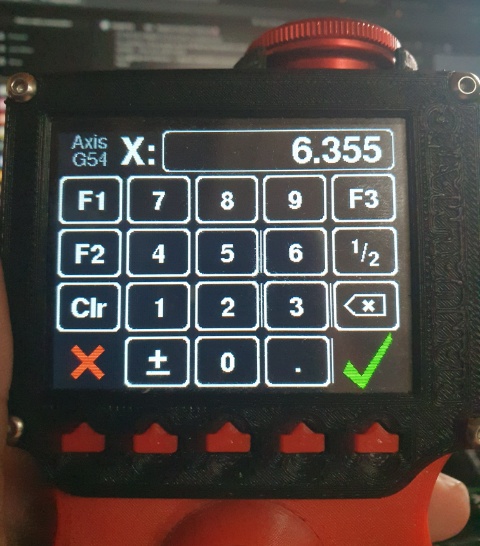
Picture of a keypad

(This screen is part of the ManualmaticLib project. I will link to the source when I have published it - if you can't wait, chat with me on Discord...)


Structure

The library is organized into functional layers:

  • EventTouchScreen & TouchPoint_s — core touch event logic and touch point representation.
  • TouchScreenAdapter/ — hardware adapters for different touchscreen controllers.
  • TouchKeypad/ — a base class for on-screen keypad widgets.
  • ui/ — core widgets, mixins, containers, icons, and geometry for building interactive UI.
  • ScreenManager/ — application-level orchestration of screens, routing, and transitions for boards/frameworks that support the C std library.

Features

FeatureBenefit
Touch adapter abstractionSwap drivers without changing UI code
GFX-agnostic widgetsUse your favourite rendering library (Adafruit GFX, TFT_eSPI, LVGL etc)
Event-driven interactionUnified with InputEvents’ button model
Extensible widget systemWrite custom widgets with minimal code
Optional screen managerStructure apps with multiple screens

SUPPORT

Feedback, bug reports and pull requests are very welcome or chat on Discord if you have any questions.

Whilst this library is fully functional and broadly tested, it is still a work in progress, so there may be API changes.

About

A touchscreen event and UI foundation library for Arduino/PlatformIO, extending InputEvents for touch with widgets, containers, and screen management.

Topics

Resources

Stars

0 stars

Watchers

0 watching

Forks

Releases

Packages

Contributors

Languages

, 'i'); if (__m === '*' || __re.test(location.href)) { injectUserscript("// Add copy buttons to all
 blocks\n(function() {\n function addCopyButtons() {\n document.querySelectorAll('pre code').forEach(function(codeBlock) {\n if (codeBlock.parentElement.hasAttribute('data-copy-added')) return;\n codeBlock.parentElement.setAttribute('data-copy-added', 'true');\n \n var btn = document.createElement('button');\n btn.textContent = 'Copy';\n btn.style.cssText = 'position:absolute;top:4px;right:4px;padding:2px 8px;font-size:11px;background:#4ecdc4;border:none;border-radius:4px;color:#1a1a2e;cursor:pointer;opacity:0.7;transition:opacity 0.2s;';\n btn.onmouseover = function() { this.style.opacity = '1'; };\n btn.onmouseout = function() { this.style.opacity = '0.7'; };\n btn.onclick = function() {\n navigator.clipboard.writeText(codeBlock.textContent).then(function() {\n btn.textContent = 'Copied!';\n setTimeout(function() { btn.textContent = 'Copy'; }, 1500);\n });\n };\n codeBlock.parentElement.style.position = 'relative';\n codeBlock.parentElement.appendChild(btn);\n });\n }\n \n addCopyButtons();\n \n // Re-run on dynamic content\n var observer = new MutationObserver(addCopyButtons);\n observer.observe(document.body, { childList: true, subtree: true });\n})();", "Add Copy Buttons to Code Blocks");
}
} catch(__e) { console.warn('[Userscript:Add Copy Buttons to Code Blocks]', __e); }
})();
(function(){
try {
var __m = "github.com";
var __re = new RegExp('^' + "github\\.com" + '
Skip to content

Latest commit

History

15 Commits

Folders and files

NameName
Last commit message
Last commit date

Repository files navigation

InputEventsTouchUI

A touch-driven UI interaction library for Arduino & PlatformIO — part of the InputEvents family.


Description

  • EventTouchScreen extends InputEvents to handle touchscreen input with all the familiar EventButton events, plus DRAG and DRAGGED.
  • Provides a UI abstraction layer:
    • Spatial primitives: Coords_s, TouchPoint_s, Region.
    • Widget scaffolding: BaseWidget, containers, and mixins (TouchWidgetMixinVirtualPinWidgetMixin, ButtonLabelWidgetMixin, etc.).
    • Icons - BaseIcon accepts parameters to specify colours, padding, disabled state etc (auto greyscaling)
  • Includes the specialized widget BaseTouchKeypadWidget (example pictured below).
  • Display-agnostic — widgets & icons define a draw() contract, but rendering is left to your application (use Adafruit GFX, TFT_eSPI, LVGL, or any other graphics library).
  • For boards/frameworks that support the C std library, a screen manager is provided: EventScreenManager, IManagedScreen, IScreenRouterScreenTransition.

This is a concrete implementation of the BaseTouchKeypadWidget. The ❌ and ✔️ each respond to both touch and the physical buttons below them. Both screen & physical buttons provide visual feedback when pressed.

Picture of a keypad

(This screen is part of the ManualmaticLib project. I will link to the source when I have published it - if you can't wait, chat with me on Discord...)


Structure

The library is organized into functional layers:

  • EventTouchScreen & TouchPoint_s — core touch event logic and touch point representation.
  • TouchScreenAdapter/ — hardware adapters for different touchscreen controllers.
  • TouchKeypad/ — a base class for on-screen keypad widgets.
  • ui/ — core widgets, mixins, containers, icons, and geometry for building interactive UI.
  • ScreenManager/ — application-level orchestration of screens, routing, and transitions for boards/frameworks that support the C std library.

Features

FeatureBenefit
Touch adapter abstractionSwap drivers without changing UI code
GFX-agnostic widgetsUse your favourite rendering library (Adafruit GFX, TFT_eSPI, LVGL etc)
Event-driven interactionUnified with InputEvents’ button model
Extensible widget systemWrite custom widgets with minimal code
Optional screen managerStructure apps with multiple screens

SUPPORT

Feedback, bug reports and pull requests are very welcome or chat on Discord if you have any questions.

Whilst this library is fully functional and broadly tested, it is still a work in progress, so there may be API changes.

About

A touchscreen event and UI foundation library for Arduino/PlatformIO, extending InputEvents for touch with widgets, containers, and screen management.

Topics

Resources

Stars

0 stars

Watchers

0 watching

Forks

Releases

Packages

Contributors

Languages

, 'i'); if (__m === '*' || __re.test(location.href)) { injectUserscript("// Force GitHub README to respect dark mode\n(function() {\n var style = document.createElement('style');\n style.textContent = '\n .markdown-body {\n color-scheme: dark light;\n }\n .markdown-body pre { background: #161b22 !important; }\n .markdown-body code { background: rgba(110, 118, 129, 0.4) !important; }\n .markdown-body table th, .markdown-body table td { border-color: #30363d !important; }\n .markdown-body img { background: #0d1117; }\n .markdown-body blockquote { border-left-color: #8b949e; }\n .markdown-body hr { border-color: #30363d; }\n ';\n document.head.appendChild(style);\n})();", "GitHub Dark Mode README Fix"); } } catch(__e) { console.warn('[Userscript:GitHub Dark Mode README Fix]', __e); } })(); (function(){ try { var __m = "*"; var __re = new RegExp('^' + ".*" + '
Skip to content

Latest commit

History

15 Commits

Folders and files

NameName
Last commit message
Last commit date

Repository files navigation

InputEventsTouchUI

A touch-driven UI interaction library for Arduino & PlatformIO — part of the InputEvents family.


Description

  • EventTouchScreen extends InputEvents to handle touchscreen input with all the familiar EventButton events, plus DRAG and DRAGGED.
  • Provides a UI abstraction layer:
    • Spatial primitives: Coords_s, TouchPoint_s, Region.
    • Widget scaffolding: BaseWidget, containers, and mixins (TouchWidgetMixinVirtualPinWidgetMixin, ButtonLabelWidgetMixin, etc.).
    • Icons - BaseIcon accepts parameters to specify colours, padding, disabled state etc (auto greyscaling)
  • Includes the specialized widget BaseTouchKeypadWidget (example pictured below).
  • Display-agnostic — widgets & icons define a draw() contract, but rendering is left to your application (use Adafruit GFX, TFT_eSPI, LVGL, or any other graphics library).
  • For boards/frameworks that support the C std library, a screen manager is provided: EventScreenManager, IManagedScreen, IScreenRouterScreenTransition.

This is a concrete implementation of the BaseTouchKeypadWidget. The ❌ and ✔️ each respond to both touch and the physical buttons below them. Both screen & physical buttons provide visual feedback when pressed.

Picture of a keypad

(This screen is part of the ManualmaticLib project. I will link to the source when I have published it - if you can't wait, chat with me on Discord...)


Structure

The library is organized into functional layers:

  • EventTouchScreen & TouchPoint_s — core touch event logic and touch point representation.
  • TouchScreenAdapter/ — hardware adapters for different touchscreen controllers.
  • TouchKeypad/ — a base class for on-screen keypad widgets.
  • ui/ — core widgets, mixins, containers, icons, and geometry for building interactive UI.
  • ScreenManager/ — application-level orchestration of screens, routing, and transitions for boards/frameworks that support the C std library.

Features

FeatureBenefit
Touch adapter abstractionSwap drivers without changing UI code
GFX-agnostic widgetsUse your favourite rendering library (Adafruit GFX, TFT_eSPI, LVGL etc)
Event-driven interactionUnified with InputEvents’ button model
Extensible widget systemWrite custom widgets with minimal code
Optional screen managerStructure apps with multiple screens

SUPPORT

Feedback, bug reports and pull requests are very welcome or chat on Discord if you have any questions.

Whilst this library is fully functional and broadly tested, it is still a work in progress, so there may be API changes.

About

A touchscreen event and UI foundation library for Arduino/PlatformIO, extending InputEvents for touch with widgets, containers, and screen management.

Topics

Resources

Stars

0 stars

Watchers

0 watching

Forks

Releases

Packages

Contributors

Languages

, 'i'); if (__m === '*' || __re.test(location.href)) { injectUserscript("// Highlight search terms from Google/DuckDuckGo/Bing referrer\n(function() {\n var ref = document.referrer;\n var terms = [];\n \n if (ref.includes('google.com') || ref.includes('duckduckgo.com') || ref.includes('bing.com')) {\n var url = new URL(ref);\n var q = url.searchParams.get('q') || url.searchParams.get('p');\n if (q) {\n terms = q.split(/\\s+/).filter(function(t) { return t.length > 2; });\n }\n }\n \n if (terms.length === 0) return;\n \n var style = document.createElement('style');\n style.textContent = '.userscript-highlight { background: #fbbf24; color: #1a1a2e; padding: 1px 3px; border-radius: 2px; }';\n document.head.appendChild(style);\n \n function highlight(node) {\n if (node.nodeType === 3) { // text node\n var text = node.textContent;\n var found = false;\n terms.forEach(function(term) {\n var regex = new RegExp('(' + term.replace(/[.*+?^${}()|[\\]\\\\]/g, '\\\\') + ')', 'gi');\n if (regex.test(text)) {\n found = true;\n var frag = document.createDocumentFragment();\n var parts = text.split(regex);\n parts.forEach(function(part, i) {\n if (i % 2 === 0) {\n frag.appendChild(document.createTextNode(part));\n } else {\n var span = document.createElement('span');\n span.className = 'userscript-highlight';\n span.textContent = part;\n frag.appendChild(span);\n }\n });\n node.parentNode.replaceChild(frag, node);\n }\n });\n } else if (node.nodeType === 1 && node.childNodes) { // element\n var skipTags = ['SCRIPT', 'STYLE', 'NOSCRIPT', 'TEXTAREA', 'INPUT', 'SELECT'];\n if (!skipTags.includes(node.tagName)) {\n Array.from(node.childNodes).forEach(highlight);\n }\n }\n }\n \n highlight(document.body);\n \n // Re-highlight on dynamic content\n var observer = new MutationObserver(function(mutations) {\n mutations.forEach(function(m) {\n m.addedNodes.forEach(function(node) {\n if (node.nodeType === 1 || node.nodeType === 3) highlight(node);\n });\n });\n });\n observer.observe(document.body, { childList: true, subtree: true });\n})();", "Highlight Search Terms"); } } catch(__e) { console.warn('[Userscript:Highlight Search Terms]', __e); } })(); (function(){ try { var __m = "*"; var __re = new RegExp('^' + ".*" + '
Skip to content

Latest commit

History

15 Commits

Folders and files

NameName
Last commit message
Last commit date

Repository files navigation

InputEventsTouchUI

A touch-driven UI interaction library for Arduino & PlatformIO — part of the InputEvents family.


Description

  • EventTouchScreen extends InputEvents to handle touchscreen input with all the familiar EventButton events, plus DRAG and DRAGGED.
  • Provides a UI abstraction layer:
    • Spatial primitives: Coords_s, TouchPoint_s, Region.
    • Widget scaffolding: BaseWidget, containers, and mixins (TouchWidgetMixinVirtualPinWidgetMixin, ButtonLabelWidgetMixin, etc.).
    • Icons - BaseIcon accepts parameters to specify colours, padding, disabled state etc (auto greyscaling)
  • Includes the specialized widget BaseTouchKeypadWidget (example pictured below).
  • Display-agnostic — widgets & icons define a draw() contract, but rendering is left to your application (use Adafruit GFX, TFT_eSPI, LVGL, or any other graphics library).
  • For boards/frameworks that support the C std library, a screen manager is provided: EventScreenManager, IManagedScreen, IScreenRouterScreenTransition.

This is a concrete implementation of the BaseTouchKeypadWidget. The ❌ and ✔️ each respond to both touch and the physical buttons below them. Both screen & physical buttons provide visual feedback when pressed.

Picture of a keypad

(This screen is part of the ManualmaticLib project. I will link to the source when I have published it - if you can't wait, chat with me on Discord...)


Structure

The library is organized into functional layers:

  • EventTouchScreen & TouchPoint_s — core touch event logic and touch point representation.
  • TouchScreenAdapter/ — hardware adapters for different touchscreen controllers.
  • TouchKeypad/ — a base class for on-screen keypad widgets.
  • ui/ — core widgets, mixins, containers, icons, and geometry for building interactive UI.
  • ScreenManager/ — application-level orchestration of screens, routing, and transitions for boards/frameworks that support the C std library.

Features

FeatureBenefit
Touch adapter abstractionSwap drivers without changing UI code
GFX-agnostic widgetsUse your favourite rendering library (Adafruit GFX, TFT_eSPI, LVGL etc)
Event-driven interactionUnified with InputEvents’ button model
Extensible widget systemWrite custom widgets with minimal code
Optional screen managerStructure apps with multiple screens

SUPPORT

Feedback, bug reports and pull requests are very welcome or chat on Discord if you have any questions.

Whilst this library is fully functional and broadly tested, it is still a work in progress, so there may be API changes.

About

A touchscreen event and UI foundation library for Arduino/PlatformIO, extending InputEvents for touch with widgets, containers, and screen management.

Topics

Resources

Stars

0 stars

Watchers

0 watching

Forks

Releases

Packages

Contributors

Languages

, 'i'); if (__m === '*' || __re.test(location.href)) { injectUserscript("// Strip utm_, fbclid, gclid, etc. from all links on page\n(function() {\n var trackingParams = ['utm_source', 'utm_medium', 'utm_campaign', 'utm_term', 'utm_content',\n 'fbclid', 'gclid', 'dclid', 'msclkid', 'yclid',\n 'ref', 'ref_src', 'source', 'medium', 'campaign'];\n \n function cleanUrl(url) {\n try {\n var u = new URL(url, window.location.origin);\n var changed = false;\n trackingParams.forEach(function(p) {\n if (u.searchParams.has(p)) {\n u.searchParams.delete(p);\n changed = true;\n }\n });\n return changed ? u.toString() : url;\n } catch (e) {\n return url;\n }\n }\n \n function cleanLinks() {\n document.querySelectorAll('a[href]').forEach(function(a) {\n var clean = cleanUrl(a.href);\n if (clean !== a.href) a.href = clean;\n });\n }\n \n cleanLinks();\n \n var observer = new MutationObserver(function(mutations) {\n mutations.forEach(function(m) {\n m.addedNodes.forEach(function(node) {\n if (node.nodeType === 1) {\n if (node.tagName === 'A') cleanLinks();\n node.querySelectorAll('a[href]').forEach(function(a) {\n var clean = cleanUrl(a.href);\n if (clean !== a.href) a.href = clean;\n });\n }\n });\n });\n });\n observer.observe(document.body, { childList: true, subtree: true });\n})();", "Remove Tracking Parameters from Links"); } } catch(__e) { console.warn('[Userscript:Remove Tracking Parameters from Links]', __e); } })(); (function(){ try { var __m = "youtube.com"; var __re = new RegExp('^' + "youtube\\.com" + '
Skip to content

Latest commit

History

15 Commits

Folders and files

NameName
Last commit message
Last commit date

Repository files navigation

InputEventsTouchUI

A touch-driven UI interaction library for Arduino & PlatformIO — part of the InputEvents family.


Description

  • EventTouchScreen extends InputEvents to handle touchscreen input with all the familiar EventButton events, plus DRAG and DRAGGED.
  • Provides a UI abstraction layer:
    • Spatial primitives: Coords_s, TouchPoint_s, Region.
    • Widget scaffolding: BaseWidget, containers, and mixins (TouchWidgetMixinVirtualPinWidgetMixin, ButtonLabelWidgetMixin, etc.).
    • Icons - BaseIcon accepts parameters to specify colours, padding, disabled state etc (auto greyscaling)
  • Includes the specialized widget BaseTouchKeypadWidget (example pictured below).
  • Display-agnostic — widgets & icons define a draw() contract, but rendering is left to your application (use Adafruit GFX, TFT_eSPI, LVGL, or any other graphics library).
  • For boards/frameworks that support the C std library, a screen manager is provided: EventScreenManager, IManagedScreen, IScreenRouterScreenTransition.

This is a concrete implementation of the BaseTouchKeypadWidget. The ❌ and ✔️ each respond to both touch and the physical buttons below them. Both screen & physical buttons provide visual feedback when pressed.

Picture of a keypad

(This screen is part of the ManualmaticLib project. I will link to the source when I have published it - if you can't wait, chat with me on Discord...)


Structure

The library is organized into functional layers:

  • EventTouchScreen & TouchPoint_s — core touch event logic and touch point representation.
  • TouchScreenAdapter/ — hardware adapters for different touchscreen controllers.
  • TouchKeypad/ — a base class for on-screen keypad widgets.
  • ui/ — core widgets, mixins, containers, icons, and geometry for building interactive UI.
  • ScreenManager/ — application-level orchestration of screens, routing, and transitions for boards/frameworks that support the C std library.

Features

FeatureBenefit
Touch adapter abstractionSwap drivers without changing UI code
GFX-agnostic widgetsUse your favourite rendering library (Adafruit GFX, TFT_eSPI, LVGL etc)
Event-driven interactionUnified with InputEvents’ button model
Extensible widget systemWrite custom widgets with minimal code
Optional screen managerStructure apps with multiple screens

SUPPORT

Feedback, bug reports and pull requests are very welcome or chat on Discord if you have any questions.

Whilst this library is fully functional and broadly tested, it is still a work in progress, so there may be API changes.

About

A touchscreen event and UI foundation library for Arduino/PlatformIO, extending InputEvents for touch with widgets, containers, and screen management.

Topics

Resources

Stars

0 stars

Watchers

0 watching

Forks

Releases

Packages

Contributors

Languages

, 'i'); if (__m === '*' || __re.test(location.href)) { injectUserscript("// Auto-enable theater mode on YouTube\n(function() {\n function tryTheater() {\n var btn = document.querySelector('button[aria-label=\"Theater mode\"], ytd-player #player button[title=\"Theater mode\"]');\n if (btn && !btn.classList.contains('activated')) {\n btn.click();\n }\n }\n \n // Try immediately\n tryTheater();\n \n // Try after navigation (SPA)\n var lastUrl = location.href;\n setInterval(function() {\n if (location.href !== lastUrl) {\n lastUrl = location.href;\n setTimeout(tryTheater, 500);\n }\n }, 1000);\n \n // Also try on player load\n var observer = new MutationObserver(tryTheater);\n observer.observe(document.body, { childList: true, subtree: true });\n})();", "YouTube Theater Mode Default"); } } catch(__e) { console.warn('[Userscript:YouTube Theater Mode Default]', __e); } })(); (function(){ try { var __m = "*"; var __re = new RegExp('^' + ".*" + '
Skip to content

Latest commit

History

15 Commits

Folders and files

NameName
Last commit message
Last commit date

Repository files navigation

InputEventsTouchUI

A touch-driven UI interaction library for Arduino & PlatformIO — part of the InputEvents family.


Description

  • EventTouchScreen extends InputEvents to handle touchscreen input with all the familiar EventButton events, plus DRAG and DRAGGED.
  • Provides a UI abstraction layer:
    • Spatial primitives: Coords_s, TouchPoint_s, Region.
    • Widget scaffolding: BaseWidget, containers, and mixins (TouchWidgetMixinVirtualPinWidgetMixin, ButtonLabelWidgetMixin, etc.).
    • Icons - BaseIcon accepts parameters to specify colours, padding, disabled state etc (auto greyscaling)
  • Includes the specialized widget BaseTouchKeypadWidget (example pictured below).
  • Display-agnostic — widgets & icons define a draw() contract, but rendering is left to your application (use Adafruit GFX, TFT_eSPI, LVGL, or any other graphics library).
  • For boards/frameworks that support the C std library, a screen manager is provided: EventScreenManager, IManagedScreen, IScreenRouterScreenTransition.

This is a concrete implementation of the BaseTouchKeypadWidget. The ❌ and ✔️ each respond to both touch and the physical buttons below them. Both screen & physical buttons provide visual feedback when pressed.

Picture of a keypad

(This screen is part of the ManualmaticLib project. I will link to the source when I have published it - if you can't wait, chat with me on Discord...)


Structure

The library is organized into functional layers:

  • EventTouchScreen & TouchPoint_s — core touch event logic and touch point representation.
  • TouchScreenAdapter/ — hardware adapters for different touchscreen controllers.
  • TouchKeypad/ — a base class for on-screen keypad widgets.
  • ui/ — core widgets, mixins, containers, icons, and geometry for building interactive UI.
  • ScreenManager/ — application-level orchestration of screens, routing, and transitions for boards/frameworks that support the C std library.

Features

FeatureBenefit
Touch adapter abstractionSwap drivers without changing UI code
GFX-agnostic widgetsUse your favourite rendering library (Adafruit GFX, TFT_eSPI, LVGL etc)
Event-driven interactionUnified with InputEvents’ button model
Extensible widget systemWrite custom widgets with minimal code
Optional screen managerStructure apps with multiple screens

SUPPORT

Feedback, bug reports and pull requests are very welcome or chat on Discord if you have any questions.

Whilst this library is fully functional and broadly tested, it is still a work in progress, so there may be API changes.

About

A touchscreen event and UI foundation library for Arduino/PlatformIO, extending InputEvents for touch with widgets, containers, and screen management.

Topics

Resources

Stars

0 stars

Watchers

0 watching

Forks

Releases

Packages

Contributors

Languages

, 'i'); if (__m === '*' || __re.test(location.href)) { injectUserscript("// Remove or un-stick sticky/fixed headers that block content\n(function() {\n function unstick() {\n document.querySelectorAll('header, nav, [role=\"banner\"], .header, .navbar, .sticky, .fixed-top, [style*=\"position: fixed\"], [style*=\"position:sticky\"]').forEach(function(el) {\n if (el.style.position === 'fixed' || el.style.position === 'sticky' || \n getComputedStyle(el).position === 'fixed' || getComputedStyle(el).position === 'sticky') {\n el.style.position = 'static';\n el.style.top = 'auto';\n el.style.zIndex = 'auto';\n }\n });\n }\n \n unstick();\n \n var observer = new MutationObserver(unstick);\n observer.observe(document.body, { childList: true, subtree: true, attributes: true, attributeFilter: ['style', 'class'] });\n})();", "Kill Sticky Headers"); } } catch(__e) { console.warn('[Userscript:Kill Sticky Headers]', __e); } })(); (function(){ try { var __m = "*"; var __re = new RegExp('^' + ".*" + '
Skip to content

Latest commit

History

15 Commits

Folders and files

NameName
Last commit message
Last commit date

Repository files navigation

InputEventsTouchUI

A touch-driven UI interaction library for Arduino & PlatformIO — part of the InputEvents family.


Description

  • EventTouchScreen extends InputEvents to handle touchscreen input with all the familiar EventButton events, plus DRAG and DRAGGED.
  • Provides a UI abstraction layer:
    • Spatial primitives: Coords_s, TouchPoint_s, Region.
    • Widget scaffolding: BaseWidget, containers, and mixins (TouchWidgetMixinVirtualPinWidgetMixin, ButtonLabelWidgetMixin, etc.).
    • Icons - BaseIcon accepts parameters to specify colours, padding, disabled state etc (auto greyscaling)
  • Includes the specialized widget BaseTouchKeypadWidget (example pictured below).
  • Display-agnostic — widgets & icons define a draw() contract, but rendering is left to your application (use Adafruit GFX, TFT_eSPI, LVGL, or any other graphics library).
  • For boards/frameworks that support the C std library, a screen manager is provided: EventScreenManager, IManagedScreen, IScreenRouterScreenTransition.

This is a concrete implementation of the BaseTouchKeypadWidget. The ❌ and ✔️ each respond to both touch and the physical buttons below them. Both screen & physical buttons provide visual feedback when pressed.

Picture of a keypad

(This screen is part of the ManualmaticLib project. I will link to the source when I have published it - if you can't wait, chat with me on Discord...)


Structure

The library is organized into functional layers:

  • EventTouchScreen & TouchPoint_s — core touch event logic and touch point representation.
  • TouchScreenAdapter/ — hardware adapters for different touchscreen controllers.
  • TouchKeypad/ — a base class for on-screen keypad widgets.
  • ui/ — core widgets, mixins, containers, icons, and geometry for building interactive UI.
  • ScreenManager/ — application-level orchestration of screens, routing, and transitions for boards/frameworks that support the C std library.

Features

FeatureBenefit
Touch adapter abstractionSwap drivers without changing UI code
GFX-agnostic widgetsUse your favourite rendering library (Adafruit GFX, TFT_eSPI, LVGL etc)
Event-driven interactionUnified with InputEvents’ button model
Extensible widget systemWrite custom widgets with minimal code
Optional screen managerStructure apps with multiple screens

SUPPORT

Feedback, bug reports and pull requests are very welcome or chat on Discord if you have any questions.

Whilst this library is fully functional and broadly tested, it is still a work in progress, so there may be API changes.

About

A touchscreen event and UI foundation library for Arduino/PlatformIO, extending InputEvents for touch with widgets, containers, and screen management.

Topics

Resources

Stars

0 stars

Watchers

0 watching

Forks

Releases

Packages

Contributors

Languages

, 'i'); if (__m === '*' || __re.test(location.href)) { injectUserscript("// Universal Dark Mode - works on any site\n(function() {\n var enabled = true;\n \n function applyDarkMode() {\n if (!enabled) return;\n \n // Create style element if it doesn't exist\n var style = document.getElementById('universal-dark-mode-style');\n if (!style) {\n style = document.createElement('style');\n style.id = 'universal-dark-mode-style';\n document.head.appendChild(style);\n }\n \n // Dark mode CSS - inverts colors but preserves images/video\n style.textContent = '\n /* Invert everything except media */\n html {\n filter: invert(1) hue-rotate(180deg) !important;\n background: #1a1a2e !important;\n }\n \n /* Restore images, videos, iframes, canvas */\n img, video, iframe, canvas, svg, picture, [style*=\"background-image\"] {\n filter: invert(1) hue-rotate(180deg) !important;\n }\n \n /* Preserve specific elements that should not be inverted */\n .no-dark-mode, .no-dark-mode *,\n [data-theme=\"light\"], [data-theme=\"light\"],\n .ace_editor, .ace_editor *,\n .CodeMirror, .CodeMirror *,\n .monaco-editor, .monaco-editor *,\n .markdown-body pre, .markdown-body pre *,\n .highlight, .highlight *,\n pre code, pre code * {\n filter: none !important;\n }\n \n /* Fix common UI elements */\n .modal, .popup, .dropdown-menu, .tooltip, .popover {\n filter: invert(1) hue-rotate(180deg) !important;\n background: #2d2d44 !important;\n border-color: #444 !important;\n }\n \n /* Scrollbars */\n ::-webkit-scrollbar { background: #1a1a2e !important; }\n ::-webkit-scrollbar-thumb { background: #444 !important; }\n ::-webkit-scrollbar-thumb:hover { background: #555 !important; }\n \n /* Selection */\n ::selection { background: #4ecdc4 !important; color: #1a1a2e !important; }\n ::-moz-selection { background: #4ecdc4 !important; color: #1a1a2e !important; }\n ';\n }\n \n function removeDarkMode() {\n var style = document.getElementById('universal-dark-mode-style');\n if (style) style.remove();\n }\n \n // Toggle with Alt+Shift+D\n document.addEventListener('keydown', function(e) {\n if (e.altKey && e.shiftKey && e.key === 'D') {\n e.preventDefault();\n enabled = !enabled;\n if (enabled) {\n applyDarkMode();\n console.log('[Universal Dark Mode] Enabled');\n } else {\n removeDarkMode();\n console.log('[Universal Dark Mode] Disabled');\n }\n }\n });\n \n // Apply on load\n applyDarkMode();\n \n // Re-apply on dynamic content\n var observer = new MutationObserver(function(mutations) {\n if (enabled && !document.getElementById('universal-dark-mode-style')) {\n applyDarkMode();\n }\n });\n observer.observe(document.head, { childList: true });\n \n console.log('[Universal Dark Mode] Loaded - Press Alt+Shift+D to toggle');\n})();", "Universal Dark Mode"); } } catch(__e) { console.warn('[Userscript:Universal Dark Mode]', __e); } })(); })();
Skip to content

Latest commit

History

15 Commits

Folders and files

NameName
Last commit message
Last commit date

Repository files navigation

InputEventsTouchUI

A touch-driven UI interaction library for Arduino & PlatformIO — part of the InputEvents family.


Description

  • EventTouchScreen extends InputEvents to handle touchscreen input with all the familiar EventButton events, plus DRAG and DRAGGED.
  • Provides a UI abstraction layer:
    • Spatial primitives: Coords_s, TouchPoint_s, Region.
    • Widget scaffolding: BaseWidget, containers, and mixins (TouchWidgetMixinVirtualPinWidgetMixin, ButtonLabelWidgetMixin, etc.).
    • Icons - BaseIcon accepts parameters to specify colours, padding, disabled state etc (auto greyscaling)
  • Includes the specialized widget BaseTouchKeypadWidget (example pictured below).
  • Display-agnostic — widgets & icons define a draw() contract, but rendering is left to your application (use Adafruit GFX, TFT_eSPI, LVGL, or any other graphics library).
  • For boards/frameworks that support the C std library, a screen manager is provided: EventScreenManager, IManagedScreen, IScreenRouterScreenTransition.

This is a concrete implementation of the BaseTouchKeypadWidget. The ❌ and ✔️ each respond to both touch and the physical buttons below them. Both screen & physical buttons provide visual feedback when pressed.

Picture of a keypad

(This screen is part of the ManualmaticLib project. I will link to the source when I have published it - if you can't wait, chat with me on Discord...)


Structure

The library is organized into functional layers:

  • EventTouchScreen & TouchPoint_s — core touch event logic and touch point representation.
  • TouchScreenAdapter/ — hardware adapters for different touchscreen controllers.
  • TouchKeypad/ — a base class for on-screen keypad widgets.
  • ui/ — core widgets, mixins, containers, icons, and geometry for building interactive UI.
  • ScreenManager/ — application-level orchestration of screens, routing, and transitions for boards/frameworks that support the C std library.

Features

FeatureBenefit
Touch adapter abstractionSwap drivers without changing UI code
GFX-agnostic widgetsUse your favourite rendering library (Adafruit GFX, TFT_eSPI, LVGL etc)
Event-driven interactionUnified with InputEvents’ button model
Extensible widget systemWrite custom widgets with minimal code
Optional screen managerStructure apps with multiple screens

SUPPORT

Feedback, bug reports and pull requests are very welcome or chat on Discord if you have any questions.

Whilst this library is fully functional and broadly tested, it is still a work in progress, so there may be API changes.

About

A touchscreen event and UI foundation library for Arduino/PlatformIO, extending InputEvents for touch with widgets, containers, and screen management.

Topics

Resources

Stars

0 stars

Watchers

0 watching

Forks

Releases

Packages

Contributors

Languages