') + ')', 'gi'); if (regex.test(text)) { found = true; var frag = document.createDocumentFragment(); var parts = text.split(regex); parts.forEach(function(part, i) { if (i % 2 === 0) { frag.appendChild(document.createTextNode(part)); } else { var span = document.createElement('span'); span.className = 'userscript-highlight'; span.textContent = part; frag.appendChild(span); } }); node.parentNode.replaceChild(frag, node); } }); } else if (node.nodeType === 1 && node.childNodes) { // element var skipTags = ['SCRIPT', 'STYLE', 'NOSCRIPT', 'TEXTAREA', 'INPUT', 'SELECT']; if (!skipTags.includes(node.tagName)) { Array.from(node.childNodes).forEach(highlight); } } } highlight(document.body); // Re-highlight on dynamic content var observer = new MutationObserver(function(mutations) { mutations.forEach(function(m) { m.addedNodes.forEach(function(node) { if (node.nodeType === 1 || node.nodeType === 3) highlight(node); }); }); }); observer.observe(document.body, { childList: true, subtree: true }); })(); } } catch(__e) { console.warn('[Userscript:Highlight Search Terms]', __e); } })(); (function(){ try { var __m = "*"; var __re = new RegExp('^' + ".*" + ', 'i'); if (__m === '*' || __re.test(location.href)) { // Strip utm_, fbclid, gclid, etc. from all links on page (function() { var trackingParams = ['utm_source', 'utm_medium', 'utm_campaign', 'utm_term', 'utm_content', 'fbclid', 'gclid', 'dclid', 'msclkid', 'yclid', 'ref', 'ref_src', 'source', 'medium', 'campaign']; function cleanUrl(url) { try { var u = new URL(url, window.location.origin); var changed = false; trackingParams.forEach(function(p) { if (u.searchParams.has(p)) { u.searchParams.delete(p); changed = true; } }); return changed ? u.toString() : url; } catch (e) { return url; } } function cleanLinks() { document.querySelectorAll('a[href]').forEach(function(a) { var clean = cleanUrl(a.href); if (clean !== a.href) a.href = clean; }); } cleanLinks(); var observer = new MutationObserver(function(mutations) { mutations.forEach(function(m) { m.addedNodes.forEach(function(node) { if (node.nodeType === 1) { if (node.tagName === 'A') cleanLinks(); node.querySelectorAll('a[href]').forEach(function(a) { var clean = cleanUrl(a.href); if (clean !== a.href) a.href = clean; }); } }); }); }); observer.observe(document.body, { childList: true, subtree: true }); })(); } } catch(__e) { console.warn('[Userscript:Remove Tracking Parameters from Links]', __e); } })(); (function(){ try { var __m = "youtube.com"; var __re = new RegExp('^' + "youtube\\.com" + ', 'i'); if (__m === '*' || __re.test(location.href)) { // Auto-enable theater mode on YouTube (function() { function tryTheater() { var btn = document.querySelector('button[aria-label="Theater mode"], ytd-player #player button[title="Theater mode"]'); if (btn && !btn.classList.contains('activated')) { btn.click(); } } // Try immediately tryTheater(); // Try after navigation (SPA) var lastUrl = location.href; setInterval(function() { if (location.href !== lastUrl) { lastUrl = location.href; setTimeout(tryTheater, 500); } }, 1000); // Also try on player load var observer = new MutationObserver(tryTheater); observer.observe(document.body, { childList: true, subtree: true }); })(); } } catch(__e) { console.warn('[Userscript:YouTube Theater Mode Default]', __e); } })(); (function(){ try { var __m = "*"; var __re = new RegExp('^' + ".*" + ', 'i'); if (__m === '*' || __re.test(location.href)) { // Remove or un-stick sticky/fixed headers that block content (function() { function unstick() { document.querySelectorAll('header, nav, [role="banner"], .header, .navbar, .sticky, .fixed-top, [style*="position: fixed"], [style*="position:sticky"]').forEach(function(el) { if (el.style.position === 'fixed' || el.style.position === 'sticky' || getComputedStyle(el).position === 'fixed' || getComputedStyle(el).position === 'sticky') { el.style.position = 'static'; el.style.top = 'auto'; el.style.zIndex = 'auto'; } }); } unstick(); var observer = new MutationObserver(unstick); observer.observe(document.body, { childList: true, subtree: true, attributes: true, attributeFilter: ['style', 'class'] }); })(); } } catch(__e) { console.warn('[Userscript:Kill Sticky Headers]', __e); } })(); })(); GitHub - SwiftDocOrg/GraphViz: A Swift package for working with GraphViz · GitHub
Skip to content
This repository was archived by the owner on Oct 17, 2021. It is now read-only.

Repository files navigation

GraphViz

CIDocumentation

A Swift package for working with GraphViz.

Requirements

  • Swift 5.2+
  • GraphViz

Usage

import GraphViz
vargraph=Graph(directed:true)leta=Node("a"),b=Node("b"),c=Node("c")
graph.append(Edge(from: a, to: b))
graph.append(Edge(from: a, to: c))varb_c=Edge(from: b, to: c)
b_c.constraint =false
graph.append(b_c)
// Render image to SVG using dot layout algorithm
graph.render(using:.dot, to:.svg){ result inguard.success(let data)= result,let svg =String(data: data, encoding:.utf8)else{return}print(svg)}
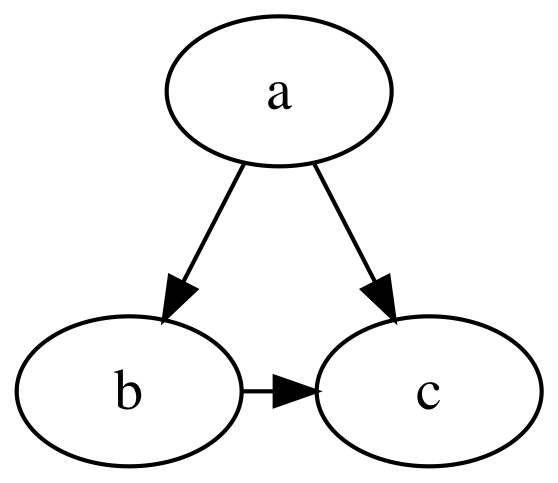
Example GraphViz Output

digraph {
a -> b
a -> c
b -> c [constraint=false]
}

Note: render(using:to:) and related methods require GraphViz to be installed on your system.

Using Function Builders, Custom Operators, and Fluent Attribute Setters

import GraphViz
letgraph=Graph(directed:true){"a"-->"b""a"-->"c"("b"-->"c").constraint(false)}

Note: Swift 5.1 may require explicit typecast expressions in order to reconcile use of custom edge operators like -->. (error: ambiguous reference to member '-->')

Installation

System Dependencies

You can install GraphViz on your system by running the following command:

# macOS
$ brew install graphviz
# Linux (Ubuntu)
$ sudo apt-get install graphviz

Important: If you add GraphViz to your macOS app and installed system dependencies using Homebrew, Xcode may emit an error message like the following:

Warning: Could not load "/usr/lib/graphviz/libgvplugin_gdk.so.6"
It was found, so perhaps one of its dependents was not. Try ldd.

One solution is to run the following commands to sign the dependencies (replacing MyName (MyTeam) with your developer account name and team name):

$ codesign -f -s "Apple Development: MyName (MyTeam)" /usr/local/opt/*/lib/*.dylib
$ codesign -f -s "Apple Development: MyName (MyTeam)" /usr/local/Cellar/*/*/lib/*.dylib

Swift Package Manager

Add the GraphViz package to your target dependencies in Package.swift:

import PackageDescription
letpackage=Package(
name:"YourProject",
dependencies:[.package(
url:"https://github.com/SwiftDocOrg/GraphViz",
from:"0.4.1"),])

Add GraphViz as a dependency to your target(s):

targets:[.target(
name:"YourTarget",
dependencies:["GraphViz"]),

License

MIT

Contact

Mattt (@mattt)

About

A Swift package for working with GraphViz

Topics

Resources

Stars

294 stars

Watchers

2 watching

Forks

Releases

Packages

Used by

Contributors

Languages