


Any kinds of contributions including pull requests, registering new issues, sending me personal emails are always welcome. Let me know if you have any idea about basic utils for Android development.
- Get started
- Utils
- Base
- LogUtil (L)
- LogHelper
- ContextUtil (Ctx)
- ResourcesUtil (Res)
- PreferencesUtil (Pref)
- ExtrasBinder
- UnitConverter (Unit)
- KeyboardUtil (Keyboard)
- APILevel
- DisplayUtil
- ViewUtil
- ServiceUtil
- ThemeUtil
- ActivityBuilder
- BundleBuilder
- PackageUtil
- VibratorUtil
- ClipboardManagerUtil
- TypedValueUtil
- WindowManagerUtil
- IntArrayUtil
- SparseArrayUtil
- ThreadUtil
- Contributors
- License
Release is in process...
buildscript {
dependencies {
classpath'com.neenbedankt.gradle.plugins:android-apt:1.8'
}
}
applyplugin: 'com.neenbedankt.android-apt'dependencies {
compile'com.thefinestartist:utils:0.9.5'apt'com.thefinestartist:compilers:0.9.5'
}Call Base.initialize(context) within your ApplicationonCreate() method.
publicclassAppextendsApplication {
@OverridepublicvoidonCreate() {
super.onCreate();
Base.initialize(this);
}
}Base helps to get Context, Resources, Assets, Configuration and DisplayMetrics in any class.
voidBase.initialize(Contextcontext);
ContextBase.getContext();
ResourcesBase.getResources();
ThemeBase.getTheme();
AssetManagerBase.getAssets();
ConfigurationBase.getConfiguration();
DisplayMetricsBase.getDisplayMetrics();
LogUtil helps to deal with Log conveniently.L is abbreviation class of LogUtil. You can extends LogUtil to create your own L.
SettingsL.getDefaultSettings();
LogHelperL.tag(Stringtag);
LogHelperL.tag(@StringResinttagRes);
LogHelperL.tag(Classclazz);
LogHelperL.showThreadInfo(booleanshowThreadInfo);
LogHelperL.stackTraceCount(intstackTraceCount);
LogHelperL.logLevel(LogLevellogLevel);
LogHelperL.showDivider(booleanshowDivider);
LogHelperL.logPrinter(LogPrinterlogPrinter);
voidL.v(bytemessage);
voidL.v(charmessage);
voidL.v(shortmessage);
voidL.v(intmessage);
voidL.v(longmessage);
voidL.v(floatmessage);
voidL.v(doublemessage);
voidL.v(booleanmessage);
voidL.v(Stringmessage);
voidL.v(JSONObjectmessage);
voidL.v(JSONArraymessage);
voidL.v(Exceptionmessage);
voidL.v(Objectmessage);
// and so on...voidL.json(StringjsonString);
voidL.json(LogLevellogLevel, StringjsonString);
voidL.xml(StringxmlString);
voidL.xml(LogLevellogLevel, StringjsonString);
// Set default settings at your Application.L.getDefaultSettings()
.setTag(LogUtil.class)
.setShowThreadInfo(false)
.setStackTraceCount(0)
.setLogLevel(LogLevel.FULL)
.setShowDivider(false)
.setLogPrinter(newAndroidLogPrinter());
L.v("Hello World");
L.tag("Tag").e(12.0f);
L.showThreadInfo(true).i(newint[]{1, 2, 3});
L.stackTraceCount(3).showDivider(true).json("{\"name\":\"Leonardo Taehwan Kim\",\"email\":\"leonardo@thefinestartist.com\"}");
LogHelper helps to deal with Log conveniently.
LogHelpernewLogHelper();
LogHelpernewLogHelper(Stringtag);
LogHelpernewLogHelper(@StringResinttagRes);
LogHelpernewLogHelper(Classclazz);
LogHelpertag(Stringtag);
LogHelpertag(@StringResinttagRes);
LogHelpertag(Classclazz);
LogHelpershowThreadInfo(booleanshowThreadInfo);
LogHelperstackTraceCount(intstackTraceCount);
LogHelperlogLevel(LogLevellogLevel);
LogHelpershowDivider(booleanshowDivider);
LogHelperlogPrinter(LogPrinterlogPrinter);
voidv(bytemessage);
voidv(charmessage);
voidv(shortmessage);
voidv(intmessage);
voidv(longmessage);
voidv(floatmessage);
voidv(doublemessage);
voidv(booleanmessage);
voidv(Stringmessage);
voidv(JSONObjectmessage);
voidv(JSONArraymessage);
voidv(Exceptionmessage);
voidv(Objectmessage);
// and so on...voidjson(StringjsonString);
voidjson(LogLevellogLevel, StringjsonString);
voidxml(StringxmlString);
voidxml(LogLevellogLevel, StringjsonString);
// Set default settings at any Class.LogHelperlogHelper = newLogHelper(MainActivity.class).showThreadInfo(true);
logHelper.v("Hello World");
logHelper.e(12.0f);
logHelper.json("{\"name\":\"Leonardo Taehwan Kim\",\"email\":\"leonardo@thefinestartist.com\"}");
ContextUtil helps to use Context conveniently.Ctx is abbreviation class of ContextUtil. You can extends ContextUtil to create your own Ctx.
booleanCtx.bindService(Intentservice, ServiceConnectionconn, intflags);
intCtx.checkCallingOrSelfPermission(Stringpermission);
intCtx.checkSelfPermission(@NonNullStringpermission);
voidCtx.enforceCallingOrSelfPermission(Stringpermission, Stringmessage);
voidCtx.enforceCallingOrSelfUriPermission(Uriuri, intmodeFlags, Stringmessage);
ApplicationInfoCtx.getApplicationInfo();
FileCtx.getCacheDir();
FileCtx.getExternalCacheDir();
FileCtx.getExternalFilesDir(Stringtype);
LooperCtx.getMainLooper();
ObjectCtx.getSystemService(Stringname);
voidCtx.sendBroadcast(Intentintent, StringreceiverPermission);
voidCtx.sendBroadcast(Intentintent);
booleanCtx.startActivities(Intent[] intents, Bundleoptions);
booleanCtx.startActivities(Intent[] intents);
voidCtx.startActivity(@NonNullIntentintent);
voidCtx.startActivity(Intentintent, Bundleoptions);
ComponentNameCtx.startService(Intentservice);
booleanCtx.stopService(Intentservice);
voidCtx.unbindService(ServiceConnectionconn);
// and so on...
ResourcesUtil helps to use Resources conveniently.Res is abbreviation class of ResourcesUtil. You can extends ResourcesUtil to create your own Res.
XmlResourceParserRes.getAnimation(@AnimResintanimRes);
booleanRes.getBoolean(@BoolResintboolRes);
intRes.getColor(@ColorResintcolorRes);
intRes.getColor(@ColorResintcolorRes, Resources.Themetheme);
ColorStateListRes.getColorStateList(@ColorResintcolorRes);
ColorStateListRes.getColorStateList(@ColorResintcolorRes, Resources.Themetheme);
floatRes.getDimension(@DimenResintdimenRes);
intRes.getDimensionPixelOffset(@DimenResintdimenRes);
intRes.getDimensionPixelSize(@DimenResintdimenRes);
DisplayMetricsRes.getDisplayMetrics();
DrawableRes.getDrawable(@DrawableResintdrawableRes);
intRes.getIdentifier(Stringname, StringdefType, StringdefPackage);
int[] Res.getIntArray(@ArrayResintarrayRes);
intRes.getInteger(@IntegerResintintegerRes);
XmlResourceParserRes.getLayout(@LayoutResintlayoutRes);
StringRes.getQuantityString(intid, intquantity, Object... formatArgs);
CharSequenceRes.getQuantityText(intid, intquantity);
StringRes.getResourceEntryName(@AnyResintanyRes);
StringRes.getResourceName(@AnyResintanyRes);
StringRes.getResourcePackageName(@AnyResintanyRes);
StringRes.getResourceTypeName(@AnyResintanyRes);
StringRes.getString(@StringResintstringRes);
StringRes.getString(@StringResintstringRes, Object... formatArgs);
String[] Res.getStringArray(@ArrayResintarrayRes);
CharSequenceRes.getText(@StringResintstringRes, CharSequencedef);
CharSequenceRes.getText(@StringResintstringRes);
CharSequence[] Res.getTextArray(@ArrayResintarrayRes);
voidRes.getValue(Stringname, TypedValueoutValue, booleanresolveRefs);
voidRes.getValue(@AnyResintanyRes, TypedValueoutValue, booleanresolveRefs);
voidRes.getValueForDensity(@AnyResintanyRes, intdensity, TypedValueoutValue, booleanresolveRefs);
XmlResourceParserRes.getXml(@XmlResintxmlRes);
TypedArrayRes.obtainAttributes(AttributeSetset, int[] attrs);
TypedArrayRes.obtainTypedArray(@ArrayResintanyRes);
InputStreamRes.openRawResource(@RawResintrawRes);
AssetFileDescriptorRes.openRawResourceFd(@RawResintrawRes);
int[] Res.getColorArray(@ArrayResintarray);
// and so on...
PreferencesUtil helps to manage application-wide preferences conveniently.Pref is abbreviation class of PreferencesUtil. You can extends PreferencesUtil to create your own Pref.
StringPref.getDefaultName();
voidPref.setDefaultName(Stringname);
booleanPref.get(Stringkey, booleandefValue);
intPref.get(Stringkey, intdefValue);
floatPref.get(Stringkey, floatdefValue);
longPref.get(Stringkey, longdefValue);
StringPref.get(Stringkey, StringdefValue);
Set<String> Pref.get(Stringkey, Set<String> defValue);
CPref.get(Stringkey, CdefValue);
booleanPref.get(Stringname, Stringkey, booleandefValue);
intPref.get(Stringname, Stringkey, intdefValue);
floatPref.get(Stringname, Stringkey, floatdefValue);
longPref.get(Stringname, Stringkey, longdefValue);
StringPref.get(Stringname, Stringkey, StringdefValue);
Set<String> Pref.get(Stringname, Stringkey, Set<String> defValue);
CPref.get(Stringname, Stringkey, CdefValue);
voidPref.put(Stringkey, booleanvalue);
voidPref.put(Stringkey, intvalue);
voidPref.put(Stringkey, floatvalue);
voidPref.put(Stringkey, longvalue);
voidPref.put(Stringkey, Stringvalue);
voidPref.put(Stringkey, Set<String> value);
voidPref.put(Stringkey, Cvalue);
voidPref.put(Stringname, Stringkey, booleanvalue);
voidPref.put(Stringname, Stringkey, intvalue);
voidPref.put(Stringname, Stringkey, floatvalue);
voidPref.put(Stringname, Stringkey, longvalue);
voidPref.put(Stringname, Stringkey, Stringvalue);
voidPref.put(Stringname, Stringkey, Set<String> value);
voidPref.put(Stringname, Stringkey, Cvalue);
voidPref.remove(Stringkey);
voidPref.remove(Stringname, Stringkey);
voidPref.clear();
voidPref.clear(Stringname);Simply call ExtrasBinder.bind(this) in your Activity or Fragment. ExtrasBinder binds data from Intent or Bundle to matching variable. ExtrasBinder will consider annotation variable as key. If there is no annotation variable, it will consider variable name as key.
// Start YourActivity with extrasIntentintent = newIntent(this, YourActivity.class);
intent.putExtra(YourActivity.EXTRA_TITLE, "Activity title");
intent.putExtra("ids", newArrayList<Integer>());
startActivity(intent);publicclassYourActivityextendsAppCompatActivity {
publicstaticfinalStringEXTRA_TITLE = "TITLE";
@Extra(EXTRA_TITLE) Stringtitle;
@ExtraArrayList<Integer> ids;
@OverrideprotectedvoidonCreate(BundlesavedInstanceState) {
super.onCreate(savedInstanceState);
ExtrasBinder.bind(this);
// do something...
}
}// Show YourFragment with extrasYourFragmentfragment = newYourFragment();
Bundlebundle = newBundle();
bundle.putString("Name", "Fragment name");
fragment.setArguments(bundle);publicclassYourFragmentextendsFragment {
@Extra("NAME") Stringname;
@Nullable@OverridepublicViewonCreateView(LayoutInflaterinflater, ViewGroupcontainer, BundlesavedInstanceState) {
ExtrasBinder.bind(this);
// do something...
}
}Proguard
-keepclasscom.thefinestartist.annotations.** { *; }
-keepclass **$$ExtraBinder { *; }
-keepclasseswithmembernamesclass * {
@com.thefinestartist.annotations.Extra <fields>;
}
UnitConverter helps to convert dp or sp size into pixel.Unit is abbreviation class of UnitConverter. You can extends UnitConverter to create your own Unit.
floatUnit.dpToPx(floatdp);
intUnit.dpToPx(intdp);
floatUnit.pxToDp(floatpx);
intUnit.pxToDp(intpx);
floatUnit.spToPx(floatsp);
intUnit.spToPx(intsp);
floatUnit.pxToSp(floatpx);
intUnit.pxToSp(intpx);
KeyboardUtil helps to show and hide keyboard conveniently.Keyboard is abbreviation class of KeyboardUtil. You can extends KeyboardUtil to create your own Keyboard.
voidKeyboard.show(View);
voidKeyboard.showImmediately(View); // Call this method if your activity or fragment is resumed.voidKeyboard.hide(View);
voidKeyboard.hide(View, clearFocus);
voidKeyboard.hide(Activity);
voidKeyboard.hide(Activity, clearFocus);
voidKeyboard.hide(Fragment);
voidKeyboard.hide(Fragment, clearFocus);
voidKeyboard.hide(Dialog);
voidKeyboard.hide(Dialog, clearFocus);
APILevel helps to check device API Build.VERSION conveniently.
- Update your Android Studio lint option before you use this class. Show Image
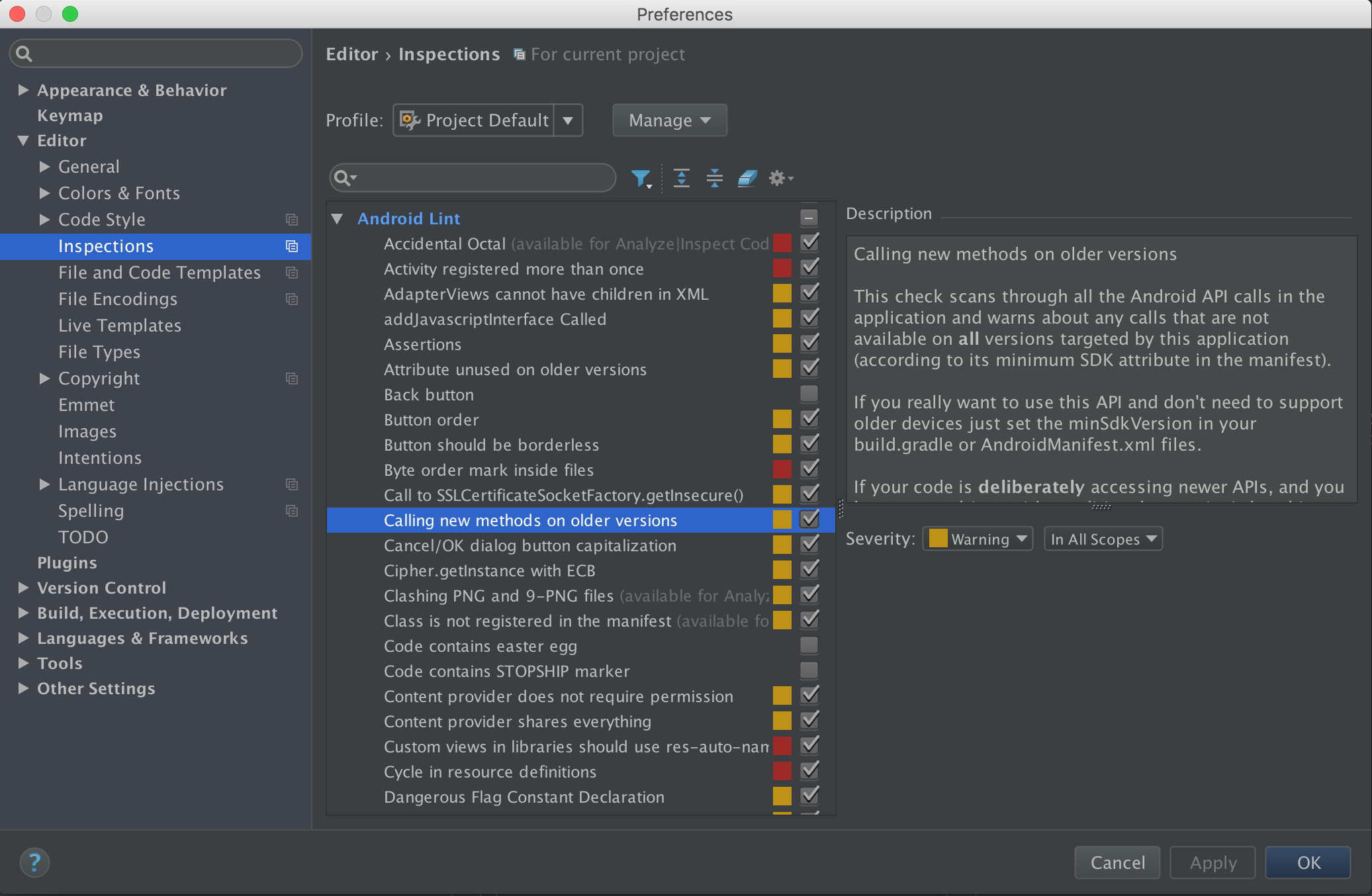
→ AndroidStudio → Preferences... → Editor → Inspections → AndroidLint → Callingnewmethodsonolderversions
→ SetSeverityasWarning.booleanAPILevel.require(intlevel); // Build.VERSION.SDK_INT >= levelbooleanAPILevel.requireCupcake();
booleanAPILevel.requireDonut();
booleanAPILevel.requireEclair();
booleanAPILevel.requireFroyo();
booleanAPILevel.requireGingerbread();
// and so on...booleanAPILevel.deprecatedAt(intlevel); // Build.VERSION.SDK_INT < levelbooleanAPILevel.deprecatedAtCupcake();
booleanAPILevel.deprecatedAtDonut();
booleanAPILevel.deprecatedAtEclair();
booleanAPILevel.deprecatedAtFroyo();
booleanAPILevel.deprecatedAtGingerbread();
// and so on...DisplayUtil helps to calculate screen size conveniently.
intDisplayUtil.getWidth();
intDisplayUtil.getHeight();
RotationDisplayUtil.getRotation();
booleanDisplayUtil.isDisplayPortrait();
booleanDisplayUtil.isDisplayLandscape();
intDisplayUtil.getStatusBarHeight();
intDisplayUtil.getToolbarHeight();
intDisplayUtil.getActionBarHeight();
intDisplayUtil.getNavigationBarHeight(); // Navigation bar is located bottom of device for `back`, `home` and `menu` buttons.
ViewUtil helps to set background drawable conveniently.
voidViewUtil.setBackground(Viewview, Drawabledrawable);
voidViewUtil.setBackground(Viewview, intdrawableRes);
ServiceUtil helps to get Android system service conveniently.
ObjectServiceUtil.getSystemService(Context.ServiceName);
AccessibilityManagerServiceUtil.getAccessibilityManager();
CaptioningManagerServiceUtil.getCaptioningManager();
AccountManagerServiceUtil.getAccountManager();
ActivityManagerServiceUtil.getActivityManager();
AlarmManagerServiceUtil.getAlarmManager();
AudioManagerServiceUtil.getAudioManager();
MediaRouterServiceUtil.getMediaRouter();
// and so on...
ThemeUtil helps to use Theme conveniently.
voidThemeUtil.applyStyle(intresId, booleanforce);
voidThemeUtil.dump(intpriority, Stringtag, Stringprefix);
intThemeUtil.getChangingConfigurations();
DrawableThemeUtil.getDrawable(@DrawableResintdrawableRes);
ResourcesThemeUtil.getResources();
TypedArrayThemeUtil.obtainStyledAttributes(@StyleableResint[] attrs);
TypedArrayThemeUtil.obtainStyledAttributes(@StyleResintresid, @StyleableResint[] attrs);
TypedArrayThemeUtil.obtainStyledAttributes(AttributeSetset, @StyleableResint[] attrs, @AttrResintdefStyleAttr, @StyleResintdefStyleRes);
booleanThemeUtil.resolveAttribute(intresid, TypedValueoutValue, booleanresolveRefs);
voidThemeUtil.setTo(Resources.Themeother);
ActivityBuilder helps to build Activity Intent and start Activity.
ConstructorActivityBuilder(@NonNullClass<C> clazz);
ActivityBuilderActivityBuilder.set(@NonNullStringkey, Tvalue);
ActivityBuilderActivityBuilder.set(@NonNullStringkey, Parcelablevalue);
ActivityBuilderActivityBuilder.set(@NonNullStringkey, Parcelable[] value);
ActivityBuilderActivityBuilder.set(@NonNullStringkey, ArrayList<T> value);
ActivityBuilderActivityBuilder.remove(@NonNullStringkey);
ActivityBuilderActivityBuilder.setFlags(intflags);
ActivityBuilderActivityBuilder.addFlags(intflags);
IntentActivityBuilder.buildIntent();
voidActivityBuilder.start();
voidActivityBuilder.startForResult(@NonNullActivityactivity, intrequestCode);
voidActivityBuilder.startForResult(@NonNullActivityactivity, intrequestCode, @NullableBundleoptions);newActivityBuilder(YourActivity.class)
.set(YourActivity.TITLE, "Title")
.set(YourActivity.CONTENT, 1)
.set("values", newint[]{1, 2, 3})
.set(YourActivity.ARRAY_LIST, list)
.start();BundleBuilder helps to build Bundle conveniently.
BundleBuilderBundleBuilder.set(Stringkey, Tvalue);
TBundleBuilder.get(Stringkey);
BundleBundleBuilder.build();Bundlebundle = newBundleBuilder()
.set("values", newint[]{1, 2, 3})
.build();PackageUtil helps to handle methods related to package.
booleanPackageUtil.isInstalled(StringpackageName);
StringPackageUtil.getPackageName();
voidPackageUtil.openPlayStore();
voidPackageUtil.openPlayStore(StringpackageName);
VibratorUtil helps to use Vibrator conveniently.
voidVibratorUtil.vibrate(); // vibrate device for 200 millisecondsvoidVibratorUtil.vibrate(milliseconds);
// and more...
ClipboardManagerUtil helps to use ClipboardManager conveniently.
voidClipboardManagerUtil.setText(CharSequencetext);
booleanClipboardManagerUtil.hasText();
CharSequenceClipboardManagerUtil.getText();
TypedValueUtil helps to use TypedValue class conveniently.
floatTypedValueUtil.applyDimension(intunit, floatvalue);
floatTypedValueUtil.complexToDimension(intdata);
intTypedValueUtil.complexToDimensionPixelOffset(intdata);
intTypedValueUtil.complexToDimensionPixelSize(intdata);
WindowManagerUtil helps to use WindowManager conveniently.
DisplayWindowManagerUtil.getDefaultDisplay();
voidWindowManagerUtil.removeViewImmediate(Viewview);
IntArrayUtil helps to deal with IntArray conveniently.
booleanIntArrayUtil.contains(int[] array, intvalue);
int[] IntArrayUtil.add(int[] array, intvalue);
SparseArrayUtil helps to deal with SparseArray conveniently.
ArrayList<C> SparseArrayUtil.asArrayList(SparseArray<C> sparseArray);ThreadUtil helps to deal with thread conveniently.
booleanThreadUtil.isMain();Leonardo Taehwan Kim
Min Kim
Robin Gustafsson
Marcos Trujillo
The MIT License (MIT)
Copyright (c) 2016 The Finest Artist
Permission is hereby granted, free of charge, to any person obtaining a copy
of this software and associated documentation files (the "Software"), to deal
in the Software without restriction, including without limitation the rights
to use, copy, modify, merge, publish, distribute, sublicense, and/or sell
copies of the Software, and to permit persons to whom the Software is
furnished to do so, subject to the following conditions:
The above copyright notice and this permission notice shall be included in
all copies or substantial portions of the Software.
THE SOFTWARE IS PROVIDED "AS IS", WITHOUT WARRANTY OF ANY KIND, EXPRESS OR
IMPLIED, INCLUDING BUT NOT LIMITED TO THE WARRANTIES OF MERCHANTABILITY,
FITNESS FOR A PARTICULAR PURPOSE AND NONINFRINGEMENT. IN NO EVENT SHALL THE
AUTHORS OR COPYRIGHT HOLDERS BE LIABLE FOR ANY CLAIM, DAMAGES OR OTHER
LIABILITY, WHETHER IN AN ACTION OF CONTRACT, TORT OR OTHERWISE, ARISING FROM,
OUT OF OR IN CONNECTION WITH THE SOFTWARE OR THE USE OR OTHER DEALINGS IN
THE SOFTWARE.