





CareKit™ is an open source software framework for creating apps that help people better understand and manage their health. The framework provides modules that you can use out of the box, or extended and customized for more targeted use cases. It's composed of three SPM packages which can each be imported separately.
CareKit: This is the best place to start building your app. CareKit provides view controllers that tie CareKitUI and CareKitStore together. The view controllers leverage Combine to provide synchronization between the store and the views.
CareKitUI: Provides the views used across the framework. The views are open and extensible subclasses of UIView. Properties within the views are public, allowing for full control over the content.
CareKitStore: Provides a Core Data solution for storing patient data. It also provides the ability to use a custom store, such as a third party database or API.
The primary CareKit framework codebase supports iOS and requires Xcode 12.0 or newer. The CareKit framework has a Base SDK version of 13.0.
You can install CareKit using Swift Package Manager. Create a new Xcode project and navigate to File > Swift Packages > Add Package Dependency. Enter the URL https://github.com/carekit-apple/CareKit and tap Next. Choose the main branch, and on the next screen, check off the packages as needed.
To add localized strings to your project, add the strings file to your project: English Strings
Download the project source code and drag in CareKit.xcodeproj, CareKitUI.xcodeproj, and CareKitStore.xcodeproj as needed. Then, embed each framework in your app by adding them to the "Embedded Binaries" section for your target as shown in the figure below.

The included catalog app demonstrates the different modules that are available in CareKit: OCKCatalog

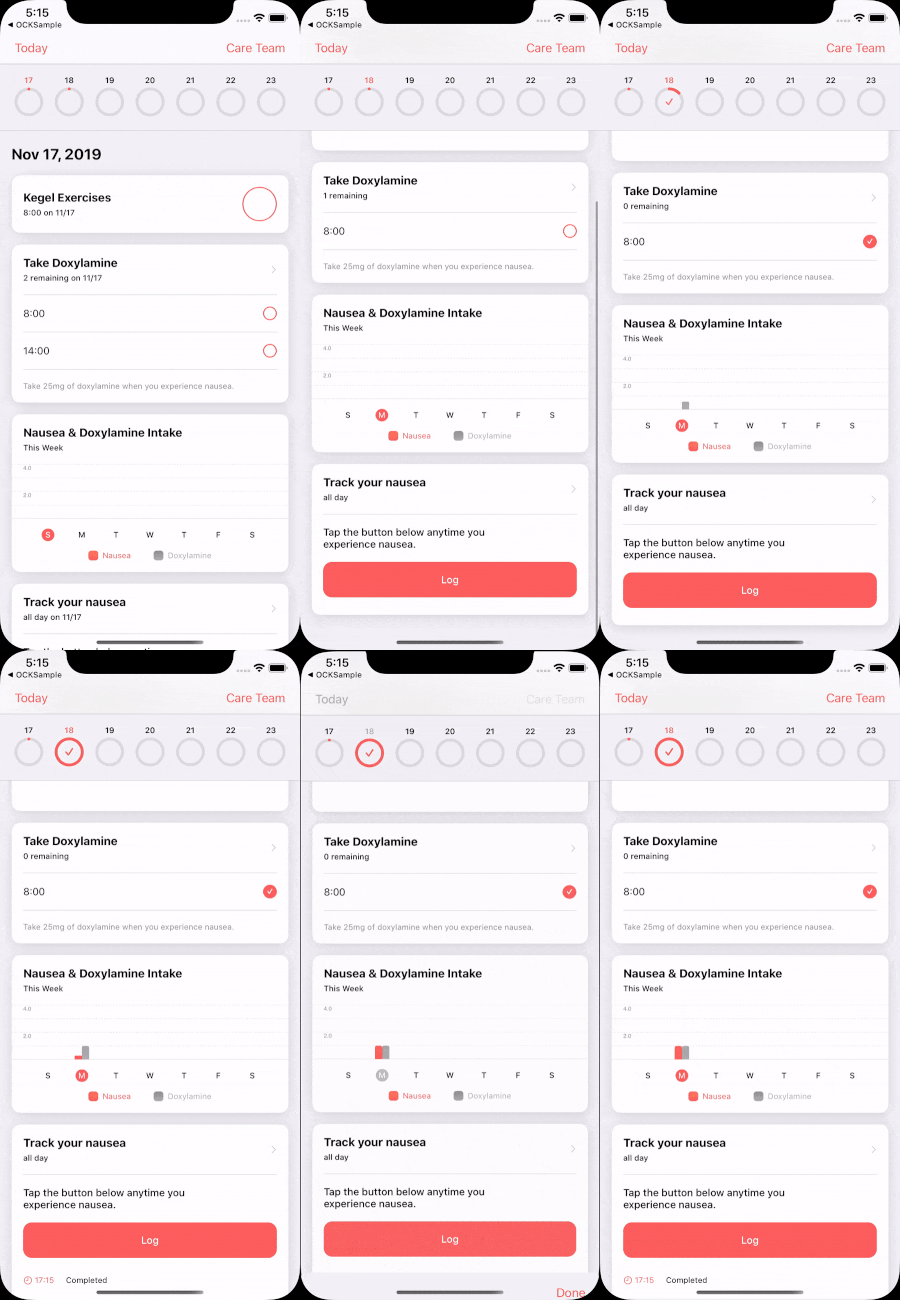
The included sample app demonstrates a fully constructed CareKit app: OCKSample
CareKit is the overarching package that provides view controllers to tie CareKitUI and CareKitStore together. When importing CareKit, CareKitUI and CareKitStore are imported under the hood.
CareKit offers full screen view controllers for convenience. The view controllers query for and display data from a store, and stay synchronized with the data.
OCKDailyTasksPageViewController: Displays tasks for each day with a calendar to page through dates.OCKContactsListViewController: Displays a list of contacts in the store.
For each card in CareKitUI, there's a corresponding view controller in CareKit. The view controllers are self contained modules that you can place anywhere by using standard view controller containment. The view controller for each card provides synchronization between the view and the store. The following code creates a synchronized view controller.
// Create a store to hold your data.
letstore=OCKStore(named:"my-store", type:.onDisk)
// Create a view controller that queries for and displays data. The view will update automatically whenever the data in the store changes.
letviewController=OCKSimpleTaskViewController(taskID:"doxylamine", eventQuery:OCKEventQuery(for:Date()), store: store)
All synchronized view controllers have a view synchronizer. The view synchronizer defines how to instantiate the view to display, and how to update the view when the data in the store changes. You can customize view synchronizers and inject them into a view controller to perform custom behavior.
// Define a custom view synchronizer.
classCustomSimpleTaskViewSynchronizer:OCKSimpleTaskViewSynchronizer{overridefunc makeView()->OCKSimpleTaskView{letview= super.makeView()
// Customize the view when it's instantiated here.
return view
}overridefunc updateView(_ view:OCKSimpleTaskView, context:OCKSynchronizationContext<OCKTaskEvents>){
super.updateView(view, context: context)
// Update the view when the data changes in the store here.
}}
// Instantiate the view controller with the custom classes, then fetch and observe data in the store.
varquery=OCKEventQuery(for:Date())
query.taskIDs =["Doxylamine"]letviewController=OCKSimpleTaskViewController(query: query, store: store, viewSynchronizer:CustomSimpleTaskViewSynchronizer())CareKit supports creating a custom view that can pair with a synchronized view controller. This allows synchronization between the custom view and the data in the store.
// Define a view synchronizer for the custom view.
classTaskButtonViewSynchronizer:ViewSynchronizing{
// Instantiate the custom view.
func makeView()->UIButton{returnUIButton(frame:CGRect(x:0, y:0, width:200, height:60))}
// Update the custom view when the data in the store changes.
func updateView(
_ view:UIButton,
context:OCKSynchronizationContext<OCKAnyEvent?>){letevent= context.viewModel
view.titleLabel?.text = event?.task.title
view.isSelected = event?.outcome !=nil}}varquery=OCKEventQuery(for:Date())
query.taskIDs =["Doxylamine"]letevents= store
.anyEvents(matching: query).map{ $0.first }letviewController=SynchronizedViewController(
initialViewModel:nil,
viewModels: events,
viewSynchronizer:TaskButtonViewSynchronizer())
CareKitUI provides cards to represent tasks, charts, and contacts. There are multiple provided styles for each category of card.
You build all cards in a similar pattern. This makes it easy to recognize and customize the properties of each card. Cards contain a headerView at the top that displays labels and icons. The contents of the card are inside a vertical contentStackView. This allows for easy placement of custom views into a card without breaking existing constraints.
For creating a card from scratch, see the OCKCardable protocol. Conforming to this protocol makes it possible for a custom card to match the styling used across the framework.
Here are the available task card styles:
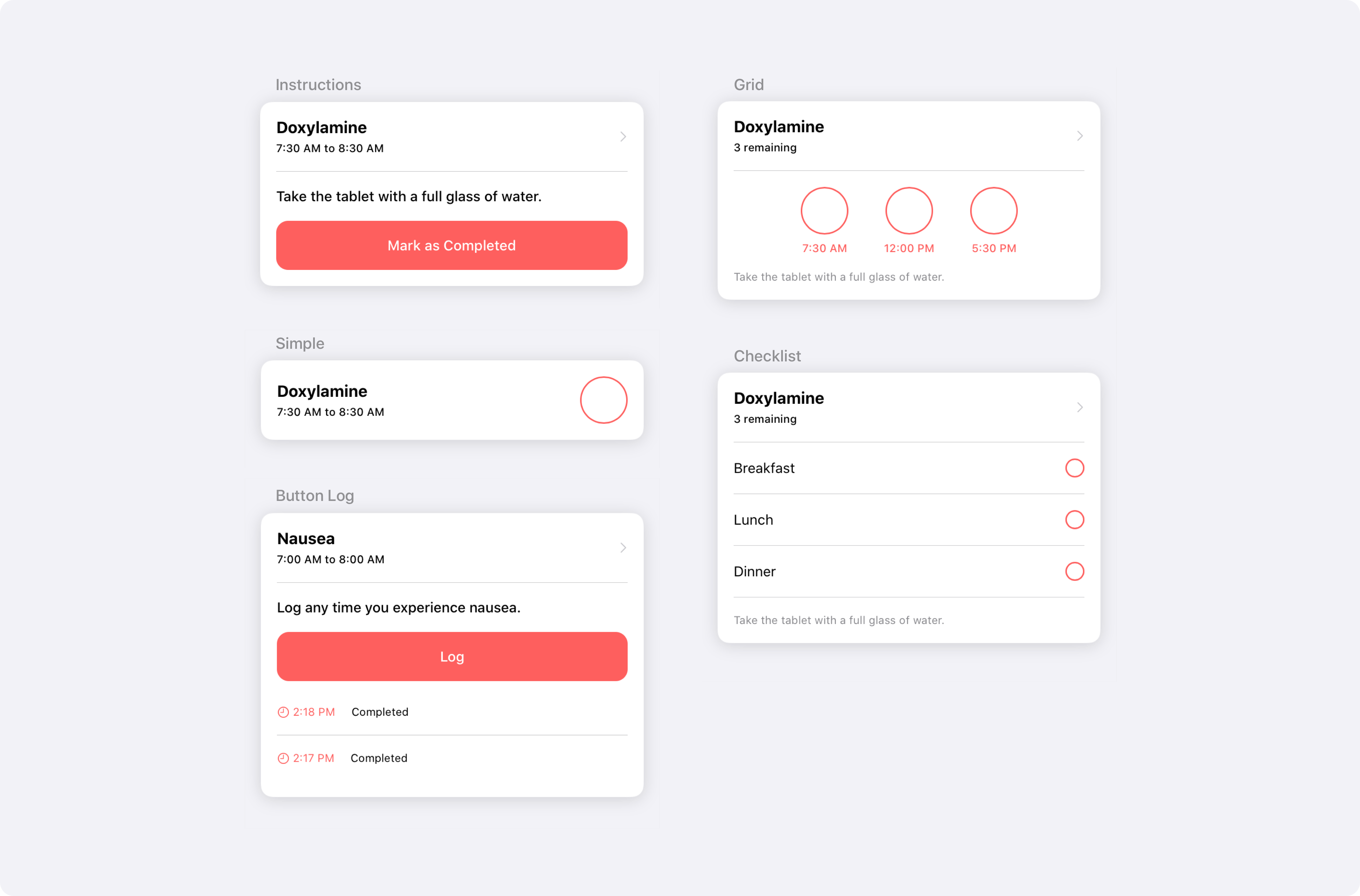
This example instantiates and customizes the instructions task card:
lettaskView=OCKInstructionsTaskView()
taskView.headerView.titleLabel.text ="Doxylamine"
taskView.headerView.detailLabel.text ="7:30 AM to 8:30 AM"
taskView.instructionsLabel.text ="Take the tablet with a full glass of water."
taskView.completionButton.isSelected =false
taskView.completionButton.label.text ="Mark as Completed"Here are the available chart card styles:

This example instantiates and customizes the bar chart:
letchartView=OCKCartesianChartView(type:.bar)
chartView.headerView.titleLabel.text ="Doxylamine"
chartView.graphView.dataSeries =[OCKDataSeries(values:[0,1,1,2,3,3,2], title:"Doxylamine")]Here are the available contact card styles:

This example instantiates and customizes the simple contact card:
letcontactView=OCKSimpleContactView()
contactView.headerView.titleLabel.text ="Lexi Torres"
contactView.headerView.detailLabel.text ="Family Practice"To provide custom styling or branding across the framework, see the OCKStylable protocol. All stylable views derive their appearance from a list of injected constants. You can customize this list of constants for quick and easy styling.
Here's an example that customizes the separator color in a view, and all of it's descendents:
// Define your custom separator color.
structCustomColors:OCKColorStyler{varseparator:UIColor{.black }}
// Define a custom struct to hold your custom color.
structCustomStyle:OCKStyler{varcolor:OCKColorStyler{CustomColors()}}
// Apply the custom style to your view.
letview=OCKSimpleTaskView()
view.customStyle =CustomStyle()
Note that each view in CareKitUI is styled with OCKStyle by default. Setting a custom style on a view propagates the custom style down to any subviews that don't already have a custom style set. You can visualize the style propagation rules in this diagram demonstrating three separate view hierarchies:

For information on styling SwiftUI views with OCKStylable, see SwiftUI in CareKitUI.
The CareKitStore package defines the OCKStoreProtocol that CareKit uses to communicate to data stores, and a concrete implementation that leverages CoreData, called OCKStore.
It also contains definitions of most of the core structures and data types that CareKit relies on, such as OCKAnyTask, OCKTaskQuery, and OCKSchedule.
The OCKStore class is an append-only, versioned store packaged with CareKit. It's implemented on top of CoreData and provides fast, secure, on-device storage. OCKStore is designed to integrate with CareKit's synchronized view controllers, but is usable in isolation as well.
import CareKitStore
letstore=OCKStore(named:"my-store", type:.onDisk)letbreakfastSchedule=OCKSchedule.dailyAtTime(hour:8, minutes:0, start:Date(), end:nil, text:"Breakfast")lettask=OCKTask(id:"doxylamine", title:"Doxylamine", carePlanID:nil, schedule: breakfastSchedule)letstoredTask=tryawait store.addTask(task)
The most important feature of OCKStore is that it's a versioned store with a notion of time. When querying the store using a date range, the result returned is for the state of the store during the interval specified. If no date interval is provided, the query returns all versions of the entity.
// On January 1st
lettask=OCKTask(id:"doxylamine", title:"Take 1 tablet of Doxylamine", carePlanID:nil, schedule: breakfastSchedule)letaddedTask=tryawait store.addTask(task)
// On January 10th
lettask=OCKTask(id:"doxylamine", title:"Take 2 tablets of Doxylamine", carePlanID:nil, schedule: breakfastSchedule)letupdatedTask=tryawait store.updateTask(task)
// On some future date.
letearlyQuery=OCKTaskQuery(dateInterval: /* Jan 1st - 5th */)letearlyTasks=tryawait store.fetchTasks(query: earlyQuery)letlaterQuery=OCKTaskQuery(dateInterval: /* Jan 12th - 17th */)letlaterTasks=tryawait store.fetchTasks(query: laterQuery)
// Queries return the newest version of the task during the query interval.
letmidQuery=OCKTaskQuery(dateInterval: /* Jan 5th - 15th */)letmidTasks=tryawait store.fetchTasks(query: laterQuery)
// Queries with no date interval return all versions of the task.
letallQuery=OCKTaskQuery()letallTasks=tryawait store.fetchTasks(query: allQuery)
This graphic visualizes how to retrieve results when querying versioned objects in CareKit. Note how a query over a date range returns the version of the object that's valid in that date range.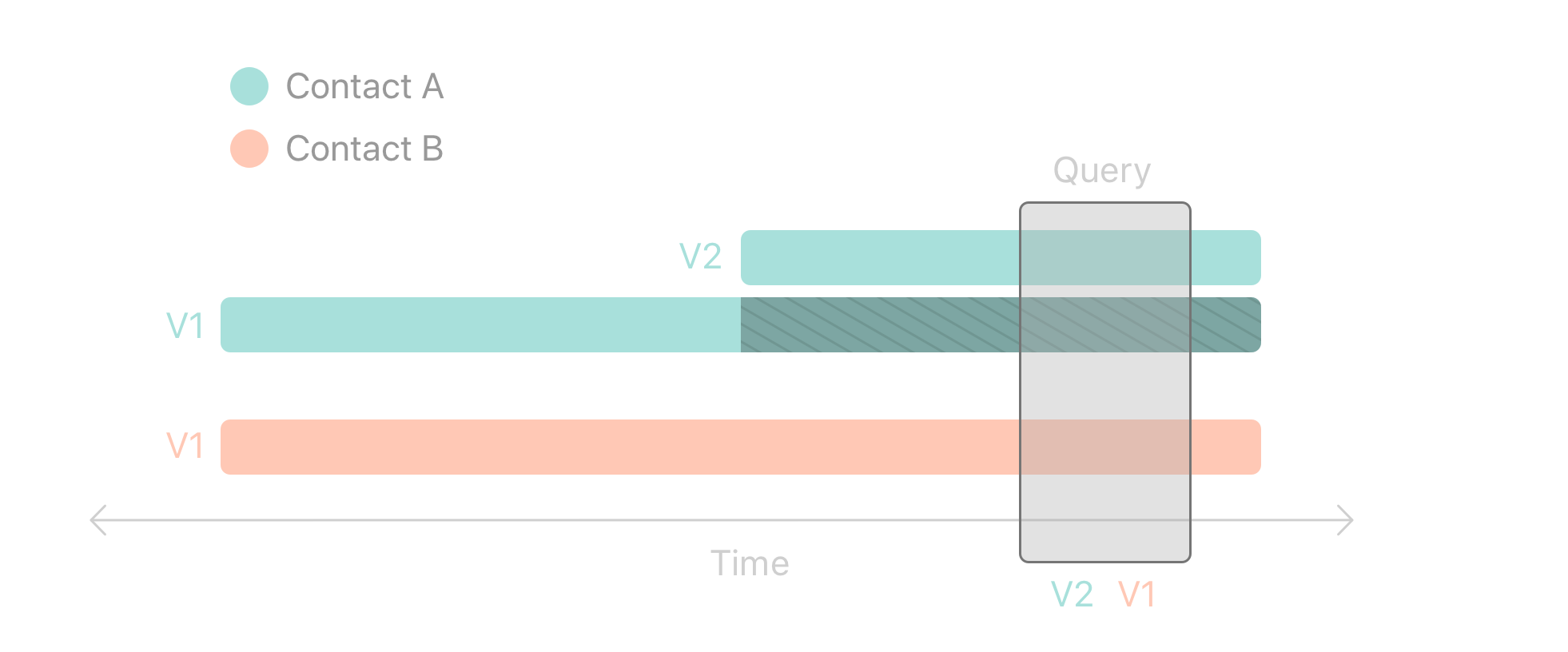
CareKitStore defines six high level entities in this diagram:

Patient: A patient represents the user of the app.
Care Plan: A patient has zero or more care plans. A care plan organizes the contacts and tasks associated with a specific treatment. For example, a patient may have one care plan for heart disease and a second for obesity.
Contact: A care plan has zero or more associated contacts. Contacts might include doctors, nurses, insurance providers, or family.
Task: A care plan has zero or more tasks. A task represents some activity that the patient performs. Examples include taking a medication, exercising, journaling, or checking in with their doctor.
Schedule: Each task must have a schedule. The schedule defines occurrences of a task, and may optionally specify target or goal values, such as how much of a medication to take.
Outcome: Each occurrence of a task may have an associated outcome. The absence of an outcome indicates no progress was made on that occurrence of the task.
Outcome Value: Each outcome has zero or more values associated with it. A value might represent how much medication was taken, or a plurality of outcome values could represent the answers to a survey.
It's important to note that tasks, contacts, and care plans can exist without a parent entity. Many CareKit apps target well defined use cases, and it can often be expedient to simply create tasks and contacts without defining a patient or care plan.
The scheduling tools provided in CareKit allow very precise and customizable scheduling of tasks. You create an instance of OCKSchedule by composing one or more
OCKScheduleElements. Each element defines a single repeating interval.
Static convenience methods exist to help with common use cases.
letbreakfastSchedule=OCKSchedule.dailyAtTime(hour:8, minutes:0, start:Date(), end:nil, text:"Breakfast")leteverySaturdayAtNoon=OCKSchedule.weeklyAtTime(weekday:7, hours:12, minutes:0, start:Date(), end:nil)You can create highly precise, complicated schedules by combining schedule elements or other schedules.
// Combine elements to create a complex schedule.
letelementA=OCKScheduleElement(start: today, end: nextWeek, interval:DateComponents(hour:36))letelementB=OCKScheduleElement(start: lastWeek, end:nil, interval:DateComponents(day:2))letcomplexSchedule=OCKSchedule(composing:[elementA, elementB])
// Combine two schedules into a composed schedule.
letdailySchedule=OCKSchedule.dailyAtTime(hour:8, minutes:0, start: tomorrow, end: nextYear, text:nil)letcrazySchedule=OCKSchedule(composing:[dailySchedule, complexSchedule])
Schedules have a number of other useful properties that you can set, including target values, durations, and textual descriptions.
letelement=OCKScheduleElement(
start: today, // The date and time this schedule begins.
end: nextYear, // The date and time this schedule ends.
interval:DateComponents(day:3), // Occurs every 3 days.
text:"Before bed", // Show "Before bed" instead of clock time.
targetValues:[OCKOutcomeValue(10, units:"mL")], // Specifies what counts as "complete".
duration: Duration =.hours(2) // The window of time to complete the task.
)text: By default, CareKit view controllers prompt users to perform tasks using clock time, such as "8:00PM". If you provide atextproperty, then CarKit uses the text to prompt the user instead, such as "Before bed" in the code above.duration: If you provide a duration, CareKit prompts the user to perform the scheduled task within a window, such as "8:00 - 10:00 PM". You can also set the duration to.allDayif you don't wish to specify any time in particular.targetValues: CareKit uses target values to determine if a user completed a specific task. SeeOCKAdherenceAggregatorfor more information.
The OCKStore class that CareKit provides is a fast, secure, on-device store that serves most use cases. It may not fully meet the needs of all developers, so CareKit also allows you to write your own store. For example, you could write a wrapper around a web server, or even a simple JSON file. You can use any class that conforms to the OCKStoreProtocol in place of the default store.
Writing a CareKit store adapter requires defining the entities that live in your store, and implementing asynchronous Create, Read, Update, and Delete methods for each. Stores are free to define their own types, as long as those types conform to a certain protocol. For example, if you're writing a store that can hold tasks, you might do it like this.
import CareKitStore
structMyTask:OCKAnyTask&Equatable&Identifiable{
// MARK: OCKAnyTask
letid:Stringlettitle:Stringletschedule:String
/* ... */
// MARK: Custom Properties
letdifficulty:DifficultyRating
/* ... */
}structMyTaskQuery:OCKAnyTaskQuery{
// MARK: OCKAnyTaskQuery
letids:[String]letcarePlanIDs:[String]
/* ... */
// MARK: Custom Properties
letdifficult:DifficultyRating?}classMyStore:OCKStoreProtocol{typealiasTask=MyTasktypealiasTaskQuery=MyTaskQuery
/* ... */
// MARK: Task CRUD Methods
func fetchTasks(query:TaskQuery, callbackQueue:DispatchQueue, completion:@escapingOCKResultClosure<[Task]>){ /* ... */ }func addTasks(_ tasks:[Task], callbackQueue:DispatchQueue, completion:OCKResultClosure<[Task]>?){ /* ... */ }func updateTasks(_ tasks:[Task], callbackQueue:DispatchQueue, completion:OCKResultClosure<[Task]>?){ /* ... */ }func deleteTasks(_ tasks:[Task], callbackQueue:DispatchQueue, completion:OCKResultClosure<[Task]>?){ /* ... */ }
/* ... */
}
Using the four basic CRUD methods you supply, CareKit is able to use protocol extensions to imbue your store with extra functionality. For example, a store that implements the four CRUD methods for tasks automatically receives the following methods.
func fetchTask(withID id:String, callbackQueue:DispatchQueue, completion:@escapingOCKResultClosure<Task>)func addTask(_ task:Task, callbackQueue:DispatchQueue, completion:OCKResultClosure<Task>?)func updateTask(_ task:Task, callbackQueue:DispatchQueue, completion:OCKResultClosure<Task>?)func deleteTask(_ task:Task, callbackQueue:DispatchQueue, completion:OCKResultClosure<Task>?)The provided methods employ naive implementations. You're free to provide your own implementations that leverage the capabilities of your underlying data store to achieve greater performance or efficiency.
If you're considering implementing your own store, read over the protocol notes and documentation carefully.
GitHub is our primary forum for CareKit. Feel free to open up issues about questions, problems, or ideas.
This project is made available under the terms of a BSD license. See the LICENSE file.