



A react native component that renders HTML as native views. This library is useful for rendering html snippets such as those that you get from wysiwyg text editors.
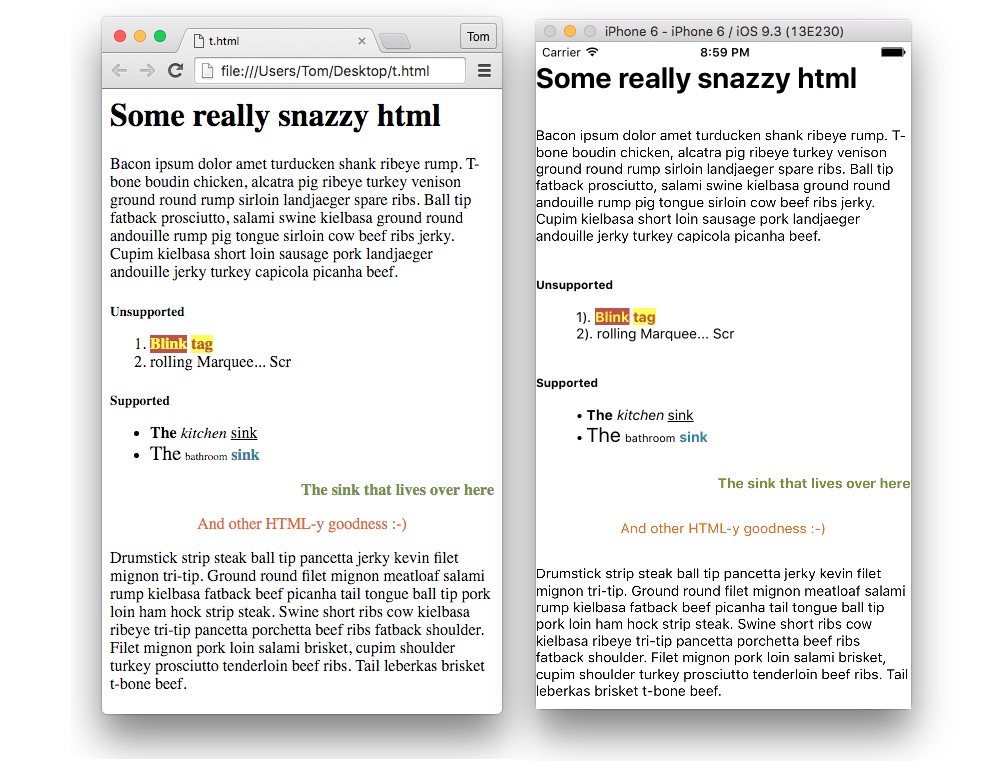
npm install react-native-fence-html --save
importHTMLfrom'react-native-fence-html'
...
render(){// The html you want to renderconsthtml=` <div> <h1>A Sample H1 Title</h1> <h2>A Sample H2 Title</h2> ... </div> `conststyles={h1: {backgroundColor: '#FF0000'},h2: {fontFamily: 'Arial'},img: {resizeMode: 'cover'}}constrenderers={img: (htmlAttribs,children,passProps)=>{return(<Imagesource={{uri: htmlAttribs.src,width: 100,height: 100}}style={passProps.htmlStyles.img}{...passProps}/>)}}return(<HTML// Required. The html snippet you want to render as a stringhtml={html}// The styles to supply for each html tag. Default styles// are already pre-provided in HTMLStyles.js. The additional// styles that you provide will be merged over these, so if// you need some funky red background on your h1, just set// the backgroundhtmlStyles={styles}// Callback for when the user taps on a link. Oh look! You// get the href passed back. Handy if you want to send// someone somewhere :-)onLinkPress={(evt,href)=>console.log(href)}/>// Renderers to use for rendering specific HTML elements.// Default renderers are pre-provided in HTMLRenderers.js.renderers={renderers})}| Feature | |
|---|---|
| iOS | ✔️ |
| Android | ✔️ |
| Faster than webview | ✔️ |
| All Native views | ✔️ |
| Inline-styles | ✔️ |
| Custom stylesheet | ✔️ |
| Tag-soup | ✔️ |
| Links | ✔️ |
| Images | ✔️ |
| Custom Renderers | ✔️ |