Token is a Neovim 0.12+ colorscheme with four first-class appearances: Token Ultra, Token, Token Flint, and Token Temper. All have dark and light variants, selective plugin integrations, and a shared optional configuration API.
Terminal themes for Ghostty, fish, delta, tmux and others are generated from the matching appearance palette, so everything stays consistent without extra work.
- Token Ultra, classic Token, Token Flint, and Token Temper appearances, each with dark and light variants
- Treesitter capture groups for accurate syntax highlighting
- LSP semantic token highlights
- LSP diagnostic signs, virtual text, and underlines
- Diff highlights for buffers and signs
- Legacy syntax group coverage for non-Treesitter filetypes
- Terminal color support (ANSI colors 0–15)
- Lualine theme included
- Opt-in plugin integrations and configuration-keyed bytecode compilation
- Contrib themes for external tools and apps generated from each appearance palette
Copper definitions, ochre control flow, teal literals, and quiet italic type roles.
| Dark | Light |
|---|---|
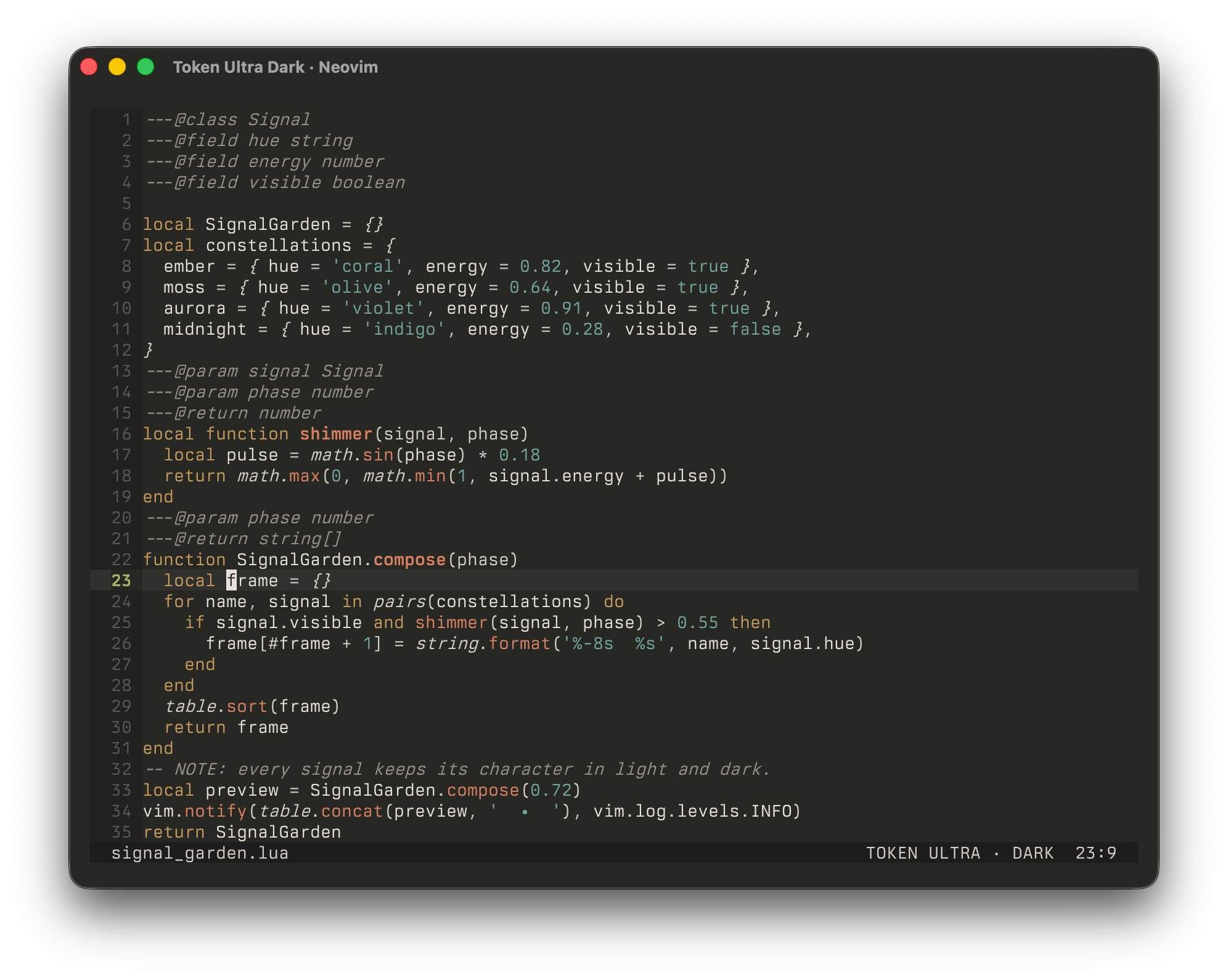 | 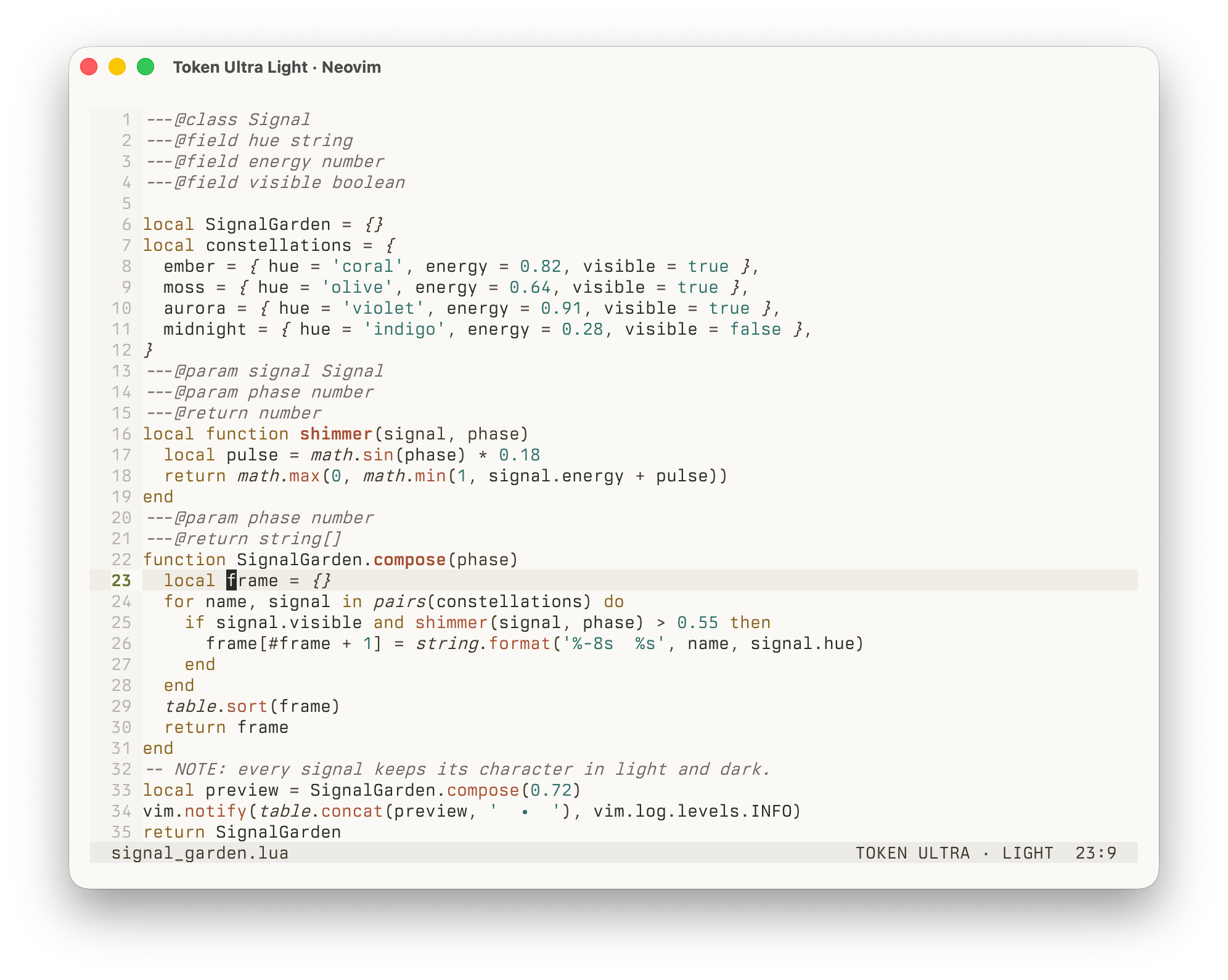 |
A warm, muted palette with earthy accents and familiar syntax roles.
| Dark | Light |
|---|---|
 |  |
A restrained cool-gray foundation with softly desaturated rust, gold, blue, and green.
| Dark | Light |
|---|---|
 |  |
A cool-gray foundation reduced to a focused teal-and-purple syntax grammar.
| Dark | Light |
|---|---|
 |  |
To install the latest tagged release instead of following untagged commits on the default branch:
-- vim.pack (Neovim 0.12+)vim.pack.add({
{
src='https://github.com/ThorstenRhau/token',
version=vim.version.range('*'),
},
})
-- lazy.nvim
{ 'ThorstenRhau/token', version='*' }localtoken=require('token')
---@typetoken.Configlocalconfig= {
transparent=false,
plugins= { gitsigns=true, snacks=true },
}
token.setup(config)
vim.cmd.colorscheme('token') -- or 'token-ultra', 'token-flint', 'token-temper'The colorscheme name selects Token Ultra, classic Token, Token Flint, or Token Temper.
vim.o.background selects dark or light within that appearance. Set the
background before loading the colorscheme, or change it at runtime to switch
variants.
setup() is shared by all appearances and is optional. Each call starts from
the defaults and deep-merges the provided options. It does not reload an active
colorscheme automatically.
Token is configurable starting with v2. Call require('token').setup() before
loading the colorscheme to customize its appearance, semantic styles, palette,
highlights, terminal colors, and plugin integrations. Calling setup() is
optional, so the minimal vim.cmd.colorscheme('token') configuration continues
to work.
V2 also changes plugin integrations from eagerly loading every supported module
to a core-only default. Select integrations under plugins, or use
plugins = { all = true } to retain the v1 integration behavior.
localtoken=require('token')
---@typetoken.Configlocalconfig= {
-- Clear base UI surfaces while preserving semantic backgrounds.transparent=false,
-- Set Neovim's ANSI terminal palette when the colorscheme loads.terminal_colors=true,
-- Give inactive windows a quieter foreground and background.dim_inactive=false,
-- Disable an attribute globally, including in overrides and plugin groups.attributes= {
bold=true,
italic=true,
underline=true,
undercurl=true,
strikethrough=true,
},
-- Overlay attributes on semantic highlight categories.styles= {
booleans= {},
comments= {},
conditionals= {},
constants= {},
functions= {},
keywords= {},
loops= {},
numbers= {},
operators= {},
preprocessor= {},
properties= {},
strings= {},
types= {},
variables= {},
},
-- Apply shared colors first, then the active background variant.colors= { all= {}, dark= {}, light= {} },
-- Replace complete highlight definitions; variant entries take precedence.highlights= { all= {}, dark= {}, light= {} },
-- Integrations are opt-in. `all = true` restores v1 behavior.plugins= {
all=false,
gitsigns=true,
snacks=true,
},
-- Mutate the configured palette after declarative color overrides.on_colors=function(colors, background, colorscheme) end,
-- Mutate final highlights before global attribute gates are applied.on_highlights=function(highlights, colors, background, colorscheme) end,
}
token.setup(config)
Style entries accept the boolean attributes shown under attributes. They are
overlaid on Token's existing definitions. Broad categories run before their
more specific counterparts: keywords before preprocessor, conditionals,
and loops, constants before booleans, and variables before properties.
Color overrides apply in the order all, current background, then on_colors.
Existing palette keys and additional keys must contain #RRGGBB values.
Highlight entries are complete nvim_set_hl definitions: a variant entry
replaces an entry with the same name from all. on_highlights runs afterward
and can mutate existing definitions. Both callbacks mutate their arguments in
place and receive an explicit dark or light background followed by the
active token-ultra, token, token-flint, or token-temper colorscheme name. Existing
callbacks that omit the trailing argument remain compatible.
Transparency clears Token's base surfaces while retaining cursor-line,
selection, search, diff, diagnostic, and accent backgrounds. Highlight
overrides and callbacks can restore individual backgrounds. dim_inactive
uses fg1 and bg1 for core and enabled-plugin NormalNC groups. Global
attribute gates run last and also apply to plugin, callback, and Lualine output.
Links to targets outside Token are preserved because Neovim links cannot combine
inherited styling with attribute overrides.
Unknown options, style categories, attributes, and plugin names are rejected
with a token: error.
Token works out of the box without compilation. For faster startup, you can pre-compile the theme into bytecode:
:TokenCompileThis writes eight configuration-keyed variants to stdpath('cache')/token/:
Ultra, classic, Flint, and Temper, each in dark and light. On next load, matching
appearance and background bytecode is used instead of the dynamic highlight
path. Compiled output contains only enabled integrations and omits terminal
assignments when terminal_colors = false.
Rerun :TokenCompile after changing Token's source or any global, captured, or
external inputs read by callbacks. Static configuration and callback-body
changes use a different cache key and fall back dynamically until recompiled.
Legacy unkeyed caches are ignored. A corrupt matching cache is deleted
automatically and the dynamic path is used as fallback.
Plugin integrations are opt-in and the default is core-only. Set
plugins = { all = true } to restore the historical behavior of loading every
integration. An explicit boolean overrides all. Keys match the module
filenames below; Lualine remains available on demand and is not selected here.
blink, blink_indent, claudecode, cmp, dap_ui, diffview, flash,
fugitive, fzf, gitsigns, hlchunk, ibl, lazy, markview, mason,
matchup, mini, neo_tree, neogit, noice, nvimtree, oil,
render_markdown, snacks, telescope, todo_comments,
treesitter_context, trouble, and whichkey.
blink.indent defaults to rainbow scope guides. To use Token's muted guides and single brighter neutral scope guide, configure it with Token's neutral groups:
require('blink.indent').setup({
scope= {
highlights= { 'BlinkIndentScope' },
underline= {
highlights= { 'BlinkIndentUnderline' },
},
},
})Pre-generated themes for external tools and apps. Auto-generated from the
registered appearance palettes; rebuild after palette changes with make contrib.
| Tool | Files | Usage |
|---|---|---|
| Apple Terminal | contrib/apple-terminal/{token,token-flint,token-temper,token-ultra}-{dark,light}.terminal | Open the file to import it, then pick the profile in Settings > Profiles |
| bat | contrib/bat/{token,token-flint,token-temper,token-ultra}-{dark,light}.tmTheme | Copy to the bat themes directory, then run bat cache --build |
| Blink Shell | contrib/blink/{token,token-flint,token-temper,token-ultra}-{dark,light}.js | Paste the selected raw file URL in Appearance > Themes > New Theme |
| Carapace | contrib/carapace/{token,token-flint,token-temper,token-ultra}-{dark,light}.json | Merge the selected carapace object into styles.json |
| ChatGPT desktop | contrib/chatgpt/{token,token-flint,token-temper,token-ultra}-{dark,light}.txt | Import the share string for the matching variant |
| delta | contrib/delta/{token,token-flint,token-temper,token-ultra}.gitconfig | Include one file and select its named dark or light feature |
| Emacs | contrib/emacs/{token,token-flint,token-temper,token-ultra}-{dark,light}-theme.el | Copy to the themes directory and load the selected theme name |
| fish | contrib/fish/{token,token-flint,token-temper,token-ultra}.theme | Copy to the fish themes directory and choose the matching appearance |
| fzf | contrib/fzf/{token,token-flint,token-temper,token-ultra}-{dark,light}.{fish,zsh} | Source the matching shell file |
| Ghostty | contrib/ghostty/{token,token-flint,token-temper,token-ultra}-{dark,light} | Copy to the Ghostty themes directory and select the matching pair |
| GtkSourceView | contrib/gtksourceview/{token,token-flint,token-temper,token-ultra}-{dark,light}.xml | Copy to the GtkSourceView styles directory and select the scheme |
| iTerm2 | contrib/iterm2/{token,token-flint,token-temper,token-ultra}-{dark,light}.itermcolors | Import from Profiles > Colors > Color Presets |
| kitty | contrib/kitty/{token,token-flint,token-temper,token-ultra}-{dark,light}.conf | Include the selected file in kitty.conf |
| lazygit | contrib/lazygit/{token,token-flint,token-temper,token-ultra}-{dark,light}.yml | Merge the selected file into config.yml |
| Obsidian | contrib/obsidian/, contrib/obsidian/{token-flint,token-temper,token-ultra}/ | Install the selected appearance directory |
| ripgrep | contrib/ripgrep/{token,token-flint,token-temper,token-ultra}-{dark,light}.ripgreprc | Point RIPGREP_CONFIG_PATH at the selected file |
| Starship | contrib/starship/{token,token-flint,token-temper,token-ultra}-{dark,light}.toml | Append the file and select the matching palette name |
| Sublime Text | contrib/sublime/{token,token-flint,token-temper,token-ultra}-{dark,light}.sublime-color-scheme | Copy to Packages/User/ and select the scheme |
| tmux | contrib/tmux/{token,token-flint,token-temper,token-ultra}-{dark,light}.conf | Source the selected file from tmux.conf |
| VS Code | contrib/vscode/ | Run scripts/install_vscode_theme.sh, then select any Token appearance |
| Windows Terminal | contrib/windows-terminal/{token,token-flint,token-temper,token-ultra}.json | Copy the selected schemes into settings or fragments |
| Xcode | contrib/xcode/{token,token-flint,token-temper,token-ultra}-{dark,light}.xccolortheme | Copy to ~/Library/Developer/Xcode/UserData/FontAndColorThemes/ and select the visible name |
| Zsh | contrib/zsh/{token,token-flint,token-temper,token-ultra}-{dark,light}.zsh | Source the selected file from .zshrc |
The recommended classic Token Obsidian accent, #bc6a49, is deliberately a
compromise between its light and dark accents. Keeping one user-level accent
avoids having to change the Obsidian setting whenever macOS switches
appearance. Token Ultra, Token Flint, and Token Temper are independently
installable as Token Ultra, Token Flint, and Token Temper.
BSD 3-Clause