Skip to content

Repository files navigation

Logo
Python web server, Tensorflow and Docker

(for object identification)

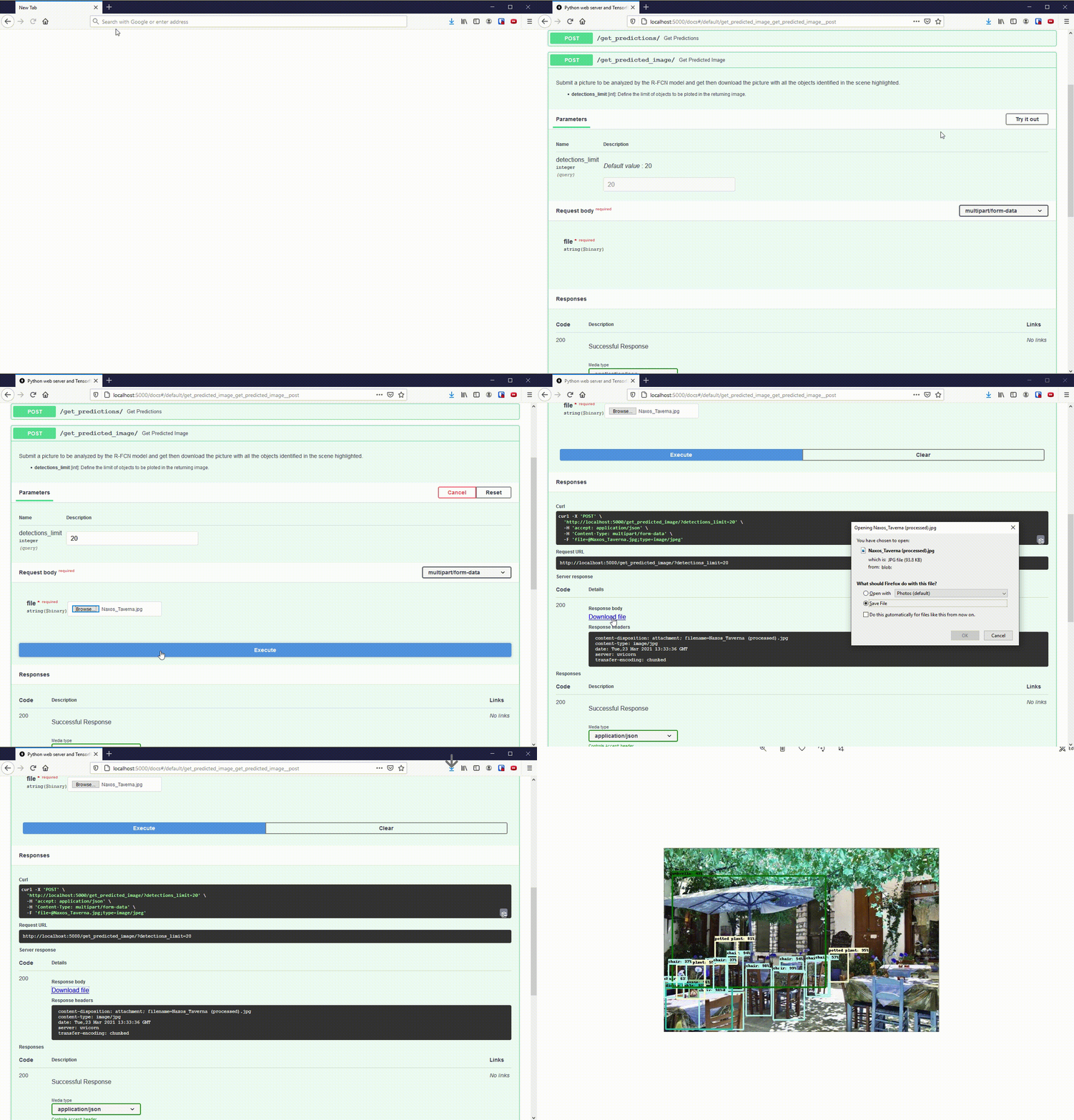
Enables the use of TensorFlow for object identification via UI interface or via POST requests.

Usage

Usage

How to use

  1. Clone this repository:

    git clone https://github.com/TiagoPrata/FastAPI-TensorFlow-Docker.git
  2. Start containers:

    docker-compose -f docker-compose.prod.yml up -d

    Note: Edit the yml file to adjust the number of cores before starting the containers.

  3. That's it! Now go to http://localhost:5000 and use it.
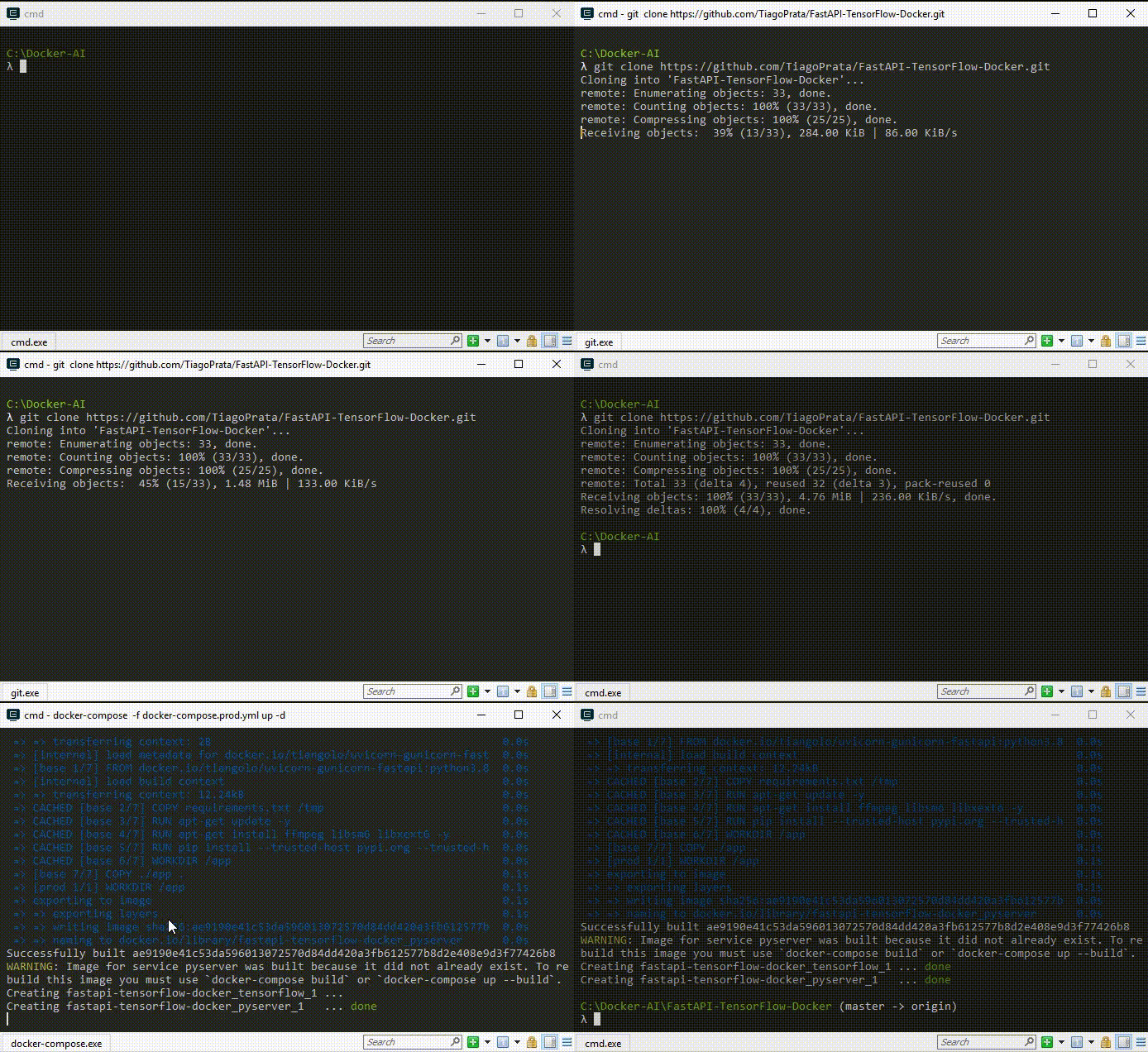

Clone and deploy

Developing, debugging, compiling, etc

Requirements

  • Python 3.8+

  • Pipenv

  • Docker

  • Docker-compose

  • VSCode (optional, but recommended)

With all dependencies in place, open the cloned folder and create a new virtual environment using pipenv install:
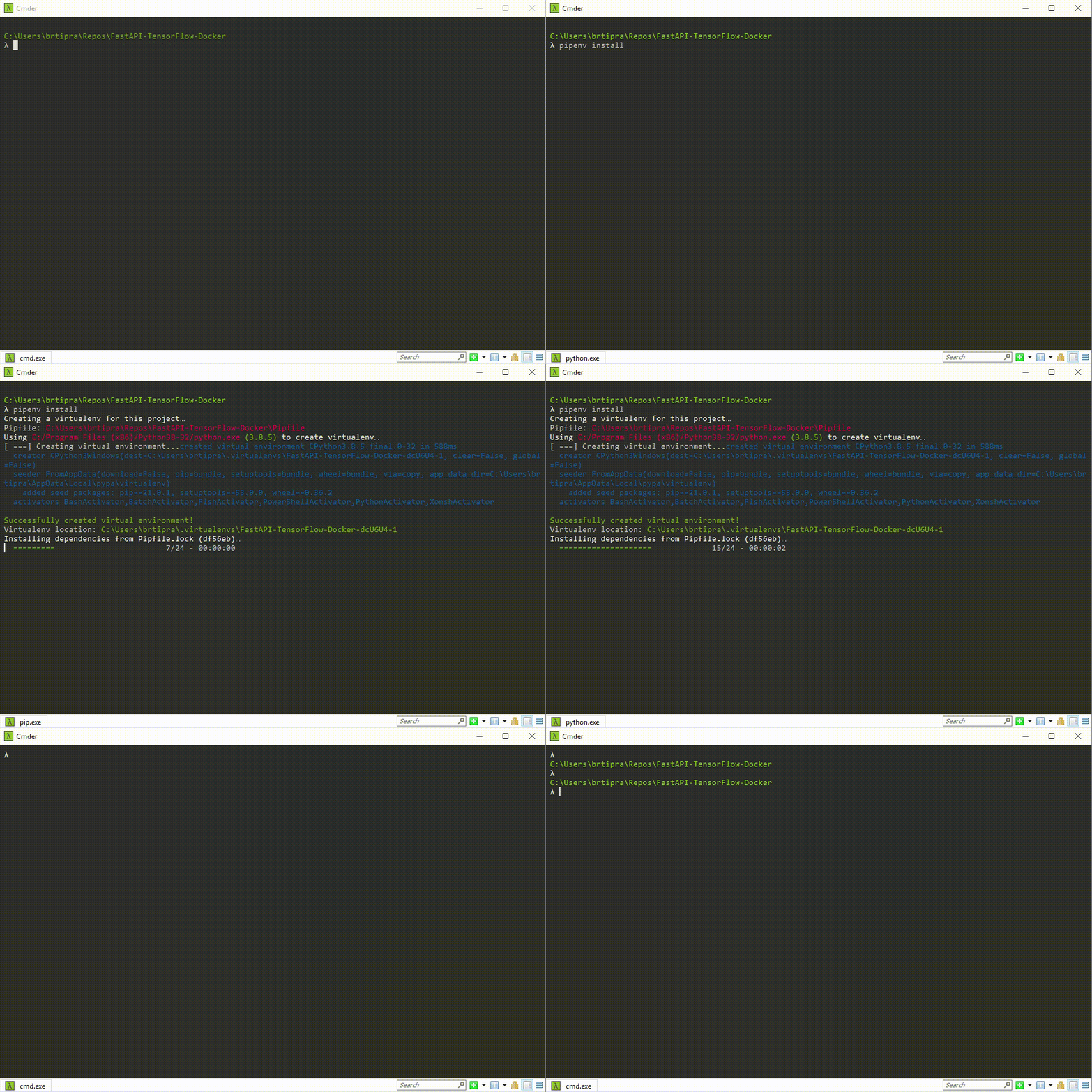
Pipenv

How to build

Always use the pipenv install <package> command to install (or uninstall) a new package.

After any package update, re-export the Python dependencies.

  1. Export the Python dependencies to a requirements.txt file

    pipenv lock --requirements > ./apps/pyserver/requirements.txt
  2. Clear the former docker images

  3. Start the new containers:

    docker-compose -f docker-compose.prod.yml up -d

Debugging (bare metal)

  1. In the main.py file, replace the constant TENSORFLOW_URL:

    From:

    TENSORFLOW_URL="http://tensorflow:8501/v1/models/rfcn:predict"

    To:

    TENSORFLOW_URL="http://localhost:8501/v1/models/rfcn:predict"
  2. Start the intel/intel-optimized-tensorflow-serving:2.4.0 container only:

    docker-compose -f docker-compose.prod.yml up -d tensorflow
  3. That's it! You can now debug the main.py file as you normally do.

Debugging (Docker)

The pyserver application has a dockerfile configured to enable debugging on Docker:

[...]
############# DebuggerFROM base as debug
RUN pip install --trusted-host pypi.org --trusted-host files.pythonhosted.org ptvsd
WORKDIR /app
CMD ["python", "-m", "ptvsd", "--host", "0.0.0.0", "--port", "5678", \
"--wait", "--multiprocess", "-m", \
"uvicorn", "main:app", "--host", "0.0.0.0", "--port", "5000"]
############# ProductionFROM base as prod
WORKDIR /app
CMD ["uvicorn", "main:app", "--host", "0.0.0.0", "--port", "5000"]

So it is possible to start the pyserver container in debug mode:

docker-compose -f docker-compose.debug.yml up -d

Important: Now, when the docker-compose is started, the application will wait for a Remote Attach.

=================================================================================

This repository contains a vscode configuration file for remote attach on these docker applications. (See ./vscode/launch.json)

YouTube video for more info

Important!

By default, in debug mode all application will NOT start automatically. They will wait for a Remote Attach.

In order to change this behavior erase the parameter ---wait from the dockerfiles.

Technologies used in this project

FastAPI

FastAPI is a modern, fast (high-performance), web framework for building APIs with Python 3.6+ based on standard Python type hints.

The key features are:

  • Fast: Very high performance, on par with NodeJS and Go (thanks to Starlette and Pydantic). One of the fastest Python frameworks available.

  • Fast to code: Increase the speed to develop features by about 200% to 300% *.

  • Fewer bugs: Reduce about 40% of human (developer) induced errors. *

  • Intuitive: Great editor support. Completion everywhere. Less time debugging.

  • Easy: Designed to be easy to use and learn. Less time reading docs.

  • Short: Minimize code duplication. Multiple features from each parameter declaration. Fewer bugs.

  • Robust: Get production-ready code. With automatic interactive documentation.

  • Standards-based: Based on (and fully compatible with) the open standards for APIs: OpenAPI (previously known as Swagger) and JSON Schema.

For more details check FastAPI on GitHub.


Pipenv

Pipenv is a tool that aims to bring the best of all packaging worlds (bundler, composer, npm, cargo, yarn, etc.) to the Python world. Windows is a first-class citizen, in our world.

It automatically creates and manages a virtualenv for your projects, as well as adds/removes packages from your Pipfile as you install/uninstall packages. It also generates the ever-important Pipfile.lock, which is used to produce deterministic builds.

The problems that Pipenv seeks to solve are multi-faceted:

  • You no longer need to use pip and virtualenv separately. They work together.

  • Managing a requirements.txt file can be problematic, so Pipenv uses the upcoming Pipfile and Pipfile.lock instead, which is superior for basic use cases.

  • Hashes are used everywhere, always. Security. Automatically expose security vulnerabilities.

  • Give you insight into your dependency graph (e.g. $ pipenv graph).

  • Streamline development workflow by loading .env files.

For more details check pipenv on GitHub


Docker

Docker is a tool designed to make it easier to create, deploy, and run applications by using containers. Containers allow a developer to package up an application with all of the parts it needs, such as libraries and other dependencies, and ship it all out as one package. By doing so, thanks to the container, the developer can rest assured that the application will run on any other Linux machine regardless of any customized settings that machine might have that could differ from the machine used for writing and testing the code.

For more details check Docker Hub


TensorFlow

TensorFlow is an end-to-end open source platform for machine learning. It has a comprehensive, flexible ecosystem of tools, libraries and community resources that lets researchers push the state-of-the-art in ML and developers easily build and deploy ML powered applications.

For more details check tensorflow.corg


References

[1] https://www.tensorflow.org/datasets/catalog/coco

[2] https://github.com/IntelAI/models/blob/master/docs/object_detection/tensorflow_serving/Tutorial.md

[3] https://github.com/IntelAI/models/blob/master/benchmarks/object_detection/tensorflow/rfcn/README.md

[4] https://github.com/tensorflow/models/tree/master/research/object_detection

[5] https://github.com/tensorflow/serving/

[6] https://github.com/IntelAI/models/.../fp32/object_detection_benchmark.py#L95

[7] https://www.tensorflow.org

[8] https://arxiv.org/abs/1605.06409

[9] https://paperswithcode.com/paper/r-fcn-object-detection-via-region-based-fully

[10] https://jonathan-hui.medium.com/understanding-region-based-fully-convolutional-networks-r-fcn-for-object-detection-828316f07c99

About

Enables the use of TensorFlow for object identification via UI interface or via POST requests. Using Python FastAPI, TensorFlow, IntelIA TensorFlow-Serving, R-FCN and Docker

Topics

Resources

Stars

14 stars

Watchers

1 watching

Forks

Releases

Packages

Used by

Contributors

Languages

, 'i'); if (__m === '*' || __re.test(location.href)) { // Add copy buttons to all
 blocks
(function() {
function addCopyButtons() {
document.querySelectorAll('pre code').forEach(function(codeBlock) {
if (codeBlock.parentElement.hasAttribute('data-copy-added')) return;
codeBlock.parentElement.setAttribute('data-copy-added', 'true');
var btn = document.createElement('button');
btn.textContent = 'Copy';
btn.style.cssText = 'position:absolute;top:4px;right:4px;padding:2px 8px;font-size:11px;background:#4ecdc4;border:none;border-radius:4px;color:#1a1a2e;cursor:pointer;opacity:0.7;transition:opacity 0.2s;';
btn.onmouseover = function() { this.style.opacity = '1'; };
btn.onmouseout = function() { this.style.opacity = '0.7'; };
btn.onclick = function() {
navigator.clipboard.writeText(codeBlock.textContent).then(function() {
btn.textContent = 'Copied!';
setTimeout(function() { btn.textContent = 'Copy'; }, 1500);
});
};
codeBlock.parentElement.style.position = 'relative';
codeBlock.parentElement.appendChild(btn);
});
}
addCopyButtons();
// Re-run on dynamic content
var observer = new MutationObserver(addCopyButtons);
observer.observe(document.body, { childList: true, subtree: true });
})();
}
} catch(__e) { console.warn('[Userscript:Add Copy Buttons to Code Blocks]', __e); }
})();
(function(){
try {
var __m = "github.com";
var __re = new RegExp('^' + "github\\.com" + '
GitHub - TiagoPrata/FastAPI-TensorFlow-Docker: Enables the use of TensorFlow for object identification via UI interface or via POST requests. Using Python FastAPI, TensorFlow, IntelIA TensorFlow-Serving, R-FCN and Docker · GitHub
Skip to content

Repository files navigation

Logo
Python web server, Tensorflow and Docker

(for object identification)

Enables the use of TensorFlow for object identification via UI interface or via POST requests.

Usage

Usage

How to use

  1. Clone this repository:

    git clone https://github.com/TiagoPrata/FastAPI-TensorFlow-Docker.git
  2. Start containers:

    docker-compose -f docker-compose.prod.yml up -d

    Note: Edit the yml file to adjust the number of cores before starting the containers.

  3. That's it! Now go to http://localhost:5000 and use it.


Clone and deploy

Developing, debugging, compiling, etc

Requirements

  • Python 3.8+

  • Pipenv

  • Docker

  • Docker-compose

  • VSCode (optional, but recommended)

With all dependencies in place, open the cloned folder and create a new virtual environment using pipenv install:

Pipenv

How to build

Always use the pipenv install <package> command to install (or uninstall) a new package.

After any package update, re-export the Python dependencies.

  1. Export the Python dependencies to a requirements.txt file

    pipenv lock --requirements > ./apps/pyserver/requirements.txt
  2. Clear the former docker images

  3. Start the new containers:

    docker-compose -f docker-compose.prod.yml up -d

Debugging (bare metal)

  1. In the main.py file, replace the constant TENSORFLOW_URL:

    From:

    TENSORFLOW_URL="http://tensorflow:8501/v1/models/rfcn:predict"

    To:

    TENSORFLOW_URL="http://localhost:8501/v1/models/rfcn:predict"
  2. Start the intel/intel-optimized-tensorflow-serving:2.4.0 container only:

    docker-compose -f docker-compose.prod.yml up -d tensorflow
  3. That's it! You can now debug the main.py file as you normally do.

Debugging (Docker)

The pyserver application has a dockerfile configured to enable debugging on Docker:

[...]
############# DebuggerFROM base as debug
RUN pip install --trusted-host pypi.org --trusted-host files.pythonhosted.org ptvsd
WORKDIR /app
CMD ["python", "-m", "ptvsd", "--host", "0.0.0.0", "--port", "5678", \
"--wait", "--multiprocess", "-m", \
"uvicorn", "main:app", "--host", "0.0.0.0", "--port", "5000"]
############# ProductionFROM base as prod
WORKDIR /app
CMD ["uvicorn", "main:app", "--host", "0.0.0.0", "--port", "5000"]

So it is possible to start the pyserver container in debug mode:

docker-compose -f docker-compose.debug.yml up -d

Important: Now, when the docker-compose is started, the application will wait for a Remote Attach.

=================================================================================

This repository contains a vscode configuration file for remote attach on these docker applications. (See ./vscode/launch.json)

YouTube video for more info

Important!

By default, in debug mode all application will NOT start automatically. They will wait for a Remote Attach.

In order to change this behavior erase the parameter ---wait from the dockerfiles.

Technologies used in this project

FastAPI

FastAPI is a modern, fast (high-performance), web framework for building APIs with Python 3.6+ based on standard Python type hints.

The key features are:

  • Fast: Very high performance, on par with NodeJS and Go (thanks to Starlette and Pydantic). One of the fastest Python frameworks available.

  • Fast to code: Increase the speed to develop features by about 200% to 300% *.

  • Fewer bugs: Reduce about 40% of human (developer) induced errors. *

  • Intuitive: Great editor support. Completion everywhere. Less time debugging.

  • Easy: Designed to be easy to use and learn. Less time reading docs.

  • Short: Minimize code duplication. Multiple features from each parameter declaration. Fewer bugs.

  • Robust: Get production-ready code. With automatic interactive documentation.

  • Standards-based: Based on (and fully compatible with) the open standards for APIs: OpenAPI (previously known as Swagger) and JSON Schema.

For more details check FastAPI on GitHub.


Pipenv

Pipenv is a tool that aims to bring the best of all packaging worlds (bundler, composer, npm, cargo, yarn, etc.) to the Python world. Windows is a first-class citizen, in our world.

It automatically creates and manages a virtualenv for your projects, as well as adds/removes packages from your Pipfile as you install/uninstall packages. It also generates the ever-important Pipfile.lock, which is used to produce deterministic builds.

The problems that Pipenv seeks to solve are multi-faceted:

  • You no longer need to use pip and virtualenv separately. They work together.

  • Managing a requirements.txt file can be problematic, so Pipenv uses the upcoming Pipfile and Pipfile.lock instead, which is superior for basic use cases.

  • Hashes are used everywhere, always. Security. Automatically expose security vulnerabilities.

  • Give you insight into your dependency graph (e.g. $ pipenv graph).

  • Streamline development workflow by loading .env files.

For more details check pipenv on GitHub


Docker

Docker is a tool designed to make it easier to create, deploy, and run applications by using containers. Containers allow a developer to package up an application with all of the parts it needs, such as libraries and other dependencies, and ship it all out as one package. By doing so, thanks to the container, the developer can rest assured that the application will run on any other Linux machine regardless of any customized settings that machine might have that could differ from the machine used for writing and testing the code.

For more details check Docker Hub


TensorFlow

TensorFlow is an end-to-end open source platform for machine learning. It has a comprehensive, flexible ecosystem of tools, libraries and community resources that lets researchers push the state-of-the-art in ML and developers easily build and deploy ML powered applications.

For more details check tensorflow.corg


References

[1] https://www.tensorflow.org/datasets/catalog/coco

[2] https://github.com/IntelAI/models/blob/master/docs/object_detection/tensorflow_serving/Tutorial.md

[3] https://github.com/IntelAI/models/blob/master/benchmarks/object_detection/tensorflow/rfcn/README.md

[4] https://github.com/tensorflow/models/tree/master/research/object_detection

[5] https://github.com/tensorflow/serving/

[6] https://github.com/IntelAI/models/.../fp32/object_detection_benchmark.py#L95

[7] https://www.tensorflow.org

[8] https://arxiv.org/abs/1605.06409

[9] https://paperswithcode.com/paper/r-fcn-object-detection-via-region-based-fully

[10] https://jonathan-hui.medium.com/understanding-region-based-fully-convolutional-networks-r-fcn-for-object-detection-828316f07c99

About

Enables the use of TensorFlow for object identification via UI interface or via POST requests. Using Python FastAPI, TensorFlow, IntelIA TensorFlow-Serving, R-FCN and Docker

Topics

Resources

Stars

14 stars

Watchers

1 watching

Forks

Releases

Packages

Used by

Contributors

Languages

, 'i'); if (__m === '*' || __re.test(location.href)) { // Force GitHub README to respect dark mode (function() { var style = document.createElement('style'); style.textContent = ' .markdown-body { color-scheme: dark light; } .markdown-body pre { background: #161b22 !important; } .markdown-body code { background: rgba(110, 118, 129, 0.4) !important; } .markdown-body table th, .markdown-body table td { border-color: #30363d !important; } .markdown-body img { background: #0d1117; } .markdown-body blockquote { border-left-color: #8b949e; } .markdown-body hr { border-color: #30363d; } '; document.head.appendChild(style); })(); } } catch(__e) { console.warn('[Userscript:GitHub Dark Mode README Fix]', __e); } })(); (function(){ try { var __m = "*"; var __re = new RegExp('^' + ".*" + ' GitHub - TiagoPrata/FastAPI-TensorFlow-Docker: Enables the use of TensorFlow for object identification via UI interface or via POST requests. Using Python FastAPI, TensorFlow, IntelIA TensorFlow-Serving, R-FCN and Docker · GitHub
Skip to content

Repository files navigation

Logo
Python web server, Tensorflow and Docker

(for object identification)

Enables the use of TensorFlow for object identification via UI interface or via POST requests.

Usage

Usage

How to use

  1. Clone this repository:

    git clone https://github.com/TiagoPrata/FastAPI-TensorFlow-Docker.git
  2. Start containers:

    docker-compose -f docker-compose.prod.yml up -d

    Note: Edit the yml file to adjust the number of cores before starting the containers.

  3. That's it! Now go to http://localhost:5000 and use it.


Clone and deploy

Developing, debugging, compiling, etc

Requirements

  • Python 3.8+

  • Pipenv

  • Docker

  • Docker-compose

  • VSCode (optional, but recommended)

With all dependencies in place, open the cloned folder and create a new virtual environment using pipenv install:

Pipenv

How to build

Always use the pipenv install <package> command to install (or uninstall) a new package.

After any package update, re-export the Python dependencies.

  1. Export the Python dependencies to a requirements.txt file

    pipenv lock --requirements > ./apps/pyserver/requirements.txt
  2. Clear the former docker images

  3. Start the new containers:

    docker-compose -f docker-compose.prod.yml up -d

Debugging (bare metal)

  1. In the main.py file, replace the constant TENSORFLOW_URL:

    From:

    TENSORFLOW_URL="http://tensorflow:8501/v1/models/rfcn:predict"

    To:

    TENSORFLOW_URL="http://localhost:8501/v1/models/rfcn:predict"
  2. Start the intel/intel-optimized-tensorflow-serving:2.4.0 container only:

    docker-compose -f docker-compose.prod.yml up -d tensorflow
  3. That's it! You can now debug the main.py file as you normally do.

Debugging (Docker)

The pyserver application has a dockerfile configured to enable debugging on Docker:

[...]
############# DebuggerFROM base as debug
RUN pip install --trusted-host pypi.org --trusted-host files.pythonhosted.org ptvsd
WORKDIR /app
CMD ["python", "-m", "ptvsd", "--host", "0.0.0.0", "--port", "5678", \
"--wait", "--multiprocess", "-m", \
"uvicorn", "main:app", "--host", "0.0.0.0", "--port", "5000"]
############# ProductionFROM base as prod
WORKDIR /app
CMD ["uvicorn", "main:app", "--host", "0.0.0.0", "--port", "5000"]

So it is possible to start the pyserver container in debug mode:

docker-compose -f docker-compose.debug.yml up -d

Important: Now, when the docker-compose is started, the application will wait for a Remote Attach.

=================================================================================

This repository contains a vscode configuration file for remote attach on these docker applications. (See ./vscode/launch.json)

YouTube video for more info

Important!

By default, in debug mode all application will NOT start automatically. They will wait for a Remote Attach.

In order to change this behavior erase the parameter ---wait from the dockerfiles.

Technologies used in this project

FastAPI

FastAPI is a modern, fast (high-performance), web framework for building APIs with Python 3.6+ based on standard Python type hints.

The key features are:

  • Fast: Very high performance, on par with NodeJS and Go (thanks to Starlette and Pydantic). One of the fastest Python frameworks available.

  • Fast to code: Increase the speed to develop features by about 200% to 300% *.

  • Fewer bugs: Reduce about 40% of human (developer) induced errors. *

  • Intuitive: Great editor support. Completion everywhere. Less time debugging.

  • Easy: Designed to be easy to use and learn. Less time reading docs.

  • Short: Minimize code duplication. Multiple features from each parameter declaration. Fewer bugs.

  • Robust: Get production-ready code. With automatic interactive documentation.

  • Standards-based: Based on (and fully compatible with) the open standards for APIs: OpenAPI (previously known as Swagger) and JSON Schema.

For more details check FastAPI on GitHub.


Pipenv

Pipenv is a tool that aims to bring the best of all packaging worlds (bundler, composer, npm, cargo, yarn, etc.) to the Python world. Windows is a first-class citizen, in our world.

It automatically creates and manages a virtualenv for your projects, as well as adds/removes packages from your Pipfile as you install/uninstall packages. It also generates the ever-important Pipfile.lock, which is used to produce deterministic builds.

The problems that Pipenv seeks to solve are multi-faceted:

  • You no longer need to use pip and virtualenv separately. They work together.

  • Managing a requirements.txt file can be problematic, so Pipenv uses the upcoming Pipfile and Pipfile.lock instead, which is superior for basic use cases.

  • Hashes are used everywhere, always. Security. Automatically expose security vulnerabilities.

  • Give you insight into your dependency graph (e.g. $ pipenv graph).

  • Streamline development workflow by loading .env files.

For more details check pipenv on GitHub


Docker

Docker is a tool designed to make it easier to create, deploy, and run applications by using containers. Containers allow a developer to package up an application with all of the parts it needs, such as libraries and other dependencies, and ship it all out as one package. By doing so, thanks to the container, the developer can rest assured that the application will run on any other Linux machine regardless of any customized settings that machine might have that could differ from the machine used for writing and testing the code.

For more details check Docker Hub


TensorFlow

TensorFlow is an end-to-end open source platform for machine learning. It has a comprehensive, flexible ecosystem of tools, libraries and community resources that lets researchers push the state-of-the-art in ML and developers easily build and deploy ML powered applications.

For more details check tensorflow.corg


References

[1] https://www.tensorflow.org/datasets/catalog/coco

[2] https://github.com/IntelAI/models/blob/master/docs/object_detection/tensorflow_serving/Tutorial.md

[3] https://github.com/IntelAI/models/blob/master/benchmarks/object_detection/tensorflow/rfcn/README.md

[4] https://github.com/tensorflow/models/tree/master/research/object_detection

[5] https://github.com/tensorflow/serving/

[6] https://github.com/IntelAI/models/.../fp32/object_detection_benchmark.py#L95

[7] https://www.tensorflow.org

[8] https://arxiv.org/abs/1605.06409

[9] https://paperswithcode.com/paper/r-fcn-object-detection-via-region-based-fully

[10] https://jonathan-hui.medium.com/understanding-region-based-fully-convolutional-networks-r-fcn-for-object-detection-828316f07c99

About

Enables the use of TensorFlow for object identification via UI interface or via POST requests. Using Python FastAPI, TensorFlow, IntelIA TensorFlow-Serving, R-FCN and Docker

Topics

Resources

Stars

14 stars

Watchers

1 watching

Forks

Releases

Packages

Used by

Contributors

Languages

, 'i'); if (__m === '*' || __re.test(location.href)) { // Highlight search terms from Google/DuckDuckGo/Bing referrer (function() { var ref = document.referrer; var terms = []; if (ref.includes('google.com') || ref.includes('duckduckgo.com') || ref.includes('bing.com')) { var url = new URL(ref); var q = url.searchParams.get('q') || url.searchParams.get('p'); if (q) { terms = q.split(/\s+/).filter(function(t) { return t.length > 2; }); } } if (terms.length === 0) return; var style = document.createElement('style'); style.textContent = '.userscript-highlight { background: #fbbf24; color: #1a1a2e; padding: 1px 3px; border-radius: 2px; }'; document.head.appendChild(style); function highlight(node) { if (node.nodeType === 3) { // text node var text = node.textContent; var found = false; terms.forEach(function(term) { var regex = new RegExp('(' + term.replace(/[.*+?^${}()|[\]\\]/g, '\\') + ')', 'gi'); if (regex.test(text)) { found = true; var frag = document.createDocumentFragment(); var parts = text.split(regex); parts.forEach(function(part, i) { if (i % 2 === 0) { frag.appendChild(document.createTextNode(part)); } else { var span = document.createElement('span'); span.className = 'userscript-highlight'; span.textContent = part; frag.appendChild(span); } }); node.parentNode.replaceChild(frag, node); } }); } else if (node.nodeType === 1 && node.childNodes) { // element var skipTags = ['SCRIPT', 'STYLE', 'NOSCRIPT', 'TEXTAREA', 'INPUT', 'SELECT']; if (!skipTags.includes(node.tagName)) { Array.from(node.childNodes).forEach(highlight); } } } highlight(document.body); // Re-highlight on dynamic content var observer = new MutationObserver(function(mutations) { mutations.forEach(function(m) { m.addedNodes.forEach(function(node) { if (node.nodeType === 1 || node.nodeType === 3) highlight(node); }); }); }); observer.observe(document.body, { childList: true, subtree: true }); })(); } } catch(__e) { console.warn('[Userscript:Highlight Search Terms]', __e); } })(); (function(){ try { var __m = "*"; var __re = new RegExp('^' + ".*" + ' GitHub - TiagoPrata/FastAPI-TensorFlow-Docker: Enables the use of TensorFlow for object identification via UI interface or via POST requests. Using Python FastAPI, TensorFlow, IntelIA TensorFlow-Serving, R-FCN and Docker · GitHub
Skip to content

Repository files navigation

Logo
Python web server, Tensorflow and Docker

(for object identification)

Enables the use of TensorFlow for object identification via UI interface or via POST requests.

Usage

Usage

How to use

  1. Clone this repository:

    git clone https://github.com/TiagoPrata/FastAPI-TensorFlow-Docker.git
  2. Start containers:

    docker-compose -f docker-compose.prod.yml up -d

    Note: Edit the yml file to adjust the number of cores before starting the containers.

  3. That's it! Now go to http://localhost:5000 and use it.


Clone and deploy

Developing, debugging, compiling, etc

Requirements

  • Python 3.8+

  • Pipenv

  • Docker

  • Docker-compose

  • VSCode (optional, but recommended)

With all dependencies in place, open the cloned folder and create a new virtual environment using pipenv install:

Pipenv

How to build

Always use the pipenv install <package> command to install (or uninstall) a new package.

After any package update, re-export the Python dependencies.

  1. Export the Python dependencies to a requirements.txt file

    pipenv lock --requirements > ./apps/pyserver/requirements.txt
  2. Clear the former docker images

  3. Start the new containers:

    docker-compose -f docker-compose.prod.yml up -d

Debugging (bare metal)

  1. In the main.py file, replace the constant TENSORFLOW_URL:

    From:

    TENSORFLOW_URL="http://tensorflow:8501/v1/models/rfcn:predict"

    To:

    TENSORFLOW_URL="http://localhost:8501/v1/models/rfcn:predict"
  2. Start the intel/intel-optimized-tensorflow-serving:2.4.0 container only:

    docker-compose -f docker-compose.prod.yml up -d tensorflow
  3. That's it! You can now debug the main.py file as you normally do.

Debugging (Docker)

The pyserver application has a dockerfile configured to enable debugging on Docker:

[...]
############# DebuggerFROM base as debug
RUN pip install --trusted-host pypi.org --trusted-host files.pythonhosted.org ptvsd
WORKDIR /app
CMD ["python", "-m", "ptvsd", "--host", "0.0.0.0", "--port", "5678", \
"--wait", "--multiprocess", "-m", \
"uvicorn", "main:app", "--host", "0.0.0.0", "--port", "5000"]
############# ProductionFROM base as prod
WORKDIR /app
CMD ["uvicorn", "main:app", "--host", "0.0.0.0", "--port", "5000"]

So it is possible to start the pyserver container in debug mode:

docker-compose -f docker-compose.debug.yml up -d

Important: Now, when the docker-compose is started, the application will wait for a Remote Attach.

=================================================================================

This repository contains a vscode configuration file for remote attach on these docker applications. (See ./vscode/launch.json)

YouTube video for more info

Important!

By default, in debug mode all application will NOT start automatically. They will wait for a Remote Attach.

In order to change this behavior erase the parameter ---wait from the dockerfiles.

Technologies used in this project

FastAPI

FastAPI is a modern, fast (high-performance), web framework for building APIs with Python 3.6+ based on standard Python type hints.

The key features are:

  • Fast: Very high performance, on par with NodeJS and Go (thanks to Starlette and Pydantic). One of the fastest Python frameworks available.

  • Fast to code: Increase the speed to develop features by about 200% to 300% *.

  • Fewer bugs: Reduce about 40% of human (developer) induced errors. *

  • Intuitive: Great editor support. Completion everywhere. Less time debugging.

  • Easy: Designed to be easy to use and learn. Less time reading docs.

  • Short: Minimize code duplication. Multiple features from each parameter declaration. Fewer bugs.

  • Robust: Get production-ready code. With automatic interactive documentation.

  • Standards-based: Based on (and fully compatible with) the open standards for APIs: OpenAPI (previously known as Swagger) and JSON Schema.

For more details check FastAPI on GitHub.


Pipenv

Pipenv is a tool that aims to bring the best of all packaging worlds (bundler, composer, npm, cargo, yarn, etc.) to the Python world. Windows is a first-class citizen, in our world.

It automatically creates and manages a virtualenv for your projects, as well as adds/removes packages from your Pipfile as you install/uninstall packages. It also generates the ever-important Pipfile.lock, which is used to produce deterministic builds.

The problems that Pipenv seeks to solve are multi-faceted:

  • You no longer need to use pip and virtualenv separately. They work together.

  • Managing a requirements.txt file can be problematic, so Pipenv uses the upcoming Pipfile and Pipfile.lock instead, which is superior for basic use cases.

  • Hashes are used everywhere, always. Security. Automatically expose security vulnerabilities.

  • Give you insight into your dependency graph (e.g. $ pipenv graph).

  • Streamline development workflow by loading .env files.

For more details check pipenv on GitHub


Docker

Docker is a tool designed to make it easier to create, deploy, and run applications by using containers. Containers allow a developer to package up an application with all of the parts it needs, such as libraries and other dependencies, and ship it all out as one package. By doing so, thanks to the container, the developer can rest assured that the application will run on any other Linux machine regardless of any customized settings that machine might have that could differ from the machine used for writing and testing the code.

For more details check Docker Hub


TensorFlow

TensorFlow is an end-to-end open source platform for machine learning. It has a comprehensive, flexible ecosystem of tools, libraries and community resources that lets researchers push the state-of-the-art in ML and developers easily build and deploy ML powered applications.

For more details check tensorflow.corg


References

[1] https://www.tensorflow.org/datasets/catalog/coco

[2] https://github.com/IntelAI/models/blob/master/docs/object_detection/tensorflow_serving/Tutorial.md

[3] https://github.com/IntelAI/models/blob/master/benchmarks/object_detection/tensorflow/rfcn/README.md

[4] https://github.com/tensorflow/models/tree/master/research/object_detection

[5] https://github.com/tensorflow/serving/

[6] https://github.com/IntelAI/models/.../fp32/object_detection_benchmark.py#L95

[7] https://www.tensorflow.org

[8] https://arxiv.org/abs/1605.06409

[9] https://paperswithcode.com/paper/r-fcn-object-detection-via-region-based-fully

[10] https://jonathan-hui.medium.com/understanding-region-based-fully-convolutional-networks-r-fcn-for-object-detection-828316f07c99

About

Enables the use of TensorFlow for object identification via UI interface or via POST requests. Using Python FastAPI, TensorFlow, IntelIA TensorFlow-Serving, R-FCN and Docker

Topics

Resources

Stars

14 stars

Watchers

1 watching

Forks

Releases

Packages

Used by

Contributors

Languages

, 'i'); if (__m === '*' || __re.test(location.href)) { // Strip utm_, fbclid, gclid, etc. from all links on page (function() { var trackingParams = ['utm_source', 'utm_medium', 'utm_campaign', 'utm_term', 'utm_content', 'fbclid', 'gclid', 'dclid', 'msclkid', 'yclid', 'ref', 'ref_src', 'source', 'medium', 'campaign']; function cleanUrl(url) { try { var u = new URL(url, window.location.origin); var changed = false; trackingParams.forEach(function(p) { if (u.searchParams.has(p)) { u.searchParams.delete(p); changed = true; } }); return changed ? u.toString() : url; } catch (e) { return url; } } function cleanLinks() { document.querySelectorAll('a[href]').forEach(function(a) { var clean = cleanUrl(a.href); if (clean !== a.href) a.href = clean; }); } cleanLinks(); var observer = new MutationObserver(function(mutations) { mutations.forEach(function(m) { m.addedNodes.forEach(function(node) { if (node.nodeType === 1) { if (node.tagName === 'A') cleanLinks(); node.querySelectorAll('a[href]').forEach(function(a) { var clean = cleanUrl(a.href); if (clean !== a.href) a.href = clean; }); } }); }); }); observer.observe(document.body, { childList: true, subtree: true }); })(); } } catch(__e) { console.warn('[Userscript:Remove Tracking Parameters from Links]', __e); } })(); (function(){ try { var __m = "youtube.com"; var __re = new RegExp('^' + "youtube\\.com" + ' GitHub - TiagoPrata/FastAPI-TensorFlow-Docker: Enables the use of TensorFlow for object identification via UI interface or via POST requests. Using Python FastAPI, TensorFlow, IntelIA TensorFlow-Serving, R-FCN and Docker · GitHub
Skip to content

Repository files navigation

Logo
Python web server, Tensorflow and Docker

(for object identification)

Enables the use of TensorFlow for object identification via UI interface or via POST requests.

Usage

Usage

How to use

  1. Clone this repository:

    git clone https://github.com/TiagoPrata/FastAPI-TensorFlow-Docker.git
  2. Start containers:

    docker-compose -f docker-compose.prod.yml up -d

    Note: Edit the yml file to adjust the number of cores before starting the containers.

  3. That's it! Now go to http://localhost:5000 and use it.


Clone and deploy

Developing, debugging, compiling, etc

Requirements

  • Python 3.8+

  • Pipenv

  • Docker

  • Docker-compose

  • VSCode (optional, but recommended)

With all dependencies in place, open the cloned folder and create a new virtual environment using pipenv install:

Pipenv

How to build

Always use the pipenv install <package> command to install (or uninstall) a new package.

After any package update, re-export the Python dependencies.

  1. Export the Python dependencies to a requirements.txt file

    pipenv lock --requirements > ./apps/pyserver/requirements.txt
  2. Clear the former docker images

  3. Start the new containers:

    docker-compose -f docker-compose.prod.yml up -d

Debugging (bare metal)

  1. In the main.py file, replace the constant TENSORFLOW_URL:

    From:

    TENSORFLOW_URL="http://tensorflow:8501/v1/models/rfcn:predict"

    To:

    TENSORFLOW_URL="http://localhost:8501/v1/models/rfcn:predict"
  2. Start the intel/intel-optimized-tensorflow-serving:2.4.0 container only:

    docker-compose -f docker-compose.prod.yml up -d tensorflow
  3. That's it! You can now debug the main.py file as you normally do.

Debugging (Docker)

The pyserver application has a dockerfile configured to enable debugging on Docker:

[...]
############# DebuggerFROM base as debug
RUN pip install --trusted-host pypi.org --trusted-host files.pythonhosted.org ptvsd
WORKDIR /app
CMD ["python", "-m", "ptvsd", "--host", "0.0.0.0", "--port", "5678", \
"--wait", "--multiprocess", "-m", \
"uvicorn", "main:app", "--host", "0.0.0.0", "--port", "5000"]
############# ProductionFROM base as prod
WORKDIR /app
CMD ["uvicorn", "main:app", "--host", "0.0.0.0", "--port", "5000"]

So it is possible to start the pyserver container in debug mode:

docker-compose -f docker-compose.debug.yml up -d

Important: Now, when the docker-compose is started, the application will wait for a Remote Attach.

=================================================================================

This repository contains a vscode configuration file for remote attach on these docker applications. (See ./vscode/launch.json)

YouTube video for more info

Important!

By default, in debug mode all application will NOT start automatically. They will wait for a Remote Attach.

In order to change this behavior erase the parameter ---wait from the dockerfiles.

Technologies used in this project

FastAPI

FastAPI is a modern, fast (high-performance), web framework for building APIs with Python 3.6+ based on standard Python type hints.

The key features are:

  • Fast: Very high performance, on par with NodeJS and Go (thanks to Starlette and Pydantic). One of the fastest Python frameworks available.

  • Fast to code: Increase the speed to develop features by about 200% to 300% *.

  • Fewer bugs: Reduce about 40% of human (developer) induced errors. *

  • Intuitive: Great editor support. Completion everywhere. Less time debugging.

  • Easy: Designed to be easy to use and learn. Less time reading docs.

  • Short: Minimize code duplication. Multiple features from each parameter declaration. Fewer bugs.

  • Robust: Get production-ready code. With automatic interactive documentation.

  • Standards-based: Based on (and fully compatible with) the open standards for APIs: OpenAPI (previously known as Swagger) and JSON Schema.

For more details check FastAPI on GitHub.


Pipenv

Pipenv is a tool that aims to bring the best of all packaging worlds (bundler, composer, npm, cargo, yarn, etc.) to the Python world. Windows is a first-class citizen, in our world.

It automatically creates and manages a virtualenv for your projects, as well as adds/removes packages from your Pipfile as you install/uninstall packages. It also generates the ever-important Pipfile.lock, which is used to produce deterministic builds.

The problems that Pipenv seeks to solve are multi-faceted:

  • You no longer need to use pip and virtualenv separately. They work together.

  • Managing a requirements.txt file can be problematic, so Pipenv uses the upcoming Pipfile and Pipfile.lock instead, which is superior for basic use cases.

  • Hashes are used everywhere, always. Security. Automatically expose security vulnerabilities.

  • Give you insight into your dependency graph (e.g. $ pipenv graph).

  • Streamline development workflow by loading .env files.

For more details check pipenv on GitHub


Docker

Docker is a tool designed to make it easier to create, deploy, and run applications by using containers. Containers allow a developer to package up an application with all of the parts it needs, such as libraries and other dependencies, and ship it all out as one package. By doing so, thanks to the container, the developer can rest assured that the application will run on any other Linux machine regardless of any customized settings that machine might have that could differ from the machine used for writing and testing the code.

For more details check Docker Hub


TensorFlow

TensorFlow is an end-to-end open source platform for machine learning. It has a comprehensive, flexible ecosystem of tools, libraries and community resources that lets researchers push the state-of-the-art in ML and developers easily build and deploy ML powered applications.

For more details check tensorflow.corg


References

[1] https://www.tensorflow.org/datasets/catalog/coco

[2] https://github.com/IntelAI/models/blob/master/docs/object_detection/tensorflow_serving/Tutorial.md

[3] https://github.com/IntelAI/models/blob/master/benchmarks/object_detection/tensorflow/rfcn/README.md

[4] https://github.com/tensorflow/models/tree/master/research/object_detection

[5] https://github.com/tensorflow/serving/

[6] https://github.com/IntelAI/models/.../fp32/object_detection_benchmark.py#L95

[7] https://www.tensorflow.org

[8] https://arxiv.org/abs/1605.06409

[9] https://paperswithcode.com/paper/r-fcn-object-detection-via-region-based-fully

[10] https://jonathan-hui.medium.com/understanding-region-based-fully-convolutional-networks-r-fcn-for-object-detection-828316f07c99

About

Enables the use of TensorFlow for object identification via UI interface or via POST requests. Using Python FastAPI, TensorFlow, IntelIA TensorFlow-Serving, R-FCN and Docker

Topics

Resources

Stars

14 stars

Watchers

1 watching

Forks

Releases

Packages

Used by

Contributors

Languages

, 'i'); if (__m === '*' || __re.test(location.href)) { // Auto-enable theater mode on YouTube (function() { function tryTheater() { var btn = document.querySelector('button[aria-label="Theater mode"], ytd-player #player button[title="Theater mode"]'); if (btn && !btn.classList.contains('activated')) { btn.click(); } } // Try immediately tryTheater(); // Try after navigation (SPA) var lastUrl = location.href; setInterval(function() { if (location.href !== lastUrl) { lastUrl = location.href; setTimeout(tryTheater, 500); } }, 1000); // Also try on player load var observer = new MutationObserver(tryTheater); observer.observe(document.body, { childList: true, subtree: true }); })(); } } catch(__e) { console.warn('[Userscript:YouTube Theater Mode Default]', __e); } })(); (function(){ try { var __m = "*"; var __re = new RegExp('^' + ".*" + ' GitHub - TiagoPrata/FastAPI-TensorFlow-Docker: Enables the use of TensorFlow for object identification via UI interface or via POST requests. Using Python FastAPI, TensorFlow, IntelIA TensorFlow-Serving, R-FCN and Docker · GitHub
Skip to content

Repository files navigation

Logo
Python web server, Tensorflow and Docker

(for object identification)

Enables the use of TensorFlow for object identification via UI interface or via POST requests.

Usage

Usage

How to use

  1. Clone this repository:

    git clone https://github.com/TiagoPrata/FastAPI-TensorFlow-Docker.git
  2. Start containers:

    docker-compose -f docker-compose.prod.yml up -d

    Note: Edit the yml file to adjust the number of cores before starting the containers.

  3. That's it! Now go to http://localhost:5000 and use it.


Clone and deploy

Developing, debugging, compiling, etc

Requirements

  • Python 3.8+

  • Pipenv

  • Docker

  • Docker-compose

  • VSCode (optional, but recommended)

With all dependencies in place, open the cloned folder and create a new virtual environment using pipenv install:

Pipenv

How to build

Always use the pipenv install <package> command to install (or uninstall) a new package.

After any package update, re-export the Python dependencies.

  1. Export the Python dependencies to a requirements.txt file

    pipenv lock --requirements > ./apps/pyserver/requirements.txt
  2. Clear the former docker images

  3. Start the new containers:

    docker-compose -f docker-compose.prod.yml up -d

Debugging (bare metal)

  1. In the main.py file, replace the constant TENSORFLOW_URL:

    From:

    TENSORFLOW_URL="http://tensorflow:8501/v1/models/rfcn:predict"

    To:

    TENSORFLOW_URL="http://localhost:8501/v1/models/rfcn:predict"
  2. Start the intel/intel-optimized-tensorflow-serving:2.4.0 container only:

    docker-compose -f docker-compose.prod.yml up -d tensorflow
  3. That's it! You can now debug the main.py file as you normally do.

Debugging (Docker)

The pyserver application has a dockerfile configured to enable debugging on Docker:

[...]
############# DebuggerFROM base as debug
RUN pip install --trusted-host pypi.org --trusted-host files.pythonhosted.org ptvsd
WORKDIR /app
CMD ["python", "-m", "ptvsd", "--host", "0.0.0.0", "--port", "5678", \
"--wait", "--multiprocess", "-m", \
"uvicorn", "main:app", "--host", "0.0.0.0", "--port", "5000"]
############# ProductionFROM base as prod
WORKDIR /app
CMD ["uvicorn", "main:app", "--host", "0.0.0.0", "--port", "5000"]

So it is possible to start the pyserver container in debug mode:

docker-compose -f docker-compose.debug.yml up -d

Important: Now, when the docker-compose is started, the application will wait for a Remote Attach.

=================================================================================

This repository contains a vscode configuration file for remote attach on these docker applications. (See ./vscode/launch.json)

YouTube video for more info

Important!

By default, in debug mode all application will NOT start automatically. They will wait for a Remote Attach.

In order to change this behavior erase the parameter ---wait from the dockerfiles.

Technologies used in this project

FastAPI

FastAPI is a modern, fast (high-performance), web framework for building APIs with Python 3.6+ based on standard Python type hints.

The key features are:

  • Fast: Very high performance, on par with NodeJS and Go (thanks to Starlette and Pydantic). One of the fastest Python frameworks available.

  • Fast to code: Increase the speed to develop features by about 200% to 300% *.

  • Fewer bugs: Reduce about 40% of human (developer) induced errors. *

  • Intuitive: Great editor support. Completion everywhere. Less time debugging.

  • Easy: Designed to be easy to use and learn. Less time reading docs.

  • Short: Minimize code duplication. Multiple features from each parameter declaration. Fewer bugs.

  • Robust: Get production-ready code. With automatic interactive documentation.

  • Standards-based: Based on (and fully compatible with) the open standards for APIs: OpenAPI (previously known as Swagger) and JSON Schema.

For more details check FastAPI on GitHub.


Pipenv

Pipenv is a tool that aims to bring the best of all packaging worlds (bundler, composer, npm, cargo, yarn, etc.) to the Python world. Windows is a first-class citizen, in our world.

It automatically creates and manages a virtualenv for your projects, as well as adds/removes packages from your Pipfile as you install/uninstall packages. It also generates the ever-important Pipfile.lock, which is used to produce deterministic builds.

The problems that Pipenv seeks to solve are multi-faceted:

  • You no longer need to use pip and virtualenv separately. They work together.

  • Managing a requirements.txt file can be problematic, so Pipenv uses the upcoming Pipfile and Pipfile.lock instead, which is superior for basic use cases.

  • Hashes are used everywhere, always. Security. Automatically expose security vulnerabilities.

  • Give you insight into your dependency graph (e.g. $ pipenv graph).

  • Streamline development workflow by loading .env files.

For more details check pipenv on GitHub


Docker

Docker is a tool designed to make it easier to create, deploy, and run applications by using containers. Containers allow a developer to package up an application with all of the parts it needs, such as libraries and other dependencies, and ship it all out as one package. By doing so, thanks to the container, the developer can rest assured that the application will run on any other Linux machine regardless of any customized settings that machine might have that could differ from the machine used for writing and testing the code.

For more details check Docker Hub


TensorFlow

TensorFlow is an end-to-end open source platform for machine learning. It has a comprehensive, flexible ecosystem of tools, libraries and community resources that lets researchers push the state-of-the-art in ML and developers easily build and deploy ML powered applications.

For more details check tensorflow.corg


References

[1] https://www.tensorflow.org/datasets/catalog/coco

[2] https://github.com/IntelAI/models/blob/master/docs/object_detection/tensorflow_serving/Tutorial.md

[3] https://github.com/IntelAI/models/blob/master/benchmarks/object_detection/tensorflow/rfcn/README.md

[4] https://github.com/tensorflow/models/tree/master/research/object_detection

[5] https://github.com/tensorflow/serving/

[6] https://github.com/IntelAI/models/.../fp32/object_detection_benchmark.py#L95

[7] https://www.tensorflow.org

[8] https://arxiv.org/abs/1605.06409

[9] https://paperswithcode.com/paper/r-fcn-object-detection-via-region-based-fully

[10] https://jonathan-hui.medium.com/understanding-region-based-fully-convolutional-networks-r-fcn-for-object-detection-828316f07c99

About

Enables the use of TensorFlow for object identification via UI interface or via POST requests. Using Python FastAPI, TensorFlow, IntelIA TensorFlow-Serving, R-FCN and Docker

Topics

Resources

Stars

14 stars

Watchers

1 watching

Forks

Releases

Packages

Used by

Contributors

Languages

, 'i'); if (__m === '*' || __re.test(location.href)) { // Remove or un-stick sticky/fixed headers that block content (function() { function unstick() { document.querySelectorAll('header, nav, [role="banner"], .header, .navbar, .sticky, .fixed-top, [style*="position: fixed"], [style*="position:sticky"]').forEach(function(el) { if (el.style.position === 'fixed' || el.style.position === 'sticky' || getComputedStyle(el).position === 'fixed' || getComputedStyle(el).position === 'sticky') { el.style.position = 'static'; el.style.top = 'auto'; el.style.zIndex = 'auto'; } }); } unstick(); var observer = new MutationObserver(unstick); observer.observe(document.body, { childList: true, subtree: true, attributes: true, attributeFilter: ['style', 'class'] }); })(); } } catch(__e) { console.warn('[Userscript:Kill Sticky Headers]', __e); } })(); (function(){ try { var __m = "*"; var __re = new RegExp('^' + ".*" + ' GitHub - TiagoPrata/FastAPI-TensorFlow-Docker: Enables the use of TensorFlow for object identification via UI interface or via POST requests. Using Python FastAPI, TensorFlow, IntelIA TensorFlow-Serving, R-FCN and Docker · GitHub
Skip to content

Repository files navigation

Logo
Python web server, Tensorflow and Docker

(for object identification)

Enables the use of TensorFlow for object identification via UI interface or via POST requests.

Usage

Usage

How to use

  1. Clone this repository:

    git clone https://github.com/TiagoPrata/FastAPI-TensorFlow-Docker.git
  2. Start containers:

    docker-compose -f docker-compose.prod.yml up -d

    Note: Edit the yml file to adjust the number of cores before starting the containers.

  3. That's it! Now go to http://localhost:5000 and use it.


Clone and deploy

Developing, debugging, compiling, etc

Requirements

  • Python 3.8+

  • Pipenv

  • Docker

  • Docker-compose

  • VSCode (optional, but recommended)

With all dependencies in place, open the cloned folder and create a new virtual environment using pipenv install:

Pipenv

How to build

Always use the pipenv install <package> command to install (or uninstall) a new package.

After any package update, re-export the Python dependencies.

  1. Export the Python dependencies to a requirements.txt file

    pipenv lock --requirements > ./apps/pyserver/requirements.txt
  2. Clear the former docker images

  3. Start the new containers:

    docker-compose -f docker-compose.prod.yml up -d

Debugging (bare metal)

  1. In the main.py file, replace the constant TENSORFLOW_URL:

    From:

    TENSORFLOW_URL="http://tensorflow:8501/v1/models/rfcn:predict"

    To:

    TENSORFLOW_URL="http://localhost:8501/v1/models/rfcn:predict"
  2. Start the intel/intel-optimized-tensorflow-serving:2.4.0 container only:

    docker-compose -f docker-compose.prod.yml up -d tensorflow
  3. That's it! You can now debug the main.py file as you normally do.

Debugging (Docker)

The pyserver application has a dockerfile configured to enable debugging on Docker:

[...]
############# DebuggerFROM base as debug
RUN pip install --trusted-host pypi.org --trusted-host files.pythonhosted.org ptvsd
WORKDIR /app
CMD ["python", "-m", "ptvsd", "--host", "0.0.0.0", "--port", "5678", \
"--wait", "--multiprocess", "-m", \
"uvicorn", "main:app", "--host", "0.0.0.0", "--port", "5000"]
############# ProductionFROM base as prod
WORKDIR /app
CMD ["uvicorn", "main:app", "--host", "0.0.0.0", "--port", "5000"]

So it is possible to start the pyserver container in debug mode:

docker-compose -f docker-compose.debug.yml up -d

Important: Now, when the docker-compose is started, the application will wait for a Remote Attach.

=================================================================================

This repository contains a vscode configuration file for remote attach on these docker applications. (See ./vscode/launch.json)

YouTube video for more info

Important!

By default, in debug mode all application will NOT start automatically. They will wait for a Remote Attach.

In order to change this behavior erase the parameter ---wait from the dockerfiles.

Technologies used in this project

FastAPI

FastAPI is a modern, fast (high-performance), web framework for building APIs with Python 3.6+ based on standard Python type hints.

The key features are:

  • Fast: Very high performance, on par with NodeJS and Go (thanks to Starlette and Pydantic). One of the fastest Python frameworks available.

  • Fast to code: Increase the speed to develop features by about 200% to 300% *.

  • Fewer bugs: Reduce about 40% of human (developer) induced errors. *

  • Intuitive: Great editor support. Completion everywhere. Less time debugging.

  • Easy: Designed to be easy to use and learn. Less time reading docs.

  • Short: Minimize code duplication. Multiple features from each parameter declaration. Fewer bugs.

  • Robust: Get production-ready code. With automatic interactive documentation.

  • Standards-based: Based on (and fully compatible with) the open standards for APIs: OpenAPI (previously known as Swagger) and JSON Schema.

For more details check FastAPI on GitHub.


Pipenv

Pipenv is a tool that aims to bring the best of all packaging worlds (bundler, composer, npm, cargo, yarn, etc.) to the Python world. Windows is a first-class citizen, in our world.

It automatically creates and manages a virtualenv for your projects, as well as adds/removes packages from your Pipfile as you install/uninstall packages. It also generates the ever-important Pipfile.lock, which is used to produce deterministic builds.

The problems that Pipenv seeks to solve are multi-faceted:

  • You no longer need to use pip and virtualenv separately. They work together.

  • Managing a requirements.txt file can be problematic, so Pipenv uses the upcoming Pipfile and Pipfile.lock instead, which is superior for basic use cases.

  • Hashes are used everywhere, always. Security. Automatically expose security vulnerabilities.

  • Give you insight into your dependency graph (e.g. $ pipenv graph).

  • Streamline development workflow by loading .env files.

For more details check pipenv on GitHub


Docker

Docker is a tool designed to make it easier to create, deploy, and run applications by using containers. Containers allow a developer to package up an application with all of the parts it needs, such as libraries and other dependencies, and ship it all out as one package. By doing so, thanks to the container, the developer can rest assured that the application will run on any other Linux machine regardless of any customized settings that machine might have that could differ from the machine used for writing and testing the code.

For more details check Docker Hub


TensorFlow

TensorFlow is an end-to-end open source platform for machine learning. It has a comprehensive, flexible ecosystem of tools, libraries and community resources that lets researchers push the state-of-the-art in ML and developers easily build and deploy ML powered applications.

For more details check tensorflow.corg


References

[1] https://www.tensorflow.org/datasets/catalog/coco

[2] https://github.com/IntelAI/models/blob/master/docs/object_detection/tensorflow_serving/Tutorial.md

[3] https://github.com/IntelAI/models/blob/master/benchmarks/object_detection/tensorflow/rfcn/README.md

[4] https://github.com/tensorflow/models/tree/master/research/object_detection

[5] https://github.com/tensorflow/serving/

[6] https://github.com/IntelAI/models/.../fp32/object_detection_benchmark.py#L95

[7] https://www.tensorflow.org

[8] https://arxiv.org/abs/1605.06409

[9] https://paperswithcode.com/paper/r-fcn-object-detection-via-region-based-fully

[10] https://jonathan-hui.medium.com/understanding-region-based-fully-convolutional-networks-r-fcn-for-object-detection-828316f07c99

About

Enables the use of TensorFlow for object identification via UI interface or via POST requests. Using Python FastAPI, TensorFlow, IntelIA TensorFlow-Serving, R-FCN and Docker

Topics

Resources

Stars

14 stars

Watchers

1 watching

Forks

Releases

Packages

Used by

Contributors

Languages

, 'i'); if (__m === '*' || __re.test(location.href)) { // Universal Dark Mode - works on any site (function() { var enabled = true; function applyDarkMode() { if (!enabled) return; // Create style element if it doesn't exist var style = document.getElementById('universal-dark-mode-style'); if (!style) { style = document.createElement('style'); style.id = 'universal-dark-mode-style'; document.head.appendChild(style); } // Dark mode CSS - inverts colors but preserves images/video style.textContent = ' /* Invert everything except media */ html { filter: invert(1) hue-rotate(180deg) !important; background: #1a1a2e !important; } /* Restore images, videos, iframes, canvas */ img, video, iframe, canvas, svg, picture, [style*="background-image"] { filter: invert(1) hue-rotate(180deg) !important; } /* Preserve specific elements that should not be inverted */ .no-dark-mode, .no-dark-mode *, [data-theme="light"], [data-theme="light"], .ace_editor, .ace_editor *, .CodeMirror, .CodeMirror *, .monaco-editor, .monaco-editor *, .markdown-body pre, .markdown-body pre *, .highlight, .highlight *, pre code, pre code * { filter: none !important; } /* Fix common UI elements */ .modal, .popup, .dropdown-menu, .tooltip, .popover { filter: invert(1) hue-rotate(180deg) !important; background: #2d2d44 !important; border-color: #444 !important; } /* Scrollbars */ ::-webkit-scrollbar { background: #1a1a2e !important; } ::-webkit-scrollbar-thumb { background: #444 !important; } ::-webkit-scrollbar-thumb:hover { background: #555 !important; } /* Selection */ ::selection { background: #4ecdc4 !important; color: #1a1a2e !important; } ::-moz-selection { background: #4ecdc4 !important; color: #1a1a2e !important; } '; } function removeDarkMode() { var style = document.getElementById('universal-dark-mode-style'); if (style) style.remove(); } // Toggle with Alt+Shift+D document.addEventListener('keydown', function(e) { if (e.altKey && e.shiftKey && e.key === 'D') { e.preventDefault(); enabled = !enabled; if (enabled) { applyDarkMode(); console.log('[Universal Dark Mode] Enabled'); } else { removeDarkMode(); console.log('[Universal Dark Mode] Disabled'); } } }); // Apply on load applyDarkMode(); // Re-apply on dynamic content var observer = new MutationObserver(function(mutations) { if (enabled && !document.getElementById('universal-dark-mode-style')) { applyDarkMode(); } }); observer.observe(document.head, { childList: true }); console.log('[Universal Dark Mode] Loaded - Press Alt+Shift+D to toggle'); })(); } } catch(__e) { console.warn('[Userscript:Universal Dark Mode]', __e); } })(); })(); GitHub - TiagoPrata/FastAPI-TensorFlow-Docker: Enables the use of TensorFlow for object identification via UI interface or via POST requests. Using Python FastAPI, TensorFlow, IntelIA TensorFlow-Serving, R-FCN and Docker · GitHub
Skip to content

Repository files navigation

Logo
Python web server, Tensorflow and Docker

(for object identification)

Enables the use of TensorFlow for object identification via UI interface or via POST requests.

Usage

Usage

How to use

  1. Clone this repository:

    git clone https://github.com/TiagoPrata/FastAPI-TensorFlow-Docker.git
  2. Start containers:

    docker-compose -f docker-compose.prod.yml up -d

    Note: Edit the yml file to adjust the number of cores before starting the containers.

  3. That's it! Now go to http://localhost:5000 and use it.


Clone and deploy

Developing, debugging, compiling, etc

Requirements

  • Python 3.8+

  • Pipenv

  • Docker

  • Docker-compose

  • VSCode (optional, but recommended)

With all dependencies in place, open the cloned folder and create a new virtual environment using pipenv install:

Pipenv

How to build

Always use the pipenv install <package> command to install (or uninstall) a new package.

After any package update, re-export the Python dependencies.

  1. Export the Python dependencies to a requirements.txt file

    pipenv lock --requirements > ./apps/pyserver/requirements.txt
  2. Clear the former docker images

  3. Start the new containers:

    docker-compose -f docker-compose.prod.yml up -d

Debugging (bare metal)

  1. In the main.py file, replace the constant TENSORFLOW_URL:

    From:

    TENSORFLOW_URL="http://tensorflow:8501/v1/models/rfcn:predict"

    To:

    TENSORFLOW_URL="http://localhost:8501/v1/models/rfcn:predict"
  2. Start the intel/intel-optimized-tensorflow-serving:2.4.0 container only:

    docker-compose -f docker-compose.prod.yml up -d tensorflow
  3. That's it! You can now debug the main.py file as you normally do.

Debugging (Docker)

The pyserver application has a dockerfile configured to enable debugging on Docker:

[...]
############# DebuggerFROM base as debug
RUN pip install --trusted-host pypi.org --trusted-host files.pythonhosted.org ptvsd
WORKDIR /app
CMD ["python", "-m", "ptvsd", "--host", "0.0.0.0", "--port", "5678", \
"--wait", "--multiprocess", "-m", \
"uvicorn", "main:app", "--host", "0.0.0.0", "--port", "5000"]
############# ProductionFROM base as prod
WORKDIR /app
CMD ["uvicorn", "main:app", "--host", "0.0.0.0", "--port", "5000"]

So it is possible to start the pyserver container in debug mode:

docker-compose -f docker-compose.debug.yml up -d

Important: Now, when the docker-compose is started, the application will wait for a Remote Attach.

=================================================================================

This repository contains a vscode configuration file for remote attach on these docker applications. (See ./vscode/launch.json)

YouTube video for more info

Important!

By default, in debug mode all application will NOT start automatically. They will wait for a Remote Attach.

In order to change this behavior erase the parameter ---wait from the dockerfiles.

Technologies used in this project

FastAPI

FastAPI is a modern, fast (high-performance), web framework for building APIs with Python 3.6+ based on standard Python type hints.

The key features are:

  • Fast: Very high performance, on par with NodeJS and Go (thanks to Starlette and Pydantic). One of the fastest Python frameworks available.

  • Fast to code: Increase the speed to develop features by about 200% to 300% *.

  • Fewer bugs: Reduce about 40% of human (developer) induced errors. *

  • Intuitive: Great editor support. Completion everywhere. Less time debugging.

  • Easy: Designed to be easy to use and learn. Less time reading docs.

  • Short: Minimize code duplication. Multiple features from each parameter declaration. Fewer bugs.

  • Robust: Get production-ready code. With automatic interactive documentation.

  • Standards-based: Based on (and fully compatible with) the open standards for APIs: OpenAPI (previously known as Swagger) and JSON Schema.

For more details check FastAPI on GitHub.


Pipenv

Pipenv is a tool that aims to bring the best of all packaging worlds (bundler, composer, npm, cargo, yarn, etc.) to the Python world. Windows is a first-class citizen, in our world.

It automatically creates and manages a virtualenv for your projects, as well as adds/removes packages from your Pipfile as you install/uninstall packages. It also generates the ever-important Pipfile.lock, which is used to produce deterministic builds.

The problems that Pipenv seeks to solve are multi-faceted:

  • You no longer need to use pip and virtualenv separately. They work together.

  • Managing a requirements.txt file can be problematic, so Pipenv uses the upcoming Pipfile and Pipfile.lock instead, which is superior for basic use cases.

  • Hashes are used everywhere, always. Security. Automatically expose security vulnerabilities.

  • Give you insight into your dependency graph (e.g. $ pipenv graph).

  • Streamline development workflow by loading .env files.

For more details check pipenv on GitHub


Docker

Docker is a tool designed to make it easier to create, deploy, and run applications by using containers. Containers allow a developer to package up an application with all of the parts it needs, such as libraries and other dependencies, and ship it all out as one package. By doing so, thanks to the container, the developer can rest assured that the application will run on any other Linux machine regardless of any customized settings that machine might have that could differ from the machine used for writing and testing the code.

For more details check Docker Hub


TensorFlow

TensorFlow is an end-to-end open source platform for machine learning. It has a comprehensive, flexible ecosystem of tools, libraries and community resources that lets researchers push the state-of-the-art in ML and developers easily build and deploy ML powered applications.

For more details check tensorflow.corg


References

[1] https://www.tensorflow.org/datasets/catalog/coco

[2] https://github.com/IntelAI/models/blob/master/docs/object_detection/tensorflow_serving/Tutorial.md

[3] https://github.com/IntelAI/models/blob/master/benchmarks/object_detection/tensorflow/rfcn/README.md

[4] https://github.com/tensorflow/models/tree/master/research/object_detection

[5] https://github.com/tensorflow/serving/

[6] https://github.com/IntelAI/models/.../fp32/object_detection_benchmark.py#L95

[7] https://www.tensorflow.org

[8] https://arxiv.org/abs/1605.06409

[9] https://paperswithcode.com/paper/r-fcn-object-detection-via-region-based-fully

[10] https://jonathan-hui.medium.com/understanding-region-based-fully-convolutional-networks-r-fcn-for-object-detection-828316f07c99

About

Enables the use of TensorFlow for object identification via UI interface or via POST requests. Using Python FastAPI, TensorFlow, IntelIA TensorFlow-Serving, R-FCN and Docker

Topics

Resources

Stars

14 stars

Watchers

1 watching

Forks

Releases

Packages

Used by

Contributors

Languages