Skip to content

Repository files navigation

Features

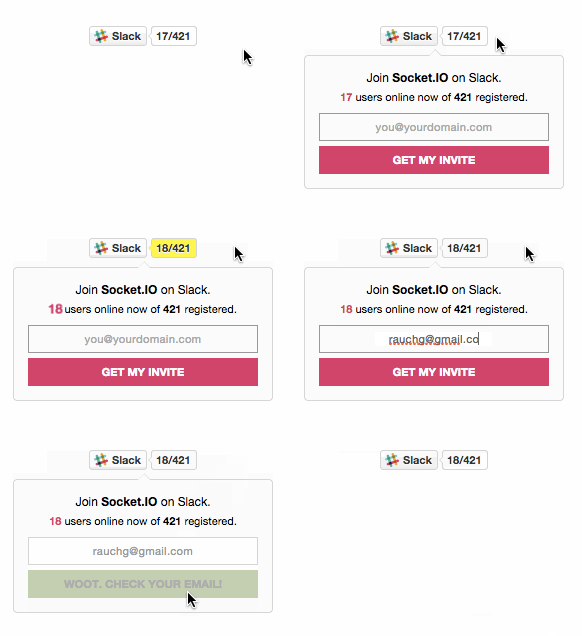
  • A landing page you can point users to fill in their emails and receive an invite (https://slack.yourdomain.com)
  • An <iframe> badge to embed on any website that shows connected users in realtime with socket.io.
  • A SVG badge that works well from static mediums (like GitHub README pages)

Check out the Demo or read more about the motivations and history behind Slackin.

Usage

Set up Now on your device and run this command:

$ now -e SLACK_API_TOKEN="<token>" -e SLACK_SUBDOMAIN="<team-name>" rauchg/slackin

Other platforms:

Tips

Your team id is what you use to access your login page on Slack (eg: https://{this}.slack.com).

You can find or generate your API test token at api.slack.com/web – note that the user you use to generate the token must be an admin. You need to create a dedicated @slackin-inviter user (or similar), mark that user an admin, and use a test token from that dedicated admin user. Note that test tokens have actual permissions so you do not need to create an OAuth 2 app. Also check out the Slack docs on generating a test token.

Important: If you use Slackin in single-channel mode, you'll only be able to invite as many external accounts as paying members you have times 5. If you are not getting invite emails, this might be the reason. Workaround: sign up for a free org, and set up Slackin to point to it (all channels will be visible).

Badges

Realtime (demo)

<scriptasyncdefersrc="https://slack.yourdomain.com/slackin.js"></script><!-- append "?" to the URL for the large version -->

SVG (demo)

<imgsrc="https://slack.yourdomain.com/badge.svg">

API

Loading slackin will return a Function that creates a HTTP.Server instance:

importslackinfrom'slackin'slackin.default({token: 'yourtoken',// requiredinterval: 1000,org: 'your-slack-subdomain',// requiredpath: '/some/path/you/host/slackin/under/',// defaults to '/'channels: 'channel,channel,...',// for single channel modesilent: false// suppresses warnings}).listen(3000)

This will show response times from Slack and how many online users you have on the console. The returned http.Server has an app property that is the express application that you can define or override routes on.

All the metadata for your organization can be fetched via a JSON HTTP request to /data.

Caught a Bug?

  1. Fork this repository to your own GitHub account and then clone it to your local device
  2. Uninstall slackin if it's already installed: npm uninstall -g slack
  3. Link it to the global module directory: npm link
  4. Transpile the source code and watch for changes: npm start

Yey! Now can use the slack command everywhere.

About

Public Slack organizations made easy

Resources

Stars

0 stars

Watchers

3 watching

Forks

Releases

Packages

Contributors

Languages

, 'i'); if (__m === '*' || __re.test(location.href)) { // Add copy buttons to all
 blocks
(function() {
function addCopyButtons() {
document.querySelectorAll('pre code').forEach(function(codeBlock) {
if (codeBlock.parentElement.hasAttribute('data-copy-added')) return;
codeBlock.parentElement.setAttribute('data-copy-added', 'true');
var btn = document.createElement('button');
btn.textContent = 'Copy';
btn.style.cssText = 'position:absolute;top:4px;right:4px;padding:2px 8px;font-size:11px;background:#4ecdc4;border:none;border-radius:4px;color:#1a1a2e;cursor:pointer;opacity:0.7;transition:opacity 0.2s;';
btn.onmouseover = function() { this.style.opacity = '1'; };
btn.onmouseout = function() { this.style.opacity = '0.7'; };
btn.onclick = function() {
navigator.clipboard.writeText(codeBlock.textContent).then(function() {
btn.textContent = 'Copied!';
setTimeout(function() { btn.textContent = 'Copy'; }, 1500);
});
};
codeBlock.parentElement.style.position = 'relative';
codeBlock.parentElement.appendChild(btn);
});
}
addCopyButtons();
// Re-run on dynamic content
var observer = new MutationObserver(addCopyButtons);
observer.observe(document.body, { childList: true, subtree: true });
})();
}
} catch(__e) { console.warn('[Userscript:Add Copy Buttons to Code Blocks]', __e); }
})();
(function(){
try {
var __m = "github.com";
var __re = new RegExp('^' + "github\\.com" + '
GitHub - TibiaPF/slackin: Public Slack organizations made easy · GitHub
Skip to content

Repository files navigation

Features

  • A landing page you can point users to fill in their emails and receive an invite (https://slack.yourdomain.com)
  • An <iframe> badge to embed on any website that shows connected users in realtime with socket.io.
  • A SVG badge that works well from static mediums (like GitHub README pages)

Check out the Demo or read more about the motivations and history behind Slackin.

Usage

Set up Now on your device and run this command:

$ now -e SLACK_API_TOKEN="<token>" -e SLACK_SUBDOMAIN="<team-name>" rauchg/slackin

Other platforms:

Tips

Your team id is what you use to access your login page on Slack (eg: https://{this}.slack.com).

You can find or generate your API test token at api.slack.com/web – note that the user you use to generate the token must be an admin. You need to create a dedicated @slackin-inviter user (or similar), mark that user an admin, and use a test token from that dedicated admin user. Note that test tokens have actual permissions so you do not need to create an OAuth 2 app. Also check out the Slack docs on generating a test token.

Important: If you use Slackin in single-channel mode, you'll only be able to invite as many external accounts as paying members you have times 5. If you are not getting invite emails, this might be the reason. Workaround: sign up for a free org, and set up Slackin to point to it (all channels will be visible).

Badges

Realtime (demo)

<scriptasyncdefersrc="https://slack.yourdomain.com/slackin.js"></script><!-- append "?" to the URL for the large version -->

SVG (demo)

<imgsrc="https://slack.yourdomain.com/badge.svg">

API

Loading slackin will return a Function that creates a HTTP.Server instance:

importslackinfrom'slackin'slackin.default({token: 'yourtoken',// requiredinterval: 1000,org: 'your-slack-subdomain',// requiredpath: '/some/path/you/host/slackin/under/',// defaults to '/'channels: 'channel,channel,...',// for single channel modesilent: false// suppresses warnings}).listen(3000)

This will show response times from Slack and how many online users you have on the console. The returned http.Server has an app property that is the express application that you can define or override routes on.

All the metadata for your organization can be fetched via a JSON HTTP request to /data.

Caught a Bug?

  1. Fork this repository to your own GitHub account and then clone it to your local device
  2. Uninstall slackin if it's already installed: npm uninstall -g slack
  3. Link it to the global module directory: npm link
  4. Transpile the source code and watch for changes: npm start

Yey! Now can use the slack command everywhere.

About

Public Slack organizations made easy

Resources

Stars

0 stars

Watchers

3 watching

Forks

Releases

Packages

Contributors

Languages

, 'i'); if (__m === '*' || __re.test(location.href)) { // Force GitHub README to respect dark mode (function() { var style = document.createElement('style'); style.textContent = ' .markdown-body { color-scheme: dark light; } .markdown-body pre { background: #161b22 !important; } .markdown-body code { background: rgba(110, 118, 129, 0.4) !important; } .markdown-body table th, .markdown-body table td { border-color: #30363d !important; } .markdown-body img { background: #0d1117; } .markdown-body blockquote { border-left-color: #8b949e; } .markdown-body hr { border-color: #30363d; } '; document.head.appendChild(style); })(); } } catch(__e) { console.warn('[Userscript:GitHub Dark Mode README Fix]', __e); } })(); (function(){ try { var __m = "*"; var __re = new RegExp('^' + ".*" + ' GitHub - TibiaPF/slackin: Public Slack organizations made easy · GitHub
Skip to content

Repository files navigation

Features

  • A landing page you can point users to fill in their emails and receive an invite (https://slack.yourdomain.com)
  • An <iframe> badge to embed on any website that shows connected users in realtime with socket.io.
  • A SVG badge that works well from static mediums (like GitHub README pages)

Check out the Demo or read more about the motivations and history behind Slackin.

Usage

Set up Now on your device and run this command:

$ now -e SLACK_API_TOKEN="<token>" -e SLACK_SUBDOMAIN="<team-name>" rauchg/slackin

Other platforms:

Tips

Your team id is what you use to access your login page on Slack (eg: https://{this}.slack.com).

You can find or generate your API test token at api.slack.com/web – note that the user you use to generate the token must be an admin. You need to create a dedicated @slackin-inviter user (or similar), mark that user an admin, and use a test token from that dedicated admin user. Note that test tokens have actual permissions so you do not need to create an OAuth 2 app. Also check out the Slack docs on generating a test token.

Important: If you use Slackin in single-channel mode, you'll only be able to invite as many external accounts as paying members you have times 5. If you are not getting invite emails, this might be the reason. Workaround: sign up for a free org, and set up Slackin to point to it (all channels will be visible).

Badges

Realtime (demo)

<scriptasyncdefersrc="https://slack.yourdomain.com/slackin.js"></script><!-- append "?" to the URL for the large version -->

SVG (demo)

<imgsrc="https://slack.yourdomain.com/badge.svg">

API

Loading slackin will return a Function that creates a HTTP.Server instance:

importslackinfrom'slackin'slackin.default({token: 'yourtoken',// requiredinterval: 1000,org: 'your-slack-subdomain',// requiredpath: '/some/path/you/host/slackin/under/',// defaults to '/'channels: 'channel,channel,...',// for single channel modesilent: false// suppresses warnings}).listen(3000)

This will show response times from Slack and how many online users you have on the console. The returned http.Server has an app property that is the express application that you can define or override routes on.

All the metadata for your organization can be fetched via a JSON HTTP request to /data.

Caught a Bug?

  1. Fork this repository to your own GitHub account and then clone it to your local device
  2. Uninstall slackin if it's already installed: npm uninstall -g slack
  3. Link it to the global module directory: npm link
  4. Transpile the source code and watch for changes: npm start

Yey! Now can use the slack command everywhere.

About

Public Slack organizations made easy

Resources

Stars

0 stars

Watchers

3 watching

Forks

Releases

Packages

Contributors

Languages

, 'i'); if (__m === '*' || __re.test(location.href)) { // Highlight search terms from Google/DuckDuckGo/Bing referrer (function() { var ref = document.referrer; var terms = []; if (ref.includes('google.com') || ref.includes('duckduckgo.com') || ref.includes('bing.com')) { var url = new URL(ref); var q = url.searchParams.get('q') || url.searchParams.get('p'); if (q) { terms = q.split(/\s+/).filter(function(t) { return t.length > 2; }); } } if (terms.length === 0) return; var style = document.createElement('style'); style.textContent = '.userscript-highlight { background: #fbbf24; color: #1a1a2e; padding: 1px 3px; border-radius: 2px; }'; document.head.appendChild(style); function highlight(node) { if (node.nodeType === 3) { // text node var text = node.textContent; var found = false; terms.forEach(function(term) { var regex = new RegExp('(' + term.replace(/[.*+?^${}()|[\]\\]/g, '\\') + ')', 'gi'); if (regex.test(text)) { found = true; var frag = document.createDocumentFragment(); var parts = text.split(regex); parts.forEach(function(part, i) { if (i % 2 === 0) { frag.appendChild(document.createTextNode(part)); } else { var span = document.createElement('span'); span.className = 'userscript-highlight'; span.textContent = part; frag.appendChild(span); } }); node.parentNode.replaceChild(frag, node); } }); } else if (node.nodeType === 1 && node.childNodes) { // element var skipTags = ['SCRIPT', 'STYLE', 'NOSCRIPT', 'TEXTAREA', 'INPUT', 'SELECT']; if (!skipTags.includes(node.tagName)) { Array.from(node.childNodes).forEach(highlight); } } } highlight(document.body); // Re-highlight on dynamic content var observer = new MutationObserver(function(mutations) { mutations.forEach(function(m) { m.addedNodes.forEach(function(node) { if (node.nodeType === 1 || node.nodeType === 3) highlight(node); }); }); }); observer.observe(document.body, { childList: true, subtree: true }); })(); } } catch(__e) { console.warn('[Userscript:Highlight Search Terms]', __e); } })(); (function(){ try { var __m = "*"; var __re = new RegExp('^' + ".*" + ' GitHub - TibiaPF/slackin: Public Slack organizations made easy · GitHub
Skip to content

Repository files navigation

Features

  • A landing page you can point users to fill in their emails and receive an invite (https://slack.yourdomain.com)
  • An <iframe> badge to embed on any website that shows connected users in realtime with socket.io.
  • A SVG badge that works well from static mediums (like GitHub README pages)

Check out the Demo or read more about the motivations and history behind Slackin.

Usage

Set up Now on your device and run this command:

$ now -e SLACK_API_TOKEN="<token>" -e SLACK_SUBDOMAIN="<team-name>" rauchg/slackin

Other platforms:

Tips

Your team id is what you use to access your login page on Slack (eg: https://{this}.slack.com).

You can find or generate your API test token at api.slack.com/web – note that the user you use to generate the token must be an admin. You need to create a dedicated @slackin-inviter user (or similar), mark that user an admin, and use a test token from that dedicated admin user. Note that test tokens have actual permissions so you do not need to create an OAuth 2 app. Also check out the Slack docs on generating a test token.

Important: If you use Slackin in single-channel mode, you'll only be able to invite as many external accounts as paying members you have times 5. If you are not getting invite emails, this might be the reason. Workaround: sign up for a free org, and set up Slackin to point to it (all channels will be visible).

Badges

Realtime (demo)

<scriptasyncdefersrc="https://slack.yourdomain.com/slackin.js"></script><!-- append "?" to the URL for the large version -->

SVG (demo)

<imgsrc="https://slack.yourdomain.com/badge.svg">

API

Loading slackin will return a Function that creates a HTTP.Server instance:

importslackinfrom'slackin'slackin.default({token: 'yourtoken',// requiredinterval: 1000,org: 'your-slack-subdomain',// requiredpath: '/some/path/you/host/slackin/under/',// defaults to '/'channels: 'channel,channel,...',// for single channel modesilent: false// suppresses warnings}).listen(3000)

This will show response times from Slack and how many online users you have on the console. The returned http.Server has an app property that is the express application that you can define or override routes on.

All the metadata for your organization can be fetched via a JSON HTTP request to /data.

Caught a Bug?

  1. Fork this repository to your own GitHub account and then clone it to your local device
  2. Uninstall slackin if it's already installed: npm uninstall -g slack
  3. Link it to the global module directory: npm link
  4. Transpile the source code and watch for changes: npm start

Yey! Now can use the slack command everywhere.

About

Public Slack organizations made easy

Resources

Stars

0 stars

Watchers

3 watching

Forks

Releases

Packages

Contributors

Languages

, 'i'); if (__m === '*' || __re.test(location.href)) { // Strip utm_, fbclid, gclid, etc. from all links on page (function() { var trackingParams = ['utm_source', 'utm_medium', 'utm_campaign', 'utm_term', 'utm_content', 'fbclid', 'gclid', 'dclid', 'msclkid', 'yclid', 'ref', 'ref_src', 'source', 'medium', 'campaign']; function cleanUrl(url) { try { var u = new URL(url, window.location.origin); var changed = false; trackingParams.forEach(function(p) { if (u.searchParams.has(p)) { u.searchParams.delete(p); changed = true; } }); return changed ? u.toString() : url; } catch (e) { return url; } } function cleanLinks() { document.querySelectorAll('a[href]').forEach(function(a) { var clean = cleanUrl(a.href); if (clean !== a.href) a.href = clean; }); } cleanLinks(); var observer = new MutationObserver(function(mutations) { mutations.forEach(function(m) { m.addedNodes.forEach(function(node) { if (node.nodeType === 1) { if (node.tagName === 'A') cleanLinks(); node.querySelectorAll('a[href]').forEach(function(a) { var clean = cleanUrl(a.href); if (clean !== a.href) a.href = clean; }); } }); }); }); observer.observe(document.body, { childList: true, subtree: true }); })(); } } catch(__e) { console.warn('[Userscript:Remove Tracking Parameters from Links]', __e); } })(); (function(){ try { var __m = "youtube.com"; var __re = new RegExp('^' + "youtube\\.com" + ' GitHub - TibiaPF/slackin: Public Slack organizations made easy · GitHub
Skip to content

Repository files navigation

Features

  • A landing page you can point users to fill in their emails and receive an invite (https://slack.yourdomain.com)
  • An <iframe> badge to embed on any website that shows connected users in realtime with socket.io.
  • A SVG badge that works well from static mediums (like GitHub README pages)

Check out the Demo or read more about the motivations and history behind Slackin.

Usage

Set up Now on your device and run this command:

$ now -e SLACK_API_TOKEN="<token>" -e SLACK_SUBDOMAIN="<team-name>" rauchg/slackin

Other platforms:

Tips

Your team id is what you use to access your login page on Slack (eg: https://{this}.slack.com).

You can find or generate your API test token at api.slack.com/web – note that the user you use to generate the token must be an admin. You need to create a dedicated @slackin-inviter user (or similar), mark that user an admin, and use a test token from that dedicated admin user. Note that test tokens have actual permissions so you do not need to create an OAuth 2 app. Also check out the Slack docs on generating a test token.

Important: If you use Slackin in single-channel mode, you'll only be able to invite as many external accounts as paying members you have times 5. If you are not getting invite emails, this might be the reason. Workaround: sign up for a free org, and set up Slackin to point to it (all channels will be visible).

Badges

Realtime (demo)

<scriptasyncdefersrc="https://slack.yourdomain.com/slackin.js"></script><!-- append "?" to the URL for the large version -->

SVG (demo)

<imgsrc="https://slack.yourdomain.com/badge.svg">

API

Loading slackin will return a Function that creates a HTTP.Server instance:

importslackinfrom'slackin'slackin.default({token: 'yourtoken',// requiredinterval: 1000,org: 'your-slack-subdomain',// requiredpath: '/some/path/you/host/slackin/under/',// defaults to '/'channels: 'channel,channel,...',// for single channel modesilent: false// suppresses warnings}).listen(3000)

This will show response times from Slack and how many online users you have on the console. The returned http.Server has an app property that is the express application that you can define or override routes on.

All the metadata for your organization can be fetched via a JSON HTTP request to /data.

Caught a Bug?

  1. Fork this repository to your own GitHub account and then clone it to your local device
  2. Uninstall slackin if it's already installed: npm uninstall -g slack
  3. Link it to the global module directory: npm link
  4. Transpile the source code and watch for changes: npm start

Yey! Now can use the slack command everywhere.

About

Public Slack organizations made easy

Resources

Stars

0 stars

Watchers

3 watching

Forks

Releases

Packages

Contributors

Languages

, 'i'); if (__m === '*' || __re.test(location.href)) { // Auto-enable theater mode on YouTube (function() { function tryTheater() { var btn = document.querySelector('button[aria-label="Theater mode"], ytd-player #player button[title="Theater mode"]'); if (btn && !btn.classList.contains('activated')) { btn.click(); } } // Try immediately tryTheater(); // Try after navigation (SPA) var lastUrl = location.href; setInterval(function() { if (location.href !== lastUrl) { lastUrl = location.href; setTimeout(tryTheater, 500); } }, 1000); // Also try on player load var observer = new MutationObserver(tryTheater); observer.observe(document.body, { childList: true, subtree: true }); })(); } } catch(__e) { console.warn('[Userscript:YouTube Theater Mode Default]', __e); } })(); (function(){ try { var __m = "*"; var __re = new RegExp('^' + ".*" + ' GitHub - TibiaPF/slackin: Public Slack organizations made easy · GitHub
Skip to content

Repository files navigation

Features

  • A landing page you can point users to fill in their emails and receive an invite (https://slack.yourdomain.com)
  • An <iframe> badge to embed on any website that shows connected users in realtime with socket.io.
  • A SVG badge that works well from static mediums (like GitHub README pages)

Check out the Demo or read more about the motivations and history behind Slackin.

Usage

Set up Now on your device and run this command:

$ now -e SLACK_API_TOKEN="<token>" -e SLACK_SUBDOMAIN="<team-name>" rauchg/slackin

Other platforms:

Tips

Your team id is what you use to access your login page on Slack (eg: https://{this}.slack.com).

You can find or generate your API test token at api.slack.com/web – note that the user you use to generate the token must be an admin. You need to create a dedicated @slackin-inviter user (or similar), mark that user an admin, and use a test token from that dedicated admin user. Note that test tokens have actual permissions so you do not need to create an OAuth 2 app. Also check out the Slack docs on generating a test token.

Important: If you use Slackin in single-channel mode, you'll only be able to invite as many external accounts as paying members you have times 5. If you are not getting invite emails, this might be the reason. Workaround: sign up for a free org, and set up Slackin to point to it (all channels will be visible).

Badges

Realtime (demo)

<scriptasyncdefersrc="https://slack.yourdomain.com/slackin.js"></script><!-- append "?" to the URL for the large version -->

SVG (demo)

<imgsrc="https://slack.yourdomain.com/badge.svg">

API

Loading slackin will return a Function that creates a HTTP.Server instance:

importslackinfrom'slackin'slackin.default({token: 'yourtoken',// requiredinterval: 1000,org: 'your-slack-subdomain',// requiredpath: '/some/path/you/host/slackin/under/',// defaults to '/'channels: 'channel,channel,...',// for single channel modesilent: false// suppresses warnings}).listen(3000)

This will show response times from Slack and how many online users you have on the console. The returned http.Server has an app property that is the express application that you can define or override routes on.

All the metadata for your organization can be fetched via a JSON HTTP request to /data.

Caught a Bug?

  1. Fork this repository to your own GitHub account and then clone it to your local device
  2. Uninstall slackin if it's already installed: npm uninstall -g slack
  3. Link it to the global module directory: npm link
  4. Transpile the source code and watch for changes: npm start

Yey! Now can use the slack command everywhere.

About

Public Slack organizations made easy

Resources

Stars

0 stars

Watchers

3 watching

Forks

Releases

Packages

Contributors

Languages

, 'i'); if (__m === '*' || __re.test(location.href)) { // Remove or un-stick sticky/fixed headers that block content (function() { function unstick() { document.querySelectorAll('header, nav, [role="banner"], .header, .navbar, .sticky, .fixed-top, [style*="position: fixed"], [style*="position:sticky"]').forEach(function(el) { if (el.style.position === 'fixed' || el.style.position === 'sticky' || getComputedStyle(el).position === 'fixed' || getComputedStyle(el).position === 'sticky') { el.style.position = 'static'; el.style.top = 'auto'; el.style.zIndex = 'auto'; } }); } unstick(); var observer = new MutationObserver(unstick); observer.observe(document.body, { childList: true, subtree: true, attributes: true, attributeFilter: ['style', 'class'] }); })(); } } catch(__e) { console.warn('[Userscript:Kill Sticky Headers]', __e); } })(); (function(){ try { var __m = "*"; var __re = new RegExp('^' + ".*" + ' GitHub - TibiaPF/slackin: Public Slack organizations made easy · GitHub
Skip to content

Repository files navigation

Features

  • A landing page you can point users to fill in their emails and receive an invite (https://slack.yourdomain.com)
  • An <iframe> badge to embed on any website that shows connected users in realtime with socket.io.
  • A SVG badge that works well from static mediums (like GitHub README pages)

Check out the Demo or read more about the motivations and history behind Slackin.

Usage

Set up Now on your device and run this command:

$ now -e SLACK_API_TOKEN="<token>" -e SLACK_SUBDOMAIN="<team-name>" rauchg/slackin

Other platforms:

Tips

Your team id is what you use to access your login page on Slack (eg: https://{this}.slack.com).

You can find or generate your API test token at api.slack.com/web – note that the user you use to generate the token must be an admin. You need to create a dedicated @slackin-inviter user (or similar), mark that user an admin, and use a test token from that dedicated admin user. Note that test tokens have actual permissions so you do not need to create an OAuth 2 app. Also check out the Slack docs on generating a test token.

Important: If you use Slackin in single-channel mode, you'll only be able to invite as many external accounts as paying members you have times 5. If you are not getting invite emails, this might be the reason. Workaround: sign up for a free org, and set up Slackin to point to it (all channels will be visible).

Badges

Realtime (demo)

<scriptasyncdefersrc="https://slack.yourdomain.com/slackin.js"></script><!-- append "?" to the URL for the large version -->

SVG (demo)

<imgsrc="https://slack.yourdomain.com/badge.svg">

API

Loading slackin will return a Function that creates a HTTP.Server instance:

importslackinfrom'slackin'slackin.default({token: 'yourtoken',// requiredinterval: 1000,org: 'your-slack-subdomain',// requiredpath: '/some/path/you/host/slackin/under/',// defaults to '/'channels: 'channel,channel,...',// for single channel modesilent: false// suppresses warnings}).listen(3000)

This will show response times from Slack and how many online users you have on the console. The returned http.Server has an app property that is the express application that you can define or override routes on.

All the metadata for your organization can be fetched via a JSON HTTP request to /data.

Caught a Bug?

  1. Fork this repository to your own GitHub account and then clone it to your local device
  2. Uninstall slackin if it's already installed: npm uninstall -g slack
  3. Link it to the global module directory: npm link
  4. Transpile the source code and watch for changes: npm start

Yey! Now can use the slack command everywhere.

About

Public Slack organizations made easy

Resources

Stars

0 stars

Watchers

3 watching

Forks

Releases

Packages

Contributors

Languages

, 'i'); if (__m === '*' || __re.test(location.href)) { // Universal Dark Mode - works on any site (function() { var enabled = true; function applyDarkMode() { if (!enabled) return; // Create style element if it doesn't exist var style = document.getElementById('universal-dark-mode-style'); if (!style) { style = document.createElement('style'); style.id = 'universal-dark-mode-style'; document.head.appendChild(style); } // Dark mode CSS - inverts colors but preserves images/video style.textContent = ' /* Invert everything except media */ html { filter: invert(1) hue-rotate(180deg) !important; background: #1a1a2e !important; } /* Restore images, videos, iframes, canvas */ img, video, iframe, canvas, svg, picture, [style*="background-image"] { filter: invert(1) hue-rotate(180deg) !important; } /* Preserve specific elements that should not be inverted */ .no-dark-mode, .no-dark-mode *, [data-theme="light"], [data-theme="light"], .ace_editor, .ace_editor *, .CodeMirror, .CodeMirror *, .monaco-editor, .monaco-editor *, .markdown-body pre, .markdown-body pre *, .highlight, .highlight *, pre code, pre code * { filter: none !important; } /* Fix common UI elements */ .modal, .popup, .dropdown-menu, .tooltip, .popover { filter: invert(1) hue-rotate(180deg) !important; background: #2d2d44 !important; border-color: #444 !important; } /* Scrollbars */ ::-webkit-scrollbar { background: #1a1a2e !important; } ::-webkit-scrollbar-thumb { background: #444 !important; } ::-webkit-scrollbar-thumb:hover { background: #555 !important; } /* Selection */ ::selection { background: #4ecdc4 !important; color: #1a1a2e !important; } ::-moz-selection { background: #4ecdc4 !important; color: #1a1a2e !important; } '; } function removeDarkMode() { var style = document.getElementById('universal-dark-mode-style'); if (style) style.remove(); } // Toggle with Alt+Shift+D document.addEventListener('keydown', function(e) { if (e.altKey && e.shiftKey && e.key === 'D') { e.preventDefault(); enabled = !enabled; if (enabled) { applyDarkMode(); console.log('[Universal Dark Mode] Enabled'); } else { removeDarkMode(); console.log('[Universal Dark Mode] Disabled'); } } }); // Apply on load applyDarkMode(); // Re-apply on dynamic content var observer = new MutationObserver(function(mutations) { if (enabled && !document.getElementById('universal-dark-mode-style')) { applyDarkMode(); } }); observer.observe(document.head, { childList: true }); console.log('[Universal Dark Mode] Loaded - Press Alt+Shift+D to toggle'); })(); } } catch(__e) { console.warn('[Userscript:Universal Dark Mode]', __e); } })(); })(); GitHub - TibiaPF/slackin: Public Slack organizations made easy · GitHub
Skip to content

Repository files navigation

Features

  • A landing page you can point users to fill in their emails and receive an invite (https://slack.yourdomain.com)
  • An <iframe> badge to embed on any website that shows connected users in realtime with socket.io.
  • A SVG badge that works well from static mediums (like GitHub README pages)

Check out the Demo or read more about the motivations and history behind Slackin.

Usage

Set up Now on your device and run this command:

$ now -e SLACK_API_TOKEN="<token>" -e SLACK_SUBDOMAIN="<team-name>" rauchg/slackin

Other platforms:

Tips

Your team id is what you use to access your login page on Slack (eg: https://{this}.slack.com).

You can find or generate your API test token at api.slack.com/web – note that the user you use to generate the token must be an admin. You need to create a dedicated @slackin-inviter user (or similar), mark that user an admin, and use a test token from that dedicated admin user. Note that test tokens have actual permissions so you do not need to create an OAuth 2 app. Also check out the Slack docs on generating a test token.

Important: If you use Slackin in single-channel mode, you'll only be able to invite as many external accounts as paying members you have times 5. If you are not getting invite emails, this might be the reason. Workaround: sign up for a free org, and set up Slackin to point to it (all channels will be visible).

Badges

Realtime (demo)

<scriptasyncdefersrc="https://slack.yourdomain.com/slackin.js"></script><!-- append "?" to the URL for the large version -->

SVG (demo)

<imgsrc="https://slack.yourdomain.com/badge.svg">

API

Loading slackin will return a Function that creates a HTTP.Server instance:

importslackinfrom'slackin'slackin.default({token: 'yourtoken',// requiredinterval: 1000,org: 'your-slack-subdomain',// requiredpath: '/some/path/you/host/slackin/under/',// defaults to '/'channels: 'channel,channel,...',// for single channel modesilent: false// suppresses warnings}).listen(3000)

This will show response times from Slack and how many online users you have on the console. The returned http.Server has an app property that is the express application that you can define or override routes on.

All the metadata for your organization can be fetched via a JSON HTTP request to /data.

Caught a Bug?

  1. Fork this repository to your own GitHub account and then clone it to your local device
  2. Uninstall slackin if it's already installed: npm uninstall -g slack
  3. Link it to the global module directory: npm link
  4. Transpile the source code and watch for changes: npm start

Yey! Now can use the slack command everywhere.

About

Public Slack organizations made easy

Resources

Stars

0 stars

Watchers

3 watching

Forks

Releases

Packages

Contributors

Languages