


A flexible chat formatting plugin with MiniMessage support for LuckPerms
Modern chat formatting powered by MiniMessage, full LuckPerms metadata support, group/track formats, and PlaceholderAPI!
- LuckPerms(Required) – Permissions plugin
- PlaceholderAPI(Optional) – Additional placeholders
- Full MiniMessage formatting support
- Group and track-specific chat formats
- Optional support for PlaceholderAPI
- Supports
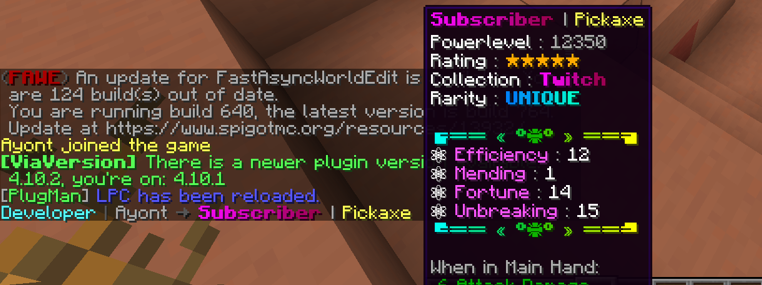
[ITEM]placeholder in chat - Customizable reload message
- No legacy color codes – modern MiniMessage only
| Command / Feature | Permission | Description |
|---|---|---|
/lpc reload | lpc.reload | Reloads the config |
| MiniMessage colors | lpc.colorcodes | Allows using MiniMessage codes |
[ITEM] Placeholder | lpc.itemplaceholder | Enables the [ITEM] placeholder |
# LPC Configuration# Main chat format (MiniMessage!)chat-format: "{prefix}{name}<dark_gray> »<reset> {message}"# Format per group (optional)group-formats:
# default: "<gray>[User]</gray> {name}<dark_gray> »<reset> {message}"# admin: "<red>[Admin]</red> {name}<dark_gray> »<reset> {message}"# Format per track (optional)track-formats:
# staff_track: "<gold>[Staff]</gold> {name}<dark_gray> »<reset> {message}"# donator_track: "<aqua>[Donator]</aqua> {name}<dark_gray> »<reset> {message}"# Enable the [ITEM] placeholderuse-item-placeholder: true# Reload messagereload-message: "<green>LPC configuration reloaded successfully!"| Placeholder | Description |
|---|---|
{message} | The chat message |
{name} | Player's name |
{displayname} | Display name / nickname |
{world} | Player's current world |
{prefix} | Highest priority prefix |
{suffix} | Highest priority suffix |
{prefixes} | Sorted list of all prefixes |
{suffixes} | Sorted list of all suffixes |
{username-color} | Username color from meta |
{message-color} | Message color from meta |
ℹ️ Important: All color values (prefix, suffix, etc.) must be in MiniMessage format – no legacy codes (
&a,§b, etc.)
Chat Format Example

[ITEM] Placeholder Example
- Stop your server
- Place the
LPC.jarinto your/pluginsfolder - Start the server to generate configuration files
- Edit the
config.ymlto your liking - Use
/lpc reloadto apply your changes ✅
- Not affiliated with LuckPerms – Please do not contact the LuckPerms author for support!
- Legacy formatting version available at: GitHub LPC
| LuckPerms Software | Planned Support |
|---|---|
| Paper/Spigot 1.8.8-1.21 | 🔧 Planned |
| Paper/Spigot 1.21-latest | ✅ Supported |
| Fabric 26.1 | 🔧 Planned |
| NeoForge 26.1 | 🔧 Planned |
| Forge 26.1 | 🔧 Planned |
| Hytale beta | ❌ Unplanned |
| Velocity 3.x | 🔧 Planned |
| Sponge 12 | 🔧 Planned |
| Nukkit | ❌ Unplanned |
| Bungeecord | 🔧 Planned |
| Bukkit-Legacy 1.7.10 | ❌ Unplanned |