MVVM View System for Unity3D
Odin Inspector Asset recommended to usage with this Package (https://odininspector.com)
- UniGame.ViewSystem
- support base principles of MVVM concepts.
- support ui skins out of the box
- based on Unity Addressables Resources
- handle Addressables Resource lifetime
For this module you need to install R3 package, NuGetForUnity and ObservableCollections.
ObservableCollections can be installer vai NuGetForUnity
In Unity projects, you can installing ObservableCollections with NugetForUnity. If R3 integration is required, similarly install ObservableCollections.R3 via NuGetForUnity.
follow the instructions on home pages for these packages:
- https://github.com/Cysharp/R3
- https://github.com/GlitchEnzo/NuGetForUnity
- https://github.com/Cysharp/ObservableCollections
"dependencies": {
"com.unity.localization": "1.5.4",
"com.unity.addressables": "2.6.0",
"com.unigame.addressablestools" : "https://github.com/UnioGame/unigame.addressables",
"com.unigame.unicore": "https://github.com/UnioGame/unigame.core.git",
"com.unigame.localization": "https://github.com/UnioGame/unigame.localization.git",
"com.unigame.rx": "https://github.com/UnioGame/unigame.rx.git",
"com.cysharp.unitask" : "https://github.com/Cysharp/UniTask.git?path=src/UniTask/Assets/Plugins/UniTask",
"com.cysharp.r3": "https://github.com/Cysharp/R3.git?path=src/R3.Unity/Assets/R3.Unity",
"com.github-glitchenzo.nugetforunity": "https://github.com/GlitchEnzo/NuGetForUnity.git?path=/src/NuGetForUnity"
},
Add to your project manifiest by path [%UnityProject%]/Packages/manifiest.json new package:
{
"dependencies": {
"com.unigame.viewsystem" : "https://github.com/UnioGame/unigame.viewsystem.git""com.unigame.localization" : "https://github.com/UnioGame/unigame.localization.git",
"com.cysharp.unitask" : "https://github.com/Cysharp/UniTask.git?path=src/UniTask/Assets/Plugins/UniTask"
}
}- Create View System Asset

[MenuItem("Assets/UniGame/ViewSystem/Create ViewSystem")]Here you can initialize locations of views

For skinned views. Skin name of view equal to it's parent folder. Your project views prefabs structure involve direct mapping into its skins

For now All views load at runtime through Unity Addressable Asset system
By default if your views not registered as Addressable Asset when View System automatically register it into new Addressable Group With name equal to its ViewsSettings Source Name

You can enable Addressable Group Name override:
- Enable "Apply Addressable Group" option
- SetUp new views group name

View System Support additional "nested" view settings sources. All view from that sources will be registered into main View System when it loaded. All nested view settings loads async. If that't source must be loaded before the View System will be available its possible activate "Await Loading" option.

"Layout Flow Control" asset control views behaviours between all layouts. View System support two flow behaviour out from the box.

- DefaultFlow
Base flow controller with auto closing screens/windows when active scene changed
- SingleViewFlow
More complex flow with support 'IScreenSuspendingWindow' api. If View with 'IScreenSuspendingWindow' is open, when all current screens wills suspend and resume after it closed.
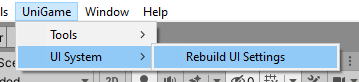
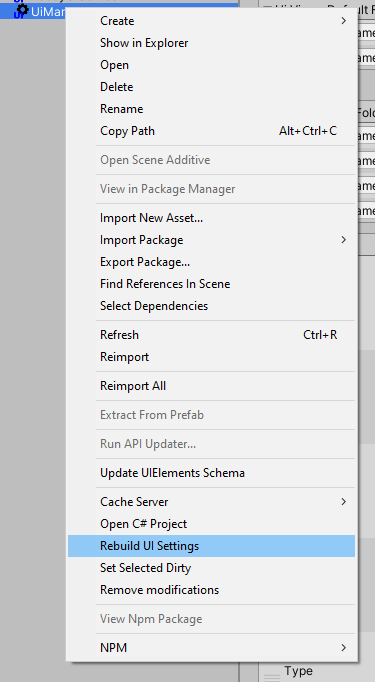
You can manualy trigger rebuild:
- Rebuild Command

- For All Settings
- For target settings asset from inspector context menu
Different flavours of the same view type can be created by utilizing skins. When a skin tag is provided on view creation the corresponding skin is instantiated (if it's been registered prior to it). Skin tag can be provided as a string or a variable of SkinId type (which allows choosing one of the registered tags from a dropdown list and implicitly converts it to a string)
voidExampleFunc(SkinIdlargeDemoView){awaitgameViewSystem.OpenWindow<DemoView>(ViewModel,"SmallDemoView");awaitgameViewSystem.OpenWindow<DemoView>(ViewModel,largeDemoView);}Place views of the same type in separate folders and add them to the UI Views Skin Folders list in view system settings. After rebuilding the views will be added to the views registry with folder names as their skin tags
Add View Skin Component to a prefab to turn it into a skin. To add a new skin tag enter it into Skin Tag Name field and press Invoke, an existing tag can be chosen from the Skin Tag dropdown list. No need to specify skin folders in view system settings


View Factory - provide custom view creation logic. You can create your own factory by implementing:
- IViewFactory
- IViewFactoryProvider
And select new provider in View System Settings
Add to your project scriptings define symbol "ZENJECT_ENABLED" to enable Zenject DI support

Anywhere in your initialization of game pass Zenject DiContainer to ZenjectViewFactoryProvider.Container static field
publicclassZenjectViewFactoryProvider:IViewFactoryProvider{publicstaticDiContainerContainer{get;set;}}You can use Zenject DI module as an example to create your own custom DI support in view lines of code. Module is located in ZenjectViewModule directory
//ZenjectViewFactory examplepublicclassZenjectViewFactory:IViewFactory{publicViewFactory_viewFactory;publicDiContainer_container;publicZenjectViewFactory(DiContainercontainer,AsyncLazyreadyStatus,IViewResourceProviderviewResourceProvider){_container=container;_viewFactory=newViewFactory(readyStatus,viewResourceProvider);}publicasyncUniTask<IView>Create(stringviewId,stringskinTag="",Transformparent=null,stringviewName=null,boolstayWorldPosition=false){varview=await_viewFactory.Create(viewId,skinTag,parent,viewName,stayWorldPosition);if(view==null||view.GameObject==null)returnview;varviewObject=view.GameObject;_container.InjectGameObject(viewObject);returnview;}}When ViewFactory creates or reuses a view whose root is a RectTransform, it restores the
root anchors, pivot, size, anchored position, local rotation, and local scale from the source
prefab before reactivating the instance. With stayWorldPosition enabled, the world position
and rotation are preserved after the layout reset.
This automatic reset applies only to the view root. Use a view state snapshot for child transforms and other visual properties changed by animations or runtime presentation logic.
ViewStateSnapshot is an opt-in utility for capturing and restoring the visual baseline of pooled or repeatedly initialized views. Any UnityEngine.Object can act as the snapshot owner and identifier.
Only explicitly registered objects and properties are captured. The API does not scan the view hierarchy and does not capture ViewModels, Animator state, Spine state, tweens, or dynamic content.
usingUniGame.ViewSystem.Runtime;publicsealedclassInventoryPanel:View<InventoryPanelViewModel>{[SerializeField]privateRectTransformpanel;[SerializeField]privateList<RectTransform>icons;[SerializeField]privateImagebackground;[SerializeField]privateGameObjectloadingIndicator;protectedoverrideUniTaskOnInitialize(InventoryPanelViewModelmodel){this.CacheViewState(panel,ViewTransformStateFlags.AnchoredPosition).Cache(icons,ViewTransformStateFlags.AnchoredPosition|ViewTransformStateFlags.LocalScale).CacheColor(background).CacheActive(loadingIndicator);this.RestoreViewState();returnUniTask.CompletedTask;}}The first cache call captures the baseline. Caching the same RectTransform again merges additional flags without replacing the original values.
ViewTransformStateFlags supports:
AnchoredPosition(anchoredPosition3D)SizeDeltaAnchors(anchorMinandanchorMax)PivotLocalRotationLocalScaleAll
Transforms are restored first, followed by graphic colors and active states.
The snapshot can be stored and restored explicitly:
ViewStateSnapshotsnapshot=this.CacheViewState(panel,ViewTransformStateFlags.All).CacheColor(background);this.RestoreViewState(snapshot);RestoreViewState(owner, snapshot) succeeds only when the snapshot is still registered for that owner. snapshot.Restore() can also be used when ownership has already been established by the caller.
Use TryGetViewState() for a lookup without creating a snapshot. Use ReleaseViewState() to return the snapshot to the class pool and allow the next cache call to capture a new baseline:
if(this.TryGetViewState(outvarsnapshot))snapshot.Restore();this.ReleaseViewState();- Snapshots are stored per owner and are released automatically with the owner's Unity asset lifetime.
- A pooled view keeps its original snapshot across model/view lifetime restarts.
- Releasing a view's model lifetime does not release its snapshot.
- Each pooled
ViewStateSnapshotowns reusable transform, color, and active-state dictionaries. Returning it to the pool clears the dictionaries but preserves their capacity. - Repeated restore operations do not create delegates or temporary collections.
- The API is intended for the Unity main thread.
- Captured targets must not be destroyed before their snapshot owner.
The View System uses MVVM principles to manage UI with reactive data binding and automatic lifetime management.
View System implements a sophisticated two-level lifetime management system that ensures proper cleanup of subscriptions and resources. This is critical for preventing memory leaks and managing complex UI hierarchies.
Each View maintains two independent LifeTimes that serve different purposes:
ViewLifeTime - Lifespan of the View Instance
- Created when View is instantiated
- Lives throughout entire View lifecycle (from creation to destruction)
- Manages resources that persist for the entire View lifecycle
- Terminated only when View is destroyed
- Used for: animations independent of model, component lifecycle events, long-lived resources
ModelLifeTime (aka LifeTime) - Lifespan of Data Subscriptions
- Created/restarted each time View is initialized with a model
- Manages all Observable subscriptions to model data
- Automatically restarted when model is changed
- Old subscriptions are automatically disconnected when restarted
- Used for: data binding, reactive streams, model-dependent operations
Diagram: LifeTime Management Flow
View Created
|
+--- ViewLifeTime.Start() ───────────────────────────────┐
(Lives for entire View) |
|
RegisterView(Model1) |
|
+--- ModelLifeTime.Restart() |
| |
+--- Subscribe to Model1 data |
| (health, mana, etc.) |
| |
+--- Active Subscriptions ●●● |
|
RegisterView(Model2) ← Model Changed! |
| |
+--- ModelLifeTime.Restart() |
| (Old subscriptions auto-disconnected) |
| |
+--- Subscribe to Model2 data |
| (fresh subscriptions) |
| |
+--- Active Subscriptions ●●● |
|
Close()/Destroy() |
| |
+--- ViewLifeTime.Terminate() ◄──────────────────────────┘
ModelLifeTime.Terminate()
Resources Released
View Destroyed
publicclassHealthBarView:ViewBase<CharacterViewModel>{[SerializeField]privateImagehealthFill;protectedoverrideUniTaskOnInitialize(CharacterViewModelmodel){this.Bind(model.CurrentHealth,UpdateHealthBar);returnUniTask.CompletedTask;}}Use ViewLifeTime for:
Use ModelLifeTime (LifeTime) for:
- All data bindings to Observable fields
- Async operations triggered by model changes
- Model-dependent subscriptions
- React to data stream events
// RECOMMENDED: Using Bind extensionsthis.Bind(model.Health,UpdateDisplay);// ALTERNATIVE: Direct Rx approach (what Bind does internally)model.Health.Subscribe(UpdateDisplay).AddTo(LifeTime);Key Difference:
- ViewLifeTime: "Keep this while View exists"
- ModelLifeTime: "Keep this while this Model is active"
When a View is reinitialized with a new model, the system automatically cleans up old subscriptions:
// Example: Character select screen with Bind extensionspublicclassCharacterDetailsView:ViewBase<CharacterViewModel>{[SerializeField]privateTextMeshProUGUInameText;[SerializeField]privateSliderhealthSlider;protectedoverrideUniTaskOnInitialize(CharacterViewModelmodel){// RECOMMENDED: Using Bind extensions (auto-managed)this.Bind(model.Name,nameText).Bind(model.Health,healthSlider);returnUniTask.CompletedTask;}}// In controller code:varcharacter1ViewModel=newCharacterViewModel{Name=new("Hero")};varcharacter2ViewModel=newCharacterViewModel{Name=new("Villain")};// User selects character 1awaitdetailsView.RegisterView(character1ViewModel);// → OnInitialize() bound to character1 stats// → Subscriptions connected to character1 data// User selects character 2awaitdetailsView.RegisterView(character2ViewModel);// → OnInitialize() called again// → OLD subscriptions to character1 automatically → DISCONNECTED// → NEW subscriptions to character2 → CREATED// → No memory leak, no duplicate subscriptionsWithout LifeTime Management (Memory Leak):
// ❌ WRONG - This leaks memory!publicvoidBadExample(CharacterViewModelmodel){model.Health.Subscribe(x =>UpdateUI(x));// Never unsubscribes!// If you call this 100 times with different models,// you'll have 100 active subscriptions}With LifeTime Management - Bind Extensions (RECOMMENDED):
// ✅ CORRECT - Using Bind (fluent API)publicvoidGoodExampleWithBind(CharacterViewModelmodel){this.Bind(model.Health,UpdateUI);// Auto-managed lifetime, disconnects on model change}Views have distinct status states throughout their lifecycle:
| Status | Meaning | Next State |
|---|---|---|
| None | Initial state | Shown, Hidden |
| Shown | View is visible and active | Hiding |
| Showing | Animation in progress | Shown |
| Hidden | View exists but not visible | Shown, Closed |
| Hiding | Hide animation in progress | Hidden |
| Closed | View destroyed, lifecycle ended | (final) |
Complete Status Flow Diagram:
RegisterView(model)
↓
Initialize(model)
↓
Status: None
↓
Show() called
↓
Status: Showing → OnShowAction() plays animation
↓
Status: Shown
↓
Hide() called
↓
Status: Hiding → OnHideAction() plays animation
↓
Status: Hidden
↓
Close() called
↓
Status: Closed → Destroy() → ViewLifeTime.Terminate()
Observable Status Tracking:
// RECOMMENDED: Using Bind extensionsthis.Bind(view.SelectStatus(ViewStatus.Hidden), v =>Debug.Log($"{v.SourceName} is hidden"));// ALTERNATIVE: Direct Rx approachview.Status.Where(status =>status==ViewStatus.Shown).Subscribe(_ =>Debug.Log("View is now visible")).AddTo(lifeTime);// ALTERNATIVE: Using SelectStatus helperview.SelectStatus(ViewStatus.Hidden).Subscribe(v =>Debug.Log($"{v.SourceName} is hidden")).AddTo(lifeTime);Lifecycle Hooks by Status:
publicclassMyView:ViewBase<MyViewModel>{[SerializeField]privateButtoncloseButton;protectedoverrideUniTaskOnInitialize(MyViewModelmodel){// Called right after model attachment// Status: None → Shown (transitioning)// Bind button to close commandthis.Bind(closeButton,model.CloseCommand);// Or with actionthis.Bind(closeButton,Close);returnUniTask.CompletedTask;}protectedoverrideUniTaskOnShowAction(){// Called when transitioning to Shown// Use for entrance animationsreturnPlayEntranceAnimation();}protectedoverrideUniTaskOnHideAction(){// Called when transitioning to Hidden // Use for exit animationsreturnPlayExitAnimation();}}All base Bind extensions use ViewModelLifetime that allows auto disconnect from data streams when ViewModel changed.
Binding extensions allow you to easily connect your view and data sources with a rich flow syntax and support Rx methods and async/await semantics.
Bind extensions support static lambda expressions to eliminate closure allocations. This is especially important in performance-critical scenarios like frequent updates or animations.
Static Lambda - Zero Allocation Closures:
A static lambda cannot capture any local variables, which prevents the compiler from creating a display class for closure storage:
// ✅ RECOMMENDED: Static lambda - zero allocation// Compiler doesn't create display class for closurethis.Bind(model,purchaseStream,static(model,stream)=>stream.purchase.Execute(stream));// ❌ Non-static lambda - closure allocation// Compiler creates display class to capture variablesthis.Bind(model,purchaseStream,(model,stream)=>stream.purchase.Execute(stream));When to use static lambdas:
- Combining multiple observable streams
- High-frequency updates (animations, real-time data)
- Performance-critical UI sections
- The lambda doesn't need to capture
thisor local variables
Example - Static Lambda Binding:
publicclassPurchaseView:ViewBase<PurchaseViewModel>{[SerializeField]privateButtonpurchaseButton;protectedoverrideUniTaskOnInitialize(PurchaseViewModelmodel){// Zero-allocation: static lambda combines two streamsthis.Bind(model,model.PurchaseStream,static(purchaseData,viewModel)=>viewModel.purchase.Execute(purchaseData));returnUniTask.CompletedTask;}}Static Lambda vs Direct Method Reference:
// ✅ Direct method reference - simple binding, zero allocationthis.Bind(model.Health,UpdateUI);// ✅ Static lambda - complex binding with multiple parameters, zero allocationthis.Bind(model,itemStream,static(item,m)=>m.ProcessItem(item));// ❌ Non-static lambda - allocates closure classthis.Bind(model,itemStream,(item,m)=>model.ProcessItemAndReport(item));// Captures 'model' in display class - not neededStatic Lambda Requirements (C# 9+):
- Cannot use
thisreference - Cannot capture local variables
- Can only use method parameters and static members
- Compiler enforces these restrictions and prevents allocation
The BindData extension methods are optimized for scenarios where you need both the View context and data stream values in a single callback. They eliminate closure allocations by using static lambdas internally.
BindData Overloads:
// Variant 1: View only + callback with dataview.BindData(model,dataStream,action);// action receives: context// Variant 2: View + Data + callback with bothview.BindData(model,dataStream,static x =>ProcessData(x.Data,x.Source));// Variant 3: View + Data + Stream valueview.BindData(model,dataStream,static x =>x.Data.ProcessItem(x.Source,x.Value));Advantages Over Regular Bind:
- Zero-Allocation Context Passing: Pass both View and Model data without closure allocation
- Static Lambda Friendly: Built to work seamlessly with static lambdas
- Multiple Data Sources: Combine and process multiple reactive streams together
- Fluent API: Returns the sender for method chaining
Example - BindData with Model Update:
publicclassDetailsView:View<SomeViewModel>{protectedoverrideUniTaskOnInitialize(SomeViewModelmodel){// Zero-allocation: combines stream + view context// x.Data = model, x.Source = this (view), x.Value = stream valuethis.BindData(model,model.Id,static x =>x.Data.SomeMethod(x.Source)).BindData(model,model.Updated,static x =>x.Data.SomeMethod(x.Source));returnUniTask.CompletedTask;}}publicclassSomeViewModel:ViewModel{publicReactiveProperty<int>Id{get;}=new();publicReactiveCommand<Unit>Updated{get;}=new();}Help methods to direct bind unity UGUI types to data streams
- Button methods
Bind Button to model action
publicButtonopenChest;[Serializable]publicclassWindowViewModel:ViewModelBase{publicReactiveCommandcheckAction=newReactiveCommand();publicIReactiveCommand<Unit>ChestAction=>checkAction;}protectedoverrideUniTaskOnViewInitialize(WindowViewModelmodel){this.Bind(openChest,model.ChestAction);returnUniTask.CompletedTask;}Bind Model to Button invoke
publicButtonopenChest;[Serializable]publicclassWindowViewModel:ViewModelBase{publicReactiveCommandcheckAction=newReactiveCommand();publicIReactiveCommand<Unit>ChestAction=>checkAction;}protectedoverrideUniTaskOnViewInitialize(WindowViewModelmodel){this.Bind(model.ChestAction,openChest);returnUniTask.CompletedTask;}- TextMeshPro methods
[Serializable]publicclassWindowViewModel:ViewModelBase{publicReactiveProperty<string>label=new();publicReactiveProperty<string>value=new();}publicTextMeshProUGUIlabel;publicTextMeshProUGUIvalue;protectedoverrideUniTaskOnViewInitialize(WindowViewModelmodel){this.Bind(model.label,label).Bind(model.value,value);returnUniTask.CompletedTask;}Allow you call show/hide/close and another actions with when views/data streams events occurs
All examples can be found here:
https://github.com/UniGameTeam/UniGame.ViewSystem.Examples


