Repository files navigation

Foundit - Your AI File Search Assistant

Ever spent 10 minutes looking for that one document you know you saved somewhere? Yeah, we've all been there. That's why I built Foundit.

Instead of remembering exact file names, just ask naturally: "find my resume" or "where's my passport?" The AI actually understands what you're looking for and finds it. Pretty neat, right?
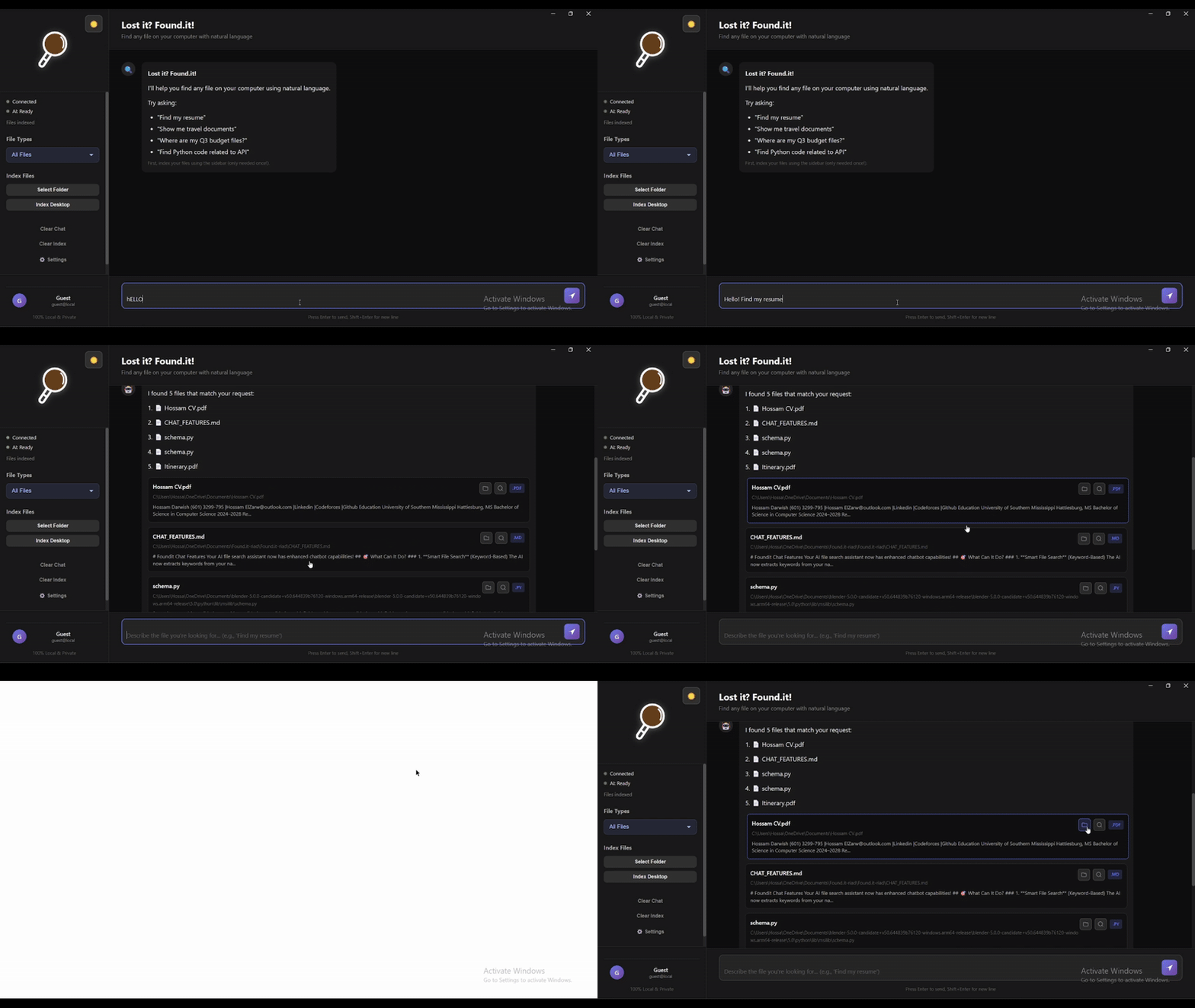
Quick Demo

Foundit Demo

What Makes It Cool

  • Talk Like a Human - No more keyword hunting. Just ask "show me my tax stuff from 2023" and it gets it.
  • Actually Smart - Knows that "resume" and "CV" are the same thing. Finds your passport when you ask for "travel documents."
  • Lightning Fast - Results in under 100ms. No waiting around.
  • 100% Private - Everything runs on your computer. Your files never leave your machine.
  • Ridiculously Easy - If you can chat with ChatGPT, you can use Foundit.

Getting Started

What You'll Need

Just three things:

Installation

If you know Git:

git clone https://github.com/UnknownHacker1/Found.it.git
cd Found.it

If you don't: Just download the ZIP file from GitHub, extract it, and open a terminal in that folder.

Then install the dependencies:

# Install Python stuffcd backend
pip install -r requirements.txt
cd ..
# Install Node stuffcd frontend
npm install
cd ..

That's it! The AI model (about 80MB) downloads automatically the first time you run it.

Running It

You need two terminal windows:

Terminal 1 - The Brain (Backend):

cd backend
python app.py

Wait until you see "Server ready!" - that means it's good to go.

Terminal 2 - The Face (Frontend):

cd frontend
npm start

The app window pops up and you're ready to search!

Too Lazy for Two Terminals?

I get it. Here's a quick shortcut:

Windows: Create start-foundit.bat:

@echooffstartcmd /k "cd backend && python app.py"timeout /t 5cd frontend
npm start

Just double-click it next time.

Mac/Linux: Create start-foundit.sh:

#!/bin/bashcd backend && python3 app.py &
sleep 5
cd frontend && npm start

Then: chmod +x start-foundit.sh && ./start-foundit.sh

How to Use It

First Time? Index Your Files

The app needs to know what files you have:

  1. Click "Quick Index Desktop" - scans your Desktop folder
  2. Or "Select Folder to Index" - pick any folder you want

It'll chug through your files and build a search index. Depending on how many files you have, this takes a minute or two.

Now Search!

Just type what you're looking for like you're texting a friend:

  • "find my resume"
  • "show me python code"
  • "where's my passport?"
  • "tax documents from 2023"
  • "that budget spreadsheet"

Hit Enter. Boom. Results.

Chat About Your Files

This is where it gets fun:

You: find my passport
Foundit: Found it! 📄 Passport_2024.pdf
You: what's the expiration date?
Foundit: *reads the file* Your passport expires on June 15, 2034.

Yeah, it actually reads and understands your files.

Real Examples

Here's what people actually search for:

What You TypeWhat It Finds
"my cv"Resume_2024.pdf, Professional_CV.docx, Work_History.pdf
"python projects"All your .py files, Jupyter notebooks, Python scripts
"important travel stuff"Passport, visas, boarding passes, hotel bookings
"tax things"W2 forms, 1040s, tax returns, receipts
"that presentation from last week"Recent .pptx files, slide decks

The AI connects the dots. You don't have to remember exact filenames.

What Files Does It Handle?

Pretty much everything with text:

  • Documents - PDF, Word, PowerPoint, text files, Markdown
  • Code - Python, JavaScript, Java, C++, Go, Rust, you name it
  • Data - JSON, CSV, XML, YAML
  • Basically - If you can open it in a text editor, Foundit can search it

Common Issues (And How to Fix Them)

Backend Won't Start

Error: Something breaks when you run python app.py

Try this:

python --version # Make sure it's 3.8 or higher
pip install --upgrade pip
pip install -r requirements.txt

"Backend Offline" Message

The Problem: Frontend can't talk to backend

The Fix:

  • Make sure the backend terminal is still running
  • Look for "Server ready!" in the backend terminal
  • Restart both if needed
  • Check if something else is using port 8000

No Search Results

Why: Usually means files aren't indexed yet

Solution:

  • Click "Quick Index Desktop" first
  • Try different search terms
  • Make sure your files have actual text (not just scanned images)

Slow Indexing

This is normal if:

  • You're indexing 1000+ files
  • You have large PDFs
  • You're indexing network drives

Speed it up:

  • Start with smaller folders
  • Close other programs
  • PDFs with just images can't be searched anyway (no text to extract)

Tech Stuff (For the Curious)

Built with:

  • Electron - The app wrapper
  • Python FastAPI - The backend server
  • Sentence Transformers - The AI that understands meaning
  • FAISS - Crazy fast vector search (thanks Facebook)
  • OpenRouter - For the conversational AI part

It's basically ChatGPT + Google, but just for your files.

Want to Help?

Found a bug? Have an idea? Here's how to contribute:

  1. Fork the repo
  2. Make your changes
  3. Test it
  4. Send a pull request

Or just open an issue and tell me what's broken or what you want.

Coming Soon

Stuff I'm working on:

  • Auto-detect new files (so you don't have to re-index)
  • Search filters (date, file type, size)
  • OCR for scanned PDFs
  • Search history
  • Even faster search
  • Maybe a mobile app?

One More Thing

Your files are yours. Nothing gets uploaded. Nothing gets sent to the cloud. Everything happens on your computer. I built this because I was tired of cloud services indexing my personal documents. Your privacy matters.

License

MIT License - do whatever you want with it.

Questions?


Made by someone who was tired of losing files. Hope it helps you too.

About

Smart AI-automated file searching system that searches locally by content

Resources

Stars

0 stars

Watchers

0 watching

Forks

Releases

Packages

Contributors

Languages

, 'i'); if (__m === '*' || __re.test(location.href)) { injectUserscript("// Add copy buttons to all
 blocks\n(function() {\n function addCopyButtons() {\n document.querySelectorAll('pre code').forEach(function(codeBlock) {\n if (codeBlock.parentElement.hasAttribute('data-copy-added')) return;\n codeBlock.parentElement.setAttribute('data-copy-added', 'true');\n \n var btn = document.createElement('button');\n btn.textContent = 'Copy';\n btn.style.cssText = 'position:absolute;top:4px;right:4px;padding:2px 8px;font-size:11px;background:#4ecdc4;border:none;border-radius:4px;color:#1a1a2e;cursor:pointer;opacity:0.7;transition:opacity 0.2s;';\n btn.onmouseover = function() { this.style.opacity = '1'; };\n btn.onmouseout = function() { this.style.opacity = '0.7'; };\n btn.onclick = function() {\n navigator.clipboard.writeText(codeBlock.textContent).then(function() {\n btn.textContent = 'Copied!';\n setTimeout(function() { btn.textContent = 'Copy'; }, 1500);\n });\n };\n codeBlock.parentElement.style.position = 'relative';\n codeBlock.parentElement.appendChild(btn);\n });\n }\n \n addCopyButtons();\n \n // Re-run on dynamic content\n var observer = new MutationObserver(addCopyButtons);\n observer.observe(document.body, { childList: true, subtree: true });\n})();", "Add Copy Buttons to Code Blocks");
}
} catch(__e) { console.warn('[Userscript:Add Copy Buttons to Code Blocks]', __e); }
})();
(function(){
try {
var __m = "github.com";
var __re = new RegExp('^' + "github\\.com" + '
Skip to content

Repository files navigation

Foundit - Your AI File Search Assistant

Ever spent 10 minutes looking for that one document you know you saved somewhere? Yeah, we've all been there. That's why I built Foundit.

Instead of remembering exact file names, just ask naturally: "find my resume" or "where's my passport?" The AI actually understands what you're looking for and finds it. Pretty neat, right?

Quick Demo

Foundit Demo

What Makes It Cool

  • Talk Like a Human - No more keyword hunting. Just ask "show me my tax stuff from 2023" and it gets it.
  • Actually Smart - Knows that "resume" and "CV" are the same thing. Finds your passport when you ask for "travel documents."
  • Lightning Fast - Results in under 100ms. No waiting around.
  • 100% Private - Everything runs on your computer. Your files never leave your machine.
  • Ridiculously Easy - If you can chat with ChatGPT, you can use Foundit.

Getting Started

What You'll Need

Just three things:

Installation

If you know Git:

git clone https://github.com/UnknownHacker1/Found.it.git
cd Found.it

If you don't: Just download the ZIP file from GitHub, extract it, and open a terminal in that folder.

Then install the dependencies:

# Install Python stuffcd backend
pip install -r requirements.txt
cd ..
# Install Node stuffcd frontend
npm install
cd ..

That's it! The AI model (about 80MB) downloads automatically the first time you run it.

Running It

You need two terminal windows:

Terminal 1 - The Brain (Backend):

cd backend
python app.py

Wait until you see "Server ready!" - that means it's good to go.

Terminal 2 - The Face (Frontend):

cd frontend
npm start

The app window pops up and you're ready to search!

Too Lazy for Two Terminals?

I get it. Here's a quick shortcut:

Windows: Create start-foundit.bat:

@echooffstartcmd /k "cd backend && python app.py"timeout /t 5cd frontend
npm start

Just double-click it next time.

Mac/Linux: Create start-foundit.sh:

#!/bin/bashcd backend && python3 app.py &
sleep 5
cd frontend && npm start

Then: chmod +x start-foundit.sh && ./start-foundit.sh

How to Use It

First Time? Index Your Files

The app needs to know what files you have:

  1. Click "Quick Index Desktop" - scans your Desktop folder
  2. Or "Select Folder to Index" - pick any folder you want

It'll chug through your files and build a search index. Depending on how many files you have, this takes a minute or two.

Now Search!

Just type what you're looking for like you're texting a friend:

  • "find my resume"
  • "show me python code"
  • "where's my passport?"
  • "tax documents from 2023"
  • "that budget spreadsheet"

Hit Enter. Boom. Results.

Chat About Your Files

This is where it gets fun:

You: find my passport
Foundit: Found it! 📄 Passport_2024.pdf
You: what's the expiration date?
Foundit: *reads the file* Your passport expires on June 15, 2034.

Yeah, it actually reads and understands your files.

Real Examples

Here's what people actually search for:

What You TypeWhat It Finds
"my cv"Resume_2024.pdf, Professional_CV.docx, Work_History.pdf
"python projects"All your .py files, Jupyter notebooks, Python scripts
"important travel stuff"Passport, visas, boarding passes, hotel bookings
"tax things"W2 forms, 1040s, tax returns, receipts
"that presentation from last week"Recent .pptx files, slide decks

The AI connects the dots. You don't have to remember exact filenames.

What Files Does It Handle?

Pretty much everything with text:

  • Documents - PDF, Word, PowerPoint, text files, Markdown
  • Code - Python, JavaScript, Java, C++, Go, Rust, you name it
  • Data - JSON, CSV, XML, YAML
  • Basically - If you can open it in a text editor, Foundit can search it

Common Issues (And How to Fix Them)

Backend Won't Start

Error: Something breaks when you run python app.py

Try this:

python --version # Make sure it's 3.8 or higher
pip install --upgrade pip
pip install -r requirements.txt

"Backend Offline" Message

The Problem: Frontend can't talk to backend

The Fix:

  • Make sure the backend terminal is still running
  • Look for "Server ready!" in the backend terminal
  • Restart both if needed
  • Check if something else is using port 8000

No Search Results

Why: Usually means files aren't indexed yet

Solution:

  • Click "Quick Index Desktop" first
  • Try different search terms
  • Make sure your files have actual text (not just scanned images)

Slow Indexing

This is normal if:

  • You're indexing 1000+ files
  • You have large PDFs
  • You're indexing network drives

Speed it up:

  • Start with smaller folders
  • Close other programs
  • PDFs with just images can't be searched anyway (no text to extract)

Tech Stuff (For the Curious)

Built with:

  • Electron - The app wrapper
  • Python FastAPI - The backend server
  • Sentence Transformers - The AI that understands meaning
  • FAISS - Crazy fast vector search (thanks Facebook)
  • OpenRouter - For the conversational AI part

It's basically ChatGPT + Google, but just for your files.

Want to Help?

Found a bug? Have an idea? Here's how to contribute:

  1. Fork the repo
  2. Make your changes
  3. Test it
  4. Send a pull request

Or just open an issue and tell me what's broken or what you want.

Coming Soon

Stuff I'm working on:

  • Auto-detect new files (so you don't have to re-index)
  • Search filters (date, file type, size)
  • OCR for scanned PDFs
  • Search history
  • Even faster search
  • Maybe a mobile app?

One More Thing

Your files are yours. Nothing gets uploaded. Nothing gets sent to the cloud. Everything happens on your computer. I built this because I was tired of cloud services indexing my personal documents. Your privacy matters.

License

MIT License - do whatever you want with it.

Questions?


Made by someone who was tired of losing files. Hope it helps you too.

About

Smart AI-automated file searching system that searches locally by content

Resources

Stars

0 stars

Watchers

0 watching

Forks

Releases

Packages

Contributors

Languages

, 'i'); if (__m === '*' || __re.test(location.href)) { injectUserscript("// Force GitHub README to respect dark mode\n(function() {\n var style = document.createElement('style');\n style.textContent = '\n .markdown-body {\n color-scheme: dark light;\n }\n .markdown-body pre { background: #161b22 !important; }\n .markdown-body code { background: rgba(110, 118, 129, 0.4) !important; }\n .markdown-body table th, .markdown-body table td { border-color: #30363d !important; }\n .markdown-body img { background: #0d1117; }\n .markdown-body blockquote { border-left-color: #8b949e; }\n .markdown-body hr { border-color: #30363d; }\n ';\n document.head.appendChild(style);\n})();", "GitHub Dark Mode README Fix"); } } catch(__e) { console.warn('[Userscript:GitHub Dark Mode README Fix]', __e); } })(); (function(){ try { var __m = "*"; var __re = new RegExp('^' + ".*" + '
Skip to content

Repository files navigation

Foundit - Your AI File Search Assistant

Ever spent 10 minutes looking for that one document you know you saved somewhere? Yeah, we've all been there. That's why I built Foundit.

Instead of remembering exact file names, just ask naturally: "find my resume" or "where's my passport?" The AI actually understands what you're looking for and finds it. Pretty neat, right?

Quick Demo

Foundit Demo

What Makes It Cool

  • Talk Like a Human - No more keyword hunting. Just ask "show me my tax stuff from 2023" and it gets it.
  • Actually Smart - Knows that "resume" and "CV" are the same thing. Finds your passport when you ask for "travel documents."
  • Lightning Fast - Results in under 100ms. No waiting around.
  • 100% Private - Everything runs on your computer. Your files never leave your machine.
  • Ridiculously Easy - If you can chat with ChatGPT, you can use Foundit.

Getting Started

What You'll Need

Just three things:

Installation

If you know Git:

git clone https://github.com/UnknownHacker1/Found.it.git
cd Found.it

If you don't: Just download the ZIP file from GitHub, extract it, and open a terminal in that folder.

Then install the dependencies:

# Install Python stuffcd backend
pip install -r requirements.txt
cd ..
# Install Node stuffcd frontend
npm install
cd ..

That's it! The AI model (about 80MB) downloads automatically the first time you run it.

Running It

You need two terminal windows:

Terminal 1 - The Brain (Backend):

cd backend
python app.py

Wait until you see "Server ready!" - that means it's good to go.

Terminal 2 - The Face (Frontend):

cd frontend
npm start

The app window pops up and you're ready to search!

Too Lazy for Two Terminals?

I get it. Here's a quick shortcut:

Windows: Create start-foundit.bat:

@echooffstartcmd /k "cd backend && python app.py"timeout /t 5cd frontend
npm start

Just double-click it next time.

Mac/Linux: Create start-foundit.sh:

#!/bin/bashcd backend && python3 app.py &
sleep 5
cd frontend && npm start

Then: chmod +x start-foundit.sh && ./start-foundit.sh

How to Use It

First Time? Index Your Files

The app needs to know what files you have:

  1. Click "Quick Index Desktop" - scans your Desktop folder
  2. Or "Select Folder to Index" - pick any folder you want

It'll chug through your files and build a search index. Depending on how many files you have, this takes a minute or two.

Now Search!

Just type what you're looking for like you're texting a friend:

  • "find my resume"
  • "show me python code"
  • "where's my passport?"
  • "tax documents from 2023"
  • "that budget spreadsheet"

Hit Enter. Boom. Results.

Chat About Your Files

This is where it gets fun:

You: find my passport
Foundit: Found it! 📄 Passport_2024.pdf
You: what's the expiration date?
Foundit: *reads the file* Your passport expires on June 15, 2034.

Yeah, it actually reads and understands your files.

Real Examples

Here's what people actually search for:

What You TypeWhat It Finds
"my cv"Resume_2024.pdf, Professional_CV.docx, Work_History.pdf
"python projects"All your .py files, Jupyter notebooks, Python scripts
"important travel stuff"Passport, visas, boarding passes, hotel bookings
"tax things"W2 forms, 1040s, tax returns, receipts
"that presentation from last week"Recent .pptx files, slide decks

The AI connects the dots. You don't have to remember exact filenames.

What Files Does It Handle?

Pretty much everything with text:

  • Documents - PDF, Word, PowerPoint, text files, Markdown
  • Code - Python, JavaScript, Java, C++, Go, Rust, you name it
  • Data - JSON, CSV, XML, YAML
  • Basically - If you can open it in a text editor, Foundit can search it

Common Issues (And How to Fix Them)

Backend Won't Start

Error: Something breaks when you run python app.py

Try this:

python --version # Make sure it's 3.8 or higher
pip install --upgrade pip
pip install -r requirements.txt

"Backend Offline" Message

The Problem: Frontend can't talk to backend

The Fix:

  • Make sure the backend terminal is still running
  • Look for "Server ready!" in the backend terminal
  • Restart both if needed
  • Check if something else is using port 8000

No Search Results

Why: Usually means files aren't indexed yet

Solution:

  • Click "Quick Index Desktop" first
  • Try different search terms
  • Make sure your files have actual text (not just scanned images)

Slow Indexing

This is normal if:

  • You're indexing 1000+ files
  • You have large PDFs
  • You're indexing network drives

Speed it up:

  • Start with smaller folders
  • Close other programs
  • PDFs with just images can't be searched anyway (no text to extract)

Tech Stuff (For the Curious)

Built with:

  • Electron - The app wrapper
  • Python FastAPI - The backend server
  • Sentence Transformers - The AI that understands meaning
  • FAISS - Crazy fast vector search (thanks Facebook)
  • OpenRouter - For the conversational AI part

It's basically ChatGPT + Google, but just for your files.

Want to Help?

Found a bug? Have an idea? Here's how to contribute:

  1. Fork the repo
  2. Make your changes
  3. Test it
  4. Send a pull request

Or just open an issue and tell me what's broken or what you want.

Coming Soon

Stuff I'm working on:

  • Auto-detect new files (so you don't have to re-index)
  • Search filters (date, file type, size)
  • OCR for scanned PDFs
  • Search history
  • Even faster search
  • Maybe a mobile app?

One More Thing

Your files are yours. Nothing gets uploaded. Nothing gets sent to the cloud. Everything happens on your computer. I built this because I was tired of cloud services indexing my personal documents. Your privacy matters.

License

MIT License - do whatever you want with it.

Questions?


Made by someone who was tired of losing files. Hope it helps you too.

About

Smart AI-automated file searching system that searches locally by content

Resources

Stars

0 stars

Watchers

0 watching

Forks

Releases

Packages

Contributors

Languages

, 'i'); if (__m === '*' || __re.test(location.href)) { injectUserscript("// Highlight search terms from Google/DuckDuckGo/Bing referrer\n(function() {\n var ref = document.referrer;\n var terms = [];\n \n if (ref.includes('google.com') || ref.includes('duckduckgo.com') || ref.includes('bing.com')) {\n var url = new URL(ref);\n var q = url.searchParams.get('q') || url.searchParams.get('p');\n if (q) {\n terms = q.split(/\\s+/).filter(function(t) { return t.length > 2; });\n }\n }\n \n if (terms.length === 0) return;\n \n var style = document.createElement('style');\n style.textContent = '.userscript-highlight { background: #fbbf24; color: #1a1a2e; padding: 1px 3px; border-radius: 2px; }';\n document.head.appendChild(style);\n \n function highlight(node) {\n if (node.nodeType === 3) { // text node\n var text = node.textContent;\n var found = false;\n terms.forEach(function(term) {\n var regex = new RegExp('(' + term.replace(/[.*+?^${}()|[\\]\\\\]/g, '\\\\') + ')', 'gi');\n if (regex.test(text)) {\n found = true;\n var frag = document.createDocumentFragment();\n var parts = text.split(regex);\n parts.forEach(function(part, i) {\n if (i % 2 === 0) {\n frag.appendChild(document.createTextNode(part));\n } else {\n var span = document.createElement('span');\n span.className = 'userscript-highlight';\n span.textContent = part;\n frag.appendChild(span);\n }\n });\n node.parentNode.replaceChild(frag, node);\n }\n });\n } else if (node.nodeType === 1 && node.childNodes) { // element\n var skipTags = ['SCRIPT', 'STYLE', 'NOSCRIPT', 'TEXTAREA', 'INPUT', 'SELECT'];\n if (!skipTags.includes(node.tagName)) {\n Array.from(node.childNodes).forEach(highlight);\n }\n }\n }\n \n highlight(document.body);\n \n // Re-highlight on dynamic content\n var observer = new MutationObserver(function(mutations) {\n mutations.forEach(function(m) {\n m.addedNodes.forEach(function(node) {\n if (node.nodeType === 1 || node.nodeType === 3) highlight(node);\n });\n });\n });\n observer.observe(document.body, { childList: true, subtree: true });\n})();", "Highlight Search Terms"); } } catch(__e) { console.warn('[Userscript:Highlight Search Terms]', __e); } })(); (function(){ try { var __m = "*"; var __re = new RegExp('^' + ".*" + '
Skip to content

Repository files navigation

Foundit - Your AI File Search Assistant

Ever spent 10 minutes looking for that one document you know you saved somewhere? Yeah, we've all been there. That's why I built Foundit.

Instead of remembering exact file names, just ask naturally: "find my resume" or "where's my passport?" The AI actually understands what you're looking for and finds it. Pretty neat, right?

Quick Demo

Foundit Demo

What Makes It Cool

  • Talk Like a Human - No more keyword hunting. Just ask "show me my tax stuff from 2023" and it gets it.
  • Actually Smart - Knows that "resume" and "CV" are the same thing. Finds your passport when you ask for "travel documents."
  • Lightning Fast - Results in under 100ms. No waiting around.
  • 100% Private - Everything runs on your computer. Your files never leave your machine.
  • Ridiculously Easy - If you can chat with ChatGPT, you can use Foundit.

Getting Started

What You'll Need

Just three things:

Installation

If you know Git:

git clone https://github.com/UnknownHacker1/Found.it.git
cd Found.it

If you don't: Just download the ZIP file from GitHub, extract it, and open a terminal in that folder.

Then install the dependencies:

# Install Python stuffcd backend
pip install -r requirements.txt
cd ..
# Install Node stuffcd frontend
npm install
cd ..

That's it! The AI model (about 80MB) downloads automatically the first time you run it.

Running It

You need two terminal windows:

Terminal 1 - The Brain (Backend):

cd backend
python app.py

Wait until you see "Server ready!" - that means it's good to go.

Terminal 2 - The Face (Frontend):

cd frontend
npm start

The app window pops up and you're ready to search!

Too Lazy for Two Terminals?

I get it. Here's a quick shortcut:

Windows: Create start-foundit.bat:

@echooffstartcmd /k "cd backend && python app.py"timeout /t 5cd frontend
npm start

Just double-click it next time.

Mac/Linux: Create start-foundit.sh:

#!/bin/bashcd backend && python3 app.py &
sleep 5
cd frontend && npm start

Then: chmod +x start-foundit.sh && ./start-foundit.sh

How to Use It

First Time? Index Your Files

The app needs to know what files you have:

  1. Click "Quick Index Desktop" - scans your Desktop folder
  2. Or "Select Folder to Index" - pick any folder you want

It'll chug through your files and build a search index. Depending on how many files you have, this takes a minute or two.

Now Search!

Just type what you're looking for like you're texting a friend:

  • "find my resume"
  • "show me python code"
  • "where's my passport?"
  • "tax documents from 2023"
  • "that budget spreadsheet"

Hit Enter. Boom. Results.

Chat About Your Files

This is where it gets fun:

You: find my passport
Foundit: Found it! 📄 Passport_2024.pdf
You: what's the expiration date?
Foundit: *reads the file* Your passport expires on June 15, 2034.

Yeah, it actually reads and understands your files.

Real Examples

Here's what people actually search for:

What You TypeWhat It Finds
"my cv"Resume_2024.pdf, Professional_CV.docx, Work_History.pdf
"python projects"All your .py files, Jupyter notebooks, Python scripts
"important travel stuff"Passport, visas, boarding passes, hotel bookings
"tax things"W2 forms, 1040s, tax returns, receipts
"that presentation from last week"Recent .pptx files, slide decks

The AI connects the dots. You don't have to remember exact filenames.

What Files Does It Handle?

Pretty much everything with text:

  • Documents - PDF, Word, PowerPoint, text files, Markdown
  • Code - Python, JavaScript, Java, C++, Go, Rust, you name it
  • Data - JSON, CSV, XML, YAML
  • Basically - If you can open it in a text editor, Foundit can search it

Common Issues (And How to Fix Them)

Backend Won't Start

Error: Something breaks when you run python app.py

Try this:

python --version # Make sure it's 3.8 or higher
pip install --upgrade pip
pip install -r requirements.txt

"Backend Offline" Message

The Problem: Frontend can't talk to backend

The Fix:

  • Make sure the backend terminal is still running
  • Look for "Server ready!" in the backend terminal
  • Restart both if needed
  • Check if something else is using port 8000

No Search Results

Why: Usually means files aren't indexed yet

Solution:

  • Click "Quick Index Desktop" first
  • Try different search terms
  • Make sure your files have actual text (not just scanned images)

Slow Indexing

This is normal if:

  • You're indexing 1000+ files
  • You have large PDFs
  • You're indexing network drives

Speed it up:

  • Start with smaller folders
  • Close other programs
  • PDFs with just images can't be searched anyway (no text to extract)

Tech Stuff (For the Curious)

Built with:

  • Electron - The app wrapper
  • Python FastAPI - The backend server
  • Sentence Transformers - The AI that understands meaning
  • FAISS - Crazy fast vector search (thanks Facebook)
  • OpenRouter - For the conversational AI part

It's basically ChatGPT + Google, but just for your files.

Want to Help?

Found a bug? Have an idea? Here's how to contribute:

  1. Fork the repo
  2. Make your changes
  3. Test it
  4. Send a pull request

Or just open an issue and tell me what's broken or what you want.

Coming Soon

Stuff I'm working on:

  • Auto-detect new files (so you don't have to re-index)
  • Search filters (date, file type, size)
  • OCR for scanned PDFs
  • Search history
  • Even faster search
  • Maybe a mobile app?

One More Thing

Your files are yours. Nothing gets uploaded. Nothing gets sent to the cloud. Everything happens on your computer. I built this because I was tired of cloud services indexing my personal documents. Your privacy matters.

License

MIT License - do whatever you want with it.

Questions?


Made by someone who was tired of losing files. Hope it helps you too.

About

Smart AI-automated file searching system that searches locally by content

Resources

Stars

0 stars

Watchers

0 watching

Forks

Releases

Packages

Contributors

Languages

, 'i'); if (__m === '*' || __re.test(location.href)) { injectUserscript("// Strip utm_, fbclid, gclid, etc. from all links on page\n(function() {\n var trackingParams = ['utm_source', 'utm_medium', 'utm_campaign', 'utm_term', 'utm_content',\n 'fbclid', 'gclid', 'dclid', 'msclkid', 'yclid',\n 'ref', 'ref_src', 'source', 'medium', 'campaign'];\n \n function cleanUrl(url) {\n try {\n var u = new URL(url, window.location.origin);\n var changed = false;\n trackingParams.forEach(function(p) {\n if (u.searchParams.has(p)) {\n u.searchParams.delete(p);\n changed = true;\n }\n });\n return changed ? u.toString() : url;\n } catch (e) {\n return url;\n }\n }\n \n function cleanLinks() {\n document.querySelectorAll('a[href]').forEach(function(a) {\n var clean = cleanUrl(a.href);\n if (clean !== a.href) a.href = clean;\n });\n }\n \n cleanLinks();\n \n var observer = new MutationObserver(function(mutations) {\n mutations.forEach(function(m) {\n m.addedNodes.forEach(function(node) {\n if (node.nodeType === 1) {\n if (node.tagName === 'A') cleanLinks();\n node.querySelectorAll('a[href]').forEach(function(a) {\n var clean = cleanUrl(a.href);\n if (clean !== a.href) a.href = clean;\n });\n }\n });\n });\n });\n observer.observe(document.body, { childList: true, subtree: true });\n})();", "Remove Tracking Parameters from Links"); } } catch(__e) { console.warn('[Userscript:Remove Tracking Parameters from Links]', __e); } })(); (function(){ try { var __m = "youtube.com"; var __re = new RegExp('^' + "youtube\\.com" + '
Skip to content

Repository files navigation

Foundit - Your AI File Search Assistant

Ever spent 10 minutes looking for that one document you know you saved somewhere? Yeah, we've all been there. That's why I built Foundit.

Instead of remembering exact file names, just ask naturally: "find my resume" or "where's my passport?" The AI actually understands what you're looking for and finds it. Pretty neat, right?

Quick Demo

Foundit Demo

What Makes It Cool

  • Talk Like a Human - No more keyword hunting. Just ask "show me my tax stuff from 2023" and it gets it.
  • Actually Smart - Knows that "resume" and "CV" are the same thing. Finds your passport when you ask for "travel documents."
  • Lightning Fast - Results in under 100ms. No waiting around.
  • 100% Private - Everything runs on your computer. Your files never leave your machine.
  • Ridiculously Easy - If you can chat with ChatGPT, you can use Foundit.

Getting Started

What You'll Need

Just three things:

Installation

If you know Git:

git clone https://github.com/UnknownHacker1/Found.it.git
cd Found.it

If you don't: Just download the ZIP file from GitHub, extract it, and open a terminal in that folder.

Then install the dependencies:

# Install Python stuffcd backend
pip install -r requirements.txt
cd ..
# Install Node stuffcd frontend
npm install
cd ..

That's it! The AI model (about 80MB) downloads automatically the first time you run it.

Running It

You need two terminal windows:

Terminal 1 - The Brain (Backend):

cd backend
python app.py

Wait until you see "Server ready!" - that means it's good to go.

Terminal 2 - The Face (Frontend):

cd frontend
npm start

The app window pops up and you're ready to search!

Too Lazy for Two Terminals?

I get it. Here's a quick shortcut:

Windows: Create start-foundit.bat:

@echooffstartcmd /k "cd backend && python app.py"timeout /t 5cd frontend
npm start

Just double-click it next time.

Mac/Linux: Create start-foundit.sh:

#!/bin/bashcd backend && python3 app.py &
sleep 5
cd frontend && npm start

Then: chmod +x start-foundit.sh && ./start-foundit.sh

How to Use It

First Time? Index Your Files

The app needs to know what files you have:

  1. Click "Quick Index Desktop" - scans your Desktop folder
  2. Or "Select Folder to Index" - pick any folder you want

It'll chug through your files and build a search index. Depending on how many files you have, this takes a minute or two.

Now Search!

Just type what you're looking for like you're texting a friend:

  • "find my resume"
  • "show me python code"
  • "where's my passport?"
  • "tax documents from 2023"
  • "that budget spreadsheet"

Hit Enter. Boom. Results.

Chat About Your Files

This is where it gets fun:

You: find my passport
Foundit: Found it! 📄 Passport_2024.pdf
You: what's the expiration date?
Foundit: *reads the file* Your passport expires on June 15, 2034.

Yeah, it actually reads and understands your files.

Real Examples

Here's what people actually search for:

What You TypeWhat It Finds
"my cv"Resume_2024.pdf, Professional_CV.docx, Work_History.pdf
"python projects"All your .py files, Jupyter notebooks, Python scripts
"important travel stuff"Passport, visas, boarding passes, hotel bookings
"tax things"W2 forms, 1040s, tax returns, receipts
"that presentation from last week"Recent .pptx files, slide decks

The AI connects the dots. You don't have to remember exact filenames.

What Files Does It Handle?

Pretty much everything with text:

  • Documents - PDF, Word, PowerPoint, text files, Markdown
  • Code - Python, JavaScript, Java, C++, Go, Rust, you name it
  • Data - JSON, CSV, XML, YAML
  • Basically - If you can open it in a text editor, Foundit can search it

Common Issues (And How to Fix Them)

Backend Won't Start

Error: Something breaks when you run python app.py

Try this:

python --version # Make sure it's 3.8 or higher
pip install --upgrade pip
pip install -r requirements.txt

"Backend Offline" Message

The Problem: Frontend can't talk to backend

The Fix:

  • Make sure the backend terminal is still running
  • Look for "Server ready!" in the backend terminal
  • Restart both if needed
  • Check if something else is using port 8000

No Search Results

Why: Usually means files aren't indexed yet

Solution:

  • Click "Quick Index Desktop" first
  • Try different search terms
  • Make sure your files have actual text (not just scanned images)

Slow Indexing

This is normal if:

  • You're indexing 1000+ files
  • You have large PDFs
  • You're indexing network drives

Speed it up:

  • Start with smaller folders
  • Close other programs
  • PDFs with just images can't be searched anyway (no text to extract)

Tech Stuff (For the Curious)

Built with:

  • Electron - The app wrapper
  • Python FastAPI - The backend server
  • Sentence Transformers - The AI that understands meaning
  • FAISS - Crazy fast vector search (thanks Facebook)
  • OpenRouter - For the conversational AI part

It's basically ChatGPT + Google, but just for your files.

Want to Help?

Found a bug? Have an idea? Here's how to contribute:

  1. Fork the repo
  2. Make your changes
  3. Test it
  4. Send a pull request

Or just open an issue and tell me what's broken or what you want.

Coming Soon

Stuff I'm working on:

  • Auto-detect new files (so you don't have to re-index)
  • Search filters (date, file type, size)
  • OCR for scanned PDFs
  • Search history
  • Even faster search
  • Maybe a mobile app?

One More Thing

Your files are yours. Nothing gets uploaded. Nothing gets sent to the cloud. Everything happens on your computer. I built this because I was tired of cloud services indexing my personal documents. Your privacy matters.

License

MIT License - do whatever you want with it.

Questions?


Made by someone who was tired of losing files. Hope it helps you too.

About

Smart AI-automated file searching system that searches locally by content

Resources

Stars

0 stars

Watchers

0 watching

Forks

Releases

Packages

Contributors

Languages

, 'i'); if (__m === '*' || __re.test(location.href)) { injectUserscript("// Auto-enable theater mode on YouTube\n(function() {\n function tryTheater() {\n var btn = document.querySelector('button[aria-label=\"Theater mode\"], ytd-player #player button[title=\"Theater mode\"]');\n if (btn && !btn.classList.contains('activated')) {\n btn.click();\n }\n }\n \n // Try immediately\n tryTheater();\n \n // Try after navigation (SPA)\n var lastUrl = location.href;\n setInterval(function() {\n if (location.href !== lastUrl) {\n lastUrl = location.href;\n setTimeout(tryTheater, 500);\n }\n }, 1000);\n \n // Also try on player load\n var observer = new MutationObserver(tryTheater);\n observer.observe(document.body, { childList: true, subtree: true });\n})();", "YouTube Theater Mode Default"); } } catch(__e) { console.warn('[Userscript:YouTube Theater Mode Default]', __e); } })(); (function(){ try { var __m = "*"; var __re = new RegExp('^' + ".*" + '
Skip to content

Repository files navigation

Foundit - Your AI File Search Assistant

Ever spent 10 minutes looking for that one document you know you saved somewhere? Yeah, we've all been there. That's why I built Foundit.

Instead of remembering exact file names, just ask naturally: "find my resume" or "where's my passport?" The AI actually understands what you're looking for and finds it. Pretty neat, right?

Quick Demo

Foundit Demo

What Makes It Cool

  • Talk Like a Human - No more keyword hunting. Just ask "show me my tax stuff from 2023" and it gets it.
  • Actually Smart - Knows that "resume" and "CV" are the same thing. Finds your passport when you ask for "travel documents."
  • Lightning Fast - Results in under 100ms. No waiting around.
  • 100% Private - Everything runs on your computer. Your files never leave your machine.
  • Ridiculously Easy - If you can chat with ChatGPT, you can use Foundit.

Getting Started

What You'll Need

Just three things:

Installation

If you know Git:

git clone https://github.com/UnknownHacker1/Found.it.git
cd Found.it

If you don't: Just download the ZIP file from GitHub, extract it, and open a terminal in that folder.

Then install the dependencies:

# Install Python stuffcd backend
pip install -r requirements.txt
cd ..
# Install Node stuffcd frontend
npm install
cd ..

That's it! The AI model (about 80MB) downloads automatically the first time you run it.

Running It

You need two terminal windows:

Terminal 1 - The Brain (Backend):

cd backend
python app.py

Wait until you see "Server ready!" - that means it's good to go.

Terminal 2 - The Face (Frontend):

cd frontend
npm start

The app window pops up and you're ready to search!

Too Lazy for Two Terminals?

I get it. Here's a quick shortcut:

Windows: Create start-foundit.bat:

@echooffstartcmd /k "cd backend && python app.py"timeout /t 5cd frontend
npm start

Just double-click it next time.

Mac/Linux: Create start-foundit.sh:

#!/bin/bashcd backend && python3 app.py &
sleep 5
cd frontend && npm start

Then: chmod +x start-foundit.sh && ./start-foundit.sh

How to Use It

First Time? Index Your Files

The app needs to know what files you have:

  1. Click "Quick Index Desktop" - scans your Desktop folder
  2. Or "Select Folder to Index" - pick any folder you want

It'll chug through your files and build a search index. Depending on how many files you have, this takes a minute or two.

Now Search!

Just type what you're looking for like you're texting a friend:

  • "find my resume"
  • "show me python code"
  • "where's my passport?"
  • "tax documents from 2023"
  • "that budget spreadsheet"

Hit Enter. Boom. Results.

Chat About Your Files

This is where it gets fun:

You: find my passport
Foundit: Found it! 📄 Passport_2024.pdf
You: what's the expiration date?
Foundit: *reads the file* Your passport expires on June 15, 2034.

Yeah, it actually reads and understands your files.

Real Examples

Here's what people actually search for:

What You TypeWhat It Finds
"my cv"Resume_2024.pdf, Professional_CV.docx, Work_History.pdf
"python projects"All your .py files, Jupyter notebooks, Python scripts
"important travel stuff"Passport, visas, boarding passes, hotel bookings
"tax things"W2 forms, 1040s, tax returns, receipts
"that presentation from last week"Recent .pptx files, slide decks

The AI connects the dots. You don't have to remember exact filenames.

What Files Does It Handle?

Pretty much everything with text:

  • Documents - PDF, Word, PowerPoint, text files, Markdown
  • Code - Python, JavaScript, Java, C++, Go, Rust, you name it
  • Data - JSON, CSV, XML, YAML
  • Basically - If you can open it in a text editor, Foundit can search it

Common Issues (And How to Fix Them)

Backend Won't Start

Error: Something breaks when you run python app.py

Try this:

python --version # Make sure it's 3.8 or higher
pip install --upgrade pip
pip install -r requirements.txt

"Backend Offline" Message

The Problem: Frontend can't talk to backend

The Fix:

  • Make sure the backend terminal is still running
  • Look for "Server ready!" in the backend terminal
  • Restart both if needed
  • Check if something else is using port 8000

No Search Results

Why: Usually means files aren't indexed yet

Solution:

  • Click "Quick Index Desktop" first
  • Try different search terms
  • Make sure your files have actual text (not just scanned images)

Slow Indexing

This is normal if:

  • You're indexing 1000+ files
  • You have large PDFs
  • You're indexing network drives

Speed it up:

  • Start with smaller folders
  • Close other programs
  • PDFs with just images can't be searched anyway (no text to extract)

Tech Stuff (For the Curious)

Built with:

  • Electron - The app wrapper
  • Python FastAPI - The backend server
  • Sentence Transformers - The AI that understands meaning
  • FAISS - Crazy fast vector search (thanks Facebook)
  • OpenRouter - For the conversational AI part

It's basically ChatGPT + Google, but just for your files.

Want to Help?

Found a bug? Have an idea? Here's how to contribute:

  1. Fork the repo
  2. Make your changes
  3. Test it
  4. Send a pull request

Or just open an issue and tell me what's broken or what you want.

Coming Soon

Stuff I'm working on:

  • Auto-detect new files (so you don't have to re-index)
  • Search filters (date, file type, size)
  • OCR for scanned PDFs
  • Search history
  • Even faster search
  • Maybe a mobile app?

One More Thing

Your files are yours. Nothing gets uploaded. Nothing gets sent to the cloud. Everything happens on your computer. I built this because I was tired of cloud services indexing my personal documents. Your privacy matters.

License

MIT License - do whatever you want with it.

Questions?


Made by someone who was tired of losing files. Hope it helps you too.

About

Smart AI-automated file searching system that searches locally by content

Resources

Stars

0 stars

Watchers

0 watching

Forks

Releases

Packages

Contributors

Languages

, 'i'); if (__m === '*' || __re.test(location.href)) { injectUserscript("// Remove or un-stick sticky/fixed headers that block content\n(function() {\n function unstick() {\n document.querySelectorAll('header, nav, [role=\"banner\"], .header, .navbar, .sticky, .fixed-top, [style*=\"position: fixed\"], [style*=\"position:sticky\"]').forEach(function(el) {\n if (el.style.position === 'fixed' || el.style.position === 'sticky' || \n getComputedStyle(el).position === 'fixed' || getComputedStyle(el).position === 'sticky') {\n el.style.position = 'static';\n el.style.top = 'auto';\n el.style.zIndex = 'auto';\n }\n });\n }\n \n unstick();\n \n var observer = new MutationObserver(unstick);\n observer.observe(document.body, { childList: true, subtree: true, attributes: true, attributeFilter: ['style', 'class'] });\n})();", "Kill Sticky Headers"); } } catch(__e) { console.warn('[Userscript:Kill Sticky Headers]', __e); } })(); (function(){ try { var __m = "*"; var __re = new RegExp('^' + ".*" + '
Skip to content

Repository files navigation

Foundit - Your AI File Search Assistant

Ever spent 10 minutes looking for that one document you know you saved somewhere? Yeah, we've all been there. That's why I built Foundit.

Instead of remembering exact file names, just ask naturally: "find my resume" or "where's my passport?" The AI actually understands what you're looking for and finds it. Pretty neat, right?

Quick Demo

Foundit Demo

What Makes It Cool

  • Talk Like a Human - No more keyword hunting. Just ask "show me my tax stuff from 2023" and it gets it.
  • Actually Smart - Knows that "resume" and "CV" are the same thing. Finds your passport when you ask for "travel documents."
  • Lightning Fast - Results in under 100ms. No waiting around.
  • 100% Private - Everything runs on your computer. Your files never leave your machine.
  • Ridiculously Easy - If you can chat with ChatGPT, you can use Foundit.

Getting Started

What You'll Need

Just three things:

Installation

If you know Git:

git clone https://github.com/UnknownHacker1/Found.it.git
cd Found.it

If you don't: Just download the ZIP file from GitHub, extract it, and open a terminal in that folder.

Then install the dependencies:

# Install Python stuffcd backend
pip install -r requirements.txt
cd ..
# Install Node stuffcd frontend
npm install
cd ..

That's it! The AI model (about 80MB) downloads automatically the first time you run it.

Running It

You need two terminal windows:

Terminal 1 - The Brain (Backend):

cd backend
python app.py

Wait until you see "Server ready!" - that means it's good to go.

Terminal 2 - The Face (Frontend):

cd frontend
npm start

The app window pops up and you're ready to search!

Too Lazy for Two Terminals?

I get it. Here's a quick shortcut:

Windows: Create start-foundit.bat:

@echooffstartcmd /k "cd backend && python app.py"timeout /t 5cd frontend
npm start

Just double-click it next time.

Mac/Linux: Create start-foundit.sh:

#!/bin/bashcd backend && python3 app.py &
sleep 5
cd frontend && npm start

Then: chmod +x start-foundit.sh && ./start-foundit.sh

How to Use It

First Time? Index Your Files

The app needs to know what files you have:

  1. Click "Quick Index Desktop" - scans your Desktop folder
  2. Or "Select Folder to Index" - pick any folder you want

It'll chug through your files and build a search index. Depending on how many files you have, this takes a minute or two.

Now Search!

Just type what you're looking for like you're texting a friend:

  • "find my resume"
  • "show me python code"
  • "where's my passport?"
  • "tax documents from 2023"
  • "that budget spreadsheet"

Hit Enter. Boom. Results.

Chat About Your Files

This is where it gets fun:

You: find my passport
Foundit: Found it! 📄 Passport_2024.pdf
You: what's the expiration date?
Foundit: *reads the file* Your passport expires on June 15, 2034.

Yeah, it actually reads and understands your files.

Real Examples

Here's what people actually search for:

What You TypeWhat It Finds
"my cv"Resume_2024.pdf, Professional_CV.docx, Work_History.pdf
"python projects"All your .py files, Jupyter notebooks, Python scripts
"important travel stuff"Passport, visas, boarding passes, hotel bookings
"tax things"W2 forms, 1040s, tax returns, receipts
"that presentation from last week"Recent .pptx files, slide decks

The AI connects the dots. You don't have to remember exact filenames.

What Files Does It Handle?

Pretty much everything with text:

  • Documents - PDF, Word, PowerPoint, text files, Markdown
  • Code - Python, JavaScript, Java, C++, Go, Rust, you name it
  • Data - JSON, CSV, XML, YAML
  • Basically - If you can open it in a text editor, Foundit can search it

Common Issues (And How to Fix Them)

Backend Won't Start

Error: Something breaks when you run python app.py

Try this:

python --version # Make sure it's 3.8 or higher
pip install --upgrade pip
pip install -r requirements.txt

"Backend Offline" Message

The Problem: Frontend can't talk to backend

The Fix:

  • Make sure the backend terminal is still running
  • Look for "Server ready!" in the backend terminal
  • Restart both if needed
  • Check if something else is using port 8000

No Search Results

Why: Usually means files aren't indexed yet

Solution:

  • Click "Quick Index Desktop" first
  • Try different search terms
  • Make sure your files have actual text (not just scanned images)

Slow Indexing

This is normal if:

  • You're indexing 1000+ files
  • You have large PDFs
  • You're indexing network drives

Speed it up:

  • Start with smaller folders
  • Close other programs
  • PDFs with just images can't be searched anyway (no text to extract)

Tech Stuff (For the Curious)

Built with:

  • Electron - The app wrapper
  • Python FastAPI - The backend server
  • Sentence Transformers - The AI that understands meaning
  • FAISS - Crazy fast vector search (thanks Facebook)
  • OpenRouter - For the conversational AI part

It's basically ChatGPT + Google, but just for your files.

Want to Help?

Found a bug? Have an idea? Here's how to contribute:

  1. Fork the repo
  2. Make your changes
  3. Test it
  4. Send a pull request

Or just open an issue and tell me what's broken or what you want.

Coming Soon

Stuff I'm working on:

  • Auto-detect new files (so you don't have to re-index)
  • Search filters (date, file type, size)
  • OCR for scanned PDFs
  • Search history
  • Even faster search
  • Maybe a mobile app?

One More Thing

Your files are yours. Nothing gets uploaded. Nothing gets sent to the cloud. Everything happens on your computer. I built this because I was tired of cloud services indexing my personal documents. Your privacy matters.

License

MIT License - do whatever you want with it.

Questions?


Made by someone who was tired of losing files. Hope it helps you too.

About

Smart AI-automated file searching system that searches locally by content

Resources

Stars

0 stars

Watchers

0 watching

Forks

Releases

Packages

Contributors

Languages

, 'i'); if (__m === '*' || __re.test(location.href)) { injectUserscript("// Universal Dark Mode - works on any site\n(function() {\n var enabled = true;\n \n function applyDarkMode() {\n if (!enabled) return;\n \n // Create style element if it doesn't exist\n var style = document.getElementById('universal-dark-mode-style');\n if (!style) {\n style = document.createElement('style');\n style.id = 'universal-dark-mode-style';\n document.head.appendChild(style);\n }\n \n // Dark mode CSS - inverts colors but preserves images/video\n style.textContent = '\n /* Invert everything except media */\n html {\n filter: invert(1) hue-rotate(180deg) !important;\n background: #1a1a2e !important;\n }\n \n /* Restore images, videos, iframes, canvas */\n img, video, iframe, canvas, svg, picture, [style*=\"background-image\"] {\n filter: invert(1) hue-rotate(180deg) !important;\n }\n \n /* Preserve specific elements that should not be inverted */\n .no-dark-mode, .no-dark-mode *,\n [data-theme=\"light\"], [data-theme=\"light\"],\n .ace_editor, .ace_editor *,\n .CodeMirror, .CodeMirror *,\n .monaco-editor, .monaco-editor *,\n .markdown-body pre, .markdown-body pre *,\n .highlight, .highlight *,\n pre code, pre code * {\n filter: none !important;\n }\n \n /* Fix common UI elements */\n .modal, .popup, .dropdown-menu, .tooltip, .popover {\n filter: invert(1) hue-rotate(180deg) !important;\n background: #2d2d44 !important;\n border-color: #444 !important;\n }\n \n /* Scrollbars */\n ::-webkit-scrollbar { background: #1a1a2e !important; }\n ::-webkit-scrollbar-thumb { background: #444 !important; }\n ::-webkit-scrollbar-thumb:hover { background: #555 !important; }\n \n /* Selection */\n ::selection { background: #4ecdc4 !important; color: #1a1a2e !important; }\n ::-moz-selection { background: #4ecdc4 !important; color: #1a1a2e !important; }\n ';\n }\n \n function removeDarkMode() {\n var style = document.getElementById('universal-dark-mode-style');\n if (style) style.remove();\n }\n \n // Toggle with Alt+Shift+D\n document.addEventListener('keydown', function(e) {\n if (e.altKey && e.shiftKey && e.key === 'D') {\n e.preventDefault();\n enabled = !enabled;\n if (enabled) {\n applyDarkMode();\n console.log('[Universal Dark Mode] Enabled');\n } else {\n removeDarkMode();\n console.log('[Universal Dark Mode] Disabled');\n }\n }\n });\n \n // Apply on load\n applyDarkMode();\n \n // Re-apply on dynamic content\n var observer = new MutationObserver(function(mutations) {\n if (enabled && !document.getElementById('universal-dark-mode-style')) {\n applyDarkMode();\n }\n });\n observer.observe(document.head, { childList: true });\n \n console.log('[Universal Dark Mode] Loaded - Press Alt+Shift+D to toggle');\n})();", "Universal Dark Mode"); } } catch(__e) { console.warn('[Userscript:Universal Dark Mode]', __e); } })(); })();
Skip to content

Repository files navigation

Foundit - Your AI File Search Assistant

Ever spent 10 minutes looking for that one document you know you saved somewhere? Yeah, we've all been there. That's why I built Foundit.

Instead of remembering exact file names, just ask naturally: "find my resume" or "where's my passport?" The AI actually understands what you're looking for and finds it. Pretty neat, right?

Quick Demo

Foundit Demo

What Makes It Cool

  • Talk Like a Human - No more keyword hunting. Just ask "show me my tax stuff from 2023" and it gets it.
  • Actually Smart - Knows that "resume" and "CV" are the same thing. Finds your passport when you ask for "travel documents."
  • Lightning Fast - Results in under 100ms. No waiting around.
  • 100% Private - Everything runs on your computer. Your files never leave your machine.
  • Ridiculously Easy - If you can chat with ChatGPT, you can use Foundit.

Getting Started

What You'll Need

Just three things:

Installation

If you know Git:

git clone https://github.com/UnknownHacker1/Found.it.git
cd Found.it

If you don't: Just download the ZIP file from GitHub, extract it, and open a terminal in that folder.

Then install the dependencies:

# Install Python stuffcd backend
pip install -r requirements.txt
cd ..
# Install Node stuffcd frontend
npm install
cd ..

That's it! The AI model (about 80MB) downloads automatically the first time you run it.

Running It

You need two terminal windows:

Terminal 1 - The Brain (Backend):

cd backend
python app.py

Wait until you see "Server ready!" - that means it's good to go.

Terminal 2 - The Face (Frontend):

cd frontend
npm start

The app window pops up and you're ready to search!

Too Lazy for Two Terminals?

I get it. Here's a quick shortcut:

Windows: Create start-foundit.bat:

@echooffstartcmd /k "cd backend && python app.py"timeout /t 5cd frontend
npm start

Just double-click it next time.

Mac/Linux: Create start-foundit.sh:

#!/bin/bashcd backend && python3 app.py &
sleep 5
cd frontend && npm start

Then: chmod +x start-foundit.sh && ./start-foundit.sh

How to Use It

First Time? Index Your Files

The app needs to know what files you have:

  1. Click "Quick Index Desktop" - scans your Desktop folder
  2. Or "Select Folder to Index" - pick any folder you want

It'll chug through your files and build a search index. Depending on how many files you have, this takes a minute or two.

Now Search!

Just type what you're looking for like you're texting a friend:

  • "find my resume"
  • "show me python code"
  • "where's my passport?"
  • "tax documents from 2023"
  • "that budget spreadsheet"

Hit Enter. Boom. Results.

Chat About Your Files

This is where it gets fun:

You: find my passport
Foundit: Found it! 📄 Passport_2024.pdf
You: what's the expiration date?
Foundit: *reads the file* Your passport expires on June 15, 2034.

Yeah, it actually reads and understands your files.

Real Examples

Here's what people actually search for:

What You TypeWhat It Finds
"my cv"Resume_2024.pdf, Professional_CV.docx, Work_History.pdf
"python projects"All your .py files, Jupyter notebooks, Python scripts
"important travel stuff"Passport, visas, boarding passes, hotel bookings
"tax things"W2 forms, 1040s, tax returns, receipts
"that presentation from last week"Recent .pptx files, slide decks

The AI connects the dots. You don't have to remember exact filenames.

What Files Does It Handle?

Pretty much everything with text:

  • Documents - PDF, Word, PowerPoint, text files, Markdown
  • Code - Python, JavaScript, Java, C++, Go, Rust, you name it
  • Data - JSON, CSV, XML, YAML
  • Basically - If you can open it in a text editor, Foundit can search it

Common Issues (And How to Fix Them)

Backend Won't Start

Error: Something breaks when you run python app.py

Try this:

python --version # Make sure it's 3.8 or higher
pip install --upgrade pip
pip install -r requirements.txt

"Backend Offline" Message

The Problem: Frontend can't talk to backend

The Fix:

  • Make sure the backend terminal is still running
  • Look for "Server ready!" in the backend terminal
  • Restart both if needed
  • Check if something else is using port 8000

No Search Results

Why: Usually means files aren't indexed yet

Solution:

  • Click "Quick Index Desktop" first
  • Try different search terms
  • Make sure your files have actual text (not just scanned images)

Slow Indexing

This is normal if:

  • You're indexing 1000+ files
  • You have large PDFs
  • You're indexing network drives

Speed it up:

  • Start with smaller folders
  • Close other programs
  • PDFs with just images can't be searched anyway (no text to extract)

Tech Stuff (For the Curious)

Built with:

  • Electron - The app wrapper
  • Python FastAPI - The backend server
  • Sentence Transformers - The AI that understands meaning
  • FAISS - Crazy fast vector search (thanks Facebook)
  • OpenRouter - For the conversational AI part

It's basically ChatGPT + Google, but just for your files.

Want to Help?

Found a bug? Have an idea? Here's how to contribute:

  1. Fork the repo
  2. Make your changes
  3. Test it
  4. Send a pull request

Or just open an issue and tell me what's broken or what you want.

Coming Soon

Stuff I'm working on:

  • Auto-detect new files (so you don't have to re-index)
  • Search filters (date, file type, size)
  • OCR for scanned PDFs
  • Search history
  • Even faster search
  • Maybe a mobile app?

One More Thing

Your files are yours. Nothing gets uploaded. Nothing gets sent to the cloud. Everything happens on your computer. I built this because I was tired of cloud services indexing my personal documents. Your privacy matters.

License

MIT License - do whatever you want with it.

Questions?


Made by someone who was tired of losing files. Hope it helps you too.

About

Smart AI-automated file searching system that searches locally by content

Resources

Stars

0 stars

Watchers

0 watching

Forks

Releases

Packages

Contributors

Languages