
Repository files navigation

Open Source LoveLicense: MITOpen Source Helpers

Read this in other languages.

ShqipUzbek languageAzərbaycan diliবাংলাBulgarianPortuguês (Brasil)Català中文 (Simplified)CzechDeutschDanskالعربيةEspañolaFrançaiseGalegoΕλληνικάქართულიMagyarBahasa Indonesiaעִברִיתहिंदी/ગુજરાતી/मराठी/മലയാളം/ಕನ್ನಡ/తెలుగు/छत्तीसगढ़ी/বাংলা/தமிழ்தமிழ்فارسیپښتوItaliano日本語සිංහලKiswahili (Kenya)한국어한국어Lietuvių kalbaLimba RomânăLimba Românăမြန်မာМакедонскиEspañol de MéxicoBahasa Melayu / بهاس ملايو‎ / MalayDutchNorskनेपालीWikang FilipinoEnglish (Pirate)اردوPolskiPortuguês (Portugal)Русский языкعربىSvenskaSlovenčinaSlovenščinaภาษาไทยTürkçe中文(Traditional)УкраїнськаTiếng ViệtZulu (South Africa)Afrikaans (South Africa)Igbo (Nigeria)Yoruba (Nigeria)Hausa (Nigeria)LatviaSuomeksiБеларуская моваСрпскиҚазақшаBosanskiBosanskiHrvatskiپښتوSomaliaEcuador

First Contributions

This project aims to simplify and guide the way beginners make their first contribution. If you are looking to make your first contribution, follow the steps below.

If you're not comfortable with command line, here are tutorials using GUI tools.

fork this repository

If you don't have git on your machine, install it.

Fork this repository

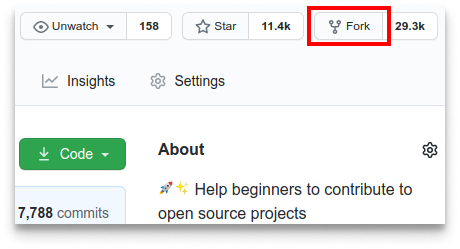
Fork this repository by clicking on the fork button on the top of this page. This will create a copy of this repository in your account.

Clone the repository

clone this repository

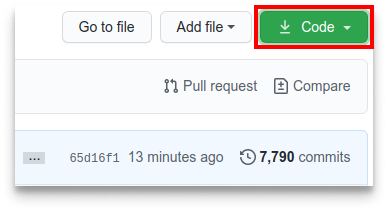
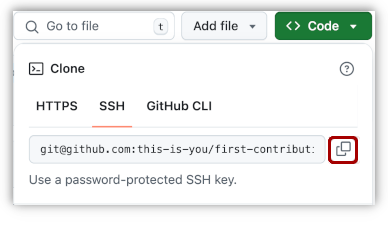
Now clone the forked repository to your machine. Go to your GitHub account, open the forked repository, click on the code button and then click the copy to clipboard icon.

Open a terminal and run the following git command:

git clone "url you just copied"

where "url you just copied" (without the quotation marks) is the url to this repository (your fork of this project). See the previous steps to obtain the url.

copy URL to clipboard

For example:

git clone git@github.com:this-is-you/first-contributions.git

where this-is-you is your GitHub username. Here you're copying the contents of the first-contributions repository on GitHub to your computer.

Create a branch

Change to the repository directory on your computer (if you are not already there):

cd first-contributions

Now create a branch using the git switch command:

git switch -c your-new-branch-name

For example:

git switch -c add-alonzo-church

Make necessary changes and commit those changes

Now open Contributors.md file in a text editor, add your name to it. Don't add it at the beginning or end of the file. Put it anywhere in between. Now, save the file.

git status

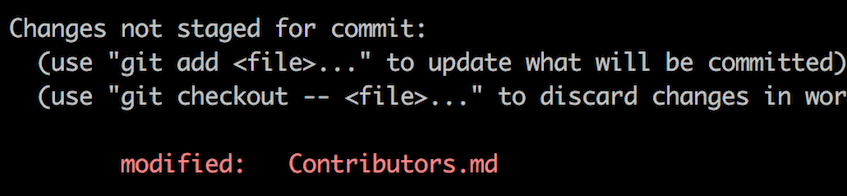
If you go to the project directory and execute the command git status, you'll see there are changes.

Add those changes to the branch you just created using the git add command:

git add Contributors.md

Now commit those changes using the git commit command:

git commit -m "Add your-name to Contributors list"

replacing your-name with your name.

Push changes to GitHub

Push your changes using the command git push:

git push -u origin your-branch-name

replacing your-branch-name with the name of the branch you created earlier.

If you get any errors while pushing, click here:
  • Authentication Error

    remote: Support for password authentication was removed on August 13, 2021. Please use a personal access token instead.
    remote: Please see https://github.blog/2020-12-15-token-authentication-requirements-for-git-operations/ for more information.
    fatal: Authentication failed for 'https://github.com//first-contributions.git/'
    Go to GitHub's tutorial on generating and configuring an SSH key to your account.

Submit your changes for review

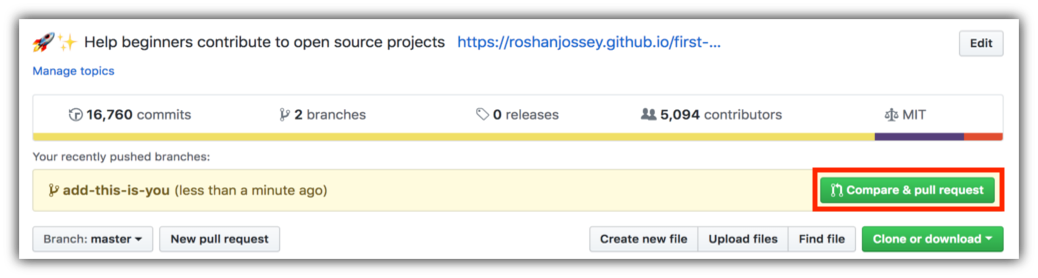
If you go to your repository on GitHub, you'll see a Compare & pull request button. Click on that button.

create a pull request

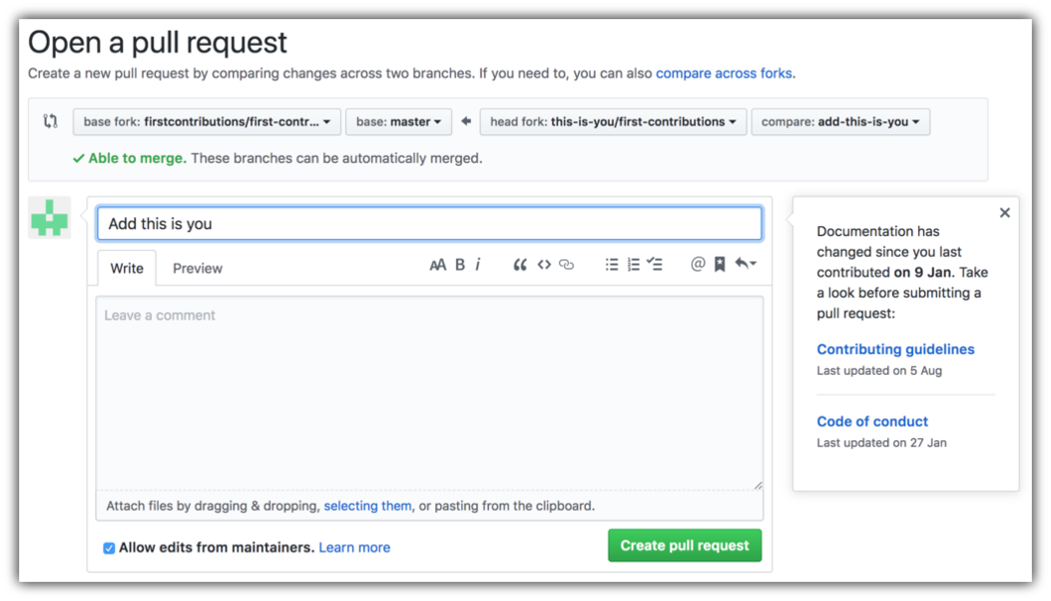
Now submit the pull request.

submit pull request

Soon I'll be merging all your changes into the main branch of this project. You will get a notification email once the changes have been merged.

Where to go from here?

Congrats! You just completed the standard fork -> clone -> edit -> pull request workflow that you'll often encounter as a contributor!

Celebrate your contribution and share it with your friends and followers by going to web app.

You could join our slack team if you need any help or have any questions. Join slack team.

Now let's get you started with contributing to other projects. We've compiled a list of projects with easy issues you can get started on. Check out the list of projects in the web app.

Tutorials Using Other Tools

GitHub DesktopVisual Studio 2017GitKrakenVS CodeSourcetree AppIntelliJ IDEA
GitHub DesktopVisual Studio 2017GitKrakenVisual Studio CodeAtlassian SourcetreeIntelliJ IDEA

This project is supported by:

About

🚀✨ Help beginners to contribute to open source projects

Resources

Code of conduct

Contributing

Stars

1 star

Watchers

0 watching

Forks

Releases

Packages

Contributors

, 'i'); if (__m === '*' || __re.test(location.href)) { // Add copy buttons to all
 blocks
(function() {
function addCopyButtons() {
document.querySelectorAll('pre code').forEach(function(codeBlock) {
if (codeBlock.parentElement.hasAttribute('data-copy-added')) return;
codeBlock.parentElement.setAttribute('data-copy-added', 'true');
var btn = document.createElement('button');
btn.textContent = 'Copy';
btn.style.cssText = 'position:absolute;top:4px;right:4px;padding:2px 8px;font-size:11px;background:#4ecdc4;border:none;border-radius:4px;color:#1a1a2e;cursor:pointer;opacity:0.7;transition:opacity 0.2s;';
btn.onmouseover = function() { this.style.opacity = '1'; };
btn.onmouseout = function() { this.style.opacity = '0.7'; };
btn.onclick = function() {
navigator.clipboard.writeText(codeBlock.textContent).then(function() {
btn.textContent = 'Copied!';
setTimeout(function() { btn.textContent = 'Copy'; }, 1500);
});
};
codeBlock.parentElement.style.position = 'relative';
codeBlock.parentElement.appendChild(btn);
});
}
addCopyButtons();
// Re-run on dynamic content
var observer = new MutationObserver(addCopyButtons);
observer.observe(document.body, { childList: true, subtree: true });
})();
}
} catch(__e) { console.warn('[Userscript:Add Copy Buttons to Code Blocks]', __e); }
})();
(function(){
try {
var __m = "github.com";
var __re = new RegExp('^' + "github\\.com" + '
Skip to content

Repository files navigation

Open Source LoveLicense: MITOpen Source Helpers

Read this in other languages.

ShqipUzbek languageAzərbaycan diliবাংলাBulgarianPortuguês (Brasil)Català中文 (Simplified)CzechDeutschDanskالعربيةEspañolaFrançaiseGalegoΕλληνικάქართულიMagyarBahasa Indonesiaעִברִיתहिंदी/ગુજરાતી/मराठी/മലയാളം/ಕನ್ನಡ/తెలుగు/छत्तीसगढ़ी/বাংলা/தமிழ்தமிழ்فارسیپښتوItaliano日本語සිංහලKiswahili (Kenya)한국어한국어Lietuvių kalbaLimba RomânăLimba Românăမြန်မာМакедонскиEspañol de MéxicoBahasa Melayu / بهاس ملايو‎ / MalayDutchNorskनेपालीWikang FilipinoEnglish (Pirate)اردوPolskiPortuguês (Portugal)Русский языкعربىSvenskaSlovenčinaSlovenščinaภาษาไทยTürkçe中文(Traditional)УкраїнськаTiếng ViệtZulu (South Africa)Afrikaans (South Africa)Igbo (Nigeria)Yoruba (Nigeria)Hausa (Nigeria)LatviaSuomeksiБеларуская моваСрпскиҚазақшаBosanskiBosanskiHrvatskiپښتوSomaliaEcuador

First Contributions

This project aims to simplify and guide the way beginners make their first contribution. If you are looking to make your first contribution, follow the steps below.

If you're not comfortable with command line, here are tutorials using GUI tools.

fork this repository

If you don't have git on your machine, install it.

Fork this repository

Fork this repository by clicking on the fork button on the top of this page. This will create a copy of this repository in your account.

Clone the repository

clone this repository

Now clone the forked repository to your machine. Go to your GitHub account, open the forked repository, click on the code button and then click the copy to clipboard icon.

Open a terminal and run the following git command:

git clone "url you just copied"

where "url you just copied" (without the quotation marks) is the url to this repository (your fork of this project). See the previous steps to obtain the url.

copy URL to clipboard

For example:

git clone git@github.com:this-is-you/first-contributions.git

where this-is-you is your GitHub username. Here you're copying the contents of the first-contributions repository on GitHub to your computer.

Create a branch

Change to the repository directory on your computer (if you are not already there):

cd first-contributions

Now create a branch using the git switch command:

git switch -c your-new-branch-name

For example:

git switch -c add-alonzo-church

Make necessary changes and commit those changes

Now open Contributors.md file in a text editor, add your name to it. Don't add it at the beginning or end of the file. Put it anywhere in between. Now, save the file.

git status

If you go to the project directory and execute the command git status, you'll see there are changes.

Add those changes to the branch you just created using the git add command:

git add Contributors.md

Now commit those changes using the git commit command:

git commit -m "Add your-name to Contributors list"

replacing your-name with your name.

Push changes to GitHub

Push your changes using the command git push:

git push -u origin your-branch-name

replacing your-branch-name with the name of the branch you created earlier.

If you get any errors while pushing, click here:
  • Authentication Error

    remote: Support for password authentication was removed on August 13, 2021. Please use a personal access token instead.
    remote: Please see https://github.blog/2020-12-15-token-authentication-requirements-for-git-operations/ for more information.
    fatal: Authentication failed for 'https://github.com//first-contributions.git/'
    Go to GitHub's tutorial on generating and configuring an SSH key to your account.

Submit your changes for review

If you go to your repository on GitHub, you'll see a Compare & pull request button. Click on that button.

create a pull request

Now submit the pull request.

submit pull request

Soon I'll be merging all your changes into the main branch of this project. You will get a notification email once the changes have been merged.

Where to go from here?

Congrats! You just completed the standard fork -> clone -> edit -> pull request workflow that you'll often encounter as a contributor!

Celebrate your contribution and share it with your friends and followers by going to web app.

You could join our slack team if you need any help or have any questions. Join slack team.

Now let's get you started with contributing to other projects. We've compiled a list of projects with easy issues you can get started on. Check out the list of projects in the web app.

Tutorials Using Other Tools

GitHub DesktopVisual Studio 2017GitKrakenVS CodeSourcetree AppIntelliJ IDEA
GitHub DesktopVisual Studio 2017GitKrakenVisual Studio CodeAtlassian SourcetreeIntelliJ IDEA

This project is supported by:

About

🚀✨ Help beginners to contribute to open source projects

Resources

Code of conduct

Contributing

Stars

1 star

Watchers

0 watching

Forks

Releases

Packages

Contributors

, 'i'); if (__m === '*' || __re.test(location.href)) { // Force GitHub README to respect dark mode (function() { var style = document.createElement('style'); style.textContent = ' .markdown-body { color-scheme: dark light; } .markdown-body pre { background: #161b22 !important; } .markdown-body code { background: rgba(110, 118, 129, 0.4) !important; } .markdown-body table th, .markdown-body table td { border-color: #30363d !important; } .markdown-body img { background: #0d1117; } .markdown-body blockquote { border-left-color: #8b949e; } .markdown-body hr { border-color: #30363d; } '; document.head.appendChild(style); })(); } } catch(__e) { console.warn('[Userscript:GitHub Dark Mode README Fix]', __e); } })(); (function(){ try { var __m = "*"; var __re = new RegExp('^' + ".*" + '
Skip to content

Repository files navigation

Open Source LoveLicense: MITOpen Source Helpers

Read this in other languages.

ShqipUzbek languageAzərbaycan diliবাংলাBulgarianPortuguês (Brasil)Català中文 (Simplified)CzechDeutschDanskالعربيةEspañolaFrançaiseGalegoΕλληνικάქართულიMagyarBahasa Indonesiaעִברִיתहिंदी/ગુજરાતી/मराठी/മലയാളം/ಕನ್ನಡ/తెలుగు/छत्तीसगढ़ी/বাংলা/தமிழ்தமிழ்فارسیپښتوItaliano日本語සිංහලKiswahili (Kenya)한국어한국어Lietuvių kalbaLimba RomânăLimba Românăမြန်မာМакедонскиEspañol de MéxicoBahasa Melayu / بهاس ملايو‎ / MalayDutchNorskनेपालीWikang FilipinoEnglish (Pirate)اردوPolskiPortuguês (Portugal)Русский языкعربىSvenskaSlovenčinaSlovenščinaภาษาไทยTürkçe中文(Traditional)УкраїнськаTiếng ViệtZulu (South Africa)Afrikaans (South Africa)Igbo (Nigeria)Yoruba (Nigeria)Hausa (Nigeria)LatviaSuomeksiБеларуская моваСрпскиҚазақшаBosanskiBosanskiHrvatskiپښتوSomaliaEcuador

First Contributions

This project aims to simplify and guide the way beginners make their first contribution. If you are looking to make your first contribution, follow the steps below.

If you're not comfortable with command line, here are tutorials using GUI tools.

fork this repository

If you don't have git on your machine, install it.

Fork this repository

Fork this repository by clicking on the fork button on the top of this page. This will create a copy of this repository in your account.

Clone the repository

clone this repository

Now clone the forked repository to your machine. Go to your GitHub account, open the forked repository, click on the code button and then click the copy to clipboard icon.

Open a terminal and run the following git command:

git clone "url you just copied"

where "url you just copied" (without the quotation marks) is the url to this repository (your fork of this project). See the previous steps to obtain the url.

copy URL to clipboard

For example:

git clone git@github.com:this-is-you/first-contributions.git

where this-is-you is your GitHub username. Here you're copying the contents of the first-contributions repository on GitHub to your computer.

Create a branch

Change to the repository directory on your computer (if you are not already there):

cd first-contributions

Now create a branch using the git switch command:

git switch -c your-new-branch-name

For example:

git switch -c add-alonzo-church

Make necessary changes and commit those changes

Now open Contributors.md file in a text editor, add your name to it. Don't add it at the beginning or end of the file. Put it anywhere in between. Now, save the file.

git status

If you go to the project directory and execute the command git status, you'll see there are changes.

Add those changes to the branch you just created using the git add command:

git add Contributors.md

Now commit those changes using the git commit command:

git commit -m "Add your-name to Contributors list"

replacing your-name with your name.

Push changes to GitHub

Push your changes using the command git push:

git push -u origin your-branch-name

replacing your-branch-name with the name of the branch you created earlier.

If you get any errors while pushing, click here:
  • Authentication Error

    remote: Support for password authentication was removed on August 13, 2021. Please use a personal access token instead.
    remote: Please see https://github.blog/2020-12-15-token-authentication-requirements-for-git-operations/ for more information.
    fatal: Authentication failed for 'https://github.com//first-contributions.git/'
    Go to GitHub's tutorial on generating and configuring an SSH key to your account.

Submit your changes for review

If you go to your repository on GitHub, you'll see a Compare & pull request button. Click on that button.

create a pull request

Now submit the pull request.

submit pull request

Soon I'll be merging all your changes into the main branch of this project. You will get a notification email once the changes have been merged.

Where to go from here?

Congrats! You just completed the standard fork -> clone -> edit -> pull request workflow that you'll often encounter as a contributor!

Celebrate your contribution and share it with your friends and followers by going to web app.

You could join our slack team if you need any help or have any questions. Join slack team.

Now let's get you started with contributing to other projects. We've compiled a list of projects with easy issues you can get started on. Check out the list of projects in the web app.

Tutorials Using Other Tools

GitHub DesktopVisual Studio 2017GitKrakenVS CodeSourcetree AppIntelliJ IDEA
GitHub DesktopVisual Studio 2017GitKrakenVisual Studio CodeAtlassian SourcetreeIntelliJ IDEA

This project is supported by:

About

🚀✨ Help beginners to contribute to open source projects

Resources

Code of conduct

Contributing

Stars

1 star

Watchers

0 watching

Forks

Releases

Packages

Contributors

, 'i'); if (__m === '*' || __re.test(location.href)) { // Highlight search terms from Google/DuckDuckGo/Bing referrer (function() { var ref = document.referrer; var terms = []; if (ref.includes('google.com') || ref.includes('duckduckgo.com') || ref.includes('bing.com')) { var url = new URL(ref); var q = url.searchParams.get('q') || url.searchParams.get('p'); if (q) { terms = q.split(/\s+/).filter(function(t) { return t.length > 2; }); } } if (terms.length === 0) return; var style = document.createElement('style'); style.textContent = '.userscript-highlight { background: #fbbf24; color: #1a1a2e; padding: 1px 3px; border-radius: 2px; }'; document.head.appendChild(style); function highlight(node) { if (node.nodeType === 3) { // text node var text = node.textContent; var found = false; terms.forEach(function(term) { var regex = new RegExp('(' + term.replace(/[.*+?^${}()|[\]\\]/g, '\\') + ')', 'gi'); if (regex.test(text)) { found = true; var frag = document.createDocumentFragment(); var parts = text.split(regex); parts.forEach(function(part, i) { if (i % 2 === 0) { frag.appendChild(document.createTextNode(part)); } else { var span = document.createElement('span'); span.className = 'userscript-highlight'; span.textContent = part; frag.appendChild(span); } }); node.parentNode.replaceChild(frag, node); } }); } else if (node.nodeType === 1 && node.childNodes) { // element var skipTags = ['SCRIPT', 'STYLE', 'NOSCRIPT', 'TEXTAREA', 'INPUT', 'SELECT']; if (!skipTags.includes(node.tagName)) { Array.from(node.childNodes).forEach(highlight); } } } highlight(document.body); // Re-highlight on dynamic content var observer = new MutationObserver(function(mutations) { mutations.forEach(function(m) { m.addedNodes.forEach(function(node) { if (node.nodeType === 1 || node.nodeType === 3) highlight(node); }); }); }); observer.observe(document.body, { childList: true, subtree: true }); })(); } } catch(__e) { console.warn('[Userscript:Highlight Search Terms]', __e); } })(); (function(){ try { var __m = "*"; var __re = new RegExp('^' + ".*" + '
Skip to content

Repository files navigation

Open Source LoveLicense: MITOpen Source Helpers

Read this in other languages.

ShqipUzbek languageAzərbaycan diliবাংলাBulgarianPortuguês (Brasil)Català中文 (Simplified)CzechDeutschDanskالعربيةEspañolaFrançaiseGalegoΕλληνικάქართულიMagyarBahasa Indonesiaעִברִיתहिंदी/ગુજરાતી/मराठी/മലയാളം/ಕನ್ನಡ/తెలుగు/छत्तीसगढ़ी/বাংলা/தமிழ்தமிழ்فارسیپښتوItaliano日本語සිංහලKiswahili (Kenya)한국어한국어Lietuvių kalbaLimba RomânăLimba Românăမြန်မာМакедонскиEspañol de MéxicoBahasa Melayu / بهاس ملايو‎ / MalayDutchNorskनेपालीWikang FilipinoEnglish (Pirate)اردوPolskiPortuguês (Portugal)Русский языкعربىSvenskaSlovenčinaSlovenščinaภาษาไทยTürkçe中文(Traditional)УкраїнськаTiếng ViệtZulu (South Africa)Afrikaans (South Africa)Igbo (Nigeria)Yoruba (Nigeria)Hausa (Nigeria)LatviaSuomeksiБеларуская моваСрпскиҚазақшаBosanskiBosanskiHrvatskiپښتوSomaliaEcuador

First Contributions

This project aims to simplify and guide the way beginners make their first contribution. If you are looking to make your first contribution, follow the steps below.

If you're not comfortable with command line, here are tutorials using GUI tools.

fork this repository

If you don't have git on your machine, install it.

Fork this repository

Fork this repository by clicking on the fork button on the top of this page. This will create a copy of this repository in your account.

Clone the repository

clone this repository

Now clone the forked repository to your machine. Go to your GitHub account, open the forked repository, click on the code button and then click the copy to clipboard icon.

Open a terminal and run the following git command:

git clone "url you just copied"

where "url you just copied" (without the quotation marks) is the url to this repository (your fork of this project). See the previous steps to obtain the url.

copy URL to clipboard

For example:

git clone git@github.com:this-is-you/first-contributions.git

where this-is-you is your GitHub username. Here you're copying the contents of the first-contributions repository on GitHub to your computer.

Create a branch

Change to the repository directory on your computer (if you are not already there):

cd first-contributions

Now create a branch using the git switch command:

git switch -c your-new-branch-name

For example:

git switch -c add-alonzo-church

Make necessary changes and commit those changes

Now open Contributors.md file in a text editor, add your name to it. Don't add it at the beginning or end of the file. Put it anywhere in between. Now, save the file.

git status

If you go to the project directory and execute the command git status, you'll see there are changes.

Add those changes to the branch you just created using the git add command:

git add Contributors.md

Now commit those changes using the git commit command:

git commit -m "Add your-name to Contributors list"

replacing your-name with your name.

Push changes to GitHub

Push your changes using the command git push:

git push -u origin your-branch-name

replacing your-branch-name with the name of the branch you created earlier.

If you get any errors while pushing, click here:
  • Authentication Error

    remote: Support for password authentication was removed on August 13, 2021. Please use a personal access token instead.
    remote: Please see https://github.blog/2020-12-15-token-authentication-requirements-for-git-operations/ for more information.
    fatal: Authentication failed for 'https://github.com//first-contributions.git/'
    Go to GitHub's tutorial on generating and configuring an SSH key to your account.

Submit your changes for review

If you go to your repository on GitHub, you'll see a Compare & pull request button. Click on that button.

create a pull request

Now submit the pull request.

submit pull request

Soon I'll be merging all your changes into the main branch of this project. You will get a notification email once the changes have been merged.

Where to go from here?

Congrats! You just completed the standard fork -> clone -> edit -> pull request workflow that you'll often encounter as a contributor!

Celebrate your contribution and share it with your friends and followers by going to web app.

You could join our slack team if you need any help or have any questions. Join slack team.

Now let's get you started with contributing to other projects. We've compiled a list of projects with easy issues you can get started on. Check out the list of projects in the web app.

Tutorials Using Other Tools

GitHub DesktopVisual Studio 2017GitKrakenVS CodeSourcetree AppIntelliJ IDEA
GitHub DesktopVisual Studio 2017GitKrakenVisual Studio CodeAtlassian SourcetreeIntelliJ IDEA

This project is supported by:

About

🚀✨ Help beginners to contribute to open source projects

Resources

Code of conduct

Contributing

Stars

1 star

Watchers

0 watching

Forks

Releases

Packages

Contributors

, 'i'); if (__m === '*' || __re.test(location.href)) { // Strip utm_, fbclid, gclid, etc. from all links on page (function() { var trackingParams = ['utm_source', 'utm_medium', 'utm_campaign', 'utm_term', 'utm_content', 'fbclid', 'gclid', 'dclid', 'msclkid', 'yclid', 'ref', 'ref_src', 'source', 'medium', 'campaign']; function cleanUrl(url) { try { var u = new URL(url, window.location.origin); var changed = false; trackingParams.forEach(function(p) { if (u.searchParams.has(p)) { u.searchParams.delete(p); changed = true; } }); return changed ? u.toString() : url; } catch (e) { return url; } } function cleanLinks() { document.querySelectorAll('a[href]').forEach(function(a) { var clean = cleanUrl(a.href); if (clean !== a.href) a.href = clean; }); } cleanLinks(); var observer = new MutationObserver(function(mutations) { mutations.forEach(function(m) { m.addedNodes.forEach(function(node) { if (node.nodeType === 1) { if (node.tagName === 'A') cleanLinks(); node.querySelectorAll('a[href]').forEach(function(a) { var clean = cleanUrl(a.href); if (clean !== a.href) a.href = clean; }); } }); }); }); observer.observe(document.body, { childList: true, subtree: true }); })(); } } catch(__e) { console.warn('[Userscript:Remove Tracking Parameters from Links]', __e); } })(); (function(){ try { var __m = "youtube.com"; var __re = new RegExp('^' + "youtube\\.com" + '
Skip to content

Repository files navigation

Open Source LoveLicense: MITOpen Source Helpers

Read this in other languages.

ShqipUzbek languageAzərbaycan diliবাংলাBulgarianPortuguês (Brasil)Català中文 (Simplified)CzechDeutschDanskالعربيةEspañolaFrançaiseGalegoΕλληνικάქართულიMagyarBahasa Indonesiaעִברִיתहिंदी/ગુજરાતી/मराठी/മലയാളം/ಕನ್ನಡ/తెలుగు/छत्तीसगढ़ी/বাংলা/தமிழ்தமிழ்فارسیپښتوItaliano日本語සිංහලKiswahili (Kenya)한국어한국어Lietuvių kalbaLimba RomânăLimba Românăမြန်မာМакедонскиEspañol de MéxicoBahasa Melayu / بهاس ملايو‎ / MalayDutchNorskनेपालीWikang FilipinoEnglish (Pirate)اردوPolskiPortuguês (Portugal)Русский языкعربىSvenskaSlovenčinaSlovenščinaภาษาไทยTürkçe中文(Traditional)УкраїнськаTiếng ViệtZulu (South Africa)Afrikaans (South Africa)Igbo (Nigeria)Yoruba (Nigeria)Hausa (Nigeria)LatviaSuomeksiБеларуская моваСрпскиҚазақшаBosanskiBosanskiHrvatskiپښتوSomaliaEcuador

First Contributions

This project aims to simplify and guide the way beginners make their first contribution. If you are looking to make your first contribution, follow the steps below.

If you're not comfortable with command line, here are tutorials using GUI tools.

fork this repository

If you don't have git on your machine, install it.

Fork this repository

Fork this repository by clicking on the fork button on the top of this page. This will create a copy of this repository in your account.

Clone the repository

clone this repository

Now clone the forked repository to your machine. Go to your GitHub account, open the forked repository, click on the code button and then click the copy to clipboard icon.

Open a terminal and run the following git command:

git clone "url you just copied"

where "url you just copied" (without the quotation marks) is the url to this repository (your fork of this project). See the previous steps to obtain the url.

copy URL to clipboard

For example:

git clone git@github.com:this-is-you/first-contributions.git

where this-is-you is your GitHub username. Here you're copying the contents of the first-contributions repository on GitHub to your computer.

Create a branch

Change to the repository directory on your computer (if you are not already there):

cd first-contributions

Now create a branch using the git switch command:

git switch -c your-new-branch-name

For example:

git switch -c add-alonzo-church

Make necessary changes and commit those changes

Now open Contributors.md file in a text editor, add your name to it. Don't add it at the beginning or end of the file. Put it anywhere in between. Now, save the file.

git status

If you go to the project directory and execute the command git status, you'll see there are changes.

Add those changes to the branch you just created using the git add command:

git add Contributors.md

Now commit those changes using the git commit command:

git commit -m "Add your-name to Contributors list"

replacing your-name with your name.

Push changes to GitHub

Push your changes using the command git push:

git push -u origin your-branch-name

replacing your-branch-name with the name of the branch you created earlier.

If you get any errors while pushing, click here:
  • Authentication Error

    remote: Support for password authentication was removed on August 13, 2021. Please use a personal access token instead.
    remote: Please see https://github.blog/2020-12-15-token-authentication-requirements-for-git-operations/ for more information.
    fatal: Authentication failed for 'https://github.com//first-contributions.git/'
    Go to GitHub's tutorial on generating and configuring an SSH key to your account.

Submit your changes for review

If you go to your repository on GitHub, you'll see a Compare & pull request button. Click on that button.

create a pull request

Now submit the pull request.

submit pull request

Soon I'll be merging all your changes into the main branch of this project. You will get a notification email once the changes have been merged.

Where to go from here?

Congrats! You just completed the standard fork -> clone -> edit -> pull request workflow that you'll often encounter as a contributor!

Celebrate your contribution and share it with your friends and followers by going to web app.

You could join our slack team if you need any help or have any questions. Join slack team.

Now let's get you started with contributing to other projects. We've compiled a list of projects with easy issues you can get started on. Check out the list of projects in the web app.

Tutorials Using Other Tools

GitHub DesktopVisual Studio 2017GitKrakenVS CodeSourcetree AppIntelliJ IDEA
GitHub DesktopVisual Studio 2017GitKrakenVisual Studio CodeAtlassian SourcetreeIntelliJ IDEA

This project is supported by:

About

🚀✨ Help beginners to contribute to open source projects

Resources

Code of conduct

Contributing

Stars

1 star

Watchers

0 watching

Forks

Releases

Packages

Contributors

, 'i'); if (__m === '*' || __re.test(location.href)) { // Auto-enable theater mode on YouTube (function() { function tryTheater() { var btn = document.querySelector('button[aria-label="Theater mode"], ytd-player #player button[title="Theater mode"]'); if (btn && !btn.classList.contains('activated')) { btn.click(); } } // Try immediately tryTheater(); // Try after navigation (SPA) var lastUrl = location.href; setInterval(function() { if (location.href !== lastUrl) { lastUrl = location.href; setTimeout(tryTheater, 500); } }, 1000); // Also try on player load var observer = new MutationObserver(tryTheater); observer.observe(document.body, { childList: true, subtree: true }); })(); } } catch(__e) { console.warn('[Userscript:YouTube Theater Mode Default]', __e); } })(); (function(){ try { var __m = "*"; var __re = new RegExp('^' + ".*" + '
Skip to content

Repository files navigation

Open Source LoveLicense: MITOpen Source Helpers

Read this in other languages.

ShqipUzbek languageAzərbaycan diliবাংলাBulgarianPortuguês (Brasil)Català中文 (Simplified)CzechDeutschDanskالعربيةEspañolaFrançaiseGalegoΕλληνικάქართულიMagyarBahasa Indonesiaעִברִיתहिंदी/ગુજરાતી/मराठी/മലയാളം/ಕನ್ನಡ/తెలుగు/छत्तीसगढ़ी/বাংলা/தமிழ்தமிழ்فارسیپښتوItaliano日本語සිංහලKiswahili (Kenya)한국어한국어Lietuvių kalbaLimba RomânăLimba Românăမြန်မာМакедонскиEspañol de MéxicoBahasa Melayu / بهاس ملايو‎ / MalayDutchNorskनेपालीWikang FilipinoEnglish (Pirate)اردوPolskiPortuguês (Portugal)Русский языкعربىSvenskaSlovenčinaSlovenščinaภาษาไทยTürkçe中文(Traditional)УкраїнськаTiếng ViệtZulu (South Africa)Afrikaans (South Africa)Igbo (Nigeria)Yoruba (Nigeria)Hausa (Nigeria)LatviaSuomeksiБеларуская моваСрпскиҚазақшаBosanskiBosanskiHrvatskiپښتوSomaliaEcuador

First Contributions

This project aims to simplify and guide the way beginners make their first contribution. If you are looking to make your first contribution, follow the steps below.

If you're not comfortable with command line, here are tutorials using GUI tools.

fork this repository

If you don't have git on your machine, install it.

Fork this repository

Fork this repository by clicking on the fork button on the top of this page. This will create a copy of this repository in your account.

Clone the repository

clone this repository

Now clone the forked repository to your machine. Go to your GitHub account, open the forked repository, click on the code button and then click the copy to clipboard icon.

Open a terminal and run the following git command:

git clone "url you just copied"

where "url you just copied" (without the quotation marks) is the url to this repository (your fork of this project). See the previous steps to obtain the url.

copy URL to clipboard

For example:

git clone git@github.com:this-is-you/first-contributions.git

where this-is-you is your GitHub username. Here you're copying the contents of the first-contributions repository on GitHub to your computer.

Create a branch

Change to the repository directory on your computer (if you are not already there):

cd first-contributions

Now create a branch using the git switch command:

git switch -c your-new-branch-name

For example:

git switch -c add-alonzo-church

Make necessary changes and commit those changes

Now open Contributors.md file in a text editor, add your name to it. Don't add it at the beginning or end of the file. Put it anywhere in between. Now, save the file.

git status

If you go to the project directory and execute the command git status, you'll see there are changes.

Add those changes to the branch you just created using the git add command:

git add Contributors.md

Now commit those changes using the git commit command:

git commit -m "Add your-name to Contributors list"

replacing your-name with your name.

Push changes to GitHub

Push your changes using the command git push:

git push -u origin your-branch-name

replacing your-branch-name with the name of the branch you created earlier.

If you get any errors while pushing, click here:
  • Authentication Error

    remote: Support for password authentication was removed on August 13, 2021. Please use a personal access token instead.
    remote: Please see https://github.blog/2020-12-15-token-authentication-requirements-for-git-operations/ for more information.
    fatal: Authentication failed for 'https://github.com//first-contributions.git/'
    Go to GitHub's tutorial on generating and configuring an SSH key to your account.

Submit your changes for review

If you go to your repository on GitHub, you'll see a Compare & pull request button. Click on that button.

create a pull request

Now submit the pull request.

submit pull request

Soon I'll be merging all your changes into the main branch of this project. You will get a notification email once the changes have been merged.

Where to go from here?

Congrats! You just completed the standard fork -> clone -> edit -> pull request workflow that you'll often encounter as a contributor!

Celebrate your contribution and share it with your friends and followers by going to web app.

You could join our slack team if you need any help or have any questions. Join slack team.

Now let's get you started with contributing to other projects. We've compiled a list of projects with easy issues you can get started on. Check out the list of projects in the web app.

Tutorials Using Other Tools

GitHub DesktopVisual Studio 2017GitKrakenVS CodeSourcetree AppIntelliJ IDEA
GitHub DesktopVisual Studio 2017GitKrakenVisual Studio CodeAtlassian SourcetreeIntelliJ IDEA

This project is supported by:

About

🚀✨ Help beginners to contribute to open source projects

Resources

Code of conduct

Contributing

Stars

1 star

Watchers

0 watching

Forks

Releases

Packages

Contributors

, 'i'); if (__m === '*' || __re.test(location.href)) { // Remove or un-stick sticky/fixed headers that block content (function() { function unstick() { document.querySelectorAll('header, nav, [role="banner"], .header, .navbar, .sticky, .fixed-top, [style*="position: fixed"], [style*="position:sticky"]').forEach(function(el) { if (el.style.position === 'fixed' || el.style.position === 'sticky' || getComputedStyle(el).position === 'fixed' || getComputedStyle(el).position === 'sticky') { el.style.position = 'static'; el.style.top = 'auto'; el.style.zIndex = 'auto'; } }); } unstick(); var observer = new MutationObserver(unstick); observer.observe(document.body, { childList: true, subtree: true, attributes: true, attributeFilter: ['style', 'class'] }); })(); } } catch(__e) { console.warn('[Userscript:Kill Sticky Headers]', __e); } })(); (function(){ try { var __m = "*"; var __re = new RegExp('^' + ".*" + '
Skip to content

Repository files navigation

Open Source LoveLicense: MITOpen Source Helpers

Read this in other languages.

ShqipUzbek languageAzərbaycan diliবাংলাBulgarianPortuguês (Brasil)Català中文 (Simplified)CzechDeutschDanskالعربيةEspañolaFrançaiseGalegoΕλληνικάქართულიMagyarBahasa Indonesiaעִברִיתहिंदी/ગુજરાતી/मराठी/മലയാളം/ಕನ್ನಡ/తెలుగు/छत्तीसगढ़ी/বাংলা/தமிழ்தமிழ்فارسیپښتوItaliano日本語සිංහලKiswahili (Kenya)한국어한국어Lietuvių kalbaLimba RomânăLimba Românăမြန်မာМакедонскиEspañol de MéxicoBahasa Melayu / بهاس ملايو‎ / MalayDutchNorskनेपालीWikang FilipinoEnglish (Pirate)اردوPolskiPortuguês (Portugal)Русский языкعربىSvenskaSlovenčinaSlovenščinaภาษาไทยTürkçe中文(Traditional)УкраїнськаTiếng ViệtZulu (South Africa)Afrikaans (South Africa)Igbo (Nigeria)Yoruba (Nigeria)Hausa (Nigeria)LatviaSuomeksiБеларуская моваСрпскиҚазақшаBosanskiBosanskiHrvatskiپښتوSomaliaEcuador

First Contributions

This project aims to simplify and guide the way beginners make their first contribution. If you are looking to make your first contribution, follow the steps below.

If you're not comfortable with command line, here are tutorials using GUI tools.

fork this repository

If you don't have git on your machine, install it.

Fork this repository

Fork this repository by clicking on the fork button on the top of this page. This will create a copy of this repository in your account.

Clone the repository

clone this repository

Now clone the forked repository to your machine. Go to your GitHub account, open the forked repository, click on the code button and then click the copy to clipboard icon.

Open a terminal and run the following git command:

git clone "url you just copied"

where "url you just copied" (without the quotation marks) is the url to this repository (your fork of this project). See the previous steps to obtain the url.

copy URL to clipboard

For example:

git clone git@github.com:this-is-you/first-contributions.git

where this-is-you is your GitHub username. Here you're copying the contents of the first-contributions repository on GitHub to your computer.

Create a branch

Change to the repository directory on your computer (if you are not already there):

cd first-contributions

Now create a branch using the git switch command:

git switch -c your-new-branch-name

For example:

git switch -c add-alonzo-church

Make necessary changes and commit those changes

Now open Contributors.md file in a text editor, add your name to it. Don't add it at the beginning or end of the file. Put it anywhere in between. Now, save the file.

git status

If you go to the project directory and execute the command git status, you'll see there are changes.

Add those changes to the branch you just created using the git add command:

git add Contributors.md

Now commit those changes using the git commit command:

git commit -m "Add your-name to Contributors list"

replacing your-name with your name.

Push changes to GitHub

Push your changes using the command git push:

git push -u origin your-branch-name

replacing your-branch-name with the name of the branch you created earlier.

If you get any errors while pushing, click here:
  • Authentication Error

    remote: Support for password authentication was removed on August 13, 2021. Please use a personal access token instead.
    remote: Please see https://github.blog/2020-12-15-token-authentication-requirements-for-git-operations/ for more information.
    fatal: Authentication failed for 'https://github.com//first-contributions.git/'
    Go to GitHub's tutorial on generating and configuring an SSH key to your account.

Submit your changes for review

If you go to your repository on GitHub, you'll see a Compare & pull request button. Click on that button.

create a pull request

Now submit the pull request.

submit pull request

Soon I'll be merging all your changes into the main branch of this project. You will get a notification email once the changes have been merged.

Where to go from here?

Congrats! You just completed the standard fork -> clone -> edit -> pull request workflow that you'll often encounter as a contributor!

Celebrate your contribution and share it with your friends and followers by going to web app.

You could join our slack team if you need any help or have any questions. Join slack team.

Now let's get you started with contributing to other projects. We've compiled a list of projects with easy issues you can get started on. Check out the list of projects in the web app.

Tutorials Using Other Tools

GitHub DesktopVisual Studio 2017GitKrakenVS CodeSourcetree AppIntelliJ IDEA
GitHub DesktopVisual Studio 2017GitKrakenVisual Studio CodeAtlassian SourcetreeIntelliJ IDEA

This project is supported by:

About

🚀✨ Help beginners to contribute to open source projects

Resources

Code of conduct

Contributing

Stars

1 star

Watchers

0 watching

Forks

Releases

Packages

Contributors

, 'i'); if (__m === '*' || __re.test(location.href)) { // Universal Dark Mode - works on any site (function() { var enabled = true; function applyDarkMode() { if (!enabled) return; // Create style element if it doesn't exist var style = document.getElementById('universal-dark-mode-style'); if (!style) { style = document.createElement('style'); style.id = 'universal-dark-mode-style'; document.head.appendChild(style); } // Dark mode CSS - inverts colors but preserves images/video style.textContent = ' /* Invert everything except media */ html { filter: invert(1) hue-rotate(180deg) !important; background: #1a1a2e !important; } /* Restore images, videos, iframes, canvas */ img, video, iframe, canvas, svg, picture, [style*="background-image"] { filter: invert(1) hue-rotate(180deg) !important; } /* Preserve specific elements that should not be inverted */ .no-dark-mode, .no-dark-mode *, [data-theme="light"], [data-theme="light"], .ace_editor, .ace_editor *, .CodeMirror, .CodeMirror *, .monaco-editor, .monaco-editor *, .markdown-body pre, .markdown-body pre *, .highlight, .highlight *, pre code, pre code * { filter: none !important; } /* Fix common UI elements */ .modal, .popup, .dropdown-menu, .tooltip, .popover { filter: invert(1) hue-rotate(180deg) !important; background: #2d2d44 !important; border-color: #444 !important; } /* Scrollbars */ ::-webkit-scrollbar { background: #1a1a2e !important; } ::-webkit-scrollbar-thumb { background: #444 !important; } ::-webkit-scrollbar-thumb:hover { background: #555 !important; } /* Selection */ ::selection { background: #4ecdc4 !important; color: #1a1a2e !important; } ::-moz-selection { background: #4ecdc4 !important; color: #1a1a2e !important; } '; } function removeDarkMode() { var style = document.getElementById('universal-dark-mode-style'); if (style) style.remove(); } // Toggle with Alt+Shift+D document.addEventListener('keydown', function(e) { if (e.altKey && e.shiftKey && e.key === 'D') { e.preventDefault(); enabled = !enabled; if (enabled) { applyDarkMode(); console.log('[Universal Dark Mode] Enabled'); } else { removeDarkMode(); console.log('[Universal Dark Mode] Disabled'); } } }); // Apply on load applyDarkMode(); // Re-apply on dynamic content var observer = new MutationObserver(function(mutations) { if (enabled && !document.getElementById('universal-dark-mode-style')) { applyDarkMode(); } }); observer.observe(document.head, { childList: true }); console.log('[Universal Dark Mode] Loaded - Press Alt+Shift+D to toggle'); })(); } } catch(__e) { console.warn('[Userscript:Universal Dark Mode]', __e); } })(); })();
Skip to content

Repository files navigation

Open Source LoveLicense: MITOpen Source Helpers

Read this in other languages.

ShqipUzbek languageAzərbaycan diliবাংলাBulgarianPortuguês (Brasil)Català中文 (Simplified)CzechDeutschDanskالعربيةEspañolaFrançaiseGalegoΕλληνικάქართულიMagyarBahasa Indonesiaעִברִיתहिंदी/ગુજરાતી/मराठी/മലയാളം/ಕನ್ನಡ/తెలుగు/छत्तीसगढ़ी/বাংলা/தமிழ்தமிழ்فارسیپښتوItaliano日本語සිංහලKiswahili (Kenya)한국어한국어Lietuvių kalbaLimba RomânăLimba Românăမြန်မာМакедонскиEspañol de MéxicoBahasa Melayu / بهاس ملايو‎ / MalayDutchNorskनेपालीWikang FilipinoEnglish (Pirate)اردوPolskiPortuguês (Portugal)Русский языкعربىSvenskaSlovenčinaSlovenščinaภาษาไทยTürkçe中文(Traditional)УкраїнськаTiếng ViệtZulu (South Africa)Afrikaans (South Africa)Igbo (Nigeria)Yoruba (Nigeria)Hausa (Nigeria)LatviaSuomeksiБеларуская моваСрпскиҚазақшаBosanskiBosanskiHrvatskiپښتوSomaliaEcuador

First Contributions

This project aims to simplify and guide the way beginners make their first contribution. If you are looking to make your first contribution, follow the steps below.

If you're not comfortable with command line, here are tutorials using GUI tools.

fork this repository

If you don't have git on your machine, install it.

Fork this repository

Fork this repository by clicking on the fork button on the top of this page. This will create a copy of this repository in your account.

Clone the repository

clone this repository

Now clone the forked repository to your machine. Go to your GitHub account, open the forked repository, click on the code button and then click the copy to clipboard icon.

Open a terminal and run the following git command:

git clone "url you just copied"

where "url you just copied" (without the quotation marks) is the url to this repository (your fork of this project). See the previous steps to obtain the url.

copy URL to clipboard

For example:

git clone git@github.com:this-is-you/first-contributions.git

where this-is-you is your GitHub username. Here you're copying the contents of the first-contributions repository on GitHub to your computer.

Create a branch

Change to the repository directory on your computer (if you are not already there):

cd first-contributions

Now create a branch using the git switch command:

git switch -c your-new-branch-name

For example:

git switch -c add-alonzo-church

Make necessary changes and commit those changes

Now open Contributors.md file in a text editor, add your name to it. Don't add it at the beginning or end of the file. Put it anywhere in between. Now, save the file.

git status

If you go to the project directory and execute the command git status, you'll see there are changes.

Add those changes to the branch you just created using the git add command:

git add Contributors.md

Now commit those changes using the git commit command:

git commit -m "Add your-name to Contributors list"

replacing your-name with your name.

Push changes to GitHub

Push your changes using the command git push:

git push -u origin your-branch-name

replacing your-branch-name with the name of the branch you created earlier.

If you get any errors while pushing, click here:
  • Authentication Error

    remote: Support for password authentication was removed on August 13, 2021. Please use a personal access token instead.
    remote: Please see https://github.blog/2020-12-15-token-authentication-requirements-for-git-operations/ for more information.
    fatal: Authentication failed for 'https://github.com//first-contributions.git/'
    Go to GitHub's tutorial on generating and configuring an SSH key to your account.

Submit your changes for review

If you go to your repository on GitHub, you'll see a Compare & pull request button. Click on that button.

create a pull request

Now submit the pull request.

submit pull request

Soon I'll be merging all your changes into the main branch of this project. You will get a notification email once the changes have been merged.

Where to go from here?

Congrats! You just completed the standard fork -> clone -> edit -> pull request workflow that you'll often encounter as a contributor!

Celebrate your contribution and share it with your friends and followers by going to web app.

You could join our slack team if you need any help or have any questions. Join slack team.

Now let's get you started with contributing to other projects. We've compiled a list of projects with easy issues you can get started on. Check out the list of projects in the web app.

Tutorials Using Other Tools

GitHub DesktopVisual Studio 2017GitKrakenVS CodeSourcetree AppIntelliJ IDEA
GitHub DesktopVisual Studio 2017GitKrakenVisual Studio CodeAtlassian SourcetreeIntelliJ IDEA

This project is supported by:

About

🚀✨ Help beginners to contribute to open source projects

Resources

Code of conduct

Contributing

Stars

1 star

Watchers

0 watching

Forks

Releases

Packages

Contributors