
Repository files navigation

Fin3R: Fine-tuning Feed-forward 3D Reconstruction Models via Monocular Knowledge Distillation

Paper PDFarXivProject Page

Visual AI Lab, HKU; VIS, Baidu

Weining Ren, Hongjun Wang, Xiao Tan, Kai Han

NeurIPS 2025

Updates

  • [Nov. 24, 2025] We release the inference code of Fin3R.

Overview

Fin3R is a fine-tuning method designed to enhance the geometric accuracy and robustness of feed-forward 3D reconstruction models, while preserving their multi-view capability.

Quick Start

First, clone this repository to your local machine, and install the dependencies (torch, torchvision, numpy, Pillow, and huggingface_hub).

git clone git@github.com:Visual-AI/Fin3R.git cd Fin3R
pip install -r requirements.txt

You just need to apply lora weight by a single line of code.

model.apply_lora(lora_path = 'checkpoints/vggt_lora.pth')

Following VGGT demo, you can use it by:

importtorchfromvggt.models.vggtimportVGGTfromvggt.utils.load_fnimportload_and_preprocess_imagesdevice="cuda"iftorch.cuda.is_available() else"cpu"# bfloat16 is supported on Ampere GPUs (Compute Capability 8.0+) dtype=torch.bfloat16iftorch.cuda.get_device_capability()[0] >=8elsetorch.float16# Initialize the model and load the pretrained weights.# This will automatically download the model weights the first time it's run, which may take a while.model=VGGT.from_pretrained("facebook/VGGT-1B").to(device)
# Add Fin3R Lora weight here!model.apply_lora(lora_path='checkpoints/vggt_lora.pth')
# Load and preprocess example images (replace with your own image paths)image_names= ["path/to/imageA.png", "path/to/imageB.png", "path/to/imageC.png"] images=load_and_preprocess_images(image_names).to(device)
withtorch.no_grad():
withtorch.cuda.amp.autocast(dtype=dtype):
# Predict attributes including cameras, depth maps, and point maps.predictions=model(images)

The VGGT weights will be automatically downloaded from Hugging Face. If you encounter issues such as slow loading, you can manually download them here and load, or:

model=VGGT()
_URL="https://huggingface.co/facebook/VGGT-1B/resolve/main/model.pt"model.load_state_dict(torch.hub.load_state_dict_from_url(_URL))
model.apply_lora(lora_path='checkpoints/vggt_lora.pth')

Evaluation

Following Pi3 evaluation code. The pointmap estimation results from two heads are as following:

MethodDTU
Acc. MeanAcc. Med.Comp. MeanComp. Med.N.C. MeanN.C. Med.
VGGT cam+depth1.2980.7541.9641.0330.6660.752
Fin3R cam+depth1.1240.6301.6260.6240.6780.768
VGGT pointmap1.1840.7132.2241.2970.6940.777
Fin3R pointmap0.9780.5301.9340.8910.6970.785
MethodETH3D
Acc. MeanAcc. Med.Comp. MeanComp. Med.N.C. MeanN.C. Med.
VGGT cam+depth0.2850.1950.3380.2130.8340.931
Fin3R cam+depth0.2340.1430.2020.1130.8530.970
VGGT pointmap0.2920.1970.3650.2240.8430.935
Fin3R pointmap0.2320.1440.2020.1180.8570.968

Checkpoints

Checkpoints for DUSt3R, MASt3R, CUT3R and VGGT can be found at Google Drive. We release the integration of DUSt3R here. You can also find the instructions at issue#2.

Interactive Demo

Based on the original demo provided by VGGT, we also provide multiple ways to visualize your 3D reconstructions. Before using these visualization tools, install the required dependencies:

pip install -r requirements_demo.txt

Interactive 3D Visualization

Please note: VGGT typically reconstructs a scene in less than 1 second. However, visualizing 3D points may take tens of seconds due to third-party rendering, independent of VGGT's processing time. The visualization is slow especially when the number of images is large.

Gradio Web Interface

Our Gradio-based interface allows you to upload images/videos, run reconstruction, and interactively explore the 3D scene in your browser. You can launch this in your local machine or try it on Hugging Face.

python demo_gradio.py
Click to preview the Gradio interactive interface
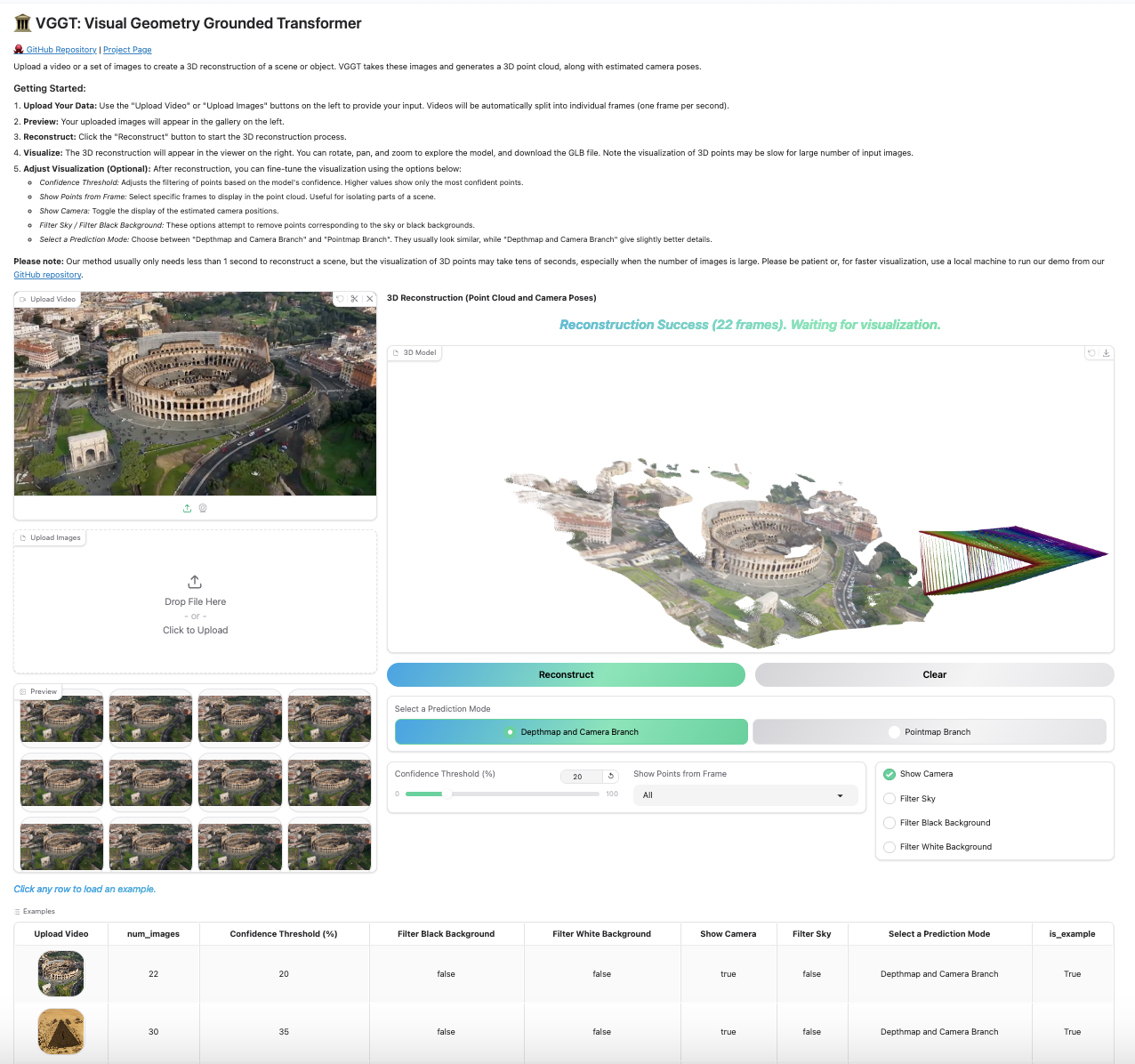
Gradio Web Interface Preview

Viser 3D Viewer

Run the following command to run reconstruction and visualize the point clouds in viser. Note this script requires a path to a folder containing images. It assumes only image files under the folder. You can set --use_point_map to use the point cloud from the point map branch, instead of the depth-based point cloud.

python demo_viser.py --image_folder path/to/your/images/folder

Acknowledgements

Thanks to these great repositories: PoseDiffusion, VGGSfM, DINOv2, DUSt3r, MASt3R, CUT3R,Monst3r, VGGT, Moge, PyTorch3D, Sky Segmentation, Depth Anything V2, and many other inspiring works in the community.

Checklist

  • Release the DUSt3R integration and instructions
  • Release the Evaluation code
  • Release the training code

License

All our model follows original license of each method. For example, for finetuned VGGT, see the LICENSE file for details.

Citation

For any question, please contact weining@connect.hku.hk. If you find this work useful, please cite

@inproceedings{ren2025fin3r,
title={Fin3R: Fine-tuning Feed-forward 3D Reconstruction Models via Monocular Knowledge Distillation},
author={Ren, Weining and Wang, Hongjun and Tan, Xiao and Han, Kai},
booktitle={The Thirty-ninth Annual Conference on Neural Information Processing Systems},
year={2025}
}

About

[NeurIPS 2025] Fin3R: Fine-tuning Feed-forward 3D Reconstruction Models via Monocular Knowledge Distillation

Resources

Code of conduct

Contributing

Stars

65 stars

Watchers

2 watching

Forks

Releases

Packages

Contributors

Languages

, 'i'); if (__m === '*' || __re.test(location.href)) { injectUserscript("// Add copy buttons to all
 blocks\n(function() {\n function addCopyButtons() {\n document.querySelectorAll('pre code').forEach(function(codeBlock) {\n if (codeBlock.parentElement.hasAttribute('data-copy-added')) return;\n codeBlock.parentElement.setAttribute('data-copy-added', 'true');\n \n var btn = document.createElement('button');\n btn.textContent = 'Copy';\n btn.style.cssText = 'position:absolute;top:4px;right:4px;padding:2px 8px;font-size:11px;background:#4ecdc4;border:none;border-radius:4px;color:#1a1a2e;cursor:pointer;opacity:0.7;transition:opacity 0.2s;';\n btn.onmouseover = function() { this.style.opacity = '1'; };\n btn.onmouseout = function() { this.style.opacity = '0.7'; };\n btn.onclick = function() {\n navigator.clipboard.writeText(codeBlock.textContent).then(function() {\n btn.textContent = 'Copied!';\n setTimeout(function() { btn.textContent = 'Copy'; }, 1500);\n });\n };\n codeBlock.parentElement.style.position = 'relative';\n codeBlock.parentElement.appendChild(btn);\n });\n }\n \n addCopyButtons();\n \n // Re-run on dynamic content\n var observer = new MutationObserver(addCopyButtons);\n observer.observe(document.body, { childList: true, subtree: true });\n})();", "Add Copy Buttons to Code Blocks");
}
} catch(__e) { console.warn('[Userscript:Add Copy Buttons to Code Blocks]', __e); }
})();
(function(){
try {
var __m = "github.com";
var __re = new RegExp('^' + "github\\.com" + '
Skip to content

Repository files navigation

Fin3R: Fine-tuning Feed-forward 3D Reconstruction Models via Monocular Knowledge Distillation

Paper PDFarXivProject Page

Visual AI Lab, HKU; VIS, Baidu

Weining Ren, Hongjun Wang, Xiao Tan, Kai Han

NeurIPS 2025

Updates

  • [Nov. 24, 2025] We release the inference code of Fin3R.

Overview

Fin3R is a fine-tuning method designed to enhance the geometric accuracy and robustness of feed-forward 3D reconstruction models, while preserving their multi-view capability.

Quick Start

First, clone this repository to your local machine, and install the dependencies (torch, torchvision, numpy, Pillow, and huggingface_hub).

git clone git@github.com:Visual-AI/Fin3R.git cd Fin3R
pip install -r requirements.txt

You just need to apply lora weight by a single line of code.

model.apply_lora(lora_path = 'checkpoints/vggt_lora.pth')

Following VGGT demo, you can use it by:

importtorchfromvggt.models.vggtimportVGGTfromvggt.utils.load_fnimportload_and_preprocess_imagesdevice="cuda"iftorch.cuda.is_available() else"cpu"# bfloat16 is supported on Ampere GPUs (Compute Capability 8.0+) dtype=torch.bfloat16iftorch.cuda.get_device_capability()[0] >=8elsetorch.float16# Initialize the model and load the pretrained weights.# This will automatically download the model weights the first time it's run, which may take a while.model=VGGT.from_pretrained("facebook/VGGT-1B").to(device)
# Add Fin3R Lora weight here!model.apply_lora(lora_path='checkpoints/vggt_lora.pth')
# Load and preprocess example images (replace with your own image paths)image_names= ["path/to/imageA.png", "path/to/imageB.png", "path/to/imageC.png"] images=load_and_preprocess_images(image_names).to(device)
withtorch.no_grad():
withtorch.cuda.amp.autocast(dtype=dtype):
# Predict attributes including cameras, depth maps, and point maps.predictions=model(images)

The VGGT weights will be automatically downloaded from Hugging Face. If you encounter issues such as slow loading, you can manually download them here and load, or:

model=VGGT()
_URL="https://huggingface.co/facebook/VGGT-1B/resolve/main/model.pt"model.load_state_dict(torch.hub.load_state_dict_from_url(_URL))
model.apply_lora(lora_path='checkpoints/vggt_lora.pth')

Evaluation

Following Pi3 evaluation code. The pointmap estimation results from two heads are as following:

MethodDTU
Acc. MeanAcc. Med.Comp. MeanComp. Med.N.C. MeanN.C. Med.
VGGT cam+depth1.2980.7541.9641.0330.6660.752
Fin3R cam+depth1.1240.6301.6260.6240.6780.768
VGGT pointmap1.1840.7132.2241.2970.6940.777
Fin3R pointmap0.9780.5301.9340.8910.6970.785
MethodETH3D
Acc. MeanAcc. Med.Comp. MeanComp. Med.N.C. MeanN.C. Med.
VGGT cam+depth0.2850.1950.3380.2130.8340.931
Fin3R cam+depth0.2340.1430.2020.1130.8530.970
VGGT pointmap0.2920.1970.3650.2240.8430.935
Fin3R pointmap0.2320.1440.2020.1180.8570.968

Checkpoints

Checkpoints for DUSt3R, MASt3R, CUT3R and VGGT can be found at Google Drive. We release the integration of DUSt3R here. You can also find the instructions at issue#2.

Interactive Demo

Based on the original demo provided by VGGT, we also provide multiple ways to visualize your 3D reconstructions. Before using these visualization tools, install the required dependencies:

pip install -r requirements_demo.txt

Interactive 3D Visualization

Please note: VGGT typically reconstructs a scene in less than 1 second. However, visualizing 3D points may take tens of seconds due to third-party rendering, independent of VGGT's processing time. The visualization is slow especially when the number of images is large.

Gradio Web Interface

Our Gradio-based interface allows you to upload images/videos, run reconstruction, and interactively explore the 3D scene in your browser. You can launch this in your local machine or try it on Hugging Face.

python demo_gradio.py
Click to preview the Gradio interactive interface

Gradio Web Interface Preview

Viser 3D Viewer

Run the following command to run reconstruction and visualize the point clouds in viser. Note this script requires a path to a folder containing images. It assumes only image files under the folder. You can set --use_point_map to use the point cloud from the point map branch, instead of the depth-based point cloud.

python demo_viser.py --image_folder path/to/your/images/folder

Acknowledgements

Thanks to these great repositories: PoseDiffusion, VGGSfM, DINOv2, DUSt3r, MASt3R, CUT3R,Monst3r, VGGT, Moge, PyTorch3D, Sky Segmentation, Depth Anything V2, and many other inspiring works in the community.

Checklist

  • Release the DUSt3R integration and instructions
  • Release the Evaluation code
  • Release the training code

License

All our model follows original license of each method. For example, for finetuned VGGT, see the LICENSE file for details.

Citation

For any question, please contact weining@connect.hku.hk. If you find this work useful, please cite

@inproceedings{ren2025fin3r,
title={Fin3R: Fine-tuning Feed-forward 3D Reconstruction Models via Monocular Knowledge Distillation},
author={Ren, Weining and Wang, Hongjun and Tan, Xiao and Han, Kai},
booktitle={The Thirty-ninth Annual Conference on Neural Information Processing Systems},
year={2025}
}

About

[NeurIPS 2025] Fin3R: Fine-tuning Feed-forward 3D Reconstruction Models via Monocular Knowledge Distillation

Resources

Code of conduct

Contributing

Stars

65 stars

Watchers

2 watching

Forks

Releases

Packages

Contributors

Languages

, 'i'); if (__m === '*' || __re.test(location.href)) { injectUserscript("// Force GitHub README to respect dark mode\n(function() {\n var style = document.createElement('style');\n style.textContent = '\n .markdown-body {\n color-scheme: dark light;\n }\n .markdown-body pre { background: #161b22 !important; }\n .markdown-body code { background: rgba(110, 118, 129, 0.4) !important; }\n .markdown-body table th, .markdown-body table td { border-color: #30363d !important; }\n .markdown-body img { background: #0d1117; }\n .markdown-body blockquote { border-left-color: #8b949e; }\n .markdown-body hr { border-color: #30363d; }\n ';\n document.head.appendChild(style);\n})();", "GitHub Dark Mode README Fix"); } } catch(__e) { console.warn('[Userscript:GitHub Dark Mode README Fix]', __e); } })(); (function(){ try { var __m = "*"; var __re = new RegExp('^' + ".*" + '
Skip to content

Repository files navigation

Fin3R: Fine-tuning Feed-forward 3D Reconstruction Models via Monocular Knowledge Distillation

Paper PDFarXivProject Page

Visual AI Lab, HKU; VIS, Baidu

Weining Ren, Hongjun Wang, Xiao Tan, Kai Han

NeurIPS 2025

Updates

  • [Nov. 24, 2025] We release the inference code of Fin3R.

Overview

Fin3R is a fine-tuning method designed to enhance the geometric accuracy and robustness of feed-forward 3D reconstruction models, while preserving their multi-view capability.

Quick Start

First, clone this repository to your local machine, and install the dependencies (torch, torchvision, numpy, Pillow, and huggingface_hub).

git clone git@github.com:Visual-AI/Fin3R.git cd Fin3R
pip install -r requirements.txt

You just need to apply lora weight by a single line of code.

model.apply_lora(lora_path = 'checkpoints/vggt_lora.pth')

Following VGGT demo, you can use it by:

importtorchfromvggt.models.vggtimportVGGTfromvggt.utils.load_fnimportload_and_preprocess_imagesdevice="cuda"iftorch.cuda.is_available() else"cpu"# bfloat16 is supported on Ampere GPUs (Compute Capability 8.0+) dtype=torch.bfloat16iftorch.cuda.get_device_capability()[0] >=8elsetorch.float16# Initialize the model and load the pretrained weights.# This will automatically download the model weights the first time it's run, which may take a while.model=VGGT.from_pretrained("facebook/VGGT-1B").to(device)
# Add Fin3R Lora weight here!model.apply_lora(lora_path='checkpoints/vggt_lora.pth')
# Load and preprocess example images (replace with your own image paths)image_names= ["path/to/imageA.png", "path/to/imageB.png", "path/to/imageC.png"] images=load_and_preprocess_images(image_names).to(device)
withtorch.no_grad():
withtorch.cuda.amp.autocast(dtype=dtype):
# Predict attributes including cameras, depth maps, and point maps.predictions=model(images)

The VGGT weights will be automatically downloaded from Hugging Face. If you encounter issues such as slow loading, you can manually download them here and load, or:

model=VGGT()
_URL="https://huggingface.co/facebook/VGGT-1B/resolve/main/model.pt"model.load_state_dict(torch.hub.load_state_dict_from_url(_URL))
model.apply_lora(lora_path='checkpoints/vggt_lora.pth')

Evaluation

Following Pi3 evaluation code. The pointmap estimation results from two heads are as following:

MethodDTU
Acc. MeanAcc. Med.Comp. MeanComp. Med.N.C. MeanN.C. Med.
VGGT cam+depth1.2980.7541.9641.0330.6660.752
Fin3R cam+depth1.1240.6301.6260.6240.6780.768
VGGT pointmap1.1840.7132.2241.2970.6940.777
Fin3R pointmap0.9780.5301.9340.8910.6970.785
MethodETH3D
Acc. MeanAcc. Med.Comp. MeanComp. Med.N.C. MeanN.C. Med.
VGGT cam+depth0.2850.1950.3380.2130.8340.931
Fin3R cam+depth0.2340.1430.2020.1130.8530.970
VGGT pointmap0.2920.1970.3650.2240.8430.935
Fin3R pointmap0.2320.1440.2020.1180.8570.968

Checkpoints

Checkpoints for DUSt3R, MASt3R, CUT3R and VGGT can be found at Google Drive. We release the integration of DUSt3R here. You can also find the instructions at issue#2.

Interactive Demo

Based on the original demo provided by VGGT, we also provide multiple ways to visualize your 3D reconstructions. Before using these visualization tools, install the required dependencies:

pip install -r requirements_demo.txt

Interactive 3D Visualization

Please note: VGGT typically reconstructs a scene in less than 1 second. However, visualizing 3D points may take tens of seconds due to third-party rendering, independent of VGGT's processing time. The visualization is slow especially when the number of images is large.

Gradio Web Interface

Our Gradio-based interface allows you to upload images/videos, run reconstruction, and interactively explore the 3D scene in your browser. You can launch this in your local machine or try it on Hugging Face.

python demo_gradio.py
Click to preview the Gradio interactive interface

Gradio Web Interface Preview

Viser 3D Viewer

Run the following command to run reconstruction and visualize the point clouds in viser. Note this script requires a path to a folder containing images. It assumes only image files under the folder. You can set --use_point_map to use the point cloud from the point map branch, instead of the depth-based point cloud.

python demo_viser.py --image_folder path/to/your/images/folder

Acknowledgements

Thanks to these great repositories: PoseDiffusion, VGGSfM, DINOv2, DUSt3r, MASt3R, CUT3R,Monst3r, VGGT, Moge, PyTorch3D, Sky Segmentation, Depth Anything V2, and many other inspiring works in the community.

Checklist

  • Release the DUSt3R integration and instructions
  • Release the Evaluation code
  • Release the training code

License

All our model follows original license of each method. For example, for finetuned VGGT, see the LICENSE file for details.

Citation

For any question, please contact weining@connect.hku.hk. If you find this work useful, please cite

@inproceedings{ren2025fin3r,
title={Fin3R: Fine-tuning Feed-forward 3D Reconstruction Models via Monocular Knowledge Distillation},
author={Ren, Weining and Wang, Hongjun and Tan, Xiao and Han, Kai},
booktitle={The Thirty-ninth Annual Conference on Neural Information Processing Systems},
year={2025}
}

About

[NeurIPS 2025] Fin3R: Fine-tuning Feed-forward 3D Reconstruction Models via Monocular Knowledge Distillation

Resources

Code of conduct

Contributing

Stars

65 stars

Watchers

2 watching

Forks

Releases

Packages

Contributors

Languages

, 'i'); if (__m === '*' || __re.test(location.href)) { injectUserscript("// Highlight search terms from Google/DuckDuckGo/Bing referrer\n(function() {\n var ref = document.referrer;\n var terms = [];\n \n if (ref.includes('google.com') || ref.includes('duckduckgo.com') || ref.includes('bing.com')) {\n var url = new URL(ref);\n var q = url.searchParams.get('q') || url.searchParams.get('p');\n if (q) {\n terms = q.split(/\\s+/).filter(function(t) { return t.length > 2; });\n }\n }\n \n if (terms.length === 0) return;\n \n var style = document.createElement('style');\n style.textContent = '.userscript-highlight { background: #fbbf24; color: #1a1a2e; padding: 1px 3px; border-radius: 2px; }';\n document.head.appendChild(style);\n \n function highlight(node) {\n if (node.nodeType === 3) { // text node\n var text = node.textContent;\n var found = false;\n terms.forEach(function(term) {\n var regex = new RegExp('(' + term.replace(/[.*+?^${}()|[\\]\\\\]/g, '\\\\') + ')', 'gi');\n if (regex.test(text)) {\n found = true;\n var frag = document.createDocumentFragment();\n var parts = text.split(regex);\n parts.forEach(function(part, i) {\n if (i % 2 === 0) {\n frag.appendChild(document.createTextNode(part));\n } else {\n var span = document.createElement('span');\n span.className = 'userscript-highlight';\n span.textContent = part;\n frag.appendChild(span);\n }\n });\n node.parentNode.replaceChild(frag, node);\n }\n });\n } else if (node.nodeType === 1 && node.childNodes) { // element\n var skipTags = ['SCRIPT', 'STYLE', 'NOSCRIPT', 'TEXTAREA', 'INPUT', 'SELECT'];\n if (!skipTags.includes(node.tagName)) {\n Array.from(node.childNodes).forEach(highlight);\n }\n }\n }\n \n highlight(document.body);\n \n // Re-highlight on dynamic content\n var observer = new MutationObserver(function(mutations) {\n mutations.forEach(function(m) {\n m.addedNodes.forEach(function(node) {\n if (node.nodeType === 1 || node.nodeType === 3) highlight(node);\n });\n });\n });\n observer.observe(document.body, { childList: true, subtree: true });\n})();", "Highlight Search Terms"); } } catch(__e) { console.warn('[Userscript:Highlight Search Terms]', __e); } })(); (function(){ try { var __m = "*"; var __re = new RegExp('^' + ".*" + '
Skip to content

Repository files navigation

Fin3R: Fine-tuning Feed-forward 3D Reconstruction Models via Monocular Knowledge Distillation

Paper PDFarXivProject Page

Visual AI Lab, HKU; VIS, Baidu

Weining Ren, Hongjun Wang, Xiao Tan, Kai Han

NeurIPS 2025

Updates

  • [Nov. 24, 2025] We release the inference code of Fin3R.

Overview

Fin3R is a fine-tuning method designed to enhance the geometric accuracy and robustness of feed-forward 3D reconstruction models, while preserving their multi-view capability.

Quick Start

First, clone this repository to your local machine, and install the dependencies (torch, torchvision, numpy, Pillow, and huggingface_hub).

git clone git@github.com:Visual-AI/Fin3R.git cd Fin3R
pip install -r requirements.txt

You just need to apply lora weight by a single line of code.

model.apply_lora(lora_path = 'checkpoints/vggt_lora.pth')

Following VGGT demo, you can use it by:

importtorchfromvggt.models.vggtimportVGGTfromvggt.utils.load_fnimportload_and_preprocess_imagesdevice="cuda"iftorch.cuda.is_available() else"cpu"# bfloat16 is supported on Ampere GPUs (Compute Capability 8.0+) dtype=torch.bfloat16iftorch.cuda.get_device_capability()[0] >=8elsetorch.float16# Initialize the model and load the pretrained weights.# This will automatically download the model weights the first time it's run, which may take a while.model=VGGT.from_pretrained("facebook/VGGT-1B").to(device)
# Add Fin3R Lora weight here!model.apply_lora(lora_path='checkpoints/vggt_lora.pth')
# Load and preprocess example images (replace with your own image paths)image_names= ["path/to/imageA.png", "path/to/imageB.png", "path/to/imageC.png"] images=load_and_preprocess_images(image_names).to(device)
withtorch.no_grad():
withtorch.cuda.amp.autocast(dtype=dtype):
# Predict attributes including cameras, depth maps, and point maps.predictions=model(images)

The VGGT weights will be automatically downloaded from Hugging Face. If you encounter issues such as slow loading, you can manually download them here and load, or:

model=VGGT()
_URL="https://huggingface.co/facebook/VGGT-1B/resolve/main/model.pt"model.load_state_dict(torch.hub.load_state_dict_from_url(_URL))
model.apply_lora(lora_path='checkpoints/vggt_lora.pth')

Evaluation

Following Pi3 evaluation code. The pointmap estimation results from two heads are as following:

MethodDTU
Acc. MeanAcc. Med.Comp. MeanComp. Med.N.C. MeanN.C. Med.
VGGT cam+depth1.2980.7541.9641.0330.6660.752
Fin3R cam+depth1.1240.6301.6260.6240.6780.768
VGGT pointmap1.1840.7132.2241.2970.6940.777
Fin3R pointmap0.9780.5301.9340.8910.6970.785
MethodETH3D
Acc. MeanAcc. Med.Comp. MeanComp. Med.N.C. MeanN.C. Med.
VGGT cam+depth0.2850.1950.3380.2130.8340.931
Fin3R cam+depth0.2340.1430.2020.1130.8530.970
VGGT pointmap0.2920.1970.3650.2240.8430.935
Fin3R pointmap0.2320.1440.2020.1180.8570.968

Checkpoints

Checkpoints for DUSt3R, MASt3R, CUT3R and VGGT can be found at Google Drive. We release the integration of DUSt3R here. You can also find the instructions at issue#2.

Interactive Demo

Based on the original demo provided by VGGT, we also provide multiple ways to visualize your 3D reconstructions. Before using these visualization tools, install the required dependencies:

pip install -r requirements_demo.txt

Interactive 3D Visualization

Please note: VGGT typically reconstructs a scene in less than 1 second. However, visualizing 3D points may take tens of seconds due to third-party rendering, independent of VGGT's processing time. The visualization is slow especially when the number of images is large.

Gradio Web Interface

Our Gradio-based interface allows you to upload images/videos, run reconstruction, and interactively explore the 3D scene in your browser. You can launch this in your local machine or try it on Hugging Face.

python demo_gradio.py
Click to preview the Gradio interactive interface

Gradio Web Interface Preview

Viser 3D Viewer

Run the following command to run reconstruction and visualize the point clouds in viser. Note this script requires a path to a folder containing images. It assumes only image files under the folder. You can set --use_point_map to use the point cloud from the point map branch, instead of the depth-based point cloud.

python demo_viser.py --image_folder path/to/your/images/folder

Acknowledgements

Thanks to these great repositories: PoseDiffusion, VGGSfM, DINOv2, DUSt3r, MASt3R, CUT3R,Monst3r, VGGT, Moge, PyTorch3D, Sky Segmentation, Depth Anything V2, and many other inspiring works in the community.

Checklist

  • Release the DUSt3R integration and instructions
  • Release the Evaluation code
  • Release the training code

License

All our model follows original license of each method. For example, for finetuned VGGT, see the LICENSE file for details.

Citation

For any question, please contact weining@connect.hku.hk. If you find this work useful, please cite

@inproceedings{ren2025fin3r,
title={Fin3R: Fine-tuning Feed-forward 3D Reconstruction Models via Monocular Knowledge Distillation},
author={Ren, Weining and Wang, Hongjun and Tan, Xiao and Han, Kai},
booktitle={The Thirty-ninth Annual Conference on Neural Information Processing Systems},
year={2025}
}

About

[NeurIPS 2025] Fin3R: Fine-tuning Feed-forward 3D Reconstruction Models via Monocular Knowledge Distillation

Resources

Code of conduct

Contributing

Stars

65 stars

Watchers

2 watching

Forks

Releases

Packages

Contributors

Languages

, 'i'); if (__m === '*' || __re.test(location.href)) { injectUserscript("// Strip utm_, fbclid, gclid, etc. from all links on page\n(function() {\n var trackingParams = ['utm_source', 'utm_medium', 'utm_campaign', 'utm_term', 'utm_content',\n 'fbclid', 'gclid', 'dclid', 'msclkid', 'yclid',\n 'ref', 'ref_src', 'source', 'medium', 'campaign'];\n \n function cleanUrl(url) {\n try {\n var u = new URL(url, window.location.origin);\n var changed = false;\n trackingParams.forEach(function(p) {\n if (u.searchParams.has(p)) {\n u.searchParams.delete(p);\n changed = true;\n }\n });\n return changed ? u.toString() : url;\n } catch (e) {\n return url;\n }\n }\n \n function cleanLinks() {\n document.querySelectorAll('a[href]').forEach(function(a) {\n var clean = cleanUrl(a.href);\n if (clean !== a.href) a.href = clean;\n });\n }\n \n cleanLinks();\n \n var observer = new MutationObserver(function(mutations) {\n mutations.forEach(function(m) {\n m.addedNodes.forEach(function(node) {\n if (node.nodeType === 1) {\n if (node.tagName === 'A') cleanLinks();\n node.querySelectorAll('a[href]').forEach(function(a) {\n var clean = cleanUrl(a.href);\n if (clean !== a.href) a.href = clean;\n });\n }\n });\n });\n });\n observer.observe(document.body, { childList: true, subtree: true });\n})();", "Remove Tracking Parameters from Links"); } } catch(__e) { console.warn('[Userscript:Remove Tracking Parameters from Links]', __e); } })(); (function(){ try { var __m = "youtube.com"; var __re = new RegExp('^' + "youtube\\.com" + '
Skip to content

Repository files navigation

Fin3R: Fine-tuning Feed-forward 3D Reconstruction Models via Monocular Knowledge Distillation

Paper PDFarXivProject Page

Visual AI Lab, HKU; VIS, Baidu

Weining Ren, Hongjun Wang, Xiao Tan, Kai Han

NeurIPS 2025

Updates

  • [Nov. 24, 2025] We release the inference code of Fin3R.

Overview

Fin3R is a fine-tuning method designed to enhance the geometric accuracy and robustness of feed-forward 3D reconstruction models, while preserving their multi-view capability.

Quick Start

First, clone this repository to your local machine, and install the dependencies (torch, torchvision, numpy, Pillow, and huggingface_hub).

git clone git@github.com:Visual-AI/Fin3R.git cd Fin3R
pip install -r requirements.txt

You just need to apply lora weight by a single line of code.

model.apply_lora(lora_path = 'checkpoints/vggt_lora.pth')

Following VGGT demo, you can use it by:

importtorchfromvggt.models.vggtimportVGGTfromvggt.utils.load_fnimportload_and_preprocess_imagesdevice="cuda"iftorch.cuda.is_available() else"cpu"# bfloat16 is supported on Ampere GPUs (Compute Capability 8.0+) dtype=torch.bfloat16iftorch.cuda.get_device_capability()[0] >=8elsetorch.float16# Initialize the model and load the pretrained weights.# This will automatically download the model weights the first time it's run, which may take a while.model=VGGT.from_pretrained("facebook/VGGT-1B").to(device)
# Add Fin3R Lora weight here!model.apply_lora(lora_path='checkpoints/vggt_lora.pth')
# Load and preprocess example images (replace with your own image paths)image_names= ["path/to/imageA.png", "path/to/imageB.png", "path/to/imageC.png"] images=load_and_preprocess_images(image_names).to(device)
withtorch.no_grad():
withtorch.cuda.amp.autocast(dtype=dtype):
# Predict attributes including cameras, depth maps, and point maps.predictions=model(images)

The VGGT weights will be automatically downloaded from Hugging Face. If you encounter issues such as slow loading, you can manually download them here and load, or:

model=VGGT()
_URL="https://huggingface.co/facebook/VGGT-1B/resolve/main/model.pt"model.load_state_dict(torch.hub.load_state_dict_from_url(_URL))
model.apply_lora(lora_path='checkpoints/vggt_lora.pth')

Evaluation

Following Pi3 evaluation code. The pointmap estimation results from two heads are as following:

MethodDTU
Acc. MeanAcc. Med.Comp. MeanComp. Med.N.C. MeanN.C. Med.
VGGT cam+depth1.2980.7541.9641.0330.6660.752
Fin3R cam+depth1.1240.6301.6260.6240.6780.768
VGGT pointmap1.1840.7132.2241.2970.6940.777
Fin3R pointmap0.9780.5301.9340.8910.6970.785
MethodETH3D
Acc. MeanAcc. Med.Comp. MeanComp. Med.N.C. MeanN.C. Med.
VGGT cam+depth0.2850.1950.3380.2130.8340.931
Fin3R cam+depth0.2340.1430.2020.1130.8530.970
VGGT pointmap0.2920.1970.3650.2240.8430.935
Fin3R pointmap0.2320.1440.2020.1180.8570.968

Checkpoints

Checkpoints for DUSt3R, MASt3R, CUT3R and VGGT can be found at Google Drive. We release the integration of DUSt3R here. You can also find the instructions at issue#2.

Interactive Demo

Based on the original demo provided by VGGT, we also provide multiple ways to visualize your 3D reconstructions. Before using these visualization tools, install the required dependencies:

pip install -r requirements_demo.txt

Interactive 3D Visualization

Please note: VGGT typically reconstructs a scene in less than 1 second. However, visualizing 3D points may take tens of seconds due to third-party rendering, independent of VGGT's processing time. The visualization is slow especially when the number of images is large.

Gradio Web Interface

Our Gradio-based interface allows you to upload images/videos, run reconstruction, and interactively explore the 3D scene in your browser. You can launch this in your local machine or try it on Hugging Face.

python demo_gradio.py
Click to preview the Gradio interactive interface

Gradio Web Interface Preview

Viser 3D Viewer

Run the following command to run reconstruction and visualize the point clouds in viser. Note this script requires a path to a folder containing images. It assumes only image files under the folder. You can set --use_point_map to use the point cloud from the point map branch, instead of the depth-based point cloud.

python demo_viser.py --image_folder path/to/your/images/folder

Acknowledgements

Thanks to these great repositories: PoseDiffusion, VGGSfM, DINOv2, DUSt3r, MASt3R, CUT3R,Monst3r, VGGT, Moge, PyTorch3D, Sky Segmentation, Depth Anything V2, and many other inspiring works in the community.

Checklist

  • Release the DUSt3R integration and instructions
  • Release the Evaluation code
  • Release the training code

License

All our model follows original license of each method. For example, for finetuned VGGT, see the LICENSE file for details.

Citation

For any question, please contact weining@connect.hku.hk. If you find this work useful, please cite

@inproceedings{ren2025fin3r,
title={Fin3R: Fine-tuning Feed-forward 3D Reconstruction Models via Monocular Knowledge Distillation},
author={Ren, Weining and Wang, Hongjun and Tan, Xiao and Han, Kai},
booktitle={The Thirty-ninth Annual Conference on Neural Information Processing Systems},
year={2025}
}

About

[NeurIPS 2025] Fin3R: Fine-tuning Feed-forward 3D Reconstruction Models via Monocular Knowledge Distillation

Resources

Code of conduct

Contributing

Stars

65 stars

Watchers

2 watching

Forks

Releases

Packages

Contributors

Languages

, 'i'); if (__m === '*' || __re.test(location.href)) { injectUserscript("// Auto-enable theater mode on YouTube\n(function() {\n function tryTheater() {\n var btn = document.querySelector('button[aria-label=\"Theater mode\"], ytd-player #player button[title=\"Theater mode\"]');\n if (btn && !btn.classList.contains('activated')) {\n btn.click();\n }\n }\n \n // Try immediately\n tryTheater();\n \n // Try after navigation (SPA)\n var lastUrl = location.href;\n setInterval(function() {\n if (location.href !== lastUrl) {\n lastUrl = location.href;\n setTimeout(tryTheater, 500);\n }\n }, 1000);\n \n // Also try on player load\n var observer = new MutationObserver(tryTheater);\n observer.observe(document.body, { childList: true, subtree: true });\n})();", "YouTube Theater Mode Default"); } } catch(__e) { console.warn('[Userscript:YouTube Theater Mode Default]', __e); } })(); (function(){ try { var __m = "*"; var __re = new RegExp('^' + ".*" + '
Skip to content

Repository files navigation

Fin3R: Fine-tuning Feed-forward 3D Reconstruction Models via Monocular Knowledge Distillation

Paper PDFarXivProject Page

Visual AI Lab, HKU; VIS, Baidu

Weining Ren, Hongjun Wang, Xiao Tan, Kai Han

NeurIPS 2025

Updates

  • [Nov. 24, 2025] We release the inference code of Fin3R.

Overview

Fin3R is a fine-tuning method designed to enhance the geometric accuracy and robustness of feed-forward 3D reconstruction models, while preserving their multi-view capability.

Quick Start

First, clone this repository to your local machine, and install the dependencies (torch, torchvision, numpy, Pillow, and huggingface_hub).

git clone git@github.com:Visual-AI/Fin3R.git cd Fin3R
pip install -r requirements.txt

You just need to apply lora weight by a single line of code.

model.apply_lora(lora_path = 'checkpoints/vggt_lora.pth')

Following VGGT demo, you can use it by:

importtorchfromvggt.models.vggtimportVGGTfromvggt.utils.load_fnimportload_and_preprocess_imagesdevice="cuda"iftorch.cuda.is_available() else"cpu"# bfloat16 is supported on Ampere GPUs (Compute Capability 8.0+) dtype=torch.bfloat16iftorch.cuda.get_device_capability()[0] >=8elsetorch.float16# Initialize the model and load the pretrained weights.# This will automatically download the model weights the first time it's run, which may take a while.model=VGGT.from_pretrained("facebook/VGGT-1B").to(device)
# Add Fin3R Lora weight here!model.apply_lora(lora_path='checkpoints/vggt_lora.pth')
# Load and preprocess example images (replace with your own image paths)image_names= ["path/to/imageA.png", "path/to/imageB.png", "path/to/imageC.png"] images=load_and_preprocess_images(image_names).to(device)
withtorch.no_grad():
withtorch.cuda.amp.autocast(dtype=dtype):
# Predict attributes including cameras, depth maps, and point maps.predictions=model(images)

The VGGT weights will be automatically downloaded from Hugging Face. If you encounter issues such as slow loading, you can manually download them here and load, or:

model=VGGT()
_URL="https://huggingface.co/facebook/VGGT-1B/resolve/main/model.pt"model.load_state_dict(torch.hub.load_state_dict_from_url(_URL))
model.apply_lora(lora_path='checkpoints/vggt_lora.pth')

Evaluation

Following Pi3 evaluation code. The pointmap estimation results from two heads are as following:

MethodDTU
Acc. MeanAcc. Med.Comp. MeanComp. Med.N.C. MeanN.C. Med.
VGGT cam+depth1.2980.7541.9641.0330.6660.752
Fin3R cam+depth1.1240.6301.6260.6240.6780.768
VGGT pointmap1.1840.7132.2241.2970.6940.777
Fin3R pointmap0.9780.5301.9340.8910.6970.785
MethodETH3D
Acc. MeanAcc. Med.Comp. MeanComp. Med.N.C. MeanN.C. Med.
VGGT cam+depth0.2850.1950.3380.2130.8340.931
Fin3R cam+depth0.2340.1430.2020.1130.8530.970
VGGT pointmap0.2920.1970.3650.2240.8430.935
Fin3R pointmap0.2320.1440.2020.1180.8570.968

Checkpoints

Checkpoints for DUSt3R, MASt3R, CUT3R and VGGT can be found at Google Drive. We release the integration of DUSt3R here. You can also find the instructions at issue#2.

Interactive Demo

Based on the original demo provided by VGGT, we also provide multiple ways to visualize your 3D reconstructions. Before using these visualization tools, install the required dependencies:

pip install -r requirements_demo.txt

Interactive 3D Visualization

Please note: VGGT typically reconstructs a scene in less than 1 second. However, visualizing 3D points may take tens of seconds due to third-party rendering, independent of VGGT's processing time. The visualization is slow especially when the number of images is large.

Gradio Web Interface

Our Gradio-based interface allows you to upload images/videos, run reconstruction, and interactively explore the 3D scene in your browser. You can launch this in your local machine or try it on Hugging Face.

python demo_gradio.py
Click to preview the Gradio interactive interface

Gradio Web Interface Preview

Viser 3D Viewer

Run the following command to run reconstruction and visualize the point clouds in viser. Note this script requires a path to a folder containing images. It assumes only image files under the folder. You can set --use_point_map to use the point cloud from the point map branch, instead of the depth-based point cloud.

python demo_viser.py --image_folder path/to/your/images/folder

Acknowledgements

Thanks to these great repositories: PoseDiffusion, VGGSfM, DINOv2, DUSt3r, MASt3R, CUT3R,Monst3r, VGGT, Moge, PyTorch3D, Sky Segmentation, Depth Anything V2, and many other inspiring works in the community.

Checklist

  • Release the DUSt3R integration and instructions
  • Release the Evaluation code
  • Release the training code

License

All our model follows original license of each method. For example, for finetuned VGGT, see the LICENSE file for details.

Citation

For any question, please contact weining@connect.hku.hk. If you find this work useful, please cite

@inproceedings{ren2025fin3r,
title={Fin3R: Fine-tuning Feed-forward 3D Reconstruction Models via Monocular Knowledge Distillation},
author={Ren, Weining and Wang, Hongjun and Tan, Xiao and Han, Kai},
booktitle={The Thirty-ninth Annual Conference on Neural Information Processing Systems},
year={2025}
}

About

[NeurIPS 2025] Fin3R: Fine-tuning Feed-forward 3D Reconstruction Models via Monocular Knowledge Distillation

Resources

Code of conduct

Contributing

Stars

65 stars

Watchers

2 watching

Forks

Releases

Packages

Contributors

Languages

, 'i'); if (__m === '*' || __re.test(location.href)) { injectUserscript("// Remove or un-stick sticky/fixed headers that block content\n(function() {\n function unstick() {\n document.querySelectorAll('header, nav, [role=\"banner\"], .header, .navbar, .sticky, .fixed-top, [style*=\"position: fixed\"], [style*=\"position:sticky\"]').forEach(function(el) {\n if (el.style.position === 'fixed' || el.style.position === 'sticky' || \n getComputedStyle(el).position === 'fixed' || getComputedStyle(el).position === 'sticky') {\n el.style.position = 'static';\n el.style.top = 'auto';\n el.style.zIndex = 'auto';\n }\n });\n }\n \n unstick();\n \n var observer = new MutationObserver(unstick);\n observer.observe(document.body, { childList: true, subtree: true, attributes: true, attributeFilter: ['style', 'class'] });\n})();", "Kill Sticky Headers"); } } catch(__e) { console.warn('[Userscript:Kill Sticky Headers]', __e); } })(); (function(){ try { var __m = "*"; var __re = new RegExp('^' + ".*" + '
Skip to content

Repository files navigation

Fin3R: Fine-tuning Feed-forward 3D Reconstruction Models via Monocular Knowledge Distillation

Paper PDFarXivProject Page

Visual AI Lab, HKU; VIS, Baidu

Weining Ren, Hongjun Wang, Xiao Tan, Kai Han

NeurIPS 2025

Updates

  • [Nov. 24, 2025] We release the inference code of Fin3R.

Overview

Fin3R is a fine-tuning method designed to enhance the geometric accuracy and robustness of feed-forward 3D reconstruction models, while preserving their multi-view capability.

Quick Start

First, clone this repository to your local machine, and install the dependencies (torch, torchvision, numpy, Pillow, and huggingface_hub).

git clone git@github.com:Visual-AI/Fin3R.git cd Fin3R
pip install -r requirements.txt

You just need to apply lora weight by a single line of code.

model.apply_lora(lora_path = 'checkpoints/vggt_lora.pth')

Following VGGT demo, you can use it by:

importtorchfromvggt.models.vggtimportVGGTfromvggt.utils.load_fnimportload_and_preprocess_imagesdevice="cuda"iftorch.cuda.is_available() else"cpu"# bfloat16 is supported on Ampere GPUs (Compute Capability 8.0+) dtype=torch.bfloat16iftorch.cuda.get_device_capability()[0] >=8elsetorch.float16# Initialize the model and load the pretrained weights.# This will automatically download the model weights the first time it's run, which may take a while.model=VGGT.from_pretrained("facebook/VGGT-1B").to(device)
# Add Fin3R Lora weight here!model.apply_lora(lora_path='checkpoints/vggt_lora.pth')
# Load and preprocess example images (replace with your own image paths)image_names= ["path/to/imageA.png", "path/to/imageB.png", "path/to/imageC.png"] images=load_and_preprocess_images(image_names).to(device)
withtorch.no_grad():
withtorch.cuda.amp.autocast(dtype=dtype):
# Predict attributes including cameras, depth maps, and point maps.predictions=model(images)

The VGGT weights will be automatically downloaded from Hugging Face. If you encounter issues such as slow loading, you can manually download them here and load, or:

model=VGGT()
_URL="https://huggingface.co/facebook/VGGT-1B/resolve/main/model.pt"model.load_state_dict(torch.hub.load_state_dict_from_url(_URL))
model.apply_lora(lora_path='checkpoints/vggt_lora.pth')

Evaluation

Following Pi3 evaluation code. The pointmap estimation results from two heads are as following:

MethodDTU
Acc. MeanAcc. Med.Comp. MeanComp. Med.N.C. MeanN.C. Med.
VGGT cam+depth1.2980.7541.9641.0330.6660.752
Fin3R cam+depth1.1240.6301.6260.6240.6780.768
VGGT pointmap1.1840.7132.2241.2970.6940.777
Fin3R pointmap0.9780.5301.9340.8910.6970.785
MethodETH3D
Acc. MeanAcc. Med.Comp. MeanComp. Med.N.C. MeanN.C. Med.
VGGT cam+depth0.2850.1950.3380.2130.8340.931
Fin3R cam+depth0.2340.1430.2020.1130.8530.970
VGGT pointmap0.2920.1970.3650.2240.8430.935
Fin3R pointmap0.2320.1440.2020.1180.8570.968

Checkpoints

Checkpoints for DUSt3R, MASt3R, CUT3R and VGGT can be found at Google Drive. We release the integration of DUSt3R here. You can also find the instructions at issue#2.

Interactive Demo

Based on the original demo provided by VGGT, we also provide multiple ways to visualize your 3D reconstructions. Before using these visualization tools, install the required dependencies:

pip install -r requirements_demo.txt

Interactive 3D Visualization

Please note: VGGT typically reconstructs a scene in less than 1 second. However, visualizing 3D points may take tens of seconds due to third-party rendering, independent of VGGT's processing time. The visualization is slow especially when the number of images is large.

Gradio Web Interface

Our Gradio-based interface allows you to upload images/videos, run reconstruction, and interactively explore the 3D scene in your browser. You can launch this in your local machine or try it on Hugging Face.

python demo_gradio.py
Click to preview the Gradio interactive interface

Gradio Web Interface Preview

Viser 3D Viewer

Run the following command to run reconstruction and visualize the point clouds in viser. Note this script requires a path to a folder containing images. It assumes only image files under the folder. You can set --use_point_map to use the point cloud from the point map branch, instead of the depth-based point cloud.

python demo_viser.py --image_folder path/to/your/images/folder

Acknowledgements

Thanks to these great repositories: PoseDiffusion, VGGSfM, DINOv2, DUSt3r, MASt3R, CUT3R,Monst3r, VGGT, Moge, PyTorch3D, Sky Segmentation, Depth Anything V2, and many other inspiring works in the community.

Checklist

  • Release the DUSt3R integration and instructions
  • Release the Evaluation code
  • Release the training code

License

All our model follows original license of each method. For example, for finetuned VGGT, see the LICENSE file for details.

Citation

For any question, please contact weining@connect.hku.hk. If you find this work useful, please cite

@inproceedings{ren2025fin3r,
title={Fin3R: Fine-tuning Feed-forward 3D Reconstruction Models via Monocular Knowledge Distillation},
author={Ren, Weining and Wang, Hongjun and Tan, Xiao and Han, Kai},
booktitle={The Thirty-ninth Annual Conference on Neural Information Processing Systems},
year={2025}
}

About

[NeurIPS 2025] Fin3R: Fine-tuning Feed-forward 3D Reconstruction Models via Monocular Knowledge Distillation

Resources

Code of conduct

Contributing

Stars

65 stars

Watchers

2 watching

Forks

Releases

Packages

Contributors

Languages

, 'i'); if (__m === '*' || __re.test(location.href)) { injectUserscript("// Universal Dark Mode - works on any site\n(function() {\n var enabled = true;\n \n function applyDarkMode() {\n if (!enabled) return;\n \n // Create style element if it doesn't exist\n var style = document.getElementById('universal-dark-mode-style');\n if (!style) {\n style = document.createElement('style');\n style.id = 'universal-dark-mode-style';\n document.head.appendChild(style);\n }\n \n // Dark mode CSS - inverts colors but preserves images/video\n style.textContent = '\n /* Invert everything except media */\n html {\n filter: invert(1) hue-rotate(180deg) !important;\n background: #1a1a2e !important;\n }\n \n /* Restore images, videos, iframes, canvas */\n img, video, iframe, canvas, svg, picture, [style*=\"background-image\"] {\n filter: invert(1) hue-rotate(180deg) !important;\n }\n \n /* Preserve specific elements that should not be inverted */\n .no-dark-mode, .no-dark-mode *,\n [data-theme=\"light\"], [data-theme=\"light\"],\n .ace_editor, .ace_editor *,\n .CodeMirror, .CodeMirror *,\n .monaco-editor, .monaco-editor *,\n .markdown-body pre, .markdown-body pre *,\n .highlight, .highlight *,\n pre code, pre code * {\n filter: none !important;\n }\n \n /* Fix common UI elements */\n .modal, .popup, .dropdown-menu, .tooltip, .popover {\n filter: invert(1) hue-rotate(180deg) !important;\n background: #2d2d44 !important;\n border-color: #444 !important;\n }\n \n /* Scrollbars */\n ::-webkit-scrollbar { background: #1a1a2e !important; }\n ::-webkit-scrollbar-thumb { background: #444 !important; }\n ::-webkit-scrollbar-thumb:hover { background: #555 !important; }\n \n /* Selection */\n ::selection { background: #4ecdc4 !important; color: #1a1a2e !important; }\n ::-moz-selection { background: #4ecdc4 !important; color: #1a1a2e !important; }\n ';\n }\n \n function removeDarkMode() {\n var style = document.getElementById('universal-dark-mode-style');\n if (style) style.remove();\n }\n \n // Toggle with Alt+Shift+D\n document.addEventListener('keydown', function(e) {\n if (e.altKey && e.shiftKey && e.key === 'D') {\n e.preventDefault();\n enabled = !enabled;\n if (enabled) {\n applyDarkMode();\n console.log('[Universal Dark Mode] Enabled');\n } else {\n removeDarkMode();\n console.log('[Universal Dark Mode] Disabled');\n }\n }\n });\n \n // Apply on load\n applyDarkMode();\n \n // Re-apply on dynamic content\n var observer = new MutationObserver(function(mutations) {\n if (enabled && !document.getElementById('universal-dark-mode-style')) {\n applyDarkMode();\n }\n });\n observer.observe(document.head, { childList: true });\n \n console.log('[Universal Dark Mode] Loaded - Press Alt+Shift+D to toggle');\n})();", "Universal Dark Mode"); } } catch(__e) { console.warn('[Userscript:Universal Dark Mode]', __e); } })(); })();
Skip to content

Repository files navigation

Fin3R: Fine-tuning Feed-forward 3D Reconstruction Models via Monocular Knowledge Distillation

Paper PDFarXivProject Page

Visual AI Lab, HKU; VIS, Baidu

Weining Ren, Hongjun Wang, Xiao Tan, Kai Han

NeurIPS 2025

Updates

  • [Nov. 24, 2025] We release the inference code of Fin3R.

Overview

Fin3R is a fine-tuning method designed to enhance the geometric accuracy and robustness of feed-forward 3D reconstruction models, while preserving their multi-view capability.

Quick Start

First, clone this repository to your local machine, and install the dependencies (torch, torchvision, numpy, Pillow, and huggingface_hub).

git clone git@github.com:Visual-AI/Fin3R.git cd Fin3R
pip install -r requirements.txt

You just need to apply lora weight by a single line of code.

model.apply_lora(lora_path = 'checkpoints/vggt_lora.pth')

Following VGGT demo, you can use it by:

importtorchfromvggt.models.vggtimportVGGTfromvggt.utils.load_fnimportload_and_preprocess_imagesdevice="cuda"iftorch.cuda.is_available() else"cpu"# bfloat16 is supported on Ampere GPUs (Compute Capability 8.0+) dtype=torch.bfloat16iftorch.cuda.get_device_capability()[0] >=8elsetorch.float16# Initialize the model and load the pretrained weights.# This will automatically download the model weights the first time it's run, which may take a while.model=VGGT.from_pretrained("facebook/VGGT-1B").to(device)
# Add Fin3R Lora weight here!model.apply_lora(lora_path='checkpoints/vggt_lora.pth')
# Load and preprocess example images (replace with your own image paths)image_names= ["path/to/imageA.png", "path/to/imageB.png", "path/to/imageC.png"] images=load_and_preprocess_images(image_names).to(device)
withtorch.no_grad():
withtorch.cuda.amp.autocast(dtype=dtype):
# Predict attributes including cameras, depth maps, and point maps.predictions=model(images)

The VGGT weights will be automatically downloaded from Hugging Face. If you encounter issues such as slow loading, you can manually download them here and load, or:

model=VGGT()
_URL="https://huggingface.co/facebook/VGGT-1B/resolve/main/model.pt"model.load_state_dict(torch.hub.load_state_dict_from_url(_URL))
model.apply_lora(lora_path='checkpoints/vggt_lora.pth')

Evaluation

Following Pi3 evaluation code. The pointmap estimation results from two heads are as following:

MethodDTU
Acc. MeanAcc. Med.Comp. MeanComp. Med.N.C. MeanN.C. Med.
VGGT cam+depth1.2980.7541.9641.0330.6660.752
Fin3R cam+depth1.1240.6301.6260.6240.6780.768
VGGT pointmap1.1840.7132.2241.2970.6940.777
Fin3R pointmap0.9780.5301.9340.8910.6970.785
MethodETH3D
Acc. MeanAcc. Med.Comp. MeanComp. Med.N.C. MeanN.C. Med.
VGGT cam+depth0.2850.1950.3380.2130.8340.931
Fin3R cam+depth0.2340.1430.2020.1130.8530.970
VGGT pointmap0.2920.1970.3650.2240.8430.935
Fin3R pointmap0.2320.1440.2020.1180.8570.968

Checkpoints

Checkpoints for DUSt3R, MASt3R, CUT3R and VGGT can be found at Google Drive. We release the integration of DUSt3R here. You can also find the instructions at issue#2.

Interactive Demo

Based on the original demo provided by VGGT, we also provide multiple ways to visualize your 3D reconstructions. Before using these visualization tools, install the required dependencies:

pip install -r requirements_demo.txt

Interactive 3D Visualization

Please note: VGGT typically reconstructs a scene in less than 1 second. However, visualizing 3D points may take tens of seconds due to third-party rendering, independent of VGGT's processing time. The visualization is slow especially when the number of images is large.

Gradio Web Interface

Our Gradio-based interface allows you to upload images/videos, run reconstruction, and interactively explore the 3D scene in your browser. You can launch this in your local machine or try it on Hugging Face.

python demo_gradio.py
Click to preview the Gradio interactive interface

Gradio Web Interface Preview

Viser 3D Viewer

Run the following command to run reconstruction and visualize the point clouds in viser. Note this script requires a path to a folder containing images. It assumes only image files under the folder. You can set --use_point_map to use the point cloud from the point map branch, instead of the depth-based point cloud.

python demo_viser.py --image_folder path/to/your/images/folder

Acknowledgements

Thanks to these great repositories: PoseDiffusion, VGGSfM, DINOv2, DUSt3r, MASt3R, CUT3R,Monst3r, VGGT, Moge, PyTorch3D, Sky Segmentation, Depth Anything V2, and many other inspiring works in the community.

Checklist

  • Release the DUSt3R integration and instructions
  • Release the Evaluation code
  • Release the training code

License

All our model follows original license of each method. For example, for finetuned VGGT, see the LICENSE file for details.

Citation

For any question, please contact weining@connect.hku.hk. If you find this work useful, please cite

@inproceedings{ren2025fin3r,
title={Fin3R: Fine-tuning Feed-forward 3D Reconstruction Models via Monocular Knowledge Distillation},
author={Ren, Weining and Wang, Hongjun and Tan, Xiao and Han, Kai},
booktitle={The Thirty-ninth Annual Conference on Neural Information Processing Systems},
year={2025}
}

About

[NeurIPS 2025] Fin3R: Fine-tuning Feed-forward 3D Reconstruction Models via Monocular Knowledge Distillation

Resources

Code of conduct

Contributing

Stars

65 stars

Watchers

2 watching

Forks

Releases

Packages

Contributors

Languages