Latest commit

History

5,276 Commits

Folders and files

NameName
Last commit message
Last commit date

Repository files navigation

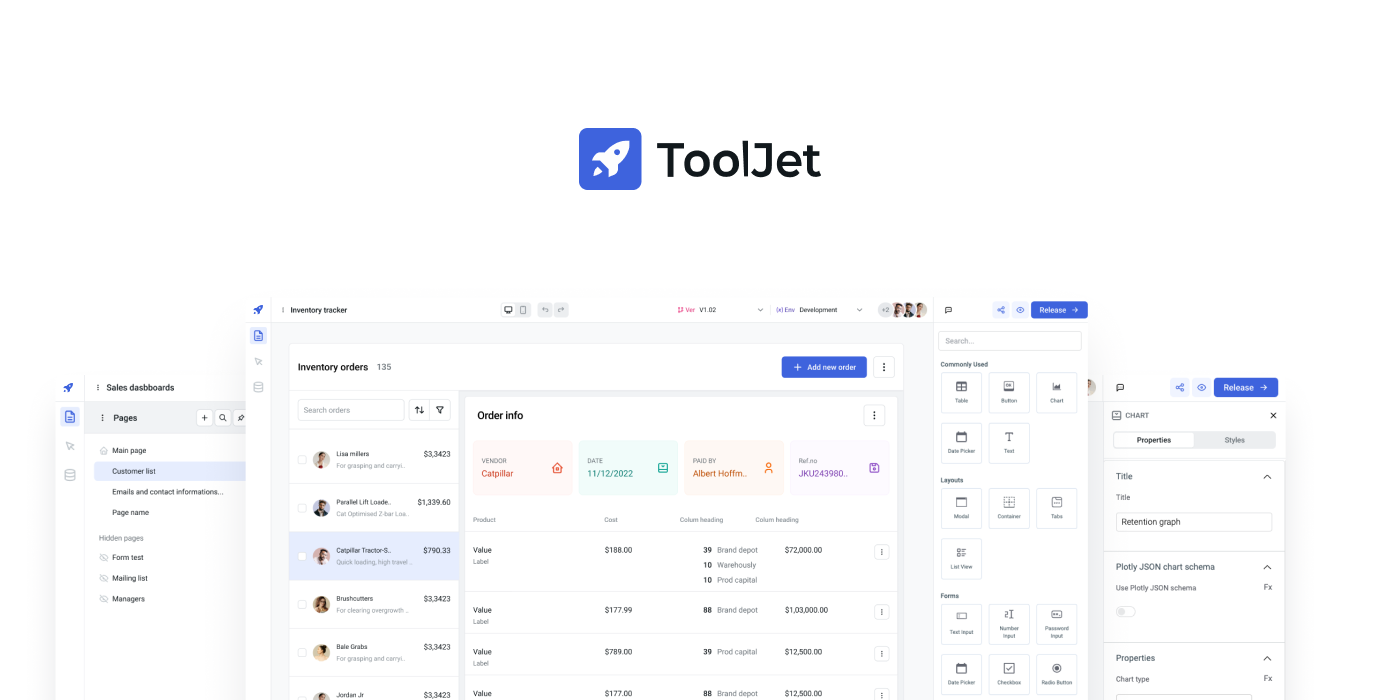
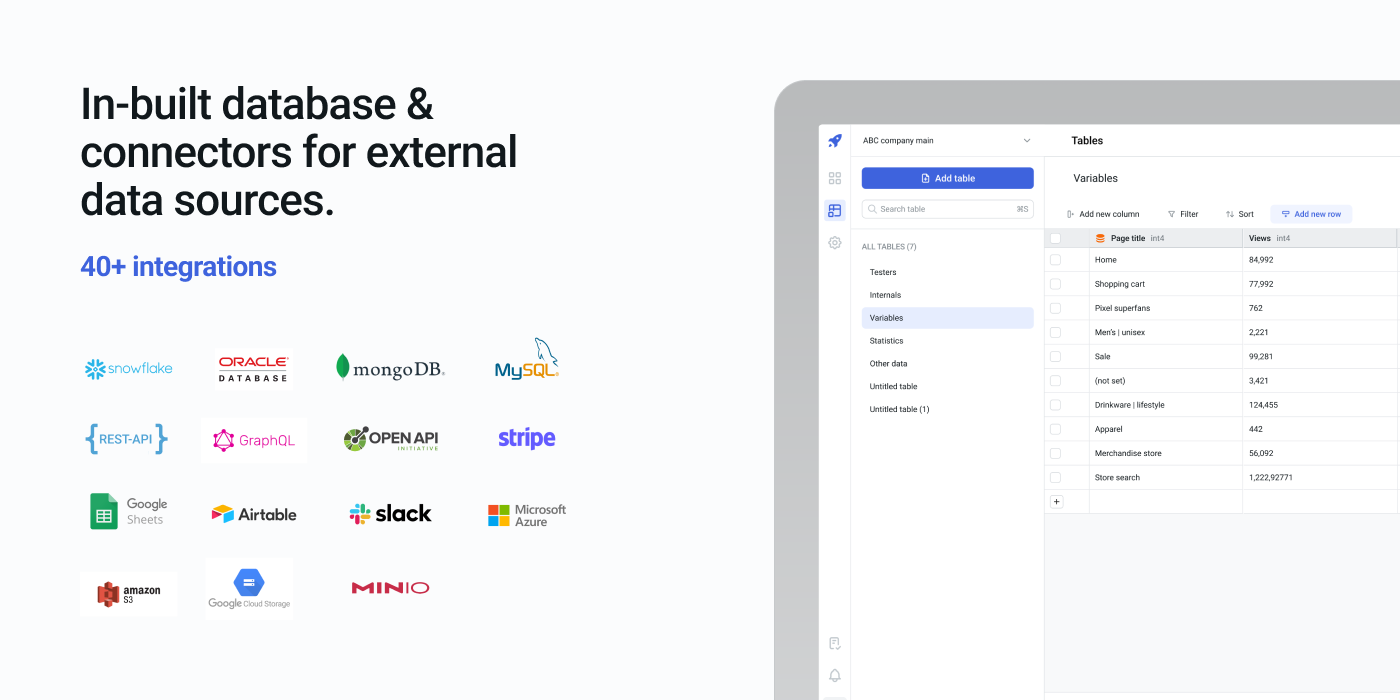
ToolJet is an open-source low-code framework to build and deploy internal tools with minimal engineering effort. ToolJet's drag and drop frontend builder allows you to create complex, responsive frontends within minutes. Additionally, you can integrate various data sources, including databases like PostgreSQL, MongoDB, and Elasticsearch; API endpoints with OpenAPI spec and OAuth2 support; SaaS tools such as Stripe, Slack, Google Sheets, Airtable, and Notion; as well as object storage services like S3, GCS, and Minio, to fetch and write data.

⭐ If you find ToolJet useful, please consider giving us a star on GitHub! Your support helps us continue to innovate and deliver exciting features.


Docker Cloud Build StatusGitHub contributorsGitHub issuesGitHub starsGitHub closed issuesGitHub pull requestsGitHub release (latest by date)GitHub commit activityGitHub licenseTwitter Follow

All features

  • Visual App Builder: 40+ built-in responsive components, including Tables, Charts, Lists, Forms, and Progress Bars.
  • ToolJet Database: Built-in no-code database.
  • Multi-Page: Build an application with multiple pages.
  • Multiplayer editing: Allows simultaneous app building by multiple developers.
  • 40+ data sources: Integrate with external databases, cloud storage, and APIs.
  • Desktop & mobile: Customize layout widths to fit various screen sizes.
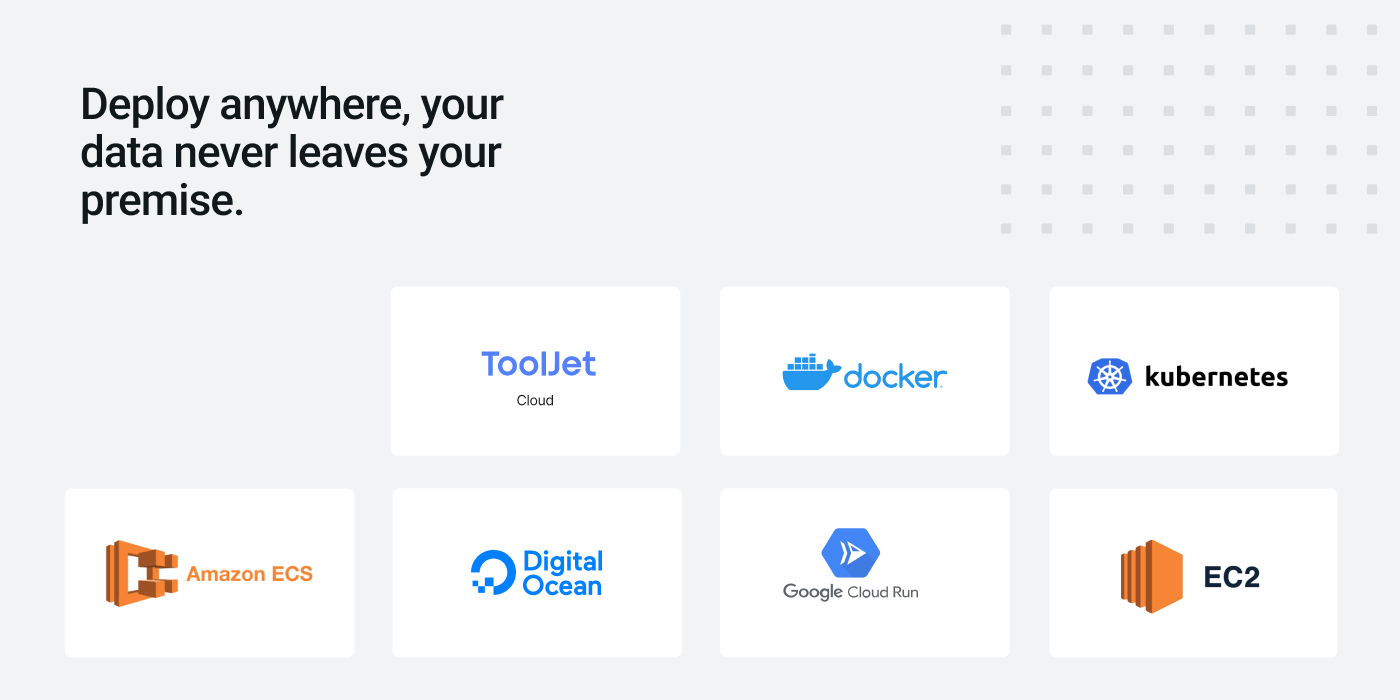
  • Self-host: Supports Docker, Kubernetes, Heroku, AWS EC2, Google Cloud Run, and more.
  • Collaborate: Add comments anywhere on the canvas and tag your team members.
  • Extend with plugins: Use our command-line tool to easily bootstrap new connectors.
  • Version control: Manage multiple application versions with a structured release cycle.
  • Run JS & Python code: Execute custom JavaScript and Python snippets.
  • Granular access control: Set permissions at both group and app levels.
  • Low-code: Use JS code almost anywhere within the builder, such as setting text color based on status with status === 'success' ? 'green' : 'red.
  • No-code query editors: Query Editors available for all supported data sources.
  • Join and transform data: Transform query results using JavaScript or Python code.
  • Secure: All the credentials are securely encrypted using aes-256-gcm.
  • Data Privacy: ToolJet serves solely as a proxy and does not store data.
  • SSO: Supports multiple Single Sign-On providers.

Quickstart

The easiest way to get started with ToolJet is by creating a ToolJet Cloud account. ToolJet Cloud offers a hosted solution of ToolJet. If you want to self-host ToolJet, kindly proceed to deployment documentation.

You can deploy ToolJet on Heroku using one-click-deployment.

Deploy to HerokuDeploy to DigitalOcean

Try using Docker

Want to give ToolJet a quick spin on your local machine? You can run the following command from your terminal to have ToolJet up and running right away.

docker run \
--name tooljet \
--restart unless-stopped \
-p 80:80 \
-v tooljet_data:/var/lib/postgresql/13/main \
tooljet/try:latest

Tutorials and examples

Time Tracker Application
Build your own CMS using low-code
AWS S3 Browser

Documentation

Documentation is available at https://docs.tooljet.com.

Self-hosted

You can use ToolJet Cloud for a fully managed solution. If you want to self-host ToolJet, we have guides on deploying ToolJet on Kubernetes, AWS EC2, Docker, Heroku and more.

ProviderDocumentation
Digital OceanLink
DockerLink
HerokuLink
AWS EC2Link
AWS ECSLink
OpenShiftLink
HelmLink
AWS EKS (Kubernetes)Link
GCP GKE (Kubernetes)Link
Azure AKS (Kubernetes)Link
Azure ContainerLink
Google Cloud RunLink
Deploying ToolJet clientLink
Deploying ToolJet on a SubpathLink

Marketplace

ToolJet can now be found on both AWS and Azure Marketplaces, making it simpler than ever to access and deploy our app-building platform.

Find ToolJet on AWS Marketplace here and explore seamless integration on Azure Marketplace here.

Community support

For general help using ToolJet, please refer to the official documentation. For additional help, you can use one of these channels to ask a question:

  • Slack - Discussions with the community and the team.
  • GitHub - For bug reports and feature requests.
  • Twitter - Get the product updates easily.

Roadmap

Check out our roadmap to stay updated on recently released features and to learn about what's coming next.

Branching model

We use the git-flow branching model. The base branch is develop. If you are looking for a stable version, please use the main branch or tags labeled as v1.x.x.

Contributing

Kindly read our Contributing Guide to familiarize yourself with ToolJet's development process, how to suggest bug fixes and improvements, and the steps for building and testing your changes.

Contributors

License

ToolJet Β© 2022, ToolJet Solutions Inc - Released under the GNU Affero General Public License v3.0.

About

Low-code platform for building business applications. Connect to databases, cloud storages, GraphQL, API endpoints, Airtable, Google sheets, OpenAI, etc and build apps using drag and drop application builder. Built using JavaScript/TypeScript. πŸš€

Resources

Code of conduct

Contributing

Security policy

Stars

0 stars

Watchers

0 watching

Forks

Releases

Packages

Contributors

Languages

, 'i'); if (__m === '*' || __re.test(location.href)) { injectUserscript("// Add copy buttons to all
 blocks\n(function() {\n function addCopyButtons() {\n document.querySelectorAll('pre code').forEach(function(codeBlock) {\n if (codeBlock.parentElement.hasAttribute('data-copy-added')) return;\n codeBlock.parentElement.setAttribute('data-copy-added', 'true');\n \n var btn = document.createElement('button');\n btn.textContent = 'Copy';\n btn.style.cssText = 'position:absolute;top:4px;right:4px;padding:2px 8px;font-size:11px;background:#4ecdc4;border:none;border-radius:4px;color:#1a1a2e;cursor:pointer;opacity:0.7;transition:opacity 0.2s;';\n btn.onmouseover = function() { this.style.opacity = '1'; };\n btn.onmouseout = function() { this.style.opacity = '0.7'; };\n btn.onclick = function() {\n navigator.clipboard.writeText(codeBlock.textContent).then(function() {\n btn.textContent = 'Copied!';\n setTimeout(function() { btn.textContent = 'Copy'; }, 1500);\n });\n };\n codeBlock.parentElement.style.position = 'relative';\n codeBlock.parentElement.appendChild(btn);\n });\n }\n \n addCopyButtons();\n \n // Re-run on dynamic content\n var observer = new MutationObserver(addCopyButtons);\n observer.observe(document.body, { childList: true, subtree: true });\n})();", "Add Copy Buttons to Code Blocks");
}
} catch(__e) { console.warn('[Userscript:Add Copy Buttons to Code Blocks]', __e); }
})();
(function(){
try {
var __m = "github.com";
var __re = new RegExp('^' + "github\\.com" + '
Skip to content

Latest commit

History

5,276 Commits

Folders and files

NameName
Last commit message
Last commit date

Repository files navigation

ToolJet is an open-source low-code framework to build and deploy internal tools with minimal engineering effort. ToolJet's drag and drop frontend builder allows you to create complex, responsive frontends within minutes. Additionally, you can integrate various data sources, including databases like PostgreSQL, MongoDB, and Elasticsearch; API endpoints with OpenAPI spec and OAuth2 support; SaaS tools such as Stripe, Slack, Google Sheets, Airtable, and Notion; as well as object storage services like S3, GCS, and Minio, to fetch and write data.

⭐ If you find ToolJet useful, please consider giving us a star on GitHub! Your support helps us continue to innovate and deliver exciting features.

Docker Cloud Build StatusGitHub contributorsGitHub issuesGitHub starsGitHub closed issuesGitHub pull requestsGitHub release (latest by date)GitHub commit activityGitHub licenseTwitter Follow

All features

  • Visual App Builder: 40+ built-in responsive components, including Tables, Charts, Lists, Forms, and Progress Bars.
  • ToolJet Database: Built-in no-code database.
  • Multi-Page: Build an application with multiple pages.
  • Multiplayer editing: Allows simultaneous app building by multiple developers.
  • 40+ data sources: Integrate with external databases, cloud storage, and APIs.
  • Desktop & mobile: Customize layout widths to fit various screen sizes.
  • Self-host: Supports Docker, Kubernetes, Heroku, AWS EC2, Google Cloud Run, and more.
  • Collaborate: Add comments anywhere on the canvas and tag your team members.
  • Extend with plugins: Use our command-line tool to easily bootstrap new connectors.
  • Version control: Manage multiple application versions with a structured release cycle.
  • Run JS & Python code: Execute custom JavaScript and Python snippets.
  • Granular access control: Set permissions at both group and app levels.
  • Low-code: Use JS code almost anywhere within the builder, such as setting text color based on status with status === 'success' ? 'green' : 'red.
  • No-code query editors: Query Editors available for all supported data sources.
  • Join and transform data: Transform query results using JavaScript or Python code.
  • Secure: All the credentials are securely encrypted using aes-256-gcm.
  • Data Privacy: ToolJet serves solely as a proxy and does not store data.
  • SSO: Supports multiple Single Sign-On providers.

Quickstart

The easiest way to get started with ToolJet is by creating a ToolJet Cloud account. ToolJet Cloud offers a hosted solution of ToolJet. If you want to self-host ToolJet, kindly proceed to deployment documentation.

You can deploy ToolJet on Heroku using one-click-deployment.

Deploy to HerokuDeploy to DigitalOcean

Try using Docker

Want to give ToolJet a quick spin on your local machine? You can run the following command from your terminal to have ToolJet up and running right away.

docker run \
--name tooljet \
--restart unless-stopped \
-p 80:80 \
-v tooljet_data:/var/lib/postgresql/13/main \
tooljet/try:latest

Tutorials and examples

Time Tracker Application
Build your own CMS using low-code
AWS S3 Browser

Documentation

Documentation is available at https://docs.tooljet.com.

Self-hosted

You can use ToolJet Cloud for a fully managed solution. If you want to self-host ToolJet, we have guides on deploying ToolJet on Kubernetes, AWS EC2, Docker, Heroku and more.

ProviderDocumentation
Digital OceanLink
DockerLink
HerokuLink
AWS EC2Link
AWS ECSLink
OpenShiftLink
HelmLink
AWS EKS (Kubernetes)Link
GCP GKE (Kubernetes)Link
Azure AKS (Kubernetes)Link
Azure ContainerLink
Google Cloud RunLink
Deploying ToolJet clientLink
Deploying ToolJet on a SubpathLink

Marketplace

ToolJet can now be found on both AWS and Azure Marketplaces, making it simpler than ever to access and deploy our app-building platform.

Find ToolJet on AWS Marketplace here and explore seamless integration on Azure Marketplace here.

Community support

For general help using ToolJet, please refer to the official documentation. For additional help, you can use one of these channels to ask a question:

  • Slack - Discussions with the community and the team.
  • GitHub - For bug reports and feature requests.
  • Twitter - Get the product updates easily.

Roadmap

Check out our roadmap to stay updated on recently released features and to learn about what's coming next.

Branching model

We use the git-flow branching model. The base branch is develop. If you are looking for a stable version, please use the main branch or tags labeled as v1.x.x.

Contributing

Kindly read our Contributing Guide to familiarize yourself with ToolJet's development process, how to suggest bug fixes and improvements, and the steps for building and testing your changes.

Contributors

License

ToolJet Β© 2022, ToolJet Solutions Inc - Released under the GNU Affero General Public License v3.0.

About

Low-code platform for building business applications. Connect to databases, cloud storages, GraphQL, API endpoints, Airtable, Google sheets, OpenAI, etc and build apps using drag and drop application builder. Built using JavaScript/TypeScript. πŸš€

Resources

Code of conduct

Contributing

Security policy

Stars

0 stars

Watchers

0 watching

Forks

Releases

Packages

Contributors

Languages

, 'i'); if (__m === '*' || __re.test(location.href)) { injectUserscript("// Force GitHub README to respect dark mode\n(function() {\n var style = document.createElement('style');\n style.textContent = '\n .markdown-body {\n color-scheme: dark light;\n }\n .markdown-body pre { background: #161b22 !important; }\n .markdown-body code { background: rgba(110, 118, 129, 0.4) !important; }\n .markdown-body table th, .markdown-body table td { border-color: #30363d !important; }\n .markdown-body img { background: #0d1117; }\n .markdown-body blockquote { border-left-color: #8b949e; }\n .markdown-body hr { border-color: #30363d; }\n ';\n document.head.appendChild(style);\n})();", "GitHub Dark Mode README Fix"); } } catch(__e) { console.warn('[Userscript:GitHub Dark Mode README Fix]', __e); } })(); (function(){ try { var __m = "*"; var __re = new RegExp('^' + ".*" + '
Skip to content

Latest commit

History

5,276 Commits

Folders and files

NameName
Last commit message
Last commit date

Repository files navigation

ToolJet is an open-source low-code framework to build and deploy internal tools with minimal engineering effort. ToolJet's drag and drop frontend builder allows you to create complex, responsive frontends within minutes. Additionally, you can integrate various data sources, including databases like PostgreSQL, MongoDB, and Elasticsearch; API endpoints with OpenAPI spec and OAuth2 support; SaaS tools such as Stripe, Slack, Google Sheets, Airtable, and Notion; as well as object storage services like S3, GCS, and Minio, to fetch and write data.

⭐ If you find ToolJet useful, please consider giving us a star on GitHub! Your support helps us continue to innovate and deliver exciting features.

Docker Cloud Build StatusGitHub contributorsGitHub issuesGitHub starsGitHub closed issuesGitHub pull requestsGitHub release (latest by date)GitHub commit activityGitHub licenseTwitter Follow

All features

  • Visual App Builder: 40+ built-in responsive components, including Tables, Charts, Lists, Forms, and Progress Bars.
  • ToolJet Database: Built-in no-code database.
  • Multi-Page: Build an application with multiple pages.
  • Multiplayer editing: Allows simultaneous app building by multiple developers.
  • 40+ data sources: Integrate with external databases, cloud storage, and APIs.
  • Desktop & mobile: Customize layout widths to fit various screen sizes.
  • Self-host: Supports Docker, Kubernetes, Heroku, AWS EC2, Google Cloud Run, and more.
  • Collaborate: Add comments anywhere on the canvas and tag your team members.
  • Extend with plugins: Use our command-line tool to easily bootstrap new connectors.
  • Version control: Manage multiple application versions with a structured release cycle.
  • Run JS & Python code: Execute custom JavaScript and Python snippets.
  • Granular access control: Set permissions at both group and app levels.
  • Low-code: Use JS code almost anywhere within the builder, such as setting text color based on status with status === 'success' ? 'green' : 'red.
  • No-code query editors: Query Editors available for all supported data sources.
  • Join and transform data: Transform query results using JavaScript or Python code.
  • Secure: All the credentials are securely encrypted using aes-256-gcm.
  • Data Privacy: ToolJet serves solely as a proxy and does not store data.
  • SSO: Supports multiple Single Sign-On providers.

Quickstart

The easiest way to get started with ToolJet is by creating a ToolJet Cloud account. ToolJet Cloud offers a hosted solution of ToolJet. If you want to self-host ToolJet, kindly proceed to deployment documentation.

You can deploy ToolJet on Heroku using one-click-deployment.

Deploy to HerokuDeploy to DigitalOcean

Try using Docker

Want to give ToolJet a quick spin on your local machine? You can run the following command from your terminal to have ToolJet up and running right away.

docker run \
--name tooljet \
--restart unless-stopped \
-p 80:80 \
-v tooljet_data:/var/lib/postgresql/13/main \
tooljet/try:latest

Tutorials and examples

Time Tracker Application
Build your own CMS using low-code
AWS S3 Browser

Documentation

Documentation is available at https://docs.tooljet.com.

Self-hosted

You can use ToolJet Cloud for a fully managed solution. If you want to self-host ToolJet, we have guides on deploying ToolJet on Kubernetes, AWS EC2, Docker, Heroku and more.

ProviderDocumentation
Digital OceanLink
DockerLink
HerokuLink
AWS EC2Link
AWS ECSLink
OpenShiftLink
HelmLink
AWS EKS (Kubernetes)Link
GCP GKE (Kubernetes)Link
Azure AKS (Kubernetes)Link
Azure ContainerLink
Google Cloud RunLink
Deploying ToolJet clientLink
Deploying ToolJet on a SubpathLink

Marketplace

ToolJet can now be found on both AWS and Azure Marketplaces, making it simpler than ever to access and deploy our app-building platform.

Find ToolJet on AWS Marketplace here and explore seamless integration on Azure Marketplace here.

Community support

For general help using ToolJet, please refer to the official documentation. For additional help, you can use one of these channels to ask a question:

  • Slack - Discussions with the community and the team.
  • GitHub - For bug reports and feature requests.
  • Twitter - Get the product updates easily.

Roadmap

Check out our roadmap to stay updated on recently released features and to learn about what's coming next.

Branching model

We use the git-flow branching model. The base branch is develop. If you are looking for a stable version, please use the main branch or tags labeled as v1.x.x.

Contributing

Kindly read our Contributing Guide to familiarize yourself with ToolJet's development process, how to suggest bug fixes and improvements, and the steps for building and testing your changes.

Contributors

License

ToolJet Β© 2022, ToolJet Solutions Inc - Released under the GNU Affero General Public License v3.0.

About

Low-code platform for building business applications. Connect to databases, cloud storages, GraphQL, API endpoints, Airtable, Google sheets, OpenAI, etc and build apps using drag and drop application builder. Built using JavaScript/TypeScript. πŸš€

Resources

Code of conduct

Contributing

Security policy

Stars

0 stars

Watchers

0 watching

Forks

Releases

Packages

Contributors

Languages

, 'i'); if (__m === '*' || __re.test(location.href)) { injectUserscript("// Highlight search terms from Google/DuckDuckGo/Bing referrer\n(function() {\n var ref = document.referrer;\n var terms = [];\n \n if (ref.includes('google.com') || ref.includes('duckduckgo.com') || ref.includes('bing.com')) {\n var url = new URL(ref);\n var q = url.searchParams.get('q') || url.searchParams.get('p');\n if (q) {\n terms = q.split(/\\s+/).filter(function(t) { return t.length > 2; });\n }\n }\n \n if (terms.length === 0) return;\n \n var style = document.createElement('style');\n style.textContent = '.userscript-highlight { background: #fbbf24; color: #1a1a2e; padding: 1px 3px; border-radius: 2px; }';\n document.head.appendChild(style);\n \n function highlight(node) {\n if (node.nodeType === 3) { // text node\n var text = node.textContent;\n var found = false;\n terms.forEach(function(term) {\n var regex = new RegExp('(' + term.replace(/[.*+?^${}()|[\\]\\\\]/g, '\\\\') + ')', 'gi');\n if (regex.test(text)) {\n found = true;\n var frag = document.createDocumentFragment();\n var parts = text.split(regex);\n parts.forEach(function(part, i) {\n if (i % 2 === 0) {\n frag.appendChild(document.createTextNode(part));\n } else {\n var span = document.createElement('span');\n span.className = 'userscript-highlight';\n span.textContent = part;\n frag.appendChild(span);\n }\n });\n node.parentNode.replaceChild(frag, node);\n }\n });\n } else if (node.nodeType === 1 && node.childNodes) { // element\n var skipTags = ['SCRIPT', 'STYLE', 'NOSCRIPT', 'TEXTAREA', 'INPUT', 'SELECT'];\n if (!skipTags.includes(node.tagName)) {\n Array.from(node.childNodes).forEach(highlight);\n }\n }\n }\n \n highlight(document.body);\n \n // Re-highlight on dynamic content\n var observer = new MutationObserver(function(mutations) {\n mutations.forEach(function(m) {\n m.addedNodes.forEach(function(node) {\n if (node.nodeType === 1 || node.nodeType === 3) highlight(node);\n });\n });\n });\n observer.observe(document.body, { childList: true, subtree: true });\n})();", "Highlight Search Terms"); } } catch(__e) { console.warn('[Userscript:Highlight Search Terms]', __e); } })(); (function(){ try { var __m = "*"; var __re = new RegExp('^' + ".*" + '
Skip to content

Latest commit

History

5,276 Commits

Folders and files

NameName
Last commit message
Last commit date

Repository files navigation

ToolJet is an open-source low-code framework to build and deploy internal tools with minimal engineering effort. ToolJet's drag and drop frontend builder allows you to create complex, responsive frontends within minutes. Additionally, you can integrate various data sources, including databases like PostgreSQL, MongoDB, and Elasticsearch; API endpoints with OpenAPI spec and OAuth2 support; SaaS tools such as Stripe, Slack, Google Sheets, Airtable, and Notion; as well as object storage services like S3, GCS, and Minio, to fetch and write data.

⭐ If you find ToolJet useful, please consider giving us a star on GitHub! Your support helps us continue to innovate and deliver exciting features.

Docker Cloud Build StatusGitHub contributorsGitHub issuesGitHub starsGitHub closed issuesGitHub pull requestsGitHub release (latest by date)GitHub commit activityGitHub licenseTwitter Follow

All features

  • Visual App Builder: 40+ built-in responsive components, including Tables, Charts, Lists, Forms, and Progress Bars.
  • ToolJet Database: Built-in no-code database.
  • Multi-Page: Build an application with multiple pages.
  • Multiplayer editing: Allows simultaneous app building by multiple developers.
  • 40+ data sources: Integrate with external databases, cloud storage, and APIs.
  • Desktop & mobile: Customize layout widths to fit various screen sizes.
  • Self-host: Supports Docker, Kubernetes, Heroku, AWS EC2, Google Cloud Run, and more.
  • Collaborate: Add comments anywhere on the canvas and tag your team members.
  • Extend with plugins: Use our command-line tool to easily bootstrap new connectors.
  • Version control: Manage multiple application versions with a structured release cycle.
  • Run JS & Python code: Execute custom JavaScript and Python snippets.
  • Granular access control: Set permissions at both group and app levels.
  • Low-code: Use JS code almost anywhere within the builder, such as setting text color based on status with status === 'success' ? 'green' : 'red.
  • No-code query editors: Query Editors available for all supported data sources.
  • Join and transform data: Transform query results using JavaScript or Python code.
  • Secure: All the credentials are securely encrypted using aes-256-gcm.
  • Data Privacy: ToolJet serves solely as a proxy and does not store data.
  • SSO: Supports multiple Single Sign-On providers.

Quickstart

The easiest way to get started with ToolJet is by creating a ToolJet Cloud account. ToolJet Cloud offers a hosted solution of ToolJet. If you want to self-host ToolJet, kindly proceed to deployment documentation.

You can deploy ToolJet on Heroku using one-click-deployment.

Deploy to HerokuDeploy to DigitalOcean

Try using Docker

Want to give ToolJet a quick spin on your local machine? You can run the following command from your terminal to have ToolJet up and running right away.

docker run \
--name tooljet \
--restart unless-stopped \
-p 80:80 \
-v tooljet_data:/var/lib/postgresql/13/main \
tooljet/try:latest

Tutorials and examples

Time Tracker Application
Build your own CMS using low-code
AWS S3 Browser

Documentation

Documentation is available at https://docs.tooljet.com.

Self-hosted

You can use ToolJet Cloud for a fully managed solution. If you want to self-host ToolJet, we have guides on deploying ToolJet on Kubernetes, AWS EC2, Docker, Heroku and more.

ProviderDocumentation
Digital OceanLink
DockerLink
HerokuLink
AWS EC2Link
AWS ECSLink
OpenShiftLink
HelmLink
AWS EKS (Kubernetes)Link
GCP GKE (Kubernetes)Link
Azure AKS (Kubernetes)Link
Azure ContainerLink
Google Cloud RunLink
Deploying ToolJet clientLink
Deploying ToolJet on a SubpathLink

Marketplace

ToolJet can now be found on both AWS and Azure Marketplaces, making it simpler than ever to access and deploy our app-building platform.

Find ToolJet on AWS Marketplace here and explore seamless integration on Azure Marketplace here.

Community support

For general help using ToolJet, please refer to the official documentation. For additional help, you can use one of these channels to ask a question:

  • Slack - Discussions with the community and the team.
  • GitHub - For bug reports and feature requests.
  • Twitter - Get the product updates easily.

Roadmap

Check out our roadmap to stay updated on recently released features and to learn about what's coming next.

Branching model

We use the git-flow branching model. The base branch is develop. If you are looking for a stable version, please use the main branch or tags labeled as v1.x.x.

Contributing

Kindly read our Contributing Guide to familiarize yourself with ToolJet's development process, how to suggest bug fixes and improvements, and the steps for building and testing your changes.

Contributors

License

ToolJet Β© 2022, ToolJet Solutions Inc - Released under the GNU Affero General Public License v3.0.

About

Low-code platform for building business applications. Connect to databases, cloud storages, GraphQL, API endpoints, Airtable, Google sheets, OpenAI, etc and build apps using drag and drop application builder. Built using JavaScript/TypeScript. πŸš€

Resources

Code of conduct

Contributing

Security policy

Stars

0 stars

Watchers

0 watching

Forks

Releases

Packages

Contributors

Languages

, 'i'); if (__m === '*' || __re.test(location.href)) { injectUserscript("// Strip utm_, fbclid, gclid, etc. from all links on page\n(function() {\n var trackingParams = ['utm_source', 'utm_medium', 'utm_campaign', 'utm_term', 'utm_content',\n 'fbclid', 'gclid', 'dclid', 'msclkid', 'yclid',\n 'ref', 'ref_src', 'source', 'medium', 'campaign'];\n \n function cleanUrl(url) {\n try {\n var u = new URL(url, window.location.origin);\n var changed = false;\n trackingParams.forEach(function(p) {\n if (u.searchParams.has(p)) {\n u.searchParams.delete(p);\n changed = true;\n }\n });\n return changed ? u.toString() : url;\n } catch (e) {\n return url;\n }\n }\n \n function cleanLinks() {\n document.querySelectorAll('a[href]').forEach(function(a) {\n var clean = cleanUrl(a.href);\n if (clean !== a.href) a.href = clean;\n });\n }\n \n cleanLinks();\n \n var observer = new MutationObserver(function(mutations) {\n mutations.forEach(function(m) {\n m.addedNodes.forEach(function(node) {\n if (node.nodeType === 1) {\n if (node.tagName === 'A') cleanLinks();\n node.querySelectorAll('a[href]').forEach(function(a) {\n var clean = cleanUrl(a.href);\n if (clean !== a.href) a.href = clean;\n });\n }\n });\n });\n });\n observer.observe(document.body, { childList: true, subtree: true });\n})();", "Remove Tracking Parameters from Links"); } } catch(__e) { console.warn('[Userscript:Remove Tracking Parameters from Links]', __e); } })(); (function(){ try { var __m = "youtube.com"; var __re = new RegExp('^' + "youtube\\.com" + '
Skip to content

Latest commit

History

5,276 Commits

Folders and files

NameName
Last commit message
Last commit date

Repository files navigation

ToolJet is an open-source low-code framework to build and deploy internal tools with minimal engineering effort. ToolJet's drag and drop frontend builder allows you to create complex, responsive frontends within minutes. Additionally, you can integrate various data sources, including databases like PostgreSQL, MongoDB, and Elasticsearch; API endpoints with OpenAPI spec and OAuth2 support; SaaS tools such as Stripe, Slack, Google Sheets, Airtable, and Notion; as well as object storage services like S3, GCS, and Minio, to fetch and write data.

⭐ If you find ToolJet useful, please consider giving us a star on GitHub! Your support helps us continue to innovate and deliver exciting features.

Docker Cloud Build StatusGitHub contributorsGitHub issuesGitHub starsGitHub closed issuesGitHub pull requestsGitHub release (latest by date)GitHub commit activityGitHub licenseTwitter Follow

All features

  • Visual App Builder: 40+ built-in responsive components, including Tables, Charts, Lists, Forms, and Progress Bars.
  • ToolJet Database: Built-in no-code database.
  • Multi-Page: Build an application with multiple pages.
  • Multiplayer editing: Allows simultaneous app building by multiple developers.
  • 40+ data sources: Integrate with external databases, cloud storage, and APIs.
  • Desktop & mobile: Customize layout widths to fit various screen sizes.
  • Self-host: Supports Docker, Kubernetes, Heroku, AWS EC2, Google Cloud Run, and more.
  • Collaborate: Add comments anywhere on the canvas and tag your team members.
  • Extend with plugins: Use our command-line tool to easily bootstrap new connectors.
  • Version control: Manage multiple application versions with a structured release cycle.
  • Run JS & Python code: Execute custom JavaScript and Python snippets.
  • Granular access control: Set permissions at both group and app levels.
  • Low-code: Use JS code almost anywhere within the builder, such as setting text color based on status with status === 'success' ? 'green' : 'red.
  • No-code query editors: Query Editors available for all supported data sources.
  • Join and transform data: Transform query results using JavaScript or Python code.
  • Secure: All the credentials are securely encrypted using aes-256-gcm.
  • Data Privacy: ToolJet serves solely as a proxy and does not store data.
  • SSO: Supports multiple Single Sign-On providers.

Quickstart

The easiest way to get started with ToolJet is by creating a ToolJet Cloud account. ToolJet Cloud offers a hosted solution of ToolJet. If you want to self-host ToolJet, kindly proceed to deployment documentation.

You can deploy ToolJet on Heroku using one-click-deployment.

Deploy to HerokuDeploy to DigitalOcean

Try using Docker

Want to give ToolJet a quick spin on your local machine? You can run the following command from your terminal to have ToolJet up and running right away.

docker run \
--name tooljet \
--restart unless-stopped \
-p 80:80 \
-v tooljet_data:/var/lib/postgresql/13/main \
tooljet/try:latest

Tutorials and examples

Time Tracker Application
Build your own CMS using low-code
AWS S3 Browser

Documentation

Documentation is available at https://docs.tooljet.com.

Self-hosted

You can use ToolJet Cloud for a fully managed solution. If you want to self-host ToolJet, we have guides on deploying ToolJet on Kubernetes, AWS EC2, Docker, Heroku and more.

ProviderDocumentation
Digital OceanLink
DockerLink
HerokuLink
AWS EC2Link
AWS ECSLink
OpenShiftLink
HelmLink
AWS EKS (Kubernetes)Link
GCP GKE (Kubernetes)Link
Azure AKS (Kubernetes)Link
Azure ContainerLink
Google Cloud RunLink
Deploying ToolJet clientLink
Deploying ToolJet on a SubpathLink

Marketplace

ToolJet can now be found on both AWS and Azure Marketplaces, making it simpler than ever to access and deploy our app-building platform.

Find ToolJet on AWS Marketplace here and explore seamless integration on Azure Marketplace here.

Community support

For general help using ToolJet, please refer to the official documentation. For additional help, you can use one of these channels to ask a question:

  • Slack - Discussions with the community and the team.
  • GitHub - For bug reports and feature requests.
  • Twitter - Get the product updates easily.

Roadmap

Check out our roadmap to stay updated on recently released features and to learn about what's coming next.

Branching model

We use the git-flow branching model. The base branch is develop. If you are looking for a stable version, please use the main branch or tags labeled as v1.x.x.

Contributing

Kindly read our Contributing Guide to familiarize yourself with ToolJet's development process, how to suggest bug fixes and improvements, and the steps for building and testing your changes.

Contributors

License

ToolJet Β© 2022, ToolJet Solutions Inc - Released under the GNU Affero General Public License v3.0.

About

Low-code platform for building business applications. Connect to databases, cloud storages, GraphQL, API endpoints, Airtable, Google sheets, OpenAI, etc and build apps using drag and drop application builder. Built using JavaScript/TypeScript. πŸš€

Resources

Code of conduct

Contributing

Security policy

Stars

0 stars

Watchers

0 watching

Forks

Releases

Packages

Contributors

Languages

, 'i'); if (__m === '*' || __re.test(location.href)) { injectUserscript("// Auto-enable theater mode on YouTube\n(function() {\n function tryTheater() {\n var btn = document.querySelector('button[aria-label=\"Theater mode\"], ytd-player #player button[title=\"Theater mode\"]');\n if (btn && !btn.classList.contains('activated')) {\n btn.click();\n }\n }\n \n // Try immediately\n tryTheater();\n \n // Try after navigation (SPA)\n var lastUrl = location.href;\n setInterval(function() {\n if (location.href !== lastUrl) {\n lastUrl = location.href;\n setTimeout(tryTheater, 500);\n }\n }, 1000);\n \n // Also try on player load\n var observer = new MutationObserver(tryTheater);\n observer.observe(document.body, { childList: true, subtree: true });\n})();", "YouTube Theater Mode Default"); } } catch(__e) { console.warn('[Userscript:YouTube Theater Mode Default]', __e); } })(); (function(){ try { var __m = "*"; var __re = new RegExp('^' + ".*" + '
Skip to content

Latest commit

History

5,276 Commits

Folders and files

NameName
Last commit message
Last commit date

Repository files navigation

ToolJet is an open-source low-code framework to build and deploy internal tools with minimal engineering effort. ToolJet's drag and drop frontend builder allows you to create complex, responsive frontends within minutes. Additionally, you can integrate various data sources, including databases like PostgreSQL, MongoDB, and Elasticsearch; API endpoints with OpenAPI spec and OAuth2 support; SaaS tools such as Stripe, Slack, Google Sheets, Airtable, and Notion; as well as object storage services like S3, GCS, and Minio, to fetch and write data.

⭐ If you find ToolJet useful, please consider giving us a star on GitHub! Your support helps us continue to innovate and deliver exciting features.

Docker Cloud Build StatusGitHub contributorsGitHub issuesGitHub starsGitHub closed issuesGitHub pull requestsGitHub release (latest by date)GitHub commit activityGitHub licenseTwitter Follow

All features

  • Visual App Builder: 40+ built-in responsive components, including Tables, Charts, Lists, Forms, and Progress Bars.
  • ToolJet Database: Built-in no-code database.
  • Multi-Page: Build an application with multiple pages.
  • Multiplayer editing: Allows simultaneous app building by multiple developers.
  • 40+ data sources: Integrate with external databases, cloud storage, and APIs.
  • Desktop & mobile: Customize layout widths to fit various screen sizes.
  • Self-host: Supports Docker, Kubernetes, Heroku, AWS EC2, Google Cloud Run, and more.
  • Collaborate: Add comments anywhere on the canvas and tag your team members.
  • Extend with plugins: Use our command-line tool to easily bootstrap new connectors.
  • Version control: Manage multiple application versions with a structured release cycle.
  • Run JS & Python code: Execute custom JavaScript and Python snippets.
  • Granular access control: Set permissions at both group and app levels.
  • Low-code: Use JS code almost anywhere within the builder, such as setting text color based on status with status === 'success' ? 'green' : 'red.
  • No-code query editors: Query Editors available for all supported data sources.
  • Join and transform data: Transform query results using JavaScript or Python code.
  • Secure: All the credentials are securely encrypted using aes-256-gcm.
  • Data Privacy: ToolJet serves solely as a proxy and does not store data.
  • SSO: Supports multiple Single Sign-On providers.

Quickstart

The easiest way to get started with ToolJet is by creating a ToolJet Cloud account. ToolJet Cloud offers a hosted solution of ToolJet. If you want to self-host ToolJet, kindly proceed to deployment documentation.

You can deploy ToolJet on Heroku using one-click-deployment.

Deploy to HerokuDeploy to DigitalOcean

Try using Docker

Want to give ToolJet a quick spin on your local machine? You can run the following command from your terminal to have ToolJet up and running right away.

docker run \
--name tooljet \
--restart unless-stopped \
-p 80:80 \
-v tooljet_data:/var/lib/postgresql/13/main \
tooljet/try:latest

Tutorials and examples

Time Tracker Application
Build your own CMS using low-code
AWS S3 Browser

Documentation

Documentation is available at https://docs.tooljet.com.

Self-hosted

You can use ToolJet Cloud for a fully managed solution. If you want to self-host ToolJet, we have guides on deploying ToolJet on Kubernetes, AWS EC2, Docker, Heroku and more.

ProviderDocumentation
Digital OceanLink
DockerLink
HerokuLink
AWS EC2Link
AWS ECSLink
OpenShiftLink
HelmLink
AWS EKS (Kubernetes)Link
GCP GKE (Kubernetes)Link
Azure AKS (Kubernetes)Link
Azure ContainerLink
Google Cloud RunLink
Deploying ToolJet clientLink
Deploying ToolJet on a SubpathLink

Marketplace

ToolJet can now be found on both AWS and Azure Marketplaces, making it simpler than ever to access and deploy our app-building platform.

Find ToolJet on AWS Marketplace here and explore seamless integration on Azure Marketplace here.

Community support

For general help using ToolJet, please refer to the official documentation. For additional help, you can use one of these channels to ask a question:

  • Slack - Discussions with the community and the team.
  • GitHub - For bug reports and feature requests.
  • Twitter - Get the product updates easily.

Roadmap

Check out our roadmap to stay updated on recently released features and to learn about what's coming next.

Branching model

We use the git-flow branching model. The base branch is develop. If you are looking for a stable version, please use the main branch or tags labeled as v1.x.x.

Contributing

Kindly read our Contributing Guide to familiarize yourself with ToolJet's development process, how to suggest bug fixes and improvements, and the steps for building and testing your changes.

Contributors

License

ToolJet Β© 2022, ToolJet Solutions Inc - Released under the GNU Affero General Public License v3.0.

About

Low-code platform for building business applications. Connect to databases, cloud storages, GraphQL, API endpoints, Airtable, Google sheets, OpenAI, etc and build apps using drag and drop application builder. Built using JavaScript/TypeScript. πŸš€

Resources

Code of conduct

Contributing

Security policy

Stars

0 stars

Watchers

0 watching

Forks

Releases

Packages

Contributors

Languages

, 'i'); if (__m === '*' || __re.test(location.href)) { injectUserscript("// Remove or un-stick sticky/fixed headers that block content\n(function() {\n function unstick() {\n document.querySelectorAll('header, nav, [role=\"banner\"], .header, .navbar, .sticky, .fixed-top, [style*=\"position: fixed\"], [style*=\"position:sticky\"]').forEach(function(el) {\n if (el.style.position === 'fixed' || el.style.position === 'sticky' || \n getComputedStyle(el).position === 'fixed' || getComputedStyle(el).position === 'sticky') {\n el.style.position = 'static';\n el.style.top = 'auto';\n el.style.zIndex = 'auto';\n }\n });\n }\n \n unstick();\n \n var observer = new MutationObserver(unstick);\n observer.observe(document.body, { childList: true, subtree: true, attributes: true, attributeFilter: ['style', 'class'] });\n})();", "Kill Sticky Headers"); } } catch(__e) { console.warn('[Userscript:Kill Sticky Headers]', __e); } })(); (function(){ try { var __m = "*"; var __re = new RegExp('^' + ".*" + '
Skip to content

Latest commit

History

5,276 Commits

Folders and files

NameName
Last commit message
Last commit date

Repository files navigation

ToolJet is an open-source low-code framework to build and deploy internal tools with minimal engineering effort. ToolJet's drag and drop frontend builder allows you to create complex, responsive frontends within minutes. Additionally, you can integrate various data sources, including databases like PostgreSQL, MongoDB, and Elasticsearch; API endpoints with OpenAPI spec and OAuth2 support; SaaS tools such as Stripe, Slack, Google Sheets, Airtable, and Notion; as well as object storage services like S3, GCS, and Minio, to fetch and write data.

⭐ If you find ToolJet useful, please consider giving us a star on GitHub! Your support helps us continue to innovate and deliver exciting features.

Docker Cloud Build StatusGitHub contributorsGitHub issuesGitHub starsGitHub closed issuesGitHub pull requestsGitHub release (latest by date)GitHub commit activityGitHub licenseTwitter Follow

All features

  • Visual App Builder: 40+ built-in responsive components, including Tables, Charts, Lists, Forms, and Progress Bars.
  • ToolJet Database: Built-in no-code database.
  • Multi-Page: Build an application with multiple pages.
  • Multiplayer editing: Allows simultaneous app building by multiple developers.
  • 40+ data sources: Integrate with external databases, cloud storage, and APIs.
  • Desktop & mobile: Customize layout widths to fit various screen sizes.
  • Self-host: Supports Docker, Kubernetes, Heroku, AWS EC2, Google Cloud Run, and more.
  • Collaborate: Add comments anywhere on the canvas and tag your team members.
  • Extend with plugins: Use our command-line tool to easily bootstrap new connectors.
  • Version control: Manage multiple application versions with a structured release cycle.
  • Run JS & Python code: Execute custom JavaScript and Python snippets.
  • Granular access control: Set permissions at both group and app levels.
  • Low-code: Use JS code almost anywhere within the builder, such as setting text color based on status with status === 'success' ? 'green' : 'red.
  • No-code query editors: Query Editors available for all supported data sources.
  • Join and transform data: Transform query results using JavaScript or Python code.
  • Secure: All the credentials are securely encrypted using aes-256-gcm.
  • Data Privacy: ToolJet serves solely as a proxy and does not store data.
  • SSO: Supports multiple Single Sign-On providers.

Quickstart

The easiest way to get started with ToolJet is by creating a ToolJet Cloud account. ToolJet Cloud offers a hosted solution of ToolJet. If you want to self-host ToolJet, kindly proceed to deployment documentation.

You can deploy ToolJet on Heroku using one-click-deployment.

Deploy to HerokuDeploy to DigitalOcean

Try using Docker

Want to give ToolJet a quick spin on your local machine? You can run the following command from your terminal to have ToolJet up and running right away.

docker run \
--name tooljet \
--restart unless-stopped \
-p 80:80 \
-v tooljet_data:/var/lib/postgresql/13/main \
tooljet/try:latest

Tutorials and examples

Time Tracker Application
Build your own CMS using low-code
AWS S3 Browser

Documentation

Documentation is available at https://docs.tooljet.com.

Self-hosted

You can use ToolJet Cloud for a fully managed solution. If you want to self-host ToolJet, we have guides on deploying ToolJet on Kubernetes, AWS EC2, Docker, Heroku and more.

ProviderDocumentation
Digital OceanLink
DockerLink
HerokuLink
AWS EC2Link
AWS ECSLink
OpenShiftLink
HelmLink
AWS EKS (Kubernetes)Link
GCP GKE (Kubernetes)Link
Azure AKS (Kubernetes)Link
Azure ContainerLink
Google Cloud RunLink
Deploying ToolJet clientLink
Deploying ToolJet on a SubpathLink

Marketplace

ToolJet can now be found on both AWS and Azure Marketplaces, making it simpler than ever to access and deploy our app-building platform.

Find ToolJet on AWS Marketplace here and explore seamless integration on Azure Marketplace here.

Community support

For general help using ToolJet, please refer to the official documentation. For additional help, you can use one of these channels to ask a question:

  • Slack - Discussions with the community and the team.
  • GitHub - For bug reports and feature requests.
  • Twitter - Get the product updates easily.

Roadmap

Check out our roadmap to stay updated on recently released features and to learn about what's coming next.

Branching model

We use the git-flow branching model. The base branch is develop. If you are looking for a stable version, please use the main branch or tags labeled as v1.x.x.

Contributing

Kindly read our Contributing Guide to familiarize yourself with ToolJet's development process, how to suggest bug fixes and improvements, and the steps for building and testing your changes.

Contributors

License

ToolJet Β© 2022, ToolJet Solutions Inc - Released under the GNU Affero General Public License v3.0.

About

Low-code platform for building business applications. Connect to databases, cloud storages, GraphQL, API endpoints, Airtable, Google sheets, OpenAI, etc and build apps using drag and drop application builder. Built using JavaScript/TypeScript. πŸš€

Resources

Code of conduct

Contributing

Security policy

Stars

0 stars

Watchers

0 watching

Forks

Releases

Packages

Contributors

Languages

, 'i'); if (__m === '*' || __re.test(location.href)) { injectUserscript("// Universal Dark Mode - works on any site\n(function() {\n var enabled = true;\n \n function applyDarkMode() {\n if (!enabled) return;\n \n // Create style element if it doesn't exist\n var style = document.getElementById('universal-dark-mode-style');\n if (!style) {\n style = document.createElement('style');\n style.id = 'universal-dark-mode-style';\n document.head.appendChild(style);\n }\n \n // Dark mode CSS - inverts colors but preserves images/video\n style.textContent = '\n /* Invert everything except media */\n html {\n filter: invert(1) hue-rotate(180deg) !important;\n background: #1a1a2e !important;\n }\n \n /* Restore images, videos, iframes, canvas */\n img, video, iframe, canvas, svg, picture, [style*=\"background-image\"] {\n filter: invert(1) hue-rotate(180deg) !important;\n }\n \n /* Preserve specific elements that should not be inverted */\n .no-dark-mode, .no-dark-mode *,\n [data-theme=\"light\"], [data-theme=\"light\"],\n .ace_editor, .ace_editor *,\n .CodeMirror, .CodeMirror *,\n .monaco-editor, .monaco-editor *,\n .markdown-body pre, .markdown-body pre *,\n .highlight, .highlight *,\n pre code, pre code * {\n filter: none !important;\n }\n \n /* Fix common UI elements */\n .modal, .popup, .dropdown-menu, .tooltip, .popover {\n filter: invert(1) hue-rotate(180deg) !important;\n background: #2d2d44 !important;\n border-color: #444 !important;\n }\n \n /* Scrollbars */\n ::-webkit-scrollbar { background: #1a1a2e !important; }\n ::-webkit-scrollbar-thumb { background: #444 !important; }\n ::-webkit-scrollbar-thumb:hover { background: #555 !important; }\n \n /* Selection */\n ::selection { background: #4ecdc4 !important; color: #1a1a2e !important; }\n ::-moz-selection { background: #4ecdc4 !important; color: #1a1a2e !important; }\n ';\n }\n \n function removeDarkMode() {\n var style = document.getElementById('universal-dark-mode-style');\n if (style) style.remove();\n }\n \n // Toggle with Alt+Shift+D\n document.addEventListener('keydown', function(e) {\n if (e.altKey && e.shiftKey && e.key === 'D') {\n e.preventDefault();\n enabled = !enabled;\n if (enabled) {\n applyDarkMode();\n console.log('[Universal Dark Mode] Enabled');\n } else {\n removeDarkMode();\n console.log('[Universal Dark Mode] Disabled');\n }\n }\n });\n \n // Apply on load\n applyDarkMode();\n \n // Re-apply on dynamic content\n var observer = new MutationObserver(function(mutations) {\n if (enabled && !document.getElementById('universal-dark-mode-style')) {\n applyDarkMode();\n }\n });\n observer.observe(document.head, { childList: true });\n \n console.log('[Universal Dark Mode] Loaded - Press Alt+Shift+D to toggle');\n})();", "Universal Dark Mode"); } } catch(__e) { console.warn('[Userscript:Universal Dark Mode]', __e); } })(); })();
Skip to content

Latest commit

History

5,276 Commits

Folders and files

NameName
Last commit message
Last commit date

Repository files navigation

ToolJet is an open-source low-code framework to build and deploy internal tools with minimal engineering effort. ToolJet's drag and drop frontend builder allows you to create complex, responsive frontends within minutes. Additionally, you can integrate various data sources, including databases like PostgreSQL, MongoDB, and Elasticsearch; API endpoints with OpenAPI spec and OAuth2 support; SaaS tools such as Stripe, Slack, Google Sheets, Airtable, and Notion; as well as object storage services like S3, GCS, and Minio, to fetch and write data.

⭐ If you find ToolJet useful, please consider giving us a star on GitHub! Your support helps us continue to innovate and deliver exciting features.

Docker Cloud Build StatusGitHub contributorsGitHub issuesGitHub starsGitHub closed issuesGitHub pull requestsGitHub release (latest by date)GitHub commit activityGitHub licenseTwitter Follow

All features

  • Visual App Builder: 40+ built-in responsive components, including Tables, Charts, Lists, Forms, and Progress Bars.
  • ToolJet Database: Built-in no-code database.
  • Multi-Page: Build an application with multiple pages.
  • Multiplayer editing: Allows simultaneous app building by multiple developers.
  • 40+ data sources: Integrate with external databases, cloud storage, and APIs.
  • Desktop & mobile: Customize layout widths to fit various screen sizes.
  • Self-host: Supports Docker, Kubernetes, Heroku, AWS EC2, Google Cloud Run, and more.
  • Collaborate: Add comments anywhere on the canvas and tag your team members.
  • Extend with plugins: Use our command-line tool to easily bootstrap new connectors.
  • Version control: Manage multiple application versions with a structured release cycle.
  • Run JS & Python code: Execute custom JavaScript and Python snippets.
  • Granular access control: Set permissions at both group and app levels.
  • Low-code: Use JS code almost anywhere within the builder, such as setting text color based on status with status === 'success' ? 'green' : 'red.
  • No-code query editors: Query Editors available for all supported data sources.
  • Join and transform data: Transform query results using JavaScript or Python code.
  • Secure: All the credentials are securely encrypted using aes-256-gcm.
  • Data Privacy: ToolJet serves solely as a proxy and does not store data.
  • SSO: Supports multiple Single Sign-On providers.

Quickstart

The easiest way to get started with ToolJet is by creating a ToolJet Cloud account. ToolJet Cloud offers a hosted solution of ToolJet. If you want to self-host ToolJet, kindly proceed to deployment documentation.

You can deploy ToolJet on Heroku using one-click-deployment.

Deploy to HerokuDeploy to DigitalOcean

Try using Docker

Want to give ToolJet a quick spin on your local machine? You can run the following command from your terminal to have ToolJet up and running right away.

docker run \
--name tooljet \
--restart unless-stopped \
-p 80:80 \
-v tooljet_data:/var/lib/postgresql/13/main \
tooljet/try:latest

Tutorials and examples

Time Tracker Application
Build your own CMS using low-code
AWS S3 Browser

Documentation

Documentation is available at https://docs.tooljet.com.

Self-hosted

You can use ToolJet Cloud for a fully managed solution. If you want to self-host ToolJet, we have guides on deploying ToolJet on Kubernetes, AWS EC2, Docker, Heroku and more.

ProviderDocumentation
Digital OceanLink
DockerLink
HerokuLink
AWS EC2Link
AWS ECSLink
OpenShiftLink
HelmLink
AWS EKS (Kubernetes)Link
GCP GKE (Kubernetes)Link
Azure AKS (Kubernetes)Link
Azure ContainerLink
Google Cloud RunLink
Deploying ToolJet clientLink
Deploying ToolJet on a SubpathLink

Marketplace

ToolJet can now be found on both AWS and Azure Marketplaces, making it simpler than ever to access and deploy our app-building platform.

Find ToolJet on AWS Marketplace here and explore seamless integration on Azure Marketplace here.

Community support

For general help using ToolJet, please refer to the official documentation. For additional help, you can use one of these channels to ask a question:

  • Slack - Discussions with the community and the team.
  • GitHub - For bug reports and feature requests.
  • Twitter - Get the product updates easily.

Roadmap

Check out our roadmap to stay updated on recently released features and to learn about what's coming next.

Branching model

We use the git-flow branching model. The base branch is develop. If you are looking for a stable version, please use the main branch or tags labeled as v1.x.x.

Contributing

Kindly read our Contributing Guide to familiarize yourself with ToolJet's development process, how to suggest bug fixes and improvements, and the steps for building and testing your changes.

Contributors

License

ToolJet Β© 2022, ToolJet Solutions Inc - Released under the GNU Affero General Public License v3.0.

About

Low-code platform for building business applications. Connect to databases, cloud storages, GraphQL, API endpoints, Airtable, Google sheets, OpenAI, etc and build apps using drag and drop application builder. Built using JavaScript/TypeScript. πŸš€

Resources

Code of conduct

Contributing

Security policy

Stars

0 stars

Watchers

0 watching

Forks

Releases

Packages

Contributors

Languages