A Python library that wraps the multiprocessing package. It provides a simple to use API to build queue-based multiprocessing pipelines.
Run pip install queue-automator (use python >=3.6 )
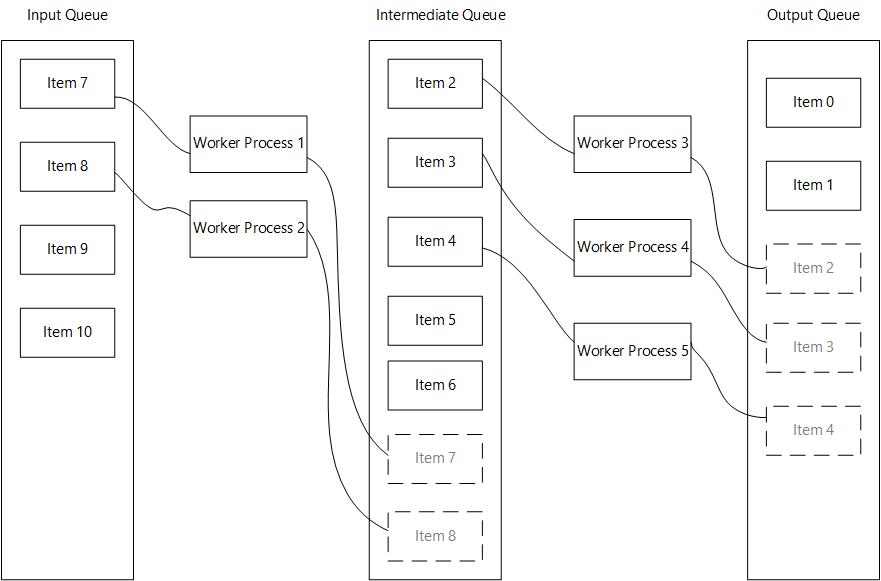
QueueAutomator provides a clean decorator API to get started with multiprocessing and queues.
This library offers an easy interface to parallelize consecutive tasks that take a long time to finish.
As it is build on top of the native python-multiprocessing library, you can run compute intensive tasks without locking the main process
All the code that manages queues, spawning and joining processes is already implemented, so you can focus on the task at hand.
How it works:
fromqueue_automatorimportQueueAutomatorfromtimeimportsleep# Create an instance of QueueAutomator()automator=QueueAutomator()
# Register a worker function (if input_queue_name and output_queue_name are not provided# they will default to 'input' and 'output' respectively). 'input' and 'output'# are necessary to mark the start and ending of your pipeline@automator.register_as_worker_function(process_count=2)defdo_work(item: int) ->int:
sleep(2)
result=item*2print(f'{item} times two {result}')
returnresultif__name__=='__main__':
input_data=range(30)
# Always set your input data before calling .run()automator.set_input_data(input_data)
results=automator.run()
print(results)fromqueue_automatorimportQueueAutomatorfromtimeimportsleepautomator=QueueAutomator()
@automator.register_as_worker_function(output_queue_name='square_queue', process_count=2)defdo_work(item: int) ->int:
sleep(2)
result=item*2print(f'{item} times two {result}')
returnresult@automator.register_as_worker_function(input_queue_name='square_queue', output_queue_name='cube_queue', process_count=2)defdo_work_2(item: int) ->int:
sleep(2)
result=item**2print(f'{item} squared {result}')
returnresult@automator.register_as_worker_function(input_queue_name='cube_queue', process_count=2)defdo_work_3(item: int) ->int:
sleep(2)
result=item**3print(f'{item} cubed {result}')
returnresult# Note that the first and last functions in the pipeline do not need to# declare the input and output queue names respectively.if__name__=='__main__':
input_data=range(30)
# Always set your input data before calling .run()automator.set_input_data(input_data)
results=automator.run()
print(results)fromqueue_automator.maybeimportMultiprocessMaybedefdo_work(item: int) ->int:
sleep(2)
result=item*2print(f'{item} times two {result}')
returnresultdefdo_work_2(item: int) ->int:
sleep(2)
result=item**2print(f'{item} squared {result}')
returnresultdefdo_work_3(item: int) ->int:
sleep(2)
result=item**3print(f'{item} cubed {result}')
returnresultif__name__=='__main__':
result=MultiprocessMaybe() \
.insert(range(10)) \
.then(do_work) \
.insert(range(10, 20)) \
.then(do_work_2) \
.insert(range(20, 30)) \
.maybe(do_work_3, default=0)
print(result)As with anything, this is not a silver bullet that gets rid of all problems using python multiprocessing
There are some caveats when using this library:
Launching processes in python is an expensive operation, as it spawns a separate instance of the interpreter. The performance gains could be offset by the time it takes to spawn a process
Try to keep the number of processes in line with your CPU cores, spawning a ton of them could result in slower performance overall.
The input objects of every worker function need to be serializable or pickable. This is a limitation of python multiprocessing. If you are dealing with complex objects try to convert them to a suitable format before processing, or implement the
__reduce__,__repr__or__dict__methods in your classes.It is important that you try to keep your worker functions pure, which means that they should not have side effects.
The
.run()method should be called from your main entry point or a function that is called at your main entry point, (this is another limitation of python's multiprocessing)Try to optimize the number of process depending of how long a task takes, prioritize longer running tasks.