
 |
|---|
| MeltingPot is an automated common binary signature extractor and pattern generator. For the given sample set with the same file format, it slices each file into small pieces of binary sequences and correlates the files sharing the similar sequences. To show the result, MeltingPot generates a set of YARA formatted patterns each of which represents the common signature of a certain file cluster. Such patterns can be directly applied by YARA scan engine. |
MeltingPot is composed of the main engine and the supporting plugins. The relation is briefly illustrated here:
- The engine first loads the user specified configuration.
- It applies the
file slicing pluginto slice the input files. - It correlates the slices by examining their similarity with the help of
similarity comparison plugin. - Now the engine acquires the file slice clusters. It then extracts the common binary signature from each cluster.
- Finally, the engine outputs the signatures with
pattern formation plugin.
 |
|---|
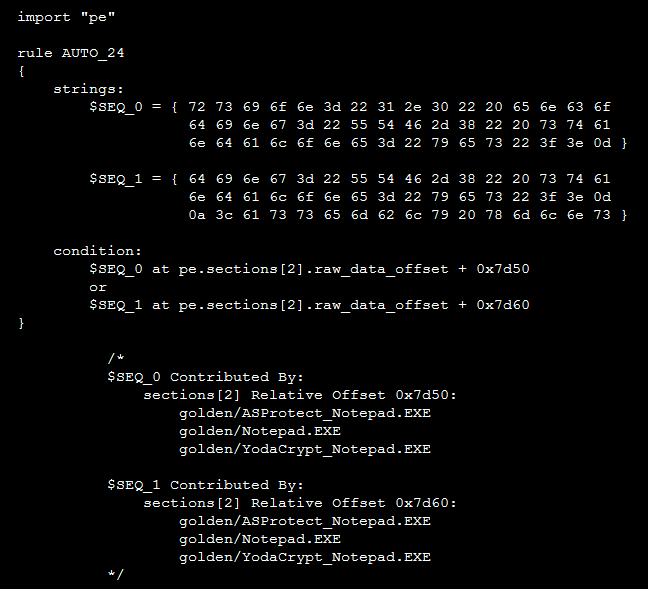
| The example pattern for the Windows Notepad and its packed version using several kinds of software protectors. |
As mentioned above, we have three kinds of plugins:
File slicing- Slicing an input file by format parsing. (E.g. Windows PE, Android DEX)Similarity comparison- Measuring the similarity for a pair of slices. (E.g. ssdeep, ngram)Pattern formation- Producing YARA pattern.
If analysts intend for custom research purpose, they can craft the custom plugins in the plugin source directory and use the MeltingPot build script to create the libraries.
First of all, we need to prepare the following utilities:
- CMake - A cross platform build system.
- Valgrind - An instrumentation framework help for memory debug.
- SSDeep - A fuzzy hash generation and comparison library.
- GLib - A large set of libraries to handle common data structures.
- libconfig - A library to process structured configuration file.
For Ubuntu 12.04 and above, it should be easy:
$ sudo apt-get install -qq cmake
$ sudo apt-get install -qq valgrind
$ sudo apt-get install -qq libfuzzy-dev
$ sudo apt-get install -qq libglib2.0-dev
$ sudo apt-get install -qq libconfig-dev
Now we can build the entire source tree under the project root folder:
$ ./clean.py --rebuild
$ cd build
$ cmake ..
$ make
Then the engine should be under:
./engine/bin/release/cluster
And the relevant plugins should be under:
./plugin/slice/lib/release/libslc_*.so./plugin/similarity/lib/release/libsim_*.so./plugin/format/lib/release/libfmt_*.so
If we modify the main engine or the plugins, we can move to the corresponding subdirectory to rebuild the binary.
To build the engine independently:
$ cd engine
$ ./clean.py --rebuild
$ cd build
$ cmake .. -DCMAKE_BUILD_TYPE=Debug|Release
$ make
Note that we have two build types.
For debug build, the compiler debug flags are turned on, and the binary locates at ./engine/bin/debug/cluster.
For optimized build, the binary locates at ./engine/bin/release/cluster.
To build the plugin independently (using File Slicing plugin as example):
$ cd plugin/slice
$ ./clean.py --rebuild
$ cd build
$ cmake .. --DCMAKE_BUILD_TYPE=Debug|Release
$ make
Again, we must specify the build type for compiliation.
For debug build, the binary locates at ./plugin/slice/debug/libslc_*.so.
For optimized build, the binary locates at ./plugin/slice/release/libslc_*.so.
For the other two kinds of plugins, the build rule is the same.
To run the engine, we should specify some relevant configurations. The example is shown in ./engine/cluster.conf.
We discuss these parameters below:
| Parameter | Description |
|---|---|
SIZE_SLICE | The size of the sliced file binary |
SIZE_HEX_BLOCK | The length of the signature extracted from a slice cluster |
COUNT_HEX_BLOCK | The number of to be extracted signatures from a cluster |
THRESHOLD_SIMILARITY | The threshold to group similar slices |
RATIO_NOISE | The ratio of dummy bytes (00 or ff) in a signature |
RATIO_WILDCARD | The ratio of wildcard characters in a signature |
TRUNCATE_GROUP_SIZE_LESS_THAN | The threshold to ignore trivial clusters |
FLAG_COMMENT | The knob for pattern comments |
PATH_ROOT_INPUT | The pathname of input sample set |
PATH_ROOT_OUTPUT | The pathname of output pattern folder |
PATH_PLUGIN_SLICE | The pathname of the file slicing plugin |
PATH_PLUGIN_SIMILARITY | The pathname of similarity comparison plugin |
PATH_PLUGIN_FORMAT | The pathname of pattern formation plugin |
In addition, we have the following advanced parameters:
| Parameter | Description |
|---|---|
COUNT_THREAD | The number of running threads |
IO_BANDWIDTH | The maximum number of files a thread can simultaneously open |
With the configuration file prepared, we can launch the MeltPot engine:
- For normal task, run:
./engine/bin/release/cluster --conf ./engine/cluster.conf- For memory debug, use debug build and run:
valgrind ./engine/bin/debug/cluster --conf ./engine/cluster.confNote that if we apply valgrind for memory debugging, valgrind will produce a "still-reachable" alert in the summary report. This is due to the side effect produced by GLib. MeltingPot should be memory safe :-).
Please contact me via the mail andy.zsshen@gmail.com.