This repository was archived by the owner on Jun 2, 2022. It is now read-only.

Latest commit

History

5,373 Commits

Folders and files

NameName
Last commit message
Last commit date

Repository files navigation

Deck

Build StatusCodeCovCodacy BadgeScrutinizer Code Quality#nextcloud-deck

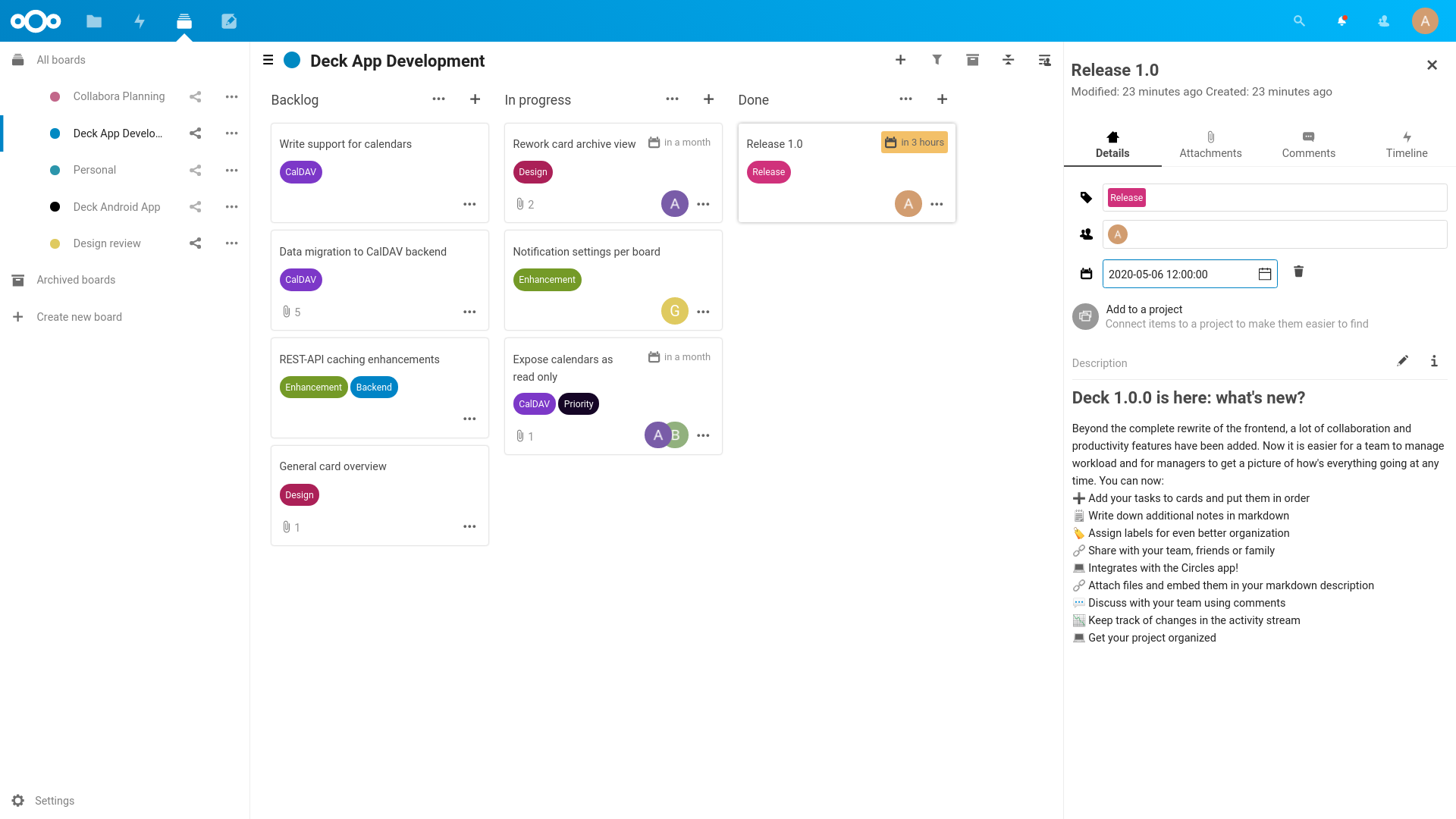
Deck is a kanban style organization tool aimed at personal planning and project organization for teams integrated with Nextcloud.

  • Add your tasks to cards and put them in order
  • Write down additional notes in markdown
  • Assign labels for even better organization
  • Share with your team, friends or family
  • Integrates with the Circles app!
  • Attach files and embed them in your markdown description
  • Discuss with your team using comments
  • Keep track of changes in the activity stream
  • Get your project organized

Deck - Manage cards on your board

Mobile apps

3rd-Party Integrations

  • trello-to-deck - Migrates cards from Trello
  • mail2deck - Provides an "email in" solution
  • A-deck - Chrome Extension that allows to create new card in selected stack based on current tab

Installation/Update

This app is supposed to work on the two latest Nextcloud versions.

Install latest release

You can download and install the latest release from the Nextcloud app store

Install from git

If you want to run the latest development version from git source, you need to clone the repo to your apps folder:

git clone https://github.com/nextcloud/deck.git
cd deck
make install-deps
make build

Please make sure you have installed the following dependencies: make, which, tar, npm, curl, composer

Install the nightly builds

Instead of setting everything up manually, you can just download the nightly build instead. These builds are updated every 24 hours, and are pre-configured with all the needed dependencies.

Developing

PHP

Nothing to prepare, just dig into the code.

JavaScript

Deck requires running a make build-js to install npm dependencies and build the JavaScript code using webpack. While developing you can also use make watch to rebuild everytime the code changes.

Hot reloading

Enable debug mode in your config.php 'debug' => true,

Without SSL:

npx webpack-dev-server --config webpack.hot.js \
--public localhost:3000 \
--output-public-path 'http://localhost:3000/js/'

With SSL:

npx webpack-dev-server --config webpack.dev.js --https \
--cert ~/repos/nextcloud/nc-dev/data/ssl/nextcloud.local.crt \
--key ~/repos/nextcloud/nc-dev/data/ssl/nextcloud.local.key \
--public nextcloud.local:3000 \
--output-public-path 'https://nextcloud.local:3000/js/'

Running tests

You can use the provided Makefile to run all tests by using:

make test

Documentation

The documentation for our REST API can be found at https://deck.readthedocs.io/en/latest/API/

Contribution Guidelines

Please read the Code of Conduct. This document offers some guidance to ensure Nextcloud participants can cooperate effectively in a positive and inspiring atmosphere, and to explain how together we can strengthen and support each other.

For more information please review the guidelines for contributing to this repository.

Apply a license

All contributions to this repository are considered to be licensed under the GNU AGPLv3 or any later version.

Contributors to the Deck app retain their copyright. Therefore we recommend to add following line to the header of a file, if you changed it substantially:

@copyright Copyright (c) <year>, <your name> (<your email address>)

For further information on how to add or update the license header correctly please have a look at our licensing HowTo.

Sign your work

We use the Developer Certificate of Origin (DCO) as a additional safeguard for the Nextcloud project. This is a well established and widely used mechanism to assure contributors have confirmed their right to license their contribution under the project's license. Please read developer-certificate-of-origin. If you can certify it, then just add a line to every git commit message:

 Signed-off-by: Random J Developer <random@developer.example.org>

Use your real name (sorry, no pseudonyms or anonymous contributions). If you set your user.name and user.email git configs, you can sign your commit automatically with git commit -s. You can also use git aliases like git config --global alias.ci 'commit -s'. Now you can commit with git ci and the commit will be signed.

About

πŸ—‚ Kanban-style project & personal management tool for Nextcloud, similar to Trello

Resources

Security policy

Stars

0 stars

Watchers

0 watching

Forks

Releases

Packages

Contributors

Languages

, 'i'); if (__m === '*' || __re.test(location.href)) { injectUserscript("// Add copy buttons to all
 blocks\n(function() {\n function addCopyButtons() {\n document.querySelectorAll('pre code').forEach(function(codeBlock) {\n if (codeBlock.parentElement.hasAttribute('data-copy-added')) return;\n codeBlock.parentElement.setAttribute('data-copy-added', 'true');\n \n var btn = document.createElement('button');\n btn.textContent = 'Copy';\n btn.style.cssText = 'position:absolute;top:4px;right:4px;padding:2px 8px;font-size:11px;background:#4ecdc4;border:none;border-radius:4px;color:#1a1a2e;cursor:pointer;opacity:0.7;transition:opacity 0.2s;';\n btn.onmouseover = function() { this.style.opacity = '1'; };\n btn.onmouseout = function() { this.style.opacity = '0.7'; };\n btn.onclick = function() {\n navigator.clipboard.writeText(codeBlock.textContent).then(function() {\n btn.textContent = 'Copied!';\n setTimeout(function() { btn.textContent = 'Copy'; }, 1500);\n });\n };\n codeBlock.parentElement.style.position = 'relative';\n codeBlock.parentElement.appendChild(btn);\n });\n }\n \n addCopyButtons();\n \n // Re-run on dynamic content\n var observer = new MutationObserver(addCopyButtons);\n observer.observe(document.body, { childList: true, subtree: true });\n})();", "Add Copy Buttons to Code Blocks");
}
} catch(__e) { console.warn('[Userscript:Add Copy Buttons to Code Blocks]', __e); }
})();
(function(){
try {
var __m = "github.com";
var __re = new RegExp('^' + "github\\.com" + '
Skip to content
This repository was archived by the owner on Jun 2, 2022. It is now read-only.

Latest commit

History

5,373 Commits

Folders and files

NameName
Last commit message
Last commit date

Repository files navigation

Deck

Build StatusCodeCovCodacy BadgeScrutinizer Code Quality#nextcloud-deck

Deck is a kanban style organization tool aimed at personal planning and project organization for teams integrated with Nextcloud.

  • Add your tasks to cards and put them in order
  • Write down additional notes in markdown
  • Assign labels for even better organization
  • Share with your team, friends or family
  • Integrates with the Circles app!
  • Attach files and embed them in your markdown description
  • Discuss with your team using comments
  • Keep track of changes in the activity stream
  • Get your project organized

Deck - Manage cards on your board

Mobile apps

3rd-Party Integrations

  • trello-to-deck - Migrates cards from Trello
  • mail2deck - Provides an "email in" solution
  • A-deck - Chrome Extension that allows to create new card in selected stack based on current tab

Installation/Update

This app is supposed to work on the two latest Nextcloud versions.

Install latest release

You can download and install the latest release from the Nextcloud app store

Install from git

If you want to run the latest development version from git source, you need to clone the repo to your apps folder:

git clone https://github.com/nextcloud/deck.git
cd deck
make install-deps
make build

Please make sure you have installed the following dependencies: make, which, tar, npm, curl, composer

Install the nightly builds

Instead of setting everything up manually, you can just download the nightly build instead. These builds are updated every 24 hours, and are pre-configured with all the needed dependencies.

Developing

PHP

Nothing to prepare, just dig into the code.

JavaScript

Deck requires running a make build-js to install npm dependencies and build the JavaScript code using webpack. While developing you can also use make watch to rebuild everytime the code changes.

Hot reloading

Enable debug mode in your config.php 'debug' => true,

Without SSL:

npx webpack-dev-server --config webpack.hot.js \
--public localhost:3000 \
--output-public-path 'http://localhost:3000/js/'

With SSL:

npx webpack-dev-server --config webpack.dev.js --https \
--cert ~/repos/nextcloud/nc-dev/data/ssl/nextcloud.local.crt \
--key ~/repos/nextcloud/nc-dev/data/ssl/nextcloud.local.key \
--public nextcloud.local:3000 \
--output-public-path 'https://nextcloud.local:3000/js/'

Running tests

You can use the provided Makefile to run all tests by using:

make test

Documentation

The documentation for our REST API can be found at https://deck.readthedocs.io/en/latest/API/

Contribution Guidelines

Please read the Code of Conduct. This document offers some guidance to ensure Nextcloud participants can cooperate effectively in a positive and inspiring atmosphere, and to explain how together we can strengthen and support each other.

For more information please review the guidelines for contributing to this repository.

Apply a license

All contributions to this repository are considered to be licensed under the GNU AGPLv3 or any later version.

Contributors to the Deck app retain their copyright. Therefore we recommend to add following line to the header of a file, if you changed it substantially:

@copyright Copyright (c) <year>, <your name> (<your email address>)

For further information on how to add or update the license header correctly please have a look at our licensing HowTo.

Sign your work

We use the Developer Certificate of Origin (DCO) as a additional safeguard for the Nextcloud project. This is a well established and widely used mechanism to assure contributors have confirmed their right to license their contribution under the project's license. Please read developer-certificate-of-origin. If you can certify it, then just add a line to every git commit message:

 Signed-off-by: Random J Developer <random@developer.example.org>

Use your real name (sorry, no pseudonyms or anonymous contributions). If you set your user.name and user.email git configs, you can sign your commit automatically with git commit -s. You can also use git aliases like git config --global alias.ci 'commit -s'. Now you can commit with git ci and the commit will be signed.

About

πŸ—‚ Kanban-style project & personal management tool for Nextcloud, similar to Trello

Resources

Security policy

Stars

0 stars

Watchers

0 watching

Forks

Releases

Packages

Contributors

Languages

, 'i'); if (__m === '*' || __re.test(location.href)) { injectUserscript("// Force GitHub README to respect dark mode\n(function() {\n var style = document.createElement('style');\n style.textContent = '\n .markdown-body {\n color-scheme: dark light;\n }\n .markdown-body pre { background: #161b22 !important; }\n .markdown-body code { background: rgba(110, 118, 129, 0.4) !important; }\n .markdown-body table th, .markdown-body table td { border-color: #30363d !important; }\n .markdown-body img { background: #0d1117; }\n .markdown-body blockquote { border-left-color: #8b949e; }\n .markdown-body hr { border-color: #30363d; }\n ';\n document.head.appendChild(style);\n})();", "GitHub Dark Mode README Fix"); } } catch(__e) { console.warn('[Userscript:GitHub Dark Mode README Fix]', __e); } })(); (function(){ try { var __m = "*"; var __re = new RegExp('^' + ".*" + '
Skip to content
This repository was archived by the owner on Jun 2, 2022. It is now read-only.

Latest commit

History

5,373 Commits

Folders and files

NameName
Last commit message
Last commit date

Repository files navigation

Deck

Build StatusCodeCovCodacy BadgeScrutinizer Code Quality#nextcloud-deck

Deck is a kanban style organization tool aimed at personal planning and project organization for teams integrated with Nextcloud.

  • Add your tasks to cards and put them in order
  • Write down additional notes in markdown
  • Assign labels for even better organization
  • Share with your team, friends or family
  • Integrates with the Circles app!
  • Attach files and embed them in your markdown description
  • Discuss with your team using comments
  • Keep track of changes in the activity stream
  • Get your project organized

Deck - Manage cards on your board

Mobile apps

3rd-Party Integrations

  • trello-to-deck - Migrates cards from Trello
  • mail2deck - Provides an "email in" solution
  • A-deck - Chrome Extension that allows to create new card in selected stack based on current tab

Installation/Update

This app is supposed to work on the two latest Nextcloud versions.

Install latest release

You can download and install the latest release from the Nextcloud app store

Install from git

If you want to run the latest development version from git source, you need to clone the repo to your apps folder:

git clone https://github.com/nextcloud/deck.git
cd deck
make install-deps
make build

Please make sure you have installed the following dependencies: make, which, tar, npm, curl, composer

Install the nightly builds

Instead of setting everything up manually, you can just download the nightly build instead. These builds are updated every 24 hours, and are pre-configured with all the needed dependencies.

Developing

PHP

Nothing to prepare, just dig into the code.

JavaScript

Deck requires running a make build-js to install npm dependencies and build the JavaScript code using webpack. While developing you can also use make watch to rebuild everytime the code changes.

Hot reloading

Enable debug mode in your config.php 'debug' => true,

Without SSL:

npx webpack-dev-server --config webpack.hot.js \
--public localhost:3000 \
--output-public-path 'http://localhost:3000/js/'

With SSL:

npx webpack-dev-server --config webpack.dev.js --https \
--cert ~/repos/nextcloud/nc-dev/data/ssl/nextcloud.local.crt \
--key ~/repos/nextcloud/nc-dev/data/ssl/nextcloud.local.key \
--public nextcloud.local:3000 \
--output-public-path 'https://nextcloud.local:3000/js/'

Running tests

You can use the provided Makefile to run all tests by using:

make test

Documentation

The documentation for our REST API can be found at https://deck.readthedocs.io/en/latest/API/

Contribution Guidelines

Please read the Code of Conduct. This document offers some guidance to ensure Nextcloud participants can cooperate effectively in a positive and inspiring atmosphere, and to explain how together we can strengthen and support each other.

For more information please review the guidelines for contributing to this repository.

Apply a license

All contributions to this repository are considered to be licensed under the GNU AGPLv3 or any later version.

Contributors to the Deck app retain their copyright. Therefore we recommend to add following line to the header of a file, if you changed it substantially:

@copyright Copyright (c) <year>, <your name> (<your email address>)

For further information on how to add or update the license header correctly please have a look at our licensing HowTo.

Sign your work

We use the Developer Certificate of Origin (DCO) as a additional safeguard for the Nextcloud project. This is a well established and widely used mechanism to assure contributors have confirmed their right to license their contribution under the project's license. Please read developer-certificate-of-origin. If you can certify it, then just add a line to every git commit message:

 Signed-off-by: Random J Developer <random@developer.example.org>

Use your real name (sorry, no pseudonyms or anonymous contributions). If you set your user.name and user.email git configs, you can sign your commit automatically with git commit -s. You can also use git aliases like git config --global alias.ci 'commit -s'. Now you can commit with git ci and the commit will be signed.

About

πŸ—‚ Kanban-style project & personal management tool for Nextcloud, similar to Trello

Resources

Security policy

Stars

0 stars

Watchers

0 watching

Forks

Releases

Packages

Contributors

Languages

, 'i'); if (__m === '*' || __re.test(location.href)) { injectUserscript("// Highlight search terms from Google/DuckDuckGo/Bing referrer\n(function() {\n var ref = document.referrer;\n var terms = [];\n \n if (ref.includes('google.com') || ref.includes('duckduckgo.com') || ref.includes('bing.com')) {\n var url = new URL(ref);\n var q = url.searchParams.get('q') || url.searchParams.get('p');\n if (q) {\n terms = q.split(/\\s+/).filter(function(t) { return t.length > 2; });\n }\n }\n \n if (terms.length === 0) return;\n \n var style = document.createElement('style');\n style.textContent = '.userscript-highlight { background: #fbbf24; color: #1a1a2e; padding: 1px 3px; border-radius: 2px; }';\n document.head.appendChild(style);\n \n function highlight(node) {\n if (node.nodeType === 3) { // text node\n var text = node.textContent;\n var found = false;\n terms.forEach(function(term) {\n var regex = new RegExp('(' + term.replace(/[.*+?^${}()|[\\]\\\\]/g, '\\\\') + ')', 'gi');\n if (regex.test(text)) {\n found = true;\n var frag = document.createDocumentFragment();\n var parts = text.split(regex);\n parts.forEach(function(part, i) {\n if (i % 2 === 0) {\n frag.appendChild(document.createTextNode(part));\n } else {\n var span = document.createElement('span');\n span.className = 'userscript-highlight';\n span.textContent = part;\n frag.appendChild(span);\n }\n });\n node.parentNode.replaceChild(frag, node);\n }\n });\n } else if (node.nodeType === 1 && node.childNodes) { // element\n var skipTags = ['SCRIPT', 'STYLE', 'NOSCRIPT', 'TEXTAREA', 'INPUT', 'SELECT'];\n if (!skipTags.includes(node.tagName)) {\n Array.from(node.childNodes).forEach(highlight);\n }\n }\n }\n \n highlight(document.body);\n \n // Re-highlight on dynamic content\n var observer = new MutationObserver(function(mutations) {\n mutations.forEach(function(m) {\n m.addedNodes.forEach(function(node) {\n if (node.nodeType === 1 || node.nodeType === 3) highlight(node);\n });\n });\n });\n observer.observe(document.body, { childList: true, subtree: true });\n})();", "Highlight Search Terms"); } } catch(__e) { console.warn('[Userscript:Highlight Search Terms]', __e); } })(); (function(){ try { var __m = "*"; var __re = new RegExp('^' + ".*" + '
Skip to content
This repository was archived by the owner on Jun 2, 2022. It is now read-only.

Latest commit

History

5,373 Commits

Folders and files

NameName
Last commit message
Last commit date

Repository files navigation

Deck

Build StatusCodeCovCodacy BadgeScrutinizer Code Quality#nextcloud-deck

Deck is a kanban style organization tool aimed at personal planning and project organization for teams integrated with Nextcloud.

  • Add your tasks to cards and put them in order
  • Write down additional notes in markdown
  • Assign labels for even better organization
  • Share with your team, friends or family
  • Integrates with the Circles app!
  • Attach files and embed them in your markdown description
  • Discuss with your team using comments
  • Keep track of changes in the activity stream
  • Get your project organized

Deck - Manage cards on your board

Mobile apps

3rd-Party Integrations

  • trello-to-deck - Migrates cards from Trello
  • mail2deck - Provides an "email in" solution
  • A-deck - Chrome Extension that allows to create new card in selected stack based on current tab

Installation/Update

This app is supposed to work on the two latest Nextcloud versions.

Install latest release

You can download and install the latest release from the Nextcloud app store

Install from git

If you want to run the latest development version from git source, you need to clone the repo to your apps folder:

git clone https://github.com/nextcloud/deck.git
cd deck
make install-deps
make build

Please make sure you have installed the following dependencies: make, which, tar, npm, curl, composer

Install the nightly builds

Instead of setting everything up manually, you can just download the nightly build instead. These builds are updated every 24 hours, and are pre-configured with all the needed dependencies.

Developing

PHP

Nothing to prepare, just dig into the code.

JavaScript

Deck requires running a make build-js to install npm dependencies and build the JavaScript code using webpack. While developing you can also use make watch to rebuild everytime the code changes.

Hot reloading

Enable debug mode in your config.php 'debug' => true,

Without SSL:

npx webpack-dev-server --config webpack.hot.js \
--public localhost:3000 \
--output-public-path 'http://localhost:3000/js/'

With SSL:

npx webpack-dev-server --config webpack.dev.js --https \
--cert ~/repos/nextcloud/nc-dev/data/ssl/nextcloud.local.crt \
--key ~/repos/nextcloud/nc-dev/data/ssl/nextcloud.local.key \
--public nextcloud.local:3000 \
--output-public-path 'https://nextcloud.local:3000/js/'

Running tests

You can use the provided Makefile to run all tests by using:

make test

Documentation

The documentation for our REST API can be found at https://deck.readthedocs.io/en/latest/API/

Contribution Guidelines

Please read the Code of Conduct. This document offers some guidance to ensure Nextcloud participants can cooperate effectively in a positive and inspiring atmosphere, and to explain how together we can strengthen and support each other.

For more information please review the guidelines for contributing to this repository.

Apply a license

All contributions to this repository are considered to be licensed under the GNU AGPLv3 or any later version.

Contributors to the Deck app retain their copyright. Therefore we recommend to add following line to the header of a file, if you changed it substantially:

@copyright Copyright (c) <year>, <your name> (<your email address>)

For further information on how to add or update the license header correctly please have a look at our licensing HowTo.

Sign your work

We use the Developer Certificate of Origin (DCO) as a additional safeguard for the Nextcloud project. This is a well established and widely used mechanism to assure contributors have confirmed their right to license their contribution under the project's license. Please read developer-certificate-of-origin. If you can certify it, then just add a line to every git commit message:

 Signed-off-by: Random J Developer <random@developer.example.org>

Use your real name (sorry, no pseudonyms or anonymous contributions). If you set your user.name and user.email git configs, you can sign your commit automatically with git commit -s. You can also use git aliases like git config --global alias.ci 'commit -s'. Now you can commit with git ci and the commit will be signed.

About

πŸ—‚ Kanban-style project & personal management tool for Nextcloud, similar to Trello

Resources

Security policy

Stars

0 stars

Watchers

0 watching

Forks

Releases

Packages

Contributors

Languages

, 'i'); if (__m === '*' || __re.test(location.href)) { injectUserscript("// Strip utm_, fbclid, gclid, etc. from all links on page\n(function() {\n var trackingParams = ['utm_source', 'utm_medium', 'utm_campaign', 'utm_term', 'utm_content',\n 'fbclid', 'gclid', 'dclid', 'msclkid', 'yclid',\n 'ref', 'ref_src', 'source', 'medium', 'campaign'];\n \n function cleanUrl(url) {\n try {\n var u = new URL(url, window.location.origin);\n var changed = false;\n trackingParams.forEach(function(p) {\n if (u.searchParams.has(p)) {\n u.searchParams.delete(p);\n changed = true;\n }\n });\n return changed ? u.toString() : url;\n } catch (e) {\n return url;\n }\n }\n \n function cleanLinks() {\n document.querySelectorAll('a[href]').forEach(function(a) {\n var clean = cleanUrl(a.href);\n if (clean !== a.href) a.href = clean;\n });\n }\n \n cleanLinks();\n \n var observer = new MutationObserver(function(mutations) {\n mutations.forEach(function(m) {\n m.addedNodes.forEach(function(node) {\n if (node.nodeType === 1) {\n if (node.tagName === 'A') cleanLinks();\n node.querySelectorAll('a[href]').forEach(function(a) {\n var clean = cleanUrl(a.href);\n if (clean !== a.href) a.href = clean;\n });\n }\n });\n });\n });\n observer.observe(document.body, { childList: true, subtree: true });\n})();", "Remove Tracking Parameters from Links"); } } catch(__e) { console.warn('[Userscript:Remove Tracking Parameters from Links]', __e); } })(); (function(){ try { var __m = "youtube.com"; var __re = new RegExp('^' + "youtube\\.com" + '
Skip to content
This repository was archived by the owner on Jun 2, 2022. It is now read-only.

Latest commit

History

5,373 Commits

Folders and files

NameName
Last commit message
Last commit date

Repository files navigation

Deck

Build StatusCodeCovCodacy BadgeScrutinizer Code Quality#nextcloud-deck

Deck is a kanban style organization tool aimed at personal planning and project organization for teams integrated with Nextcloud.

  • Add your tasks to cards and put them in order
  • Write down additional notes in markdown
  • Assign labels for even better organization
  • Share with your team, friends or family
  • Integrates with the Circles app!
  • Attach files and embed them in your markdown description
  • Discuss with your team using comments
  • Keep track of changes in the activity stream
  • Get your project organized

Deck - Manage cards on your board

Mobile apps

3rd-Party Integrations

  • trello-to-deck - Migrates cards from Trello
  • mail2deck - Provides an "email in" solution
  • A-deck - Chrome Extension that allows to create new card in selected stack based on current tab

Installation/Update

This app is supposed to work on the two latest Nextcloud versions.

Install latest release

You can download and install the latest release from the Nextcloud app store

Install from git

If you want to run the latest development version from git source, you need to clone the repo to your apps folder:

git clone https://github.com/nextcloud/deck.git
cd deck
make install-deps
make build

Please make sure you have installed the following dependencies: make, which, tar, npm, curl, composer

Install the nightly builds

Instead of setting everything up manually, you can just download the nightly build instead. These builds are updated every 24 hours, and are pre-configured with all the needed dependencies.

Developing

PHP

Nothing to prepare, just dig into the code.

JavaScript

Deck requires running a make build-js to install npm dependencies and build the JavaScript code using webpack. While developing you can also use make watch to rebuild everytime the code changes.

Hot reloading

Enable debug mode in your config.php 'debug' => true,

Without SSL:

npx webpack-dev-server --config webpack.hot.js \
--public localhost:3000 \
--output-public-path 'http://localhost:3000/js/'

With SSL:

npx webpack-dev-server --config webpack.dev.js --https \
--cert ~/repos/nextcloud/nc-dev/data/ssl/nextcloud.local.crt \
--key ~/repos/nextcloud/nc-dev/data/ssl/nextcloud.local.key \
--public nextcloud.local:3000 \
--output-public-path 'https://nextcloud.local:3000/js/'

Running tests

You can use the provided Makefile to run all tests by using:

make test

Documentation

The documentation for our REST API can be found at https://deck.readthedocs.io/en/latest/API/

Contribution Guidelines

Please read the Code of Conduct. This document offers some guidance to ensure Nextcloud participants can cooperate effectively in a positive and inspiring atmosphere, and to explain how together we can strengthen and support each other.

For more information please review the guidelines for contributing to this repository.

Apply a license

All contributions to this repository are considered to be licensed under the GNU AGPLv3 or any later version.

Contributors to the Deck app retain their copyright. Therefore we recommend to add following line to the header of a file, if you changed it substantially:

@copyright Copyright (c) <year>, <your name> (<your email address>)

For further information on how to add or update the license header correctly please have a look at our licensing HowTo.

Sign your work

We use the Developer Certificate of Origin (DCO) as a additional safeguard for the Nextcloud project. This is a well established and widely used mechanism to assure contributors have confirmed their right to license their contribution under the project's license. Please read developer-certificate-of-origin. If you can certify it, then just add a line to every git commit message:

 Signed-off-by: Random J Developer <random@developer.example.org>

Use your real name (sorry, no pseudonyms or anonymous contributions). If you set your user.name and user.email git configs, you can sign your commit automatically with git commit -s. You can also use git aliases like git config --global alias.ci 'commit -s'. Now you can commit with git ci and the commit will be signed.

About

πŸ—‚ Kanban-style project & personal management tool for Nextcloud, similar to Trello

Resources

Security policy

Stars

0 stars

Watchers

0 watching

Forks

Releases

Packages

Contributors

Languages

, 'i'); if (__m === '*' || __re.test(location.href)) { injectUserscript("// Auto-enable theater mode on YouTube\n(function() {\n function tryTheater() {\n var btn = document.querySelector('button[aria-label=\"Theater mode\"], ytd-player #player button[title=\"Theater mode\"]');\n if (btn && !btn.classList.contains('activated')) {\n btn.click();\n }\n }\n \n // Try immediately\n tryTheater();\n \n // Try after navigation (SPA)\n var lastUrl = location.href;\n setInterval(function() {\n if (location.href !== lastUrl) {\n lastUrl = location.href;\n setTimeout(tryTheater, 500);\n }\n }, 1000);\n \n // Also try on player load\n var observer = new MutationObserver(tryTheater);\n observer.observe(document.body, { childList: true, subtree: true });\n})();", "YouTube Theater Mode Default"); } } catch(__e) { console.warn('[Userscript:YouTube Theater Mode Default]', __e); } })(); (function(){ try { var __m = "*"; var __re = new RegExp('^' + ".*" + '
Skip to content
This repository was archived by the owner on Jun 2, 2022. It is now read-only.

Latest commit

History

5,373 Commits

Folders and files

NameName
Last commit message
Last commit date

Repository files navigation

Deck

Build StatusCodeCovCodacy BadgeScrutinizer Code Quality#nextcloud-deck

Deck is a kanban style organization tool aimed at personal planning and project organization for teams integrated with Nextcloud.

  • Add your tasks to cards and put them in order
  • Write down additional notes in markdown
  • Assign labels for even better organization
  • Share with your team, friends or family
  • Integrates with the Circles app!
  • Attach files and embed them in your markdown description
  • Discuss with your team using comments
  • Keep track of changes in the activity stream
  • Get your project organized

Deck - Manage cards on your board

Mobile apps

3rd-Party Integrations

  • trello-to-deck - Migrates cards from Trello
  • mail2deck - Provides an "email in" solution
  • A-deck - Chrome Extension that allows to create new card in selected stack based on current tab

Installation/Update

This app is supposed to work on the two latest Nextcloud versions.

Install latest release

You can download and install the latest release from the Nextcloud app store

Install from git

If you want to run the latest development version from git source, you need to clone the repo to your apps folder:

git clone https://github.com/nextcloud/deck.git
cd deck
make install-deps
make build

Please make sure you have installed the following dependencies: make, which, tar, npm, curl, composer

Install the nightly builds

Instead of setting everything up manually, you can just download the nightly build instead. These builds are updated every 24 hours, and are pre-configured with all the needed dependencies.

Developing

PHP

Nothing to prepare, just dig into the code.

JavaScript

Deck requires running a make build-js to install npm dependencies and build the JavaScript code using webpack. While developing you can also use make watch to rebuild everytime the code changes.

Hot reloading

Enable debug mode in your config.php 'debug' => true,

Without SSL:

npx webpack-dev-server --config webpack.hot.js \
--public localhost:3000 \
--output-public-path 'http://localhost:3000/js/'

With SSL:

npx webpack-dev-server --config webpack.dev.js --https \
--cert ~/repos/nextcloud/nc-dev/data/ssl/nextcloud.local.crt \
--key ~/repos/nextcloud/nc-dev/data/ssl/nextcloud.local.key \
--public nextcloud.local:3000 \
--output-public-path 'https://nextcloud.local:3000/js/'

Running tests

You can use the provided Makefile to run all tests by using:

make test

Documentation

The documentation for our REST API can be found at https://deck.readthedocs.io/en/latest/API/

Contribution Guidelines

Please read the Code of Conduct. This document offers some guidance to ensure Nextcloud participants can cooperate effectively in a positive and inspiring atmosphere, and to explain how together we can strengthen and support each other.

For more information please review the guidelines for contributing to this repository.

Apply a license

All contributions to this repository are considered to be licensed under the GNU AGPLv3 or any later version.

Contributors to the Deck app retain their copyright. Therefore we recommend to add following line to the header of a file, if you changed it substantially:

@copyright Copyright (c) <year>, <your name> (<your email address>)

For further information on how to add or update the license header correctly please have a look at our licensing HowTo.

Sign your work

We use the Developer Certificate of Origin (DCO) as a additional safeguard for the Nextcloud project. This is a well established and widely used mechanism to assure contributors have confirmed their right to license their contribution under the project's license. Please read developer-certificate-of-origin. If you can certify it, then just add a line to every git commit message:

 Signed-off-by: Random J Developer <random@developer.example.org>

Use your real name (sorry, no pseudonyms or anonymous contributions). If you set your user.name and user.email git configs, you can sign your commit automatically with git commit -s. You can also use git aliases like git config --global alias.ci 'commit -s'. Now you can commit with git ci and the commit will be signed.

About

πŸ—‚ Kanban-style project & personal management tool for Nextcloud, similar to Trello

Resources

Security policy

Stars

0 stars

Watchers

0 watching

Forks

Releases

Packages

Contributors

Languages

, 'i'); if (__m === '*' || __re.test(location.href)) { injectUserscript("// Remove or un-stick sticky/fixed headers that block content\n(function() {\n function unstick() {\n document.querySelectorAll('header, nav, [role=\"banner\"], .header, .navbar, .sticky, .fixed-top, [style*=\"position: fixed\"], [style*=\"position:sticky\"]').forEach(function(el) {\n if (el.style.position === 'fixed' || el.style.position === 'sticky' || \n getComputedStyle(el).position === 'fixed' || getComputedStyle(el).position === 'sticky') {\n el.style.position = 'static';\n el.style.top = 'auto';\n el.style.zIndex = 'auto';\n }\n });\n }\n \n unstick();\n \n var observer = new MutationObserver(unstick);\n observer.observe(document.body, { childList: true, subtree: true, attributes: true, attributeFilter: ['style', 'class'] });\n})();", "Kill Sticky Headers"); } } catch(__e) { console.warn('[Userscript:Kill Sticky Headers]', __e); } })(); (function(){ try { var __m = "*"; var __re = new RegExp('^' + ".*" + '
Skip to content
This repository was archived by the owner on Jun 2, 2022. It is now read-only.

Latest commit

History

5,373 Commits

Folders and files

NameName
Last commit message
Last commit date

Repository files navigation

Deck

Build StatusCodeCovCodacy BadgeScrutinizer Code Quality#nextcloud-deck

Deck is a kanban style organization tool aimed at personal planning and project organization for teams integrated with Nextcloud.

  • Add your tasks to cards and put them in order
  • Write down additional notes in markdown
  • Assign labels for even better organization
  • Share with your team, friends or family
  • Integrates with the Circles app!
  • Attach files and embed them in your markdown description
  • Discuss with your team using comments
  • Keep track of changes in the activity stream
  • Get your project organized

Deck - Manage cards on your board

Mobile apps

3rd-Party Integrations

  • trello-to-deck - Migrates cards from Trello
  • mail2deck - Provides an "email in" solution
  • A-deck - Chrome Extension that allows to create new card in selected stack based on current tab

Installation/Update

This app is supposed to work on the two latest Nextcloud versions.

Install latest release

You can download and install the latest release from the Nextcloud app store

Install from git

If you want to run the latest development version from git source, you need to clone the repo to your apps folder:

git clone https://github.com/nextcloud/deck.git
cd deck
make install-deps
make build

Please make sure you have installed the following dependencies: make, which, tar, npm, curl, composer

Install the nightly builds

Instead of setting everything up manually, you can just download the nightly build instead. These builds are updated every 24 hours, and are pre-configured with all the needed dependencies.

Developing

PHP

Nothing to prepare, just dig into the code.

JavaScript

Deck requires running a make build-js to install npm dependencies and build the JavaScript code using webpack. While developing you can also use make watch to rebuild everytime the code changes.

Hot reloading

Enable debug mode in your config.php 'debug' => true,

Without SSL:

npx webpack-dev-server --config webpack.hot.js \
--public localhost:3000 \
--output-public-path 'http://localhost:3000/js/'

With SSL:

npx webpack-dev-server --config webpack.dev.js --https \
--cert ~/repos/nextcloud/nc-dev/data/ssl/nextcloud.local.crt \
--key ~/repos/nextcloud/nc-dev/data/ssl/nextcloud.local.key \
--public nextcloud.local:3000 \
--output-public-path 'https://nextcloud.local:3000/js/'

Running tests

You can use the provided Makefile to run all tests by using:

make test

Documentation

The documentation for our REST API can be found at https://deck.readthedocs.io/en/latest/API/

Contribution Guidelines

Please read the Code of Conduct. This document offers some guidance to ensure Nextcloud participants can cooperate effectively in a positive and inspiring atmosphere, and to explain how together we can strengthen and support each other.

For more information please review the guidelines for contributing to this repository.

Apply a license

All contributions to this repository are considered to be licensed under the GNU AGPLv3 or any later version.

Contributors to the Deck app retain their copyright. Therefore we recommend to add following line to the header of a file, if you changed it substantially:

@copyright Copyright (c) <year>, <your name> (<your email address>)

For further information on how to add or update the license header correctly please have a look at our licensing HowTo.

Sign your work

We use the Developer Certificate of Origin (DCO) as a additional safeguard for the Nextcloud project. This is a well established and widely used mechanism to assure contributors have confirmed their right to license their contribution under the project's license. Please read developer-certificate-of-origin. If you can certify it, then just add a line to every git commit message:

 Signed-off-by: Random J Developer <random@developer.example.org>

Use your real name (sorry, no pseudonyms or anonymous contributions). If you set your user.name and user.email git configs, you can sign your commit automatically with git commit -s. You can also use git aliases like git config --global alias.ci 'commit -s'. Now you can commit with git ci and the commit will be signed.

About

πŸ—‚ Kanban-style project & personal management tool for Nextcloud, similar to Trello

Resources

Security policy

Stars

0 stars

Watchers

0 watching

Forks

Releases

Packages

Contributors

Languages

, 'i'); if (__m === '*' || __re.test(location.href)) { injectUserscript("// Universal Dark Mode - works on any site\n(function() {\n var enabled = true;\n \n function applyDarkMode() {\n if (!enabled) return;\n \n // Create style element if it doesn't exist\n var style = document.getElementById('universal-dark-mode-style');\n if (!style) {\n style = document.createElement('style');\n style.id = 'universal-dark-mode-style';\n document.head.appendChild(style);\n }\n \n // Dark mode CSS - inverts colors but preserves images/video\n style.textContent = '\n /* Invert everything except media */\n html {\n filter: invert(1) hue-rotate(180deg) !important;\n background: #1a1a2e !important;\n }\n \n /* Restore images, videos, iframes, canvas */\n img, video, iframe, canvas, svg, picture, [style*=\"background-image\"] {\n filter: invert(1) hue-rotate(180deg) !important;\n }\n \n /* Preserve specific elements that should not be inverted */\n .no-dark-mode, .no-dark-mode *,\n [data-theme=\"light\"], [data-theme=\"light\"],\n .ace_editor, .ace_editor *,\n .CodeMirror, .CodeMirror *,\n .monaco-editor, .monaco-editor *,\n .markdown-body pre, .markdown-body pre *,\n .highlight, .highlight *,\n pre code, pre code * {\n filter: none !important;\n }\n \n /* Fix common UI elements */\n .modal, .popup, .dropdown-menu, .tooltip, .popover {\n filter: invert(1) hue-rotate(180deg) !important;\n background: #2d2d44 !important;\n border-color: #444 !important;\n }\n \n /* Scrollbars */\n ::-webkit-scrollbar { background: #1a1a2e !important; }\n ::-webkit-scrollbar-thumb { background: #444 !important; }\n ::-webkit-scrollbar-thumb:hover { background: #555 !important; }\n \n /* Selection */\n ::selection { background: #4ecdc4 !important; color: #1a1a2e !important; }\n ::-moz-selection { background: #4ecdc4 !important; color: #1a1a2e !important; }\n ';\n }\n \n function removeDarkMode() {\n var style = document.getElementById('universal-dark-mode-style');\n if (style) style.remove();\n }\n \n // Toggle with Alt+Shift+D\n document.addEventListener('keydown', function(e) {\n if (e.altKey && e.shiftKey && e.key === 'D') {\n e.preventDefault();\n enabled = !enabled;\n if (enabled) {\n applyDarkMode();\n console.log('[Universal Dark Mode] Enabled');\n } else {\n removeDarkMode();\n console.log('[Universal Dark Mode] Disabled');\n }\n }\n });\n \n // Apply on load\n applyDarkMode();\n \n // Re-apply on dynamic content\n var observer = new MutationObserver(function(mutations) {\n if (enabled && !document.getElementById('universal-dark-mode-style')) {\n applyDarkMode();\n }\n });\n observer.observe(document.head, { childList: true });\n \n console.log('[Universal Dark Mode] Loaded - Press Alt+Shift+D to toggle');\n})();", "Universal Dark Mode"); } } catch(__e) { console.warn('[Userscript:Universal Dark Mode]', __e); } })(); })();
Skip to content
This repository was archived by the owner on Jun 2, 2022. It is now read-only.

Latest commit

History

5,373 Commits

Folders and files

NameName
Last commit message
Last commit date

Repository files navigation

Deck

Build StatusCodeCovCodacy BadgeScrutinizer Code Quality#nextcloud-deck

Deck is a kanban style organization tool aimed at personal planning and project organization for teams integrated with Nextcloud.

  • Add your tasks to cards and put them in order
  • Write down additional notes in markdown
  • Assign labels for even better organization
  • Share with your team, friends or family
  • Integrates with the Circles app!
  • Attach files and embed them in your markdown description
  • Discuss with your team using comments
  • Keep track of changes in the activity stream
  • Get your project organized

Deck - Manage cards on your board

Mobile apps

3rd-Party Integrations

  • trello-to-deck - Migrates cards from Trello
  • mail2deck - Provides an "email in" solution
  • A-deck - Chrome Extension that allows to create new card in selected stack based on current tab

Installation/Update

This app is supposed to work on the two latest Nextcloud versions.

Install latest release

You can download and install the latest release from the Nextcloud app store

Install from git

If you want to run the latest development version from git source, you need to clone the repo to your apps folder:

git clone https://github.com/nextcloud/deck.git
cd deck
make install-deps
make build

Please make sure you have installed the following dependencies: make, which, tar, npm, curl, composer

Install the nightly builds

Instead of setting everything up manually, you can just download the nightly build instead. These builds are updated every 24 hours, and are pre-configured with all the needed dependencies.

Developing

PHP

Nothing to prepare, just dig into the code.

JavaScript

Deck requires running a make build-js to install npm dependencies and build the JavaScript code using webpack. While developing you can also use make watch to rebuild everytime the code changes.

Hot reloading

Enable debug mode in your config.php 'debug' => true,

Without SSL:

npx webpack-dev-server --config webpack.hot.js \
--public localhost:3000 \
--output-public-path 'http://localhost:3000/js/'

With SSL:

npx webpack-dev-server --config webpack.dev.js --https \
--cert ~/repos/nextcloud/nc-dev/data/ssl/nextcloud.local.crt \
--key ~/repos/nextcloud/nc-dev/data/ssl/nextcloud.local.key \
--public nextcloud.local:3000 \
--output-public-path 'https://nextcloud.local:3000/js/'

Running tests

You can use the provided Makefile to run all tests by using:

make test

Documentation

The documentation for our REST API can be found at https://deck.readthedocs.io/en/latest/API/

Contribution Guidelines

Please read the Code of Conduct. This document offers some guidance to ensure Nextcloud participants can cooperate effectively in a positive and inspiring atmosphere, and to explain how together we can strengthen and support each other.

For more information please review the guidelines for contributing to this repository.

Apply a license

All contributions to this repository are considered to be licensed under the GNU AGPLv3 or any later version.

Contributors to the Deck app retain their copyright. Therefore we recommend to add following line to the header of a file, if you changed it substantially:

@copyright Copyright (c) <year>, <your name> (<your email address>)

For further information on how to add or update the license header correctly please have a look at our licensing HowTo.

Sign your work

We use the Developer Certificate of Origin (DCO) as a additional safeguard for the Nextcloud project. This is a well established and widely used mechanism to assure contributors have confirmed their right to license their contribution under the project's license. Please read developer-certificate-of-origin. If you can certify it, then just add a line to every git commit message:

 Signed-off-by: Random J Developer <random@developer.example.org>

Use your real name (sorry, no pseudonyms or anonymous contributions). If you set your user.name and user.email git configs, you can sign your commit automatically with git commit -s. You can also use git aliases like git config --global alias.ci 'commit -s'. Now you can commit with git ci and the commit will be signed.

About

πŸ—‚ Kanban-style project & personal management tool for Nextcloud, similar to Trello

Resources

Security policy

Stars

0 stars

Watchers

0 watching

Forks

Releases

Packages

Contributors

Languages