


Google Alerts API for nodejs. See tests for all features coverage.
- Creating alerts (no support for few parameters)
- Fetching alerts
- Modifing alerts (no support for few parameters)
- Removing alerts
$npmi-Sgoogle-alerts-apiconstalerts=require('google-alerts-api');IMPORTANT: Due to the latest changes in Google, authentication with disabled JavaScript is permited. Still, you can generate cookies on your own and reuse it later on (see how to get cookies)
alerts.configure({cookies: 'W3sia2V5IjoiR0FQUyIsInZhbHVlIjoiMTpCRXRtZEpjc...saGRasC==',});constalerts=require('google-alerts-api');const{HOW_OFTEN,DELIVER_TO,HOW_MANY,SOURCE_TYPE}=alerts;alerts.configure({cookies: 'W3sia2V5IjoiR0FQUyIsInZhbHVlIjoiMTpCRXRtZEpjc...saGRasC==',});alerts.sync((err)=>{if(err)returnconsole.log(err);constalertList=alerts.getAlerts();alertList.forEach(alert=>printAlertInfo);});functionprintAlertInfo(alert){console.log('name:',alert.name);//'How Many' property information:if(alert.howMany===HOW_MANY.BEST){console.log('How many: Only the best results');}elseif(alert.howMany===HOW_MANY.ALL){console.log('How many: All Results');}}{name: '"Donald Trump * ISIS"',id: '4f94515ec736ef62:ade5b03803caa237:com:en:PL:R',howOften: 2,//use HOW_OFTEN enum to find out proper meaningsources: '...',// some of SOURCE_TYPE enum property, SOURCE_TYPE.AUTOMATIC by defaultlang: 'en',region: 'PL',howMany: 3,//use HOW_MANY enum to find out proper meaningdeliverTo: 2,//use DELIVER_TO enum to find out proper meaningdeliverToData: '',//email address, available when deliverTo === DELIVER_TO.MAILrss: 'https://google.com/alerts/feeds/00357582442749620569/11537740808718742679'//field available, when deliverTo === DELIVER_TO.RSS}Modify alert (see tests for more examples):
const{HOW_OFTEN,DELIVER_TO,HOW_MANY}=alerts;alerts.sync((err)=>{if(err)returnconsole.log(err);constalertToModify=alerts.getAlerts()[0];alerts.modify(alertToModify.id,{name: '"(Donald OR Melania) Trump"'},()=>{alerts.sync(()=>{constsyncedAlertsList=alerts.getAlerts();//search in syncedAlertsList to check updated alert});});});functionprintAlertInfo(alert){console.log('name:',alert.name);//'How Many' property information:if(alert.howMany===HOW_MANY.BEST){console.log('How many: Only the best results');}elseif(alert.howMany===HOW_MANY.ALL){console.log('How many: All Results');}}const SOURCE_TYPE = {
AUTOMATIC,
NEWS,
BLOGS,
WEB,
NEWS_AND_BLOGS,
NEWS_AND_WEB,
BLOGS_AND_WEB,
VIDEO,
BOOKS,
DISCUSSIONS,
FINANCE,
};
alerts.sync(()=>{constalertToCreate={howOften: HOW_OFTEN.AT_MOST_ONCE_A_DAY,sources: SOURCE_TYPE.AUTOMATIC,// default onelang: 'en',name: 'NodeJS AND "Chrome V8"',region: 'PL',// or "any", if you want "All Regions"howMany: HOW_MANY.BEST,deliverTo: DELIVER_TO.RSS,deliverToData: ''};alerts.create(alertToCreate,(err,alert)=>{console.log(alert);});});alerts.sync((err)=>{constalertToRemove=alerts.getAlerts()[0];alerts.remove(alertToRemove.id,(err)=>{alerts.sync((err)=>{constsyncedAlertsList=alerts.getAlerts();//alertToRemove does not exists here.});});});You can authenticate once, and then use your cookies. Unfortunatelly it requires an additional action from you:
- Open Chrome Browser in Incognito mode
- Navigate http://myaccount.google.com
- Log into your account
- Open Chrome Dev Tools
- Navigate Application tab, select Cookies preview for http://myaccount.google.com domain
- Copy SID, HSID and SSID cookie values
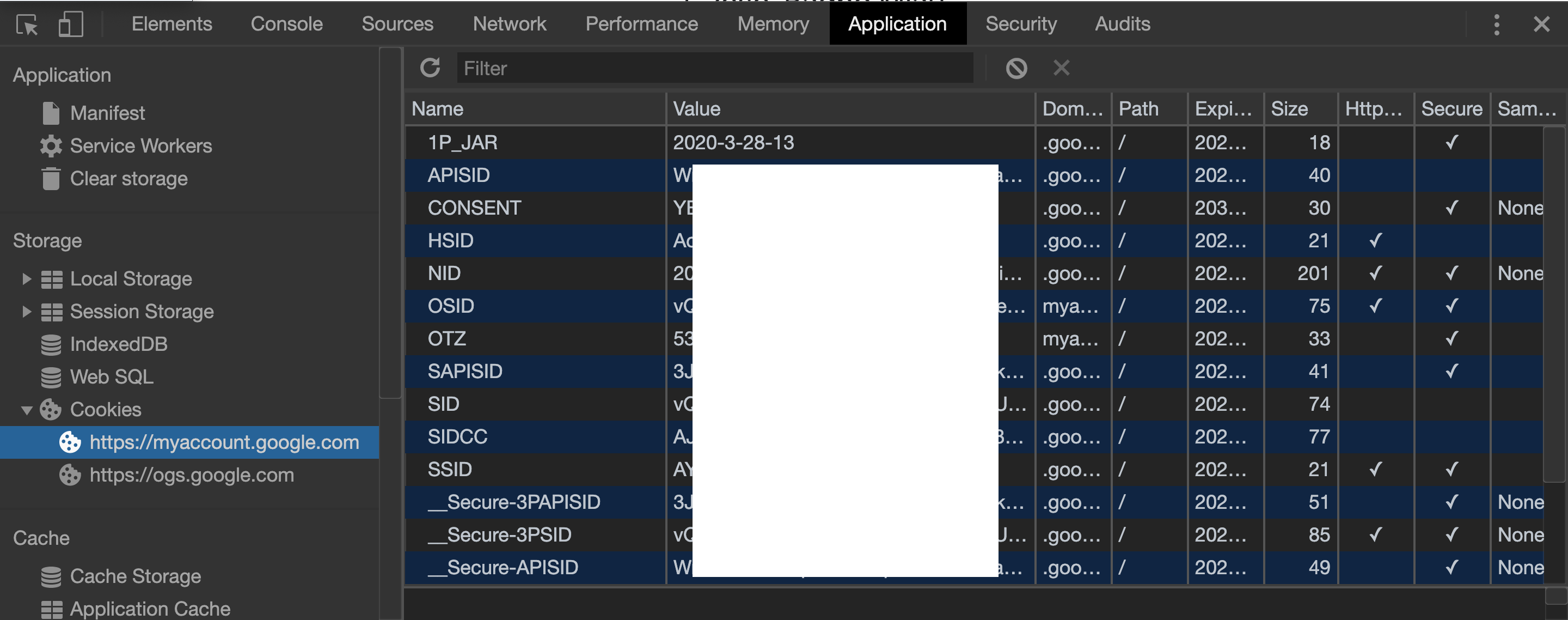
- Put your SID, HSID, SSID values into value field of the code:
window.btoa(JSON.stringify([{key: 'SID',value: '',domain: 'google.com'},{key: 'HSID',value: '',domain: 'google.com'},{key: 'SSID',value: '',domain: 'google.com'},]));- Run this code in Console tab
- The output is your auth cookie string
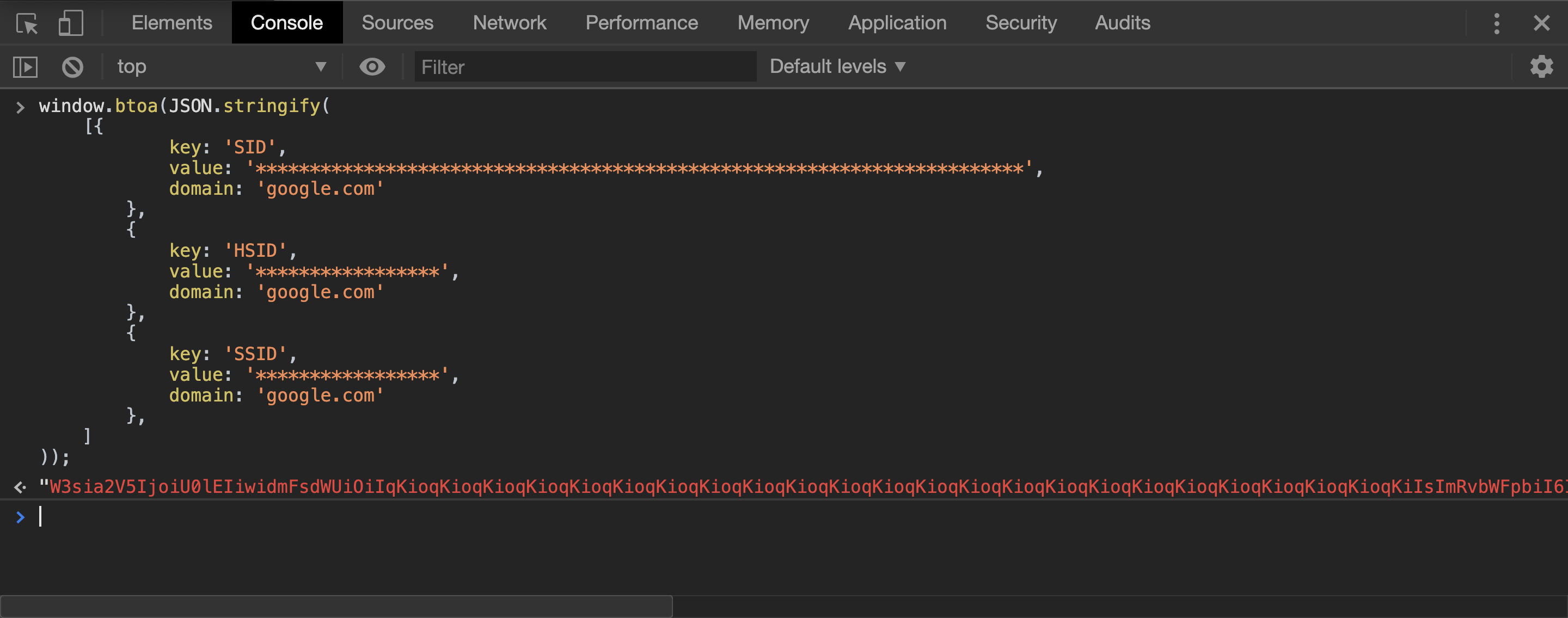
- Put auth cookie string configuration:
constfs=require('fs')constalerts=require('google-alerts-api')alerts.configure({cookies: "your 'auth cookie string' goes here..."});alerts.sync((err)=>{if(err)returnconsole.log(err)constalertList=alerts.getAlerts()});- https://accounts.google.com/b/1/DisplayUnlockCaptcha (make sure you are editing settings for proper user...)
- https://myaccount.google.com/lesssecureapps
- review auth issues labeled issues, hope you will find an answer