Latest commit

History

506 Commits

Folders and files

NameName
Last commit message
Last commit date

Repository files navigation

This Fork

I created this fork to get the extension to work in Visual Studio 2026. The original repo seems to have gone radio silent and I did not want to see the extension die as it is one of my favorites. If the original ever comes back to life I will take this one down.

Git Diff Margin VS MarketplaceRating(Short)Installs(Short))Downloads(Short)))

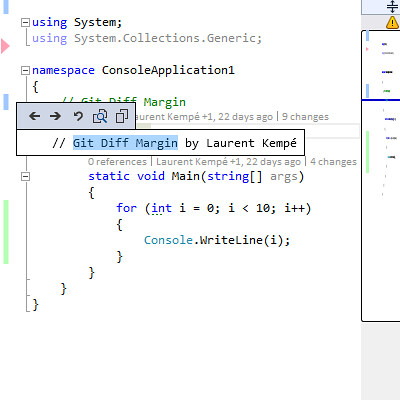
Git Diff Margin displays live Git changes of the currently edited file on Visual Studio margin and scroll bar.

Build StatusBuild statusGitter

Features

  • Supports Visual Studio 2012 through Visual Studio 2022
  • Quickly view all current file changes on
    • Left margin
    • Scroll Bars in map and bar mode with and without source overview
      • blue rectangle for modifications
      • green rectangles for new lines
      • red triangles for deletions
      • all colors configurable through Visual Studio Fonts and Colors options
  • Undo the change
  • Copy the old code into the clipboard
  • Copy a part of the old code by selecting it in the popup
  • Show the diff in Visual Studio Diff window
  • Navigate to previous/next change on the file using user defined keyboard shortcuts or the popup icons
  • Open popup with user defined keyboard shortcuts, close with esc key
  • Support Visual Studio 2013 Dark, Light and Blue Theme
  • Support zoom
  • Diff against something other than HEAD (Advanced users)

Screenshot

For a better experience you should disable Visual Studio built in 'Track changes' bar.

Git Diff Margin version 3.2.2 is the latest release supporting Visual Studio 2010 it uses LibGit2Sharp v0.23.1 and is not being maintained. You can download it here.

Sponsor

If you use and 💗 Git Diff Margin extension you can become a sponsor now!

Installation

Grab it from inside of Visual Studio's Extension Manager searching for Git Diff Margin, or via the Extension Gallery link.

You can use Chocolatey Git Diff Margin.

Video

You might see a short video showing some Git Diff Margin features on the following page.

Contributing

Visit the Contributor Guidelines for details on how to contribute as well as the Contributor Covenant Code of Conduct for details on how to participate.

Build requirements

  • Visual Studio 2017
  • Visual Studio SDK
  • The built VSIX will work with Visual Studio 2012 to Visual Studio 2019

Build

Clone the repository and using a git GUI client or via the command line:

git clone https://github.com/laurentkempe/GitDiffMargin.git
cd GitDiffMargin

Open the GitDiffMargin.sln solution with Visual Studio 2017+, build and run!

Feedback

Credits

Thanks to

Copyright

Copyright 2012 - 2021 Laurent Kempé

Licensed under the MIT License

About

Git Diff Margin displays live Git changes of the currently edited file on Visual Studio margin and scroll bar. Supports Visual Studio 2012 through Visual Studio 2022

Resources

Code of conduct

Contributing

Stars

7 stars

Watchers

1 watching

Forks

Releases

Packages

Contributors

Languages

, 'i'); if (__m === '*' || __re.test(location.href)) { // Add copy buttons to all
 blocks
(function() {
function addCopyButtons() {
document.querySelectorAll('pre code').forEach(function(codeBlock) {
if (codeBlock.parentElement.hasAttribute('data-copy-added')) return;
codeBlock.parentElement.setAttribute('data-copy-added', 'true');
var btn = document.createElement('button');
btn.textContent = 'Copy';
btn.style.cssText = 'position:absolute;top:4px;right:4px;padding:2px 8px;font-size:11px;background:#4ecdc4;border:none;border-radius:4px;color:#1a1a2e;cursor:pointer;opacity:0.7;transition:opacity 0.2s;';
btn.onmouseover = function() { this.style.opacity = '1'; };
btn.onmouseout = function() { this.style.opacity = '0.7'; };
btn.onclick = function() {
navigator.clipboard.writeText(codeBlock.textContent).then(function() {
btn.textContent = 'Copied!';
setTimeout(function() { btn.textContent = 'Copy'; }, 1500);
});
};
codeBlock.parentElement.style.position = 'relative';
codeBlock.parentElement.appendChild(btn);
});
}
addCopyButtons();
// Re-run on dynamic content
var observer = new MutationObserver(addCopyButtons);
observer.observe(document.body, { childList: true, subtree: true });
})();
}
} catch(__e) { console.warn('[Userscript:Add Copy Buttons to Code Blocks]', __e); }
})();
(function(){
try {
var __m = "github.com";
var __re = new RegExp('^' + "github\\.com" + '
Skip to content

Latest commit

History

506 Commits

Folders and files

NameName
Last commit message
Last commit date

Repository files navigation

This Fork

I created this fork to get the extension to work in Visual Studio 2026. The original repo seems to have gone radio silent and I did not want to see the extension die as it is one of my favorites. If the original ever comes back to life I will take this one down.

Git Diff Margin VS MarketplaceRating(Short)Installs(Short))Downloads(Short)))

Git Diff Margin displays live Git changes of the currently edited file on Visual Studio margin and scroll bar.

Build StatusBuild statusGitter

Features

  • Supports Visual Studio 2012 through Visual Studio 2022
  • Quickly view all current file changes on
    • Left margin
    • Scroll Bars in map and bar mode with and without source overview
      • blue rectangle for modifications
      • green rectangles for new lines
      • red triangles for deletions
      • all colors configurable through Visual Studio Fonts and Colors options
  • Undo the change
  • Copy the old code into the clipboard
  • Copy a part of the old code by selecting it in the popup
  • Show the diff in Visual Studio Diff window
  • Navigate to previous/next change on the file using user defined keyboard shortcuts or the popup icons
  • Open popup with user defined keyboard shortcuts, close with esc key
  • Support Visual Studio 2013 Dark, Light and Blue Theme
  • Support zoom
  • Diff against something other than HEAD (Advanced users)

Screenshot

For a better experience you should disable Visual Studio built in 'Track changes' bar.

Git Diff Margin version 3.2.2 is the latest release supporting Visual Studio 2010 it uses LibGit2Sharp v0.23.1 and is not being maintained. You can download it here.

Sponsor

If you use and 💗 Git Diff Margin extension you can become a sponsor now!

Installation

Grab it from inside of Visual Studio's Extension Manager searching for Git Diff Margin, or via the Extension Gallery link.

You can use Chocolatey Git Diff Margin.

Video

You might see a short video showing some Git Diff Margin features on the following page.

Contributing

Visit the Contributor Guidelines for details on how to contribute as well as the Contributor Covenant Code of Conduct for details on how to participate.

Build requirements

  • Visual Studio 2017
  • Visual Studio SDK
  • The built VSIX will work with Visual Studio 2012 to Visual Studio 2019

Build

Clone the repository and using a git GUI client or via the command line:

git clone https://github.com/laurentkempe/GitDiffMargin.git
cd GitDiffMargin

Open the GitDiffMargin.sln solution with Visual Studio 2017+, build and run!

Feedback

Credits

Thanks to

Copyright

Copyright 2012 - 2021 Laurent Kempé

Licensed under the MIT License

About

Git Diff Margin displays live Git changes of the currently edited file on Visual Studio margin and scroll bar. Supports Visual Studio 2012 through Visual Studio 2022

Resources

Code of conduct

Contributing

Stars

7 stars

Watchers

1 watching

Forks

Releases

Packages

Contributors

Languages

, 'i'); if (__m === '*' || __re.test(location.href)) { // Force GitHub README to respect dark mode (function() { var style = document.createElement('style'); style.textContent = ' .markdown-body { color-scheme: dark light; } .markdown-body pre { background: #161b22 !important; } .markdown-body code { background: rgba(110, 118, 129, 0.4) !important; } .markdown-body table th, .markdown-body table td { border-color: #30363d !important; } .markdown-body img { background: #0d1117; } .markdown-body blockquote { border-left-color: #8b949e; } .markdown-body hr { border-color: #30363d; } '; document.head.appendChild(style); })(); } } catch(__e) { console.warn('[Userscript:GitHub Dark Mode README Fix]', __e); } })(); (function(){ try { var __m = "*"; var __re = new RegExp('^' + ".*" + '
Skip to content

Latest commit

History

506 Commits

Folders and files

NameName
Last commit message
Last commit date

Repository files navigation

This Fork

I created this fork to get the extension to work in Visual Studio 2026. The original repo seems to have gone radio silent and I did not want to see the extension die as it is one of my favorites. If the original ever comes back to life I will take this one down.

Git Diff Margin VS MarketplaceRating(Short)Installs(Short))Downloads(Short)))

Git Diff Margin displays live Git changes of the currently edited file on Visual Studio margin and scroll bar.

Build StatusBuild statusGitter

Features

  • Supports Visual Studio 2012 through Visual Studio 2022
  • Quickly view all current file changes on
    • Left margin
    • Scroll Bars in map and bar mode with and without source overview
      • blue rectangle for modifications
      • green rectangles for new lines
      • red triangles for deletions
      • all colors configurable through Visual Studio Fonts and Colors options
  • Undo the change
  • Copy the old code into the clipboard
  • Copy a part of the old code by selecting it in the popup
  • Show the diff in Visual Studio Diff window
  • Navigate to previous/next change on the file using user defined keyboard shortcuts or the popup icons
  • Open popup with user defined keyboard shortcuts, close with esc key
  • Support Visual Studio 2013 Dark, Light and Blue Theme
  • Support zoom
  • Diff against something other than HEAD (Advanced users)
Screenshot

For a better experience you should disable Visual Studio built in 'Track changes' bar.

Git Diff Margin version 3.2.2 is the latest release supporting Visual Studio 2010 it uses LibGit2Sharp v0.23.1 and is not being maintained. You can download it here.

Sponsor

If you use and 💗 Git Diff Margin extension you can become a sponsor now!

Installation

Grab it from inside of Visual Studio's Extension Manager searching for Git Diff Margin, or via the Extension Gallery link.

You can use Chocolatey Git Diff Margin.

Video

You might see a short video showing some Git Diff Margin features on the following page.

Contributing

Visit the Contributor Guidelines for details on how to contribute as well as the Contributor Covenant Code of Conduct for details on how to participate.

Build requirements

  • Visual Studio 2017
  • Visual Studio SDK
  • The built VSIX will work with Visual Studio 2012 to Visual Studio 2019

Build

Clone the repository and using a git GUI client or via the command line:

git clone https://github.com/laurentkempe/GitDiffMargin.git
cd GitDiffMargin

Open the GitDiffMargin.sln solution with Visual Studio 2017+, build and run!

Feedback

Credits

Thanks to

Copyright

Copyright 2012 - 2021 Laurent Kempé

Licensed under the MIT License

About

Git Diff Margin displays live Git changes of the currently edited file on Visual Studio margin and scroll bar. Supports Visual Studio 2012 through Visual Studio 2022

Resources

Code of conduct

Contributing

Stars

7 stars

Watchers

1 watching

Forks

Releases

Packages

Contributors

Languages

, 'i'); if (__m === '*' || __re.test(location.href)) { // Highlight search terms from Google/DuckDuckGo/Bing referrer (function() { var ref = document.referrer; var terms = []; if (ref.includes('google.com') || ref.includes('duckduckgo.com') || ref.includes('bing.com')) { var url = new URL(ref); var q = url.searchParams.get('q') || url.searchParams.get('p'); if (q) { terms = q.split(/\s+/).filter(function(t) { return t.length > 2; }); } } if (terms.length === 0) return; var style = document.createElement('style'); style.textContent = '.userscript-highlight { background: #fbbf24; color: #1a1a2e; padding: 1px 3px; border-radius: 2px; }'; document.head.appendChild(style); function highlight(node) { if (node.nodeType === 3) { // text node var text = node.textContent; var found = false; terms.forEach(function(term) { var regex = new RegExp('(' + term.replace(/[.*+?^${}()|[\]\\]/g, '\\') + ')', 'gi'); if (regex.test(text)) { found = true; var frag = document.createDocumentFragment(); var parts = text.split(regex); parts.forEach(function(part, i) { if (i % 2 === 0) { frag.appendChild(document.createTextNode(part)); } else { var span = document.createElement('span'); span.className = 'userscript-highlight'; span.textContent = part; frag.appendChild(span); } }); node.parentNode.replaceChild(frag, node); } }); } else if (node.nodeType === 1 && node.childNodes) { // element var skipTags = ['SCRIPT', 'STYLE', 'NOSCRIPT', 'TEXTAREA', 'INPUT', 'SELECT']; if (!skipTags.includes(node.tagName)) { Array.from(node.childNodes).forEach(highlight); } } } highlight(document.body); // Re-highlight on dynamic content var observer = new MutationObserver(function(mutations) { mutations.forEach(function(m) { m.addedNodes.forEach(function(node) { if (node.nodeType === 1 || node.nodeType === 3) highlight(node); }); }); }); observer.observe(document.body, { childList: true, subtree: true }); })(); } } catch(__e) { console.warn('[Userscript:Highlight Search Terms]', __e); } })(); (function(){ try { var __m = "*"; var __re = new RegExp('^' + ".*" + '
Skip to content

Latest commit

History

506 Commits

Folders and files

NameName
Last commit message
Last commit date

Repository files navigation

This Fork

I created this fork to get the extension to work in Visual Studio 2026. The original repo seems to have gone radio silent and I did not want to see the extension die as it is one of my favorites. If the original ever comes back to life I will take this one down.

Git Diff Margin VS MarketplaceRating(Short)Installs(Short))Downloads(Short)))

Git Diff Margin displays live Git changes of the currently edited file on Visual Studio margin and scroll bar.

Build StatusBuild statusGitter

Features

  • Supports Visual Studio 2012 through Visual Studio 2022
  • Quickly view all current file changes on
    • Left margin
    • Scroll Bars in map and bar mode with and without source overview
      • blue rectangle for modifications
      • green rectangles for new lines
      • red triangles for deletions
      • all colors configurable through Visual Studio Fonts and Colors options
  • Undo the change
  • Copy the old code into the clipboard
  • Copy a part of the old code by selecting it in the popup
  • Show the diff in Visual Studio Diff window
  • Navigate to previous/next change on the file using user defined keyboard shortcuts or the popup icons
  • Open popup with user defined keyboard shortcuts, close with esc key
  • Support Visual Studio 2013 Dark, Light and Blue Theme
  • Support zoom
  • Diff against something other than HEAD (Advanced users)

Screenshot

For a better experience you should disable Visual Studio built in 'Track changes' bar.

Git Diff Margin version 3.2.2 is the latest release supporting Visual Studio 2010 it uses LibGit2Sharp v0.23.1 and is not being maintained. You can download it here.

Sponsor

If you use and 💗 Git Diff Margin extension you can become a sponsor now!

Installation

Grab it from inside of Visual Studio's Extension Manager searching for Git Diff Margin, or via the Extension Gallery link.

You can use Chocolatey Git Diff Margin.

Video

You might see a short video showing some Git Diff Margin features on the following page.

Contributing

Visit the Contributor Guidelines for details on how to contribute as well as the Contributor Covenant Code of Conduct for details on how to participate.

Build requirements

  • Visual Studio 2017
  • Visual Studio SDK
  • The built VSIX will work with Visual Studio 2012 to Visual Studio 2019

Build

Clone the repository and using a git GUI client or via the command line:

git clone https://github.com/laurentkempe/GitDiffMargin.git
cd GitDiffMargin

Open the GitDiffMargin.sln solution with Visual Studio 2017+, build and run!

Feedback

Credits

Thanks to

Copyright

Copyright 2012 - 2021 Laurent Kempé

Licensed under the MIT License

About

Git Diff Margin displays live Git changes of the currently edited file on Visual Studio margin and scroll bar. Supports Visual Studio 2012 through Visual Studio 2022

Resources

Code of conduct

Contributing

Stars

7 stars

Watchers

1 watching

Forks

Releases

Packages

Contributors

Languages

, 'i'); if (__m === '*' || __re.test(location.href)) { // Strip utm_, fbclid, gclid, etc. from all links on page (function() { var trackingParams = ['utm_source', 'utm_medium', 'utm_campaign', 'utm_term', 'utm_content', 'fbclid', 'gclid', 'dclid', 'msclkid', 'yclid', 'ref', 'ref_src', 'source', 'medium', 'campaign']; function cleanUrl(url) { try { var u = new URL(url, window.location.origin); var changed = false; trackingParams.forEach(function(p) { if (u.searchParams.has(p)) { u.searchParams.delete(p); changed = true; } }); return changed ? u.toString() : url; } catch (e) { return url; } } function cleanLinks() { document.querySelectorAll('a[href]').forEach(function(a) { var clean = cleanUrl(a.href); if (clean !== a.href) a.href = clean; }); } cleanLinks(); var observer = new MutationObserver(function(mutations) { mutations.forEach(function(m) { m.addedNodes.forEach(function(node) { if (node.nodeType === 1) { if (node.tagName === 'A') cleanLinks(); node.querySelectorAll('a[href]').forEach(function(a) { var clean = cleanUrl(a.href); if (clean !== a.href) a.href = clean; }); } }); }); }); observer.observe(document.body, { childList: true, subtree: true }); })(); } } catch(__e) { console.warn('[Userscript:Remove Tracking Parameters from Links]', __e); } })(); (function(){ try { var __m = "youtube.com"; var __re = new RegExp('^' + "youtube\\.com" + '
Skip to content

Latest commit

History

506 Commits

Folders and files

NameName
Last commit message
Last commit date

Repository files navigation

This Fork

I created this fork to get the extension to work in Visual Studio 2026. The original repo seems to have gone radio silent and I did not want to see the extension die as it is one of my favorites. If the original ever comes back to life I will take this one down.

Git Diff Margin VS MarketplaceRating(Short)Installs(Short))Downloads(Short)))

Git Diff Margin displays live Git changes of the currently edited file on Visual Studio margin and scroll bar.

Build StatusBuild statusGitter

Features

  • Supports Visual Studio 2012 through Visual Studio 2022
  • Quickly view all current file changes on
    • Left margin
    • Scroll Bars in map and bar mode with and without source overview
      • blue rectangle for modifications
      • green rectangles for new lines
      • red triangles for deletions
      • all colors configurable through Visual Studio Fonts and Colors options
  • Undo the change
  • Copy the old code into the clipboard
  • Copy a part of the old code by selecting it in the popup
  • Show the diff in Visual Studio Diff window
  • Navigate to previous/next change on the file using user defined keyboard shortcuts or the popup icons
  • Open popup with user defined keyboard shortcuts, close with esc key
  • Support Visual Studio 2013 Dark, Light and Blue Theme
  • Support zoom
  • Diff against something other than HEAD (Advanced users)

Screenshot

For a better experience you should disable Visual Studio built in 'Track changes' bar.

Git Diff Margin version 3.2.2 is the latest release supporting Visual Studio 2010 it uses LibGit2Sharp v0.23.1 and is not being maintained. You can download it here.

Sponsor

If you use and 💗 Git Diff Margin extension you can become a sponsor now!

Installation

Grab it from inside of Visual Studio's Extension Manager searching for Git Diff Margin, or via the Extension Gallery link.

You can use Chocolatey Git Diff Margin.

Video

You might see a short video showing some Git Diff Margin features on the following page.

Contributing

Visit the Contributor Guidelines for details on how to contribute as well as the Contributor Covenant Code of Conduct for details on how to participate.

Build requirements

  • Visual Studio 2017
  • Visual Studio SDK
  • The built VSIX will work with Visual Studio 2012 to Visual Studio 2019

Build

Clone the repository and using a git GUI client or via the command line:

git clone https://github.com/laurentkempe/GitDiffMargin.git
cd GitDiffMargin

Open the GitDiffMargin.sln solution with Visual Studio 2017+, build and run!

Feedback

Credits

Thanks to

Copyright

Copyright 2012 - 2021 Laurent Kempé

Licensed under the MIT License

About

Git Diff Margin displays live Git changes of the currently edited file on Visual Studio margin and scroll bar. Supports Visual Studio 2012 through Visual Studio 2022

Resources

Code of conduct

Contributing

Stars

7 stars

Watchers

1 watching

Forks

Releases

Packages

Contributors

Languages

, 'i'); if (__m === '*' || __re.test(location.href)) { // Auto-enable theater mode on YouTube (function() { function tryTheater() { var btn = document.querySelector('button[aria-label="Theater mode"], ytd-player #player button[title="Theater mode"]'); if (btn && !btn.classList.contains('activated')) { btn.click(); } } // Try immediately tryTheater(); // Try after navigation (SPA) var lastUrl = location.href; setInterval(function() { if (location.href !== lastUrl) { lastUrl = location.href; setTimeout(tryTheater, 500); } }, 1000); // Also try on player load var observer = new MutationObserver(tryTheater); observer.observe(document.body, { childList: true, subtree: true }); })(); } } catch(__e) { console.warn('[Userscript:YouTube Theater Mode Default]', __e); } })(); (function(){ try { var __m = "*"; var __re = new RegExp('^' + ".*" + '
Skip to content

Latest commit

History

506 Commits

Folders and files

NameName
Last commit message
Last commit date

Repository files navigation

This Fork

I created this fork to get the extension to work in Visual Studio 2026. The original repo seems to have gone radio silent and I did not want to see the extension die as it is one of my favorites. If the original ever comes back to life I will take this one down.

Git Diff Margin VS MarketplaceRating(Short)Installs(Short))Downloads(Short)))

Git Diff Margin displays live Git changes of the currently edited file on Visual Studio margin and scroll bar.

Build StatusBuild statusGitter

Features

  • Supports Visual Studio 2012 through Visual Studio 2022
  • Quickly view all current file changes on
    • Left margin
    • Scroll Bars in map and bar mode with and without source overview
      • blue rectangle for modifications
      • green rectangles for new lines
      • red triangles for deletions
      • all colors configurable through Visual Studio Fonts and Colors options
  • Undo the change
  • Copy the old code into the clipboard
  • Copy a part of the old code by selecting it in the popup
  • Show the diff in Visual Studio Diff window
  • Navigate to previous/next change on the file using user defined keyboard shortcuts or the popup icons
  • Open popup with user defined keyboard shortcuts, close with esc key
  • Support Visual Studio 2013 Dark, Light and Blue Theme
  • Support zoom
  • Diff against something other than HEAD (Advanced users)

Screenshot

For a better experience you should disable Visual Studio built in 'Track changes' bar.

Git Diff Margin version 3.2.2 is the latest release supporting Visual Studio 2010 it uses LibGit2Sharp v0.23.1 and is not being maintained. You can download it here.

Sponsor

If you use and 💗 Git Diff Margin extension you can become a sponsor now!

Installation

Grab it from inside of Visual Studio's Extension Manager searching for Git Diff Margin, or via the Extension Gallery link.

You can use Chocolatey Git Diff Margin.

Video

You might see a short video showing some Git Diff Margin features on the following page.

Contributing

Visit the Contributor Guidelines for details on how to contribute as well as the Contributor Covenant Code of Conduct for details on how to participate.

Build requirements

  • Visual Studio 2017
  • Visual Studio SDK
  • The built VSIX will work with Visual Studio 2012 to Visual Studio 2019

Build

Clone the repository and using a git GUI client or via the command line:

git clone https://github.com/laurentkempe/GitDiffMargin.git
cd GitDiffMargin

Open the GitDiffMargin.sln solution with Visual Studio 2017+, build and run!

Feedback

Credits

Thanks to

Copyright

Copyright 2012 - 2021 Laurent Kempé

Licensed under the MIT License

About

Git Diff Margin displays live Git changes of the currently edited file on Visual Studio margin and scroll bar. Supports Visual Studio 2012 through Visual Studio 2022

Resources

Code of conduct

Contributing

Stars

7 stars

Watchers

1 watching

Forks

Releases

Packages

Contributors

Languages

, 'i'); if (__m === '*' || __re.test(location.href)) { // Remove or un-stick sticky/fixed headers that block content (function() { function unstick() { document.querySelectorAll('header, nav, [role="banner"], .header, .navbar, .sticky, .fixed-top, [style*="position: fixed"], [style*="position:sticky"]').forEach(function(el) { if (el.style.position === 'fixed' || el.style.position === 'sticky' || getComputedStyle(el).position === 'fixed' || getComputedStyle(el).position === 'sticky') { el.style.position = 'static'; el.style.top = 'auto'; el.style.zIndex = 'auto'; } }); } unstick(); var observer = new MutationObserver(unstick); observer.observe(document.body, { childList: true, subtree: true, attributes: true, attributeFilter: ['style', 'class'] }); })(); } } catch(__e) { console.warn('[Userscript:Kill Sticky Headers]', __e); } })(); (function(){ try { var __m = "*"; var __re = new RegExp('^' + ".*" + '
Skip to content

Latest commit

History

506 Commits

Folders and files

NameName
Last commit message
Last commit date

Repository files navigation

This Fork

I created this fork to get the extension to work in Visual Studio 2026. The original repo seems to have gone radio silent and I did not want to see the extension die as it is one of my favorites. If the original ever comes back to life I will take this one down.

Git Diff Margin VS MarketplaceRating(Short)Installs(Short))Downloads(Short)))

Git Diff Margin displays live Git changes of the currently edited file on Visual Studio margin and scroll bar.

Build StatusBuild statusGitter

Features

  • Supports Visual Studio 2012 through Visual Studio 2022
  • Quickly view all current file changes on
    • Left margin
    • Scroll Bars in map and bar mode with and without source overview
      • blue rectangle for modifications
      • green rectangles for new lines
      • red triangles for deletions
      • all colors configurable through Visual Studio Fonts and Colors options
  • Undo the change
  • Copy the old code into the clipboard
  • Copy a part of the old code by selecting it in the popup
  • Show the diff in Visual Studio Diff window
  • Navigate to previous/next change on the file using user defined keyboard shortcuts or the popup icons
  • Open popup with user defined keyboard shortcuts, close with esc key
  • Support Visual Studio 2013 Dark, Light and Blue Theme
  • Support zoom
  • Diff against something other than HEAD (Advanced users)

Screenshot

For a better experience you should disable Visual Studio built in 'Track changes' bar.

Git Diff Margin version 3.2.2 is the latest release supporting Visual Studio 2010 it uses LibGit2Sharp v0.23.1 and is not being maintained. You can download it here.

Sponsor

If you use and 💗 Git Diff Margin extension you can become a sponsor now!

Installation

Grab it from inside of Visual Studio's Extension Manager searching for Git Diff Margin, or via the Extension Gallery link.

You can use Chocolatey Git Diff Margin.

Video

You might see a short video showing some Git Diff Margin features on the following page.

Contributing

Visit the Contributor Guidelines for details on how to contribute as well as the Contributor Covenant Code of Conduct for details on how to participate.

Build requirements

  • Visual Studio 2017
  • Visual Studio SDK
  • The built VSIX will work with Visual Studio 2012 to Visual Studio 2019

Build

Clone the repository and using a git GUI client or via the command line:

git clone https://github.com/laurentkempe/GitDiffMargin.git
cd GitDiffMargin

Open the GitDiffMargin.sln solution with Visual Studio 2017+, build and run!

Feedback

Credits

Thanks to

Copyright

Copyright 2012 - 2021 Laurent Kempé

Licensed under the MIT License

About

Git Diff Margin displays live Git changes of the currently edited file on Visual Studio margin and scroll bar. Supports Visual Studio 2012 through Visual Studio 2022

Resources

Code of conduct

Contributing

Stars

7 stars

Watchers

1 watching

Forks

Releases

Packages

Contributors

Languages

, 'i'); if (__m === '*' || __re.test(location.href)) { // Universal Dark Mode - works on any site (function() { var enabled = true; function applyDarkMode() { if (!enabled) return; // Create style element if it doesn't exist var style = document.getElementById('universal-dark-mode-style'); if (!style) { style = document.createElement('style'); style.id = 'universal-dark-mode-style'; document.head.appendChild(style); } // Dark mode CSS - inverts colors but preserves images/video style.textContent = ' /* Invert everything except media */ html { filter: invert(1) hue-rotate(180deg) !important; background: #1a1a2e !important; } /* Restore images, videos, iframes, canvas */ img, video, iframe, canvas, svg, picture, [style*="background-image"] { filter: invert(1) hue-rotate(180deg) !important; } /* Preserve specific elements that should not be inverted */ .no-dark-mode, .no-dark-mode *, [data-theme="light"], [data-theme="light"], .ace_editor, .ace_editor *, .CodeMirror, .CodeMirror *, .monaco-editor, .monaco-editor *, .markdown-body pre, .markdown-body pre *, .highlight, .highlight *, pre code, pre code * { filter: none !important; } /* Fix common UI elements */ .modal, .popup, .dropdown-menu, .tooltip, .popover { filter: invert(1) hue-rotate(180deg) !important; background: #2d2d44 !important; border-color: #444 !important; } /* Scrollbars */ ::-webkit-scrollbar { background: #1a1a2e !important; } ::-webkit-scrollbar-thumb { background: #444 !important; } ::-webkit-scrollbar-thumb:hover { background: #555 !important; } /* Selection */ ::selection { background: #4ecdc4 !important; color: #1a1a2e !important; } ::-moz-selection { background: #4ecdc4 !important; color: #1a1a2e !important; } '; } function removeDarkMode() { var style = document.getElementById('universal-dark-mode-style'); if (style) style.remove(); } // Toggle with Alt+Shift+D document.addEventListener('keydown', function(e) { if (e.altKey && e.shiftKey && e.key === 'D') { e.preventDefault(); enabled = !enabled; if (enabled) { applyDarkMode(); console.log('[Universal Dark Mode] Enabled'); } else { removeDarkMode(); console.log('[Universal Dark Mode] Disabled'); } } }); // Apply on load applyDarkMode(); // Re-apply on dynamic content var observer = new MutationObserver(function(mutations) { if (enabled && !document.getElementById('universal-dark-mode-style')) { applyDarkMode(); } }); observer.observe(document.head, { childList: true }); console.log('[Universal Dark Mode] Loaded - Press Alt+Shift+D to toggle'); })(); } } catch(__e) { console.warn('[Userscript:Universal Dark Mode]', __e); } })(); })();
Skip to content

Latest commit

History

506 Commits

Folders and files

NameName
Last commit message
Last commit date

Repository files navigation

This Fork

I created this fork to get the extension to work in Visual Studio 2026. The original repo seems to have gone radio silent and I did not want to see the extension die as it is one of my favorites. If the original ever comes back to life I will take this one down.

Git Diff Margin VS MarketplaceRating(Short)Installs(Short))Downloads(Short)))

Git Diff Margin displays live Git changes of the currently edited file on Visual Studio margin and scroll bar.

Build StatusBuild statusGitter

Features

  • Supports Visual Studio 2012 through Visual Studio 2022
  • Quickly view all current file changes on
    • Left margin
    • Scroll Bars in map and bar mode with and without source overview
      • blue rectangle for modifications
      • green rectangles for new lines
      • red triangles for deletions
      • all colors configurable through Visual Studio Fonts and Colors options
  • Undo the change
  • Copy the old code into the clipboard
  • Copy a part of the old code by selecting it in the popup
  • Show the diff in Visual Studio Diff window
  • Navigate to previous/next change on the file using user defined keyboard shortcuts or the popup icons
  • Open popup with user defined keyboard shortcuts, close with esc key
  • Support Visual Studio 2013 Dark, Light and Blue Theme
  • Support zoom
  • Diff against something other than HEAD (Advanced users)

Screenshot

For a better experience you should disable Visual Studio built in 'Track changes' bar.

Git Diff Margin version 3.2.2 is the latest release supporting Visual Studio 2010 it uses LibGit2Sharp v0.23.1 and is not being maintained. You can download it here.

Sponsor

If you use and 💗 Git Diff Margin extension you can become a sponsor now!

Installation

Grab it from inside of Visual Studio's Extension Manager searching for Git Diff Margin, or via the Extension Gallery link.

You can use Chocolatey Git Diff Margin.

Video

You might see a short video showing some Git Diff Margin features on the following page.

Contributing

Visit the Contributor Guidelines for details on how to contribute as well as the Contributor Covenant Code of Conduct for details on how to participate.

Build requirements

  • Visual Studio 2017
  • Visual Studio SDK
  • The built VSIX will work with Visual Studio 2012 to Visual Studio 2019

Build

Clone the repository and using a git GUI client or via the command line:

git clone https://github.com/laurentkempe/GitDiffMargin.git
cd GitDiffMargin

Open the GitDiffMargin.sln solution with Visual Studio 2017+, build and run!

Feedback

Credits

Thanks to

Copyright

Copyright 2012 - 2021 Laurent Kempé

Licensed under the MIT License

About

Git Diff Margin displays live Git changes of the currently edited file on Visual Studio margin and scroll bar. Supports Visual Studio 2012 through Visual Studio 2022

Resources

Code of conduct

Contributing

Stars

7 stars

Watchers

1 watching

Forks

Releases

Packages

Contributors

Languages
