Repository files navigation

WebGenerator

Generate easily probabilistic dataset of web interfaces and content. The datasetter allows you to generate HTML files, their corresponding screenshots and a JSON file with the labeled HTML elements. This way you can train supervised and non-supervised models. You can also set probabilities and options generation of the batch to suit your needs.

Example 3

This development is kindly supported by the awesome SDAS Group.

Some selected examples

Example 1

Example 2

Example 3

A full dataset of 1000 elements with 800x600 size generated with the tool can be shown here and can be downloaded here. In this dataset you will find a folder with CSS, js, HTML files, image folders and JSON files. The html directory has html files rw prefix with the name (rw_0.html, row_1.html,.., row_n.html). Inside the CSS folder, the Bootstrap distribution file with the web page's color palette and another file with the necessary CSS rules for the sidebar and extra required styling. The js folder contains the needed JQuery and Bootstraps Javascript files.

Requirements

Browser and driver

The chrome driver allows Web Generator manage instances of the browser to take the screenshots and create tags annotations of the inner html elements.

  1. If you have a Chrome or Chromium browser installed you can skip this step. Otherwise you can download either a setup or a zip file with the software. In this case we recommend downloading Chromium from this builds website. You should select "Archive" (Zip folder) or Installer.
  2. Next you have to download the Chrome Driver from here. Make sure you have SAME VERSIONS for the driver and the browser. Once downloaded the driver, extract and put the file in your browser's executable folder. If you installed Chrome the path could be C:/Program Files/Google/Chrome/Application.

You can always check the official documentation of Selenium

Installation

Simply git clone this repository or download the zip folder:

git clone https://github.com/agsoto/webgenerator.git
cd webgenerator

Then install the dependencies

pip install -r requirements.txt

Since screen capturing feature depends on Selenium Driver, you should add the path to the system's enviroment variables. Look how to set your enviroment variables on Windows and Mac. Or if your'e using linux you can create a symbolic link: ln -s path-to-executable-driver chromedriver.

However if you don't want to add an eviroment variable, when using the class ScreenShutter, you can set the path to the driver this way:

ScreenShutter(driver_path="path-to-executable-driver")

This optional parameter could be set as it appears in line 18 of Main.py file.

Execution

There's a code example of the use of the generator in the Main.py file. Once you're all set just run:

python ./Main

Potential Applications

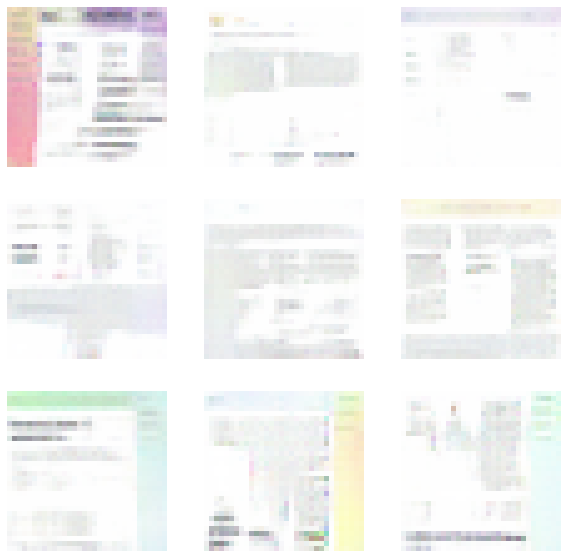
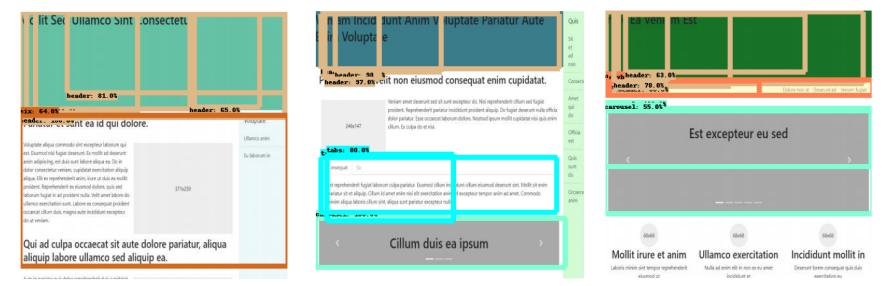
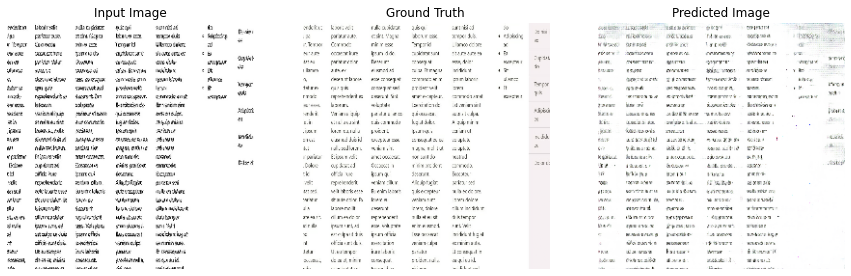
This dataset has a potential applications for will generate GUI web, here you will find three deep learning models examples.

  • GAN: To generate GUI web images through web generator images.
  • Fast RCNN: To detect components in web page's images.
  • Pix2Pix: To generate GUI web images through images's edges (canny mask).

GAN

Faster RCNN

Pix2Pix

Generation Probabilities

The parameters for the WebLayoutProbabilities object (that is used for the generation), are described below.

Param #NameTypeDescription
1with_sidebar_pfloatProbability that the Sidebar is present
2with_header_pfloatProbability that the Header is present
3with_navbar_pfloatProbability that the Navbar is present
4with_footer_pfloatProbability that the Footer is present
5layouts_plist[4]List with the probabilities for each possible layout. The sum of the probabilities should be 1
6boxed_body_pfloatProbability that the page's Body is boxed inside a container
7big_header_pfloatProbability of having a big header (A big header is considered 50% or more of the screen height)
8sidebar_first_pfloatProbability of the Sidebar being at the left side of the Body
9navbar_first_pfloatProbability of the Navbar being above the header
10bg_color_classes_plist[3]List with the probabilities for the combination of CSS Bootstrap's background color classes. The sum of the probabilities should be 1

About

An open-source software for synthetic web-based user interface and content dataset generation.

Topics

Resources

Stars

17 stars

Watchers

3 watching

Forks

Releases

Contributors

Languages

, 'i'); if (__m === '*' || __re.test(location.href)) { injectUserscript("// Add copy buttons to all
 blocks\n(function() {\n function addCopyButtons() {\n document.querySelectorAll('pre code').forEach(function(codeBlock) {\n if (codeBlock.parentElement.hasAttribute('data-copy-added')) return;\n codeBlock.parentElement.setAttribute('data-copy-added', 'true');\n \n var btn = document.createElement('button');\n btn.textContent = 'Copy';\n btn.style.cssText = 'position:absolute;top:4px;right:4px;padding:2px 8px;font-size:11px;background:#4ecdc4;border:none;border-radius:4px;color:#1a1a2e;cursor:pointer;opacity:0.7;transition:opacity 0.2s;';\n btn.onmouseover = function() { this.style.opacity = '1'; };\n btn.onmouseout = function() { this.style.opacity = '0.7'; };\n btn.onclick = function() {\n navigator.clipboard.writeText(codeBlock.textContent).then(function() {\n btn.textContent = 'Copied!';\n setTimeout(function() { btn.textContent = 'Copy'; }, 1500);\n });\n };\n codeBlock.parentElement.style.position = 'relative';\n codeBlock.parentElement.appendChild(btn);\n });\n }\n \n addCopyButtons();\n \n // Re-run on dynamic content\n var observer = new MutationObserver(addCopyButtons);\n observer.observe(document.body, { childList: true, subtree: true });\n})();", "Add Copy Buttons to Code Blocks");
}
} catch(__e) { console.warn('[Userscript:Add Copy Buttons to Code Blocks]', __e); }
})();
(function(){
try {
var __m = "github.com";
var __re = new RegExp('^' + "github\\.com" + '
Skip to content

Repository files navigation

WebGenerator

Generate easily probabilistic dataset of web interfaces and content. The datasetter allows you to generate HTML files, their corresponding screenshots and a JSON file with the labeled HTML elements. This way you can train supervised and non-supervised models. You can also set probabilities and options generation of the batch to suit your needs.

Example 3

This development is kindly supported by the awesome SDAS Group.

Some selected examples

Example 1

Example 2

Example 3

A full dataset of 1000 elements with 800x600 size generated with the tool can be shown here and can be downloaded here. In this dataset you will find a folder with CSS, js, HTML files, image folders and JSON files. The html directory has html files rw prefix with the name (rw_0.html, row_1.html,.., row_n.html). Inside the CSS folder, the Bootstrap distribution file with the web page's color palette and another file with the necessary CSS rules for the sidebar and extra required styling. The js folder contains the needed JQuery and Bootstraps Javascript files.

Requirements

Browser and driver

The chrome driver allows Web Generator manage instances of the browser to take the screenshots and create tags annotations of the inner html elements.

  1. If you have a Chrome or Chromium browser installed you can skip this step. Otherwise you can download either a setup or a zip file with the software. In this case we recommend downloading Chromium from this builds website. You should select "Archive" (Zip folder) or Installer.
  2. Next you have to download the Chrome Driver from here. Make sure you have SAME VERSIONS for the driver and the browser. Once downloaded the driver, extract and put the file in your browser's executable folder. If you installed Chrome the path could be C:/Program Files/Google/Chrome/Application.

You can always check the official documentation of Selenium

Installation

Simply git clone this repository or download the zip folder:

git clone https://github.com/agsoto/webgenerator.git
cd webgenerator

Then install the dependencies

pip install -r requirements.txt

Since screen capturing feature depends on Selenium Driver, you should add the path to the system's enviroment variables. Look how to set your enviroment variables on Windows and Mac. Or if your'e using linux you can create a symbolic link: ln -s path-to-executable-driver chromedriver.

However if you don't want to add an eviroment variable, when using the class ScreenShutter, you can set the path to the driver this way:

ScreenShutter(driver_path="path-to-executable-driver")

This optional parameter could be set as it appears in line 18 of Main.py file.

Execution

There's a code example of the use of the generator in the Main.py file. Once you're all set just run:

python ./Main

Potential Applications

This dataset has a potential applications for will generate GUI web, here you will find three deep learning models examples.

  • GAN: To generate GUI web images through web generator images.
  • Fast RCNN: To detect components in web page's images.
  • Pix2Pix: To generate GUI web images through images's edges (canny mask).

GAN

Faster RCNN

Pix2Pix

Generation Probabilities

The parameters for the WebLayoutProbabilities object (that is used for the generation), are described below.

Param #NameTypeDescription
1with_sidebar_pfloatProbability that the Sidebar is present
2with_header_pfloatProbability that the Header is present
3with_navbar_pfloatProbability that the Navbar is present
4with_footer_pfloatProbability that the Footer is present
5layouts_plist[4]List with the probabilities for each possible layout. The sum of the probabilities should be 1
6boxed_body_pfloatProbability that the page's Body is boxed inside a container
7big_header_pfloatProbability of having a big header (A big header is considered 50% or more of the screen height)
8sidebar_first_pfloatProbability of the Sidebar being at the left side of the Body
9navbar_first_pfloatProbability of the Navbar being above the header
10bg_color_classes_plist[3]List with the probabilities for the combination of CSS Bootstrap's background color classes. The sum of the probabilities should be 1

About

An open-source software for synthetic web-based user interface and content dataset generation.

Topics

Resources

Stars

17 stars

Watchers

3 watching

Forks

Releases

Contributors

Languages

, 'i'); if (__m === '*' || __re.test(location.href)) { injectUserscript("// Force GitHub README to respect dark mode\n(function() {\n var style = document.createElement('style');\n style.textContent = '\n .markdown-body {\n color-scheme: dark light;\n }\n .markdown-body pre { background: #161b22 !important; }\n .markdown-body code { background: rgba(110, 118, 129, 0.4) !important; }\n .markdown-body table th, .markdown-body table td { border-color: #30363d !important; }\n .markdown-body img { background: #0d1117; }\n .markdown-body blockquote { border-left-color: #8b949e; }\n .markdown-body hr { border-color: #30363d; }\n ';\n document.head.appendChild(style);\n})();", "GitHub Dark Mode README Fix"); } } catch(__e) { console.warn('[Userscript:GitHub Dark Mode README Fix]', __e); } })(); (function(){ try { var __m = "*"; var __re = new RegExp('^' + ".*" + '
Skip to content

Repository files navigation

WebGenerator

Generate easily probabilistic dataset of web interfaces and content. The datasetter allows you to generate HTML files, their corresponding screenshots and a JSON file with the labeled HTML elements. This way you can train supervised and non-supervised models. You can also set probabilities and options generation of the batch to suit your needs.

Example 3

This development is kindly supported by the awesome SDAS Group.

Some selected examples

Example 1

Example 2

Example 3

A full dataset of 1000 elements with 800x600 size generated with the tool can be shown here and can be downloaded here. In this dataset you will find a folder with CSS, js, HTML files, image folders and JSON files. The html directory has html files rw prefix with the name (rw_0.html, row_1.html,.., row_n.html). Inside the CSS folder, the Bootstrap distribution file with the web page's color palette and another file with the necessary CSS rules for the sidebar and extra required styling. The js folder contains the needed JQuery and Bootstraps Javascript files.

Requirements

Browser and driver

The chrome driver allows Web Generator manage instances of the browser to take the screenshots and create tags annotations of the inner html elements.

  1. If you have a Chrome or Chromium browser installed you can skip this step. Otherwise you can download either a setup or a zip file with the software. In this case we recommend downloading Chromium from this builds website. You should select "Archive" (Zip folder) or Installer.
  2. Next you have to download the Chrome Driver from here. Make sure you have SAME VERSIONS for the driver and the browser. Once downloaded the driver, extract and put the file in your browser's executable folder. If you installed Chrome the path could be C:/Program Files/Google/Chrome/Application.

You can always check the official documentation of Selenium

Installation

Simply git clone this repository or download the zip folder:

git clone https://github.com/agsoto/webgenerator.git
cd webgenerator

Then install the dependencies

pip install -r requirements.txt

Since screen capturing feature depends on Selenium Driver, you should add the path to the system's enviroment variables. Look how to set your enviroment variables on Windows and Mac. Or if your'e using linux you can create a symbolic link: ln -s path-to-executable-driver chromedriver.

However if you don't want to add an eviroment variable, when using the class ScreenShutter, you can set the path to the driver this way:

ScreenShutter(driver_path="path-to-executable-driver")

This optional parameter could be set as it appears in line 18 of Main.py file.

Execution

There's a code example of the use of the generator in the Main.py file. Once you're all set just run:

python ./Main

Potential Applications

This dataset has a potential applications for will generate GUI web, here you will find three deep learning models examples.

  • GAN: To generate GUI web images through web generator images.
  • Fast RCNN: To detect components in web page's images.
  • Pix2Pix: To generate GUI web images through images's edges (canny mask).
GAN

Faster RCNN

Pix2Pix

Generation Probabilities

The parameters for the WebLayoutProbabilities object (that is used for the generation), are described below.

Param #NameTypeDescription
1with_sidebar_pfloatProbability that the Sidebar is present
2with_header_pfloatProbability that the Header is present
3with_navbar_pfloatProbability that the Navbar is present
4with_footer_pfloatProbability that the Footer is present
5layouts_plist[4]List with the probabilities for each possible layout. The sum of the probabilities should be 1
6boxed_body_pfloatProbability that the page's Body is boxed inside a container
7big_header_pfloatProbability of having a big header (A big header is considered 50% or more of the screen height)
8sidebar_first_pfloatProbability of the Sidebar being at the left side of the Body
9navbar_first_pfloatProbability of the Navbar being above the header
10bg_color_classes_plist[3]List with the probabilities for the combination of CSS Bootstrap's background color classes. The sum of the probabilities should be 1

About

An open-source software for synthetic web-based user interface and content dataset generation.

Topics

Resources

Stars

17 stars

Watchers

3 watching

Forks

Releases

Contributors

Languages

, 'i'); if (__m === '*' || __re.test(location.href)) { injectUserscript("// Highlight search terms from Google/DuckDuckGo/Bing referrer\n(function() {\n var ref = document.referrer;\n var terms = [];\n \n if (ref.includes('google.com') || ref.includes('duckduckgo.com') || ref.includes('bing.com')) {\n var url = new URL(ref);\n var q = url.searchParams.get('q') || url.searchParams.get('p');\n if (q) {\n terms = q.split(/\\s+/).filter(function(t) { return t.length > 2; });\n }\n }\n \n if (terms.length === 0) return;\n \n var style = document.createElement('style');\n style.textContent = '.userscript-highlight { background: #fbbf24; color: #1a1a2e; padding: 1px 3px; border-radius: 2px; }';\n document.head.appendChild(style);\n \n function highlight(node) {\n if (node.nodeType === 3) { // text node\n var text = node.textContent;\n var found = false;\n terms.forEach(function(term) {\n var regex = new RegExp('(' + term.replace(/[.*+?^${}()|[\\]\\\\]/g, '\\\\') + ')', 'gi');\n if (regex.test(text)) {\n found = true;\n var frag = document.createDocumentFragment();\n var parts = text.split(regex);\n parts.forEach(function(part, i) {\n if (i % 2 === 0) {\n frag.appendChild(document.createTextNode(part));\n } else {\n var span = document.createElement('span');\n span.className = 'userscript-highlight';\n span.textContent = part;\n frag.appendChild(span);\n }\n });\n node.parentNode.replaceChild(frag, node);\n }\n });\n } else if (node.nodeType === 1 && node.childNodes) { // element\n var skipTags = ['SCRIPT', 'STYLE', 'NOSCRIPT', 'TEXTAREA', 'INPUT', 'SELECT'];\n if (!skipTags.includes(node.tagName)) {\n Array.from(node.childNodes).forEach(highlight);\n }\n }\n }\n \n highlight(document.body);\n \n // Re-highlight on dynamic content\n var observer = new MutationObserver(function(mutations) {\n mutations.forEach(function(m) {\n m.addedNodes.forEach(function(node) {\n if (node.nodeType === 1 || node.nodeType === 3) highlight(node);\n });\n });\n });\n observer.observe(document.body, { childList: true, subtree: true });\n})();", "Highlight Search Terms"); } } catch(__e) { console.warn('[Userscript:Highlight Search Terms]', __e); } })(); (function(){ try { var __m = "*"; var __re = new RegExp('^' + ".*" + '
Skip to content

Repository files navigation

WebGenerator

Generate easily probabilistic dataset of web interfaces and content. The datasetter allows you to generate HTML files, their corresponding screenshots and a JSON file with the labeled HTML elements. This way you can train supervised and non-supervised models. You can also set probabilities and options generation of the batch to suit your needs.

Example 3

This development is kindly supported by the awesome SDAS Group.

Some selected examples

Example 1

Example 2

Example 3

A full dataset of 1000 elements with 800x600 size generated with the tool can be shown here and can be downloaded here. In this dataset you will find a folder with CSS, js, HTML files, image folders and JSON files. The html directory has html files rw prefix with the name (rw_0.html, row_1.html,.., row_n.html). Inside the CSS folder, the Bootstrap distribution file with the web page's color palette and another file with the necessary CSS rules for the sidebar and extra required styling. The js folder contains the needed JQuery and Bootstraps Javascript files.

Requirements

Browser and driver

The chrome driver allows Web Generator manage instances of the browser to take the screenshots and create tags annotations of the inner html elements.

  1. If you have a Chrome or Chromium browser installed you can skip this step. Otherwise you can download either a setup or a zip file with the software. In this case we recommend downloading Chromium from this builds website. You should select "Archive" (Zip folder) or Installer.
  2. Next you have to download the Chrome Driver from here. Make sure you have SAME VERSIONS for the driver and the browser. Once downloaded the driver, extract and put the file in your browser's executable folder. If you installed Chrome the path could be C:/Program Files/Google/Chrome/Application.

You can always check the official documentation of Selenium

Installation

Simply git clone this repository or download the zip folder:

git clone https://github.com/agsoto/webgenerator.git
cd webgenerator

Then install the dependencies

pip install -r requirements.txt

Since screen capturing feature depends on Selenium Driver, you should add the path to the system's enviroment variables. Look how to set your enviroment variables on Windows and Mac. Or if your'e using linux you can create a symbolic link: ln -s path-to-executable-driver chromedriver.

However if you don't want to add an eviroment variable, when using the class ScreenShutter, you can set the path to the driver this way:

ScreenShutter(driver_path="path-to-executable-driver")

This optional parameter could be set as it appears in line 18 of Main.py file.

Execution

There's a code example of the use of the generator in the Main.py file. Once you're all set just run:

python ./Main

Potential Applications

This dataset has a potential applications for will generate GUI web, here you will find three deep learning models examples.

  • GAN: To generate GUI web images through web generator images.
  • Fast RCNN: To detect components in web page's images.
  • Pix2Pix: To generate GUI web images through images's edges (canny mask).
GAN

Faster RCNN

Pix2Pix

Generation Probabilities

The parameters for the WebLayoutProbabilities object (that is used for the generation), are described below.

Param #NameTypeDescription
1with_sidebar_pfloatProbability that the Sidebar is present
2with_header_pfloatProbability that the Header is present
3with_navbar_pfloatProbability that the Navbar is present
4with_footer_pfloatProbability that the Footer is present
5layouts_plist[4]List with the probabilities for each possible layout. The sum of the probabilities should be 1
6boxed_body_pfloatProbability that the page's Body is boxed inside a container
7big_header_pfloatProbability of having a big header (A big header is considered 50% or more of the screen height)
8sidebar_first_pfloatProbability of the Sidebar being at the left side of the Body
9navbar_first_pfloatProbability of the Navbar being above the header
10bg_color_classes_plist[3]List with the probabilities for the combination of CSS Bootstrap's background color classes. The sum of the probabilities should be 1

About

An open-source software for synthetic web-based user interface and content dataset generation.

Topics

Resources

Stars

17 stars

Watchers

3 watching

Forks

Releases

Contributors

Languages

, 'i'); if (__m === '*' || __re.test(location.href)) { injectUserscript("// Strip utm_, fbclid, gclid, etc. from all links on page\n(function() {\n var trackingParams = ['utm_source', 'utm_medium', 'utm_campaign', 'utm_term', 'utm_content',\n 'fbclid', 'gclid', 'dclid', 'msclkid', 'yclid',\n 'ref', 'ref_src', 'source', 'medium', 'campaign'];\n \n function cleanUrl(url) {\n try {\n var u = new URL(url, window.location.origin);\n var changed = false;\n trackingParams.forEach(function(p) {\n if (u.searchParams.has(p)) {\n u.searchParams.delete(p);\n changed = true;\n }\n });\n return changed ? u.toString() : url;\n } catch (e) {\n return url;\n }\n }\n \n function cleanLinks() {\n document.querySelectorAll('a[href]').forEach(function(a) {\n var clean = cleanUrl(a.href);\n if (clean !== a.href) a.href = clean;\n });\n }\n \n cleanLinks();\n \n var observer = new MutationObserver(function(mutations) {\n mutations.forEach(function(m) {\n m.addedNodes.forEach(function(node) {\n if (node.nodeType === 1) {\n if (node.tagName === 'A') cleanLinks();\n node.querySelectorAll('a[href]').forEach(function(a) {\n var clean = cleanUrl(a.href);\n if (clean !== a.href) a.href = clean;\n });\n }\n });\n });\n });\n observer.observe(document.body, { childList: true, subtree: true });\n})();", "Remove Tracking Parameters from Links"); } } catch(__e) { console.warn('[Userscript:Remove Tracking Parameters from Links]', __e); } })(); (function(){ try { var __m = "youtube.com"; var __re = new RegExp('^' + "youtube\\.com" + '
Skip to content

Repository files navigation

WebGenerator

Generate easily probabilistic dataset of web interfaces and content. The datasetter allows you to generate HTML files, their corresponding screenshots and a JSON file with the labeled HTML elements. This way you can train supervised and non-supervised models. You can also set probabilities and options generation of the batch to suit your needs.

Example 3

This development is kindly supported by the awesome SDAS Group.

Some selected examples

Example 1

Example 2

Example 3

A full dataset of 1000 elements with 800x600 size generated with the tool can be shown here and can be downloaded here. In this dataset you will find a folder with CSS, js, HTML files, image folders and JSON files. The html directory has html files rw prefix with the name (rw_0.html, row_1.html,.., row_n.html). Inside the CSS folder, the Bootstrap distribution file with the web page's color palette and another file with the necessary CSS rules for the sidebar and extra required styling. The js folder contains the needed JQuery and Bootstraps Javascript files.

Requirements

Browser and driver

The chrome driver allows Web Generator manage instances of the browser to take the screenshots and create tags annotations of the inner html elements.

  1. If you have a Chrome or Chromium browser installed you can skip this step. Otherwise you can download either a setup or a zip file with the software. In this case we recommend downloading Chromium from this builds website. You should select "Archive" (Zip folder) or Installer.
  2. Next you have to download the Chrome Driver from here. Make sure you have SAME VERSIONS for the driver and the browser. Once downloaded the driver, extract and put the file in your browser's executable folder. If you installed Chrome the path could be C:/Program Files/Google/Chrome/Application.

You can always check the official documentation of Selenium

Installation

Simply git clone this repository or download the zip folder:

git clone https://github.com/agsoto/webgenerator.git
cd webgenerator

Then install the dependencies

pip install -r requirements.txt

Since screen capturing feature depends on Selenium Driver, you should add the path to the system's enviroment variables. Look how to set your enviroment variables on Windows and Mac. Or if your'e using linux you can create a symbolic link: ln -s path-to-executable-driver chromedriver.

However if you don't want to add an eviroment variable, when using the class ScreenShutter, you can set the path to the driver this way:

ScreenShutter(driver_path="path-to-executable-driver")

This optional parameter could be set as it appears in line 18 of Main.py file.

Execution

There's a code example of the use of the generator in the Main.py file. Once you're all set just run:

python ./Main

Potential Applications

This dataset has a potential applications for will generate GUI web, here you will find three deep learning models examples.

  • GAN: To generate GUI web images through web generator images.
  • Fast RCNN: To detect components in web page's images.
  • Pix2Pix: To generate GUI web images through images's edges (canny mask).
GAN

Faster RCNN

Pix2Pix

Generation Probabilities

The parameters for the WebLayoutProbabilities object (that is used for the generation), are described below.

Param #NameTypeDescription
1with_sidebar_pfloatProbability that the Sidebar is present
2with_header_pfloatProbability that the Header is present
3with_navbar_pfloatProbability that the Navbar is present
4with_footer_pfloatProbability that the Footer is present
5layouts_plist[4]List with the probabilities for each possible layout. The sum of the probabilities should be 1
6boxed_body_pfloatProbability that the page's Body is boxed inside a container
7big_header_pfloatProbability of having a big header (A big header is considered 50% or more of the screen height)
8sidebar_first_pfloatProbability of the Sidebar being at the left side of the Body
9navbar_first_pfloatProbability of the Navbar being above the header
10bg_color_classes_plist[3]List with the probabilities for the combination of CSS Bootstrap's background color classes. The sum of the probabilities should be 1

About

An open-source software for synthetic web-based user interface and content dataset generation.

Topics

Resources

Stars

17 stars

Watchers

3 watching

Forks

Releases

Contributors

Languages

, 'i'); if (__m === '*' || __re.test(location.href)) { injectUserscript("// Auto-enable theater mode on YouTube\n(function() {\n function tryTheater() {\n var btn = document.querySelector('button[aria-label=\"Theater mode\"], ytd-player #player button[title=\"Theater mode\"]');\n if (btn && !btn.classList.contains('activated')) {\n btn.click();\n }\n }\n \n // Try immediately\n tryTheater();\n \n // Try after navigation (SPA)\n var lastUrl = location.href;\n setInterval(function() {\n if (location.href !== lastUrl) {\n lastUrl = location.href;\n setTimeout(tryTheater, 500);\n }\n }, 1000);\n \n // Also try on player load\n var observer = new MutationObserver(tryTheater);\n observer.observe(document.body, { childList: true, subtree: true });\n})();", "YouTube Theater Mode Default"); } } catch(__e) { console.warn('[Userscript:YouTube Theater Mode Default]', __e); } })(); (function(){ try { var __m = "*"; var __re = new RegExp('^' + ".*" + '
Skip to content

Repository files navigation

WebGenerator

Generate easily probabilistic dataset of web interfaces and content. The datasetter allows you to generate HTML files, their corresponding screenshots and a JSON file with the labeled HTML elements. This way you can train supervised and non-supervised models. You can also set probabilities and options generation of the batch to suit your needs.

Example 3

This development is kindly supported by the awesome SDAS Group.

Some selected examples

Example 1

Example 2

Example 3

A full dataset of 1000 elements with 800x600 size generated with the tool can be shown here and can be downloaded here. In this dataset you will find a folder with CSS, js, HTML files, image folders and JSON files. The html directory has html files rw prefix with the name (rw_0.html, row_1.html,.., row_n.html). Inside the CSS folder, the Bootstrap distribution file with the web page's color palette and another file with the necessary CSS rules for the sidebar and extra required styling. The js folder contains the needed JQuery and Bootstraps Javascript files.

Requirements

Browser and driver

The chrome driver allows Web Generator manage instances of the browser to take the screenshots and create tags annotations of the inner html elements.

  1. If you have a Chrome or Chromium browser installed you can skip this step. Otherwise you can download either a setup or a zip file with the software. In this case we recommend downloading Chromium from this builds website. You should select "Archive" (Zip folder) or Installer.
  2. Next you have to download the Chrome Driver from here. Make sure you have SAME VERSIONS for the driver and the browser. Once downloaded the driver, extract and put the file in your browser's executable folder. If you installed Chrome the path could be C:/Program Files/Google/Chrome/Application.

You can always check the official documentation of Selenium

Installation

Simply git clone this repository or download the zip folder:

git clone https://github.com/agsoto/webgenerator.git
cd webgenerator

Then install the dependencies

pip install -r requirements.txt

Since screen capturing feature depends on Selenium Driver, you should add the path to the system's enviroment variables. Look how to set your enviroment variables on Windows and Mac. Or if your'e using linux you can create a symbolic link: ln -s path-to-executable-driver chromedriver.

However if you don't want to add an eviroment variable, when using the class ScreenShutter, you can set the path to the driver this way:

ScreenShutter(driver_path="path-to-executable-driver")

This optional parameter could be set as it appears in line 18 of Main.py file.

Execution

There's a code example of the use of the generator in the Main.py file. Once you're all set just run:

python ./Main

Potential Applications

This dataset has a potential applications for will generate GUI web, here you will find three deep learning models examples.

  • GAN: To generate GUI web images through web generator images.
  • Fast RCNN: To detect components in web page's images.
  • Pix2Pix: To generate GUI web images through images's edges (canny mask).

GAN

Faster RCNN

Pix2Pix

Generation Probabilities

The parameters for the WebLayoutProbabilities object (that is used for the generation), are described below.

Param #NameTypeDescription
1with_sidebar_pfloatProbability that the Sidebar is present
2with_header_pfloatProbability that the Header is present
3with_navbar_pfloatProbability that the Navbar is present
4with_footer_pfloatProbability that the Footer is present
5layouts_plist[4]List with the probabilities for each possible layout. The sum of the probabilities should be 1
6boxed_body_pfloatProbability that the page's Body is boxed inside a container
7big_header_pfloatProbability of having a big header (A big header is considered 50% or more of the screen height)
8sidebar_first_pfloatProbability of the Sidebar being at the left side of the Body
9navbar_first_pfloatProbability of the Navbar being above the header
10bg_color_classes_plist[3]List with the probabilities for the combination of CSS Bootstrap's background color classes. The sum of the probabilities should be 1

About

An open-source software for synthetic web-based user interface and content dataset generation.

Topics

Resources

Stars

17 stars

Watchers

3 watching

Forks

Releases

Contributors

Languages

, 'i'); if (__m === '*' || __re.test(location.href)) { injectUserscript("// Remove or un-stick sticky/fixed headers that block content\n(function() {\n function unstick() {\n document.querySelectorAll('header, nav, [role=\"banner\"], .header, .navbar, .sticky, .fixed-top, [style*=\"position: fixed\"], [style*=\"position:sticky\"]').forEach(function(el) {\n if (el.style.position === 'fixed' || el.style.position === 'sticky' || \n getComputedStyle(el).position === 'fixed' || getComputedStyle(el).position === 'sticky') {\n el.style.position = 'static';\n el.style.top = 'auto';\n el.style.zIndex = 'auto';\n }\n });\n }\n \n unstick();\n \n var observer = new MutationObserver(unstick);\n observer.observe(document.body, { childList: true, subtree: true, attributes: true, attributeFilter: ['style', 'class'] });\n})();", "Kill Sticky Headers"); } } catch(__e) { console.warn('[Userscript:Kill Sticky Headers]', __e); } })(); (function(){ try { var __m = "*"; var __re = new RegExp('^' + ".*" + '
Skip to content

Repository files navigation

WebGenerator

Generate easily probabilistic dataset of web interfaces and content. The datasetter allows you to generate HTML files, their corresponding screenshots and a JSON file with the labeled HTML elements. This way you can train supervised and non-supervised models. You can also set probabilities and options generation of the batch to suit your needs.

Example 3

This development is kindly supported by the awesome SDAS Group.

Some selected examples

Example 1

Example 2

Example 3

A full dataset of 1000 elements with 800x600 size generated with the tool can be shown here and can be downloaded here. In this dataset you will find a folder with CSS, js, HTML files, image folders and JSON files. The html directory has html files rw prefix with the name (rw_0.html, row_1.html,.., row_n.html). Inside the CSS folder, the Bootstrap distribution file with the web page's color palette and another file with the necessary CSS rules for the sidebar and extra required styling. The js folder contains the needed JQuery and Bootstraps Javascript files.

Requirements

Browser and driver

The chrome driver allows Web Generator manage instances of the browser to take the screenshots and create tags annotations of the inner html elements.

  1. If you have a Chrome or Chromium browser installed you can skip this step. Otherwise you can download either a setup or a zip file with the software. In this case we recommend downloading Chromium from this builds website. You should select "Archive" (Zip folder) or Installer.
  2. Next you have to download the Chrome Driver from here. Make sure you have SAME VERSIONS for the driver and the browser. Once downloaded the driver, extract and put the file in your browser's executable folder. If you installed Chrome the path could be C:/Program Files/Google/Chrome/Application.

You can always check the official documentation of Selenium

Installation

Simply git clone this repository or download the zip folder:

git clone https://github.com/agsoto/webgenerator.git
cd webgenerator

Then install the dependencies

pip install -r requirements.txt

Since screen capturing feature depends on Selenium Driver, you should add the path to the system's enviroment variables. Look how to set your enviroment variables on Windows and Mac. Or if your'e using linux you can create a symbolic link: ln -s path-to-executable-driver chromedriver.

However if you don't want to add an eviroment variable, when using the class ScreenShutter, you can set the path to the driver this way:

ScreenShutter(driver_path="path-to-executable-driver")

This optional parameter could be set as it appears in line 18 of Main.py file.

Execution

There's a code example of the use of the generator in the Main.py file. Once you're all set just run:

python ./Main

Potential Applications

This dataset has a potential applications for will generate GUI web, here you will find three deep learning models examples.

  • GAN: To generate GUI web images through web generator images.
  • Fast RCNN: To detect components in web page's images.
  • Pix2Pix: To generate GUI web images through images's edges (canny mask).

GAN

Faster RCNN

Pix2Pix

Generation Probabilities

The parameters for the WebLayoutProbabilities object (that is used for the generation), are described below.

Param #NameTypeDescription
1with_sidebar_pfloatProbability that the Sidebar is present
2with_header_pfloatProbability that the Header is present
3with_navbar_pfloatProbability that the Navbar is present
4with_footer_pfloatProbability that the Footer is present
5layouts_plist[4]List with the probabilities for each possible layout. The sum of the probabilities should be 1
6boxed_body_pfloatProbability that the page's Body is boxed inside a container
7big_header_pfloatProbability of having a big header (A big header is considered 50% or more of the screen height)
8sidebar_first_pfloatProbability of the Sidebar being at the left side of the Body
9navbar_first_pfloatProbability of the Navbar being above the header
10bg_color_classes_plist[3]List with the probabilities for the combination of CSS Bootstrap's background color classes. The sum of the probabilities should be 1

About

An open-source software for synthetic web-based user interface and content dataset generation.

Topics

Resources

Stars

17 stars

Watchers

3 watching

Forks

Releases

Contributors

Languages

, 'i'); if (__m === '*' || __re.test(location.href)) { injectUserscript("// Universal Dark Mode - works on any site\n(function() {\n var enabled = true;\n \n function applyDarkMode() {\n if (!enabled) return;\n \n // Create style element if it doesn't exist\n var style = document.getElementById('universal-dark-mode-style');\n if (!style) {\n style = document.createElement('style');\n style.id = 'universal-dark-mode-style';\n document.head.appendChild(style);\n }\n \n // Dark mode CSS - inverts colors but preserves images/video\n style.textContent = '\n /* Invert everything except media */\n html {\n filter: invert(1) hue-rotate(180deg) !important;\n background: #1a1a2e !important;\n }\n \n /* Restore images, videos, iframes, canvas */\n img, video, iframe, canvas, svg, picture, [style*=\"background-image\"] {\n filter: invert(1) hue-rotate(180deg) !important;\n }\n \n /* Preserve specific elements that should not be inverted */\n .no-dark-mode, .no-dark-mode *,\n [data-theme=\"light\"], [data-theme=\"light\"],\n .ace_editor, .ace_editor *,\n .CodeMirror, .CodeMirror *,\n .monaco-editor, .monaco-editor *,\n .markdown-body pre, .markdown-body pre *,\n .highlight, .highlight *,\n pre code, pre code * {\n filter: none !important;\n }\n \n /* Fix common UI elements */\n .modal, .popup, .dropdown-menu, .tooltip, .popover {\n filter: invert(1) hue-rotate(180deg) !important;\n background: #2d2d44 !important;\n border-color: #444 !important;\n }\n \n /* Scrollbars */\n ::-webkit-scrollbar { background: #1a1a2e !important; }\n ::-webkit-scrollbar-thumb { background: #444 !important; }\n ::-webkit-scrollbar-thumb:hover { background: #555 !important; }\n \n /* Selection */\n ::selection { background: #4ecdc4 !important; color: #1a1a2e !important; }\n ::-moz-selection { background: #4ecdc4 !important; color: #1a1a2e !important; }\n ';\n }\n \n function removeDarkMode() {\n var style = document.getElementById('universal-dark-mode-style');\n if (style) style.remove();\n }\n \n // Toggle with Alt+Shift+D\n document.addEventListener('keydown', function(e) {\n if (e.altKey && e.shiftKey && e.key === 'D') {\n e.preventDefault();\n enabled = !enabled;\n if (enabled) {\n applyDarkMode();\n console.log('[Universal Dark Mode] Enabled');\n } else {\n removeDarkMode();\n console.log('[Universal Dark Mode] Disabled');\n }\n }\n });\n \n // Apply on load\n applyDarkMode();\n \n // Re-apply on dynamic content\n var observer = new MutationObserver(function(mutations) {\n if (enabled && !document.getElementById('universal-dark-mode-style')) {\n applyDarkMode();\n }\n });\n observer.observe(document.head, { childList: true });\n \n console.log('[Universal Dark Mode] Loaded - Press Alt+Shift+D to toggle');\n})();", "Universal Dark Mode"); } } catch(__e) { console.warn('[Userscript:Universal Dark Mode]', __e); } })(); })();
Skip to content

Repository files navigation

WebGenerator

Generate easily probabilistic dataset of web interfaces and content. The datasetter allows you to generate HTML files, their corresponding screenshots and a JSON file with the labeled HTML elements. This way you can train supervised and non-supervised models. You can also set probabilities and options generation of the batch to suit your needs.

Example 3

This development is kindly supported by the awesome SDAS Group.

Some selected examples

Example 1

Example 2

Example 3

A full dataset of 1000 elements with 800x600 size generated with the tool can be shown here and can be downloaded here. In this dataset you will find a folder with CSS, js, HTML files, image folders and JSON files. The html directory has html files rw prefix with the name (rw_0.html, row_1.html,.., row_n.html). Inside the CSS folder, the Bootstrap distribution file with the web page's color palette and another file with the necessary CSS rules for the sidebar and extra required styling. The js folder contains the needed JQuery and Bootstraps Javascript files.

Requirements

Browser and driver

The chrome driver allows Web Generator manage instances of the browser to take the screenshots and create tags annotations of the inner html elements.

  1. If you have a Chrome or Chromium browser installed you can skip this step. Otherwise you can download either a setup or a zip file with the software. In this case we recommend downloading Chromium from this builds website. You should select "Archive" (Zip folder) or Installer.
  2. Next you have to download the Chrome Driver from here. Make sure you have SAME VERSIONS for the driver and the browser. Once downloaded the driver, extract and put the file in your browser's executable folder. If you installed Chrome the path could be C:/Program Files/Google/Chrome/Application.

You can always check the official documentation of Selenium

Installation

Simply git clone this repository or download the zip folder:

git clone https://github.com/agsoto/webgenerator.git
cd webgenerator

Then install the dependencies

pip install -r requirements.txt

Since screen capturing feature depends on Selenium Driver, you should add the path to the system's enviroment variables. Look how to set your enviroment variables on Windows and Mac. Or if your'e using linux you can create a symbolic link: ln -s path-to-executable-driver chromedriver.

However if you don't want to add an eviroment variable, when using the class ScreenShutter, you can set the path to the driver this way:

ScreenShutter(driver_path="path-to-executable-driver")

This optional parameter could be set as it appears in line 18 of Main.py file.

Execution

There's a code example of the use of the generator in the Main.py file. Once you're all set just run:

python ./Main

Potential Applications

This dataset has a potential applications for will generate GUI web, here you will find three deep learning models examples.

  • GAN: To generate GUI web images through web generator images.
  • Fast RCNN: To detect components in web page's images.
  • Pix2Pix: To generate GUI web images through images's edges (canny mask).

GAN

Faster RCNN

Pix2Pix

Generation Probabilities

The parameters for the WebLayoutProbabilities object (that is used for the generation), are described below.

Param #NameTypeDescription
1with_sidebar_pfloatProbability that the Sidebar is present
2with_header_pfloatProbability that the Header is present
3with_navbar_pfloatProbability that the Navbar is present
4with_footer_pfloatProbability that the Footer is present
5layouts_plist[4]List with the probabilities for each possible layout. The sum of the probabilities should be 1
6boxed_body_pfloatProbability that the page's Body is boxed inside a container
7big_header_pfloatProbability of having a big header (A big header is considered 50% or more of the screen height)
8sidebar_first_pfloatProbability of the Sidebar being at the left side of the Body
9navbar_first_pfloatProbability of the Navbar being above the header
10bg_color_classes_plist[3]List with the probabilities for the combination of CSS Bootstrap's background color classes. The sum of the probabilities should be 1

About

An open-source software for synthetic web-based user interface and content dataset generation.

Topics

Resources

Stars

17 stars

Watchers

3 watching

Forks

Releases

Contributors

Languages