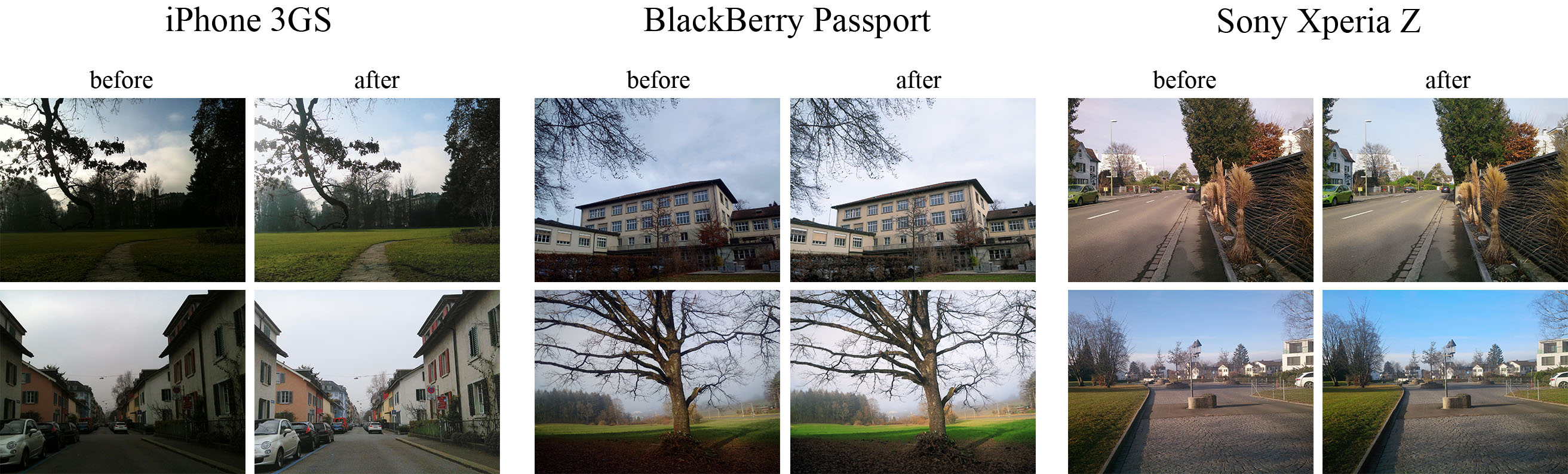
The provided code implements the paper that presents an end-to-end deep learning approach for translating ordinary photos from smartphones into DSLR-quality images. The learned model can be applied to photos of arbitrary resolution, while the methodology itself is generalized to any type of digital camera. More visual results can be found here.
- Python + Pillow, scipy, numpy, imageio packages
- TensorFlow 1.x / 2.x + CUDA CuDNN
- Nvidia GPU
- Download the pre-trained VGG-19 model and put it into
vgg_pretrained/folder - Download DPED dataset (patches for CNN training) and extract it into
dped/folder.
This folder should contain three subolders:sony/,iphone/andblackberry/
python train_model.py model=<model>Obligatory parameters:
model:iphone,blackberryorsony
Optional parameters and their default values:
batch_size:50- batch size [smaller values can lead to unstable training]train_size:30000- the number of training patches randomly loaded eacheval_stepiterationseval_step:1000- eacheval_stepiterations the model is saved and the training data is reloadednum_train_iters:20000- the number of training iterationslearning_rate:5e-4- learning ratew_content:10- the weight of the content lossw_color:0.5- the weight of the color lossw_texture:1- the weight of the texture [adversarial] lossw_tv:2000- the weight of the total variation lossdped_dir:dped/- path to the folder with DPED datasetvgg_dir:vgg_pretrained/imagenet-vgg-verydeep-19.mat- path to the pre-trained VGG-19 network
Example:
python train_model.py model=iphone batch_size=50 dped_dir=dped/ w_color=0.7python test_model.py model=<model>Obligatory parameters:
model:iphone_orig,blackberry_origorsony_orig
Optional parameters:
test_subset:full,small- all 29 or only 5 test images will be processedresolution:orig,high,medium,small,tiny- the resolution of the test images [origmeans original resolution]use_gpu:true,false- run models on GPU or CPUdped_dir:dped/- path to the folder with DPED dataset
Example:
python test_model.py model=iphone_orig test_subset=full resolution=orig use_gpu=truepython test_model.py model=<model>Obligatory parameters:
model:iphone,blackberryorsony
Optional parameters:
test_subset:full,small- all 29 or only 5 test images will be processediteration:allor<number>- get visual results for all iterations or for the specific iteration,<number>must be a multiple ofeval_stepresolution:orig,high,medium,small,tiny- the resolution of the test images [origmeans original resolution]use_gpu:true,false- run models on GPU or CPUdped_dir:dped/- path to the folder with DPED dataset
Example:
python test_model.py model=iphone iteration=13000 test_subset=full resolution=orig use_gpu=true
dped/- the folder with the DPED datasetmodels/- logs and models that are saved during the training processmodels_orig/- the provided pre-trained models foriphone,sonyandblackberryresults/- visual results for small image patches that are saved while trainingvgg-pretrained/- the folder with the pre-trained VGG-19 networkvisual_results/- processed [enhanced] test images
load_dataset.py- python script that loads training datamodels.py- architecture of the image enhancement [resnet] and adversarial networksssim.py- implementation of the ssim scoretrain_model.py- implementation of the training proceduretest_model.py- applying the pre-trained models to test imagesutils.py- auxiliary functionsvgg.py- loading the pre-trained vgg-19 network
What if I get an error: "OOM when allocating tensor with shape [...]"?
Your GPU does not have enough memory. If this happens during the training process:
- Decrease the size of the training batch [
batch_size]. Note however that smaller values can lead to unstable training.
If this happens while testing the models:
- Run the model on CPU (set the parameter
use_gputofalse). Note that this can take up to 5 minutes per image. - Use cropped images, set the parameter
resolutionto:
high- center crop of size1680x1260pixelsmedium- center crop of size1366x1024pixelssmall- center crop of size1024x768pixelstiny- center crop of size800x600pixels
The less resolution is - the smaller part of the image will be processed
@inproceedings{ignatov2017dslr,
title={DSLR-Quality Photos on Mobile Devices with Deep Convolutional Networks},
author={Ignatov, Andrey and Kobyshev, Nikolay and Timofte, Radu and Vanhoey, Kenneth and Van Gool, Luc},
booktitle={Proceedings of the IEEE International Conference on Computer Vision},
pages={3277--3285},
year={2017}
}
Please contact Andrey Ignatov (andrey.ignatoff@gmail.com) for more information