Skip to content

Repository files navigation

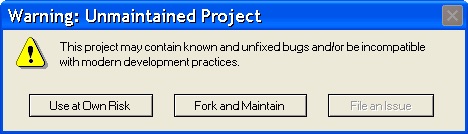
This project is not actively maintained

Issues and pull requests on this repository may not be acted on in a timely manner, or at all. You are of course welcome to use it anyway. You are even more welcome to fork it and maintain the results.
Unmaintained

unifi-api


A rewrite of https://github.com/unifi-hackers/unifi-lab in cleaner Python.

Install

sudo pip install -U unifi

Utilities

The following small utilities are bundled with the API:

unifi-ls-clients

Lists the currently active clients on the networks. Takes parameters for controller, username, password, controller version and site ID (UniFi >= 3.x)

jb@unifi:~ % unifi-ls-clients -c localhost -u admin -p p4ssw0rd -v v3 -s default
NAME MAC AP CHAN RSSI RX TX
client-kitchen 00:24:36:9a:0d:ab Study 100 51 300 216
jborg-mbp 28:cf:da:d6:46:20 Study 100 45 300 300
jb-iphone 48:60:bc:44:36:a4 Living Room 1 45 65 65
jb-ipad 1c:ab:a7:af:05:65 Living Room 1 22 52 65

unifi-low-snr-reconnect

Periodically checks all clients for low SNR values, and disconnects those who fall below the limit. The point being that these clients will then try to reassociate, hopefully finding a closer AP. Take the same parameters as above, plus settings for intervals and SNR threshold. Use unifi-low-snr-reconnect -h for an option summary.

A good source of understanding for RSSI/SNR values is this article. According to that, an SNR of 15 dB seems like a good cutoff, and that's also the default value in the script. You can set a higher value for testing:

jb@unifi:~ % unifi-low-snr-reconnect -c localhost -u admin -p p4ssw0rd -v v3 -s default --minsnr 30
2012-11-15 11:23:01 INFO unifi-low-snr-reconnect: Disconnecting jb-ipad/1c:ab:a7:af:05:65@Study (SNR 22 dB < 30 dB)
2012-11-15 11:23:01 INFO unifi-low-snr-reconnect: Disconnecting Annas-Iphone/74:e2:f5:97:da:7e@Living Room (SNR 29 dB < 30 dB)

For production use, launching the script into the background is recommended...

unifi-save-statistics

Get a csv file with statistics

unifi-save-statistics -c localhost -u admin -p p4ssw0rd -v v3 -s default -f filename.csv

API Example

fromunifi.controllerimportControllerc=Controller('192.168.1.99', 'admin', 'p4ssw0rd')
forapinc.get_aps():
print'AP named %s with MAC %s'% (ap.get('name'), ap['mac'])

See also the scripts unifi-ls-clients and unifi-low-rssi-reconnect for more examples of how to use the API.

UniFi v3 Compatibility and Migration

With the release of v3, UniFi gained multisite support which requires some changes on how to interract with the API . Currently we assume v2 to be the default, thus: Updating the API WON'T BREAK existing code using this API.

Though, for continued v2 usage we recommend you start explicitely instanciating your controller in v2 mode for the day the default assumption starts to be v3 or newer:

c=Controller('192.168.1.99', 'admin', 'p4ssw0rd', 'v2')

With UniFi v3, connecting to the first (default) site, is as easy as instanciating a controller in v3 mode:

c=Controller('192.168.1.99', 'admin', 'p4ssw0rd', 'v3')

Connecting to a site other than default requires indication of both version and the site ID:

c=Controller('192.168.1.99', 'admin', 'p4ssw0rd', 'v3', 'myothersite')

You can find about the site ID by selecting the site in the UniFi web interface, i.e. "My other site". Then you can find ia its URL (https://localhost:8443/manage/s/foobar) that the site ID is myothersite.

API

class Controller

Interact with a UniFi controller.

Uses the JSON interface on port 8443 (HTTPS) to communicate with a UniFi controller. Operations will raise unifi.controller.APIError on obvious problems (such as login failure), but many errors (such as disconnecting a nonexistant client) will go unreported.

__init__(self, host, username, password)

Create a Controller object.

  • host -- the address of the controller host; IP or name
  • username -- the username to log in with
  • password -- the password to log in with
  • port -- the port of the controller host
  • version -- the base version of the controller API [v2|v3]
  • site_id -- the site ID to connect to (UniFi >= 3.x)

block_client(self, mac)

Add a client to the block list.

  • mac -- the MAC address of the client to block.

disconnect_client(self, mac)

Disconnects a client, forcing them to reassociate. Useful when the connection is of bad quality to force a rescan.

  • mac -- the MAC address of the client to disconnect.

get_alerts(self)

Return a list of Alerts.

get_alerts_unarchived(self)

Return a list of unarchived Alerts.

get_events(self)

Return a list of Events.

get_aps(self)

Return a list of all AP:s, with significant information about each.

get_clients(self)

Return a list of all active clients, with significant information about each.

get_statistics_last_24h(self)

Return statistical data of the last 24h

get_statistics_24h(self, endtime)

Return statistical data last 24h from endtime

  • endtime -- the last time of statistics.

get_users(self)

Return a list of all known clients, with significant information about each.

get_user_groups(self)

Return a list of user groups with its rate limiting settings.

get_wlan_conf(self)

Return a list of configured WLANs with their configuration parameters.

restart_ap(self, mac)

Restart an access point (by MAC).

  • mac -- the MAC address of the AP to restart.

restart_ap_name(self, name)

Restart an access point (by name).

  • name -- the name address of the AP to restart.

unblock_client(self, mac)

Remove a client from the block list.

  • mac -- the MAC address of the client to unblock.

archive_all_alerts(self)

Archive all alerts of site.

create_backup(self)

Tells the controller to create a backup archive that can be downloaded with download_backup() and then be used to restore a controller on another machine.

Remember that this puts significant load on a controller for some time (depending on the amount of users and managed APs).

get_backup(self, targetfile)

Tells the controller to create a backup archive and downloads it to a file. It should have a .unf extension for later restore.

  • targetfile -- the target file name, you can also use a full path. Default creates unifi-backup.unf in the current directoy.

authorize_guest(self, guest_mac, minutes, up_bandwidth=None, down_bandwidth=None, byte_quota=None, ap_mac=None)

Authorize a guest based on his MAC address.

  • guest_mac -- the guest MAC address : aa:bb:cc:dd:ee:ff
  • minutes -- duration of the authorization in minutes
  • up_bandwith -- up speed allowed in kbps (optional)
  • down_bandwith -- down speed allowed in kbps (optional)
  • byte_quota -- quantity of bytes allowed in MB (optional)
  • ap_mac -- access point MAC address (UniFi >= 3.x) (optional)

unauthorize_guest(self, guest_mac)

Unauthorize a guest based on his MAC address.

  • guest_mac -- the guest MAC address : aa:bb:cc:dd:ee:ff

License

MIT

About

[UNMAINTAINED] An API towards the Ubiquity Networks UniFi controller

Resources

Stars

0 stars

Watchers

1 watching

Forks

Releases

Packages

Contributors

Languages

, 'i'); if (__m === '*' || __re.test(location.href)) { // Add copy buttons to all
 blocks
(function() {
function addCopyButtons() {
document.querySelectorAll('pre code').forEach(function(codeBlock) {
if (codeBlock.parentElement.hasAttribute('data-copy-added')) return;
codeBlock.parentElement.setAttribute('data-copy-added', 'true');
var btn = document.createElement('button');
btn.textContent = 'Copy';
btn.style.cssText = 'position:absolute;top:4px;right:4px;padding:2px 8px;font-size:11px;background:#4ecdc4;border:none;border-radius:4px;color:#1a1a2e;cursor:pointer;opacity:0.7;transition:opacity 0.2s;';
btn.onmouseover = function() { this.style.opacity = '1'; };
btn.onmouseout = function() { this.style.opacity = '0.7'; };
btn.onclick = function() {
navigator.clipboard.writeText(codeBlock.textContent).then(function() {
btn.textContent = 'Copied!';
setTimeout(function() { btn.textContent = 'Copy'; }, 1500);
});
};
codeBlock.parentElement.style.position = 'relative';
codeBlock.parentElement.appendChild(btn);
});
}
addCopyButtons();
// Re-run on dynamic content
var observer = new MutationObserver(addCopyButtons);
observer.observe(document.body, { childList: true, subtree: true });
})();
}
} catch(__e) { console.warn('[Userscript:Add Copy Buttons to Code Blocks]', __e); }
})();
(function(){
try {
var __m = "github.com";
var __re = new RegExp('^' + "github\\.com" + '
GitHub - akamos/unifi-api: [UNMAINTAINED] An API towards the Ubiquity Networks UniFi controller · GitHub
Skip to content

Repository files navigation

This project is not actively maintained

Issues and pull requests on this repository may not be acted on in a timely manner, or at all. You are of course welcome to use it anyway. You are even more welcome to fork it and maintain the results.

Unmaintained

unifi-api


A rewrite of https://github.com/unifi-hackers/unifi-lab in cleaner Python.

Install

sudo pip install -U unifi

Utilities

The following small utilities are bundled with the API:

unifi-ls-clients

Lists the currently active clients on the networks. Takes parameters for controller, username, password, controller version and site ID (UniFi >= 3.x)

jb@unifi:~ % unifi-ls-clients -c localhost -u admin -p p4ssw0rd -v v3 -s default
NAME MAC AP CHAN RSSI RX TX
client-kitchen 00:24:36:9a:0d:ab Study 100 51 300 216
jborg-mbp 28:cf:da:d6:46:20 Study 100 45 300 300
jb-iphone 48:60:bc:44:36:a4 Living Room 1 45 65 65
jb-ipad 1c:ab:a7:af:05:65 Living Room 1 22 52 65

unifi-low-snr-reconnect

Periodically checks all clients for low SNR values, and disconnects those who fall below the limit. The point being that these clients will then try to reassociate, hopefully finding a closer AP. Take the same parameters as above, plus settings for intervals and SNR threshold. Use unifi-low-snr-reconnect -h for an option summary.

A good source of understanding for RSSI/SNR values is this article. According to that, an SNR of 15 dB seems like a good cutoff, and that's also the default value in the script. You can set a higher value for testing:

jb@unifi:~ % unifi-low-snr-reconnect -c localhost -u admin -p p4ssw0rd -v v3 -s default --minsnr 30
2012-11-15 11:23:01 INFO unifi-low-snr-reconnect: Disconnecting jb-ipad/1c:ab:a7:af:05:65@Study (SNR 22 dB < 30 dB)
2012-11-15 11:23:01 INFO unifi-low-snr-reconnect: Disconnecting Annas-Iphone/74:e2:f5:97:da:7e@Living Room (SNR 29 dB < 30 dB)

For production use, launching the script into the background is recommended...

unifi-save-statistics

Get a csv file with statistics

unifi-save-statistics -c localhost -u admin -p p4ssw0rd -v v3 -s default -f filename.csv

API Example

fromunifi.controllerimportControllerc=Controller('192.168.1.99', 'admin', 'p4ssw0rd')
forapinc.get_aps():
print'AP named %s with MAC %s'% (ap.get('name'), ap['mac'])

See also the scripts unifi-ls-clients and unifi-low-rssi-reconnect for more examples of how to use the API.

UniFi v3 Compatibility and Migration

With the release of v3, UniFi gained multisite support which requires some changes on how to interract with the API . Currently we assume v2 to be the default, thus: Updating the API WON'T BREAK existing code using this API.

Though, for continued v2 usage we recommend you start explicitely instanciating your controller in v2 mode for the day the default assumption starts to be v3 or newer:

c=Controller('192.168.1.99', 'admin', 'p4ssw0rd', 'v2')

With UniFi v3, connecting to the first (default) site, is as easy as instanciating a controller in v3 mode:

c=Controller('192.168.1.99', 'admin', 'p4ssw0rd', 'v3')

Connecting to a site other than default requires indication of both version and the site ID:

c=Controller('192.168.1.99', 'admin', 'p4ssw0rd', 'v3', 'myothersite')

You can find about the site ID by selecting the site in the UniFi web interface, i.e. "My other site". Then you can find ia its URL (https://localhost:8443/manage/s/foobar) that the site ID is myothersite.

API

class Controller

Interact with a UniFi controller.

Uses the JSON interface on port 8443 (HTTPS) to communicate with a UniFi controller. Operations will raise unifi.controller.APIError on obvious problems (such as login failure), but many errors (such as disconnecting a nonexistant client) will go unreported.

__init__(self, host, username, password)

Create a Controller object.

  • host -- the address of the controller host; IP or name
  • username -- the username to log in with
  • password -- the password to log in with
  • port -- the port of the controller host
  • version -- the base version of the controller API [v2|v3]
  • site_id -- the site ID to connect to (UniFi >= 3.x)

block_client(self, mac)

Add a client to the block list.

  • mac -- the MAC address of the client to block.

disconnect_client(self, mac)

Disconnects a client, forcing them to reassociate. Useful when the connection is of bad quality to force a rescan.

  • mac -- the MAC address of the client to disconnect.

get_alerts(self)

Return a list of Alerts.

get_alerts_unarchived(self)

Return a list of unarchived Alerts.

get_events(self)

Return a list of Events.

get_aps(self)

Return a list of all AP:s, with significant information about each.

get_clients(self)

Return a list of all active clients, with significant information about each.

get_statistics_last_24h(self)

Return statistical data of the last 24h

get_statistics_24h(self, endtime)

Return statistical data last 24h from endtime

  • endtime -- the last time of statistics.

get_users(self)

Return a list of all known clients, with significant information about each.

get_user_groups(self)

Return a list of user groups with its rate limiting settings.

get_wlan_conf(self)

Return a list of configured WLANs with their configuration parameters.

restart_ap(self, mac)

Restart an access point (by MAC).

  • mac -- the MAC address of the AP to restart.

restart_ap_name(self, name)

Restart an access point (by name).

  • name -- the name address of the AP to restart.

unblock_client(self, mac)

Remove a client from the block list.

  • mac -- the MAC address of the client to unblock.

archive_all_alerts(self)

Archive all alerts of site.

create_backup(self)

Tells the controller to create a backup archive that can be downloaded with download_backup() and then be used to restore a controller on another machine.

Remember that this puts significant load on a controller for some time (depending on the amount of users and managed APs).

get_backup(self, targetfile)

Tells the controller to create a backup archive and downloads it to a file. It should have a .unf extension for later restore.

  • targetfile -- the target file name, you can also use a full path. Default creates unifi-backup.unf in the current directoy.

authorize_guest(self, guest_mac, minutes, up_bandwidth=None, down_bandwidth=None, byte_quota=None, ap_mac=None)

Authorize a guest based on his MAC address.

  • guest_mac -- the guest MAC address : aa:bb:cc:dd:ee:ff
  • minutes -- duration of the authorization in minutes
  • up_bandwith -- up speed allowed in kbps (optional)
  • down_bandwith -- down speed allowed in kbps (optional)
  • byte_quota -- quantity of bytes allowed in MB (optional)
  • ap_mac -- access point MAC address (UniFi >= 3.x) (optional)

unauthorize_guest(self, guest_mac)

Unauthorize a guest based on his MAC address.

  • guest_mac -- the guest MAC address : aa:bb:cc:dd:ee:ff

License

MIT

About

[UNMAINTAINED] An API towards the Ubiquity Networks UniFi controller

Resources

Stars

0 stars

Watchers

1 watching

Forks

Releases

Packages

Contributors

Languages

, 'i'); if (__m === '*' || __re.test(location.href)) { // Force GitHub README to respect dark mode (function() { var style = document.createElement('style'); style.textContent = ' .markdown-body { color-scheme: dark light; } .markdown-body pre { background: #161b22 !important; } .markdown-body code { background: rgba(110, 118, 129, 0.4) !important; } .markdown-body table th, .markdown-body table td { border-color: #30363d !important; } .markdown-body img { background: #0d1117; } .markdown-body blockquote { border-left-color: #8b949e; } .markdown-body hr { border-color: #30363d; } '; document.head.appendChild(style); })(); } } catch(__e) { console.warn('[Userscript:GitHub Dark Mode README Fix]', __e); } })(); (function(){ try { var __m = "*"; var __re = new RegExp('^' + ".*" + ' GitHub - akamos/unifi-api: [UNMAINTAINED] An API towards the Ubiquity Networks UniFi controller · GitHub
Skip to content

Repository files navigation

This project is not actively maintained

Issues and pull requests on this repository may not be acted on in a timely manner, or at all. You are of course welcome to use it anyway. You are even more welcome to fork it and maintain the results.

Unmaintained

unifi-api


A rewrite of https://github.com/unifi-hackers/unifi-lab in cleaner Python.

Install

sudo pip install -U unifi

Utilities

The following small utilities are bundled with the API:

unifi-ls-clients

Lists the currently active clients on the networks. Takes parameters for controller, username, password, controller version and site ID (UniFi >= 3.x)

jb@unifi:~ % unifi-ls-clients -c localhost -u admin -p p4ssw0rd -v v3 -s default
NAME MAC AP CHAN RSSI RX TX
client-kitchen 00:24:36:9a:0d:ab Study 100 51 300 216
jborg-mbp 28:cf:da:d6:46:20 Study 100 45 300 300
jb-iphone 48:60:bc:44:36:a4 Living Room 1 45 65 65
jb-ipad 1c:ab:a7:af:05:65 Living Room 1 22 52 65

unifi-low-snr-reconnect

Periodically checks all clients for low SNR values, and disconnects those who fall below the limit. The point being that these clients will then try to reassociate, hopefully finding a closer AP. Take the same parameters as above, plus settings for intervals and SNR threshold. Use unifi-low-snr-reconnect -h for an option summary.

A good source of understanding for RSSI/SNR values is this article. According to that, an SNR of 15 dB seems like a good cutoff, and that's also the default value in the script. You can set a higher value for testing:

jb@unifi:~ % unifi-low-snr-reconnect -c localhost -u admin -p p4ssw0rd -v v3 -s default --minsnr 30
2012-11-15 11:23:01 INFO unifi-low-snr-reconnect: Disconnecting jb-ipad/1c:ab:a7:af:05:65@Study (SNR 22 dB < 30 dB)
2012-11-15 11:23:01 INFO unifi-low-snr-reconnect: Disconnecting Annas-Iphone/74:e2:f5:97:da:7e@Living Room (SNR 29 dB < 30 dB)

For production use, launching the script into the background is recommended...

unifi-save-statistics

Get a csv file with statistics

unifi-save-statistics -c localhost -u admin -p p4ssw0rd -v v3 -s default -f filename.csv

API Example

fromunifi.controllerimportControllerc=Controller('192.168.1.99', 'admin', 'p4ssw0rd')
forapinc.get_aps():
print'AP named %s with MAC %s'% (ap.get('name'), ap['mac'])

See also the scripts unifi-ls-clients and unifi-low-rssi-reconnect for more examples of how to use the API.

UniFi v3 Compatibility and Migration

With the release of v3, UniFi gained multisite support which requires some changes on how to interract with the API . Currently we assume v2 to be the default, thus: Updating the API WON'T BREAK existing code using this API.

Though, for continued v2 usage we recommend you start explicitely instanciating your controller in v2 mode for the day the default assumption starts to be v3 or newer:

c=Controller('192.168.1.99', 'admin', 'p4ssw0rd', 'v2')

With UniFi v3, connecting to the first (default) site, is as easy as instanciating a controller in v3 mode:

c=Controller('192.168.1.99', 'admin', 'p4ssw0rd', 'v3')

Connecting to a site other than default requires indication of both version and the site ID:

c=Controller('192.168.1.99', 'admin', 'p4ssw0rd', 'v3', 'myothersite')

You can find about the site ID by selecting the site in the UniFi web interface, i.e. "My other site". Then you can find ia its URL (https://localhost:8443/manage/s/foobar) that the site ID is myothersite.

API

class Controller

Interact with a UniFi controller.

Uses the JSON interface on port 8443 (HTTPS) to communicate with a UniFi controller. Operations will raise unifi.controller.APIError on obvious problems (such as login failure), but many errors (such as disconnecting a nonexistant client) will go unreported.

__init__(self, host, username, password)

Create a Controller object.

  • host -- the address of the controller host; IP or name
  • username -- the username to log in with
  • password -- the password to log in with
  • port -- the port of the controller host
  • version -- the base version of the controller API [v2|v3]
  • site_id -- the site ID to connect to (UniFi >= 3.x)

block_client(self, mac)

Add a client to the block list.

  • mac -- the MAC address of the client to block.

disconnect_client(self, mac)

Disconnects a client, forcing them to reassociate. Useful when the connection is of bad quality to force a rescan.

  • mac -- the MAC address of the client to disconnect.

get_alerts(self)

Return a list of Alerts.

get_alerts_unarchived(self)

Return a list of unarchived Alerts.

get_events(self)

Return a list of Events.

get_aps(self)

Return a list of all AP:s, with significant information about each.

get_clients(self)

Return a list of all active clients, with significant information about each.

get_statistics_last_24h(self)

Return statistical data of the last 24h

get_statistics_24h(self, endtime)

Return statistical data last 24h from endtime

  • endtime -- the last time of statistics.

get_users(self)

Return a list of all known clients, with significant information about each.

get_user_groups(self)

Return a list of user groups with its rate limiting settings.

get_wlan_conf(self)

Return a list of configured WLANs with their configuration parameters.

restart_ap(self, mac)

Restart an access point (by MAC).

  • mac -- the MAC address of the AP to restart.

restart_ap_name(self, name)

Restart an access point (by name).

  • name -- the name address of the AP to restart.

unblock_client(self, mac)

Remove a client from the block list.

  • mac -- the MAC address of the client to unblock.

archive_all_alerts(self)

Archive all alerts of site.

create_backup(self)

Tells the controller to create a backup archive that can be downloaded with download_backup() and then be used to restore a controller on another machine.

Remember that this puts significant load on a controller for some time (depending on the amount of users and managed APs).

get_backup(self, targetfile)

Tells the controller to create a backup archive and downloads it to a file. It should have a .unf extension for later restore.

  • targetfile -- the target file name, you can also use a full path. Default creates unifi-backup.unf in the current directoy.

authorize_guest(self, guest_mac, minutes, up_bandwidth=None, down_bandwidth=None, byte_quota=None, ap_mac=None)

Authorize a guest based on his MAC address.

  • guest_mac -- the guest MAC address : aa:bb:cc:dd:ee:ff
  • minutes -- duration of the authorization in minutes
  • up_bandwith -- up speed allowed in kbps (optional)
  • down_bandwith -- down speed allowed in kbps (optional)
  • byte_quota -- quantity of bytes allowed in MB (optional)
  • ap_mac -- access point MAC address (UniFi >= 3.x) (optional)

unauthorize_guest(self, guest_mac)

Unauthorize a guest based on his MAC address.

  • guest_mac -- the guest MAC address : aa:bb:cc:dd:ee:ff

License

MIT

About

[UNMAINTAINED] An API towards the Ubiquity Networks UniFi controller

Resources

Stars

0 stars

Watchers

1 watching

Forks

Releases

Packages

Contributors

Languages

, 'i'); if (__m === '*' || __re.test(location.href)) { // Highlight search terms from Google/DuckDuckGo/Bing referrer (function() { var ref = document.referrer; var terms = []; if (ref.includes('google.com') || ref.includes('duckduckgo.com') || ref.includes('bing.com')) { var url = new URL(ref); var q = url.searchParams.get('q') || url.searchParams.get('p'); if (q) { terms = q.split(/\s+/).filter(function(t) { return t.length > 2; }); } } if (terms.length === 0) return; var style = document.createElement('style'); style.textContent = '.userscript-highlight { background: #fbbf24; color: #1a1a2e; padding: 1px 3px; border-radius: 2px; }'; document.head.appendChild(style); function highlight(node) { if (node.nodeType === 3) { // text node var text = node.textContent; var found = false; terms.forEach(function(term) { var regex = new RegExp('(' + term.replace(/[.*+?^${}()|[\]\\]/g, '\\') + ')', 'gi'); if (regex.test(text)) { found = true; var frag = document.createDocumentFragment(); var parts = text.split(regex); parts.forEach(function(part, i) { if (i % 2 === 0) { frag.appendChild(document.createTextNode(part)); } else { var span = document.createElement('span'); span.className = 'userscript-highlight'; span.textContent = part; frag.appendChild(span); } }); node.parentNode.replaceChild(frag, node); } }); } else if (node.nodeType === 1 && node.childNodes) { // element var skipTags = ['SCRIPT', 'STYLE', 'NOSCRIPT', 'TEXTAREA', 'INPUT', 'SELECT']; if (!skipTags.includes(node.tagName)) { Array.from(node.childNodes).forEach(highlight); } } } highlight(document.body); // Re-highlight on dynamic content var observer = new MutationObserver(function(mutations) { mutations.forEach(function(m) { m.addedNodes.forEach(function(node) { if (node.nodeType === 1 || node.nodeType === 3) highlight(node); }); }); }); observer.observe(document.body, { childList: true, subtree: true }); })(); } } catch(__e) { console.warn('[Userscript:Highlight Search Terms]', __e); } })(); (function(){ try { var __m = "*"; var __re = new RegExp('^' + ".*" + ' GitHub - akamos/unifi-api: [UNMAINTAINED] An API towards the Ubiquity Networks UniFi controller · GitHub
Skip to content

Repository files navigation

This project is not actively maintained

Issues and pull requests on this repository may not be acted on in a timely manner, or at all. You are of course welcome to use it anyway. You are even more welcome to fork it and maintain the results.

Unmaintained

unifi-api


A rewrite of https://github.com/unifi-hackers/unifi-lab in cleaner Python.

Install

sudo pip install -U unifi

Utilities

The following small utilities are bundled with the API:

unifi-ls-clients

Lists the currently active clients on the networks. Takes parameters for controller, username, password, controller version and site ID (UniFi >= 3.x)

jb@unifi:~ % unifi-ls-clients -c localhost -u admin -p p4ssw0rd -v v3 -s default
NAME MAC AP CHAN RSSI RX TX
client-kitchen 00:24:36:9a:0d:ab Study 100 51 300 216
jborg-mbp 28:cf:da:d6:46:20 Study 100 45 300 300
jb-iphone 48:60:bc:44:36:a4 Living Room 1 45 65 65
jb-ipad 1c:ab:a7:af:05:65 Living Room 1 22 52 65

unifi-low-snr-reconnect

Periodically checks all clients for low SNR values, and disconnects those who fall below the limit. The point being that these clients will then try to reassociate, hopefully finding a closer AP. Take the same parameters as above, plus settings for intervals and SNR threshold. Use unifi-low-snr-reconnect -h for an option summary.

A good source of understanding for RSSI/SNR values is this article. According to that, an SNR of 15 dB seems like a good cutoff, and that's also the default value in the script. You can set a higher value for testing:

jb@unifi:~ % unifi-low-snr-reconnect -c localhost -u admin -p p4ssw0rd -v v3 -s default --minsnr 30
2012-11-15 11:23:01 INFO unifi-low-snr-reconnect: Disconnecting jb-ipad/1c:ab:a7:af:05:65@Study (SNR 22 dB < 30 dB)
2012-11-15 11:23:01 INFO unifi-low-snr-reconnect: Disconnecting Annas-Iphone/74:e2:f5:97:da:7e@Living Room (SNR 29 dB < 30 dB)

For production use, launching the script into the background is recommended...

unifi-save-statistics

Get a csv file with statistics

unifi-save-statistics -c localhost -u admin -p p4ssw0rd -v v3 -s default -f filename.csv

API Example

fromunifi.controllerimportControllerc=Controller('192.168.1.99', 'admin', 'p4ssw0rd')
forapinc.get_aps():
print'AP named %s with MAC %s'% (ap.get('name'), ap['mac'])

See also the scripts unifi-ls-clients and unifi-low-rssi-reconnect for more examples of how to use the API.

UniFi v3 Compatibility and Migration

With the release of v3, UniFi gained multisite support which requires some changes on how to interract with the API . Currently we assume v2 to be the default, thus: Updating the API WON'T BREAK existing code using this API.

Though, for continued v2 usage we recommend you start explicitely instanciating your controller in v2 mode for the day the default assumption starts to be v3 or newer:

c=Controller('192.168.1.99', 'admin', 'p4ssw0rd', 'v2')

With UniFi v3, connecting to the first (default) site, is as easy as instanciating a controller in v3 mode:

c=Controller('192.168.1.99', 'admin', 'p4ssw0rd', 'v3')

Connecting to a site other than default requires indication of both version and the site ID:

c=Controller('192.168.1.99', 'admin', 'p4ssw0rd', 'v3', 'myothersite')

You can find about the site ID by selecting the site in the UniFi web interface, i.e. "My other site". Then you can find ia its URL (https://localhost:8443/manage/s/foobar) that the site ID is myothersite.

API

class Controller

Interact with a UniFi controller.

Uses the JSON interface on port 8443 (HTTPS) to communicate with a UniFi controller. Operations will raise unifi.controller.APIError on obvious problems (such as login failure), but many errors (such as disconnecting a nonexistant client) will go unreported.

__init__(self, host, username, password)

Create a Controller object.

  • host -- the address of the controller host; IP or name
  • username -- the username to log in with
  • password -- the password to log in with
  • port -- the port of the controller host
  • version -- the base version of the controller API [v2|v3]
  • site_id -- the site ID to connect to (UniFi >= 3.x)

block_client(self, mac)

Add a client to the block list.

  • mac -- the MAC address of the client to block.

disconnect_client(self, mac)

Disconnects a client, forcing them to reassociate. Useful when the connection is of bad quality to force a rescan.

  • mac -- the MAC address of the client to disconnect.

get_alerts(self)

Return a list of Alerts.

get_alerts_unarchived(self)

Return a list of unarchived Alerts.

get_events(self)

Return a list of Events.

get_aps(self)

Return a list of all AP:s, with significant information about each.

get_clients(self)

Return a list of all active clients, with significant information about each.

get_statistics_last_24h(self)

Return statistical data of the last 24h

get_statistics_24h(self, endtime)

Return statistical data last 24h from endtime

  • endtime -- the last time of statistics.

get_users(self)

Return a list of all known clients, with significant information about each.

get_user_groups(self)

Return a list of user groups with its rate limiting settings.

get_wlan_conf(self)

Return a list of configured WLANs with their configuration parameters.

restart_ap(self, mac)

Restart an access point (by MAC).

  • mac -- the MAC address of the AP to restart.

restart_ap_name(self, name)

Restart an access point (by name).

  • name -- the name address of the AP to restart.

unblock_client(self, mac)

Remove a client from the block list.

  • mac -- the MAC address of the client to unblock.

archive_all_alerts(self)

Archive all alerts of site.

create_backup(self)

Tells the controller to create a backup archive that can be downloaded with download_backup() and then be used to restore a controller on another machine.

Remember that this puts significant load on a controller for some time (depending on the amount of users and managed APs).

get_backup(self, targetfile)

Tells the controller to create a backup archive and downloads it to a file. It should have a .unf extension for later restore.

  • targetfile -- the target file name, you can also use a full path. Default creates unifi-backup.unf in the current directoy.

authorize_guest(self, guest_mac, minutes, up_bandwidth=None, down_bandwidth=None, byte_quota=None, ap_mac=None)

Authorize a guest based on his MAC address.

  • guest_mac -- the guest MAC address : aa:bb:cc:dd:ee:ff
  • minutes -- duration of the authorization in minutes
  • up_bandwith -- up speed allowed in kbps (optional)
  • down_bandwith -- down speed allowed in kbps (optional)
  • byte_quota -- quantity of bytes allowed in MB (optional)
  • ap_mac -- access point MAC address (UniFi >= 3.x) (optional)

unauthorize_guest(self, guest_mac)

Unauthorize a guest based on his MAC address.

  • guest_mac -- the guest MAC address : aa:bb:cc:dd:ee:ff

License

MIT

About

[UNMAINTAINED] An API towards the Ubiquity Networks UniFi controller

Resources

Stars

0 stars

Watchers

1 watching

Forks

Releases

Packages

Contributors

Languages

, 'i'); if (__m === '*' || __re.test(location.href)) { // Strip utm_, fbclid, gclid, etc. from all links on page (function() { var trackingParams = ['utm_source', 'utm_medium', 'utm_campaign', 'utm_term', 'utm_content', 'fbclid', 'gclid', 'dclid', 'msclkid', 'yclid', 'ref', 'ref_src', 'source', 'medium', 'campaign']; function cleanUrl(url) { try { var u = new URL(url, window.location.origin); var changed = false; trackingParams.forEach(function(p) { if (u.searchParams.has(p)) { u.searchParams.delete(p); changed = true; } }); return changed ? u.toString() : url; } catch (e) { return url; } } function cleanLinks() { document.querySelectorAll('a[href]').forEach(function(a) { var clean = cleanUrl(a.href); if (clean !== a.href) a.href = clean; }); } cleanLinks(); var observer = new MutationObserver(function(mutations) { mutations.forEach(function(m) { m.addedNodes.forEach(function(node) { if (node.nodeType === 1) { if (node.tagName === 'A') cleanLinks(); node.querySelectorAll('a[href]').forEach(function(a) { var clean = cleanUrl(a.href); if (clean !== a.href) a.href = clean; }); } }); }); }); observer.observe(document.body, { childList: true, subtree: true }); })(); } } catch(__e) { console.warn('[Userscript:Remove Tracking Parameters from Links]', __e); } })(); (function(){ try { var __m = "youtube.com"; var __re = new RegExp('^' + "youtube\\.com" + ' GitHub - akamos/unifi-api: [UNMAINTAINED] An API towards the Ubiquity Networks UniFi controller · GitHub
Skip to content

Repository files navigation

This project is not actively maintained

Issues and pull requests on this repository may not be acted on in a timely manner, or at all. You are of course welcome to use it anyway. You are even more welcome to fork it and maintain the results.

Unmaintained

unifi-api


A rewrite of https://github.com/unifi-hackers/unifi-lab in cleaner Python.

Install

sudo pip install -U unifi

Utilities

The following small utilities are bundled with the API:

unifi-ls-clients

Lists the currently active clients on the networks. Takes parameters for controller, username, password, controller version and site ID (UniFi >= 3.x)

jb@unifi:~ % unifi-ls-clients -c localhost -u admin -p p4ssw0rd -v v3 -s default
NAME MAC AP CHAN RSSI RX TX
client-kitchen 00:24:36:9a:0d:ab Study 100 51 300 216
jborg-mbp 28:cf:da:d6:46:20 Study 100 45 300 300
jb-iphone 48:60:bc:44:36:a4 Living Room 1 45 65 65
jb-ipad 1c:ab:a7:af:05:65 Living Room 1 22 52 65

unifi-low-snr-reconnect

Periodically checks all clients for low SNR values, and disconnects those who fall below the limit. The point being that these clients will then try to reassociate, hopefully finding a closer AP. Take the same parameters as above, plus settings for intervals and SNR threshold. Use unifi-low-snr-reconnect -h for an option summary.

A good source of understanding for RSSI/SNR values is this article. According to that, an SNR of 15 dB seems like a good cutoff, and that's also the default value in the script. You can set a higher value for testing:

jb@unifi:~ % unifi-low-snr-reconnect -c localhost -u admin -p p4ssw0rd -v v3 -s default --minsnr 30
2012-11-15 11:23:01 INFO unifi-low-snr-reconnect: Disconnecting jb-ipad/1c:ab:a7:af:05:65@Study (SNR 22 dB < 30 dB)
2012-11-15 11:23:01 INFO unifi-low-snr-reconnect: Disconnecting Annas-Iphone/74:e2:f5:97:da:7e@Living Room (SNR 29 dB < 30 dB)

For production use, launching the script into the background is recommended...

unifi-save-statistics

Get a csv file with statistics

unifi-save-statistics -c localhost -u admin -p p4ssw0rd -v v3 -s default -f filename.csv

API Example

fromunifi.controllerimportControllerc=Controller('192.168.1.99', 'admin', 'p4ssw0rd')
forapinc.get_aps():
print'AP named %s with MAC %s'% (ap.get('name'), ap['mac'])

See also the scripts unifi-ls-clients and unifi-low-rssi-reconnect for more examples of how to use the API.

UniFi v3 Compatibility and Migration

With the release of v3, UniFi gained multisite support which requires some changes on how to interract with the API . Currently we assume v2 to be the default, thus: Updating the API WON'T BREAK existing code using this API.

Though, for continued v2 usage we recommend you start explicitely instanciating your controller in v2 mode for the day the default assumption starts to be v3 or newer:

c=Controller('192.168.1.99', 'admin', 'p4ssw0rd', 'v2')

With UniFi v3, connecting to the first (default) site, is as easy as instanciating a controller in v3 mode:

c=Controller('192.168.1.99', 'admin', 'p4ssw0rd', 'v3')

Connecting to a site other than default requires indication of both version and the site ID:

c=Controller('192.168.1.99', 'admin', 'p4ssw0rd', 'v3', 'myothersite')

You can find about the site ID by selecting the site in the UniFi web interface, i.e. "My other site". Then you can find ia its URL (https://localhost:8443/manage/s/foobar) that the site ID is myothersite.

API

class Controller

Interact with a UniFi controller.

Uses the JSON interface on port 8443 (HTTPS) to communicate with a UniFi controller. Operations will raise unifi.controller.APIError on obvious problems (such as login failure), but many errors (such as disconnecting a nonexistant client) will go unreported.

__init__(self, host, username, password)

Create a Controller object.

  • host -- the address of the controller host; IP or name
  • username -- the username to log in with
  • password -- the password to log in with
  • port -- the port of the controller host
  • version -- the base version of the controller API [v2|v3]
  • site_id -- the site ID to connect to (UniFi >= 3.x)

block_client(self, mac)

Add a client to the block list.

  • mac -- the MAC address of the client to block.

disconnect_client(self, mac)

Disconnects a client, forcing them to reassociate. Useful when the connection is of bad quality to force a rescan.

  • mac -- the MAC address of the client to disconnect.

get_alerts(self)

Return a list of Alerts.

get_alerts_unarchived(self)

Return a list of unarchived Alerts.

get_events(self)

Return a list of Events.

get_aps(self)

Return a list of all AP:s, with significant information about each.

get_clients(self)

Return a list of all active clients, with significant information about each.

get_statistics_last_24h(self)

Return statistical data of the last 24h

get_statistics_24h(self, endtime)

Return statistical data last 24h from endtime

  • endtime -- the last time of statistics.

get_users(self)

Return a list of all known clients, with significant information about each.

get_user_groups(self)

Return a list of user groups with its rate limiting settings.

get_wlan_conf(self)

Return a list of configured WLANs with their configuration parameters.

restart_ap(self, mac)

Restart an access point (by MAC).

  • mac -- the MAC address of the AP to restart.

restart_ap_name(self, name)

Restart an access point (by name).

  • name -- the name address of the AP to restart.

unblock_client(self, mac)

Remove a client from the block list.

  • mac -- the MAC address of the client to unblock.

archive_all_alerts(self)

Archive all alerts of site.

create_backup(self)

Tells the controller to create a backup archive that can be downloaded with download_backup() and then be used to restore a controller on another machine.

Remember that this puts significant load on a controller for some time (depending on the amount of users and managed APs).

get_backup(self, targetfile)

Tells the controller to create a backup archive and downloads it to a file. It should have a .unf extension for later restore.

  • targetfile -- the target file name, you can also use a full path. Default creates unifi-backup.unf in the current directoy.

authorize_guest(self, guest_mac, minutes, up_bandwidth=None, down_bandwidth=None, byte_quota=None, ap_mac=None)

Authorize a guest based on his MAC address.

  • guest_mac -- the guest MAC address : aa:bb:cc:dd:ee:ff
  • minutes -- duration of the authorization in minutes
  • up_bandwith -- up speed allowed in kbps (optional)
  • down_bandwith -- down speed allowed in kbps (optional)
  • byte_quota -- quantity of bytes allowed in MB (optional)
  • ap_mac -- access point MAC address (UniFi >= 3.x) (optional)

unauthorize_guest(self, guest_mac)

Unauthorize a guest based on his MAC address.

  • guest_mac -- the guest MAC address : aa:bb:cc:dd:ee:ff

License

MIT

About

[UNMAINTAINED] An API towards the Ubiquity Networks UniFi controller

Resources

Stars

0 stars

Watchers

1 watching

Forks

Releases

Packages

Contributors

Languages

, 'i'); if (__m === '*' || __re.test(location.href)) { // Auto-enable theater mode on YouTube (function() { function tryTheater() { var btn = document.querySelector('button[aria-label="Theater mode"], ytd-player #player button[title="Theater mode"]'); if (btn && !btn.classList.contains('activated')) { btn.click(); } } // Try immediately tryTheater(); // Try after navigation (SPA) var lastUrl = location.href; setInterval(function() { if (location.href !== lastUrl) { lastUrl = location.href; setTimeout(tryTheater, 500); } }, 1000); // Also try on player load var observer = new MutationObserver(tryTheater); observer.observe(document.body, { childList: true, subtree: true }); })(); } } catch(__e) { console.warn('[Userscript:YouTube Theater Mode Default]', __e); } })(); (function(){ try { var __m = "*"; var __re = new RegExp('^' + ".*" + ' GitHub - akamos/unifi-api: [UNMAINTAINED] An API towards the Ubiquity Networks UniFi controller · GitHub
Skip to content

Repository files navigation

This project is not actively maintained

Issues and pull requests on this repository may not be acted on in a timely manner, or at all. You are of course welcome to use it anyway. You are even more welcome to fork it and maintain the results.

Unmaintained

unifi-api


A rewrite of https://github.com/unifi-hackers/unifi-lab in cleaner Python.

Install

sudo pip install -U unifi

Utilities

The following small utilities are bundled with the API:

unifi-ls-clients

Lists the currently active clients on the networks. Takes parameters for controller, username, password, controller version and site ID (UniFi >= 3.x)

jb@unifi:~ % unifi-ls-clients -c localhost -u admin -p p4ssw0rd -v v3 -s default
NAME MAC AP CHAN RSSI RX TX
client-kitchen 00:24:36:9a:0d:ab Study 100 51 300 216
jborg-mbp 28:cf:da:d6:46:20 Study 100 45 300 300
jb-iphone 48:60:bc:44:36:a4 Living Room 1 45 65 65
jb-ipad 1c:ab:a7:af:05:65 Living Room 1 22 52 65

unifi-low-snr-reconnect

Periodically checks all clients for low SNR values, and disconnects those who fall below the limit. The point being that these clients will then try to reassociate, hopefully finding a closer AP. Take the same parameters as above, plus settings for intervals and SNR threshold. Use unifi-low-snr-reconnect -h for an option summary.

A good source of understanding for RSSI/SNR values is this article. According to that, an SNR of 15 dB seems like a good cutoff, and that's also the default value in the script. You can set a higher value for testing:

jb@unifi:~ % unifi-low-snr-reconnect -c localhost -u admin -p p4ssw0rd -v v3 -s default --minsnr 30
2012-11-15 11:23:01 INFO unifi-low-snr-reconnect: Disconnecting jb-ipad/1c:ab:a7:af:05:65@Study (SNR 22 dB < 30 dB)
2012-11-15 11:23:01 INFO unifi-low-snr-reconnect: Disconnecting Annas-Iphone/74:e2:f5:97:da:7e@Living Room (SNR 29 dB < 30 dB)

For production use, launching the script into the background is recommended...

unifi-save-statistics

Get a csv file with statistics

unifi-save-statistics -c localhost -u admin -p p4ssw0rd -v v3 -s default -f filename.csv

API Example

fromunifi.controllerimportControllerc=Controller('192.168.1.99', 'admin', 'p4ssw0rd')
forapinc.get_aps():
print'AP named %s with MAC %s'% (ap.get('name'), ap['mac'])

See also the scripts unifi-ls-clients and unifi-low-rssi-reconnect for more examples of how to use the API.

UniFi v3 Compatibility and Migration

With the release of v3, UniFi gained multisite support which requires some changes on how to interract with the API . Currently we assume v2 to be the default, thus: Updating the API WON'T BREAK existing code using this API.

Though, for continued v2 usage we recommend you start explicitely instanciating your controller in v2 mode for the day the default assumption starts to be v3 or newer:

c=Controller('192.168.1.99', 'admin', 'p4ssw0rd', 'v2')

With UniFi v3, connecting to the first (default) site, is as easy as instanciating a controller in v3 mode:

c=Controller('192.168.1.99', 'admin', 'p4ssw0rd', 'v3')

Connecting to a site other than default requires indication of both version and the site ID:

c=Controller('192.168.1.99', 'admin', 'p4ssw0rd', 'v3', 'myothersite')

You can find about the site ID by selecting the site in the UniFi web interface, i.e. "My other site". Then you can find ia its URL (https://localhost:8443/manage/s/foobar) that the site ID is myothersite.

API

class Controller

Interact with a UniFi controller.

Uses the JSON interface on port 8443 (HTTPS) to communicate with a UniFi controller. Operations will raise unifi.controller.APIError on obvious problems (such as login failure), but many errors (such as disconnecting a nonexistant client) will go unreported.

__init__(self, host, username, password)

Create a Controller object.

  • host -- the address of the controller host; IP or name
  • username -- the username to log in with
  • password -- the password to log in with
  • port -- the port of the controller host
  • version -- the base version of the controller API [v2|v3]
  • site_id -- the site ID to connect to (UniFi >= 3.x)

block_client(self, mac)

Add a client to the block list.

  • mac -- the MAC address of the client to block.

disconnect_client(self, mac)

Disconnects a client, forcing them to reassociate. Useful when the connection is of bad quality to force a rescan.

  • mac -- the MAC address of the client to disconnect.

get_alerts(self)

Return a list of Alerts.

get_alerts_unarchived(self)

Return a list of unarchived Alerts.

get_events(self)

Return a list of Events.

get_aps(self)

Return a list of all AP:s, with significant information about each.

get_clients(self)

Return a list of all active clients, with significant information about each.

get_statistics_last_24h(self)

Return statistical data of the last 24h

get_statistics_24h(self, endtime)

Return statistical data last 24h from endtime

  • endtime -- the last time of statistics.

get_users(self)

Return a list of all known clients, with significant information about each.

get_user_groups(self)

Return a list of user groups with its rate limiting settings.

get_wlan_conf(self)

Return a list of configured WLANs with their configuration parameters.

restart_ap(self, mac)

Restart an access point (by MAC).

  • mac -- the MAC address of the AP to restart.

restart_ap_name(self, name)

Restart an access point (by name).

  • name -- the name address of the AP to restart.

unblock_client(self, mac)

Remove a client from the block list.

  • mac -- the MAC address of the client to unblock.

archive_all_alerts(self)

Archive all alerts of site.

create_backup(self)

Tells the controller to create a backup archive that can be downloaded with download_backup() and then be used to restore a controller on another machine.

Remember that this puts significant load on a controller for some time (depending on the amount of users and managed APs).

get_backup(self, targetfile)

Tells the controller to create a backup archive and downloads it to a file. It should have a .unf extension for later restore.

  • targetfile -- the target file name, you can also use a full path. Default creates unifi-backup.unf in the current directoy.

authorize_guest(self, guest_mac, minutes, up_bandwidth=None, down_bandwidth=None, byte_quota=None, ap_mac=None)

Authorize a guest based on his MAC address.

  • guest_mac -- the guest MAC address : aa:bb:cc:dd:ee:ff
  • minutes -- duration of the authorization in minutes
  • up_bandwith -- up speed allowed in kbps (optional)
  • down_bandwith -- down speed allowed in kbps (optional)
  • byte_quota -- quantity of bytes allowed in MB (optional)
  • ap_mac -- access point MAC address (UniFi >= 3.x) (optional)

unauthorize_guest(self, guest_mac)

Unauthorize a guest based on his MAC address.

  • guest_mac -- the guest MAC address : aa:bb:cc:dd:ee:ff

License

MIT

About

[UNMAINTAINED] An API towards the Ubiquity Networks UniFi controller

Resources

Stars

0 stars

Watchers

1 watching

Forks

Releases

Packages

Contributors

Languages

, 'i'); if (__m === '*' || __re.test(location.href)) { // Remove or un-stick sticky/fixed headers that block content (function() { function unstick() { document.querySelectorAll('header, nav, [role="banner"], .header, .navbar, .sticky, .fixed-top, [style*="position: fixed"], [style*="position:sticky"]').forEach(function(el) { if (el.style.position === 'fixed' || el.style.position === 'sticky' || getComputedStyle(el).position === 'fixed' || getComputedStyle(el).position === 'sticky') { el.style.position = 'static'; el.style.top = 'auto'; el.style.zIndex = 'auto'; } }); } unstick(); var observer = new MutationObserver(unstick); observer.observe(document.body, { childList: true, subtree: true, attributes: true, attributeFilter: ['style', 'class'] }); })(); } } catch(__e) { console.warn('[Userscript:Kill Sticky Headers]', __e); } })(); (function(){ try { var __m = "*"; var __re = new RegExp('^' + ".*" + ' GitHub - akamos/unifi-api: [UNMAINTAINED] An API towards the Ubiquity Networks UniFi controller · GitHub
Skip to content

Repository files navigation

This project is not actively maintained

Issues and pull requests on this repository may not be acted on in a timely manner, or at all. You are of course welcome to use it anyway. You are even more welcome to fork it and maintain the results.

Unmaintained

unifi-api


A rewrite of https://github.com/unifi-hackers/unifi-lab in cleaner Python.

Install

sudo pip install -U unifi

Utilities

The following small utilities are bundled with the API:

unifi-ls-clients

Lists the currently active clients on the networks. Takes parameters for controller, username, password, controller version and site ID (UniFi >= 3.x)

jb@unifi:~ % unifi-ls-clients -c localhost -u admin -p p4ssw0rd -v v3 -s default
NAME MAC AP CHAN RSSI RX TX
client-kitchen 00:24:36:9a:0d:ab Study 100 51 300 216
jborg-mbp 28:cf:da:d6:46:20 Study 100 45 300 300
jb-iphone 48:60:bc:44:36:a4 Living Room 1 45 65 65
jb-ipad 1c:ab:a7:af:05:65 Living Room 1 22 52 65

unifi-low-snr-reconnect

Periodically checks all clients for low SNR values, and disconnects those who fall below the limit. The point being that these clients will then try to reassociate, hopefully finding a closer AP. Take the same parameters as above, plus settings for intervals and SNR threshold. Use unifi-low-snr-reconnect -h for an option summary.

A good source of understanding for RSSI/SNR values is this article. According to that, an SNR of 15 dB seems like a good cutoff, and that's also the default value in the script. You can set a higher value for testing:

jb@unifi:~ % unifi-low-snr-reconnect -c localhost -u admin -p p4ssw0rd -v v3 -s default --minsnr 30
2012-11-15 11:23:01 INFO unifi-low-snr-reconnect: Disconnecting jb-ipad/1c:ab:a7:af:05:65@Study (SNR 22 dB < 30 dB)
2012-11-15 11:23:01 INFO unifi-low-snr-reconnect: Disconnecting Annas-Iphone/74:e2:f5:97:da:7e@Living Room (SNR 29 dB < 30 dB)

For production use, launching the script into the background is recommended...

unifi-save-statistics

Get a csv file with statistics

unifi-save-statistics -c localhost -u admin -p p4ssw0rd -v v3 -s default -f filename.csv

API Example

fromunifi.controllerimportControllerc=Controller('192.168.1.99', 'admin', 'p4ssw0rd')
forapinc.get_aps():
print'AP named %s with MAC %s'% (ap.get('name'), ap['mac'])

See also the scripts unifi-ls-clients and unifi-low-rssi-reconnect for more examples of how to use the API.

UniFi v3 Compatibility and Migration

With the release of v3, UniFi gained multisite support which requires some changes on how to interract with the API . Currently we assume v2 to be the default, thus: Updating the API WON'T BREAK existing code using this API.

Though, for continued v2 usage we recommend you start explicitely instanciating your controller in v2 mode for the day the default assumption starts to be v3 or newer:

c=Controller('192.168.1.99', 'admin', 'p4ssw0rd', 'v2')

With UniFi v3, connecting to the first (default) site, is as easy as instanciating a controller in v3 mode:

c=Controller('192.168.1.99', 'admin', 'p4ssw0rd', 'v3')

Connecting to a site other than default requires indication of both version and the site ID:

c=Controller('192.168.1.99', 'admin', 'p4ssw0rd', 'v3', 'myothersite')

You can find about the site ID by selecting the site in the UniFi web interface, i.e. "My other site". Then you can find ia its URL (https://localhost:8443/manage/s/foobar) that the site ID is myothersite.

API

class Controller

Interact with a UniFi controller.

Uses the JSON interface on port 8443 (HTTPS) to communicate with a UniFi controller. Operations will raise unifi.controller.APIError on obvious problems (such as login failure), but many errors (such as disconnecting a nonexistant client) will go unreported.

__init__(self, host, username, password)

Create a Controller object.

  • host -- the address of the controller host; IP or name
  • username -- the username to log in with
  • password -- the password to log in with
  • port -- the port of the controller host
  • version -- the base version of the controller API [v2|v3]
  • site_id -- the site ID to connect to (UniFi >= 3.x)

block_client(self, mac)

Add a client to the block list.

  • mac -- the MAC address of the client to block.

disconnect_client(self, mac)

Disconnects a client, forcing them to reassociate. Useful when the connection is of bad quality to force a rescan.

  • mac -- the MAC address of the client to disconnect.

get_alerts(self)

Return a list of Alerts.

get_alerts_unarchived(self)

Return a list of unarchived Alerts.

get_events(self)

Return a list of Events.

get_aps(self)

Return a list of all AP:s, with significant information about each.

get_clients(self)

Return a list of all active clients, with significant information about each.

get_statistics_last_24h(self)

Return statistical data of the last 24h

get_statistics_24h(self, endtime)

Return statistical data last 24h from endtime

  • endtime -- the last time of statistics.

get_users(self)

Return a list of all known clients, with significant information about each.

get_user_groups(self)

Return a list of user groups with its rate limiting settings.

get_wlan_conf(self)

Return a list of configured WLANs with their configuration parameters.

restart_ap(self, mac)

Restart an access point (by MAC).

  • mac -- the MAC address of the AP to restart.

restart_ap_name(self, name)

Restart an access point (by name).

  • name -- the name address of the AP to restart.

unblock_client(self, mac)

Remove a client from the block list.

  • mac -- the MAC address of the client to unblock.

archive_all_alerts(self)

Archive all alerts of site.

create_backup(self)

Tells the controller to create a backup archive that can be downloaded with download_backup() and then be used to restore a controller on another machine.

Remember that this puts significant load on a controller for some time (depending on the amount of users and managed APs).

get_backup(self, targetfile)

Tells the controller to create a backup archive and downloads it to a file. It should have a .unf extension for later restore.

  • targetfile -- the target file name, you can also use a full path. Default creates unifi-backup.unf in the current directoy.

authorize_guest(self, guest_mac, minutes, up_bandwidth=None, down_bandwidth=None, byte_quota=None, ap_mac=None)

Authorize a guest based on his MAC address.

  • guest_mac -- the guest MAC address : aa:bb:cc:dd:ee:ff
  • minutes -- duration of the authorization in minutes
  • up_bandwith -- up speed allowed in kbps (optional)
  • down_bandwith -- down speed allowed in kbps (optional)
  • byte_quota -- quantity of bytes allowed in MB (optional)
  • ap_mac -- access point MAC address (UniFi >= 3.x) (optional)

unauthorize_guest(self, guest_mac)

Unauthorize a guest based on his MAC address.

  • guest_mac -- the guest MAC address : aa:bb:cc:dd:ee:ff

License

MIT

About

[UNMAINTAINED] An API towards the Ubiquity Networks UniFi controller

Resources

Stars

0 stars

Watchers

1 watching

Forks

Releases

Packages

Contributors

Languages

, 'i'); if (__m === '*' || __re.test(location.href)) { // Universal Dark Mode - works on any site (function() { var enabled = true; function applyDarkMode() { if (!enabled) return; // Create style element if it doesn't exist var style = document.getElementById('universal-dark-mode-style'); if (!style) { style = document.createElement('style'); style.id = 'universal-dark-mode-style'; document.head.appendChild(style); } // Dark mode CSS - inverts colors but preserves images/video style.textContent = ' /* Invert everything except media */ html { filter: invert(1) hue-rotate(180deg) !important; background: #1a1a2e !important; } /* Restore images, videos, iframes, canvas */ img, video, iframe, canvas, svg, picture, [style*="background-image"] { filter: invert(1) hue-rotate(180deg) !important; } /* Preserve specific elements that should not be inverted */ .no-dark-mode, .no-dark-mode *, [data-theme="light"], [data-theme="light"], .ace_editor, .ace_editor *, .CodeMirror, .CodeMirror *, .monaco-editor, .monaco-editor *, .markdown-body pre, .markdown-body pre *, .highlight, .highlight *, pre code, pre code * { filter: none !important; } /* Fix common UI elements */ .modal, .popup, .dropdown-menu, .tooltip, .popover { filter: invert(1) hue-rotate(180deg) !important; background: #2d2d44 !important; border-color: #444 !important; } /* Scrollbars */ ::-webkit-scrollbar { background: #1a1a2e !important; } ::-webkit-scrollbar-thumb { background: #444 !important; } ::-webkit-scrollbar-thumb:hover { background: #555 !important; } /* Selection */ ::selection { background: #4ecdc4 !important; color: #1a1a2e !important; } ::-moz-selection { background: #4ecdc4 !important; color: #1a1a2e !important; } '; } function removeDarkMode() { var style = document.getElementById('universal-dark-mode-style'); if (style) style.remove(); } // Toggle with Alt+Shift+D document.addEventListener('keydown', function(e) { if (e.altKey && e.shiftKey && e.key === 'D') { e.preventDefault(); enabled = !enabled; if (enabled) { applyDarkMode(); console.log('[Universal Dark Mode] Enabled'); } else { removeDarkMode(); console.log('[Universal Dark Mode] Disabled'); } } }); // Apply on load applyDarkMode(); // Re-apply on dynamic content var observer = new MutationObserver(function(mutations) { if (enabled && !document.getElementById('universal-dark-mode-style')) { applyDarkMode(); } }); observer.observe(document.head, { childList: true }); console.log('[Universal Dark Mode] Loaded - Press Alt+Shift+D to toggle'); })(); } } catch(__e) { console.warn('[Userscript:Universal Dark Mode]', __e); } })(); })(); GitHub - akamos/unifi-api: [UNMAINTAINED] An API towards the Ubiquity Networks UniFi controller · GitHub
Skip to content

Repository files navigation

This project is not actively maintained

Issues and pull requests on this repository may not be acted on in a timely manner, or at all. You are of course welcome to use it anyway. You are even more welcome to fork it and maintain the results.

Unmaintained

unifi-api


A rewrite of https://github.com/unifi-hackers/unifi-lab in cleaner Python.

Install

sudo pip install -U unifi

Utilities

The following small utilities are bundled with the API:

unifi-ls-clients

Lists the currently active clients on the networks. Takes parameters for controller, username, password, controller version and site ID (UniFi >= 3.x)

jb@unifi:~ % unifi-ls-clients -c localhost -u admin -p p4ssw0rd -v v3 -s default
NAME MAC AP CHAN RSSI RX TX
client-kitchen 00:24:36:9a:0d:ab Study 100 51 300 216
jborg-mbp 28:cf:da:d6:46:20 Study 100 45 300 300
jb-iphone 48:60:bc:44:36:a4 Living Room 1 45 65 65
jb-ipad 1c:ab:a7:af:05:65 Living Room 1 22 52 65

unifi-low-snr-reconnect

Periodically checks all clients for low SNR values, and disconnects those who fall below the limit. The point being that these clients will then try to reassociate, hopefully finding a closer AP. Take the same parameters as above, plus settings for intervals and SNR threshold. Use unifi-low-snr-reconnect -h for an option summary.

A good source of understanding for RSSI/SNR values is this article. According to that, an SNR of 15 dB seems like a good cutoff, and that's also the default value in the script. You can set a higher value for testing:

jb@unifi:~ % unifi-low-snr-reconnect -c localhost -u admin -p p4ssw0rd -v v3 -s default --minsnr 30
2012-11-15 11:23:01 INFO unifi-low-snr-reconnect: Disconnecting jb-ipad/1c:ab:a7:af:05:65@Study (SNR 22 dB < 30 dB)
2012-11-15 11:23:01 INFO unifi-low-snr-reconnect: Disconnecting Annas-Iphone/74:e2:f5:97:da:7e@Living Room (SNR 29 dB < 30 dB)

For production use, launching the script into the background is recommended...

unifi-save-statistics

Get a csv file with statistics

unifi-save-statistics -c localhost -u admin -p p4ssw0rd -v v3 -s default -f filename.csv

API Example

fromunifi.controllerimportControllerc=Controller('192.168.1.99', 'admin', 'p4ssw0rd')
forapinc.get_aps():
print'AP named %s with MAC %s'% (ap.get('name'), ap['mac'])

See also the scripts unifi-ls-clients and unifi-low-rssi-reconnect for more examples of how to use the API.

UniFi v3 Compatibility and Migration

With the release of v3, UniFi gained multisite support which requires some changes on how to interract with the API . Currently we assume v2 to be the default, thus: Updating the API WON'T BREAK existing code using this API.

Though, for continued v2 usage we recommend you start explicitely instanciating your controller in v2 mode for the day the default assumption starts to be v3 or newer:

c=Controller('192.168.1.99', 'admin', 'p4ssw0rd', 'v2')

With UniFi v3, connecting to the first (default) site, is as easy as instanciating a controller in v3 mode:

c=Controller('192.168.1.99', 'admin', 'p4ssw0rd', 'v3')

Connecting to a site other than default requires indication of both version and the site ID:

c=Controller('192.168.1.99', 'admin', 'p4ssw0rd', 'v3', 'myothersite')

You can find about the site ID by selecting the site in the UniFi web interface, i.e. "My other site". Then you can find ia its URL (https://localhost:8443/manage/s/foobar) that the site ID is myothersite.

API

class Controller

Interact with a UniFi controller.

Uses the JSON interface on port 8443 (HTTPS) to communicate with a UniFi controller. Operations will raise unifi.controller.APIError on obvious problems (such as login failure), but many errors (such as disconnecting a nonexistant client) will go unreported.

__init__(self, host, username, password)

Create a Controller object.

  • host -- the address of the controller host; IP or name
  • username -- the username to log in with
  • password -- the password to log in with
  • port -- the port of the controller host
  • version -- the base version of the controller API [v2|v3]
  • site_id -- the site ID to connect to (UniFi >= 3.x)

block_client(self, mac)

Add a client to the block list.

  • mac -- the MAC address of the client to block.

disconnect_client(self, mac)

Disconnects a client, forcing them to reassociate. Useful when the connection is of bad quality to force a rescan.

  • mac -- the MAC address of the client to disconnect.

get_alerts(self)

Return a list of Alerts.

get_alerts_unarchived(self)

Return a list of unarchived Alerts.

get_events(self)

Return a list of Events.

get_aps(self)

Return a list of all AP:s, with significant information about each.

get_clients(self)

Return a list of all active clients, with significant information about each.

get_statistics_last_24h(self)

Return statistical data of the last 24h

get_statistics_24h(self, endtime)

Return statistical data last 24h from endtime

  • endtime -- the last time of statistics.

get_users(self)

Return a list of all known clients, with significant information about each.

get_user_groups(self)

Return a list of user groups with its rate limiting settings.

get_wlan_conf(self)

Return a list of configured WLANs with their configuration parameters.

restart_ap(self, mac)

Restart an access point (by MAC).

  • mac -- the MAC address of the AP to restart.

restart_ap_name(self, name)

Restart an access point (by name).

  • name -- the name address of the AP to restart.

unblock_client(self, mac)

Remove a client from the block list.

  • mac -- the MAC address of the client to unblock.

archive_all_alerts(self)

Archive all alerts of site.

create_backup(self)

Tells the controller to create a backup archive that can be downloaded with download_backup() and then be used to restore a controller on another machine.

Remember that this puts significant load on a controller for some time (depending on the amount of users and managed APs).

get_backup(self, targetfile)

Tells the controller to create a backup archive and downloads it to a file. It should have a .unf extension for later restore.

  • targetfile -- the target file name, you can also use a full path. Default creates unifi-backup.unf in the current directoy.

authorize_guest(self, guest_mac, minutes, up_bandwidth=None, down_bandwidth=None, byte_quota=None, ap_mac=None)

Authorize a guest based on his MAC address.

  • guest_mac -- the guest MAC address : aa:bb:cc:dd:ee:ff
  • minutes -- duration of the authorization in minutes
  • up_bandwith -- up speed allowed in kbps (optional)
  • down_bandwith -- down speed allowed in kbps (optional)
  • byte_quota -- quantity of bytes allowed in MB (optional)
  • ap_mac -- access point MAC address (UniFi >= 3.x) (optional)

unauthorize_guest(self, guest_mac)

Unauthorize a guest based on his MAC address.

  • guest_mac -- the guest MAC address : aa:bb:cc:dd:ee:ff

License

MIT

About

[UNMAINTAINED] An API towards the Ubiquity Networks UniFi controller

Resources

Stars

0 stars

Watchers

1 watching

Forks

Releases

Packages

Contributors

Languages