Repository files navigation

Sublime Text 3 - Python Import Magic image

This plugin attempts to automatically manage Python imports.

WARNING: This is a relatively complex plugin and thus may contain bugs. It may remove imports that you need. It may add imports that you don't. Use at your own risk.

It can:

  • Detect and add imports for unknown symbols.
  • Remove unused imports.
  • Order imports according to PEP8.

It currently does NOT (but support is planned):

  • Detect changes to files and update its index automatically. The current workaround is to use the command palette Python Import Magic: Reset Index.
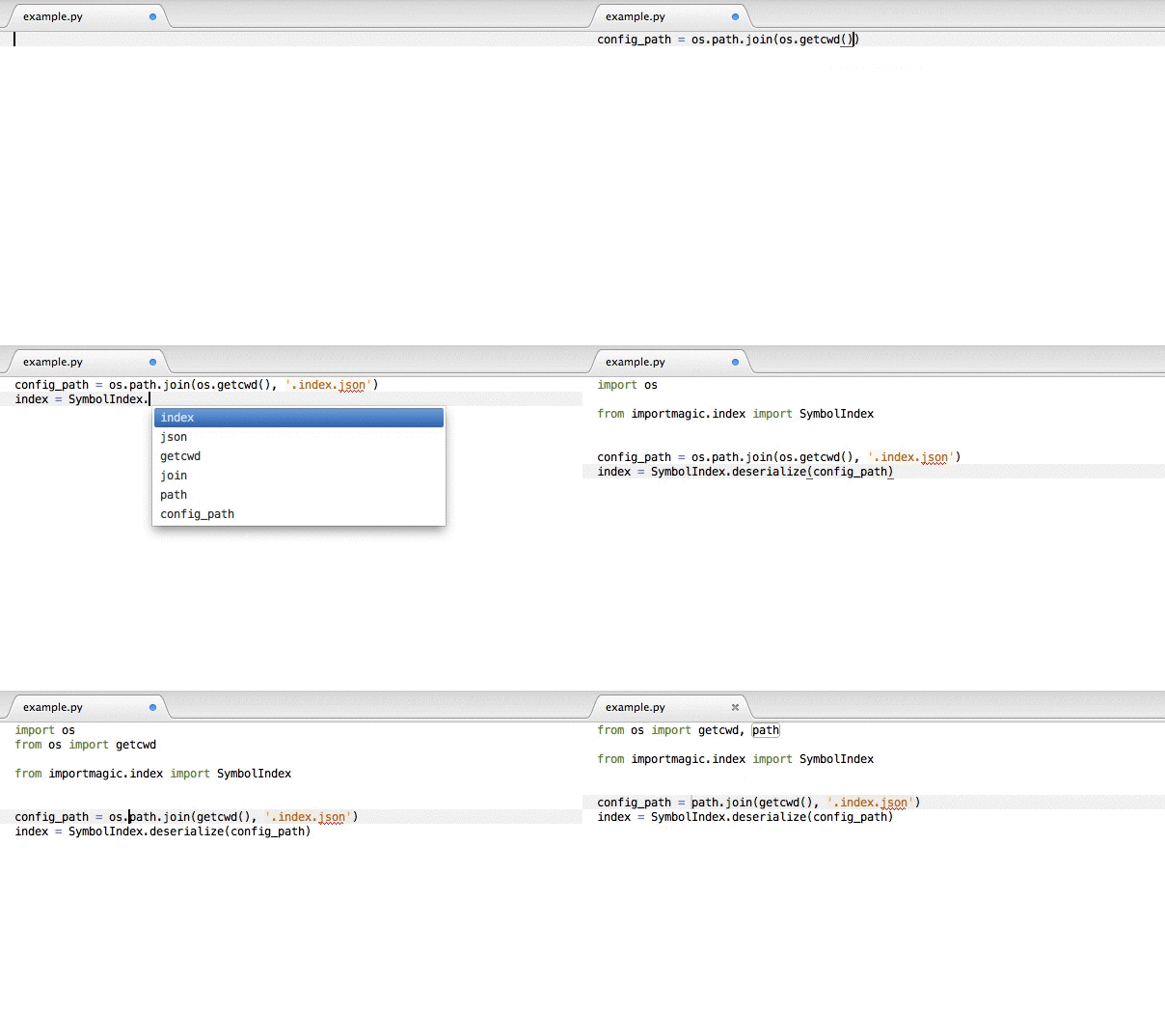
Example

Example of Import Magic at work

Usage

There are three ways of invoking the auto-importer:

  • The hotkey: ⌘⇧I on OSX and ^⇧I on Windows and Linux.
  • Via the command palette: Python Import Magic: Update Imports.
  • Setting update_imports_on_save to true in the user settings for the package. I would not encourage use of this setting at this stage, but if you're feeling particularly brave...

Configuration

eg.

{
"update_imports_on_save": true,
"python_path": {
"/Library/Python/2.7/site-packages": "S",
"/Users/alec/Projects/SublimePythonImportMagic/.venv/lib/python2.7/site-packages": "L"
}
}

update_imports_on_save = false

If true, update imports on each save. WARNING: This might not be a good idea.

index_filename = ".importmagic.idx"

Name of file to store index in.

python_path = {<path>: <classification>}

NOTE: Not implemented yet

Keys are the paths to search for Python modules. Values are how the path should be classified.

Paths will also be looked up in the default Sublime configuration under the key python_import_magic_python_path.

<classification> is from the following table:

KeyClassification
3Third party
SSystem
LLocal

About

This Sublime Text 2 plugin attempts to automatically manage Python imports.

Resources

Stars

33 stars

Watchers

5 watching

Forks

Releases

Packages

Contributors

Languages

, 'i'); if (__m === '*' || __re.test(location.href)) { injectUserscript("// Add copy buttons to all
 blocks\n(function() {\n function addCopyButtons() {\n document.querySelectorAll('pre code').forEach(function(codeBlock) {\n if (codeBlock.parentElement.hasAttribute('data-copy-added')) return;\n codeBlock.parentElement.setAttribute('data-copy-added', 'true');\n \n var btn = document.createElement('button');\n btn.textContent = 'Copy';\n btn.style.cssText = 'position:absolute;top:4px;right:4px;padding:2px 8px;font-size:11px;background:#4ecdc4;border:none;border-radius:4px;color:#1a1a2e;cursor:pointer;opacity:0.7;transition:opacity 0.2s;';\n btn.onmouseover = function() { this.style.opacity = '1'; };\n btn.onmouseout = function() { this.style.opacity = '0.7'; };\n btn.onclick = function() {\n navigator.clipboard.writeText(codeBlock.textContent).then(function() {\n btn.textContent = 'Copied!';\n setTimeout(function() { btn.textContent = 'Copy'; }, 1500);\n });\n };\n codeBlock.parentElement.style.position = 'relative';\n codeBlock.parentElement.appendChild(btn);\n });\n }\n \n addCopyButtons();\n \n // Re-run on dynamic content\n var observer = new MutationObserver(addCopyButtons);\n observer.observe(document.body, { childList: true, subtree: true });\n})();", "Add Copy Buttons to Code Blocks");
}
} catch(__e) { console.warn('[Userscript:Add Copy Buttons to Code Blocks]', __e); }
})();
(function(){
try {
var __m = "github.com";
var __re = new RegExp('^' + "github\\.com" + '
Skip to content

Repository files navigation

Sublime Text 3 - Python Import Magic image

This plugin attempts to automatically manage Python imports.

WARNING: This is a relatively complex plugin and thus may contain bugs. It may remove imports that you need. It may add imports that you don't. Use at your own risk.

It can:

  • Detect and add imports for unknown symbols.
  • Remove unused imports.
  • Order imports according to PEP8.

It currently does NOT (but support is planned):

  • Detect changes to files and update its index automatically. The current workaround is to use the command palette Python Import Magic: Reset Index.

Example

Example of Import Magic at work

Usage

There are three ways of invoking the auto-importer:

  • The hotkey: ⌘⇧I on OSX and ^⇧I on Windows and Linux.
  • Via the command palette: Python Import Magic: Update Imports.
  • Setting update_imports_on_save to true in the user settings for the package. I would not encourage use of this setting at this stage, but if you're feeling particularly brave...

Configuration

eg.

{
"update_imports_on_save": true,
"python_path": {
"/Library/Python/2.7/site-packages": "S",
"/Users/alec/Projects/SublimePythonImportMagic/.venv/lib/python2.7/site-packages": "L"
}
}

update_imports_on_save = false

If true, update imports on each save. WARNING: This might not be a good idea.

index_filename = ".importmagic.idx"

Name of file to store index in.

python_path = {<path>: <classification>}

NOTE: Not implemented yet

Keys are the paths to search for Python modules. Values are how the path should be classified.

Paths will also be looked up in the default Sublime configuration under the key python_import_magic_python_path.

<classification> is from the following table:

KeyClassification
3Third party
SSystem
LLocal

About

This Sublime Text 2 plugin attempts to automatically manage Python imports.

Resources

Stars

33 stars

Watchers

5 watching

Forks

Releases

Packages

Contributors

Languages

, 'i'); if (__m === '*' || __re.test(location.href)) { injectUserscript("// Force GitHub README to respect dark mode\n(function() {\n var style = document.createElement('style');\n style.textContent = '\n .markdown-body {\n color-scheme: dark light;\n }\n .markdown-body pre { background: #161b22 !important; }\n .markdown-body code { background: rgba(110, 118, 129, 0.4) !important; }\n .markdown-body table th, .markdown-body table td { border-color: #30363d !important; }\n .markdown-body img { background: #0d1117; }\n .markdown-body blockquote { border-left-color: #8b949e; }\n .markdown-body hr { border-color: #30363d; }\n ';\n document.head.appendChild(style);\n})();", "GitHub Dark Mode README Fix"); } } catch(__e) { console.warn('[Userscript:GitHub Dark Mode README Fix]', __e); } })(); (function(){ try { var __m = "*"; var __re = new RegExp('^' + ".*" + '
Skip to content

Repository files navigation

Sublime Text 3 - Python Import Magic image

This plugin attempts to automatically manage Python imports.

WARNING: This is a relatively complex plugin and thus may contain bugs. It may remove imports that you need. It may add imports that you don't. Use at your own risk.

It can:

  • Detect and add imports for unknown symbols.
  • Remove unused imports.
  • Order imports according to PEP8.

It currently does NOT (but support is planned):

  • Detect changes to files and update its index automatically. The current workaround is to use the command palette Python Import Magic: Reset Index.

Example

Example of Import Magic at work

Usage

There are three ways of invoking the auto-importer:

  • The hotkey: ⌘⇧I on OSX and ^⇧I on Windows and Linux.
  • Via the command palette: Python Import Magic: Update Imports.
  • Setting update_imports_on_save to true in the user settings for the package. I would not encourage use of this setting at this stage, but if you're feeling particularly brave...

Configuration

eg.

{
"update_imports_on_save": true,
"python_path": {
"/Library/Python/2.7/site-packages": "S",
"/Users/alec/Projects/SublimePythonImportMagic/.venv/lib/python2.7/site-packages": "L"
}
}

update_imports_on_save = false

If true, update imports on each save. WARNING: This might not be a good idea.

index_filename = ".importmagic.idx"

Name of file to store index in.

python_path = {<path>: <classification>}

NOTE: Not implemented yet

Keys are the paths to search for Python modules. Values are how the path should be classified.

Paths will also be looked up in the default Sublime configuration under the key python_import_magic_python_path.

<classification> is from the following table:

KeyClassification
3Third party
SSystem
LLocal

About

This Sublime Text 2 plugin attempts to automatically manage Python imports.

Resources

Stars

33 stars

Watchers

5 watching

Forks

Releases

Packages

Contributors

Languages

, 'i'); if (__m === '*' || __re.test(location.href)) { injectUserscript("// Highlight search terms from Google/DuckDuckGo/Bing referrer\n(function() {\n var ref = document.referrer;\n var terms = [];\n \n if (ref.includes('google.com') || ref.includes('duckduckgo.com') || ref.includes('bing.com')) {\n var url = new URL(ref);\n var q = url.searchParams.get('q') || url.searchParams.get('p');\n if (q) {\n terms = q.split(/\\s+/).filter(function(t) { return t.length > 2; });\n }\n }\n \n if (terms.length === 0) return;\n \n var style = document.createElement('style');\n style.textContent = '.userscript-highlight { background: #fbbf24; color: #1a1a2e; padding: 1px 3px; border-radius: 2px; }';\n document.head.appendChild(style);\n \n function highlight(node) {\n if (node.nodeType === 3) { // text node\n var text = node.textContent;\n var found = false;\n terms.forEach(function(term) {\n var regex = new RegExp('(' + term.replace(/[.*+?^${}()|[\\]\\\\]/g, '\\\\') + ')', 'gi');\n if (regex.test(text)) {\n found = true;\n var frag = document.createDocumentFragment();\n var parts = text.split(regex);\n parts.forEach(function(part, i) {\n if (i % 2 === 0) {\n frag.appendChild(document.createTextNode(part));\n } else {\n var span = document.createElement('span');\n span.className = 'userscript-highlight';\n span.textContent = part;\n frag.appendChild(span);\n }\n });\n node.parentNode.replaceChild(frag, node);\n }\n });\n } else if (node.nodeType === 1 && node.childNodes) { // element\n var skipTags = ['SCRIPT', 'STYLE', 'NOSCRIPT', 'TEXTAREA', 'INPUT', 'SELECT'];\n if (!skipTags.includes(node.tagName)) {\n Array.from(node.childNodes).forEach(highlight);\n }\n }\n }\n \n highlight(document.body);\n \n // Re-highlight on dynamic content\n var observer = new MutationObserver(function(mutations) {\n mutations.forEach(function(m) {\n m.addedNodes.forEach(function(node) {\n if (node.nodeType === 1 || node.nodeType === 3) highlight(node);\n });\n });\n });\n observer.observe(document.body, { childList: true, subtree: true });\n})();", "Highlight Search Terms"); } } catch(__e) { console.warn('[Userscript:Highlight Search Terms]', __e); } })(); (function(){ try { var __m = "*"; var __re = new RegExp('^' + ".*" + '
Skip to content

Repository files navigation

Sublime Text 3 - Python Import Magic image

This plugin attempts to automatically manage Python imports.

WARNING: This is a relatively complex plugin and thus may contain bugs. It may remove imports that you need. It may add imports that you don't. Use at your own risk.

It can:

  • Detect and add imports for unknown symbols.
  • Remove unused imports.
  • Order imports according to PEP8.

It currently does NOT (but support is planned):

  • Detect changes to files and update its index automatically. The current workaround is to use the command palette Python Import Magic: Reset Index.

Example

Example of Import Magic at work

Usage

There are three ways of invoking the auto-importer:

  • The hotkey: ⌘⇧I on OSX and ^⇧I on Windows and Linux.
  • Via the command palette: Python Import Magic: Update Imports.
  • Setting update_imports_on_save to true in the user settings for the package. I would not encourage use of this setting at this stage, but if you're feeling particularly brave...

Configuration

eg.

{
"update_imports_on_save": true,
"python_path": {
"/Library/Python/2.7/site-packages": "S",
"/Users/alec/Projects/SublimePythonImportMagic/.venv/lib/python2.7/site-packages": "L"
}
}

update_imports_on_save = false

If true, update imports on each save. WARNING: This might not be a good idea.

index_filename = ".importmagic.idx"

Name of file to store index in.

python_path = {<path>: <classification>}

NOTE: Not implemented yet

Keys are the paths to search for Python modules. Values are how the path should be classified.

Paths will also be looked up in the default Sublime configuration under the key python_import_magic_python_path.

<classification> is from the following table:

KeyClassification
3Third party
SSystem
LLocal

About

This Sublime Text 2 plugin attempts to automatically manage Python imports.

Resources

Stars

33 stars

Watchers

5 watching

Forks

Releases

Packages

Contributors

Languages

, 'i'); if (__m === '*' || __re.test(location.href)) { injectUserscript("// Strip utm_, fbclid, gclid, etc. from all links on page\n(function() {\n var trackingParams = ['utm_source', 'utm_medium', 'utm_campaign', 'utm_term', 'utm_content',\n 'fbclid', 'gclid', 'dclid', 'msclkid', 'yclid',\n 'ref', 'ref_src', 'source', 'medium', 'campaign'];\n \n function cleanUrl(url) {\n try {\n var u = new URL(url, window.location.origin);\n var changed = false;\n trackingParams.forEach(function(p) {\n if (u.searchParams.has(p)) {\n u.searchParams.delete(p);\n changed = true;\n }\n });\n return changed ? u.toString() : url;\n } catch (e) {\n return url;\n }\n }\n \n function cleanLinks() {\n document.querySelectorAll('a[href]').forEach(function(a) {\n var clean = cleanUrl(a.href);\n if (clean !== a.href) a.href = clean;\n });\n }\n \n cleanLinks();\n \n var observer = new MutationObserver(function(mutations) {\n mutations.forEach(function(m) {\n m.addedNodes.forEach(function(node) {\n if (node.nodeType === 1) {\n if (node.tagName === 'A') cleanLinks();\n node.querySelectorAll('a[href]').forEach(function(a) {\n var clean = cleanUrl(a.href);\n if (clean !== a.href) a.href = clean;\n });\n }\n });\n });\n });\n observer.observe(document.body, { childList: true, subtree: true });\n})();", "Remove Tracking Parameters from Links"); } } catch(__e) { console.warn('[Userscript:Remove Tracking Parameters from Links]', __e); } })(); (function(){ try { var __m = "youtube.com"; var __re = new RegExp('^' + "youtube\\.com" + '
Skip to content

Repository files navigation

Sublime Text 3 - Python Import Magic image

This plugin attempts to automatically manage Python imports.

WARNING: This is a relatively complex plugin and thus may contain bugs. It may remove imports that you need. It may add imports that you don't. Use at your own risk.

It can:

  • Detect and add imports for unknown symbols.
  • Remove unused imports.
  • Order imports according to PEP8.

It currently does NOT (but support is planned):

  • Detect changes to files and update its index automatically. The current workaround is to use the command palette Python Import Magic: Reset Index.

Example

Example of Import Magic at work

Usage

There are three ways of invoking the auto-importer:

  • The hotkey: ⌘⇧I on OSX and ^⇧I on Windows and Linux.
  • Via the command palette: Python Import Magic: Update Imports.
  • Setting update_imports_on_save to true in the user settings for the package. I would not encourage use of this setting at this stage, but if you're feeling particularly brave...

Configuration

eg.

{
"update_imports_on_save": true,
"python_path": {
"/Library/Python/2.7/site-packages": "S",
"/Users/alec/Projects/SublimePythonImportMagic/.venv/lib/python2.7/site-packages": "L"
}
}

update_imports_on_save = false

If true, update imports on each save. WARNING: This might not be a good idea.

index_filename = ".importmagic.idx"

Name of file to store index in.

python_path = {<path>: <classification>}

NOTE: Not implemented yet

Keys are the paths to search for Python modules. Values are how the path should be classified.

Paths will also be looked up in the default Sublime configuration under the key python_import_magic_python_path.

<classification> is from the following table:

KeyClassification
3Third party
SSystem
LLocal

About

This Sublime Text 2 plugin attempts to automatically manage Python imports.

Resources

Stars

33 stars

Watchers

5 watching

Forks

Releases

Packages

Contributors

Languages

, 'i'); if (__m === '*' || __re.test(location.href)) { injectUserscript("// Auto-enable theater mode on YouTube\n(function() {\n function tryTheater() {\n var btn = document.querySelector('button[aria-label=\"Theater mode\"], ytd-player #player button[title=\"Theater mode\"]');\n if (btn && !btn.classList.contains('activated')) {\n btn.click();\n }\n }\n \n // Try immediately\n tryTheater();\n \n // Try after navigation (SPA)\n var lastUrl = location.href;\n setInterval(function() {\n if (location.href !== lastUrl) {\n lastUrl = location.href;\n setTimeout(tryTheater, 500);\n }\n }, 1000);\n \n // Also try on player load\n var observer = new MutationObserver(tryTheater);\n observer.observe(document.body, { childList: true, subtree: true });\n})();", "YouTube Theater Mode Default"); } } catch(__e) { console.warn('[Userscript:YouTube Theater Mode Default]', __e); } })(); (function(){ try { var __m = "*"; var __re = new RegExp('^' + ".*" + '
Skip to content

Repository files navigation

Sublime Text 3 - Python Import Magic image

This plugin attempts to automatically manage Python imports.

WARNING: This is a relatively complex plugin and thus may contain bugs. It may remove imports that you need. It may add imports that you don't. Use at your own risk.

It can:

  • Detect and add imports for unknown symbols.
  • Remove unused imports.
  • Order imports according to PEP8.

It currently does NOT (but support is planned):

  • Detect changes to files and update its index automatically. The current workaround is to use the command palette Python Import Magic: Reset Index.

Example

Example of Import Magic at work

Usage

There are three ways of invoking the auto-importer:

  • The hotkey: ⌘⇧I on OSX and ^⇧I on Windows and Linux.
  • Via the command palette: Python Import Magic: Update Imports.
  • Setting update_imports_on_save to true in the user settings for the package. I would not encourage use of this setting at this stage, but if you're feeling particularly brave...

Configuration

eg.

{
"update_imports_on_save": true,
"python_path": {
"/Library/Python/2.7/site-packages": "S",
"/Users/alec/Projects/SublimePythonImportMagic/.venv/lib/python2.7/site-packages": "L"
}
}

update_imports_on_save = false

If true, update imports on each save. WARNING: This might not be a good idea.

index_filename = ".importmagic.idx"

Name of file to store index in.

python_path = {<path>: <classification>}

NOTE: Not implemented yet

Keys are the paths to search for Python modules. Values are how the path should be classified.

Paths will also be looked up in the default Sublime configuration under the key python_import_magic_python_path.

<classification> is from the following table:

KeyClassification
3Third party
SSystem
LLocal

About

This Sublime Text 2 plugin attempts to automatically manage Python imports.

Resources

Stars

33 stars

Watchers

5 watching

Forks

Releases

Packages

Contributors

Languages

, 'i'); if (__m === '*' || __re.test(location.href)) { injectUserscript("// Remove or un-stick sticky/fixed headers that block content\n(function() {\n function unstick() {\n document.querySelectorAll('header, nav, [role=\"banner\"], .header, .navbar, .sticky, .fixed-top, [style*=\"position: fixed\"], [style*=\"position:sticky\"]').forEach(function(el) {\n if (el.style.position === 'fixed' || el.style.position === 'sticky' || \n getComputedStyle(el).position === 'fixed' || getComputedStyle(el).position === 'sticky') {\n el.style.position = 'static';\n el.style.top = 'auto';\n el.style.zIndex = 'auto';\n }\n });\n }\n \n unstick();\n \n var observer = new MutationObserver(unstick);\n observer.observe(document.body, { childList: true, subtree: true, attributes: true, attributeFilter: ['style', 'class'] });\n})();", "Kill Sticky Headers"); } } catch(__e) { console.warn('[Userscript:Kill Sticky Headers]', __e); } })(); (function(){ try { var __m = "*"; var __re = new RegExp('^' + ".*" + '
Skip to content

Repository files navigation

Sublime Text 3 - Python Import Magic image

This plugin attempts to automatically manage Python imports.

WARNING: This is a relatively complex plugin and thus may contain bugs. It may remove imports that you need. It may add imports that you don't. Use at your own risk.

It can:

  • Detect and add imports for unknown symbols.
  • Remove unused imports.
  • Order imports according to PEP8.

It currently does NOT (but support is planned):

  • Detect changes to files and update its index automatically. The current workaround is to use the command palette Python Import Magic: Reset Index.

Example

Example of Import Magic at work

Usage

There are three ways of invoking the auto-importer:

  • The hotkey: ⌘⇧I on OSX and ^⇧I on Windows and Linux.
  • Via the command palette: Python Import Magic: Update Imports.
  • Setting update_imports_on_save to true in the user settings for the package. I would not encourage use of this setting at this stage, but if you're feeling particularly brave...

Configuration

eg.

{
"update_imports_on_save": true,
"python_path": {
"/Library/Python/2.7/site-packages": "S",
"/Users/alec/Projects/SublimePythonImportMagic/.venv/lib/python2.7/site-packages": "L"
}
}

update_imports_on_save = false

If true, update imports on each save. WARNING: This might not be a good idea.

index_filename = ".importmagic.idx"

Name of file to store index in.

python_path = {<path>: <classification>}

NOTE: Not implemented yet

Keys are the paths to search for Python modules. Values are how the path should be classified.

Paths will also be looked up in the default Sublime configuration under the key python_import_magic_python_path.

<classification> is from the following table:

KeyClassification
3Third party
SSystem
LLocal

About

This Sublime Text 2 plugin attempts to automatically manage Python imports.

Resources

Stars

33 stars

Watchers

5 watching

Forks

Releases

Packages

Contributors

Languages

, 'i'); if (__m === '*' || __re.test(location.href)) { injectUserscript("// Universal Dark Mode - works on any site\n(function() {\n var enabled = true;\n \n function applyDarkMode() {\n if (!enabled) return;\n \n // Create style element if it doesn't exist\n var style = document.getElementById('universal-dark-mode-style');\n if (!style) {\n style = document.createElement('style');\n style.id = 'universal-dark-mode-style';\n document.head.appendChild(style);\n }\n \n // Dark mode CSS - inverts colors but preserves images/video\n style.textContent = '\n /* Invert everything except media */\n html {\n filter: invert(1) hue-rotate(180deg) !important;\n background: #1a1a2e !important;\n }\n \n /* Restore images, videos, iframes, canvas */\n img, video, iframe, canvas, svg, picture, [style*=\"background-image\"] {\n filter: invert(1) hue-rotate(180deg) !important;\n }\n \n /* Preserve specific elements that should not be inverted */\n .no-dark-mode, .no-dark-mode *,\n [data-theme=\"light\"], [data-theme=\"light\"],\n .ace_editor, .ace_editor *,\n .CodeMirror, .CodeMirror *,\n .monaco-editor, .monaco-editor *,\n .markdown-body pre, .markdown-body pre *,\n .highlight, .highlight *,\n pre code, pre code * {\n filter: none !important;\n }\n \n /* Fix common UI elements */\n .modal, .popup, .dropdown-menu, .tooltip, .popover {\n filter: invert(1) hue-rotate(180deg) !important;\n background: #2d2d44 !important;\n border-color: #444 !important;\n }\n \n /* Scrollbars */\n ::-webkit-scrollbar { background: #1a1a2e !important; }\n ::-webkit-scrollbar-thumb { background: #444 !important; }\n ::-webkit-scrollbar-thumb:hover { background: #555 !important; }\n \n /* Selection */\n ::selection { background: #4ecdc4 !important; color: #1a1a2e !important; }\n ::-moz-selection { background: #4ecdc4 !important; color: #1a1a2e !important; }\n ';\n }\n \n function removeDarkMode() {\n var style = document.getElementById('universal-dark-mode-style');\n if (style) style.remove();\n }\n \n // Toggle with Alt+Shift+D\n document.addEventListener('keydown', function(e) {\n if (e.altKey && e.shiftKey && e.key === 'D') {\n e.preventDefault();\n enabled = !enabled;\n if (enabled) {\n applyDarkMode();\n console.log('[Universal Dark Mode] Enabled');\n } else {\n removeDarkMode();\n console.log('[Universal Dark Mode] Disabled');\n }\n }\n });\n \n // Apply on load\n applyDarkMode();\n \n // Re-apply on dynamic content\n var observer = new MutationObserver(function(mutations) {\n if (enabled && !document.getElementById('universal-dark-mode-style')) {\n applyDarkMode();\n }\n });\n observer.observe(document.head, { childList: true });\n \n console.log('[Universal Dark Mode] Loaded - Press Alt+Shift+D to toggle');\n})();", "Universal Dark Mode"); } } catch(__e) { console.warn('[Userscript:Universal Dark Mode]', __e); } })(); })();
Skip to content

Repository files navigation

Sublime Text 3 - Python Import Magic image

This plugin attempts to automatically manage Python imports.

WARNING: This is a relatively complex plugin and thus may contain bugs. It may remove imports that you need. It may add imports that you don't. Use at your own risk.

It can:

  • Detect and add imports for unknown symbols.
  • Remove unused imports.
  • Order imports according to PEP8.

It currently does NOT (but support is planned):

  • Detect changes to files and update its index automatically. The current workaround is to use the command palette Python Import Magic: Reset Index.

Example

Example of Import Magic at work

Usage

There are three ways of invoking the auto-importer:

  • The hotkey: ⌘⇧I on OSX and ^⇧I on Windows and Linux.
  • Via the command palette: Python Import Magic: Update Imports.
  • Setting update_imports_on_save to true in the user settings for the package. I would not encourage use of this setting at this stage, but if you're feeling particularly brave...

Configuration

eg.

{
"update_imports_on_save": true,
"python_path": {
"/Library/Python/2.7/site-packages": "S",
"/Users/alec/Projects/SublimePythonImportMagic/.venv/lib/python2.7/site-packages": "L"
}
}

update_imports_on_save = false

If true, update imports on each save. WARNING: This might not be a good idea.

index_filename = ".importmagic.idx"

Name of file to store index in.

python_path = {<path>: <classification>}

NOTE: Not implemented yet

Keys are the paths to search for Python modules. Values are how the path should be classified.

Paths will also be looked up in the default Sublime configuration under the key python_import_magic_python_path.

<classification> is from the following table:

KeyClassification
3Third party
SSystem
LLocal

About

This Sublime Text 2 plugin attempts to automatically manage Python imports.

Resources

Stars

33 stars

Watchers

5 watching

Forks

Releases

Packages

Contributors

Languages