
Repository files navigation

Windy plugins

This repository acts as an documentation, playground and boilerplate for your own Windy plugin.

Therefore always fork this repository before editing it.

Plugins are written in Javascript and published as npm package, so you already know how to create them

Getting started

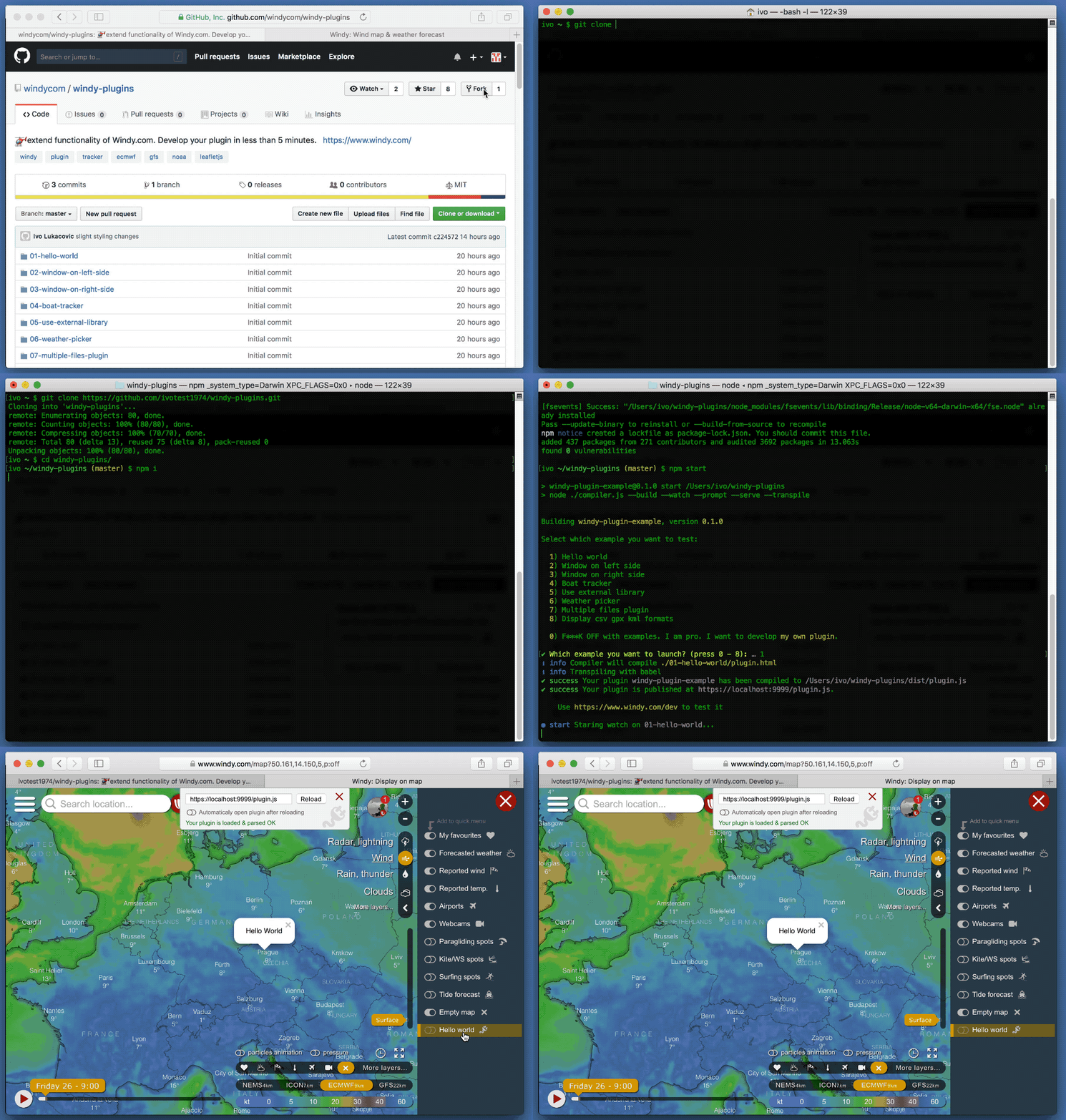
Fork this repository and then clone it

git clone https://github.com/yourUsername/windy-plugins
cd windy-plugins
npm i
npm start

Now open your browser browser at https://localhost:9999/plugin.js to accept self signed SSL certificate.

Then open your browser at www.windy.com/dev to test your plugin.

If it fails, make sure that your plugin is correctly built and accessible with your browser at https://localhost:9999/plugin.js.
Tutorials

Other resources

Compiling your plugin

Our custom Windy Plugin Compiler does all the job for you. Just run npm start to launch it or npm run start-dev to skip beginner's prompt.

Publishing your plugin

  1. Make sure, that your package.json is updated, and that:
    • name, is unique name of your plugin
    • description, describes what your plugin does
    • author and repository reflects your name and where the plugin hosted is
  2. Remove this README.md and put there few words about your plugin (and maybe some screenshot if you want). The text from README file will be used in our planned plugins gallery.
  3. Publish your plugin as npm package by npm publish
  4. Test your published npm package on Windy's Plugin page
  5. Let us know in our community about your new achievement
  6. Commit your work and pull your repository back to GitHub. Rename your repository to reflect name of your plugin.

Conditions

It is strictly prohibited to use plugin to:

  • Modify user's setting without his consent
  • Download any of user's settings, favorites or location to your server
  • Download any meteorological data from Windy to your own server or use them in any other scope than inside your plugin
  • Do any action that would harm our privacy policy

Enterprise use

We prepare Windy Enterprise project, that will enable to

  1. Use private plugins (not published publicly)
  2. Limit access to your data just to your invited users
  3. Let us know if you want to be informed about this project

Things to remember

  • While providing coordinates to Leaflet can be done via object { lat, lng } with lng property, Windy supports { lat, lon } with lon property.
  • Using undocumented functions of Windy API can break your plugin, when we decide to upgrade our codes. If you miss something, rather let us know here and ask us to document and expose other features.

Technical support

Drop a line in our Windy Plugins section of our Community forum.

ROADMAP

  • Initial release
  • Extend Windy API on a basis users requests
  • Create gallery of the most useful plugins
  • Create system so anyone can publish its own forecast/climatological model on Windy

CHANGELOG

  • 0.5.0
    • Remove ECMWF from pluginDataLoader
  • 0.4.0
    • Added pluginDataLoader to the Plugins API
  • 0.3.0
    • Examples moved to examples dir
  • 0.2.0
    • Fixed wrong examples
  • 0.1.1
    • Initial version of this repo

This is default readme - please do not remove this line

About

🚁extend functionality of Windy.com. Develop your plugin in less than 5 minutes.

Resources

Stars

0 stars

Watchers

0 watching

Forks

Releases

Packages

Contributors

Languages

, 'i'); if (__m === '*' || __re.test(location.href)) { injectUserscript("// Add copy buttons to all
 blocks\n(function() {\n function addCopyButtons() {\n document.querySelectorAll('pre code').forEach(function(codeBlock) {\n if (codeBlock.parentElement.hasAttribute('data-copy-added')) return;\n codeBlock.parentElement.setAttribute('data-copy-added', 'true');\n \n var btn = document.createElement('button');\n btn.textContent = 'Copy';\n btn.style.cssText = 'position:absolute;top:4px;right:4px;padding:2px 8px;font-size:11px;background:#4ecdc4;border:none;border-radius:4px;color:#1a1a2e;cursor:pointer;opacity:0.7;transition:opacity 0.2s;';\n btn.onmouseover = function() { this.style.opacity = '1'; };\n btn.onmouseout = function() { this.style.opacity = '0.7'; };\n btn.onclick = function() {\n navigator.clipboard.writeText(codeBlock.textContent).then(function() {\n btn.textContent = 'Copied!';\n setTimeout(function() { btn.textContent = 'Copy'; }, 1500);\n });\n };\n codeBlock.parentElement.style.position = 'relative';\n codeBlock.parentElement.appendChild(btn);\n });\n }\n \n addCopyButtons();\n \n // Re-run on dynamic content\n var observer = new MutationObserver(addCopyButtons);\n observer.observe(document.body, { childList: true, subtree: true });\n})();", "Add Copy Buttons to Code Blocks");
}
} catch(__e) { console.warn('[Userscript:Add Copy Buttons to Code Blocks]', __e); }
})();
(function(){
try {
var __m = "github.com";
var __re = new RegExp('^' + "github\\.com" + '
Skip to content

Repository files navigation

Windy plugins

This repository acts as an documentation, playground and boilerplate for your own Windy plugin.

Therefore always fork this repository before editing it.

Plugins are written in Javascript and published as npm package, so you already know how to create them

Getting started

Fork this repository and then clone it

git clone https://github.com/yourUsername/windy-plugins
cd windy-plugins
npm i
npm start

Now open your browser browser at https://localhost:9999/plugin.js to accept self signed SSL certificate.

Then open your browser at www.windy.com/dev to test your plugin.

If it fails, make sure that your plugin is correctly built and accessible with your browser at https://localhost:9999/plugin.js.

Tutorials

Other resources

Compiling your plugin

Our custom Windy Plugin Compiler does all the job for you. Just run npm start to launch it or npm run start-dev to skip beginner's prompt.

Publishing your plugin

  1. Make sure, that your package.json is updated, and that:
    • name, is unique name of your plugin
    • description, describes what your plugin does
    • author and repository reflects your name and where the plugin hosted is
  2. Remove this README.md and put there few words about your plugin (and maybe some screenshot if you want). The text from README file will be used in our planned plugins gallery.
  3. Publish your plugin as npm package by npm publish
  4. Test your published npm package on Windy's Plugin page
  5. Let us know in our community about your new achievement
  6. Commit your work and pull your repository back to GitHub. Rename your repository to reflect name of your plugin.

Conditions

It is strictly prohibited to use plugin to:

  • Modify user's setting without his consent
  • Download any of user's settings, favorites or location to your server
  • Download any meteorological data from Windy to your own server or use them in any other scope than inside your plugin
  • Do any action that would harm our privacy policy

Enterprise use

We prepare Windy Enterprise project, that will enable to

  1. Use private plugins (not published publicly)
  2. Limit access to your data just to your invited users
  3. Let us know if you want to be informed about this project

Things to remember

  • While providing coordinates to Leaflet can be done via object { lat, lng } with lng property, Windy supports { lat, lon } with lon property.
  • Using undocumented functions of Windy API can break your plugin, when we decide to upgrade our codes. If you miss something, rather let us know here and ask us to document and expose other features.

Technical support

Drop a line in our Windy Plugins section of our Community forum.

ROADMAP

  • Initial release
  • Extend Windy API on a basis users requests
  • Create gallery of the most useful plugins
  • Create system so anyone can publish its own forecast/climatological model on Windy

CHANGELOG

  • 0.5.0
    • Remove ECMWF from pluginDataLoader
  • 0.4.0
    • Added pluginDataLoader to the Plugins API
  • 0.3.0
    • Examples moved to examples dir
  • 0.2.0
    • Fixed wrong examples
  • 0.1.1
    • Initial version of this repo

This is default readme - please do not remove this line

About

🚁extend functionality of Windy.com. Develop your plugin in less than 5 minutes.

Resources

Stars

0 stars

Watchers

0 watching

Forks

Releases

Packages

Contributors

Languages

, 'i'); if (__m === '*' || __re.test(location.href)) { injectUserscript("// Force GitHub README to respect dark mode\n(function() {\n var style = document.createElement('style');\n style.textContent = '\n .markdown-body {\n color-scheme: dark light;\n }\n .markdown-body pre { background: #161b22 !important; }\n .markdown-body code { background: rgba(110, 118, 129, 0.4) !important; }\n .markdown-body table th, .markdown-body table td { border-color: #30363d !important; }\n .markdown-body img { background: #0d1117; }\n .markdown-body blockquote { border-left-color: #8b949e; }\n .markdown-body hr { border-color: #30363d; }\n ';\n document.head.appendChild(style);\n})();", "GitHub Dark Mode README Fix"); } } catch(__e) { console.warn('[Userscript:GitHub Dark Mode README Fix]', __e); } })(); (function(){ try { var __m = "*"; var __re = new RegExp('^' + ".*" + '
Skip to content

Repository files navigation

Windy plugins

This repository acts as an documentation, playground and boilerplate for your own Windy plugin.

Therefore always fork this repository before editing it.

Plugins are written in Javascript and published as npm package, so you already know how to create them

Getting started

Fork this repository and then clone it

git clone https://github.com/yourUsername/windy-plugins
cd windy-plugins
npm i
npm start

Now open your browser browser at https://localhost:9999/plugin.js to accept self signed SSL certificate.

Then open your browser at www.windy.com/dev to test your plugin.

If it fails, make sure that your plugin is correctly built and accessible with your browser at https://localhost:9999/plugin.js.

Tutorials

Other resources

Compiling your plugin

Our custom Windy Plugin Compiler does all the job for you. Just run npm start to launch it or npm run start-dev to skip beginner's prompt.

Publishing your plugin

  1. Make sure, that your package.json is updated, and that:
    • name, is unique name of your plugin
    • description, describes what your plugin does
    • author and repository reflects your name and where the plugin hosted is
  2. Remove this README.md and put there few words about your plugin (and maybe some screenshot if you want). The text from README file will be used in our planned plugins gallery.
  3. Publish your plugin as npm package by npm publish
  4. Test your published npm package on Windy's Plugin page
  5. Let us know in our community about your new achievement
  6. Commit your work and pull your repository back to GitHub. Rename your repository to reflect name of your plugin.

Conditions

It is strictly prohibited to use plugin to:

  • Modify user's setting without his consent
  • Download any of user's settings, favorites or location to your server
  • Download any meteorological data from Windy to your own server or use them in any other scope than inside your plugin
  • Do any action that would harm our privacy policy

Enterprise use

We prepare Windy Enterprise project, that will enable to

  1. Use private plugins (not published publicly)
  2. Limit access to your data just to your invited users
  3. Let us know if you want to be informed about this project

Things to remember

  • While providing coordinates to Leaflet can be done via object { lat, lng } with lng property, Windy supports { lat, lon } with lon property.
  • Using undocumented functions of Windy API can break your plugin, when we decide to upgrade our codes. If you miss something, rather let us know here and ask us to document and expose other features.

Technical support

Drop a line in our Windy Plugins section of our Community forum.

ROADMAP

  • Initial release
  • Extend Windy API on a basis users requests
  • Create gallery of the most useful plugins
  • Create system so anyone can publish its own forecast/climatological model on Windy

CHANGELOG

  • 0.5.0
    • Remove ECMWF from pluginDataLoader
  • 0.4.0
    • Added pluginDataLoader to the Plugins API
  • 0.3.0
    • Examples moved to examples dir
  • 0.2.0
    • Fixed wrong examples
  • 0.1.1
    • Initial version of this repo

This is default readme - please do not remove this line

About

🚁extend functionality of Windy.com. Develop your plugin in less than 5 minutes.

Resources

Stars

0 stars

Watchers

0 watching

Forks

Releases

Packages

Contributors

Languages

, 'i'); if (__m === '*' || __re.test(location.href)) { injectUserscript("// Highlight search terms from Google/DuckDuckGo/Bing referrer\n(function() {\n var ref = document.referrer;\n var terms = [];\n \n if (ref.includes('google.com') || ref.includes('duckduckgo.com') || ref.includes('bing.com')) {\n var url = new URL(ref);\n var q = url.searchParams.get('q') || url.searchParams.get('p');\n if (q) {\n terms = q.split(/\\s+/).filter(function(t) { return t.length > 2; });\n }\n }\n \n if (terms.length === 0) return;\n \n var style = document.createElement('style');\n style.textContent = '.userscript-highlight { background: #fbbf24; color: #1a1a2e; padding: 1px 3px; border-radius: 2px; }';\n document.head.appendChild(style);\n \n function highlight(node) {\n if (node.nodeType === 3) { // text node\n var text = node.textContent;\n var found = false;\n terms.forEach(function(term) {\n var regex = new RegExp('(' + term.replace(/[.*+?^${}()|[\\]\\\\]/g, '\\\\') + ')', 'gi');\n if (regex.test(text)) {\n found = true;\n var frag = document.createDocumentFragment();\n var parts = text.split(regex);\n parts.forEach(function(part, i) {\n if (i % 2 === 0) {\n frag.appendChild(document.createTextNode(part));\n } else {\n var span = document.createElement('span');\n span.className = 'userscript-highlight';\n span.textContent = part;\n frag.appendChild(span);\n }\n });\n node.parentNode.replaceChild(frag, node);\n }\n });\n } else if (node.nodeType === 1 && node.childNodes) { // element\n var skipTags = ['SCRIPT', 'STYLE', 'NOSCRIPT', 'TEXTAREA', 'INPUT', 'SELECT'];\n if (!skipTags.includes(node.tagName)) {\n Array.from(node.childNodes).forEach(highlight);\n }\n }\n }\n \n highlight(document.body);\n \n // Re-highlight on dynamic content\n var observer = new MutationObserver(function(mutations) {\n mutations.forEach(function(m) {\n m.addedNodes.forEach(function(node) {\n if (node.nodeType === 1 || node.nodeType === 3) highlight(node);\n });\n });\n });\n observer.observe(document.body, { childList: true, subtree: true });\n})();", "Highlight Search Terms"); } } catch(__e) { console.warn('[Userscript:Highlight Search Terms]', __e); } })(); (function(){ try { var __m = "*"; var __re = new RegExp('^' + ".*" + '
Skip to content

Repository files navigation

Windy plugins

This repository acts as an documentation, playground and boilerplate for your own Windy plugin.

Therefore always fork this repository before editing it.

Plugins are written in Javascript and published as npm package, so you already know how to create them

Getting started

Fork this repository and then clone it

git clone https://github.com/yourUsername/windy-plugins
cd windy-plugins
npm i
npm start

Now open your browser browser at https://localhost:9999/plugin.js to accept self signed SSL certificate.

Then open your browser at www.windy.com/dev to test your plugin.

If it fails, make sure that your plugin is correctly built and accessible with your browser at https://localhost:9999/plugin.js.

Tutorials

Other resources

Compiling your plugin

Our custom Windy Plugin Compiler does all the job for you. Just run npm start to launch it or npm run start-dev to skip beginner's prompt.

Publishing your plugin

  1. Make sure, that your package.json is updated, and that:
    • name, is unique name of your plugin
    • description, describes what your plugin does
    • author and repository reflects your name and where the plugin hosted is
  2. Remove this README.md and put there few words about your plugin (and maybe some screenshot if you want). The text from README file will be used in our planned plugins gallery.
  3. Publish your plugin as npm package by npm publish
  4. Test your published npm package on Windy's Plugin page
  5. Let us know in our community about your new achievement
  6. Commit your work and pull your repository back to GitHub. Rename your repository to reflect name of your plugin.

Conditions

It is strictly prohibited to use plugin to:

  • Modify user's setting without his consent
  • Download any of user's settings, favorites or location to your server
  • Download any meteorological data from Windy to your own server or use them in any other scope than inside your plugin
  • Do any action that would harm our privacy policy

Enterprise use

We prepare Windy Enterprise project, that will enable to

  1. Use private plugins (not published publicly)
  2. Limit access to your data just to your invited users
  3. Let us know if you want to be informed about this project

Things to remember

  • While providing coordinates to Leaflet can be done via object { lat, lng } with lng property, Windy supports { lat, lon } with lon property.
  • Using undocumented functions of Windy API can break your plugin, when we decide to upgrade our codes. If you miss something, rather let us know here and ask us to document and expose other features.

Technical support

Drop a line in our Windy Plugins section of our Community forum.

ROADMAP

  • Initial release
  • Extend Windy API on a basis users requests
  • Create gallery of the most useful plugins
  • Create system so anyone can publish its own forecast/climatological model on Windy

CHANGELOG

  • 0.5.0
    • Remove ECMWF from pluginDataLoader
  • 0.4.0
    • Added pluginDataLoader to the Plugins API
  • 0.3.0
    • Examples moved to examples dir
  • 0.2.0
    • Fixed wrong examples
  • 0.1.1
    • Initial version of this repo

This is default readme - please do not remove this line

About

🚁extend functionality of Windy.com. Develop your plugin in less than 5 minutes.

Resources

Stars

0 stars

Watchers

0 watching

Forks

Releases

Packages

Contributors

Languages

, 'i'); if (__m === '*' || __re.test(location.href)) { injectUserscript("// Strip utm_, fbclid, gclid, etc. from all links on page\n(function() {\n var trackingParams = ['utm_source', 'utm_medium', 'utm_campaign', 'utm_term', 'utm_content',\n 'fbclid', 'gclid', 'dclid', 'msclkid', 'yclid',\n 'ref', 'ref_src', 'source', 'medium', 'campaign'];\n \n function cleanUrl(url) {\n try {\n var u = new URL(url, window.location.origin);\n var changed = false;\n trackingParams.forEach(function(p) {\n if (u.searchParams.has(p)) {\n u.searchParams.delete(p);\n changed = true;\n }\n });\n return changed ? u.toString() : url;\n } catch (e) {\n return url;\n }\n }\n \n function cleanLinks() {\n document.querySelectorAll('a[href]').forEach(function(a) {\n var clean = cleanUrl(a.href);\n if (clean !== a.href) a.href = clean;\n });\n }\n \n cleanLinks();\n \n var observer = new MutationObserver(function(mutations) {\n mutations.forEach(function(m) {\n m.addedNodes.forEach(function(node) {\n if (node.nodeType === 1) {\n if (node.tagName === 'A') cleanLinks();\n node.querySelectorAll('a[href]').forEach(function(a) {\n var clean = cleanUrl(a.href);\n if (clean !== a.href) a.href = clean;\n });\n }\n });\n });\n });\n observer.observe(document.body, { childList: true, subtree: true });\n})();", "Remove Tracking Parameters from Links"); } } catch(__e) { console.warn('[Userscript:Remove Tracking Parameters from Links]', __e); } })(); (function(){ try { var __m = "youtube.com"; var __re = new RegExp('^' + "youtube\\.com" + '
Skip to content

Repository files navigation

Windy plugins

This repository acts as an documentation, playground and boilerplate for your own Windy plugin.

Therefore always fork this repository before editing it.

Plugins are written in Javascript and published as npm package, so you already know how to create them

Getting started

Fork this repository and then clone it

git clone https://github.com/yourUsername/windy-plugins
cd windy-plugins
npm i
npm start

Now open your browser browser at https://localhost:9999/plugin.js to accept self signed SSL certificate.

Then open your browser at www.windy.com/dev to test your plugin.

If it fails, make sure that your plugin is correctly built and accessible with your browser at https://localhost:9999/plugin.js.

Tutorials

Other resources

Compiling your plugin

Our custom Windy Plugin Compiler does all the job for you. Just run npm start to launch it or npm run start-dev to skip beginner's prompt.

Publishing your plugin

  1. Make sure, that your package.json is updated, and that:
    • name, is unique name of your plugin
    • description, describes what your plugin does
    • author and repository reflects your name and where the plugin hosted is
  2. Remove this README.md and put there few words about your plugin (and maybe some screenshot if you want). The text from README file will be used in our planned plugins gallery.
  3. Publish your plugin as npm package by npm publish
  4. Test your published npm package on Windy's Plugin page
  5. Let us know in our community about your new achievement
  6. Commit your work and pull your repository back to GitHub. Rename your repository to reflect name of your plugin.

Conditions

It is strictly prohibited to use plugin to:

  • Modify user's setting without his consent
  • Download any of user's settings, favorites or location to your server
  • Download any meteorological data from Windy to your own server or use them in any other scope than inside your plugin
  • Do any action that would harm our privacy policy

Enterprise use

We prepare Windy Enterprise project, that will enable to

  1. Use private plugins (not published publicly)
  2. Limit access to your data just to your invited users
  3. Let us know if you want to be informed about this project

Things to remember

  • While providing coordinates to Leaflet can be done via object { lat, lng } with lng property, Windy supports { lat, lon } with lon property.
  • Using undocumented functions of Windy API can break your plugin, when we decide to upgrade our codes. If you miss something, rather let us know here and ask us to document and expose other features.

Technical support

Drop a line in our Windy Plugins section of our Community forum.

ROADMAP

  • Initial release
  • Extend Windy API on a basis users requests
  • Create gallery of the most useful plugins
  • Create system so anyone can publish its own forecast/climatological model on Windy

CHANGELOG

  • 0.5.0
    • Remove ECMWF from pluginDataLoader
  • 0.4.0
    • Added pluginDataLoader to the Plugins API
  • 0.3.0
    • Examples moved to examples dir
  • 0.2.0
    • Fixed wrong examples
  • 0.1.1
    • Initial version of this repo

This is default readme - please do not remove this line

About

🚁extend functionality of Windy.com. Develop your plugin in less than 5 minutes.

Resources

Stars

0 stars

Watchers

0 watching

Forks

Releases

Packages

Contributors

Languages

, 'i'); if (__m === '*' || __re.test(location.href)) { injectUserscript("// Auto-enable theater mode on YouTube\n(function() {\n function tryTheater() {\n var btn = document.querySelector('button[aria-label=\"Theater mode\"], ytd-player #player button[title=\"Theater mode\"]');\n if (btn && !btn.classList.contains('activated')) {\n btn.click();\n }\n }\n \n // Try immediately\n tryTheater();\n \n // Try after navigation (SPA)\n var lastUrl = location.href;\n setInterval(function() {\n if (location.href !== lastUrl) {\n lastUrl = location.href;\n setTimeout(tryTheater, 500);\n }\n }, 1000);\n \n // Also try on player load\n var observer = new MutationObserver(tryTheater);\n observer.observe(document.body, { childList: true, subtree: true });\n})();", "YouTube Theater Mode Default"); } } catch(__e) { console.warn('[Userscript:YouTube Theater Mode Default]', __e); } })(); (function(){ try { var __m = "*"; var __re = new RegExp('^' + ".*" + '
Skip to content

Repository files navigation

Windy plugins

This repository acts as an documentation, playground and boilerplate for your own Windy plugin.

Therefore always fork this repository before editing it.

Plugins are written in Javascript and published as npm package, so you already know how to create them

Getting started

Fork this repository and then clone it

git clone https://github.com/yourUsername/windy-plugins
cd windy-plugins
npm i
npm start

Now open your browser browser at https://localhost:9999/plugin.js to accept self signed SSL certificate.

Then open your browser at www.windy.com/dev to test your plugin.

If it fails, make sure that your plugin is correctly built and accessible with your browser at https://localhost:9999/plugin.js.

Tutorials

Other resources

Compiling your plugin

Our custom Windy Plugin Compiler does all the job for you. Just run npm start to launch it or npm run start-dev to skip beginner's prompt.

Publishing your plugin

  1. Make sure, that your package.json is updated, and that:
    • name, is unique name of your plugin
    • description, describes what your plugin does
    • author and repository reflects your name and where the plugin hosted is
  2. Remove this README.md and put there few words about your plugin (and maybe some screenshot if you want). The text from README file will be used in our planned plugins gallery.
  3. Publish your plugin as npm package by npm publish
  4. Test your published npm package on Windy's Plugin page
  5. Let us know in our community about your new achievement
  6. Commit your work and pull your repository back to GitHub. Rename your repository to reflect name of your plugin.

Conditions

It is strictly prohibited to use plugin to:

  • Modify user's setting without his consent
  • Download any of user's settings, favorites or location to your server
  • Download any meteorological data from Windy to your own server or use them in any other scope than inside your plugin
  • Do any action that would harm our privacy policy

Enterprise use

We prepare Windy Enterprise project, that will enable to

  1. Use private plugins (not published publicly)
  2. Limit access to your data just to your invited users
  3. Let us know if you want to be informed about this project

Things to remember

  • While providing coordinates to Leaflet can be done via object { lat, lng } with lng property, Windy supports { lat, lon } with lon property.
  • Using undocumented functions of Windy API can break your plugin, when we decide to upgrade our codes. If you miss something, rather let us know here and ask us to document and expose other features.

Technical support

Drop a line in our Windy Plugins section of our Community forum.

ROADMAP

  • Initial release
  • Extend Windy API on a basis users requests
  • Create gallery of the most useful plugins
  • Create system so anyone can publish its own forecast/climatological model on Windy

CHANGELOG

  • 0.5.0
    • Remove ECMWF from pluginDataLoader
  • 0.4.0
    • Added pluginDataLoader to the Plugins API
  • 0.3.0
    • Examples moved to examples dir
  • 0.2.0
    • Fixed wrong examples
  • 0.1.1
    • Initial version of this repo

This is default readme - please do not remove this line

About

🚁extend functionality of Windy.com. Develop your plugin in less than 5 minutes.

Resources

Stars

0 stars

Watchers

0 watching

Forks

Releases

Packages

Contributors

Languages

, 'i'); if (__m === '*' || __re.test(location.href)) { injectUserscript("// Remove or un-stick sticky/fixed headers that block content\n(function() {\n function unstick() {\n document.querySelectorAll('header, nav, [role=\"banner\"], .header, .navbar, .sticky, .fixed-top, [style*=\"position: fixed\"], [style*=\"position:sticky\"]').forEach(function(el) {\n if (el.style.position === 'fixed' || el.style.position === 'sticky' || \n getComputedStyle(el).position === 'fixed' || getComputedStyle(el).position === 'sticky') {\n el.style.position = 'static';\n el.style.top = 'auto';\n el.style.zIndex = 'auto';\n }\n });\n }\n \n unstick();\n \n var observer = new MutationObserver(unstick);\n observer.observe(document.body, { childList: true, subtree: true, attributes: true, attributeFilter: ['style', 'class'] });\n})();", "Kill Sticky Headers"); } } catch(__e) { console.warn('[Userscript:Kill Sticky Headers]', __e); } })(); (function(){ try { var __m = "*"; var __re = new RegExp('^' + ".*" + '
Skip to content

Repository files navigation

Windy plugins

This repository acts as an documentation, playground and boilerplate for your own Windy plugin.

Therefore always fork this repository before editing it.

Plugins are written in Javascript and published as npm package, so you already know how to create them

Getting started

Fork this repository and then clone it

git clone https://github.com/yourUsername/windy-plugins
cd windy-plugins
npm i
npm start

Now open your browser browser at https://localhost:9999/plugin.js to accept self signed SSL certificate.

Then open your browser at www.windy.com/dev to test your plugin.

If it fails, make sure that your plugin is correctly built and accessible with your browser at https://localhost:9999/plugin.js.

Tutorials

Other resources

Compiling your plugin

Our custom Windy Plugin Compiler does all the job for you. Just run npm start to launch it or npm run start-dev to skip beginner's prompt.

Publishing your plugin

  1. Make sure, that your package.json is updated, and that:
    • name, is unique name of your plugin
    • description, describes what your plugin does
    • author and repository reflects your name and where the plugin hosted is
  2. Remove this README.md and put there few words about your plugin (and maybe some screenshot if you want). The text from README file will be used in our planned plugins gallery.
  3. Publish your plugin as npm package by npm publish
  4. Test your published npm package on Windy's Plugin page
  5. Let us know in our community about your new achievement
  6. Commit your work and pull your repository back to GitHub. Rename your repository to reflect name of your plugin.

Conditions

It is strictly prohibited to use plugin to:

  • Modify user's setting without his consent
  • Download any of user's settings, favorites or location to your server
  • Download any meteorological data from Windy to your own server or use them in any other scope than inside your plugin
  • Do any action that would harm our privacy policy

Enterprise use

We prepare Windy Enterprise project, that will enable to

  1. Use private plugins (not published publicly)
  2. Limit access to your data just to your invited users
  3. Let us know if you want to be informed about this project

Things to remember

  • While providing coordinates to Leaflet can be done via object { lat, lng } with lng property, Windy supports { lat, lon } with lon property.
  • Using undocumented functions of Windy API can break your plugin, when we decide to upgrade our codes. If you miss something, rather let us know here and ask us to document and expose other features.

Technical support

Drop a line in our Windy Plugins section of our Community forum.

ROADMAP

  • Initial release
  • Extend Windy API on a basis users requests
  • Create gallery of the most useful plugins
  • Create system so anyone can publish its own forecast/climatological model on Windy

CHANGELOG

  • 0.5.0
    • Remove ECMWF from pluginDataLoader
  • 0.4.0
    • Added pluginDataLoader to the Plugins API
  • 0.3.0
    • Examples moved to examples dir
  • 0.2.0
    • Fixed wrong examples
  • 0.1.1
    • Initial version of this repo

This is default readme - please do not remove this line

About

🚁extend functionality of Windy.com. Develop your plugin in less than 5 minutes.

Resources

Stars

0 stars

Watchers

0 watching

Forks

Releases

Packages

Contributors

Languages

, 'i'); if (__m === '*' || __re.test(location.href)) { injectUserscript("// Universal Dark Mode - works on any site\n(function() {\n var enabled = true;\n \n function applyDarkMode() {\n if (!enabled) return;\n \n // Create style element if it doesn't exist\n var style = document.getElementById('universal-dark-mode-style');\n if (!style) {\n style = document.createElement('style');\n style.id = 'universal-dark-mode-style';\n document.head.appendChild(style);\n }\n \n // Dark mode CSS - inverts colors but preserves images/video\n style.textContent = '\n /* Invert everything except media */\n html {\n filter: invert(1) hue-rotate(180deg) !important;\n background: #1a1a2e !important;\n }\n \n /* Restore images, videos, iframes, canvas */\n img, video, iframe, canvas, svg, picture, [style*=\"background-image\"] {\n filter: invert(1) hue-rotate(180deg) !important;\n }\n \n /* Preserve specific elements that should not be inverted */\n .no-dark-mode, .no-dark-mode *,\n [data-theme=\"light\"], [data-theme=\"light\"],\n .ace_editor, .ace_editor *,\n .CodeMirror, .CodeMirror *,\n .monaco-editor, .monaco-editor *,\n .markdown-body pre, .markdown-body pre *,\n .highlight, .highlight *,\n pre code, pre code * {\n filter: none !important;\n }\n \n /* Fix common UI elements */\n .modal, .popup, .dropdown-menu, .tooltip, .popover {\n filter: invert(1) hue-rotate(180deg) !important;\n background: #2d2d44 !important;\n border-color: #444 !important;\n }\n \n /* Scrollbars */\n ::-webkit-scrollbar { background: #1a1a2e !important; }\n ::-webkit-scrollbar-thumb { background: #444 !important; }\n ::-webkit-scrollbar-thumb:hover { background: #555 !important; }\n \n /* Selection */\n ::selection { background: #4ecdc4 !important; color: #1a1a2e !important; }\n ::-moz-selection { background: #4ecdc4 !important; color: #1a1a2e !important; }\n ';\n }\n \n function removeDarkMode() {\n var style = document.getElementById('universal-dark-mode-style');\n if (style) style.remove();\n }\n \n // Toggle with Alt+Shift+D\n document.addEventListener('keydown', function(e) {\n if (e.altKey && e.shiftKey && e.key === 'D') {\n e.preventDefault();\n enabled = !enabled;\n if (enabled) {\n applyDarkMode();\n console.log('[Universal Dark Mode] Enabled');\n } else {\n removeDarkMode();\n console.log('[Universal Dark Mode] Disabled');\n }\n }\n });\n \n // Apply on load\n applyDarkMode();\n \n // Re-apply on dynamic content\n var observer = new MutationObserver(function(mutations) {\n if (enabled && !document.getElementById('universal-dark-mode-style')) {\n applyDarkMode();\n }\n });\n observer.observe(document.head, { childList: true });\n \n console.log('[Universal Dark Mode] Loaded - Press Alt+Shift+D to toggle');\n})();", "Universal Dark Mode"); } } catch(__e) { console.warn('[Userscript:Universal Dark Mode]', __e); } })(); })();
Skip to content

Repository files navigation

Windy plugins

This repository acts as an documentation, playground and boilerplate for your own Windy plugin.

Therefore always fork this repository before editing it.

Plugins are written in Javascript and published as npm package, so you already know how to create them

Getting started

Fork this repository and then clone it

git clone https://github.com/yourUsername/windy-plugins
cd windy-plugins
npm i
npm start

Now open your browser browser at https://localhost:9999/plugin.js to accept self signed SSL certificate.

Then open your browser at www.windy.com/dev to test your plugin.

If it fails, make sure that your plugin is correctly built and accessible with your browser at https://localhost:9999/plugin.js.

Tutorials

Other resources

Compiling your plugin

Our custom Windy Plugin Compiler does all the job for you. Just run npm start to launch it or npm run start-dev to skip beginner's prompt.

Publishing your plugin

  1. Make sure, that your package.json is updated, and that:
    • name, is unique name of your plugin
    • description, describes what your plugin does
    • author and repository reflects your name and where the plugin hosted is
  2. Remove this README.md and put there few words about your plugin (and maybe some screenshot if you want). The text from README file will be used in our planned plugins gallery.
  3. Publish your plugin as npm package by npm publish
  4. Test your published npm package on Windy's Plugin page
  5. Let us know in our community about your new achievement
  6. Commit your work and pull your repository back to GitHub. Rename your repository to reflect name of your plugin.

Conditions

It is strictly prohibited to use plugin to:

  • Modify user's setting without his consent
  • Download any of user's settings, favorites or location to your server
  • Download any meteorological data from Windy to your own server or use them in any other scope than inside your plugin
  • Do any action that would harm our privacy policy

Enterprise use

We prepare Windy Enterprise project, that will enable to

  1. Use private plugins (not published publicly)
  2. Limit access to your data just to your invited users
  3. Let us know if you want to be informed about this project

Things to remember

  • While providing coordinates to Leaflet can be done via object { lat, lng } with lng property, Windy supports { lat, lon } with lon property.
  • Using undocumented functions of Windy API can break your plugin, when we decide to upgrade our codes. If you miss something, rather let us know here and ask us to document and expose other features.

Technical support

Drop a line in our Windy Plugins section of our Community forum.

ROADMAP

  • Initial release
  • Extend Windy API on a basis users requests
  • Create gallery of the most useful plugins
  • Create system so anyone can publish its own forecast/climatological model on Windy

CHANGELOG

  • 0.5.0
    • Remove ECMWF from pluginDataLoader
  • 0.4.0
    • Added pluginDataLoader to the Plugins API
  • 0.3.0
    • Examples moved to examples dir
  • 0.2.0
    • Fixed wrong examples
  • 0.1.1
    • Initial version of this repo

This is default readme - please do not remove this line

About

🚁extend functionality of Windy.com. Develop your plugin in less than 5 minutes.

Resources

Stars

0 stars

Watchers

0 watching

Forks

Releases

Packages

Contributors

Languages