Integrated Universal Monitoring and Telemetry System
Professional-grade IoT firmware for Raspberry Pi Pico W







SIMUT is a professional-grade IoT firmware for the Raspberry Pi Pico W that provides real-time temperature and humidity monitoring through a dual-core architecture. It features a local TFT touchscreen dashboard, an embedded web interface with role-based access control, telemetry upload (HTTP/MQTT), a CLI accessible via USB and Bluetooth, and an externalized language-pack system.
| Need | DIY Arduino Sketch | ESPHome / Tasmota | SIMUT |
|---|---|---|---|
| Standalone with display | ❌ No TFT support | ✅ Built-in touch UI | |
| Regulated environments | ❌ No audit trail | ❌ No user RBAC | ✅ Multi-user, audit logs |
| Cold chain (-80°C to +45°C) | ✅ Basic monitoring | ✅ Calibrated multi-sensor | |
| Offline operation | ✅ Yes | ❌ Often cloud-dependent | ✅ Full local web + display |
| OTA updates | ❌ Manual reflash | ✅ OTA | ✅ OTA + backup/restore |
| Security | ❌ None | ✅ HMAC-SHA256, RBAC, rate limiting |
SIMUT is for you if: you need a standalone, secure, auditable temperature monitoring system that works with or without internet — typical in laboratories, pharmacies, blood banks, vaccine storage, and food cold chains.
ESPHome/Tasmota may be better if: you already have Home Assistant, don't need a local display, and prefer YAML configuration over a built-in web UI.
┌──────────────────────────────────────────────────────────┐
│ Raspberry Pi Pico W │
│ ┌──────────────────────┐ ┌────────────────────────────┐│
│ │ Core 0 │ │ Core 1 ││
│ │ (Main Loop) │ │ (Display Loop) ││
│ │ │ │ ││
│ │ ◆ AppManager ───────┼──┼─ state/snapshots ──────┐ ││
│ │ ◆ SensorManager │ │ ◆ DisplayManager ◄────┘ ││
│ │ ◆ WebManager │ │ ◆ TouchPriority ││
│ │ ◆ TelemetryManager │ │ ◆ Themes (50 built-in) ││
│ │ ◆ CommandManager │ │ ◆ i18n (PT/EN/ES) ││
│ │ ◆ StorageManager │ │ ││
│ │ ◆ NetworkManager │ │ ││
│ └──────────┬───────────┘ └────────────────────────────┘│
│ │ │
│ ┌──────────┴──────────────────────────────────────────┐ │
│ │ Hardware Interfaces │ │
│ │ ◆ SPI → ILI9341 TFT 320×240 + XPT2046 Touch │ │
│ │ ◆ 1-Wire (PIO) → DS18B20 (up to 16) │ │
│ │ ◆ Data → DHT22 (up to 16) │ │
│ │ ◆ I2C → BME280 T+H+P (up to 8) │ │
│ │ ◆ USB CDC → CLI Serial │ │
│ │ ◆ Bluetooth (BLE) → CLI Remote │ │
│ │ ◆ WiFi (CYW43439) → HTTP Server + Telemetry │ │
│ └─────────────────────────────────────────────────────┘ │
└──────────────────────────────────────────────────────────┘
│ │ │
┌────┴────┐ ┌───┴────┐ ┌────┴───────┐
│ Sensors │ │ Web UI │ │ Telemetry │
│ DS18B20 │ │ Browser│ │ HTTP/MQTT │
│ DHT22 │ │ (RBAC) │ │ Server │
└─────────┘ └────────┘ └────────────┘
| TFT Dashboard | TFT Demo | Web UI | Early Alpha |
|---|---|---|---|
 | |  | 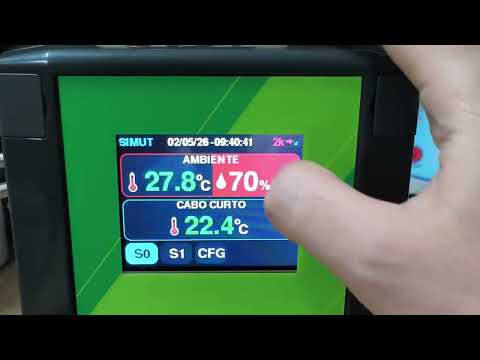 |
📸 See docs/images/README.md for how to capture screenshots from your device.
🎥 The Early Alpha video shows the first TFT + touch prototype. The UI, themes, responsiveness, and polish have evolved significantly since then — see the current TFT Demo GIF for today's experience.
| Component | Specification |
|---|---|
| MCU | Raspberry Pi Pico W (RP2040) |
| Display | ILI9341 320×240 TFT (SPI) |
| Touch | XPT2046 resistive touchscreen |
| Sensors | DS18B20 (1-Wire, up to 10) + DHT22 (ambient) |
| Buzzer | Passive piezo (PIO-driven) |
| Storage | 2 MB internal flash |
See the Wiring Guide for complete pinout and connection diagrams.
- Multi-sensor support — up to 10 DS18B20 (1-Wire/PIO) + 1 DHT22 ambient sensor
- Zero-trust sensor pipeline — ROM verification every 5 readings, hardware mismatch detection, error hysteresis
- Per-sensor alarms — temperature/humidity thresholds with buzzer melodies and visual TFT feedback
- Web-based calibration UI — calibration mode gated by
PERM_CALIB; reference value input calculates offset automatically - Ambient calibration via picoUID —
calib.csvsupports custom ID, name, and offsets for the DHT22
- 320×240 ILI9341 TFT — dashboard, real-time graphs, statistics, touch-driven settings (XPT2046)
- Touch-priority scheduler — UI input always wins over background operations
- 50 built-in themes + up to 8 custom themes loaded from LittleFS (offline editor in
tools/theme-editor/) - Dynamic dashboard layout — slot-based, theme-aware
- Atomic screen rendering — canvas-based off-screen compositing, zero tearing
- Sound system — Touch / Confirmation / Error / Alarm / Attention classes with configurable melodies and volume
- Light & dark themes for the Web UI with
localStoragepersistence
- Embedded web server — multi-user sessions, RBAC (10 permission bits), file manager, live dashboard
- gzip-compressed WebUI — minified inline pages with shared CSS/JS, browser-cacheable
- Self-service password change on the login screen with strength meter
- Telemetry — HTTP POST and MQTT with JSON / CSV / custom templates, TLS/SSL support, adaptive batch sizing
- Multi-sensor history graph — endpoint returning multiple series in one response; configurable range
- CSV export — binary
.simxbundle with magic, version, sensor table, records, and CRC32 trailer - Chunked export with adaptive retry — split on failure with automatic recovery
- Dual-channel CLI — USB Serial + Bluetooth with password-protected sessions
- Custom BT device name — configurable via web/CLI
- Deferred-flush logging during BT login to avoid flash contention
- NTP time sync — exponential backoff, multi-server fallback, virtual RTC with automatic correction
- Manual time entry via Web UI when no NTP is available
- History codec — delta + sensor-mask + anchor encoding for compact binary storage
- LittleFS — CRC32 dual-bank config, history files, rotating compact log
- Hardened authentication — HMAC-SHA256 with per-user random salt, 5000 rounds, 128-bit hash
- Random admin password on factory reset — 8-char shown on TFT, never persisted in flash
- Rate limiter — 16-slot LRU with 15-min TTL, lockout-aware eviction, exponential backoff
- Path-traversal-safe uploads —
.., percent-encoding, control bytes and reserved chars blocked SECURITY.mdwith threat model, rotation policy, and incident response
- Crash forensics — black-box profiler with watchdog scratch register autopsy
- Safe reboot path — USB-friendly reset that keeps the serial port reachable
- Soft-panic detection — cross-core health monitoring
- Watchdog discipline — feeds around every LittleFS operation and during flash operations
- OTA firmware update — upload new firmware via web UI, applied in-place with config preservation
- Backup & restore — full LittleFS backup/restore with CRC32 integrity verification
- Snapshot-based config preservation — critical settings survive firmware apply
- 2 display languages — English (inline) + Portuguese/Spanish via external language packs
- Hot-loadable language packs from LittleFS
- i18n inline fallback for keys not persisted in device language files
| Component | Specification |
|---|---|
| MCU | Raspberry Pi Pico W (RP2040) |
| Display | ILI9341 TFT 320×240 (SPI) |
| Touch | XPT2046 (SPI) |
| Sensors | DS18B20 (1-Wire) + DHT22 |
| Storage | 2 MB flash (1 MB firmware + 1 MB LittleFS) |
| Buzzer | Passive piezo (PIO-driven) |
- PlatformIO (Core 6.x or later)
- Raspberry Pi Pico W
# Clone the repository
git clone https://github.com/angeloINTJ/SIMUT.git
cd SIMUT
# Build firmware
pio run -e pico_w_release
# Flash to Pico W (hold BOOTSEL, connect USB)
pio run -e pico_w_release -t upload
# Upload LittleFS data (language packs, favicon)
pio run -e pico_w_release -t uploadfs- The device boots and shows the setup screen on the TFT
- A random 8-character admin password is displayed on the TFT
- Connect to the SIMUT WiFi access point or connect via USB Serial at 115200 baud
- Log in via the web interface (
http://simut.localor the device IP)
SIMUT/
├── src/ # All source code
│ ├── main.cpp # Entry point
│ ├── AppManager*.cpp/h # Application state machine
│ ├── DisplayManager*.cpp/h # TFT display, touch, themes
│ ├── WebManager*.cpp/h # Web server, API, OTA endpoints
│ ├── StorageManager.cpp/h # LittleFS, config, history
│ ├── SensorManager.cpp/h # DS18B20 and DHT22 drivers
│ ├── NetworkManager.cpp/h # WiFi, mDNS
│ ├── TelemetryManager.cpp/h # MQTT and HTTP telemetry
│ ├── CommandManager.cpp/h # CLI parser (USB + Bluetooth)
│ ├── LogManager.cpp/h # Logging and crash forensics
│ ├── SystemDefs*.h # System constants and limits
│ └── ota/ # OTA update subsystem
├── data/ # LittleFS assets
│ ├── favicon.ico
│ └── lang/ # Language packs
├── test/ # Unit tests (Unity framework)
├── tools/ # Build and development tools
├── docs/ # Documentation
├── platformio.ini # Build configuration
├── WebUI.h # Web UI source (compressed at build time)
└── LICENSE
| Environment | Description |
|---|---|
pico_w_release | Production firmware (default) |
pico_w_debug | Debug build with extra logging |
native | Host-side unit tests (Unity) |
-Os— optimize for size (flash is tight at ~98.7%)-Wall -Wextra— elevated warnings-specs=nano.specs— newlib-nano for smaller binary- LTO is disabled (toolchain limitation with earlephilhower Arduino-Pico)
A command-line interface is available via USB Serial (115200 baud) and Bluetooth. Key command groups:
help— show available commandsconf system— view/edit system configurationconf sensor— view/edit sensor configurationconf net— view/edit network settingsconf user— manage user accountswrite memory— persist changes to flashreload— reboot the device
The device exposes a REST API at http://<device-ip>/api/. See OTA Usage Guide for OTA-specific endpoints.
| Document | Description |
|---|---|
| User Manual | Complete hardware setup, display/web/CLI guide, troubleshooting |
| OTA Update Guide | Firmware update over-the-air via web UI or curl |
| Recovery Guide | Brick recovery after failed OTA — BOOTSEL and picotool |
| Security Policy | Threat model, credential handling, incident response |
| Changelog | Version history and feature changes |
# Run unit tests (validators, CRC, float conversion, time logic)
pio test -e nativeContributions are welcome! Please read CONTRIBUTING.md for development setup, code conventions, and the pull request process.
All contributors must follow the Code of Conduct.
- Bug reports:GitHub Issues
- Feature requests:GitHub Issues
- Security vulnerabilities: See SECURITY.md — do not open a public issue
- Questions: Open a discussion or issue
Thanks goes to these wonderful people:
Angelo Moises Alves 💻📖🎨🔌🛡️🚧 | Lorenzo Longaretto 🧪💻 | John Martin 🚇💻 | f p 📖 | Mike 💻🧪📖 |
This project follows the all-contributors specification.
Is your product or project using SIMUT? Add this badge to your README, documentation, or product page:
[](https://github.com/angeloINTJ/simut)
Large version (for presentations, posters, or product packaging):
[](https://github.com/angeloINTJ/simut)
MIT License — see LICENSE for details.
Copyright © 2026 Angelo Moises Alves