










- [2024.11.25]🎯📢LightRAG now supports seamless integration of custom knowledge graphs, empowering users to enhance the system with their own domain expertise.
- [2024.11.19]🎯📢A comprehensive guide to LightRAG is now available on LearnOpenCV. Many thanks to the blog author.
- [2024.11.12]🎯📢LightRAG now supports Oracle Database 23ai for all storage types (KV, vector, and graph).
- [2024.11.11]🎯📢LightRAG now supports deleting entities by their names.
- [2024.11.09]🎯📢Introducing the LightRAG Gui, which allows you to insert, query, visualize, and download LightRAG knowledge.
- [2024.11.04]🎯📢You can now use Neo4J for Storage.
- [2024.10.29]🎯📢LightRAG now supports multiple file types, including PDF, DOC, PPT, and CSV via
textract. - [2024.10.20]🎯📢We’ve added a new feature to LightRAG: Graph Visualization.
- [2024.10.18]🎯📢We’ve added a link to a LightRAG Introduction Video. Thanks to the author!
- [2024.10.17]🎯📢We have created a Discord channel! Welcome to join for sharing and discussions! 🎉🎉
- [2024.10.16]🎯📢LightRAG now supports Ollama models!
- [2024.10.15]🎯📢LightRAG now supports Hugging Face models!
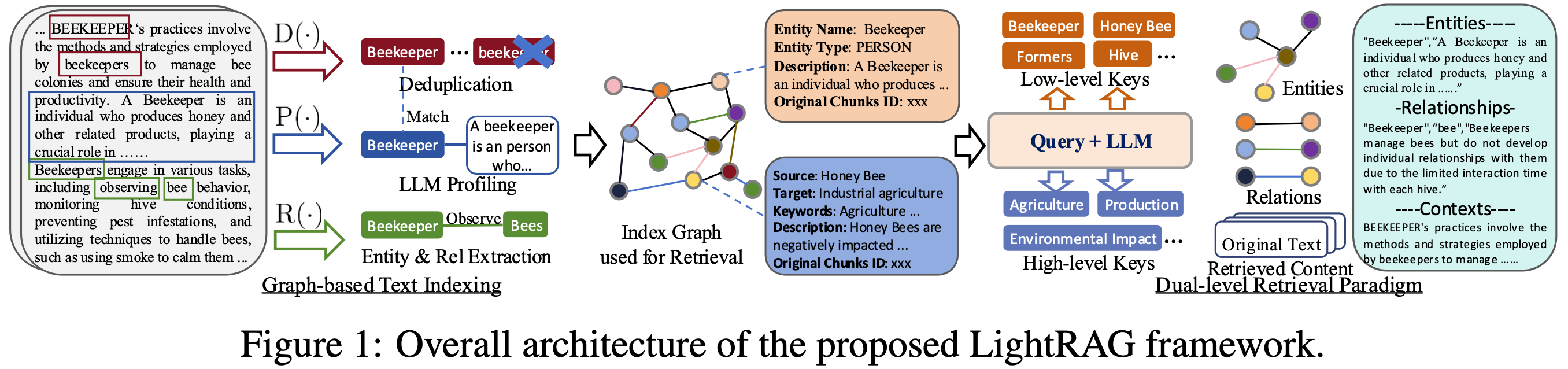
- Install from source (Recommend)
cd LightRAG
pip install -e .- Install from PyPI
pip install lightrag-hku- Video demo of running LightRAG locally.
- All the code can be found in the
examples. - Set OpenAI API key in environment if using OpenAI models:
export OPENAI_API_KEY="sk-...". - Download the demo text "A Christmas Carol by Charles Dickens":
curl https://raw.githubusercontent.com/gusye1234/nano-graphrag/main/tests/mock_data.txt > ./book.txtUse the below Python snippet (in a script) to initialize LightRAG and perform queries:
importosfromlightragimportLightRAG, QueryParamfromlightrag.llmimportgpt_4o_mini_complete, gpt_4o_complete########## Uncomment the below two lines if running in a jupyter notebook to handle the async nature of rag.insert()# import nest_asyncio# nest_asyncio.apply()#########WORKING_DIR="./dickens"ifnotos.path.exists(WORKING_DIR):
os.mkdir(WORKING_DIR)
rag=LightRAG(
working_dir=WORKING_DIR,
llm_model_func=gpt_4o_mini_complete# Use gpt_4o_mini_complete LLM model# llm_model_func=gpt_4o_complete # Optionally, use a stronger model
)
withopen("./book.txt") asf:
rag.insert(f.read())
# Perform naive searchprint(rag.query("What are the top themes in this story?", param=QueryParam(mode="naive")))
# Perform local searchprint(rag.query("What are the top themes in this story?", param=QueryParam(mode="local")))
# Perform global searchprint(rag.query("What are the top themes in this story?", param=QueryParam(mode="global")))
# Perform hybrid searchprint(rag.query("What are the top themes in this story?", param=QueryParam(mode="hybrid")))
Using Open AI-like APIs
- LightRAG also supports Open AI-like chat/embeddings APIs:
asyncdefllm_model_func(
prompt, system_prompt=None, history_messages=[], **kwargs
) ->str:
returnawaitopenai_complete_if_cache(
"solar-mini",
prompt,
system_prompt=system_prompt,
history_messages=history_messages,
api_key=os.getenv("UPSTAGE_API_KEY"),
base_url="https://api.upstage.ai/v1/solar",
**kwargs
)
asyncdefembedding_func(texts: list[str]) ->np.ndarray:
returnawaitopenai_embedding(
texts,
model="solar-embedding-1-large-query",
api_key=os.getenv("UPSTAGE_API_KEY"),
base_url="https://api.upstage.ai/v1/solar"
)
rag=LightRAG(
working_dir=WORKING_DIR,
llm_model_func=llm_model_func,
embedding_func=EmbeddingFunc(
embedding_dim=4096,
max_token_size=8192,
func=embedding_func
)
)
Using Hugging Face Models
- If you want to use Hugging Face models, you only need to set LightRAG as follows:
fromlightrag.llmimporthf_model_complete, hf_embeddingfromtransformersimportAutoModel, AutoTokenizerfromlightrag.utilsimportEmbeddingFunc# Initialize LightRAG with Hugging Face modelrag=LightRAG(
working_dir=WORKING_DIR,
llm_model_func=hf_model_complete, # Use Hugging Face model for text generationllm_model_name='meta-llama/Llama-3.1-8B-Instruct', # Model name from Hugging Face# Use Hugging Face embedding functionembedding_func=EmbeddingFunc(
embedding_dim=384,
max_token_size=5000,
func=lambdatexts: hf_embedding(
texts,
tokenizer=AutoTokenizer.from_pretrained("sentence-transformers/all-MiniLM-L6-v2"),
embed_model=AutoModel.from_pretrained("sentence-transformers/all-MiniLM-L6-v2")
)
),
)
Using Ollama Models
If you want to use Ollama models, you need to pull model you plan to use and embedding model, for example nomic-embed-text.
Then you only need to set LightRAG as follows:
fromlightrag.llmimportollama_model_complete, ollama_embeddingfromlightrag.utilsimportEmbeddingFunc# Initialize LightRAG with Ollama modelrag=LightRAG(
working_dir=WORKING_DIR,
llm_model_func=ollama_model_complete, # Use Ollama model for text generationllm_model_name='your_model_name', # Your model name# Use Ollama embedding functionembedding_func=EmbeddingFunc(
embedding_dim=768,
max_token_size=8192,
func=lambdatexts: ollama_embedding(
texts,
embed_model="nomic-embed-text"
)
),
)- For production level scenarios you will most likely want to leverage an enterprise solution
- for KG storage. Running Neo4J in Docker is recommended for seamless local testing.
- See: https://hub.docker.com/_/neo4j
exportNEO4J_URI="neo4j://localhost:7687"exportNEO4J_USERNAME="neo4j"exportNEO4J_PASSWORD="password"WhenyoulaunchtheprojectbesuretooverridethedefaultKG: NetworkSbyspecifyingkg="Neo4JStorage".
# Note: Default settings use NetworkX#Initialize LightRAG with Neo4J implementation.WORKING_DIR="./local_neo4jWorkDir"rag=LightRAG(
working_dir=WORKING_DIR,
llm_model_func=gpt_4o_mini_complete, # Use gpt_4o_mini_complete LLM modelkg="Neo4JStorage", #<-----------override KG defaultlog_level="DEBUG"#<-----------override log_level default
)
see test_neo4j.py for a working example.
In order for LightRAG to work context should be at least 32k tokens. By default Ollama models have context size of 8k. You can achieve this using one of two ways:
- Pull the model:
ollama pull qwen2- Display the model file:
ollama show --modelfile qwen2 > Modelfile- Edit the Modelfile by adding the following line:
PARAMETER num_ctx 32768- Create the modified model:
ollama create -f Modelfile qwen2mTiy can use llm_model_kwargs param to configure ollama:
rag=LightRAG(
working_dir=WORKING_DIR,
llm_model_func=ollama_model_complete, # Use Ollama model for text generationllm_model_name='your_model_name', # Your model namellm_model_kwargs={"options": {"num_ctx": 32768}},
# Use Ollama embedding functionembedding_func=EmbeddingFunc(
embedding_dim=768,
max_token_size=8192,
func=lambdatexts: ollama_embedding(
texts,
embed_model="nomic-embed-text"
)
),
)There fully functional example examples/lightrag_ollama_demo.py that utilizes gemma2:2b model, runs only 4 requests in parallel and set context size to 32k.
In order to run this experiment on low RAM GPU you should select small model and tune context window (increasing context increase memory consumption). For example, running this ollama example on repurposed mining GPU with 6Gb of RAM required to set context size to 26k while using gemma2:2b. It was able to find 197 entities and 19 relations on book.txt.
classQueryParam:
mode: Literal["local", "global", "hybrid", "naive"] ="global"only_need_context: bool=Falseresponse_type: str="Multiple Paragraphs"# Number of top-k items to retrieve; corresponds to entities in "local" mode and relationships in "global" mode.top_k: int=60# Number of tokens for the original chunks.max_token_for_text_unit: int=4000# Number of tokens for the relationship descriptionsmax_token_for_global_context: int=4000# Number of tokens for the entity descriptionsmax_token_for_local_context: int=4000# Batch Insert: Insert multiple texts at oncerag.insert(["TEXT1", "TEXT2",...])# Incremental Insert: Insert new documents into an existing LightRAG instancerag=LightRAG(
working_dir=WORKING_DIR,
llm_model_func=llm_model_func,
embedding_func=EmbeddingFunc(
embedding_dim=embedding_dimension,
max_token_size=8192,
func=embedding_func,
),
)
withopen("./newText.txt") asf:
rag.insert(f.read())rag=LightRAG(
working_dir=WORKING_DIR,
llm_model_func=llm_model_func,
embedding_func=EmbeddingFunc(
embedding_dim=embedding_dimension,
max_token_size=8192,
func=embedding_func,
),
)
custom_kg= {
"entities": [
{
"entity_name": "CompanyA",
"entity_type": "Organization",
"description": "A major technology company",
"source_id": "Source1"
},
{
"entity_name": "ProductX",
"entity_type": "Product",
"description": "A popular product developed by CompanyA",
"source_id": "Source1"
}
],
"relationships": [
{
"src_id": "CompanyA",
"tgt_id": "ProductX",
"description": "CompanyA develops ProductX",
"keywords": "develop, produce",
"weight": 1.0,
"source_id": "Source1"
}
]
}
rag.insert_custom_kg(custom_kg)# Delete Entity: Deleting entities by their namesrag=LightRAG(
working_dir=WORKING_DIR,
llm_model_func=llm_model_func,
embedding_func=EmbeddingFunc(
embedding_dim=embedding_dimension,
max_token_size=8192,
func=embedding_func,
),
)
rag.delete_by_entity("Project Gutenberg")The textract supports reading file types such as TXT, DOCX, PPTX, CSV, and PDF.
importtextractfile_path='TEXT.pdf'text_content=textract.process(file_path)
rag.insert(text_content.decode('utf-8'))
Graph visualization with html
- The following code can be found in
examples/graph_visual_with_html.py
importnetworkxasnxfrompyvis.networkimportNetwork# Load the GraphML fileG=nx.read_graphml('./dickens/graph_chunk_entity_relation.graphml')
# Create a Pyvis networknet=Network(notebook=True)
# Convert NetworkX graph to Pyvis networknet.from_nx(G)
# Save and display the networknet.show('knowledge_graph.html')
Graph visualization with Neo4j
- The following code can be found in
examples/graph_visual_with_neo4j.py
importosimportjsonfromlightrag.utilsimportxml_to_jsonfromneo4jimportGraphDatabase# ConstantsWORKING_DIR="./dickens"BATCH_SIZE_NODES=500BATCH_SIZE_EDGES=100# Neo4j connection credentialsNEO4J_URI="bolt://localhost:7687"NEO4J_USERNAME="neo4j"NEO4J_PASSWORD="your_password"defconvert_xml_to_json(xml_path, output_path):
"""Converts XML file to JSON and saves the output."""ifnotos.path.exists(xml_path):
print(f"Error: File not found - {xml_path}")
returnNonejson_data=xml_to_json(xml_path)
ifjson_data:
withopen(output_path, 'w', encoding='utf-8') asf:
json.dump(json_data, f, ensure_ascii=False, indent=2)
print(f"JSON file created: {output_path}")
returnjson_dataelse:
print("Failed to create JSON data")
returnNonedefprocess_in_batches(tx, query, data, batch_size):
"""Process data in batches and execute the given query."""foriinrange(0, len(data), batch_size):
batch=data[i:i+batch_size]
tx.run(query, {"nodes": batch} if"nodes"inqueryelse {"edges": batch})
defmain():
# Pathsxml_file=os.path.join(WORKING_DIR, 'graph_chunk_entity_relation.graphml')
json_file=os.path.join(WORKING_DIR, 'graph_data.json')
# Convert XML to JSONjson_data=convert_xml_to_json(xml_file, json_file)
ifjson_dataisNone:
return# Load nodes and edgesnodes=json_data.get('nodes', [])
edges=json_data.get('edges', [])
# Neo4j queriescreate_nodes_query=""" UNWIND $nodes AS node MERGE (e:Entity {id: node.id}) SET e.entity_type = node.entity_type, e.description = node.description, e.source_id = node.source_id, e.displayName = node.id REMOVE e:Entity WITH e, node CALL apoc.create.addLabels(e, [node.entity_type]) YIELD node AS labeledNode RETURN count(*) """create_edges_query=""" UNWIND $edges AS edge MATCH (source {id: edge.source}) MATCH (target {id: edge.target}) WITH source, target, edge, CASE WHEN edge.keywords CONTAINS 'lead' THEN 'lead' WHEN edge.keywords CONTAINS 'participate' THEN 'participate' WHEN edge.keywords CONTAINS 'uses' THEN 'uses' WHEN edge.keywords CONTAINS 'located' THEN 'located' WHEN edge.keywords CONTAINS 'occurs' THEN 'occurs' ELSE REPLACE(SPLIT(edge.keywords, ',')[0], '\"', '') END AS relType CALL apoc.create.relationship(source, relType, { weight: edge.weight, description: edge.description, keywords: edge.keywords, source_id: edge.source_id }, target) YIELD rel RETURN count(*) """set_displayname_and_labels_query=""" MATCH (n) SET n.displayName = n.id WITH n CALL apoc.create.setLabels(n, [n.entity_type]) YIELD node RETURN count(*) """# Create a Neo4j driverdriver=GraphDatabase.driver(NEO4J_URI, auth=(NEO4J_USERNAME, NEO4J_PASSWORD))
try:
# Execute queries in batcheswithdriver.session() assession:
# Insert nodes in batchessession.execute_write(process_in_batches, create_nodes_query, nodes, BATCH_SIZE_NODES)
# Insert edges in batchessession.execute_write(process_in_batches, create_edges_query, edges, BATCH_SIZE_EDGES)
# Set displayName and labelssession.run(set_displayname_and_labels_query)
exceptExceptionase:
print(f"Error occurred: {e}")
finally:
driver.close()
if__name__=="__main__":
main()| Parameter | Type | Explanation | Default |
|---|---|---|---|
| working_dir | str | Directory where the cache will be stored | lightrag_cache+timestamp |
| kv_storage | str | Storage type for documents and text chunks. Supported types: JsonKVStorage, OracleKVStorage | JsonKVStorage |
| vector_storage | str | Storage type for embedding vectors. Supported types: NanoVectorDBStorage, OracleVectorDBStorage | NanoVectorDBStorage |
| graph_storage | str | Storage type for graph edges and nodes. Supported types: NetworkXStorage, Neo4JStorage, OracleGraphStorage | NetworkXStorage |
| log_level | Log level for application runtime | logging.DEBUG | |
| chunk_token_size | int | Maximum token size per chunk when splitting documents | 1200 |
| chunk_overlap_token_size | int | Overlap token size between two chunks when splitting documents | 100 |
| tiktoken_model_name | str | Model name for the Tiktoken encoder used to calculate token numbers | gpt-4o-mini |
| entity_extract_max_gleaning | int | Number of loops in the entity extraction process, appending history messages | 1 |
| entity_summary_to_max_tokens | int | Maximum token size for each entity summary | 500 |
| node_embedding_algorithm | str | Algorithm for node embedding (currently not used) | node2vec |
| node2vec_params | dict | Parameters for node embedding | {"dimensions": 1536,"num_walks": 10,"walk_length": 40,"window_size": 2,"iterations": 3,"random_seed": 3,} |
| embedding_func | EmbeddingFunc | Function to generate embedding vectors from text | openai_embedding |
| embedding_batch_num | int | Maximum batch size for embedding processes (multiple texts sent per batch) | 32 |
| embedding_func_max_async | int | Maximum number of concurrent asynchronous embedding processes | 16 |
| llm_model_func | callable | Function for LLM generation | gpt_4o_mini_complete |
| llm_model_name | str | LLM model name for generation | meta-llama/Llama-3.2-1B-Instruct |
| llm_model_max_token_size | int | Maximum token size for LLM generation (affects entity relation summaries) | 32768 |
| llm_model_max_async | int | Maximum number of concurrent asynchronous LLM processes | 16 |
| llm_model_kwargs | dict | Additional parameters for LLM generation | |
| vector_db_storage_cls_kwargs | dict | Additional parameters for vector database (currently not used) | |
| enable_llm_cache | bool | If TRUE, stores LLM results in cache; repeated prompts return cached responses | TRUE |
| addon_params | dict | Additional parameters, e.g., {"example_number": 1, "language": "Simplified Chinese"}: sets example limit and output language | example_number: all examples, language: English |
| convert_response_to_json_func | callable | Not used | convert_response_to_json |
LightRAG also provides a FastAPI-based server implementation for RESTful API access to RAG operations. This allows you to run LightRAG as a service and interact with it through HTTP requests.
Click to expand setup instructions
- First, ensure you have the required dependencies:
pip install fastapi uvicorn pydantic- Set up your environment variables:
export RAG_DIR="your_index_directory"# Optional: Defaults to "index_default"export OPENAI_BASE_URL="Your OpenAI API base URL"# Optional: Defaults to "https://api.openai.com/v1"export OPENAI_API_KEY="Your OpenAI API key"# Requiredexport LLM_MODEL="Your LLM model"# Optional: Defaults to "gpt-4o-mini"export EMBEDDING_MODEL="Your embedding model"# Optional: Defaults to "text-embedding-3-large"- Run the API server:
python examples/lightrag_api_openai_compatible_demo.pyThe server will start on http://0.0.0.0:8020.
The API server provides the following endpoints:
Click to view Query endpoint details
- URL:
/query - Method: POST
- Body:
{
"query": "Your question here",
"mode": "hybrid", // Can be "naive", "local", "global", or "hybrid""only_need_context": true// Optional: Defaults to false, if true, only the referenced context will be returned, otherwise the llm answer will be returned
}- Example:
curl -X POST "http://127.0.0.1:8020/query" \
-H "Content-Type: application/json" \
-d '{"query": "What are the main themes?", "mode": "hybrid"}'Click to view Insert Text endpoint details
- URL:
/insert - Method: POST
- Body:
{
"text": "Your text content here"
}- Example:
curl -X POST "http://127.0.0.1:8020/insert" \
-H "Content-Type: application/json" \
-d '{"text": "Content to be inserted into RAG"}'Click to view Insert File endpoint details
- URL:
/insert_file - Method: POST
- Body:
{
"file_path": "path/to/your/file.txt"
}- Example:
curl -X POST "http://127.0.0.1:8020/insert_file" \
-H "Content-Type: application/json" \
-d '{"file_path": "./book.txt"}'Click to view Health Check endpoint details
- URL:
/health - Method: GET
- Example:
curl -X GET "http://127.0.0.1:8020/health"The API server can be configured using environment variables:
RAG_DIR: Directory for storing the RAG index (default: "index_default")- API keys and base URLs should be configured in the code for your specific LLM and embedding model providers
Click to view error handling details
The API includes comprehensive error handling:
- File not found errors (404)
- Processing errors (500)
- Supports multiple file encodings (UTF-8 and GBK)
The dataset used in LightRAG can be downloaded from TommyChien/UltraDomain.
LightRAG uses the following prompt to generate high-level queries, with the corresponding code in example/generate_query.py.
Prompt
Giventhefollowingdescriptionofadataset:
{description}
Pleaseidentify5potentialuserswhowouldengagewiththisdataset. Foreachuser, list5taskstheywouldperformwiththisdataset. Then, foreach (user, task) combination, generate5questionsthatrequireahigh-levelunderstandingoftheentiredataset.
Outputtheresultsinthefollowingstructure:
-User1: [userdescription]
-Task1: [taskdescription]
-Question1:
-Question2:
-Question3:
-Question4:
-Question5:
-Task2: [taskdescription]
...
-Task5: [taskdescription]
-User2: [userdescription]
...
-User5: [userdescription]
...To evaluate the performance of two RAG systems on high-level queries, LightRAG uses the following prompt, with the specific code available in example/batch_eval.py.
Prompt
---Role---Youareanexperttaskedwithevaluatingtwoanswerstothesamequestionbasedonthreecriteria: **Comprehensiveness**, **Diversity**, and**Empowerment**.
---Goal---Youwillevaluatetwoanswerstothesamequestionbasedonthreecriteria: **Comprehensiveness**, **Diversity**, and**Empowerment**.
-**Comprehensiveness**: Howmuchdetaildoestheanswerprovidetocoverallaspectsanddetailsofthequestion?
-**Diversity**: Howvariedandrichistheanswerinprovidingdifferentperspectivesandinsightsonthequestion?
-**Empowerment**: Howwelldoestheanswerhelpthereaderunderstandandmakeinformedjudgmentsaboutthetopic?
Foreachcriterion, choosethebetteranswer (eitherAnswer1orAnswer2) andexplainwhy. Then, selectanoverallwinnerbasedonthesethreecategories.
Hereisthequestion:
{query}
Herearethetwoanswers:
**Answer1:**
{answer1}
**Answer2:**
{answer2}
Evaluatebothanswersusingthethreecriterialistedaboveandprovidedetailedexplanationsforeachcriterion.
OutputyourevaluationinthefollowingJSONformat:
{{
"Comprehensiveness": {{
"Winner": "[Answer 1 or Answer 2]",
"Explanation": "[Provide explanation here]"
}},
"Empowerment": {{
"Winner": "[Answer 1 or Answer 2]",
"Explanation": "[Provide explanation here]"
}},
"Overall Winner": {{
"Winner": "[Answer 1 or Answer 2]",
"Explanation": "[Summarize why this answer is the overall winner based on the three criteria]"
}}
}}| Agriculture | CS | Legal | Mix | |||||
|---|---|---|---|---|---|---|---|---|
| NaiveRAG | LightRAG | NaiveRAG | LightRAG | NaiveRAG | LightRAG | NaiveRAG | LightRAG | |
| Comprehensiveness | 32.4% | 67.6% | 38.4% | 61.6% | 16.4% | 83.6% | 38.8% | 61.2% |
| Diversity | 23.6% | 76.4% | 38.0% | 62.0% | 13.6% | 86.4% | 32.4% | 67.6% |
| Empowerment | 32.4% | 67.6% | 38.8% | 61.2% | 16.4% | 83.6% | 42.8% | 57.2% |
| Overall | 32.4% | 67.6% | 38.8% | 61.2% | 15.2% | 84.8% | 40.0% | 60.0% |
| RQ-RAG | LightRAG | RQ-RAG | LightRAG | RQ-RAG | LightRAG | RQ-RAG | LightRAG | |
| Comprehensiveness | 31.6% | 68.4% | 38.8% | 61.2% | 15.2% | 84.8% | 39.2% | 60.8% |
| Diversity | 29.2% | 70.8% | 39.2% | 60.8% | 11.6% | 88.4% | 30.8% | 69.2% |
| Empowerment | 31.6% | 68.4% | 36.4% | 63.6% | 15.2% | 84.8% | 42.4% | 57.6% |
| Overall | 32.4% | 67.6% | 38.0% | 62.0% | 14.4% | 85.6% | 40.0% | 60.0% |
| HyDE | LightRAG | HyDE | LightRAG | HyDE | LightRAG | HyDE | LightRAG | |
| Comprehensiveness | 26.0% | 74.0% | 41.6% | 58.4% | 26.8% | 73.2% | 40.4% | 59.6% |
| Diversity | 24.0% | 76.0% | 38.8% | 61.2% | 20.0% | 80.0% | 32.4% | 67.6% |
| Empowerment | 25.2% | 74.8% | 40.8% | 59.2% | 26.0% | 74.0% | 46.0% | 54.0% |
| Overall | 24.8% | 75.2% | 41.6% | 58.4% | 26.4% | 73.6% | 42.4% | 57.6% |
| GraphRAG | LightRAG | GraphRAG | LightRAG | GraphRAG | LightRAG | GraphRAG | LightRAG | |
| Comprehensiveness | 45.6% | 54.4% | 48.4% | 51.6% | 48.4% | 51.6% | 50.4% | 49.6% |
| Diversity | 22.8% | 77.2% | 40.8% | 59.2% | 26.4% | 73.6% | 36.0% | 64.0% |
| Empowerment | 41.2% | 58.8% | 45.2% | 54.8% | 43.6% | 56.4% | 50.8% | 49.2% |
| Overall | 45.2% | 54.8% | 48.0% | 52.0% | 47.2% | 52.8% | 50.4% | 49.6% |
All the code can be found in the ./reproduce directory.
First, we need to extract unique contexts in the datasets.
Code
defextract_unique_contexts(input_directory, output_directory):
os.makedirs(output_directory, exist_ok=True)
jsonl_files=glob.glob(os.path.join(input_directory, '*.jsonl'))
print(f"Found {len(jsonl_files)} JSONL files.")
forfile_pathinjsonl_files:
filename=os.path.basename(file_path)
name, ext=os.path.splitext(filename)
output_filename=f"{name}_unique_contexts.json"output_path=os.path.join(output_directory, output_filename)
unique_contexts_dict= {}
print(f"Processing file: {filename}")
try:
withopen(file_path, 'r', encoding='utf-8') asinfile:
forline_number, lineinenumerate(infile, start=1):
line=line.strip()
ifnotline:
continuetry:
json_obj=json.loads(line)
context=json_obj.get('context')
ifcontextandcontextnotinunique_contexts_dict:
unique_contexts_dict[context] =Noneexceptjson.JSONDecodeErrorase:
print(f"JSON decoding error in file {filename} at line {line_number}: {e}")
exceptFileNotFoundError:
print(f"File not found: {filename}")
continueexceptExceptionase:
print(f"An error occurred while processing file {filename}: {e}")
continueunique_contexts_list=list(unique_contexts_dict.keys())
print(f"There are {len(unique_contexts_list)} unique `context` entries in the file {filename}.")
try:
withopen(output_path, 'w', encoding='utf-8') asoutfile:
json.dump(unique_contexts_list, outfile, ensure_ascii=False, indent=4)
print(f"Unique `context` entries have been saved to: {output_filename}")
exceptExceptionase:
print(f"An error occurred while saving to the file {output_filename}: {e}")
print("All files have been processed.")For the extracted contexts, we insert them into the LightRAG system.
Code
definsert_text(rag, file_path):
withopen(file_path, mode='r') asf:
unique_contexts=json.load(f)
retries=0max_retries=3whileretries<max_retries:
try:
rag.insert(unique_contexts)
breakexceptExceptionase:
retries+=1print(f"Insertion failed, retrying ({retries}/{max_retries}), error: {e}")
time.sleep(10)
ifretries==max_retries:
print("Insertion failed after exceeding the maximum number of retries")We extract tokens from the first and the second half of each context in the dataset, then combine them as dataset descriptions to generate queries.
Code
tokenizer=GPT2Tokenizer.from_pretrained('gpt2')
defget_summary(context, tot_tokens=2000):
tokens=tokenizer.tokenize(context)
half_tokens=tot_tokens//2start_tokens=tokens[1000:1000+half_tokens]
end_tokens=tokens[-(1000+half_tokens):1000]
summary_tokens=start_tokens+end_tokenssummary=tokenizer.convert_tokens_to_string(summary_tokens)
returnsummaryFor the queries generated in Step-2, we will extract them and query LightRAG.
Code
defextract_queries(file_path):
withopen(file_path, 'r') asf:
data=f.read()
data=data.replace('**', '')
queries=re.findall(r'- Question \d+: (.+)', data)
returnqueries.
├── examples
│ ├── batch_eval.py
│ ├── generate_query.py
│ ├── graph_visual_with_html.py
│ ├── graph_visual_with_neo4j.py
│ ├── lightrag_api_openai_compatible_demo.py
│ ├── lightrag_azure_openai_demo.py
│ ├── lightrag_bedrock_demo.py
│ ├── lightrag_hf_demo.py
│ ├── lightrag_lmdeploy_demo.py
│ ├── lightrag_ollama_demo.py
│ ├── lightrag_openai_compatible_demo.py
│ ├── lightrag_openai_demo.py
│ ├── lightrag_siliconcloud_demo.py
│ └── vram_management_demo.py
├── lightrag
│ ├── kg
│ │ ├── __init__.py
│ │ └── neo4j_impl.py
│ ├── __init__.py
│ ├── base.py
│ ├── lightrag.py
│ ├── llm.py
│ ├── operate.py
│ ├── prompt.py
│ ├── storage.py
│ └── utils.py
├── reproduce
│ ├── Step_0.py
│ ├── Step_1_openai_compatible.py
│ ├── Step_1.py
│ ├── Step_2.py
│ ├── Step_3_openai_compatible.py
│ └── Step_3.py
├── .gitignore
├── .pre-commit-config.yaml
├── Dockerfile
├── get_all_edges_nx.py
├── LICENSE
├── README.md
├── requirements.txt
├── setup.py
├── test_neo4j.py
└── test.pyThank you to all our contributors!
@article{guo2024lightrag,title={LightRAG: SimpleandFastRetrieval-AugmentedGeneration},author={ZiruiGuoandLianghaoXiaandYanhuaYuandTuAoandChaoHuang},year={2024},eprint={2410.05779},archivePrefix={arXiv},primaryClass={cs.IR}}Thank you for your interest in our work!