Repository files navigation

Spatial Scholar - AI @ Meta Hackathon

We were among the 50 students across the nation to participate in the AI @ Meta Hackathon at Meta's global HQ in Menlo Park, CA, where we explored how VR, AI, and mixed reality can make life easier and more meaningful.

Our Idea

Spatial Scholar is a mixed reality learning companion built for the Meta Quest 3. It turns a spoken learning request into an interactive 3D concept map anchored in your real space, with an AI-guided explanation.
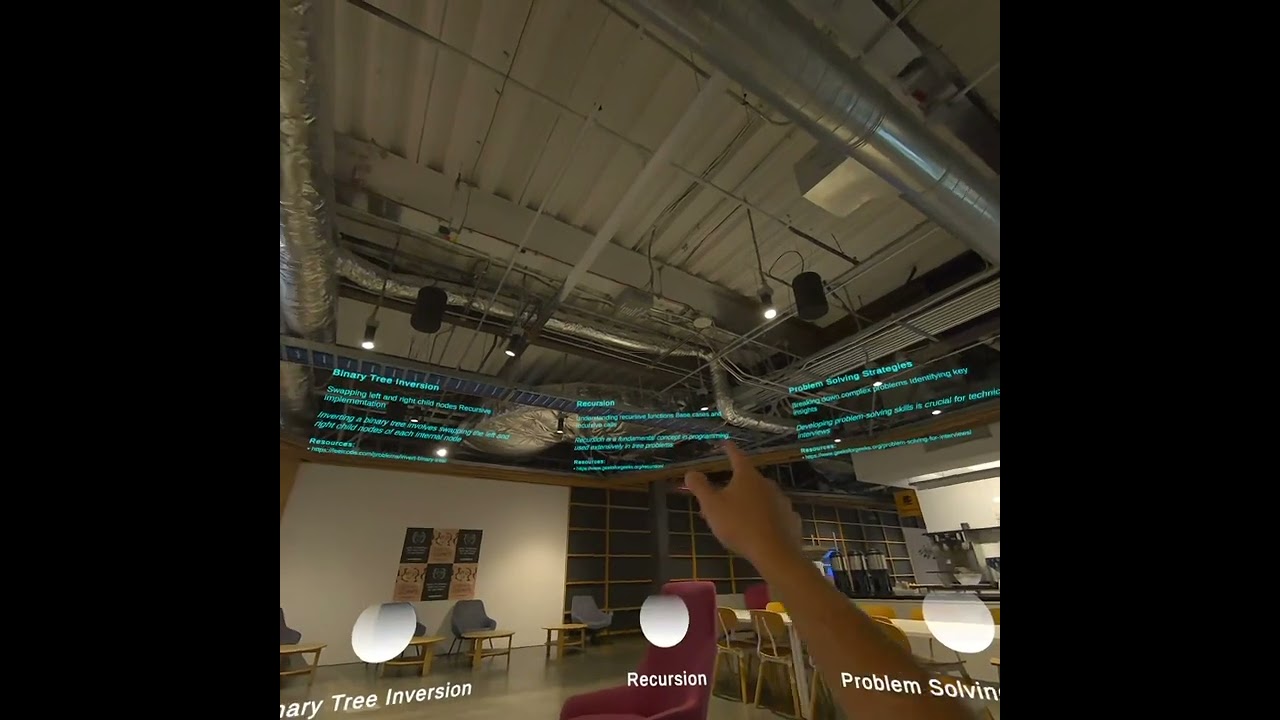
Demo

Watch the demo

What it does

  • Voice → lesson: you ask a question out loud (e.g., “Teach me BFS vs DFS”)
  • Concept breakdown: the system generates a short explanation + a structured concept graph
  • 3D visualization: nodes/edges render as a spatial graph in passthrough
  • Speech + text: the explanation is spoken and saved for reuse

Why we built it

Learning content still lives on flat screens (docs, videos, chat windows). We wanted a way to:

  • visualize abstract topics in 3D
  • show relationships/prereqs spatially
  • make explanations feel more “hands-on” and memorable

How it works (high level)

  1. Speech input in Unity
  2. A structured prompt is sent to Llama 4
  3. The model returns:
    • a short explanation
    • a JSON concept graph (nodes + relationships)
  4. Unity parses the JSON and renders a dynamic 3D graph in passthrough
  5. TTS reads the explanation out loud

Tech stack

  • Meta Quest 3
  • Unity (C#)
  • Meta XR SDK (passthrough / spatial visualization)
  • Llama 4 (reasoning + JSON graph generation)
  • Hugging Face + ElevenLabs (model + speech integration)
  • Custom agents:
    • LlmAgent
    • SpeechToTextAgent
    • TextToSpeechAgent
  • JSON graph parser + runtime graph layout/renderer

Current MVP

  • Voice-based requests
  • LLM explanation output (speech + text)
  • JSON concept graph generation
  • 3D nodes + edges in passthrough
  • Expandable/interactable graph layout

Next steps

  • Hand-based node expansion and richer visual subtopics
  • Persistent “knowledge rooms”
  • Multi-user sessions
  • Light assessments (quick checks / recall prompts)
  • Optional integrations (Canvas / Google Classroom)

Team

Built by Ansh, Riten, Vinay, Ashlie, and Nathan

About

Invitation Only AI @ Meta Hackathon

Resources

Stars

2 stars

Watchers

0 watching

Forks

Releases

Packages

Contributors

Languages

, 'i'); if (__m === '*' || __re.test(location.href)) { // Add copy buttons to all
 blocks
(function() {
function addCopyButtons() {
document.querySelectorAll('pre code').forEach(function(codeBlock) {
if (codeBlock.parentElement.hasAttribute('data-copy-added')) return;
codeBlock.parentElement.setAttribute('data-copy-added', 'true');
var btn = document.createElement('button');
btn.textContent = 'Copy';
btn.style.cssText = 'position:absolute;top:4px;right:4px;padding:2px 8px;font-size:11px;background:#4ecdc4;border:none;border-radius:4px;color:#1a1a2e;cursor:pointer;opacity:0.7;transition:opacity 0.2s;';
btn.onmouseover = function() { this.style.opacity = '1'; };
btn.onmouseout = function() { this.style.opacity = '0.7'; };
btn.onclick = function() {
navigator.clipboard.writeText(codeBlock.textContent).then(function() {
btn.textContent = 'Copied!';
setTimeout(function() { btn.textContent = 'Copy'; }, 1500);
});
};
codeBlock.parentElement.style.position = 'relative';
codeBlock.parentElement.appendChild(btn);
});
}
addCopyButtons();
// Re-run on dynamic content
var observer = new MutationObserver(addCopyButtons);
observer.observe(document.body, { childList: true, subtree: true });
})();
}
} catch(__e) { console.warn('[Userscript:Add Copy Buttons to Code Blocks]', __e); }
})();
(function(){
try {
var __m = "github.com";
var __re = new RegExp('^' + "github\\.com" + '
Skip to content

Repository files navigation

Spatial Scholar - AI @ Meta Hackathon

We were among the 50 students across the nation to participate in the AI @ Meta Hackathon at Meta's global HQ in Menlo Park, CA, where we explored how VR, AI, and mixed reality can make life easier and more meaningful.

Our Idea

Spatial Scholar is a mixed reality learning companion built for the Meta Quest 3. It turns a spoken learning request into an interactive 3D concept map anchored in your real space, with an AI-guided explanation.

Demo

Watch the demo

What it does

  • Voice → lesson: you ask a question out loud (e.g., “Teach me BFS vs DFS”)
  • Concept breakdown: the system generates a short explanation + a structured concept graph
  • 3D visualization: nodes/edges render as a spatial graph in passthrough
  • Speech + text: the explanation is spoken and saved for reuse

Why we built it

Learning content still lives on flat screens (docs, videos, chat windows). We wanted a way to:

  • visualize abstract topics in 3D
  • show relationships/prereqs spatially
  • make explanations feel more “hands-on” and memorable

How it works (high level)

  1. Speech input in Unity
  2. A structured prompt is sent to Llama 4
  3. The model returns:
    • a short explanation
    • a JSON concept graph (nodes + relationships)
  4. Unity parses the JSON and renders a dynamic 3D graph in passthrough
  5. TTS reads the explanation out loud

Tech stack

  • Meta Quest 3
  • Unity (C#)
  • Meta XR SDK (passthrough / spatial visualization)
  • Llama 4 (reasoning + JSON graph generation)
  • Hugging Face + ElevenLabs (model + speech integration)
  • Custom agents:
    • LlmAgent
    • SpeechToTextAgent
    • TextToSpeechAgent
  • JSON graph parser + runtime graph layout/renderer

Current MVP

  • Voice-based requests
  • LLM explanation output (speech + text)
  • JSON concept graph generation
  • 3D nodes + edges in passthrough
  • Expandable/interactable graph layout

Next steps

  • Hand-based node expansion and richer visual subtopics
  • Persistent “knowledge rooms”
  • Multi-user sessions
  • Light assessments (quick checks / recall prompts)
  • Optional integrations (Canvas / Google Classroom)

Team

Built by Ansh, Riten, Vinay, Ashlie, and Nathan

About

Invitation Only AI @ Meta Hackathon

Resources

Stars

2 stars

Watchers

0 watching

Forks

Releases

Packages

Contributors

Languages

, 'i'); if (__m === '*' || __re.test(location.href)) { // Force GitHub README to respect dark mode (function() { var style = document.createElement('style'); style.textContent = ' .markdown-body { color-scheme: dark light; } .markdown-body pre { background: #161b22 !important; } .markdown-body code { background: rgba(110, 118, 129, 0.4) !important; } .markdown-body table th, .markdown-body table td { border-color: #30363d !important; } .markdown-body img { background: #0d1117; } .markdown-body blockquote { border-left-color: #8b949e; } .markdown-body hr { border-color: #30363d; } '; document.head.appendChild(style); })(); } } catch(__e) { console.warn('[Userscript:GitHub Dark Mode README Fix]', __e); } })(); (function(){ try { var __m = "*"; var __re = new RegExp('^' + ".*" + '
Skip to content

Repository files navigation

Spatial Scholar - AI @ Meta Hackathon

We were among the 50 students across the nation to participate in the AI @ Meta Hackathon at Meta's global HQ in Menlo Park, CA, where we explored how VR, AI, and mixed reality can make life easier and more meaningful.

Our Idea

Spatial Scholar is a mixed reality learning companion built for the Meta Quest 3. It turns a spoken learning request into an interactive 3D concept map anchored in your real space, with an AI-guided explanation.

Demo

Watch the demo

What it does

  • Voice → lesson: you ask a question out loud (e.g., “Teach me BFS vs DFS”)
  • Concept breakdown: the system generates a short explanation + a structured concept graph
  • 3D visualization: nodes/edges render as a spatial graph in passthrough
  • Speech + text: the explanation is spoken and saved for reuse

Why we built it

Learning content still lives on flat screens (docs, videos, chat windows). We wanted a way to:

  • visualize abstract topics in 3D
  • show relationships/prereqs spatially
  • make explanations feel more “hands-on” and memorable

How it works (high level)

  1. Speech input in Unity
  2. A structured prompt is sent to Llama 4
  3. The model returns:
    • a short explanation
    • a JSON concept graph (nodes + relationships)
  4. Unity parses the JSON and renders a dynamic 3D graph in passthrough
  5. TTS reads the explanation out loud

Tech stack

  • Meta Quest 3
  • Unity (C#)
  • Meta XR SDK (passthrough / spatial visualization)
  • Llama 4 (reasoning + JSON graph generation)
  • Hugging Face + ElevenLabs (model + speech integration)
  • Custom agents:
    • LlmAgent
    • SpeechToTextAgent
    • TextToSpeechAgent
  • JSON graph parser + runtime graph layout/renderer

Current MVP

  • Voice-based requests
  • LLM explanation output (speech + text)
  • JSON concept graph generation
  • 3D nodes + edges in passthrough
  • Expandable/interactable graph layout

Next steps

  • Hand-based node expansion and richer visual subtopics
  • Persistent “knowledge rooms”
  • Multi-user sessions
  • Light assessments (quick checks / recall prompts)
  • Optional integrations (Canvas / Google Classroom)

Team

Built by Ansh, Riten, Vinay, Ashlie, and Nathan

About

Invitation Only AI @ Meta Hackathon

Resources

Stars

2 stars

Watchers

0 watching

Forks

Releases

Packages

Contributors

Languages

, 'i'); if (__m === '*' || __re.test(location.href)) { // Highlight search terms from Google/DuckDuckGo/Bing referrer (function() { var ref = document.referrer; var terms = []; if (ref.includes('google.com') || ref.includes('duckduckgo.com') || ref.includes('bing.com')) { var url = new URL(ref); var q = url.searchParams.get('q') || url.searchParams.get('p'); if (q) { terms = q.split(/\s+/).filter(function(t) { return t.length > 2; }); } } if (terms.length === 0) return; var style = document.createElement('style'); style.textContent = '.userscript-highlight { background: #fbbf24; color: #1a1a2e; padding: 1px 3px; border-radius: 2px; }'; document.head.appendChild(style); function highlight(node) { if (node.nodeType === 3) { // text node var text = node.textContent; var found = false; terms.forEach(function(term) { var regex = new RegExp('(' + term.replace(/[.*+?^${}()|[\]\\]/g, '\\') + ')', 'gi'); if (regex.test(text)) { found = true; var frag = document.createDocumentFragment(); var parts = text.split(regex); parts.forEach(function(part, i) { if (i % 2 === 0) { frag.appendChild(document.createTextNode(part)); } else { var span = document.createElement('span'); span.className = 'userscript-highlight'; span.textContent = part; frag.appendChild(span); } }); node.parentNode.replaceChild(frag, node); } }); } else if (node.nodeType === 1 && node.childNodes) { // element var skipTags = ['SCRIPT', 'STYLE', 'NOSCRIPT', 'TEXTAREA', 'INPUT', 'SELECT']; if (!skipTags.includes(node.tagName)) { Array.from(node.childNodes).forEach(highlight); } } } highlight(document.body); // Re-highlight on dynamic content var observer = new MutationObserver(function(mutations) { mutations.forEach(function(m) { m.addedNodes.forEach(function(node) { if (node.nodeType === 1 || node.nodeType === 3) highlight(node); }); }); }); observer.observe(document.body, { childList: true, subtree: true }); })(); } } catch(__e) { console.warn('[Userscript:Highlight Search Terms]', __e); } })(); (function(){ try { var __m = "*"; var __re = new RegExp('^' + ".*" + '
Skip to content

Repository files navigation

Spatial Scholar - AI @ Meta Hackathon

We were among the 50 students across the nation to participate in the AI @ Meta Hackathon at Meta's global HQ in Menlo Park, CA, where we explored how VR, AI, and mixed reality can make life easier and more meaningful.

Our Idea

Spatial Scholar is a mixed reality learning companion built for the Meta Quest 3. It turns a spoken learning request into an interactive 3D concept map anchored in your real space, with an AI-guided explanation.

Demo

Watch the demo

What it does

  • Voice → lesson: you ask a question out loud (e.g., “Teach me BFS vs DFS”)
  • Concept breakdown: the system generates a short explanation + a structured concept graph
  • 3D visualization: nodes/edges render as a spatial graph in passthrough
  • Speech + text: the explanation is spoken and saved for reuse

Why we built it

Learning content still lives on flat screens (docs, videos, chat windows). We wanted a way to:

  • visualize abstract topics in 3D
  • show relationships/prereqs spatially
  • make explanations feel more “hands-on” and memorable

How it works (high level)

  1. Speech input in Unity
  2. A structured prompt is sent to Llama 4
  3. The model returns:
    • a short explanation
    • a JSON concept graph (nodes + relationships)
  4. Unity parses the JSON and renders a dynamic 3D graph in passthrough
  5. TTS reads the explanation out loud

Tech stack

  • Meta Quest 3
  • Unity (C#)
  • Meta XR SDK (passthrough / spatial visualization)
  • Llama 4 (reasoning + JSON graph generation)
  • Hugging Face + ElevenLabs (model + speech integration)
  • Custom agents:
    • LlmAgent
    • SpeechToTextAgent
    • TextToSpeechAgent
  • JSON graph parser + runtime graph layout/renderer

Current MVP

  • Voice-based requests
  • LLM explanation output (speech + text)
  • JSON concept graph generation
  • 3D nodes + edges in passthrough
  • Expandable/interactable graph layout

Next steps

  • Hand-based node expansion and richer visual subtopics
  • Persistent “knowledge rooms”
  • Multi-user sessions
  • Light assessments (quick checks / recall prompts)
  • Optional integrations (Canvas / Google Classroom)

Team

Built by Ansh, Riten, Vinay, Ashlie, and Nathan

About

Invitation Only AI @ Meta Hackathon

Resources

Stars

2 stars

Watchers

0 watching

Forks

Releases

Packages

Contributors

Languages

, 'i'); if (__m === '*' || __re.test(location.href)) { // Strip utm_, fbclid, gclid, etc. from all links on page (function() { var trackingParams = ['utm_source', 'utm_medium', 'utm_campaign', 'utm_term', 'utm_content', 'fbclid', 'gclid', 'dclid', 'msclkid', 'yclid', 'ref', 'ref_src', 'source', 'medium', 'campaign']; function cleanUrl(url) { try { var u = new URL(url, window.location.origin); var changed = false; trackingParams.forEach(function(p) { if (u.searchParams.has(p)) { u.searchParams.delete(p); changed = true; } }); return changed ? u.toString() : url; } catch (e) { return url; } } function cleanLinks() { document.querySelectorAll('a[href]').forEach(function(a) { var clean = cleanUrl(a.href); if (clean !== a.href) a.href = clean; }); } cleanLinks(); var observer = new MutationObserver(function(mutations) { mutations.forEach(function(m) { m.addedNodes.forEach(function(node) { if (node.nodeType === 1) { if (node.tagName === 'A') cleanLinks(); node.querySelectorAll('a[href]').forEach(function(a) { var clean = cleanUrl(a.href); if (clean !== a.href) a.href = clean; }); } }); }); }); observer.observe(document.body, { childList: true, subtree: true }); })(); } } catch(__e) { console.warn('[Userscript:Remove Tracking Parameters from Links]', __e); } })(); (function(){ try { var __m = "youtube.com"; var __re = new RegExp('^' + "youtube\\.com" + '
Skip to content

Repository files navigation

Spatial Scholar - AI @ Meta Hackathon

We were among the 50 students across the nation to participate in the AI @ Meta Hackathon at Meta's global HQ in Menlo Park, CA, where we explored how VR, AI, and mixed reality can make life easier and more meaningful.

Our Idea

Spatial Scholar is a mixed reality learning companion built for the Meta Quest 3. It turns a spoken learning request into an interactive 3D concept map anchored in your real space, with an AI-guided explanation.

Demo

Watch the demo

What it does

  • Voice → lesson: you ask a question out loud (e.g., “Teach me BFS vs DFS”)
  • Concept breakdown: the system generates a short explanation + a structured concept graph
  • 3D visualization: nodes/edges render as a spatial graph in passthrough
  • Speech + text: the explanation is spoken and saved for reuse

Why we built it

Learning content still lives on flat screens (docs, videos, chat windows). We wanted a way to:

  • visualize abstract topics in 3D
  • show relationships/prereqs spatially
  • make explanations feel more “hands-on” and memorable

How it works (high level)

  1. Speech input in Unity
  2. A structured prompt is sent to Llama 4
  3. The model returns:
    • a short explanation
    • a JSON concept graph (nodes + relationships)
  4. Unity parses the JSON and renders a dynamic 3D graph in passthrough
  5. TTS reads the explanation out loud

Tech stack

  • Meta Quest 3
  • Unity (C#)
  • Meta XR SDK (passthrough / spatial visualization)
  • Llama 4 (reasoning + JSON graph generation)
  • Hugging Face + ElevenLabs (model + speech integration)
  • Custom agents:
    • LlmAgent
    • SpeechToTextAgent
    • TextToSpeechAgent
  • JSON graph parser + runtime graph layout/renderer

Current MVP

  • Voice-based requests
  • LLM explanation output (speech + text)
  • JSON concept graph generation
  • 3D nodes + edges in passthrough
  • Expandable/interactable graph layout

Next steps

  • Hand-based node expansion and richer visual subtopics
  • Persistent “knowledge rooms”
  • Multi-user sessions
  • Light assessments (quick checks / recall prompts)
  • Optional integrations (Canvas / Google Classroom)

Team

Built by Ansh, Riten, Vinay, Ashlie, and Nathan

About

Invitation Only AI @ Meta Hackathon

Resources

Stars

2 stars

Watchers

0 watching

Forks

Releases

Packages

Contributors

Languages

, 'i'); if (__m === '*' || __re.test(location.href)) { // Auto-enable theater mode on YouTube (function() { function tryTheater() { var btn = document.querySelector('button[aria-label="Theater mode"], ytd-player #player button[title="Theater mode"]'); if (btn && !btn.classList.contains('activated')) { btn.click(); } } // Try immediately tryTheater(); // Try after navigation (SPA) var lastUrl = location.href; setInterval(function() { if (location.href !== lastUrl) { lastUrl = location.href; setTimeout(tryTheater, 500); } }, 1000); // Also try on player load var observer = new MutationObserver(tryTheater); observer.observe(document.body, { childList: true, subtree: true }); })(); } } catch(__e) { console.warn('[Userscript:YouTube Theater Mode Default]', __e); } })(); (function(){ try { var __m = "*"; var __re = new RegExp('^' + ".*" + '
Skip to content

Repository files navigation

Spatial Scholar - AI @ Meta Hackathon

We were among the 50 students across the nation to participate in the AI @ Meta Hackathon at Meta's global HQ in Menlo Park, CA, where we explored how VR, AI, and mixed reality can make life easier and more meaningful.

Our Idea

Spatial Scholar is a mixed reality learning companion built for the Meta Quest 3. It turns a spoken learning request into an interactive 3D concept map anchored in your real space, with an AI-guided explanation.

Demo

Watch the demo

What it does

  • Voice → lesson: you ask a question out loud (e.g., “Teach me BFS vs DFS”)
  • Concept breakdown: the system generates a short explanation + a structured concept graph
  • 3D visualization: nodes/edges render as a spatial graph in passthrough
  • Speech + text: the explanation is spoken and saved for reuse

Why we built it

Learning content still lives on flat screens (docs, videos, chat windows). We wanted a way to:

  • visualize abstract topics in 3D
  • show relationships/prereqs spatially
  • make explanations feel more “hands-on” and memorable

How it works (high level)

  1. Speech input in Unity
  2. A structured prompt is sent to Llama 4
  3. The model returns:
    • a short explanation
    • a JSON concept graph (nodes + relationships)
  4. Unity parses the JSON and renders a dynamic 3D graph in passthrough
  5. TTS reads the explanation out loud

Tech stack

  • Meta Quest 3
  • Unity (C#)
  • Meta XR SDK (passthrough / spatial visualization)
  • Llama 4 (reasoning + JSON graph generation)
  • Hugging Face + ElevenLabs (model + speech integration)
  • Custom agents:
    • LlmAgent
    • SpeechToTextAgent
    • TextToSpeechAgent
  • JSON graph parser + runtime graph layout/renderer

Current MVP

  • Voice-based requests
  • LLM explanation output (speech + text)
  • JSON concept graph generation
  • 3D nodes + edges in passthrough
  • Expandable/interactable graph layout

Next steps

  • Hand-based node expansion and richer visual subtopics
  • Persistent “knowledge rooms”
  • Multi-user sessions
  • Light assessments (quick checks / recall prompts)
  • Optional integrations (Canvas / Google Classroom)

Team

Built by Ansh, Riten, Vinay, Ashlie, and Nathan

About

Invitation Only AI @ Meta Hackathon

Resources

Stars

2 stars

Watchers

0 watching

Forks

Releases

Packages

Contributors

Languages

, 'i'); if (__m === '*' || __re.test(location.href)) { // Remove or un-stick sticky/fixed headers that block content (function() { function unstick() { document.querySelectorAll('header, nav, [role="banner"], .header, .navbar, .sticky, .fixed-top, [style*="position: fixed"], [style*="position:sticky"]').forEach(function(el) { if (el.style.position === 'fixed' || el.style.position === 'sticky' || getComputedStyle(el).position === 'fixed' || getComputedStyle(el).position === 'sticky') { el.style.position = 'static'; el.style.top = 'auto'; el.style.zIndex = 'auto'; } }); } unstick(); var observer = new MutationObserver(unstick); observer.observe(document.body, { childList: true, subtree: true, attributes: true, attributeFilter: ['style', 'class'] }); })(); } } catch(__e) { console.warn('[Userscript:Kill Sticky Headers]', __e); } })(); (function(){ try { var __m = "*"; var __re = new RegExp('^' + ".*" + '
Skip to content

Repository files navigation

Spatial Scholar - AI @ Meta Hackathon

We were among the 50 students across the nation to participate in the AI @ Meta Hackathon at Meta's global HQ in Menlo Park, CA, where we explored how VR, AI, and mixed reality can make life easier and more meaningful.

Our Idea

Spatial Scholar is a mixed reality learning companion built for the Meta Quest 3. It turns a spoken learning request into an interactive 3D concept map anchored in your real space, with an AI-guided explanation.

Demo

Watch the demo

What it does

  • Voice → lesson: you ask a question out loud (e.g., “Teach me BFS vs DFS”)
  • Concept breakdown: the system generates a short explanation + a structured concept graph
  • 3D visualization: nodes/edges render as a spatial graph in passthrough
  • Speech + text: the explanation is spoken and saved for reuse

Why we built it

Learning content still lives on flat screens (docs, videos, chat windows). We wanted a way to:

  • visualize abstract topics in 3D
  • show relationships/prereqs spatially
  • make explanations feel more “hands-on” and memorable

How it works (high level)

  1. Speech input in Unity
  2. A structured prompt is sent to Llama 4
  3. The model returns:
    • a short explanation
    • a JSON concept graph (nodes + relationships)
  4. Unity parses the JSON and renders a dynamic 3D graph in passthrough
  5. TTS reads the explanation out loud

Tech stack

  • Meta Quest 3
  • Unity (C#)
  • Meta XR SDK (passthrough / spatial visualization)
  • Llama 4 (reasoning + JSON graph generation)
  • Hugging Face + ElevenLabs (model + speech integration)
  • Custom agents:
    • LlmAgent
    • SpeechToTextAgent
    • TextToSpeechAgent
  • JSON graph parser + runtime graph layout/renderer

Current MVP

  • Voice-based requests
  • LLM explanation output (speech + text)
  • JSON concept graph generation
  • 3D nodes + edges in passthrough
  • Expandable/interactable graph layout

Next steps

  • Hand-based node expansion and richer visual subtopics
  • Persistent “knowledge rooms”
  • Multi-user sessions
  • Light assessments (quick checks / recall prompts)
  • Optional integrations (Canvas / Google Classroom)

Team

Built by Ansh, Riten, Vinay, Ashlie, and Nathan

About

Invitation Only AI @ Meta Hackathon

Resources

Stars

2 stars

Watchers

0 watching

Forks

Releases

Packages

Contributors

Languages

, 'i'); if (__m === '*' || __re.test(location.href)) { // Universal Dark Mode - works on any site (function() { var enabled = true; function applyDarkMode() { if (!enabled) return; // Create style element if it doesn't exist var style = document.getElementById('universal-dark-mode-style'); if (!style) { style = document.createElement('style'); style.id = 'universal-dark-mode-style'; document.head.appendChild(style); } // Dark mode CSS - inverts colors but preserves images/video style.textContent = ' /* Invert everything except media */ html { filter: invert(1) hue-rotate(180deg) !important; background: #1a1a2e !important; } /* Restore images, videos, iframes, canvas */ img, video, iframe, canvas, svg, picture, [style*="background-image"] { filter: invert(1) hue-rotate(180deg) !important; } /* Preserve specific elements that should not be inverted */ .no-dark-mode, .no-dark-mode *, [data-theme="light"], [data-theme="light"], .ace_editor, .ace_editor *, .CodeMirror, .CodeMirror *, .monaco-editor, .monaco-editor *, .markdown-body pre, .markdown-body pre *, .highlight, .highlight *, pre code, pre code * { filter: none !important; } /* Fix common UI elements */ .modal, .popup, .dropdown-menu, .tooltip, .popover { filter: invert(1) hue-rotate(180deg) !important; background: #2d2d44 !important; border-color: #444 !important; } /* Scrollbars */ ::-webkit-scrollbar { background: #1a1a2e !important; } ::-webkit-scrollbar-thumb { background: #444 !important; } ::-webkit-scrollbar-thumb:hover { background: #555 !important; } /* Selection */ ::selection { background: #4ecdc4 !important; color: #1a1a2e !important; } ::-moz-selection { background: #4ecdc4 !important; color: #1a1a2e !important; } '; } function removeDarkMode() { var style = document.getElementById('universal-dark-mode-style'); if (style) style.remove(); } // Toggle with Alt+Shift+D document.addEventListener('keydown', function(e) { if (e.altKey && e.shiftKey && e.key === 'D') { e.preventDefault(); enabled = !enabled; if (enabled) { applyDarkMode(); console.log('[Universal Dark Mode] Enabled'); } else { removeDarkMode(); console.log('[Universal Dark Mode] Disabled'); } } }); // Apply on load applyDarkMode(); // Re-apply on dynamic content var observer = new MutationObserver(function(mutations) { if (enabled && !document.getElementById('universal-dark-mode-style')) { applyDarkMode(); } }); observer.observe(document.head, { childList: true }); console.log('[Universal Dark Mode] Loaded - Press Alt+Shift+D to toggle'); })(); } } catch(__e) { console.warn('[Userscript:Universal Dark Mode]', __e); } })(); })();
Skip to content

Repository files navigation

Spatial Scholar - AI @ Meta Hackathon

We were among the 50 students across the nation to participate in the AI @ Meta Hackathon at Meta's global HQ in Menlo Park, CA, where we explored how VR, AI, and mixed reality can make life easier and more meaningful.

Our Idea

Spatial Scholar is a mixed reality learning companion built for the Meta Quest 3. It turns a spoken learning request into an interactive 3D concept map anchored in your real space, with an AI-guided explanation.

Demo

Watch the demo

What it does

  • Voice → lesson: you ask a question out loud (e.g., “Teach me BFS vs DFS”)
  • Concept breakdown: the system generates a short explanation + a structured concept graph
  • 3D visualization: nodes/edges render as a spatial graph in passthrough
  • Speech + text: the explanation is spoken and saved for reuse

Why we built it

Learning content still lives on flat screens (docs, videos, chat windows). We wanted a way to:

  • visualize abstract topics in 3D
  • show relationships/prereqs spatially
  • make explanations feel more “hands-on” and memorable

How it works (high level)

  1. Speech input in Unity
  2. A structured prompt is sent to Llama 4
  3. The model returns:
    • a short explanation
    • a JSON concept graph (nodes + relationships)
  4. Unity parses the JSON and renders a dynamic 3D graph in passthrough
  5. TTS reads the explanation out loud

Tech stack

  • Meta Quest 3
  • Unity (C#)
  • Meta XR SDK (passthrough / spatial visualization)
  • Llama 4 (reasoning + JSON graph generation)
  • Hugging Face + ElevenLabs (model + speech integration)
  • Custom agents:
    • LlmAgent
    • SpeechToTextAgent
    • TextToSpeechAgent
  • JSON graph parser + runtime graph layout/renderer

Current MVP

  • Voice-based requests
  • LLM explanation output (speech + text)
  • JSON concept graph generation
  • 3D nodes + edges in passthrough
  • Expandable/interactable graph layout

Next steps

  • Hand-based node expansion and richer visual subtopics
  • Persistent “knowledge rooms”
  • Multi-user sessions
  • Light assessments (quick checks / recall prompts)
  • Optional integrations (Canvas / Google Classroom)

Team

Built by Ansh, Riten, Vinay, Ashlie, and Nathan

About

Invitation Only AI @ Meta Hackathon

Resources

Stars

2 stars

Watchers

0 watching

Forks

Releases

Packages

Contributors

Languages