Uh oh!
There was an error while loading. Please reload this page.
ui: instance settings visibility - #3244
Conversation
borisstoyanov
commented
Apr 2, 2019
@blueorangutan package |
blueorangutan
commented
Apr 2, 2019
@borisstoyanov a Jenkins job has been kicked to build packages. I'll keep you posted as I make progress. |
blueorangutan
commented
Apr 2, 2019
Packaging result: ✔centos6 ✔centos7 ✔debian. JID-2668 |
borisstoyanov
commented
Apr 2, 2019
@blueorangutan test |
blueorangutan
commented
Apr 2, 2019
@borisstoyanov a Trillian-Jenkins test job (centos7 mgmt + kvm-centos7) has been kicked to run smoke tests |
 borisstoyanov
left a comment
borisstoyanov
left a comment
There was a problem hiding this comment.
LGTM, manually checked the restriction logic and the readonly setting
yadvr
commented
May 23, 2019
@shwstppr please fix conflicts and rebase against latest master |
ed4c793 to
29a0e47Compareshwstppr
commented
May 23, 2019
Done @rhtyd |
shwstppr
commented
May 23, 2019
@blueorangutan package |
blueorangutan
commented
May 23, 2019
@shwstppr a Jenkins job has been kicked to build packages. I'll keep you posted as I make progress. |
blueorangutan
commented
May 23, 2019
Packaging result: ✔centos6 ✔centos7 ✔debian. JID-2754 |
DaanHoogland
commented
May 23, 2019
@shwstppr please rebase |
This change allows instance Settings tab to be visible but inaccessible when instance is running. A warning is shown when user tries to access Settings for a running instance and tab content is greyed out.
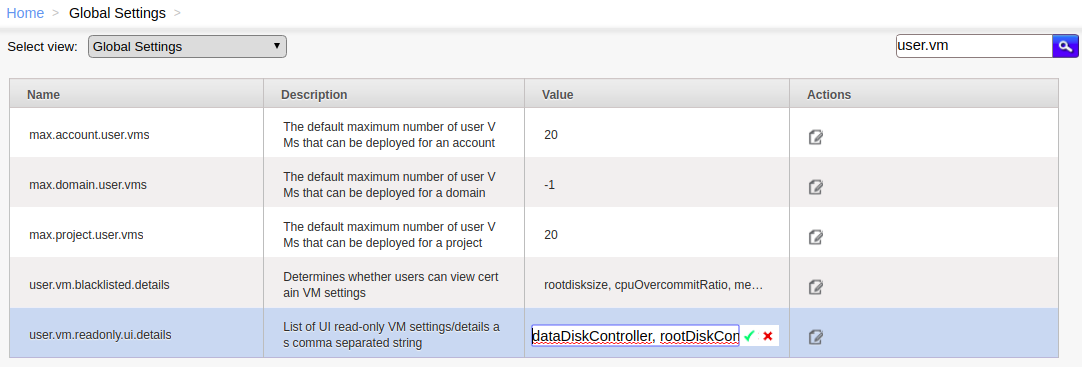
It also allows some admin defined instance settings/details to be made static for user. User will be able to see them in instance settings tab but cannot change their values as action buttons are disabled and greyed out. This can be achieved by providing a comma-separated list details for global settings key 'user.vm.readonly.ui.details'. A new value 'readonlyuidetails' has been added in UserVMResponse for UI manipulate editing functionality of settings/details.
Signed-off-by: Abhishek Kumar <abhishek.mrt22@gmail.com>
29a0e47 to
63b03b0Compareshwstppr
commented
May 23, 2019
Rebased to latest master @DaanHoogland @rhtyd |
DaanHoogland
commented
May 23, 2019
@blueorangutan package |
blueorangutan
commented
May 23, 2019
@DaanHoogland a Jenkins job has been kicked to build packages. I'll keep you posted as I make progress. |
blueorangutan
commented
May 23, 2019
Packaging result: ✔centos6 ✔centos7 ✔debian. JID-2758 |
DaanHoogland
commented
May 23, 2019
@blueorangutan test |
blueorangutan
commented
May 23, 2019
@DaanHoogland a Trillian-Jenkins test job (centos7 mgmt + kvm-centos7) has been kicked to run smoke tests |
yadvr
commented
May 23, 2019
@blueorangutan package |
blueorangutan
commented
May 23, 2019
@rhtyd a Jenkins job has been kicked to build packages. I'll keep you posted as I make progress. |
blueorangutan
commented
May 23, 2019
Packaging result: ✔centos6 ✔centos7 ✖debian. JID-2768 |
blueorangutan
commented
May 23, 2019
Trillian test result (tid-3574)
|
svenvogel
commented
May 24, 2019
@shwstppr you wrote about a comma seperated list... do you have an example for that? |
DaanHoogland
commented
May 24, 2019
I apologise for merging before rename to remove the [WIP] tag. |
shwstppr
commented
May 25, 2019
|
Description
Problem: Instance settings tab is visible only for stopped VMs but hidden otherwise. This creates confusion as users may not know that VMs need to be stopped to access settings page. Some VM details need to be read-only for the user.
Root Cause: The UI Code hides the settings tab for VMs that are not in stopped state. Instance setting tab should always be visible, but only changeable when VM is stopped. Required instance details are not read-only for the user.
Solution: The settings tab is now always visible for VMs. If VM is not in the stopped state, no interactions are allowed in the settings tab view by greying out its content and a popup is shown to advise users for stopping the VM. VM details can be made read-only in UI for the user using “user.vm.readonly.ui.details” which accepts a comma-separated list of details. For user, read-only details will be shown in the settings tab in UI but the action button for them will be disabled and greyed out. Admin can still update such details.
Types of changes
Screenshots (if appropriate):
Snapshot when VM is stopped.


Snapshot when VM is not stopped but Settings tab is clicked and Popup appears
When popup is dismissed
VM setting/detail made read-only

How Has This Been Tested?