A little demo on react-localization with Create-react-app/ format-js v5(React-intl)/ flat, with a more readable and maintainable structure.
Using Create-react-app, format-js v5 (React-intl) and flat for localization.
Main focus: Demostrate keys under each language folder could be declared in object structure instead of key-value mapping.
Run npm start to view the demo
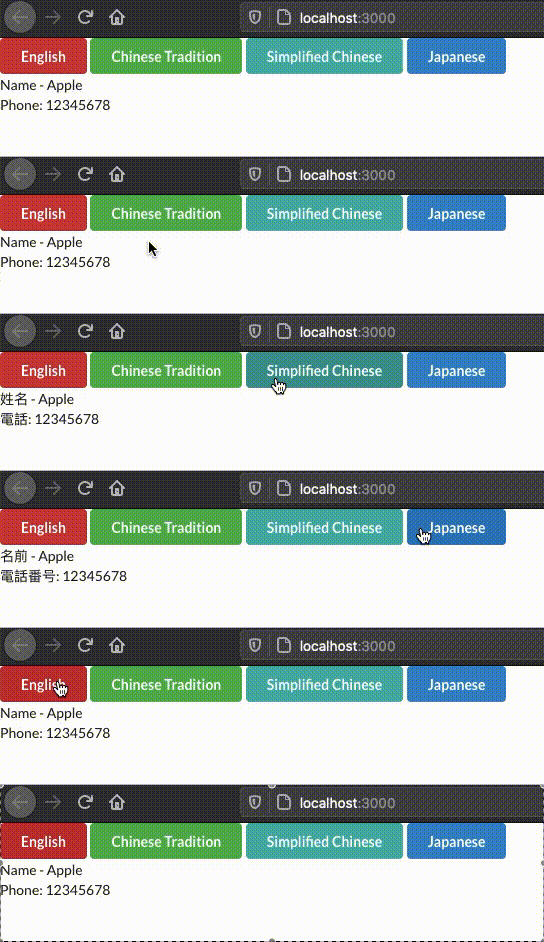
Standard way in React-intl:
constmessagesInEnglish={"student.name": "Name - {name}""student.contact.phone": "Phone - {phone}"};constmessagesInZhTw={"student.name": "姓名 - {name}""student.contact.phone": "電話 - {phone}"};constmessages={en: messagesInEnglish,"zh-Hant-TW": messagesInZhTw};But in fact we can (also prefer to) define the keys and values in each of the language folder (src/i18n) with object type, which will be more readable.
// src/i18n/enexportconststudent={name: "Name - {name}",contact: {phone: "Phone: {phone}",},};// src/i18n/zh_twexportconststudent={name: "姓名 - {name}",contact: {phone: "電話: {phone}",},};Using flat, we can flatten the keys in language object automatically, and convert into a correct format for react-intl
importflattenfrom"flat";constmessages={en: flatten(en),"zh-Hant-TW": flatten(zh_tw),};By using flat, we can also setting our locale keys/ values in array format
exportconststudent={projects: [{name: "student.projects.0.name",desc: "student.projects.0.desc",},{name: "student.projects.1.name",desc: "student.projects.1.desc",},],};// i18n/en/student.jsexportconststudent={projects: [{name: "Camera",desc: "Photo",},{name: "Foods",desc: "Apple",},],};// i18n/zh_tw/student.jsexportconststudent={projects: [{name: "拍攝",desc: "照片",},{name: "食物",desc: "蘋果",},],};{localizationKeys.student.projects.map((p,idx)=>{return(<ul><li><span>{intl.formatMessage({id: localizationKeys.student.projects[idx].name,})}</span>{` (${intl.formatMessage({id: localizationKeys.student.projects[idx].desc,})})`}</li></ul>);})}
We can centralize the locale keys to avoid the typo.
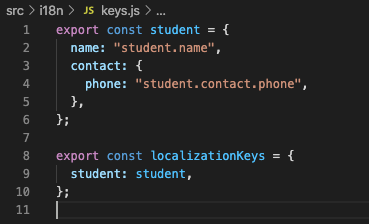
Merging the current locale with English, we can display English as default instead of text's id in UI, when the text id is failed to look from locale file
const[locale,setLocale]=useState(navigator.language);const[mergedMessages,setMergedMessages]=useState(messages["en"]);useEffect(()=>{// Merging English and current locale, avoid showing Text id if cannot look for the translate in locale filesetMergedMessages(Object.assign({},messages["en"],messages[locale]));},[locale]);