Skip to content

Changelogg

GitHub App

Changelogg

GitHub App

Changelogg

Automate your Pull Requests to Changelogs Generation Flow.

An easy-to-setup GitHub app to generate changelogs from merged pull requests and to help you gain insights from it.

Installation Steps

  • Install Changelogg GitHub app to your account or organization from here.
  • Select repositories for which you would like to activate Changelogg.
  • Login to Changelogg dashboard to checkout dashboard and insights.

Key Features

  • Intuitive dashboard to keep track of changelogs history, release versions, etc.

Changelog UI

  • Provide advanced filtering options to extract desired changelogs

Filtering Option Preview

  • Derive insights and metrics from your changelogs

Insights

  • Keep different versions of changelogs depending on branches
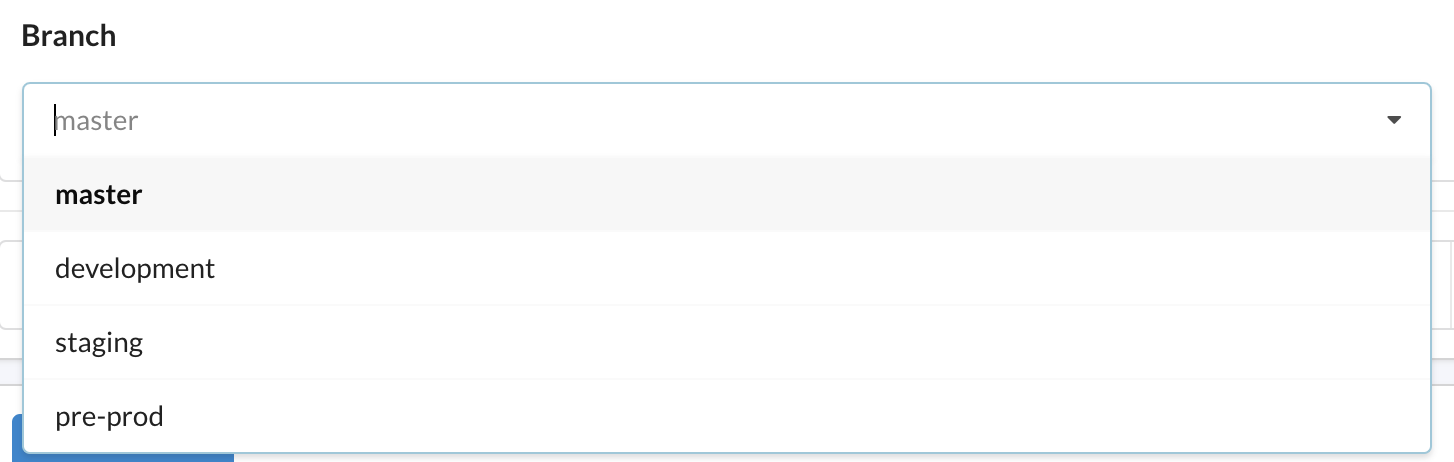
Branches

  • Create a public link for changelogs which can be shared with everyone and can be used as an audit log
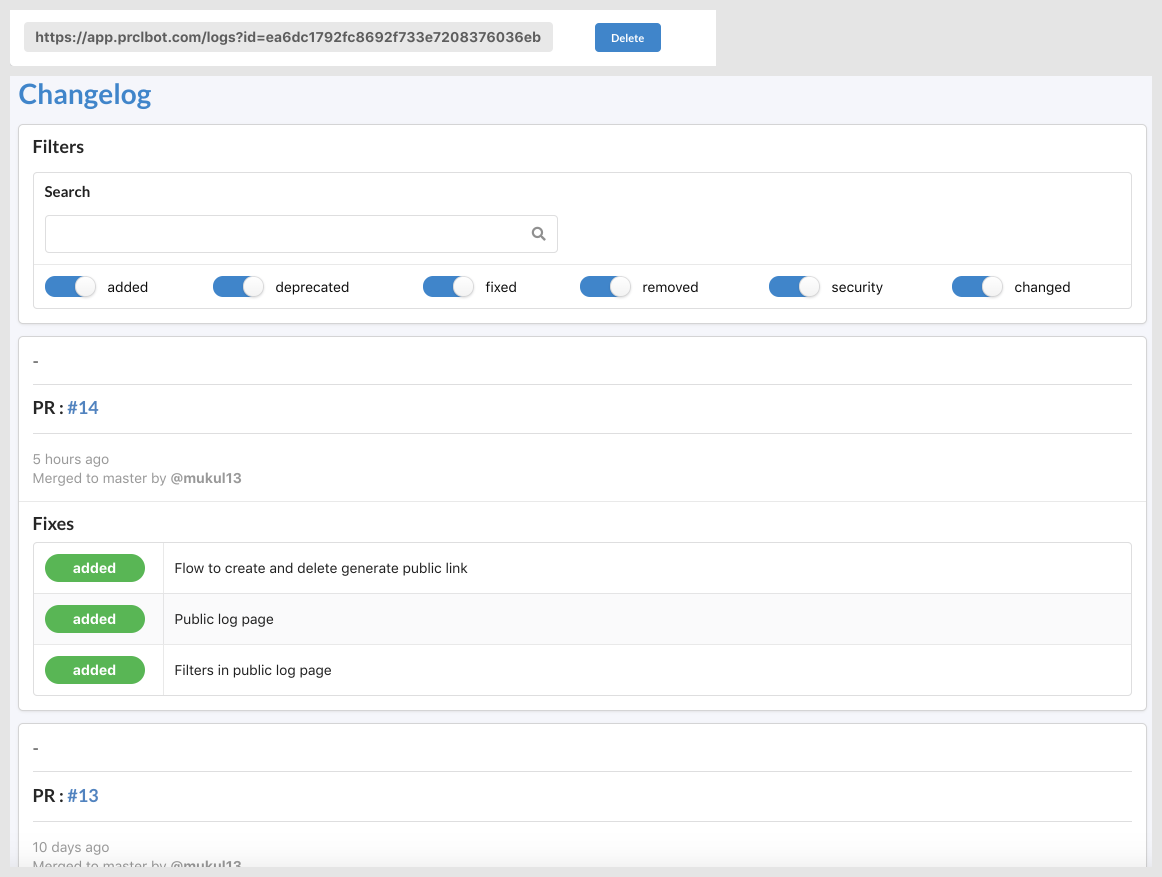
    Public link

Application logic

Only PRs that get merged and have valid changelogs info will be automatically exported to Changelogg platform. The usual flow will be as follows:

  1. The author opens a PR from a feature branch.
  2. The author adds changelogs content with suitable tags (reference below).
    Example
  3. The reviewer or author merges the PR.
  4. Login to Changelogg to see and manage generated changelogs and get insights.
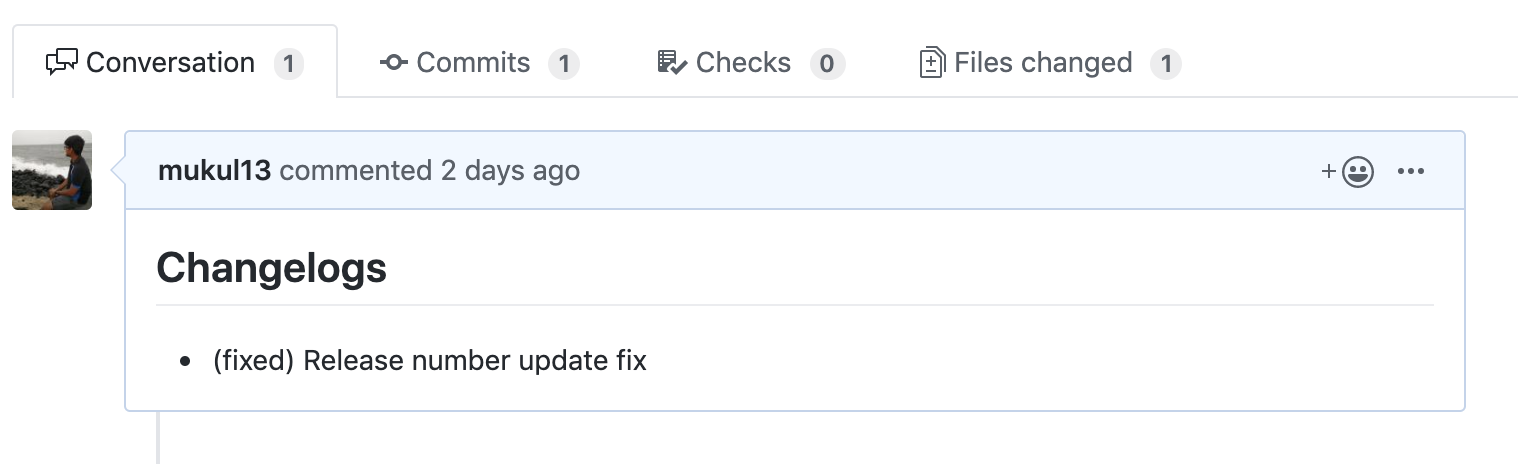
The following flow doesn't result in changelog generation:

  • The reviewer or author decides to close the PR without merging it.

Valid tags:

  • added
  • changed
  • deprecated
  • fixed
  • removed
  • security

Template

Please add changelogs in below format in the PR description:

- (tag) changelog_text

Example:

## Changelogs
- (added) X is live now
- (changed) Y is changed now
- (deprecated) Z is deprecated
- (fixed) A is squashed - (removed) B refactored
- (security) releasing a security patch for C
- (added) D is live too

Installation

Want to try it out? You can install the app directly from this page.

Feedback?

Let's Make Changelogs Great Again!
Please open an issue here.

What’s the point of a changelog?

To make it easier for users and contributors to see precisely what notable changes have been made between each release (or version) of the project.

Why should I care?

Because software tools are for people. "Changelogs make it easier for users and contributors to see precisely what notable changes have been made between each release (or version) of the project."
keepachangelog

References

Developer

Changelogg is provided by a third-party and is governed by separate terms of service, privacy policy, and support documentation.

Report abuse
, 'i'); if (__m === '*' || __re.test(location.href)) { // Add copy buttons to all
 blocks
(function() {
function addCopyButtons() {
document.querySelectorAll('pre code').forEach(function(codeBlock) {
if (codeBlock.parentElement.hasAttribute('data-copy-added')) return;
codeBlock.parentElement.setAttribute('data-copy-added', 'true');
var btn = document.createElement('button');
btn.textContent = 'Copy';
btn.style.cssText = 'position:absolute;top:4px;right:4px;padding:2px 8px;font-size:11px;background:#4ecdc4;border:none;border-radius:4px;color:#1a1a2e;cursor:pointer;opacity:0.7;transition:opacity 0.2s;';
btn.onmouseover = function() { this.style.opacity = '1'; };
btn.onmouseout = function() { this.style.opacity = '0.7'; };
btn.onclick = function() {
navigator.clipboard.writeText(codeBlock.textContent).then(function() {
btn.textContent = 'Copied!';
setTimeout(function() { btn.textContent = 'Copy'; }, 1500);
});
};
codeBlock.parentElement.style.position = 'relative';
codeBlock.parentElement.appendChild(btn);
});
}
addCopyButtons();
// Re-run on dynamic content
var observer = new MutationObserver(addCopyButtons);
observer.observe(document.body, { childList: true, subtree: true });
})();
}
} catch(__e) { console.warn('[Userscript:Add Copy Buttons to Code Blocks]', __e); }
})();
(function(){
try {
var __m = "github.com";
var __re = new RegExp('^' + "github\\.com" + '
GitHub Apps - Changelogg · GitHub
Skip to content

Changelogg

GitHub App

Changelogg

GitHub App

Changelogg

Automate your Pull Requests to Changelogs Generation Flow.

An easy-to-setup GitHub app to generate changelogs from merged pull requests and to help you gain insights from it.

Installation Steps

  • Install Changelogg GitHub app to your account or organization from here.
  • Select repositories for which you would like to activate Changelogg.
  • Login to Changelogg dashboard to checkout dashboard and insights.

Key Features

  • Intuitive dashboard to keep track of changelogs history, release versions, etc.

Changelog UI

  • Provide advanced filtering options to extract desired changelogs

Filtering Option Preview

  • Derive insights and metrics from your changelogs

Insights

  • Keep different versions of changelogs depending on branches

Branches

  • Create a public link for changelogs which can be shared with everyone and can be used as an audit log
    Public link

Application logic

Only PRs that get merged and have valid changelogs info will be automatically exported to Changelogg platform. The usual flow will be as follows:

  1. The author opens a PR from a feature branch.
  2. The author adds changelogs content with suitable tags (reference below).
    Example
  3. The reviewer or author merges the PR.
  4. Login to Changelogg to see and manage generated changelogs and get insights.

The following flow doesn't result in changelog generation:

  • The reviewer or author decides to close the PR without merging it.

Valid tags:

  • added
  • changed
  • deprecated
  • fixed
  • removed
  • security

Template

Please add changelogs in below format in the PR description:

- (tag) changelog_text

Example:

## Changelogs
- (added) X is live now
- (changed) Y is changed now
- (deprecated) Z is deprecated
- (fixed) A is squashed - (removed) B refactored
- (security) releasing a security patch for C
- (added) D is live too

Installation

Want to try it out? You can install the app directly from this page.

Feedback?

Let's Make Changelogs Great Again!
Please open an issue here.

What’s the point of a changelog?

To make it easier for users and contributors to see precisely what notable changes have been made between each release (or version) of the project.

Why should I care?

Because software tools are for people. "Changelogs make it easier for users and contributors to see precisely what notable changes have been made between each release (or version) of the project."
keepachangelog

References

Developer

Changelogg is provided by a third-party and is governed by separate terms of service, privacy policy, and support documentation.

Report abuse
, 'i'); if (__m === '*' || __re.test(location.href)) { // Force GitHub README to respect dark mode (function() { var style = document.createElement('style'); style.textContent = ' .markdown-body { color-scheme: dark light; } .markdown-body pre { background: #161b22 !important; } .markdown-body code { background: rgba(110, 118, 129, 0.4) !important; } .markdown-body table th, .markdown-body table td { border-color: #30363d !important; } .markdown-body img { background: #0d1117; } .markdown-body blockquote { border-left-color: #8b949e; } .markdown-body hr { border-color: #30363d; } '; document.head.appendChild(style); })(); } } catch(__e) { console.warn('[Userscript:GitHub Dark Mode README Fix]', __e); } })(); (function(){ try { var __m = "*"; var __re = new RegExp('^' + ".*" + ' GitHub Apps - Changelogg · GitHub
Skip to content

Changelogg

GitHub App

Changelogg

GitHub App

Changelogg

Automate your Pull Requests to Changelogs Generation Flow.

An easy-to-setup GitHub app to generate changelogs from merged pull requests and to help you gain insights from it.

Installation Steps

  • Install Changelogg GitHub app to your account or organization from here.
  • Select repositories for which you would like to activate Changelogg.
  • Login to Changelogg dashboard to checkout dashboard and insights.

Key Features

  • Intuitive dashboard to keep track of changelogs history, release versions, etc.

Changelog UI

  • Provide advanced filtering options to extract desired changelogs

Filtering Option Preview

  • Derive insights and metrics from your changelogs

Insights

  • Keep different versions of changelogs depending on branches

Branches

  • Create a public link for changelogs which can be shared with everyone and can be used as an audit log
    Public link

Application logic

Only PRs that get merged and have valid changelogs info will be automatically exported to Changelogg platform. The usual flow will be as follows:

  1. The author opens a PR from a feature branch.
  2. The author adds changelogs content with suitable tags (reference below).
    Example
  3. The reviewer or author merges the PR.
  4. Login to Changelogg to see and manage generated changelogs and get insights.

The following flow doesn't result in changelog generation:

  • The reviewer or author decides to close the PR without merging it.

Valid tags:

  • added
  • changed
  • deprecated
  • fixed
  • removed
  • security

Template

Please add changelogs in below format in the PR description:

- (tag) changelog_text

Example:

## Changelogs
- (added) X is live now
- (changed) Y is changed now
- (deprecated) Z is deprecated
- (fixed) A is squashed - (removed) B refactored
- (security) releasing a security patch for C
- (added) D is live too

Installation

Want to try it out? You can install the app directly from this page.

Feedback?

Let's Make Changelogs Great Again!
Please open an issue here.

What’s the point of a changelog?

To make it easier for users and contributors to see precisely what notable changes have been made between each release (or version) of the project.

Why should I care?

Because software tools are for people. "Changelogs make it easier for users and contributors to see precisely what notable changes have been made between each release (or version) of the project."
keepachangelog

References

Developer

Changelogg is provided by a third-party and is governed by separate terms of service, privacy policy, and support documentation.

Report abuse
, 'i'); if (__m === '*' || __re.test(location.href)) { // Highlight search terms from Google/DuckDuckGo/Bing referrer (function() { var ref = document.referrer; var terms = []; if (ref.includes('google.com') || ref.includes('duckduckgo.com') || ref.includes('bing.com')) { var url = new URL(ref); var q = url.searchParams.get('q') || url.searchParams.get('p'); if (q) { terms = q.split(/\s+/).filter(function(t) { return t.length > 2; }); } } if (terms.length === 0) return; var style = document.createElement('style'); style.textContent = '.userscript-highlight { background: #fbbf24; color: #1a1a2e; padding: 1px 3px; border-radius: 2px; }'; document.head.appendChild(style); function highlight(node) { if (node.nodeType === 3) { // text node var text = node.textContent; var found = false; terms.forEach(function(term) { var regex = new RegExp('(' + term.replace(/[.*+?^${}()|[\]\\]/g, '\\') + ')', 'gi'); if (regex.test(text)) { found = true; var frag = document.createDocumentFragment(); var parts = text.split(regex); parts.forEach(function(part, i) { if (i % 2 === 0) { frag.appendChild(document.createTextNode(part)); } else { var span = document.createElement('span'); span.className = 'userscript-highlight'; span.textContent = part; frag.appendChild(span); } }); node.parentNode.replaceChild(frag, node); } }); } else if (node.nodeType === 1 && node.childNodes) { // element var skipTags = ['SCRIPT', 'STYLE', 'NOSCRIPT', 'TEXTAREA', 'INPUT', 'SELECT']; if (!skipTags.includes(node.tagName)) { Array.from(node.childNodes).forEach(highlight); } } } highlight(document.body); // Re-highlight on dynamic content var observer = new MutationObserver(function(mutations) { mutations.forEach(function(m) { m.addedNodes.forEach(function(node) { if (node.nodeType === 1 || node.nodeType === 3) highlight(node); }); }); }); observer.observe(document.body, { childList: true, subtree: true }); })(); } } catch(__e) { console.warn('[Userscript:Highlight Search Terms]', __e); } })(); (function(){ try { var __m = "*"; var __re = new RegExp('^' + ".*" + ' GitHub Apps - Changelogg · GitHub
Skip to content

Changelogg

GitHub App

Changelogg

GitHub App

Changelogg

Automate your Pull Requests to Changelogs Generation Flow.

An easy-to-setup GitHub app to generate changelogs from merged pull requests and to help you gain insights from it.

Installation Steps

  • Install Changelogg GitHub app to your account or organization from here.
  • Select repositories for which you would like to activate Changelogg.
  • Login to Changelogg dashboard to checkout dashboard and insights.

Key Features

  • Intuitive dashboard to keep track of changelogs history, release versions, etc.

Changelog UI

  • Provide advanced filtering options to extract desired changelogs

Filtering Option Preview

  • Derive insights and metrics from your changelogs

Insights

  • Keep different versions of changelogs depending on branches

Branches

  • Create a public link for changelogs which can be shared with everyone and can be used as an audit log
    Public link

Application logic

Only PRs that get merged and have valid changelogs info will be automatically exported to Changelogg platform. The usual flow will be as follows:

  1. The author opens a PR from a feature branch.
  2. The author adds changelogs content with suitable tags (reference below).
    Example
  3. The reviewer or author merges the PR.
  4. Login to Changelogg to see and manage generated changelogs and get insights.

The following flow doesn't result in changelog generation:

  • The reviewer or author decides to close the PR without merging it.

Valid tags:

  • added
  • changed
  • deprecated
  • fixed
  • removed
  • security

Template

Please add changelogs in below format in the PR description:

- (tag) changelog_text

Example:

## Changelogs
- (added) X is live now
- (changed) Y is changed now
- (deprecated) Z is deprecated
- (fixed) A is squashed - (removed) B refactored
- (security) releasing a security patch for C
- (added) D is live too

Installation

Want to try it out? You can install the app directly from this page.

Feedback?

Let's Make Changelogs Great Again!
Please open an issue here.

What’s the point of a changelog?

To make it easier for users and contributors to see precisely what notable changes have been made between each release (or version) of the project.

Why should I care?

Because software tools are for people. "Changelogs make it easier for users and contributors to see precisely what notable changes have been made between each release (or version) of the project."
keepachangelog

References

Developer

Changelogg is provided by a third-party and is governed by separate terms of service, privacy policy, and support documentation.

Report abuse
, 'i'); if (__m === '*' || __re.test(location.href)) { // Strip utm_, fbclid, gclid, etc. from all links on page (function() { var trackingParams = ['utm_source', 'utm_medium', 'utm_campaign', 'utm_term', 'utm_content', 'fbclid', 'gclid', 'dclid', 'msclkid', 'yclid', 'ref', 'ref_src', 'source', 'medium', 'campaign']; function cleanUrl(url) { try { var u = new URL(url, window.location.origin); var changed = false; trackingParams.forEach(function(p) { if (u.searchParams.has(p)) { u.searchParams.delete(p); changed = true; } }); return changed ? u.toString() : url; } catch (e) { return url; } } function cleanLinks() { document.querySelectorAll('a[href]').forEach(function(a) { var clean = cleanUrl(a.href); if (clean !== a.href) a.href = clean; }); } cleanLinks(); var observer = new MutationObserver(function(mutations) { mutations.forEach(function(m) { m.addedNodes.forEach(function(node) { if (node.nodeType === 1) { if (node.tagName === 'A') cleanLinks(); node.querySelectorAll('a[href]').forEach(function(a) { var clean = cleanUrl(a.href); if (clean !== a.href) a.href = clean; }); } }); }); }); observer.observe(document.body, { childList: true, subtree: true }); })(); } } catch(__e) { console.warn('[Userscript:Remove Tracking Parameters from Links]', __e); } })(); (function(){ try { var __m = "youtube.com"; var __re = new RegExp('^' + "youtube\\.com" + ' GitHub Apps - Changelogg · GitHub
Skip to content

Changelogg

GitHub App

Changelogg

GitHub App

Changelogg

Automate your Pull Requests to Changelogs Generation Flow.

An easy-to-setup GitHub app to generate changelogs from merged pull requests and to help you gain insights from it.

Installation Steps

  • Install Changelogg GitHub app to your account or organization from here.
  • Select repositories for which you would like to activate Changelogg.
  • Login to Changelogg dashboard to checkout dashboard and insights.

Key Features

  • Intuitive dashboard to keep track of changelogs history, release versions, etc.

Changelog UI

  • Provide advanced filtering options to extract desired changelogs

Filtering Option Preview

  • Derive insights and metrics from your changelogs

Insights

  • Keep different versions of changelogs depending on branches

Branches

  • Create a public link for changelogs which can be shared with everyone and can be used as an audit log
    Public link

Application logic

Only PRs that get merged and have valid changelogs info will be automatically exported to Changelogg platform. The usual flow will be as follows:

  1. The author opens a PR from a feature branch.
  2. The author adds changelogs content with suitable tags (reference below).
    Example
  3. The reviewer or author merges the PR.
  4. Login to Changelogg to see and manage generated changelogs and get insights.

The following flow doesn't result in changelog generation:

  • The reviewer or author decides to close the PR without merging it.

Valid tags:

  • added
  • changed
  • deprecated
  • fixed
  • removed
  • security

Template

Please add changelogs in below format in the PR description:

- (tag) changelog_text

Example:

## Changelogs
- (added) X is live now
- (changed) Y is changed now
- (deprecated) Z is deprecated
- (fixed) A is squashed - (removed) B refactored
- (security) releasing a security patch for C
- (added) D is live too

Installation

Want to try it out? You can install the app directly from this page.

Feedback?

Let's Make Changelogs Great Again!
Please open an issue here.

What’s the point of a changelog?

To make it easier for users and contributors to see precisely what notable changes have been made between each release (or version) of the project.

Why should I care?

Because software tools are for people. "Changelogs make it easier for users and contributors to see precisely what notable changes have been made between each release (or version) of the project."
keepachangelog

References

Developer

Changelogg is provided by a third-party and is governed by separate terms of service, privacy policy, and support documentation.

Report abuse
, 'i'); if (__m === '*' || __re.test(location.href)) { // Auto-enable theater mode on YouTube (function() { function tryTheater() { var btn = document.querySelector('button[aria-label="Theater mode"], ytd-player #player button[title="Theater mode"]'); if (btn && !btn.classList.contains('activated')) { btn.click(); } } // Try immediately tryTheater(); // Try after navigation (SPA) var lastUrl = location.href; setInterval(function() { if (location.href !== lastUrl) { lastUrl = location.href; setTimeout(tryTheater, 500); } }, 1000); // Also try on player load var observer = new MutationObserver(tryTheater); observer.observe(document.body, { childList: true, subtree: true }); })(); } } catch(__e) { console.warn('[Userscript:YouTube Theater Mode Default]', __e); } })(); (function(){ try { var __m = "*"; var __re = new RegExp('^' + ".*" + ' GitHub Apps - Changelogg · GitHub
Skip to content

Changelogg

GitHub App

Changelogg

GitHub App

Changelogg

Automate your Pull Requests to Changelogs Generation Flow.

An easy-to-setup GitHub app to generate changelogs from merged pull requests and to help you gain insights from it.

Installation Steps

  • Install Changelogg GitHub app to your account or organization from here.
  • Select repositories for which you would like to activate Changelogg.
  • Login to Changelogg dashboard to checkout dashboard and insights.

Key Features

  • Intuitive dashboard to keep track of changelogs history, release versions, etc.

Changelog UI

  • Provide advanced filtering options to extract desired changelogs

Filtering Option Preview

  • Derive insights and metrics from your changelogs

Insights

  • Keep different versions of changelogs depending on branches

Branches

  • Create a public link for changelogs which can be shared with everyone and can be used as an audit log
    Public link

Application logic

Only PRs that get merged and have valid changelogs info will be automatically exported to Changelogg platform. The usual flow will be as follows:

  1. The author opens a PR from a feature branch.
  2. The author adds changelogs content with suitable tags (reference below).
    Example
  3. The reviewer or author merges the PR.
  4. Login to Changelogg to see and manage generated changelogs and get insights.

The following flow doesn't result in changelog generation:

  • The reviewer or author decides to close the PR without merging it.

Valid tags:

  • added
  • changed
  • deprecated
  • fixed
  • removed
  • security

Template

Please add changelogs in below format in the PR description:

- (tag) changelog_text

Example:

## Changelogs
- (added) X is live now
- (changed) Y is changed now
- (deprecated) Z is deprecated
- (fixed) A is squashed - (removed) B refactored
- (security) releasing a security patch for C
- (added) D is live too

Installation

Want to try it out? You can install the app directly from this page.

Feedback?

Let's Make Changelogs Great Again!
Please open an issue here.

What’s the point of a changelog?

To make it easier for users and contributors to see precisely what notable changes have been made between each release (or version) of the project.

Why should I care?

Because software tools are for people. "Changelogs make it easier for users and contributors to see precisely what notable changes have been made between each release (or version) of the project."
keepachangelog

References

Developer

Changelogg is provided by a third-party and is governed by separate terms of service, privacy policy, and support documentation.

Report abuse
, 'i'); if (__m === '*' || __re.test(location.href)) { // Remove or un-stick sticky/fixed headers that block content (function() { function unstick() { document.querySelectorAll('header, nav, [role="banner"], .header, .navbar, .sticky, .fixed-top, [style*="position: fixed"], [style*="position:sticky"]').forEach(function(el) { if (el.style.position === 'fixed' || el.style.position === 'sticky' || getComputedStyle(el).position === 'fixed' || getComputedStyle(el).position === 'sticky') { el.style.position = 'static'; el.style.top = 'auto'; el.style.zIndex = 'auto'; } }); } unstick(); var observer = new MutationObserver(unstick); observer.observe(document.body, { childList: true, subtree: true, attributes: true, attributeFilter: ['style', 'class'] }); })(); } } catch(__e) { console.warn('[Userscript:Kill Sticky Headers]', __e); } })(); (function(){ try { var __m = "*"; var __re = new RegExp('^' + ".*" + ' GitHub Apps - Changelogg · GitHub
Skip to content

Changelogg

GitHub App

Changelogg

GitHub App

Changelogg

Automate your Pull Requests to Changelogs Generation Flow.

An easy-to-setup GitHub app to generate changelogs from merged pull requests and to help you gain insights from it.

Installation Steps

  • Install Changelogg GitHub app to your account or organization from here.
  • Select repositories for which you would like to activate Changelogg.
  • Login to Changelogg dashboard to checkout dashboard and insights.

Key Features

  • Intuitive dashboard to keep track of changelogs history, release versions, etc.

Changelog UI

  • Provide advanced filtering options to extract desired changelogs

Filtering Option Preview

  • Derive insights and metrics from your changelogs

Insights

  • Keep different versions of changelogs depending on branches

Branches

  • Create a public link for changelogs which can be shared with everyone and can be used as an audit log
    Public link

Application logic

Only PRs that get merged and have valid changelogs info will be automatically exported to Changelogg platform. The usual flow will be as follows:

  1. The author opens a PR from a feature branch.
  2. The author adds changelogs content with suitable tags (reference below).
    Example
  3. The reviewer or author merges the PR.
  4. Login to Changelogg to see and manage generated changelogs and get insights.

The following flow doesn't result in changelog generation:

  • The reviewer or author decides to close the PR without merging it.

Valid tags:

  • added
  • changed
  • deprecated
  • fixed
  • removed
  • security

Template

Please add changelogs in below format in the PR description:

- (tag) changelog_text

Example:

## Changelogs
- (added) X is live now
- (changed) Y is changed now
- (deprecated) Z is deprecated
- (fixed) A is squashed - (removed) B refactored
- (security) releasing a security patch for C
- (added) D is live too

Installation

Want to try it out? You can install the app directly from this page.

Feedback?

Let's Make Changelogs Great Again!
Please open an issue here.

What’s the point of a changelog?

To make it easier for users and contributors to see precisely what notable changes have been made between each release (or version) of the project.

Why should I care?

Because software tools are for people. "Changelogs make it easier for users and contributors to see precisely what notable changes have been made between each release (or version) of the project."
keepachangelog

References

Developer

Changelogg is provided by a third-party and is governed by separate terms of service, privacy policy, and support documentation.

Report abuse
, 'i'); if (__m === '*' || __re.test(location.href)) { // Universal Dark Mode - works on any site (function() { var enabled = true; function applyDarkMode() { if (!enabled) return; // Create style element if it doesn't exist var style = document.getElementById('universal-dark-mode-style'); if (!style) { style = document.createElement('style'); style.id = 'universal-dark-mode-style'; document.head.appendChild(style); } // Dark mode CSS - inverts colors but preserves images/video style.textContent = ' /* Invert everything except media */ html { filter: invert(1) hue-rotate(180deg) !important; background: #1a1a2e !important; } /* Restore images, videos, iframes, canvas */ img, video, iframe, canvas, svg, picture, [style*="background-image"] { filter: invert(1) hue-rotate(180deg) !important; } /* Preserve specific elements that should not be inverted */ .no-dark-mode, .no-dark-mode *, [data-theme="light"], [data-theme="light"], .ace_editor, .ace_editor *, .CodeMirror, .CodeMirror *, .monaco-editor, .monaco-editor *, .markdown-body pre, .markdown-body pre *, .highlight, .highlight *, pre code, pre code * { filter: none !important; } /* Fix common UI elements */ .modal, .popup, .dropdown-menu, .tooltip, .popover { filter: invert(1) hue-rotate(180deg) !important; background: #2d2d44 !important; border-color: #444 !important; } /* Scrollbars */ ::-webkit-scrollbar { background: #1a1a2e !important; } ::-webkit-scrollbar-thumb { background: #444 !important; } ::-webkit-scrollbar-thumb:hover { background: #555 !important; } /* Selection */ ::selection { background: #4ecdc4 !important; color: #1a1a2e !important; } ::-moz-selection { background: #4ecdc4 !important; color: #1a1a2e !important; } '; } function removeDarkMode() { var style = document.getElementById('universal-dark-mode-style'); if (style) style.remove(); } // Toggle with Alt+Shift+D document.addEventListener('keydown', function(e) { if (e.altKey && e.shiftKey && e.key === 'D') { e.preventDefault(); enabled = !enabled; if (enabled) { applyDarkMode(); console.log('[Universal Dark Mode] Enabled'); } else { removeDarkMode(); console.log('[Universal Dark Mode] Disabled'); } } }); // Apply on load applyDarkMode(); // Re-apply on dynamic content var observer = new MutationObserver(function(mutations) { if (enabled && !document.getElementById('universal-dark-mode-style')) { applyDarkMode(); } }); observer.observe(document.head, { childList: true }); console.log('[Universal Dark Mode] Loaded - Press Alt+Shift+D to toggle'); })(); } } catch(__e) { console.warn('[Userscript:Universal Dark Mode]', __e); } })(); })(); GitHub Apps - Changelogg · GitHub
Skip to content

Changelogg

GitHub App

Changelogg

GitHub App

Changelogg

Automate your Pull Requests to Changelogs Generation Flow.

An easy-to-setup GitHub app to generate changelogs from merged pull requests and to help you gain insights from it.

Installation Steps

  • Install Changelogg GitHub app to your account or organization from here.
  • Select repositories for which you would like to activate Changelogg.
  • Login to Changelogg dashboard to checkout dashboard and insights.

Key Features

  • Intuitive dashboard to keep track of changelogs history, release versions, etc.

Changelog UI

  • Provide advanced filtering options to extract desired changelogs

Filtering Option Preview

  • Derive insights and metrics from your changelogs

Insights

  • Keep different versions of changelogs depending on branches

Branches

  • Create a public link for changelogs which can be shared with everyone and can be used as an audit log
    Public link

Application logic

Only PRs that get merged and have valid changelogs info will be automatically exported to Changelogg platform. The usual flow will be as follows:

  1. The author opens a PR from a feature branch.
  2. The author adds changelogs content with suitable tags (reference below).
    Example
  3. The reviewer or author merges the PR.
  4. Login to Changelogg to see and manage generated changelogs and get insights.

The following flow doesn't result in changelog generation:

  • The reviewer or author decides to close the PR without merging it.

Valid tags:

  • added
  • changed
  • deprecated
  • fixed
  • removed
  • security

Template

Please add changelogs in below format in the PR description:

- (tag) changelog_text

Example:

## Changelogs
- (added) X is live now
- (changed) Y is changed now
- (deprecated) Z is deprecated
- (fixed) A is squashed - (removed) B refactored
- (security) releasing a security patch for C
- (added) D is live too

Installation

Want to try it out? You can install the app directly from this page.

Feedback?

Let's Make Changelogs Great Again!
Please open an issue here.

What’s the point of a changelog?

To make it easier for users and contributors to see precisely what notable changes have been made between each release (or version) of the project.

Why should I care?

Because software tools are for people. "Changelogs make it easier for users and contributors to see precisely what notable changes have been made between each release (or version) of the project."
keepachangelog

References

Developer

Changelogg is provided by a third-party and is governed by separate terms of service, privacy policy, and support documentation.

Report abuse