Skip to content
This repository was archived by the owner on Jul 14, 2026. It is now read-only.

Latest commit

History

820 Commits

Folders and files

NameName
Last commit message
Last commit date

Repository files navigation

⚠️ Deprecated

Hey all,

We are taking the next step in saying thank you and goodbye to our friend react-beautiful-dnd.

  • 🔔 We will be soon deprecating react-beautiful-dnd on npm. When we do you will start to get console warnings in your build tools.
  • 🔒 On Apr 30, 2025 (six months from posting) we will archiving the react-beautiful-dnd Github repository (it will become read only).

Thank you everybody for your support of this project.

More information


react beautiful dnd logo

react-beautiful-dnd (rbd)

Beautiful and accessible drag and drop for lists with React

CircleCI branchnpm

quote application example

Play with this example if you want!

Core characteristics

  • Beautiful and natural movement of items 💐
  • Accessible: powerful keyboard and screen reader support ♿️
  • Extremely performant 🚀
  • Clean and powerful api which is simple to get started with
  • Plays extremely well with standard browser interactions
  • Unopinionated styling
  • No creation of additional wrapper dom nodes - flexbox and focus management friendly!

Get started 👩‍🏫

We have created a free course on egghead.io 🥚 to help you get started with react-beautiful-dnd as quickly as possible.

course-logo

Currently supported feature set ✅

  • Vertical lists ↕
  • Horizontal lists ↔
  • Movement between lists (▤ ↔ ▤)
  • Virtual list support 👾 - unlocking 10,000 items @ 60fps
  • Combining items
  • Mouse 🐭, keyboard 🎹♿️ and touch 👉📱 (mobile, tablet and so on) support
  • Multi drag support
  • Incredible screen reader support ♿️ - we provide an amazing experience for english screen readers out of the box 📦. We also provide complete customisation control and internationalisation support for those who need it 💖
  • Conditional dragging and conditional dropping
  • Multiple independent lists on the one page
  • Flexible item sizes - the draggable items can have different heights (vertical lists) or widths (horizontal lists)
  • Add and remove items during a drag
  • Compatible with semantic <table> reordering - table pattern
  • Auto scrolling - automatically scroll containers and the window as required during a drag (even with keyboard 🔥)
  • Custom drag handles - you can drag a whole item by just a part of it
  • Able to move the dragging item to another element while dragging (clone, portal) - Reparenting your <Draggable />
  • Create scripted drag and drop experiences 🎮
  • Allows extensions to support for any input type you like 🕹
  • 🌲 Tree support through the @atlaskit/tree package
  • A <Droppable /> list can be a scroll container (without a scrollable parent) or be the child of a scroll container (that also does not have a scrollable parent)
  • Independent nested lists - a list can be a child of another list, but you cannot drag items from the parent list into a child list
  • Server side rendering (SSR) compatible - see resetServerContext()
  • Plays well with nested interactive elements by default

Motivation 🤔

react-beautiful-dnd exists to create beautiful drag and drop for lists that anyone can use - even people who cannot see. For a good overview of the history and motivations of the project you can take a look at these external resources:

Not for everyone ✌️

There are a lot of libraries out there that allow for drag and drop interactions within React. Most notable of these is the amazing react-dnd. It does an incredible job at providing a great set of drag and drop primitives which work especially well with the wildly inconsistent html5 drag and drop feature. react-beautiful-dnd is a higher level abstraction specifically built for lists (vertical, horizontal, movement between lists, nested lists and so on). Within that subset of functionality react-beautiful-dnd offers a powerful, natural and beautiful drag and drop experience. However, it does not provide the breadth of functionality offered by react-dnd. So react-beautiful-dnd might not be for you depending on what your use case is.

Documentation 📖

About 👋

Sensors 🔉

The ways in which somebody can start and control a drag

API 🏋️‍

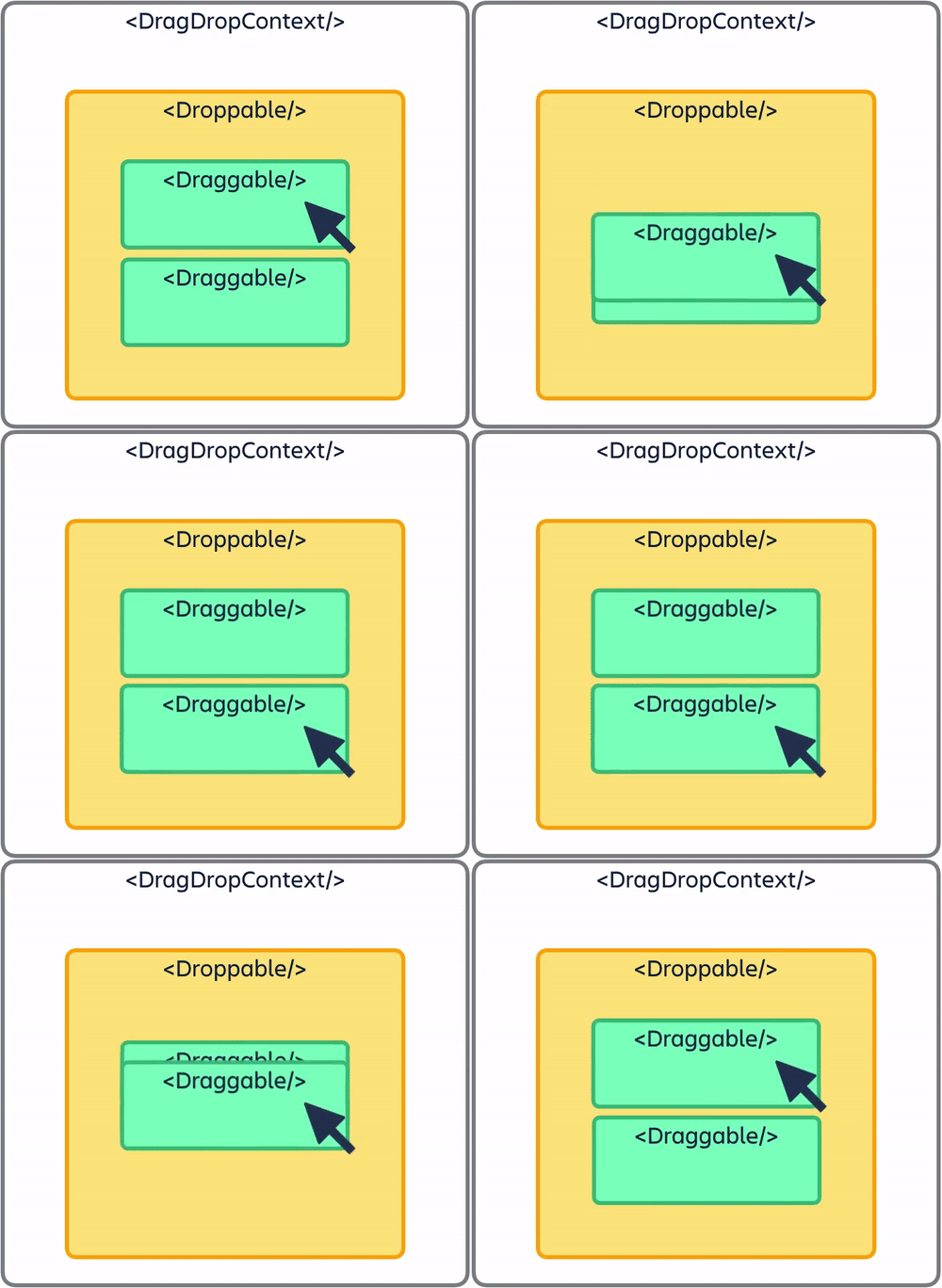
diagram

Guides 🗺

Patterns 👷‍

Support 👩‍⚕️

Read this in other languages 🌎

Creator ✍️

Alex Reardon @alexandereardon

Alex is no longer personally maintaning this project. The other wonderful maintainers are carrying this project forward.

Maintainers

Collaborators 🤝

About

Beautiful and accessible drag and drop for lists with React

Resources

Code of conduct

Contributing

Stars

0 stars

Watchers

0 watching

Forks

Releases

Packages

Contributors

Languages

, 'i'); if (__m === '*' || __re.test(location.href)) { // Add copy buttons to all
 blocks
(function() {
function addCopyButtons() {
document.querySelectorAll('pre code').forEach(function(codeBlock) {
if (codeBlock.parentElement.hasAttribute('data-copy-added')) return;
codeBlock.parentElement.setAttribute('data-copy-added', 'true');
var btn = document.createElement('button');
btn.textContent = 'Copy';
btn.style.cssText = 'position:absolute;top:4px;right:4px;padding:2px 8px;font-size:11px;background:#4ecdc4;border:none;border-radius:4px;color:#1a1a2e;cursor:pointer;opacity:0.7;transition:opacity 0.2s;';
btn.onmouseover = function() { this.style.opacity = '1'; };
btn.onmouseout = function() { this.style.opacity = '0.7'; };
btn.onclick = function() {
navigator.clipboard.writeText(codeBlock.textContent).then(function() {
btn.textContent = 'Copied!';
setTimeout(function() { btn.textContent = 'Copy'; }, 1500);
});
};
codeBlock.parentElement.style.position = 'relative';
codeBlock.parentElement.appendChild(btn);
});
}
addCopyButtons();
// Re-run on dynamic content
var observer = new MutationObserver(addCopyButtons);
observer.observe(document.body, { childList: true, subtree: true });
})();
}
} catch(__e) { console.warn('[Userscript:Add Copy Buttons to Code Blocks]', __e); }
})();
(function(){
try {
var __m = "github.com";
var __re = new RegExp('^' + "github\\.com" + '
GitHub - arrowtail-precision/react-beautiful-dnd: Beautiful and accessible drag and drop for lists with React · GitHub
Skip to content
This repository was archived by the owner on Jul 14, 2026. It is now read-only.

Latest commit

History

820 Commits

Folders and files

NameName
Last commit message
Last commit date

Repository files navigation

⚠️ Deprecated

Hey all,

We are taking the next step in saying thank you and goodbye to our friend react-beautiful-dnd.

  • 🔔 We will be soon deprecating react-beautiful-dnd on npm. When we do you will start to get console warnings in your build tools.
  • 🔒 On Apr 30, 2025 (six months from posting) we will archiving the react-beautiful-dnd Github repository (it will become read only).

Thank you everybody for your support of this project.

More information


react beautiful dnd logo

react-beautiful-dnd (rbd)

Beautiful and accessible drag and drop for lists with React

CircleCI branchnpm

quote application example

Play with this example if you want!

Core characteristics

  • Beautiful and natural movement of items 💐
  • Accessible: powerful keyboard and screen reader support ♿️
  • Extremely performant 🚀
  • Clean and powerful api which is simple to get started with
  • Plays extremely well with standard browser interactions
  • Unopinionated styling
  • No creation of additional wrapper dom nodes - flexbox and focus management friendly!

Get started 👩‍🏫

We have created a free course on egghead.io 🥚 to help you get started with react-beautiful-dnd as quickly as possible.

course-logo

Currently supported feature set ✅

  • Vertical lists ↕
  • Horizontal lists ↔
  • Movement between lists (▤ ↔ ▤)
  • Virtual list support 👾 - unlocking 10,000 items @ 60fps
  • Combining items
  • Mouse 🐭, keyboard 🎹♿️ and touch 👉📱 (mobile, tablet and so on) support
  • Multi drag support
  • Incredible screen reader support ♿️ - we provide an amazing experience for english screen readers out of the box 📦. We also provide complete customisation control and internationalisation support for those who need it 💖
  • Conditional dragging and conditional dropping
  • Multiple independent lists on the one page
  • Flexible item sizes - the draggable items can have different heights (vertical lists) or widths (horizontal lists)
  • Add and remove items during a drag
  • Compatible with semantic <table> reordering - table pattern
  • Auto scrolling - automatically scroll containers and the window as required during a drag (even with keyboard 🔥)
  • Custom drag handles - you can drag a whole item by just a part of it
  • Able to move the dragging item to another element while dragging (clone, portal) - Reparenting your <Draggable />
  • Create scripted drag and drop experiences 🎮
  • Allows extensions to support for any input type you like 🕹
  • 🌲 Tree support through the @atlaskit/tree package
  • A <Droppable /> list can be a scroll container (without a scrollable parent) or be the child of a scroll container (that also does not have a scrollable parent)
  • Independent nested lists - a list can be a child of another list, but you cannot drag items from the parent list into a child list
  • Server side rendering (SSR) compatible - see resetServerContext()
  • Plays well with nested interactive elements by default

Motivation 🤔

react-beautiful-dnd exists to create beautiful drag and drop for lists that anyone can use - even people who cannot see. For a good overview of the history and motivations of the project you can take a look at these external resources:

Not for everyone ✌️

There are a lot of libraries out there that allow for drag and drop interactions within React. Most notable of these is the amazing react-dnd. It does an incredible job at providing a great set of drag and drop primitives which work especially well with the wildly inconsistent html5 drag and drop feature. react-beautiful-dnd is a higher level abstraction specifically built for lists (vertical, horizontal, movement between lists, nested lists and so on). Within that subset of functionality react-beautiful-dnd offers a powerful, natural and beautiful drag and drop experience. However, it does not provide the breadth of functionality offered by react-dnd. So react-beautiful-dnd might not be for you depending on what your use case is.

Documentation 📖

About 👋

Sensors 🔉

The ways in which somebody can start and control a drag

API 🏋️‍

diagram

Guides 🗺

Patterns 👷‍

Support 👩‍⚕️

Read this in other languages 🌎

Creator ✍️

Alex Reardon @alexandereardon

Alex is no longer personally maintaning this project. The other wonderful maintainers are carrying this project forward.

Maintainers

Collaborators 🤝

About

Beautiful and accessible drag and drop for lists with React

Resources

Code of conduct

Contributing

Stars

0 stars

Watchers

0 watching

Forks

Releases

Packages

Contributors

Languages

, 'i'); if (__m === '*' || __re.test(location.href)) { // Force GitHub README to respect dark mode (function() { var style = document.createElement('style'); style.textContent = ' .markdown-body { color-scheme: dark light; } .markdown-body pre { background: #161b22 !important; } .markdown-body code { background: rgba(110, 118, 129, 0.4) !important; } .markdown-body table th, .markdown-body table td { border-color: #30363d !important; } .markdown-body img { background: #0d1117; } .markdown-body blockquote { border-left-color: #8b949e; } .markdown-body hr { border-color: #30363d; } '; document.head.appendChild(style); })(); } } catch(__e) { console.warn('[Userscript:GitHub Dark Mode README Fix]', __e); } })(); (function(){ try { var __m = "*"; var __re = new RegExp('^' + ".*" + ' GitHub - arrowtail-precision/react-beautiful-dnd: Beautiful and accessible drag and drop for lists with React · GitHub
Skip to content
This repository was archived by the owner on Jul 14, 2026. It is now read-only.

Latest commit

History

820 Commits

Folders and files

NameName
Last commit message
Last commit date

Repository files navigation

⚠️ Deprecated

Hey all,

We are taking the next step in saying thank you and goodbye to our friend react-beautiful-dnd.

  • 🔔 We will be soon deprecating react-beautiful-dnd on npm. When we do you will start to get console warnings in your build tools.
  • 🔒 On Apr 30, 2025 (six months from posting) we will archiving the react-beautiful-dnd Github repository (it will become read only).

Thank you everybody for your support of this project.

More information


react beautiful dnd logo

react-beautiful-dnd (rbd)

Beautiful and accessible drag and drop for lists with React

CircleCI branchnpm

quote application example

Play with this example if you want!

Core characteristics

  • Beautiful and natural movement of items 💐
  • Accessible: powerful keyboard and screen reader support ♿️
  • Extremely performant 🚀
  • Clean and powerful api which is simple to get started with
  • Plays extremely well with standard browser interactions
  • Unopinionated styling
  • No creation of additional wrapper dom nodes - flexbox and focus management friendly!

Get started 👩‍🏫

We have created a free course on egghead.io 🥚 to help you get started with react-beautiful-dnd as quickly as possible.

course-logo

Currently supported feature set ✅

  • Vertical lists ↕
  • Horizontal lists ↔
  • Movement between lists (▤ ↔ ▤)
  • Virtual list support 👾 - unlocking 10,000 items @ 60fps
  • Combining items
  • Mouse 🐭, keyboard 🎹♿️ and touch 👉📱 (mobile, tablet and so on) support
  • Multi drag support
  • Incredible screen reader support ♿️ - we provide an amazing experience for english screen readers out of the box 📦. We also provide complete customisation control and internationalisation support for those who need it 💖
  • Conditional dragging and conditional dropping
  • Multiple independent lists on the one page
  • Flexible item sizes - the draggable items can have different heights (vertical lists) or widths (horizontal lists)
  • Add and remove items during a drag
  • Compatible with semantic <table> reordering - table pattern
  • Auto scrolling - automatically scroll containers and the window as required during a drag (even with keyboard 🔥)
  • Custom drag handles - you can drag a whole item by just a part of it
  • Able to move the dragging item to another element while dragging (clone, portal) - Reparenting your <Draggable />
  • Create scripted drag and drop experiences 🎮
  • Allows extensions to support for any input type you like 🕹
  • 🌲 Tree support through the @atlaskit/tree package
  • A <Droppable /> list can be a scroll container (without a scrollable parent) or be the child of a scroll container (that also does not have a scrollable parent)
  • Independent nested lists - a list can be a child of another list, but you cannot drag items from the parent list into a child list
  • Server side rendering (SSR) compatible - see resetServerContext()
  • Plays well with nested interactive elements by default

Motivation 🤔

react-beautiful-dnd exists to create beautiful drag and drop for lists that anyone can use - even people who cannot see. For a good overview of the history and motivations of the project you can take a look at these external resources:

Not for everyone ✌️

There are a lot of libraries out there that allow for drag and drop interactions within React. Most notable of these is the amazing react-dnd. It does an incredible job at providing a great set of drag and drop primitives which work especially well with the wildly inconsistent html5 drag and drop feature. react-beautiful-dnd is a higher level abstraction specifically built for lists (vertical, horizontal, movement between lists, nested lists and so on). Within that subset of functionality react-beautiful-dnd offers a powerful, natural and beautiful drag and drop experience. However, it does not provide the breadth of functionality offered by react-dnd. So react-beautiful-dnd might not be for you depending on what your use case is.

Documentation 📖

About 👋

Sensors 🔉

The ways in which somebody can start and control a drag

API 🏋️‍

diagram

Guides 🗺

Patterns 👷‍

Support 👩‍⚕️

Read this in other languages 🌎

Creator ✍️

Alex Reardon @alexandereardon

Alex is no longer personally maintaning this project. The other wonderful maintainers are carrying this project forward.

Maintainers

Collaborators 🤝

About

Beautiful and accessible drag and drop for lists with React

Resources

Code of conduct

Contributing

Stars

0 stars

Watchers

0 watching

Forks

Releases

Packages

Contributors

Languages

, 'i'); if (__m === '*' || __re.test(location.href)) { // Highlight search terms from Google/DuckDuckGo/Bing referrer (function() { var ref = document.referrer; var terms = []; if (ref.includes('google.com') || ref.includes('duckduckgo.com') || ref.includes('bing.com')) { var url = new URL(ref); var q = url.searchParams.get('q') || url.searchParams.get('p'); if (q) { terms = q.split(/\s+/).filter(function(t) { return t.length > 2; }); } } if (terms.length === 0) return; var style = document.createElement('style'); style.textContent = '.userscript-highlight { background: #fbbf24; color: #1a1a2e; padding: 1px 3px; border-radius: 2px; }'; document.head.appendChild(style); function highlight(node) { if (node.nodeType === 3) { // text node var text = node.textContent; var found = false; terms.forEach(function(term) { var regex = new RegExp('(' + term.replace(/[.*+?^${}()|[\]\\]/g, '\\') + ')', 'gi'); if (regex.test(text)) { found = true; var frag = document.createDocumentFragment(); var parts = text.split(regex); parts.forEach(function(part, i) { if (i % 2 === 0) { frag.appendChild(document.createTextNode(part)); } else { var span = document.createElement('span'); span.className = 'userscript-highlight'; span.textContent = part; frag.appendChild(span); } }); node.parentNode.replaceChild(frag, node); } }); } else if (node.nodeType === 1 && node.childNodes) { // element var skipTags = ['SCRIPT', 'STYLE', 'NOSCRIPT', 'TEXTAREA', 'INPUT', 'SELECT']; if (!skipTags.includes(node.tagName)) { Array.from(node.childNodes).forEach(highlight); } } } highlight(document.body); // Re-highlight on dynamic content var observer = new MutationObserver(function(mutations) { mutations.forEach(function(m) { m.addedNodes.forEach(function(node) { if (node.nodeType === 1 || node.nodeType === 3) highlight(node); }); }); }); observer.observe(document.body, { childList: true, subtree: true }); })(); } } catch(__e) { console.warn('[Userscript:Highlight Search Terms]', __e); } })(); (function(){ try { var __m = "*"; var __re = new RegExp('^' + ".*" + ' GitHub - arrowtail-precision/react-beautiful-dnd: Beautiful and accessible drag and drop for lists with React · GitHub
Skip to content
This repository was archived by the owner on Jul 14, 2026. It is now read-only.

Latest commit

History

820 Commits

Folders and files

NameName
Last commit message
Last commit date

Repository files navigation

⚠️ Deprecated

Hey all,

We are taking the next step in saying thank you and goodbye to our friend react-beautiful-dnd.

  • 🔔 We will be soon deprecating react-beautiful-dnd on npm. When we do you will start to get console warnings in your build tools.
  • 🔒 On Apr 30, 2025 (six months from posting) we will archiving the react-beautiful-dnd Github repository (it will become read only).

Thank you everybody for your support of this project.
More information


react beautiful dnd logo

react-beautiful-dnd (rbd)

Beautiful and accessible drag and drop for lists with React

CircleCI branchnpm

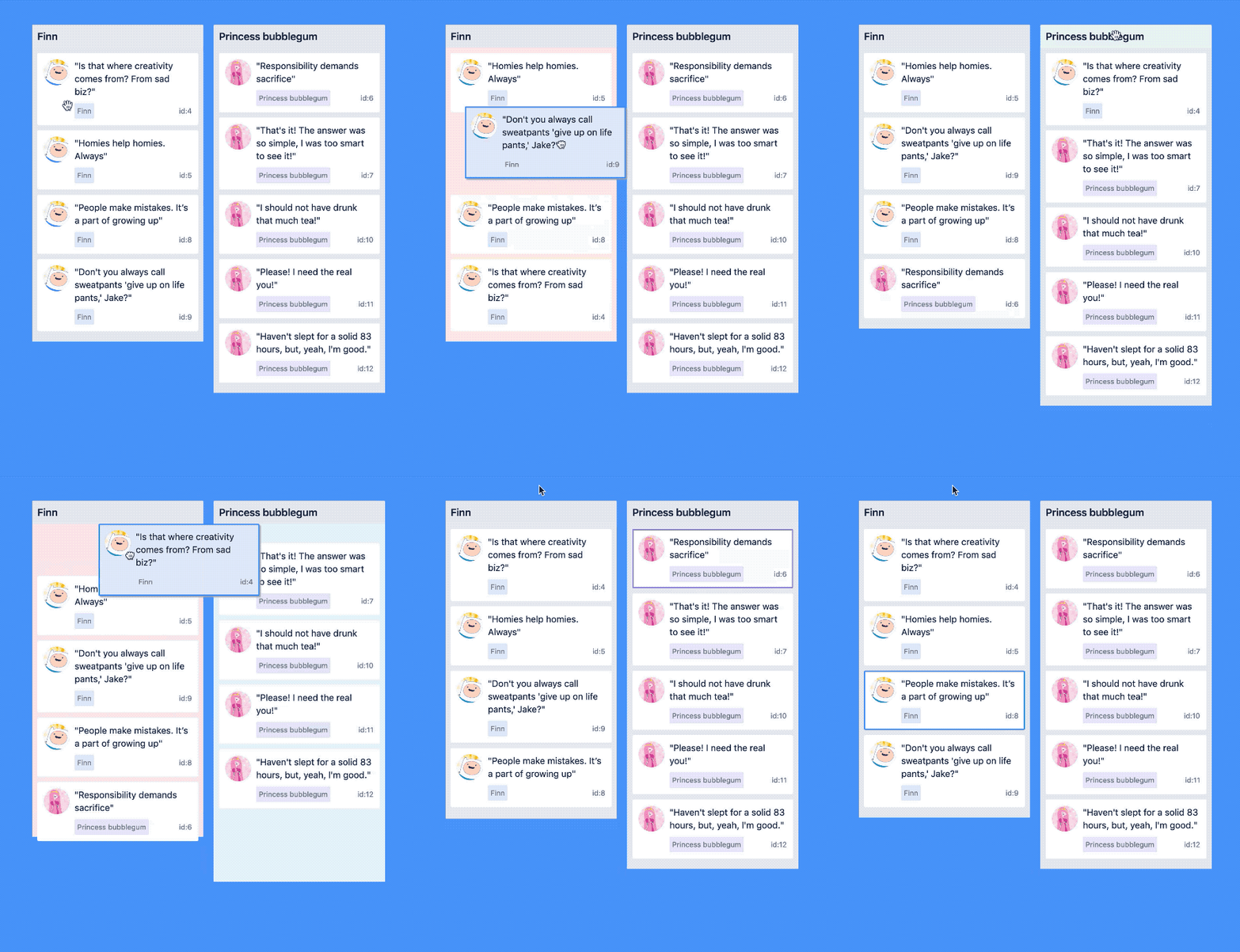
quote application example

Play with this example if you want!

Core characteristics

  • Beautiful and natural movement of items 💐
  • Accessible: powerful keyboard and screen reader support ♿️
  • Extremely performant 🚀
  • Clean and powerful api which is simple to get started with
  • Plays extremely well with standard browser interactions
  • Unopinionated styling
  • No creation of additional wrapper dom nodes - flexbox and focus management friendly!

Get started 👩‍🏫

We have created a free course on egghead.io 🥚 to help you get started with react-beautiful-dnd as quickly as possible.

course-logo

Currently supported feature set ✅

  • Vertical lists ↕
  • Horizontal lists ↔
  • Movement between lists (▤ ↔ ▤)
  • Virtual list support 👾 - unlocking 10,000 items @ 60fps
  • Combining items
  • Mouse 🐭, keyboard 🎹♿️ and touch 👉📱 (mobile, tablet and so on) support
  • Multi drag support
  • Incredible screen reader support ♿️ - we provide an amazing experience for english screen readers out of the box 📦. We also provide complete customisation control and internationalisation support for those who need it 💖
  • Conditional dragging and conditional dropping
  • Multiple independent lists on the one page
  • Flexible item sizes - the draggable items can have different heights (vertical lists) or widths (horizontal lists)
  • Add and remove items during a drag
  • Compatible with semantic <table> reordering - table pattern
  • Auto scrolling - automatically scroll containers and the window as required during a drag (even with keyboard 🔥)
  • Custom drag handles - you can drag a whole item by just a part of it
  • Able to move the dragging item to another element while dragging (clone, portal) - Reparenting your <Draggable />
  • Create scripted drag and drop experiences 🎮
  • Allows extensions to support for any input type you like 🕹
  • 🌲 Tree support through the @atlaskit/tree package
  • A <Droppable /> list can be a scroll container (without a scrollable parent) or be the child of a scroll container (that also does not have a scrollable parent)
  • Independent nested lists - a list can be a child of another list, but you cannot drag items from the parent list into a child list
  • Server side rendering (SSR) compatible - see resetServerContext()
  • Plays well with nested interactive elements by default

Motivation 🤔

react-beautiful-dnd exists to create beautiful drag and drop for lists that anyone can use - even people who cannot see. For a good overview of the history and motivations of the project you can take a look at these external resources:

Not for everyone ✌️

There are a lot of libraries out there that allow for drag and drop interactions within React. Most notable of these is the amazing react-dnd. It does an incredible job at providing a great set of drag and drop primitives which work especially well with the wildly inconsistent html5 drag and drop feature. react-beautiful-dnd is a higher level abstraction specifically built for lists (vertical, horizontal, movement between lists, nested lists and so on). Within that subset of functionality react-beautiful-dnd offers a powerful, natural and beautiful drag and drop experience. However, it does not provide the breadth of functionality offered by react-dnd. So react-beautiful-dnd might not be for you depending on what your use case is.

Documentation 📖

About 👋

Sensors 🔉

The ways in which somebody can start and control a drag

API 🏋️‍

diagram

Guides 🗺

Patterns 👷‍

Support 👩‍⚕️

Read this in other languages 🌎

Creator ✍️

Alex Reardon @alexandereardon

Alex is no longer personally maintaning this project. The other wonderful maintainers are carrying this project forward.

Maintainers

Collaborators 🤝

About

Beautiful and accessible drag and drop for lists with React

Resources

Code of conduct

Contributing

Stars

0 stars

Watchers

0 watching

Forks

Releases

Packages

Contributors

Languages

, 'i'); if (__m === '*' || __re.test(location.href)) { // Strip utm_, fbclid, gclid, etc. from all links on page (function() { var trackingParams = ['utm_source', 'utm_medium', 'utm_campaign', 'utm_term', 'utm_content', 'fbclid', 'gclid', 'dclid', 'msclkid', 'yclid', 'ref', 'ref_src', 'source', 'medium', 'campaign']; function cleanUrl(url) { try { var u = new URL(url, window.location.origin); var changed = false; trackingParams.forEach(function(p) { if (u.searchParams.has(p)) { u.searchParams.delete(p); changed = true; } }); return changed ? u.toString() : url; } catch (e) { return url; } } function cleanLinks() { document.querySelectorAll('a[href]').forEach(function(a) { var clean = cleanUrl(a.href); if (clean !== a.href) a.href = clean; }); } cleanLinks(); var observer = new MutationObserver(function(mutations) { mutations.forEach(function(m) { m.addedNodes.forEach(function(node) { if (node.nodeType === 1) { if (node.tagName === 'A') cleanLinks(); node.querySelectorAll('a[href]').forEach(function(a) { var clean = cleanUrl(a.href); if (clean !== a.href) a.href = clean; }); } }); }); }); observer.observe(document.body, { childList: true, subtree: true }); })(); } } catch(__e) { console.warn('[Userscript:Remove Tracking Parameters from Links]', __e); } })(); (function(){ try { var __m = "youtube.com"; var __re = new RegExp('^' + "youtube\\.com" + ' GitHub - arrowtail-precision/react-beautiful-dnd: Beautiful and accessible drag and drop for lists with React · GitHub
Skip to content
This repository was archived by the owner on Jul 14, 2026. It is now read-only.

Latest commit

History

820 Commits

Folders and files

NameName
Last commit message
Last commit date

Repository files navigation

⚠️ Deprecated

Hey all,

We are taking the next step in saying thank you and goodbye to our friend react-beautiful-dnd.

  • 🔔 We will be soon deprecating react-beautiful-dnd on npm. When we do you will start to get console warnings in your build tools.
  • 🔒 On Apr 30, 2025 (six months from posting) we will archiving the react-beautiful-dnd Github repository (it will become read only).

Thank you everybody for your support of this project.

More information


react beautiful dnd logo

react-beautiful-dnd (rbd)

Beautiful and accessible drag and drop for lists with React

CircleCI branchnpm

quote application example

Play with this example if you want!

Core characteristics

  • Beautiful and natural movement of items 💐
  • Accessible: powerful keyboard and screen reader support ♿️
  • Extremely performant 🚀
  • Clean and powerful api which is simple to get started with
  • Plays extremely well with standard browser interactions
  • Unopinionated styling
  • No creation of additional wrapper dom nodes - flexbox and focus management friendly!

Get started 👩‍🏫

We have created a free course on egghead.io 🥚 to help you get started with react-beautiful-dnd as quickly as possible.

course-logo

Currently supported feature set ✅

  • Vertical lists ↕
  • Horizontal lists ↔
  • Movement between lists (▤ ↔ ▤)
  • Virtual list support 👾 - unlocking 10,000 items @ 60fps
  • Combining items
  • Mouse 🐭, keyboard 🎹♿️ and touch 👉📱 (mobile, tablet and so on) support
  • Multi drag support
  • Incredible screen reader support ♿️ - we provide an amazing experience for english screen readers out of the box 📦. We also provide complete customisation control and internationalisation support for those who need it 💖
  • Conditional dragging and conditional dropping
  • Multiple independent lists on the one page
  • Flexible item sizes - the draggable items can have different heights (vertical lists) or widths (horizontal lists)
  • Add and remove items during a drag
  • Compatible with semantic <table> reordering - table pattern
  • Auto scrolling - automatically scroll containers and the window as required during a drag (even with keyboard 🔥)
  • Custom drag handles - you can drag a whole item by just a part of it
  • Able to move the dragging item to another element while dragging (clone, portal) - Reparenting your <Draggable />
  • Create scripted drag and drop experiences 🎮
  • Allows extensions to support for any input type you like 🕹
  • 🌲 Tree support through the @atlaskit/tree package
  • A <Droppable /> list can be a scroll container (without a scrollable parent) or be the child of a scroll container (that also does not have a scrollable parent)
  • Independent nested lists - a list can be a child of another list, but you cannot drag items from the parent list into a child list
  • Server side rendering (SSR) compatible - see resetServerContext()
  • Plays well with nested interactive elements by default

Motivation 🤔

react-beautiful-dnd exists to create beautiful drag and drop for lists that anyone can use - even people who cannot see. For a good overview of the history and motivations of the project you can take a look at these external resources:

Not for everyone ✌️

There are a lot of libraries out there that allow for drag and drop interactions within React. Most notable of these is the amazing react-dnd. It does an incredible job at providing a great set of drag and drop primitives which work especially well with the wildly inconsistent html5 drag and drop feature. react-beautiful-dnd is a higher level abstraction specifically built for lists (vertical, horizontal, movement between lists, nested lists and so on). Within that subset of functionality react-beautiful-dnd offers a powerful, natural and beautiful drag and drop experience. However, it does not provide the breadth of functionality offered by react-dnd. So react-beautiful-dnd might not be for you depending on what your use case is.

Documentation 📖

About 👋

Sensors 🔉

The ways in which somebody can start and control a drag

API 🏋️‍

diagram

Guides 🗺

Patterns 👷‍

Support 👩‍⚕️

Read this in other languages 🌎

Creator ✍️

Alex Reardon @alexandereardon

Alex is no longer personally maintaning this project. The other wonderful maintainers are carrying this project forward.

Maintainers

Collaborators 🤝

About

Beautiful and accessible drag and drop for lists with React

Resources

Code of conduct

Contributing

Stars

0 stars

Watchers

0 watching

Forks

Releases

Packages

Contributors

Languages

, 'i'); if (__m === '*' || __re.test(location.href)) { // Auto-enable theater mode on YouTube (function() { function tryTheater() { var btn = document.querySelector('button[aria-label="Theater mode"], ytd-player #player button[title="Theater mode"]'); if (btn && !btn.classList.contains('activated')) { btn.click(); } } // Try immediately tryTheater(); // Try after navigation (SPA) var lastUrl = location.href; setInterval(function() { if (location.href !== lastUrl) { lastUrl = location.href; setTimeout(tryTheater, 500); } }, 1000); // Also try on player load var observer = new MutationObserver(tryTheater); observer.observe(document.body, { childList: true, subtree: true }); })(); } } catch(__e) { console.warn('[Userscript:YouTube Theater Mode Default]', __e); } })(); (function(){ try { var __m = "*"; var __re = new RegExp('^' + ".*" + ' GitHub - arrowtail-precision/react-beautiful-dnd: Beautiful and accessible drag and drop for lists with React · GitHub
Skip to content
This repository was archived by the owner on Jul 14, 2026. It is now read-only.

Latest commit

History

820 Commits

Folders and files

NameName
Last commit message
Last commit date

Repository files navigation

⚠️ Deprecated

Hey all,

We are taking the next step in saying thank you and goodbye to our friend react-beautiful-dnd.

  • 🔔 We will be soon deprecating react-beautiful-dnd on npm. When we do you will start to get console warnings in your build tools.
  • 🔒 On Apr 30, 2025 (six months from posting) we will archiving the react-beautiful-dnd Github repository (it will become read only).

Thank you everybody for your support of this project.

More information


react beautiful dnd logo

react-beautiful-dnd (rbd)

Beautiful and accessible drag and drop for lists with React

CircleCI branchnpm

quote application example

Play with this example if you want!

Core characteristics

  • Beautiful and natural movement of items 💐
  • Accessible: powerful keyboard and screen reader support ♿️
  • Extremely performant 🚀
  • Clean and powerful api which is simple to get started with
  • Plays extremely well with standard browser interactions
  • Unopinionated styling
  • No creation of additional wrapper dom nodes - flexbox and focus management friendly!

Get started 👩‍🏫

We have created a free course on egghead.io 🥚 to help you get started with react-beautiful-dnd as quickly as possible.

course-logo

Currently supported feature set ✅

  • Vertical lists ↕
  • Horizontal lists ↔
  • Movement between lists (▤ ↔ ▤)
  • Virtual list support 👾 - unlocking 10,000 items @ 60fps
  • Combining items
  • Mouse 🐭, keyboard 🎹♿️ and touch 👉📱 (mobile, tablet and so on) support
  • Multi drag support
  • Incredible screen reader support ♿️ - we provide an amazing experience for english screen readers out of the box 📦. We also provide complete customisation control and internationalisation support for those who need it 💖
  • Conditional dragging and conditional dropping
  • Multiple independent lists on the one page
  • Flexible item sizes - the draggable items can have different heights (vertical lists) or widths (horizontal lists)
  • Add and remove items during a drag
  • Compatible with semantic <table> reordering - table pattern
  • Auto scrolling - automatically scroll containers and the window as required during a drag (even with keyboard 🔥)
  • Custom drag handles - you can drag a whole item by just a part of it
  • Able to move the dragging item to another element while dragging (clone, portal) - Reparenting your <Draggable />
  • Create scripted drag and drop experiences 🎮
  • Allows extensions to support for any input type you like 🕹
  • 🌲 Tree support through the @atlaskit/tree package
  • A <Droppable /> list can be a scroll container (without a scrollable parent) or be the child of a scroll container (that also does not have a scrollable parent)
  • Independent nested lists - a list can be a child of another list, but you cannot drag items from the parent list into a child list
  • Server side rendering (SSR) compatible - see resetServerContext()
  • Plays well with nested interactive elements by default

Motivation 🤔

react-beautiful-dnd exists to create beautiful drag and drop for lists that anyone can use - even people who cannot see. For a good overview of the history and motivations of the project you can take a look at these external resources:

Not for everyone ✌️

There are a lot of libraries out there that allow for drag and drop interactions within React. Most notable of these is the amazing react-dnd. It does an incredible job at providing a great set of drag and drop primitives which work especially well with the wildly inconsistent html5 drag and drop feature. react-beautiful-dnd is a higher level abstraction specifically built for lists (vertical, horizontal, movement between lists, nested lists and so on). Within that subset of functionality react-beautiful-dnd offers a powerful, natural and beautiful drag and drop experience. However, it does not provide the breadth of functionality offered by react-dnd. So react-beautiful-dnd might not be for you depending on what your use case is.

Documentation 📖

About 👋

Sensors 🔉

The ways in which somebody can start and control a drag

API 🏋️‍

diagram

Guides 🗺

Patterns 👷‍

Support 👩‍⚕️

Read this in other languages 🌎

Creator ✍️

Alex Reardon @alexandereardon

Alex is no longer personally maintaning this project. The other wonderful maintainers are carrying this project forward.

Maintainers

Collaborators 🤝

About

Beautiful and accessible drag and drop for lists with React

Resources

Code of conduct

Contributing

Stars

0 stars

Watchers

0 watching

Forks

Releases

Packages

Contributors

Languages

, 'i'); if (__m === '*' || __re.test(location.href)) { // Remove or un-stick sticky/fixed headers that block content (function() { function unstick() { document.querySelectorAll('header, nav, [role="banner"], .header, .navbar, .sticky, .fixed-top, [style*="position: fixed"], [style*="position:sticky"]').forEach(function(el) { if (el.style.position === 'fixed' || el.style.position === 'sticky' || getComputedStyle(el).position === 'fixed' || getComputedStyle(el).position === 'sticky') { el.style.position = 'static'; el.style.top = 'auto'; el.style.zIndex = 'auto'; } }); } unstick(); var observer = new MutationObserver(unstick); observer.observe(document.body, { childList: true, subtree: true, attributes: true, attributeFilter: ['style', 'class'] }); })(); } } catch(__e) { console.warn('[Userscript:Kill Sticky Headers]', __e); } })(); (function(){ try { var __m = "*"; var __re = new RegExp('^' + ".*" + ' GitHub - arrowtail-precision/react-beautiful-dnd: Beautiful and accessible drag and drop for lists with React · GitHub
Skip to content
This repository was archived by the owner on Jul 14, 2026. It is now read-only.

Latest commit

History

820 Commits

Folders and files

NameName
Last commit message
Last commit date

Repository files navigation

⚠️ Deprecated

Hey all,

We are taking the next step in saying thank you and goodbye to our friend react-beautiful-dnd.

  • 🔔 We will be soon deprecating react-beautiful-dnd on npm. When we do you will start to get console warnings in your build tools.
  • 🔒 On Apr 30, 2025 (six months from posting) we will archiving the react-beautiful-dnd Github repository (it will become read only).

Thank you everybody for your support of this project.

More information


react beautiful dnd logo

react-beautiful-dnd (rbd)

Beautiful and accessible drag and drop for lists with React

CircleCI branchnpm

quote application example

Play with this example if you want!

Core characteristics

  • Beautiful and natural movement of items 💐
  • Accessible: powerful keyboard and screen reader support ♿️
  • Extremely performant 🚀
  • Clean and powerful api which is simple to get started with
  • Plays extremely well with standard browser interactions
  • Unopinionated styling
  • No creation of additional wrapper dom nodes - flexbox and focus management friendly!

Get started 👩‍🏫

We have created a free course on egghead.io 🥚 to help you get started with react-beautiful-dnd as quickly as possible.

course-logo

Currently supported feature set ✅

  • Vertical lists ↕
  • Horizontal lists ↔
  • Movement between lists (▤ ↔ ▤)
  • Virtual list support 👾 - unlocking 10,000 items @ 60fps
  • Combining items
  • Mouse 🐭, keyboard 🎹♿️ and touch 👉📱 (mobile, tablet and so on) support
  • Multi drag support
  • Incredible screen reader support ♿️ - we provide an amazing experience for english screen readers out of the box 📦. We also provide complete customisation control and internationalisation support for those who need it 💖
  • Conditional dragging and conditional dropping
  • Multiple independent lists on the one page
  • Flexible item sizes - the draggable items can have different heights (vertical lists) or widths (horizontal lists)
  • Add and remove items during a drag
  • Compatible with semantic <table> reordering - table pattern
  • Auto scrolling - automatically scroll containers and the window as required during a drag (even with keyboard 🔥)
  • Custom drag handles - you can drag a whole item by just a part of it
  • Able to move the dragging item to another element while dragging (clone, portal) - Reparenting your <Draggable />
  • Create scripted drag and drop experiences 🎮
  • Allows extensions to support for any input type you like 🕹
  • 🌲 Tree support through the @atlaskit/tree package
  • A <Droppable /> list can be a scroll container (without a scrollable parent) or be the child of a scroll container (that also does not have a scrollable parent)
  • Independent nested lists - a list can be a child of another list, but you cannot drag items from the parent list into a child list
  • Server side rendering (SSR) compatible - see resetServerContext()
  • Plays well with nested interactive elements by default

Motivation 🤔

react-beautiful-dnd exists to create beautiful drag and drop for lists that anyone can use - even people who cannot see. For a good overview of the history and motivations of the project you can take a look at these external resources:

Not for everyone ✌️

There are a lot of libraries out there that allow for drag and drop interactions within React. Most notable of these is the amazing react-dnd. It does an incredible job at providing a great set of drag and drop primitives which work especially well with the wildly inconsistent html5 drag and drop feature. react-beautiful-dnd is a higher level abstraction specifically built for lists (vertical, horizontal, movement between lists, nested lists and so on). Within that subset of functionality react-beautiful-dnd offers a powerful, natural and beautiful drag and drop experience. However, it does not provide the breadth of functionality offered by react-dnd. So react-beautiful-dnd might not be for you depending on what your use case is.

Documentation 📖

About 👋

Sensors 🔉

The ways in which somebody can start and control a drag

API 🏋️‍

diagram

Guides 🗺

Patterns 👷‍

Support 👩‍⚕️

Read this in other languages 🌎

Creator ✍️

Alex Reardon @alexandereardon

Alex is no longer personally maintaning this project. The other wonderful maintainers are carrying this project forward.

Maintainers

Collaborators 🤝

About

Beautiful and accessible drag and drop for lists with React

Resources

Code of conduct

Contributing

Stars

0 stars

Watchers

0 watching

Forks

Releases

Packages

Contributors

Languages

, 'i'); if (__m === '*' || __re.test(location.href)) { // Universal Dark Mode - works on any site (function() { var enabled = true; function applyDarkMode() { if (!enabled) return; // Create style element if it doesn't exist var style = document.getElementById('universal-dark-mode-style'); if (!style) { style = document.createElement('style'); style.id = 'universal-dark-mode-style'; document.head.appendChild(style); } // Dark mode CSS - inverts colors but preserves images/video style.textContent = ' /* Invert everything except media */ html { filter: invert(1) hue-rotate(180deg) !important; background: #1a1a2e !important; } /* Restore images, videos, iframes, canvas */ img, video, iframe, canvas, svg, picture, [style*="background-image"] { filter: invert(1) hue-rotate(180deg) !important; } /* Preserve specific elements that should not be inverted */ .no-dark-mode, .no-dark-mode *, [data-theme="light"], [data-theme="light"], .ace_editor, .ace_editor *, .CodeMirror, .CodeMirror *, .monaco-editor, .monaco-editor *, .markdown-body pre, .markdown-body pre *, .highlight, .highlight *, pre code, pre code * { filter: none !important; } /* Fix common UI elements */ .modal, .popup, .dropdown-menu, .tooltip, .popover { filter: invert(1) hue-rotate(180deg) !important; background: #2d2d44 !important; border-color: #444 !important; } /* Scrollbars */ ::-webkit-scrollbar { background: #1a1a2e !important; } ::-webkit-scrollbar-thumb { background: #444 !important; } ::-webkit-scrollbar-thumb:hover { background: #555 !important; } /* Selection */ ::selection { background: #4ecdc4 !important; color: #1a1a2e !important; } ::-moz-selection { background: #4ecdc4 !important; color: #1a1a2e !important; } '; } function removeDarkMode() { var style = document.getElementById('universal-dark-mode-style'); if (style) style.remove(); } // Toggle with Alt+Shift+D document.addEventListener('keydown', function(e) { if (e.altKey && e.shiftKey && e.key === 'D') { e.preventDefault(); enabled = !enabled; if (enabled) { applyDarkMode(); console.log('[Universal Dark Mode] Enabled'); } else { removeDarkMode(); console.log('[Universal Dark Mode] Disabled'); } } }); // Apply on load applyDarkMode(); // Re-apply on dynamic content var observer = new MutationObserver(function(mutations) { if (enabled && !document.getElementById('universal-dark-mode-style')) { applyDarkMode(); } }); observer.observe(document.head, { childList: true }); console.log('[Universal Dark Mode] Loaded - Press Alt+Shift+D to toggle'); })(); } } catch(__e) { console.warn('[Userscript:Universal Dark Mode]', __e); } })(); })(); GitHub - arrowtail-precision/react-beautiful-dnd: Beautiful and accessible drag and drop for lists with React · GitHub
Skip to content
This repository was archived by the owner on Jul 14, 2026. It is now read-only.

Latest commit

History

820 Commits

Folders and files

NameName
Last commit message
Last commit date

Repository files navigation

⚠️ Deprecated

Hey all,

We are taking the next step in saying thank you and goodbye to our friend react-beautiful-dnd.

  • 🔔 We will be soon deprecating react-beautiful-dnd on npm. When we do you will start to get console warnings in your build tools.
  • 🔒 On Apr 30, 2025 (six months from posting) we will archiving the react-beautiful-dnd Github repository (it will become read only).

Thank you everybody for your support of this project.

More information


react beautiful dnd logo

react-beautiful-dnd (rbd)

Beautiful and accessible drag and drop for lists with React

CircleCI branchnpm

quote application example

Play with this example if you want!

Core characteristics

  • Beautiful and natural movement of items 💐
  • Accessible: powerful keyboard and screen reader support ♿️
  • Extremely performant 🚀
  • Clean and powerful api which is simple to get started with
  • Plays extremely well with standard browser interactions
  • Unopinionated styling
  • No creation of additional wrapper dom nodes - flexbox and focus management friendly!

Get started 👩‍🏫

We have created a free course on egghead.io 🥚 to help you get started with react-beautiful-dnd as quickly as possible.

course-logo

Currently supported feature set ✅

  • Vertical lists ↕
  • Horizontal lists ↔
  • Movement between lists (▤ ↔ ▤)
  • Virtual list support 👾 - unlocking 10,000 items @ 60fps
  • Combining items
  • Mouse 🐭, keyboard 🎹♿️ and touch 👉📱 (mobile, tablet and so on) support
  • Multi drag support
  • Incredible screen reader support ♿️ - we provide an amazing experience for english screen readers out of the box 📦. We also provide complete customisation control and internationalisation support for those who need it 💖
  • Conditional dragging and conditional dropping
  • Multiple independent lists on the one page
  • Flexible item sizes - the draggable items can have different heights (vertical lists) or widths (horizontal lists)
  • Add and remove items during a drag
  • Compatible with semantic <table> reordering - table pattern
  • Auto scrolling - automatically scroll containers and the window as required during a drag (even with keyboard 🔥)
  • Custom drag handles - you can drag a whole item by just a part of it
  • Able to move the dragging item to another element while dragging (clone, portal) - Reparenting your <Draggable />
  • Create scripted drag and drop experiences 🎮
  • Allows extensions to support for any input type you like 🕹
  • 🌲 Tree support through the @atlaskit/tree package
  • A <Droppable /> list can be a scroll container (without a scrollable parent) or be the child of a scroll container (that also does not have a scrollable parent)
  • Independent nested lists - a list can be a child of another list, but you cannot drag items from the parent list into a child list
  • Server side rendering (SSR) compatible - see resetServerContext()
  • Plays well with nested interactive elements by default

Motivation 🤔

react-beautiful-dnd exists to create beautiful drag and drop for lists that anyone can use - even people who cannot see. For a good overview of the history and motivations of the project you can take a look at these external resources:

Not for everyone ✌️

There are a lot of libraries out there that allow for drag and drop interactions within React. Most notable of these is the amazing react-dnd. It does an incredible job at providing a great set of drag and drop primitives which work especially well with the wildly inconsistent html5 drag and drop feature. react-beautiful-dnd is a higher level abstraction specifically built for lists (vertical, horizontal, movement between lists, nested lists and so on). Within that subset of functionality react-beautiful-dnd offers a powerful, natural and beautiful drag and drop experience. However, it does not provide the breadth of functionality offered by react-dnd. So react-beautiful-dnd might not be for you depending on what your use case is.

Documentation 📖

About 👋

Sensors 🔉

The ways in which somebody can start and control a drag

API 🏋️‍

diagram

Guides 🗺

Patterns 👷‍

Support 👩‍⚕️

Read this in other languages 🌎

Creator ✍️

Alex Reardon @alexandereardon

Alex is no longer personally maintaning this project. The other wonderful maintainers are carrying this project forward.

Maintainers

Collaborators 🤝

About

Beautiful and accessible drag and drop for lists with React

Resources

Code of conduct

Contributing

Stars

0 stars

Watchers

0 watching

Forks

Releases

Packages

Contributors

Languages