a vim interface for taskwarrior
Taskwarrior is a command-line todo list manager. It helps you manage task lists with projects, tags, dates, dependencies, annotations, recurrences and apply complex (or simple) queries with attribute modifiers, boolean, regex filters and produce any number of reports, built-in or customizable reports, attributes and color themes. Task keeps data in JSON text files and it's always improving. Find out more at https://taskwarrior.org and read man task and man taskrc.
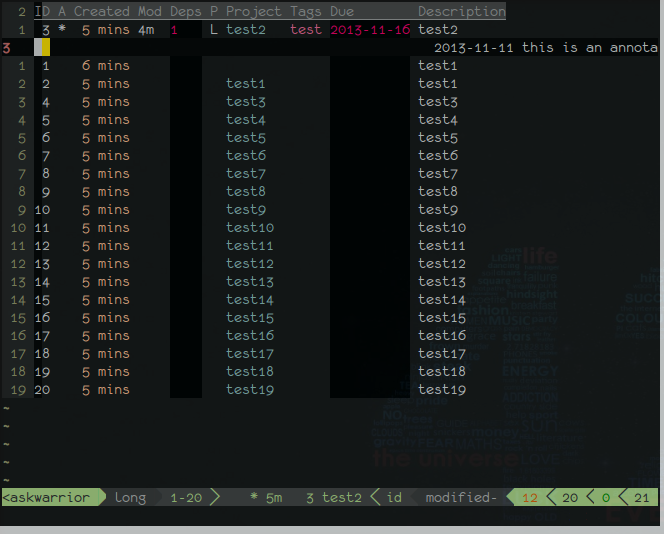
vim-taskwarrior is a vim plugin that extends taskwarrior with an interactive interface. It features a rich set of mappings and commands, is easy to customize, and makes adding, modifying, sorting, reporting and marking done, fast, easy and fun! Homepage: https://github.com/farseer90718/vim-taskwarrior, patches welcome!
This plugin requires Taskwarrior 2.2.0 or higher, although >2.3.x is required for taskd sync functions, and recommended in general, and well worth the price; free :) see: https://taskwarrior.org/download/
Vim version 7.x is required.
Suggested plugins
- vim-airline for better statusline information.
- unite.vim for easier bookmark/history operations.
If you experience line-wrapping issues, add the following line to your .vimrc
let g:task_rc_override = 'rc.defaultwidth=0'
If you experience task truncation (vim-taskwarrior not showing enough tasks), add:
let g:task_rc_override = 'rc.defaultheight=0'

Either download zip file and extract in ~/.vim or use your favorite plugin manager.
- Pathogen
git clone https://github.com/farseer90718/vim-taskwarrior ~/.vim/bundle/vim-taskwarrior
- Vundle
- Add
Bundle 'farseer90718/vim-taskwarrior'to .vimrc - Run
:BundleInstall
- Add
- NeoBundle
- Add
NeoBundle 'farseer90718/vim-taskwarrior'to .vimrc - Run
:NeoBundleInstall
- Add
- vim-plug
- Add
Plug 'blindFS/vim-taskwarrior'to .vimrc - Run
:PlugInstall
- Add
nnoremap<buffer>A... " add annotationnnoremap<buffer>x... " delete annotation.nnoremap<buffer>o... " open the annotation as a file.nnoremap<buffer>a... " create new task.nnoremap<buffer>d... " set the task in current line done.nnoremap<buffer>D... " delete tasknnoremap<buffer><Del>... " delete field/annotation/tasknnoremap<buffer><Space>... " select/remove current task to selected listnnoremap<buffer>m... " modify current field.nnoremap<buffer>M... " modify current task.nnoremap<buffer>f... " change filternnoremap<buffer>r... " change report typennoremap<buffer>c... " execute a command for selected tasks/current tasknnoremap<buffer>R... " refresh the report/clear selected listnnoremap<buffer>q... " quit buffer.nnoremap<buffer>X... " clear all completed task.nnoremap<buffer>p... " duplicate selected tasksnnoremap<buffer>u... " undo last change.nnoremap<buffer>+... " start tasknnoremap<buffer>-... " stop tasknnoremap<buffer>S... " sync with taskd server.nnoremap<buffer>s... " sort by this column primarily.(if already of the highest priority then switch the polarity)nnoremap<buffer><... " sort by this column increasingly.(if already increasingly then increase its priority)nnoremap<buffer>>... " sort by this column decreasingly.(if already decreasingly then decrease its priority)nnoremap<buffer>H... " cycle column format leftnnoremap<buffer>L... " cycle column format rightnnoremap<buffer>J... " next historical entrynnoremap<buffer>K... " previous historical entrynnoremap<buffer>B... " create a bookmark for current combinationnnoremap<buffer><F1>... " view the documentsnnoremap<buffer><CR>... " show task info.nnoremap<buffer><TAB>... " jump to the next columnnnoremap<buffer><S-TAB>... " jump to the previous columnnnoremap<buffer><right>... " jump to the next non-empty columnnnoremap<buffer><left>... " jump to the previous non-empty columnvnoremap<buffer>d... " set done to all visual selected tasksvnoremap<buffer>D... " delete all visual selected tasksvnoremap<buffer><CR>... " show information about visual selected tasksvnoremap<buffer><Space>... " add visual selected tasks to selected list:TW [args]" task [filter report arguments]
:TWUndo" undo the previous modification
:TWEditTaskrc" edit ~/.taskrc
:TWEditVitrc" edit ~/.vitrc
:TWDeleteCompleted" clear all completed tasks
:TWAdd" add new tasks interactively
:TWAnnotate" add an annotation
:TWComplete" mark task done
:TWDelete" deleta a task
:TWDeleteAnnotation" delete an annotation
:TWModifyInteractive" make changes to a task interactively (use with caution!)
:TWReportInfo" run the info report
:TWReportSort [args]" overide the sort method, reset to default if no arguments passed
:TWSync" synchronise with taskd server
:TWToggleReadonly" toggle readonly option
:TWToggleHLField" toggle highlight field option
:TWHistory" list history records using unite.vim
:TWHistoryClear" clear history
:TWBookmark" list bookmarks using unite.vim
:TWBookmarkClear" clear bookmarks" default task report typeletg:task_report_name='next'" custom reports have to be listed explicitly to make them availableletg:task_report_command= []
" whether the field under the cursor is highlightedletg:task_highlight_field=1" can not make change to task data when set to 1letg:task_readonly=0" vim built-in term for task undo in gvimletg:task_gui_term=1" allows user to override task configurations. Seperated by space. Defaults to ''letg:task_rc_override='rc.defaultwidth=999'" default fields to ask when adding a new taskletg:task_default_prompt= ['due', 'description']
" whether the info window is splited verticallyletg:task_info_vsplit=0" info window sizeletg:task_info_size=15" info window positionletg:task_info_position='belowright'" directory to store log files defaults to taskwarrior data.locationletg:task_log_directory='~/.task'" max number of historical entriesletg:task_log_max='20'" forward arrow shown on statuslineletg:task_left_arrow=' <<'" backward arrow ...letg:task_left_arrow='>> 'Default scheme:
highlightdefaultlinktaskwarrior_tableheadTablinehighlightdefaultlinktaskwarrior_fieldIncSearchhighlightdefaultlinktaskwarrior_selectedVisualhighlightdefaultlinktaskwarrior_idVarIdhighlightdefaultlinktaskwarrior_projectStringhighlightdefaultlinktaskwarrior_StatusIncludehighlightdefaultlinktaskwarrior_priorityClasshighlightdefaultlinktaskwarrior_dueTodohighlightdefaultlinktaskwarrior_endKeywordhighlightdefaultlinktaskwarrior_descriptionNormalhighlightdefaultlinktaskwarrior_entrySpecialhighlightdefaultlinktaskwarrior_dependsTodohighlightdefaultlinktaskwarrior_tagsKeywordhighlightdefaultlinktaskwarrior_uuidVarIdhighlightdefaultlinktaskwarrior_urgencyTodoFeel free to change any of above by something like:
hi taskwarrior_xxx guibg = xxx guifg = xxx ctermbg = xxx ctermfg = xxxin your vimrc.
- vim-airline by bling
- unite.vim by Shougo
- webapi-vim by mattn

