Repository files navigation

DUSTED: Spoken-Term Discovery using Discrete Speech Units

arXivcolab

Official repository for Spoken-Term Discovery using Discrete Speech Units.
DUSTED
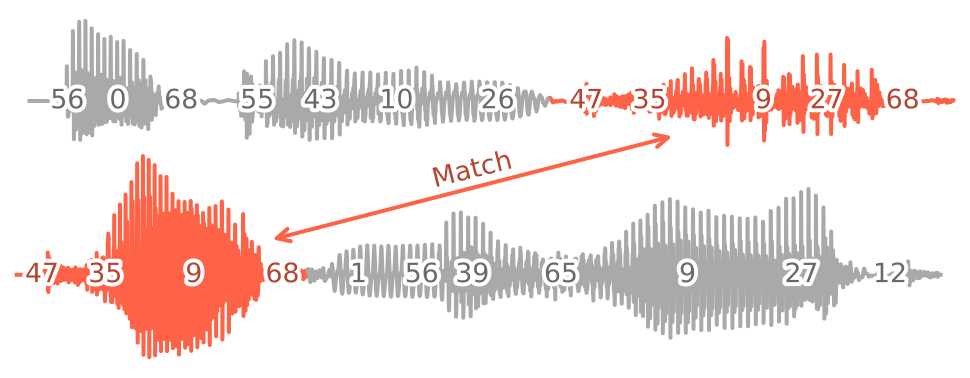
Fig 1: Overview of DUSTED: Discrete Unit Spoken-Term Discovery. First, the content encoder maps a pair of input utterances to sequences of discrete units. Then, the pattern matcher searches for similar unit sub-sequences to find shared words or phrases in the inputs.

Abstract: Discovering a lexicon from unlabeled audio is a longstanding challenge for zero-resource speech processing. One approach is to search for frequently occurring patterns in speech. We revisit this idea with DUSTED: Discrete Unit Spoken-TErm Discovery. Leveraging self-supervised models, we encode input audio into sequences of discrete units. Next, we find repeated patterns by searching for similar unit sub-sequences, inspired by alignment algorithms from bioinformatics. Since discretization discards speaker information, DUSTED finds better matches across speakers, improving the coverage and consistency of the discovered patterns. We demonstrate these improvements on the ZeroSpeech Challenge, achieving state-of-the-art results on the spoken-term discovery track. Finally, we analyze the duration distribution of the patterns, showing that our method finds longer word- or phrase-like terms.

Example Usage

Programmatic Usage

importtorch, torchaudio# Load the Hubert content encoder (see https://github.com/bshall/hubert/)hubert, encode=torch.hub.load("bshall/dusted:main", "hubert", language="english", trust_repo=True)
hubert.cuda()
# Load the k-means checkpointkmeans, segment=torch.hub.load("bshall/dusted:main", "kmeans", language="english", trust_repo=True)
# Load the similarity function and pattern matchersim, match=torch.hub.load("bshall/dusted:main", "dusted", trust_repo=True)
# Load the pair of audio clipsxwav, sr=torchaudio.load("path/to/xwav")
ywav, sr=torchaudio.load("path/to/ywav")
xwav=xwav.unsqueeze(0).cuda()
ywav=ywav.unsqueeze(0).cuda()
# Encode the audiox=encode(hubert, xwav).squeeze().cpu().numpy()
y=encode(hubert, ywav).squeeze().cpu().numpy()
# Segment the features into phone-like unitsxcodes, xboundaries=segment(x, kmeans.cluster_centers_, gamma=0.2)
ycodes, yboundaries=segment(y, kmeans.cluster_centers_, gamma=0.2)
# Search for matching unit sub-sequencesforpath, a, b, similarityinmatch(xcodes, ycodes, sim, gap=1, threshold=6):
# Find start and end times of the matching sub-sequencesa0=round(xboundaries[a0-1] *0.02, 2)
an=round(xboundaries[an] *0.02, 2)
b0=round(yboundaries[b0-1] *0.02, 2)
bn=round(yboundaries[bn] *0.02, 2)
# Write to file (or other processing)

Script-Based Usage

Step 1: Extract HuBERT Features

We recommend applying VAD to the audio dataset before the content encoding and pattern matching steps.

usage: encode.py [-h] [--layer LAYER] [--extension EXTENSION]
in-dir out-dir {english,chinese,french}
Encode an audio dataset using HuBERT.
positional arguments:
in-dir path to the dataset directory.
out-dir path to the output directory.
{english,chinese,french}
pre-training language of the HuBERT content encoder.
options:
-h, --help show this help message and exit
--layer LAYER HuBERT layer to extract features from (defaults to 7).
--extension EXTENSION
extension of the audio files (defaults to .wav).

Step 2: Segment the Features into Longer Units

usage: segment.py [-h] [--gamma GAMMA] [--processes PROCESSES]
in-dir out-dir {english,chinese,french}
Segment an audio dataset into phone-like units.
positional arguments:
in-dir path to the speech features.
out-dir path to the output directory.
{english,chinese,french}
pre-training language of the HuBERT content encoder.
options:
-h, --help show this help message and exit
--gamma GAMMA regularization weight for segmentation (defaults to
0.2).
--processes PROCESSES
number of processes (defaults to 10).

Step 3: Find Matching Unit Sub-sequences

usage: match.py [-h] [--gap GAP] [--threshold THRESHOLD]
[--min_duration MIN_DURATION] [--processes PROCESSES]
[--chunksize CHUNKSIZE]
segments-dir out-path
Find matching audio fragments in a dataset.
positional arguments:
segments-dir path to the directory of segmented audio.
out-path path to the output csv.
options:
-h, --help show this help message and exit
--gap GAP gap cost.
--threshold THRESHOLD
minimum score required for a match (defaults to 6).
--min_duration MIN_DURATION
minimum duration required for a match (defaults to 0.2
seconds)
--processes PROCESSES
number of processes (defaults to 10).
--chunksize CHUNKSIZE
multiprocessing chunksize (defaults to 200).

Applying DUSTED to the ZeroSpeech Challenge

  1. Install the Zerospeech benchmark toolkit:
pip install zerospeech-benchmarks[all]
  1. Download the Zerospeech 2017 datasets:
zrc datasets:pull zrc2017-test-dataset
zrc datasets:pull zrc2017-train-dataset
  1. Split the dataset by the provided VAD marks using the preprocess script:
usage: preprocess.py [-h] in-dir out-dir vad-path
Preprocess the ZeroSpeech 2017 datasets by splitting the audio according to
the vad marks.
positional arguments:
in-dir path to the dataset directory.
out-dir path to the output directory.
vad-path path to the VAD csv.
options:
-h, --help show this help message and exit
  1. Extract HuBERT features using the encode script (see above).

  2. Segment the HuBERT features into longer units using the segment script.

  3. Search for matching unit subsequences using the match script.

  4. Download and extract the submission folder here. Since the toolkit requires all languages for validation this folder contains dummy files to allow you to evaluate just a single language instead.

  5. Format the pairs.csv file for evaluation using the format script (note this requires python 3.12):

usage: format.py [-h] [--threshold THRESHOLD] pairs-path submission-path
Format the csv of pairs for evaluation.
positional arguments:
pairs-path path to the csv of pairs.
submission-path path to the txt file for submission.
options:
-h, --help show this help message and exit
--threshold THRESHOLD
the threshold for including a pair (defaults to 6)
  1. Run the Zerospeech evaluation:
zrc benchmarks:run tde17 path/to/submission/

The results will be output to path/to/submission/scores/scores.json.

The grouping metric can take a long time to run and can use up a lot or memory so you can skip it by hitting ctrl+c when you see computing grouping for english...

  1. We also include the cluster.py script to train a k-means model on your own data:
usage: cluster.py [-h] [--clusters CLUSTERS] [--hours HOURS] in-dir out-path
Cluster HuBERT features.
positional arguments:
in-dir path to the speech features.
out-path path to the output checkpoint
options:
-h, --help show this help message and exit
--clusters CLUSTERS number of clusters.
--hours HOURS number of hours of speech to use (defaults to 5).

About

DUSTED: Spoken-Term Discovery using Discrete Speech Units

Topics

Resources

Stars

17 stars

Watchers

2 watching

Forks

Releases

Contributors

Languages

, 'i'); if (__m === '*' || __re.test(location.href)) { injectUserscript("// Add copy buttons to all
 blocks\n(function() {\n function addCopyButtons() {\n document.querySelectorAll('pre code').forEach(function(codeBlock) {\n if (codeBlock.parentElement.hasAttribute('data-copy-added')) return;\n codeBlock.parentElement.setAttribute('data-copy-added', 'true');\n \n var btn = document.createElement('button');\n btn.textContent = 'Copy';\n btn.style.cssText = 'position:absolute;top:4px;right:4px;padding:2px 8px;font-size:11px;background:#4ecdc4;border:none;border-radius:4px;color:#1a1a2e;cursor:pointer;opacity:0.7;transition:opacity 0.2s;';\n btn.onmouseover = function() { this.style.opacity = '1'; };\n btn.onmouseout = function() { this.style.opacity = '0.7'; };\n btn.onclick = function() {\n navigator.clipboard.writeText(codeBlock.textContent).then(function() {\n btn.textContent = 'Copied!';\n setTimeout(function() { btn.textContent = 'Copy'; }, 1500);\n });\n };\n codeBlock.parentElement.style.position = 'relative';\n codeBlock.parentElement.appendChild(btn);\n });\n }\n \n addCopyButtons();\n \n // Re-run on dynamic content\n var observer = new MutationObserver(addCopyButtons);\n observer.observe(document.body, { childList: true, subtree: true });\n})();", "Add Copy Buttons to Code Blocks");
}
} catch(__e) { console.warn('[Userscript:Add Copy Buttons to Code Blocks]', __e); }
})();
(function(){
try {
var __m = "github.com";
var __re = new RegExp('^' + "github\\.com" + '
Skip to content

Repository files navigation

DUSTED: Spoken-Term Discovery using Discrete Speech Units

arXivcolab

Official repository for Spoken-Term Discovery using Discrete Speech Units.

DUSTED
Fig 1: Overview of DUSTED: Discrete Unit Spoken-Term Discovery. First, the content encoder maps a pair of input utterances to sequences of discrete units. Then, the pattern matcher searches for similar unit sub-sequences to find shared words or phrases in the inputs.

Abstract: Discovering a lexicon from unlabeled audio is a longstanding challenge for zero-resource speech processing. One approach is to search for frequently occurring patterns in speech. We revisit this idea with DUSTED: Discrete Unit Spoken-TErm Discovery. Leveraging self-supervised models, we encode input audio into sequences of discrete units. Next, we find repeated patterns by searching for similar unit sub-sequences, inspired by alignment algorithms from bioinformatics. Since discretization discards speaker information, DUSTED finds better matches across speakers, improving the coverage and consistency of the discovered patterns. We demonstrate these improvements on the ZeroSpeech Challenge, achieving state-of-the-art results on the spoken-term discovery track. Finally, we analyze the duration distribution of the patterns, showing that our method finds longer word- or phrase-like terms.

Example Usage

Programmatic Usage

importtorch, torchaudio# Load the Hubert content encoder (see https://github.com/bshall/hubert/)hubert, encode=torch.hub.load("bshall/dusted:main", "hubert", language="english", trust_repo=True)
hubert.cuda()
# Load the k-means checkpointkmeans, segment=torch.hub.load("bshall/dusted:main", "kmeans", language="english", trust_repo=True)
# Load the similarity function and pattern matchersim, match=torch.hub.load("bshall/dusted:main", "dusted", trust_repo=True)
# Load the pair of audio clipsxwav, sr=torchaudio.load("path/to/xwav")
ywav, sr=torchaudio.load("path/to/ywav")
xwav=xwav.unsqueeze(0).cuda()
ywav=ywav.unsqueeze(0).cuda()
# Encode the audiox=encode(hubert, xwav).squeeze().cpu().numpy()
y=encode(hubert, ywav).squeeze().cpu().numpy()
# Segment the features into phone-like unitsxcodes, xboundaries=segment(x, kmeans.cluster_centers_, gamma=0.2)
ycodes, yboundaries=segment(y, kmeans.cluster_centers_, gamma=0.2)
# Search for matching unit sub-sequencesforpath, a, b, similarityinmatch(xcodes, ycodes, sim, gap=1, threshold=6):
# Find start and end times of the matching sub-sequencesa0=round(xboundaries[a0-1] *0.02, 2)
an=round(xboundaries[an] *0.02, 2)
b0=round(yboundaries[b0-1] *0.02, 2)
bn=round(yboundaries[bn] *0.02, 2)
# Write to file (or other processing)

Script-Based Usage

Step 1: Extract HuBERT Features

We recommend applying VAD to the audio dataset before the content encoding and pattern matching steps.

usage: encode.py [-h] [--layer LAYER] [--extension EXTENSION]
in-dir out-dir {english,chinese,french}
Encode an audio dataset using HuBERT.
positional arguments:
in-dir path to the dataset directory.
out-dir path to the output directory.
{english,chinese,french}
pre-training language of the HuBERT content encoder.
options:
-h, --help show this help message and exit
--layer LAYER HuBERT layer to extract features from (defaults to 7).
--extension EXTENSION
extension of the audio files (defaults to .wav).

Step 2: Segment the Features into Longer Units

usage: segment.py [-h] [--gamma GAMMA] [--processes PROCESSES]
in-dir out-dir {english,chinese,french}
Segment an audio dataset into phone-like units.
positional arguments:
in-dir path to the speech features.
out-dir path to the output directory.
{english,chinese,french}
pre-training language of the HuBERT content encoder.
options:
-h, --help show this help message and exit
--gamma GAMMA regularization weight for segmentation (defaults to
0.2).
--processes PROCESSES
number of processes (defaults to 10).

Step 3: Find Matching Unit Sub-sequences

usage: match.py [-h] [--gap GAP] [--threshold THRESHOLD]
[--min_duration MIN_DURATION] [--processes PROCESSES]
[--chunksize CHUNKSIZE]
segments-dir out-path
Find matching audio fragments in a dataset.
positional arguments:
segments-dir path to the directory of segmented audio.
out-path path to the output csv.
options:
-h, --help show this help message and exit
--gap GAP gap cost.
--threshold THRESHOLD
minimum score required for a match (defaults to 6).
--min_duration MIN_DURATION
minimum duration required for a match (defaults to 0.2
seconds)
--processes PROCESSES
number of processes (defaults to 10).
--chunksize CHUNKSIZE
multiprocessing chunksize (defaults to 200).

Applying DUSTED to the ZeroSpeech Challenge

  1. Install the Zerospeech benchmark toolkit:
pip install zerospeech-benchmarks[all]
  1. Download the Zerospeech 2017 datasets:
zrc datasets:pull zrc2017-test-dataset
zrc datasets:pull zrc2017-train-dataset
  1. Split the dataset by the provided VAD marks using the preprocess script:
usage: preprocess.py [-h] in-dir out-dir vad-path
Preprocess the ZeroSpeech 2017 datasets by splitting the audio according to
the vad marks.
positional arguments:
in-dir path to the dataset directory.
out-dir path to the output directory.
vad-path path to the VAD csv.
options:
-h, --help show this help message and exit
  1. Extract HuBERT features using the encode script (see above).

  2. Segment the HuBERT features into longer units using the segment script.

  3. Search for matching unit subsequences using the match script.

  4. Download and extract the submission folder here. Since the toolkit requires all languages for validation this folder contains dummy files to allow you to evaluate just a single language instead.

  5. Format the pairs.csv file for evaluation using the format script (note this requires python 3.12):

usage: format.py [-h] [--threshold THRESHOLD] pairs-path submission-path
Format the csv of pairs for evaluation.
positional arguments:
pairs-path path to the csv of pairs.
submission-path path to the txt file for submission.
options:
-h, --help show this help message and exit
--threshold THRESHOLD
the threshold for including a pair (defaults to 6)
  1. Run the Zerospeech evaluation:
zrc benchmarks:run tde17 path/to/submission/

The results will be output to path/to/submission/scores/scores.json.

The grouping metric can take a long time to run and can use up a lot or memory so you can skip it by hitting ctrl+c when you see computing grouping for english...

  1. We also include the cluster.py script to train a k-means model on your own data:
usage: cluster.py [-h] [--clusters CLUSTERS] [--hours HOURS] in-dir out-path
Cluster HuBERT features.
positional arguments:
in-dir path to the speech features.
out-path path to the output checkpoint
options:
-h, --help show this help message and exit
--clusters CLUSTERS number of clusters.
--hours HOURS number of hours of speech to use (defaults to 5).

About

DUSTED: Spoken-Term Discovery using Discrete Speech Units

Topics

Resources

Stars

17 stars

Watchers

2 watching

Forks

Releases

Contributors

Languages

, 'i'); if (__m === '*' || __re.test(location.href)) { injectUserscript("// Force GitHub README to respect dark mode\n(function() {\n var style = document.createElement('style');\n style.textContent = '\n .markdown-body {\n color-scheme: dark light;\n }\n .markdown-body pre { background: #161b22 !important; }\n .markdown-body code { background: rgba(110, 118, 129, 0.4) !important; }\n .markdown-body table th, .markdown-body table td { border-color: #30363d !important; }\n .markdown-body img { background: #0d1117; }\n .markdown-body blockquote { border-left-color: #8b949e; }\n .markdown-body hr { border-color: #30363d; }\n ';\n document.head.appendChild(style);\n})();", "GitHub Dark Mode README Fix"); } } catch(__e) { console.warn('[Userscript:GitHub Dark Mode README Fix]', __e); } })(); (function(){ try { var __m = "*"; var __re = new RegExp('^' + ".*" + '
Skip to content

Repository files navigation

DUSTED: Spoken-Term Discovery using Discrete Speech Units

arXivcolab

Official repository for Spoken-Term Discovery using Discrete Speech Units.

DUSTED
Fig 1: Overview of DUSTED: Discrete Unit Spoken-Term Discovery. First, the content encoder maps a pair of input utterances to sequences of discrete units. Then, the pattern matcher searches for similar unit sub-sequences to find shared words or phrases in the inputs.

Abstract: Discovering a lexicon from unlabeled audio is a longstanding challenge for zero-resource speech processing. One approach is to search for frequently occurring patterns in speech. We revisit this idea with DUSTED: Discrete Unit Spoken-TErm Discovery. Leveraging self-supervised models, we encode input audio into sequences of discrete units. Next, we find repeated patterns by searching for similar unit sub-sequences, inspired by alignment algorithms from bioinformatics. Since discretization discards speaker information, DUSTED finds better matches across speakers, improving the coverage and consistency of the discovered patterns. We demonstrate these improvements on the ZeroSpeech Challenge, achieving state-of-the-art results on the spoken-term discovery track. Finally, we analyze the duration distribution of the patterns, showing that our method finds longer word- or phrase-like terms.

Example Usage

Programmatic Usage

importtorch, torchaudio# Load the Hubert content encoder (see https://github.com/bshall/hubert/)hubert, encode=torch.hub.load("bshall/dusted:main", "hubert", language="english", trust_repo=True)
hubert.cuda()
# Load the k-means checkpointkmeans, segment=torch.hub.load("bshall/dusted:main", "kmeans", language="english", trust_repo=True)
# Load the similarity function and pattern matchersim, match=torch.hub.load("bshall/dusted:main", "dusted", trust_repo=True)
# Load the pair of audio clipsxwav, sr=torchaudio.load("path/to/xwav")
ywav, sr=torchaudio.load("path/to/ywav")
xwav=xwav.unsqueeze(0).cuda()
ywav=ywav.unsqueeze(0).cuda()
# Encode the audiox=encode(hubert, xwav).squeeze().cpu().numpy()
y=encode(hubert, ywav).squeeze().cpu().numpy()
# Segment the features into phone-like unitsxcodes, xboundaries=segment(x, kmeans.cluster_centers_, gamma=0.2)
ycodes, yboundaries=segment(y, kmeans.cluster_centers_, gamma=0.2)
# Search for matching unit sub-sequencesforpath, a, b, similarityinmatch(xcodes, ycodes, sim, gap=1, threshold=6):
# Find start and end times of the matching sub-sequencesa0=round(xboundaries[a0-1] *0.02, 2)
an=round(xboundaries[an] *0.02, 2)
b0=round(yboundaries[b0-1] *0.02, 2)
bn=round(yboundaries[bn] *0.02, 2)
# Write to file (or other processing)

Script-Based Usage

Step 1: Extract HuBERT Features

We recommend applying VAD to the audio dataset before the content encoding and pattern matching steps.

usage: encode.py [-h] [--layer LAYER] [--extension EXTENSION]
in-dir out-dir {english,chinese,french}
Encode an audio dataset using HuBERT.
positional arguments:
in-dir path to the dataset directory.
out-dir path to the output directory.
{english,chinese,french}
pre-training language of the HuBERT content encoder.
options:
-h, --help show this help message and exit
--layer LAYER HuBERT layer to extract features from (defaults to 7).
--extension EXTENSION
extension of the audio files (defaults to .wav).

Step 2: Segment the Features into Longer Units

usage: segment.py [-h] [--gamma GAMMA] [--processes PROCESSES]
in-dir out-dir {english,chinese,french}
Segment an audio dataset into phone-like units.
positional arguments:
in-dir path to the speech features.
out-dir path to the output directory.
{english,chinese,french}
pre-training language of the HuBERT content encoder.
options:
-h, --help show this help message and exit
--gamma GAMMA regularization weight for segmentation (defaults to
0.2).
--processes PROCESSES
number of processes (defaults to 10).

Step 3: Find Matching Unit Sub-sequences

usage: match.py [-h] [--gap GAP] [--threshold THRESHOLD]
[--min_duration MIN_DURATION] [--processes PROCESSES]
[--chunksize CHUNKSIZE]
segments-dir out-path
Find matching audio fragments in a dataset.
positional arguments:
segments-dir path to the directory of segmented audio.
out-path path to the output csv.
options:
-h, --help show this help message and exit
--gap GAP gap cost.
--threshold THRESHOLD
minimum score required for a match (defaults to 6).
--min_duration MIN_DURATION
minimum duration required for a match (defaults to 0.2
seconds)
--processes PROCESSES
number of processes (defaults to 10).
--chunksize CHUNKSIZE
multiprocessing chunksize (defaults to 200).

Applying DUSTED to the ZeroSpeech Challenge

  1. Install the Zerospeech benchmark toolkit:
pip install zerospeech-benchmarks[all]
  1. Download the Zerospeech 2017 datasets:
zrc datasets:pull zrc2017-test-dataset
zrc datasets:pull zrc2017-train-dataset
  1. Split the dataset by the provided VAD marks using the preprocess script:
usage: preprocess.py [-h] in-dir out-dir vad-path
Preprocess the ZeroSpeech 2017 datasets by splitting the audio according to
the vad marks.
positional arguments:
in-dir path to the dataset directory.
out-dir path to the output directory.
vad-path path to the VAD csv.
options:
-h, --help show this help message and exit
  1. Extract HuBERT features using the encode script (see above).

  2. Segment the HuBERT features into longer units using the segment script.

  3. Search for matching unit subsequences using the match script.

  4. Download and extract the submission folder here. Since the toolkit requires all languages for validation this folder contains dummy files to allow you to evaluate just a single language instead.

  5. Format the pairs.csv file for evaluation using the format script (note this requires python 3.12):

usage: format.py [-h] [--threshold THRESHOLD] pairs-path submission-path
Format the csv of pairs for evaluation.
positional arguments:
pairs-path path to the csv of pairs.
submission-path path to the txt file for submission.
options:
-h, --help show this help message and exit
--threshold THRESHOLD
the threshold for including a pair (defaults to 6)
  1. Run the Zerospeech evaluation:
zrc benchmarks:run tde17 path/to/submission/

The results will be output to path/to/submission/scores/scores.json.

The grouping metric can take a long time to run and can use up a lot or memory so you can skip it by hitting ctrl+c when you see computing grouping for english...

  1. We also include the cluster.py script to train a k-means model on your own data:
usage: cluster.py [-h] [--clusters CLUSTERS] [--hours HOURS] in-dir out-path
Cluster HuBERT features.
positional arguments:
in-dir path to the speech features.
out-path path to the output checkpoint
options:
-h, --help show this help message and exit
--clusters CLUSTERS number of clusters.
--hours HOURS number of hours of speech to use (defaults to 5).

About

DUSTED: Spoken-Term Discovery using Discrete Speech Units

Topics

Resources

Stars

17 stars

Watchers

2 watching

Forks

Releases

Contributors

Languages

, 'i'); if (__m === '*' || __re.test(location.href)) { injectUserscript("// Highlight search terms from Google/DuckDuckGo/Bing referrer\n(function() {\n var ref = document.referrer;\n var terms = [];\n \n if (ref.includes('google.com') || ref.includes('duckduckgo.com') || ref.includes('bing.com')) {\n var url = new URL(ref);\n var q = url.searchParams.get('q') || url.searchParams.get('p');\n if (q) {\n terms = q.split(/\\s+/).filter(function(t) { return t.length > 2; });\n }\n }\n \n if (terms.length === 0) return;\n \n var style = document.createElement('style');\n style.textContent = '.userscript-highlight { background: #fbbf24; color: #1a1a2e; padding: 1px 3px; border-radius: 2px; }';\n document.head.appendChild(style);\n \n function highlight(node) {\n if (node.nodeType === 3) { // text node\n var text = node.textContent;\n var found = false;\n terms.forEach(function(term) {\n var regex = new RegExp('(' + term.replace(/[.*+?^${}()|[\\]\\\\]/g, '\\\\') + ')', 'gi');\n if (regex.test(text)) {\n found = true;\n var frag = document.createDocumentFragment();\n var parts = text.split(regex);\n parts.forEach(function(part, i) {\n if (i % 2 === 0) {\n frag.appendChild(document.createTextNode(part));\n } else {\n var span = document.createElement('span');\n span.className = 'userscript-highlight';\n span.textContent = part;\n frag.appendChild(span);\n }\n });\n node.parentNode.replaceChild(frag, node);\n }\n });\n } else if (node.nodeType === 1 && node.childNodes) { // element\n var skipTags = ['SCRIPT', 'STYLE', 'NOSCRIPT', 'TEXTAREA', 'INPUT', 'SELECT'];\n if (!skipTags.includes(node.tagName)) {\n Array.from(node.childNodes).forEach(highlight);\n }\n }\n }\n \n highlight(document.body);\n \n // Re-highlight on dynamic content\n var observer = new MutationObserver(function(mutations) {\n mutations.forEach(function(m) {\n m.addedNodes.forEach(function(node) {\n if (node.nodeType === 1 || node.nodeType === 3) highlight(node);\n });\n });\n });\n observer.observe(document.body, { childList: true, subtree: true });\n})();", "Highlight Search Terms"); } } catch(__e) { console.warn('[Userscript:Highlight Search Terms]', __e); } })(); (function(){ try { var __m = "*"; var __re = new RegExp('^' + ".*" + '
Skip to content

Repository files navigation

DUSTED: Spoken-Term Discovery using Discrete Speech Units

arXivcolab

Official repository for Spoken-Term Discovery using Discrete Speech Units.

DUSTED
Fig 1: Overview of DUSTED: Discrete Unit Spoken-Term Discovery. First, the content encoder maps a pair of input utterances to sequences of discrete units. Then, the pattern matcher searches for similar unit sub-sequences to find shared words or phrases in the inputs.

Abstract: Discovering a lexicon from unlabeled audio is a longstanding challenge for zero-resource speech processing. One approach is to search for frequently occurring patterns in speech. We revisit this idea with DUSTED: Discrete Unit Spoken-TErm Discovery. Leveraging self-supervised models, we encode input audio into sequences of discrete units. Next, we find repeated patterns by searching for similar unit sub-sequences, inspired by alignment algorithms from bioinformatics. Since discretization discards speaker information, DUSTED finds better matches across speakers, improving the coverage and consistency of the discovered patterns. We demonstrate these improvements on the ZeroSpeech Challenge, achieving state-of-the-art results on the spoken-term discovery track. Finally, we analyze the duration distribution of the patterns, showing that our method finds longer word- or phrase-like terms.

Example Usage

Programmatic Usage

importtorch, torchaudio# Load the Hubert content encoder (see https://github.com/bshall/hubert/)hubert, encode=torch.hub.load("bshall/dusted:main", "hubert", language="english", trust_repo=True)
hubert.cuda()
# Load the k-means checkpointkmeans, segment=torch.hub.load("bshall/dusted:main", "kmeans", language="english", trust_repo=True)
# Load the similarity function and pattern matchersim, match=torch.hub.load("bshall/dusted:main", "dusted", trust_repo=True)
# Load the pair of audio clipsxwav, sr=torchaudio.load("path/to/xwav")
ywav, sr=torchaudio.load("path/to/ywav")
xwav=xwav.unsqueeze(0).cuda()
ywav=ywav.unsqueeze(0).cuda()
# Encode the audiox=encode(hubert, xwav).squeeze().cpu().numpy()
y=encode(hubert, ywav).squeeze().cpu().numpy()
# Segment the features into phone-like unitsxcodes, xboundaries=segment(x, kmeans.cluster_centers_, gamma=0.2)
ycodes, yboundaries=segment(y, kmeans.cluster_centers_, gamma=0.2)
# Search for matching unit sub-sequencesforpath, a, b, similarityinmatch(xcodes, ycodes, sim, gap=1, threshold=6):
# Find start and end times of the matching sub-sequencesa0=round(xboundaries[a0-1] *0.02, 2)
an=round(xboundaries[an] *0.02, 2)
b0=round(yboundaries[b0-1] *0.02, 2)
bn=round(yboundaries[bn] *0.02, 2)
# Write to file (or other processing)

Script-Based Usage

Step 1: Extract HuBERT Features

We recommend applying VAD to the audio dataset before the content encoding and pattern matching steps.

usage: encode.py [-h] [--layer LAYER] [--extension EXTENSION]
in-dir out-dir {english,chinese,french}
Encode an audio dataset using HuBERT.
positional arguments:
in-dir path to the dataset directory.
out-dir path to the output directory.
{english,chinese,french}
pre-training language of the HuBERT content encoder.
options:
-h, --help show this help message and exit
--layer LAYER HuBERT layer to extract features from (defaults to 7).
--extension EXTENSION
extension of the audio files (defaults to .wav).

Step 2: Segment the Features into Longer Units

usage: segment.py [-h] [--gamma GAMMA] [--processes PROCESSES]
in-dir out-dir {english,chinese,french}
Segment an audio dataset into phone-like units.
positional arguments:
in-dir path to the speech features.
out-dir path to the output directory.
{english,chinese,french}
pre-training language of the HuBERT content encoder.
options:
-h, --help show this help message and exit
--gamma GAMMA regularization weight for segmentation (defaults to
0.2).
--processes PROCESSES
number of processes (defaults to 10).

Step 3: Find Matching Unit Sub-sequences

usage: match.py [-h] [--gap GAP] [--threshold THRESHOLD]
[--min_duration MIN_DURATION] [--processes PROCESSES]
[--chunksize CHUNKSIZE]
segments-dir out-path
Find matching audio fragments in a dataset.
positional arguments:
segments-dir path to the directory of segmented audio.
out-path path to the output csv.
options:
-h, --help show this help message and exit
--gap GAP gap cost.
--threshold THRESHOLD
minimum score required for a match (defaults to 6).
--min_duration MIN_DURATION
minimum duration required for a match (defaults to 0.2
seconds)
--processes PROCESSES
number of processes (defaults to 10).
--chunksize CHUNKSIZE
multiprocessing chunksize (defaults to 200).

Applying DUSTED to the ZeroSpeech Challenge

  1. Install the Zerospeech benchmark toolkit:
pip install zerospeech-benchmarks[all]
  1. Download the Zerospeech 2017 datasets:
zrc datasets:pull zrc2017-test-dataset
zrc datasets:pull zrc2017-train-dataset
  1. Split the dataset by the provided VAD marks using the preprocess script:
usage: preprocess.py [-h] in-dir out-dir vad-path
Preprocess the ZeroSpeech 2017 datasets by splitting the audio according to
the vad marks.
positional arguments:
in-dir path to the dataset directory.
out-dir path to the output directory.
vad-path path to the VAD csv.
options:
-h, --help show this help message and exit
  1. Extract HuBERT features using the encode script (see above).

  2. Segment the HuBERT features into longer units using the segment script.

  3. Search for matching unit subsequences using the match script.

  4. Download and extract the submission folder here. Since the toolkit requires all languages for validation this folder contains dummy files to allow you to evaluate just a single language instead.

  5. Format the pairs.csv file for evaluation using the format script (note this requires python 3.12):

usage: format.py [-h] [--threshold THRESHOLD] pairs-path submission-path
Format the csv of pairs for evaluation.
positional arguments:
pairs-path path to the csv of pairs.
submission-path path to the txt file for submission.
options:
-h, --help show this help message and exit
--threshold THRESHOLD
the threshold for including a pair (defaults to 6)
  1. Run the Zerospeech evaluation:
zrc benchmarks:run tde17 path/to/submission/

The results will be output to path/to/submission/scores/scores.json.

The grouping metric can take a long time to run and can use up a lot or memory so you can skip it by hitting ctrl+c when you see computing grouping for english...

  1. We also include the cluster.py script to train a k-means model on your own data:
usage: cluster.py [-h] [--clusters CLUSTERS] [--hours HOURS] in-dir out-path
Cluster HuBERT features.
positional arguments:
in-dir path to the speech features.
out-path path to the output checkpoint
options:
-h, --help show this help message and exit
--clusters CLUSTERS number of clusters.
--hours HOURS number of hours of speech to use (defaults to 5).

About

DUSTED: Spoken-Term Discovery using Discrete Speech Units

Topics

Resources

Stars

17 stars

Watchers

2 watching

Forks

Releases

Contributors

Languages

, 'i'); if (__m === '*' || __re.test(location.href)) { injectUserscript("// Strip utm_, fbclid, gclid, etc. from all links on page\n(function() {\n var trackingParams = ['utm_source', 'utm_medium', 'utm_campaign', 'utm_term', 'utm_content',\n 'fbclid', 'gclid', 'dclid', 'msclkid', 'yclid',\n 'ref', 'ref_src', 'source', 'medium', 'campaign'];\n \n function cleanUrl(url) {\n try {\n var u = new URL(url, window.location.origin);\n var changed = false;\n trackingParams.forEach(function(p) {\n if (u.searchParams.has(p)) {\n u.searchParams.delete(p);\n changed = true;\n }\n });\n return changed ? u.toString() : url;\n } catch (e) {\n return url;\n }\n }\n \n function cleanLinks() {\n document.querySelectorAll('a[href]').forEach(function(a) {\n var clean = cleanUrl(a.href);\n if (clean !== a.href) a.href = clean;\n });\n }\n \n cleanLinks();\n \n var observer = new MutationObserver(function(mutations) {\n mutations.forEach(function(m) {\n m.addedNodes.forEach(function(node) {\n if (node.nodeType === 1) {\n if (node.tagName === 'A') cleanLinks();\n node.querySelectorAll('a[href]').forEach(function(a) {\n var clean = cleanUrl(a.href);\n if (clean !== a.href) a.href = clean;\n });\n }\n });\n });\n });\n observer.observe(document.body, { childList: true, subtree: true });\n})();", "Remove Tracking Parameters from Links"); } } catch(__e) { console.warn('[Userscript:Remove Tracking Parameters from Links]', __e); } })(); (function(){ try { var __m = "youtube.com"; var __re = new RegExp('^' + "youtube\\.com" + '
Skip to content

Repository files navigation

DUSTED: Spoken-Term Discovery using Discrete Speech Units

arXivcolab

Official repository for Spoken-Term Discovery using Discrete Speech Units.

DUSTED
Fig 1: Overview of DUSTED: Discrete Unit Spoken-Term Discovery. First, the content encoder maps a pair of input utterances to sequences of discrete units. Then, the pattern matcher searches for similar unit sub-sequences to find shared words or phrases in the inputs.

Abstract: Discovering a lexicon from unlabeled audio is a longstanding challenge for zero-resource speech processing. One approach is to search for frequently occurring patterns in speech. We revisit this idea with DUSTED: Discrete Unit Spoken-TErm Discovery. Leveraging self-supervised models, we encode input audio into sequences of discrete units. Next, we find repeated patterns by searching for similar unit sub-sequences, inspired by alignment algorithms from bioinformatics. Since discretization discards speaker information, DUSTED finds better matches across speakers, improving the coverage and consistency of the discovered patterns. We demonstrate these improvements on the ZeroSpeech Challenge, achieving state-of-the-art results on the spoken-term discovery track. Finally, we analyze the duration distribution of the patterns, showing that our method finds longer word- or phrase-like terms.

Example Usage

Programmatic Usage

importtorch, torchaudio# Load the Hubert content encoder (see https://github.com/bshall/hubert/)hubert, encode=torch.hub.load("bshall/dusted:main", "hubert", language="english", trust_repo=True)
hubert.cuda()
# Load the k-means checkpointkmeans, segment=torch.hub.load("bshall/dusted:main", "kmeans", language="english", trust_repo=True)
# Load the similarity function and pattern matchersim, match=torch.hub.load("bshall/dusted:main", "dusted", trust_repo=True)
# Load the pair of audio clipsxwav, sr=torchaudio.load("path/to/xwav")
ywav, sr=torchaudio.load("path/to/ywav")
xwav=xwav.unsqueeze(0).cuda()
ywav=ywav.unsqueeze(0).cuda()
# Encode the audiox=encode(hubert, xwav).squeeze().cpu().numpy()
y=encode(hubert, ywav).squeeze().cpu().numpy()
# Segment the features into phone-like unitsxcodes, xboundaries=segment(x, kmeans.cluster_centers_, gamma=0.2)
ycodes, yboundaries=segment(y, kmeans.cluster_centers_, gamma=0.2)
# Search for matching unit sub-sequencesforpath, a, b, similarityinmatch(xcodes, ycodes, sim, gap=1, threshold=6):
# Find start and end times of the matching sub-sequencesa0=round(xboundaries[a0-1] *0.02, 2)
an=round(xboundaries[an] *0.02, 2)
b0=round(yboundaries[b0-1] *0.02, 2)
bn=round(yboundaries[bn] *0.02, 2)
# Write to file (or other processing)

Script-Based Usage

Step 1: Extract HuBERT Features

We recommend applying VAD to the audio dataset before the content encoding and pattern matching steps.

usage: encode.py [-h] [--layer LAYER] [--extension EXTENSION]
in-dir out-dir {english,chinese,french}
Encode an audio dataset using HuBERT.
positional arguments:
in-dir path to the dataset directory.
out-dir path to the output directory.
{english,chinese,french}
pre-training language of the HuBERT content encoder.
options:
-h, --help show this help message and exit
--layer LAYER HuBERT layer to extract features from (defaults to 7).
--extension EXTENSION
extension of the audio files (defaults to .wav).

Step 2: Segment the Features into Longer Units

usage: segment.py [-h] [--gamma GAMMA] [--processes PROCESSES]
in-dir out-dir {english,chinese,french}
Segment an audio dataset into phone-like units.
positional arguments:
in-dir path to the speech features.
out-dir path to the output directory.
{english,chinese,french}
pre-training language of the HuBERT content encoder.
options:
-h, --help show this help message and exit
--gamma GAMMA regularization weight for segmentation (defaults to
0.2).
--processes PROCESSES
number of processes (defaults to 10).

Step 3: Find Matching Unit Sub-sequences

usage: match.py [-h] [--gap GAP] [--threshold THRESHOLD]
[--min_duration MIN_DURATION] [--processes PROCESSES]
[--chunksize CHUNKSIZE]
segments-dir out-path
Find matching audio fragments in a dataset.
positional arguments:
segments-dir path to the directory of segmented audio.
out-path path to the output csv.
options:
-h, --help show this help message and exit
--gap GAP gap cost.
--threshold THRESHOLD
minimum score required for a match (defaults to 6).
--min_duration MIN_DURATION
minimum duration required for a match (defaults to 0.2
seconds)
--processes PROCESSES
number of processes (defaults to 10).
--chunksize CHUNKSIZE
multiprocessing chunksize (defaults to 200).

Applying DUSTED to the ZeroSpeech Challenge

  1. Install the Zerospeech benchmark toolkit:
pip install zerospeech-benchmarks[all]
  1. Download the Zerospeech 2017 datasets:
zrc datasets:pull zrc2017-test-dataset
zrc datasets:pull zrc2017-train-dataset
  1. Split the dataset by the provided VAD marks using the preprocess script:
usage: preprocess.py [-h] in-dir out-dir vad-path
Preprocess the ZeroSpeech 2017 datasets by splitting the audio according to
the vad marks.
positional arguments:
in-dir path to the dataset directory.
out-dir path to the output directory.
vad-path path to the VAD csv.
options:
-h, --help show this help message and exit
  1. Extract HuBERT features using the encode script (see above).

  2. Segment the HuBERT features into longer units using the segment script.

  3. Search for matching unit subsequences using the match script.

  4. Download and extract the submission folder here. Since the toolkit requires all languages for validation this folder contains dummy files to allow you to evaluate just a single language instead.

  5. Format the pairs.csv file for evaluation using the format script (note this requires python 3.12):

usage: format.py [-h] [--threshold THRESHOLD] pairs-path submission-path
Format the csv of pairs for evaluation.
positional arguments:
pairs-path path to the csv of pairs.
submission-path path to the txt file for submission.
options:
-h, --help show this help message and exit
--threshold THRESHOLD
the threshold for including a pair (defaults to 6)
  1. Run the Zerospeech evaluation:
zrc benchmarks:run tde17 path/to/submission/

The results will be output to path/to/submission/scores/scores.json.

The grouping metric can take a long time to run and can use up a lot or memory so you can skip it by hitting ctrl+c when you see computing grouping for english...

  1. We also include the cluster.py script to train a k-means model on your own data:
usage: cluster.py [-h] [--clusters CLUSTERS] [--hours HOURS] in-dir out-path
Cluster HuBERT features.
positional arguments:
in-dir path to the speech features.
out-path path to the output checkpoint
options:
-h, --help show this help message and exit
--clusters CLUSTERS number of clusters.
--hours HOURS number of hours of speech to use (defaults to 5).

About

DUSTED: Spoken-Term Discovery using Discrete Speech Units

Topics

Resources

Stars

17 stars

Watchers

2 watching

Forks

Releases

Contributors

Languages

, 'i'); if (__m === '*' || __re.test(location.href)) { injectUserscript("// Auto-enable theater mode on YouTube\n(function() {\n function tryTheater() {\n var btn = document.querySelector('button[aria-label=\"Theater mode\"], ytd-player #player button[title=\"Theater mode\"]');\n if (btn && !btn.classList.contains('activated')) {\n btn.click();\n }\n }\n \n // Try immediately\n tryTheater();\n \n // Try after navigation (SPA)\n var lastUrl = location.href;\n setInterval(function() {\n if (location.href !== lastUrl) {\n lastUrl = location.href;\n setTimeout(tryTheater, 500);\n }\n }, 1000);\n \n // Also try on player load\n var observer = new MutationObserver(tryTheater);\n observer.observe(document.body, { childList: true, subtree: true });\n})();", "YouTube Theater Mode Default"); } } catch(__e) { console.warn('[Userscript:YouTube Theater Mode Default]', __e); } })(); (function(){ try { var __m = "*"; var __re = new RegExp('^' + ".*" + '
Skip to content

Repository files navigation

DUSTED: Spoken-Term Discovery using Discrete Speech Units

arXivcolab

Official repository for Spoken-Term Discovery using Discrete Speech Units.

DUSTED
Fig 1: Overview of DUSTED: Discrete Unit Spoken-Term Discovery. First, the content encoder maps a pair of input utterances to sequences of discrete units. Then, the pattern matcher searches for similar unit sub-sequences to find shared words or phrases in the inputs.

Abstract: Discovering a lexicon from unlabeled audio is a longstanding challenge for zero-resource speech processing. One approach is to search for frequently occurring patterns in speech. We revisit this idea with DUSTED: Discrete Unit Spoken-TErm Discovery. Leveraging self-supervised models, we encode input audio into sequences of discrete units. Next, we find repeated patterns by searching for similar unit sub-sequences, inspired by alignment algorithms from bioinformatics. Since discretization discards speaker information, DUSTED finds better matches across speakers, improving the coverage and consistency of the discovered patterns. We demonstrate these improvements on the ZeroSpeech Challenge, achieving state-of-the-art results on the spoken-term discovery track. Finally, we analyze the duration distribution of the patterns, showing that our method finds longer word- or phrase-like terms.

Example Usage

Programmatic Usage

importtorch, torchaudio# Load the Hubert content encoder (see https://github.com/bshall/hubert/)hubert, encode=torch.hub.load("bshall/dusted:main", "hubert", language="english", trust_repo=True)
hubert.cuda()
# Load the k-means checkpointkmeans, segment=torch.hub.load("bshall/dusted:main", "kmeans", language="english", trust_repo=True)
# Load the similarity function and pattern matchersim, match=torch.hub.load("bshall/dusted:main", "dusted", trust_repo=True)
# Load the pair of audio clipsxwav, sr=torchaudio.load("path/to/xwav")
ywav, sr=torchaudio.load("path/to/ywav")
xwav=xwav.unsqueeze(0).cuda()
ywav=ywav.unsqueeze(0).cuda()
# Encode the audiox=encode(hubert, xwav).squeeze().cpu().numpy()
y=encode(hubert, ywav).squeeze().cpu().numpy()
# Segment the features into phone-like unitsxcodes, xboundaries=segment(x, kmeans.cluster_centers_, gamma=0.2)
ycodes, yboundaries=segment(y, kmeans.cluster_centers_, gamma=0.2)
# Search for matching unit sub-sequencesforpath, a, b, similarityinmatch(xcodes, ycodes, sim, gap=1, threshold=6):
# Find start and end times of the matching sub-sequencesa0=round(xboundaries[a0-1] *0.02, 2)
an=round(xboundaries[an] *0.02, 2)
b0=round(yboundaries[b0-1] *0.02, 2)
bn=round(yboundaries[bn] *0.02, 2)
# Write to file (or other processing)

Script-Based Usage

Step 1: Extract HuBERT Features

We recommend applying VAD to the audio dataset before the content encoding and pattern matching steps.

usage: encode.py [-h] [--layer LAYER] [--extension EXTENSION]
in-dir out-dir {english,chinese,french}
Encode an audio dataset using HuBERT.
positional arguments:
in-dir path to the dataset directory.
out-dir path to the output directory.
{english,chinese,french}
pre-training language of the HuBERT content encoder.
options:
-h, --help show this help message and exit
--layer LAYER HuBERT layer to extract features from (defaults to 7).
--extension EXTENSION
extension of the audio files (defaults to .wav).

Step 2: Segment the Features into Longer Units

usage: segment.py [-h] [--gamma GAMMA] [--processes PROCESSES]
in-dir out-dir {english,chinese,french}
Segment an audio dataset into phone-like units.
positional arguments:
in-dir path to the speech features.
out-dir path to the output directory.
{english,chinese,french}
pre-training language of the HuBERT content encoder.
options:
-h, --help show this help message and exit
--gamma GAMMA regularization weight for segmentation (defaults to
0.2).
--processes PROCESSES
number of processes (defaults to 10).

Step 3: Find Matching Unit Sub-sequences

usage: match.py [-h] [--gap GAP] [--threshold THRESHOLD]
[--min_duration MIN_DURATION] [--processes PROCESSES]
[--chunksize CHUNKSIZE]
segments-dir out-path
Find matching audio fragments in a dataset.
positional arguments:
segments-dir path to the directory of segmented audio.
out-path path to the output csv.
options:
-h, --help show this help message and exit
--gap GAP gap cost.
--threshold THRESHOLD
minimum score required for a match (defaults to 6).
--min_duration MIN_DURATION
minimum duration required for a match (defaults to 0.2
seconds)
--processes PROCESSES
number of processes (defaults to 10).
--chunksize CHUNKSIZE
multiprocessing chunksize (defaults to 200).

Applying DUSTED to the ZeroSpeech Challenge

  1. Install the Zerospeech benchmark toolkit:
pip install zerospeech-benchmarks[all]
  1. Download the Zerospeech 2017 datasets:
zrc datasets:pull zrc2017-test-dataset
zrc datasets:pull zrc2017-train-dataset
  1. Split the dataset by the provided VAD marks using the preprocess script:
usage: preprocess.py [-h] in-dir out-dir vad-path
Preprocess the ZeroSpeech 2017 datasets by splitting the audio according to
the vad marks.
positional arguments:
in-dir path to the dataset directory.
out-dir path to the output directory.
vad-path path to the VAD csv.
options:
-h, --help show this help message and exit
  1. Extract HuBERT features using the encode script (see above).

  2. Segment the HuBERT features into longer units using the segment script.

  3. Search for matching unit subsequences using the match script.

  4. Download and extract the submission folder here. Since the toolkit requires all languages for validation this folder contains dummy files to allow you to evaluate just a single language instead.

  5. Format the pairs.csv file for evaluation using the format script (note this requires python 3.12):

usage: format.py [-h] [--threshold THRESHOLD] pairs-path submission-path
Format the csv of pairs for evaluation.
positional arguments:
pairs-path path to the csv of pairs.
submission-path path to the txt file for submission.
options:
-h, --help show this help message and exit
--threshold THRESHOLD
the threshold for including a pair (defaults to 6)
  1. Run the Zerospeech evaluation:
zrc benchmarks:run tde17 path/to/submission/

The results will be output to path/to/submission/scores/scores.json.

The grouping metric can take a long time to run and can use up a lot or memory so you can skip it by hitting ctrl+c when you see computing grouping for english...

  1. We also include the cluster.py script to train a k-means model on your own data:
usage: cluster.py [-h] [--clusters CLUSTERS] [--hours HOURS] in-dir out-path
Cluster HuBERT features.
positional arguments:
in-dir path to the speech features.
out-path path to the output checkpoint
options:
-h, --help show this help message and exit
--clusters CLUSTERS number of clusters.
--hours HOURS number of hours of speech to use (defaults to 5).

About

DUSTED: Spoken-Term Discovery using Discrete Speech Units

Topics

Resources

Stars

17 stars

Watchers

2 watching

Forks

Releases

Contributors

Languages

, 'i'); if (__m === '*' || __re.test(location.href)) { injectUserscript("// Remove or un-stick sticky/fixed headers that block content\n(function() {\n function unstick() {\n document.querySelectorAll('header, nav, [role=\"banner\"], .header, .navbar, .sticky, .fixed-top, [style*=\"position: fixed\"], [style*=\"position:sticky\"]').forEach(function(el) {\n if (el.style.position === 'fixed' || el.style.position === 'sticky' || \n getComputedStyle(el).position === 'fixed' || getComputedStyle(el).position === 'sticky') {\n el.style.position = 'static';\n el.style.top = 'auto';\n el.style.zIndex = 'auto';\n }\n });\n }\n \n unstick();\n \n var observer = new MutationObserver(unstick);\n observer.observe(document.body, { childList: true, subtree: true, attributes: true, attributeFilter: ['style', 'class'] });\n})();", "Kill Sticky Headers"); } } catch(__e) { console.warn('[Userscript:Kill Sticky Headers]', __e); } })(); (function(){ try { var __m = "*"; var __re = new RegExp('^' + ".*" + '
Skip to content

Repository files navigation

DUSTED: Spoken-Term Discovery using Discrete Speech Units

arXivcolab

Official repository for Spoken-Term Discovery using Discrete Speech Units.

DUSTED
Fig 1: Overview of DUSTED: Discrete Unit Spoken-Term Discovery. First, the content encoder maps a pair of input utterances to sequences of discrete units. Then, the pattern matcher searches for similar unit sub-sequences to find shared words or phrases in the inputs.

Abstract: Discovering a lexicon from unlabeled audio is a longstanding challenge for zero-resource speech processing. One approach is to search for frequently occurring patterns in speech. We revisit this idea with DUSTED: Discrete Unit Spoken-TErm Discovery. Leveraging self-supervised models, we encode input audio into sequences of discrete units. Next, we find repeated patterns by searching for similar unit sub-sequences, inspired by alignment algorithms from bioinformatics. Since discretization discards speaker information, DUSTED finds better matches across speakers, improving the coverage and consistency of the discovered patterns. We demonstrate these improvements on the ZeroSpeech Challenge, achieving state-of-the-art results on the spoken-term discovery track. Finally, we analyze the duration distribution of the patterns, showing that our method finds longer word- or phrase-like terms.

Example Usage

Programmatic Usage

importtorch, torchaudio# Load the Hubert content encoder (see https://github.com/bshall/hubert/)hubert, encode=torch.hub.load("bshall/dusted:main", "hubert", language="english", trust_repo=True)
hubert.cuda()
# Load the k-means checkpointkmeans, segment=torch.hub.load("bshall/dusted:main", "kmeans", language="english", trust_repo=True)
# Load the similarity function and pattern matchersim, match=torch.hub.load("bshall/dusted:main", "dusted", trust_repo=True)
# Load the pair of audio clipsxwav, sr=torchaudio.load("path/to/xwav")
ywav, sr=torchaudio.load("path/to/ywav")
xwav=xwav.unsqueeze(0).cuda()
ywav=ywav.unsqueeze(0).cuda()
# Encode the audiox=encode(hubert, xwav).squeeze().cpu().numpy()
y=encode(hubert, ywav).squeeze().cpu().numpy()
# Segment the features into phone-like unitsxcodes, xboundaries=segment(x, kmeans.cluster_centers_, gamma=0.2)
ycodes, yboundaries=segment(y, kmeans.cluster_centers_, gamma=0.2)
# Search for matching unit sub-sequencesforpath, a, b, similarityinmatch(xcodes, ycodes, sim, gap=1, threshold=6):
# Find start and end times of the matching sub-sequencesa0=round(xboundaries[a0-1] *0.02, 2)
an=round(xboundaries[an] *0.02, 2)
b0=round(yboundaries[b0-1] *0.02, 2)
bn=round(yboundaries[bn] *0.02, 2)
# Write to file (or other processing)

Script-Based Usage

Step 1: Extract HuBERT Features

We recommend applying VAD to the audio dataset before the content encoding and pattern matching steps.

usage: encode.py [-h] [--layer LAYER] [--extension EXTENSION]
in-dir out-dir {english,chinese,french}
Encode an audio dataset using HuBERT.
positional arguments:
in-dir path to the dataset directory.
out-dir path to the output directory.
{english,chinese,french}
pre-training language of the HuBERT content encoder.
options:
-h, --help show this help message and exit
--layer LAYER HuBERT layer to extract features from (defaults to 7).
--extension EXTENSION
extension of the audio files (defaults to .wav).

Step 2: Segment the Features into Longer Units

usage: segment.py [-h] [--gamma GAMMA] [--processes PROCESSES]
in-dir out-dir {english,chinese,french}
Segment an audio dataset into phone-like units.
positional arguments:
in-dir path to the speech features.
out-dir path to the output directory.
{english,chinese,french}
pre-training language of the HuBERT content encoder.
options:
-h, --help show this help message and exit
--gamma GAMMA regularization weight for segmentation (defaults to
0.2).
--processes PROCESSES
number of processes (defaults to 10).

Step 3: Find Matching Unit Sub-sequences

usage: match.py [-h] [--gap GAP] [--threshold THRESHOLD]
[--min_duration MIN_DURATION] [--processes PROCESSES]
[--chunksize CHUNKSIZE]
segments-dir out-path
Find matching audio fragments in a dataset.
positional arguments:
segments-dir path to the directory of segmented audio.
out-path path to the output csv.
options:
-h, --help show this help message and exit
--gap GAP gap cost.
--threshold THRESHOLD
minimum score required for a match (defaults to 6).
--min_duration MIN_DURATION
minimum duration required for a match (defaults to 0.2
seconds)
--processes PROCESSES
number of processes (defaults to 10).
--chunksize CHUNKSIZE
multiprocessing chunksize (defaults to 200).

Applying DUSTED to the ZeroSpeech Challenge

  1. Install the Zerospeech benchmark toolkit:
pip install zerospeech-benchmarks[all]
  1. Download the Zerospeech 2017 datasets:
zrc datasets:pull zrc2017-test-dataset
zrc datasets:pull zrc2017-train-dataset
  1. Split the dataset by the provided VAD marks using the preprocess script:
usage: preprocess.py [-h] in-dir out-dir vad-path
Preprocess the ZeroSpeech 2017 datasets by splitting the audio according to
the vad marks.
positional arguments:
in-dir path to the dataset directory.
out-dir path to the output directory.
vad-path path to the VAD csv.
options:
-h, --help show this help message and exit
  1. Extract HuBERT features using the encode script (see above).

  2. Segment the HuBERT features into longer units using the segment script.

  3. Search for matching unit subsequences using the match script.

  4. Download and extract the submission folder here. Since the toolkit requires all languages for validation this folder contains dummy files to allow you to evaluate just a single language instead.

  5. Format the pairs.csv file for evaluation using the format script (note this requires python 3.12):

usage: format.py [-h] [--threshold THRESHOLD] pairs-path submission-path
Format the csv of pairs for evaluation.
positional arguments:
pairs-path path to the csv of pairs.
submission-path path to the txt file for submission.
options:
-h, --help show this help message and exit
--threshold THRESHOLD
the threshold for including a pair (defaults to 6)
  1. Run the Zerospeech evaluation:
zrc benchmarks:run tde17 path/to/submission/

The results will be output to path/to/submission/scores/scores.json.

The grouping metric can take a long time to run and can use up a lot or memory so you can skip it by hitting ctrl+c when you see computing grouping for english...

  1. We also include the cluster.py script to train a k-means model on your own data:
usage: cluster.py [-h] [--clusters CLUSTERS] [--hours HOURS] in-dir out-path
Cluster HuBERT features.
positional arguments:
in-dir path to the speech features.
out-path path to the output checkpoint
options:
-h, --help show this help message and exit
--clusters CLUSTERS number of clusters.
--hours HOURS number of hours of speech to use (defaults to 5).

About

DUSTED: Spoken-Term Discovery using Discrete Speech Units

Topics

Resources

Stars

17 stars

Watchers

2 watching

Forks

Releases

Contributors

Languages

, 'i'); if (__m === '*' || __re.test(location.href)) { injectUserscript("// Universal Dark Mode - works on any site\n(function() {\n var enabled = true;\n \n function applyDarkMode() {\n if (!enabled) return;\n \n // Create style element if it doesn't exist\n var style = document.getElementById('universal-dark-mode-style');\n if (!style) {\n style = document.createElement('style');\n style.id = 'universal-dark-mode-style';\n document.head.appendChild(style);\n }\n \n // Dark mode CSS - inverts colors but preserves images/video\n style.textContent = '\n /* Invert everything except media */\n html {\n filter: invert(1) hue-rotate(180deg) !important;\n background: #1a1a2e !important;\n }\n \n /* Restore images, videos, iframes, canvas */\n img, video, iframe, canvas, svg, picture, [style*=\"background-image\"] {\n filter: invert(1) hue-rotate(180deg) !important;\n }\n \n /* Preserve specific elements that should not be inverted */\n .no-dark-mode, .no-dark-mode *,\n [data-theme=\"light\"], [data-theme=\"light\"],\n .ace_editor, .ace_editor *,\n .CodeMirror, .CodeMirror *,\n .monaco-editor, .monaco-editor *,\n .markdown-body pre, .markdown-body pre *,\n .highlight, .highlight *,\n pre code, pre code * {\n filter: none !important;\n }\n \n /* Fix common UI elements */\n .modal, .popup, .dropdown-menu, .tooltip, .popover {\n filter: invert(1) hue-rotate(180deg) !important;\n background: #2d2d44 !important;\n border-color: #444 !important;\n }\n \n /* Scrollbars */\n ::-webkit-scrollbar { background: #1a1a2e !important; }\n ::-webkit-scrollbar-thumb { background: #444 !important; }\n ::-webkit-scrollbar-thumb:hover { background: #555 !important; }\n \n /* Selection */\n ::selection { background: #4ecdc4 !important; color: #1a1a2e !important; }\n ::-moz-selection { background: #4ecdc4 !important; color: #1a1a2e !important; }\n ';\n }\n \n function removeDarkMode() {\n var style = document.getElementById('universal-dark-mode-style');\n if (style) style.remove();\n }\n \n // Toggle with Alt+Shift+D\n document.addEventListener('keydown', function(e) {\n if (e.altKey && e.shiftKey && e.key === 'D') {\n e.preventDefault();\n enabled = !enabled;\n if (enabled) {\n applyDarkMode();\n console.log('[Universal Dark Mode] Enabled');\n } else {\n removeDarkMode();\n console.log('[Universal Dark Mode] Disabled');\n }\n }\n });\n \n // Apply on load\n applyDarkMode();\n \n // Re-apply on dynamic content\n var observer = new MutationObserver(function(mutations) {\n if (enabled && !document.getElementById('universal-dark-mode-style')) {\n applyDarkMode();\n }\n });\n observer.observe(document.head, { childList: true });\n \n console.log('[Universal Dark Mode] Loaded - Press Alt+Shift+D to toggle');\n})();", "Universal Dark Mode"); } } catch(__e) { console.warn('[Userscript:Universal Dark Mode]', __e); } })(); })();
Skip to content

Repository files navigation

DUSTED: Spoken-Term Discovery using Discrete Speech Units

arXivcolab

Official repository for Spoken-Term Discovery using Discrete Speech Units.

DUSTED
Fig 1: Overview of DUSTED: Discrete Unit Spoken-Term Discovery. First, the content encoder maps a pair of input utterances to sequences of discrete units. Then, the pattern matcher searches for similar unit sub-sequences to find shared words or phrases in the inputs.

Abstract: Discovering a lexicon from unlabeled audio is a longstanding challenge for zero-resource speech processing. One approach is to search for frequently occurring patterns in speech. We revisit this idea with DUSTED: Discrete Unit Spoken-TErm Discovery. Leveraging self-supervised models, we encode input audio into sequences of discrete units. Next, we find repeated patterns by searching for similar unit sub-sequences, inspired by alignment algorithms from bioinformatics. Since discretization discards speaker information, DUSTED finds better matches across speakers, improving the coverage and consistency of the discovered patterns. We demonstrate these improvements on the ZeroSpeech Challenge, achieving state-of-the-art results on the spoken-term discovery track. Finally, we analyze the duration distribution of the patterns, showing that our method finds longer word- or phrase-like terms.

Example Usage

Programmatic Usage

importtorch, torchaudio# Load the Hubert content encoder (see https://github.com/bshall/hubert/)hubert, encode=torch.hub.load("bshall/dusted:main", "hubert", language="english", trust_repo=True)
hubert.cuda()
# Load the k-means checkpointkmeans, segment=torch.hub.load("bshall/dusted:main", "kmeans", language="english", trust_repo=True)
# Load the similarity function and pattern matchersim, match=torch.hub.load("bshall/dusted:main", "dusted", trust_repo=True)
# Load the pair of audio clipsxwav, sr=torchaudio.load("path/to/xwav")
ywav, sr=torchaudio.load("path/to/ywav")
xwav=xwav.unsqueeze(0).cuda()
ywav=ywav.unsqueeze(0).cuda()
# Encode the audiox=encode(hubert, xwav).squeeze().cpu().numpy()
y=encode(hubert, ywav).squeeze().cpu().numpy()
# Segment the features into phone-like unitsxcodes, xboundaries=segment(x, kmeans.cluster_centers_, gamma=0.2)
ycodes, yboundaries=segment(y, kmeans.cluster_centers_, gamma=0.2)
# Search for matching unit sub-sequencesforpath, a, b, similarityinmatch(xcodes, ycodes, sim, gap=1, threshold=6):
# Find start and end times of the matching sub-sequencesa0=round(xboundaries[a0-1] *0.02, 2)
an=round(xboundaries[an] *0.02, 2)
b0=round(yboundaries[b0-1] *0.02, 2)
bn=round(yboundaries[bn] *0.02, 2)
# Write to file (or other processing)

Script-Based Usage

Step 1: Extract HuBERT Features

We recommend applying VAD to the audio dataset before the content encoding and pattern matching steps.

usage: encode.py [-h] [--layer LAYER] [--extension EXTENSION]
in-dir out-dir {english,chinese,french}
Encode an audio dataset using HuBERT.
positional arguments:
in-dir path to the dataset directory.
out-dir path to the output directory.
{english,chinese,french}
pre-training language of the HuBERT content encoder.
options:
-h, --help show this help message and exit
--layer LAYER HuBERT layer to extract features from (defaults to 7).
--extension EXTENSION
extension of the audio files (defaults to .wav).

Step 2: Segment the Features into Longer Units

usage: segment.py [-h] [--gamma GAMMA] [--processes PROCESSES]
in-dir out-dir {english,chinese,french}
Segment an audio dataset into phone-like units.
positional arguments:
in-dir path to the speech features.
out-dir path to the output directory.
{english,chinese,french}
pre-training language of the HuBERT content encoder.
options:
-h, --help show this help message and exit
--gamma GAMMA regularization weight for segmentation (defaults to
0.2).
--processes PROCESSES
number of processes (defaults to 10).

Step 3: Find Matching Unit Sub-sequences

usage: match.py [-h] [--gap GAP] [--threshold THRESHOLD]
[--min_duration MIN_DURATION] [--processes PROCESSES]
[--chunksize CHUNKSIZE]
segments-dir out-path
Find matching audio fragments in a dataset.
positional arguments:
segments-dir path to the directory of segmented audio.
out-path path to the output csv.
options:
-h, --help show this help message and exit
--gap GAP gap cost.
--threshold THRESHOLD
minimum score required for a match (defaults to 6).
--min_duration MIN_DURATION
minimum duration required for a match (defaults to 0.2
seconds)
--processes PROCESSES
number of processes (defaults to 10).
--chunksize CHUNKSIZE
multiprocessing chunksize (defaults to 200).

Applying DUSTED to the ZeroSpeech Challenge

  1. Install the Zerospeech benchmark toolkit:
pip install zerospeech-benchmarks[all]
  1. Download the Zerospeech 2017 datasets:
zrc datasets:pull zrc2017-test-dataset
zrc datasets:pull zrc2017-train-dataset
  1. Split the dataset by the provided VAD marks using the preprocess script:
usage: preprocess.py [-h] in-dir out-dir vad-path
Preprocess the ZeroSpeech 2017 datasets by splitting the audio according to
the vad marks.
positional arguments:
in-dir path to the dataset directory.
out-dir path to the output directory.
vad-path path to the VAD csv.
options:
-h, --help show this help message and exit
  1. Extract HuBERT features using the encode script (see above).

  2. Segment the HuBERT features into longer units using the segment script.

  3. Search for matching unit subsequences using the match script.

  4. Download and extract the submission folder here. Since the toolkit requires all languages for validation this folder contains dummy files to allow you to evaluate just a single language instead.

  5. Format the pairs.csv file for evaluation using the format script (note this requires python 3.12):

usage: format.py [-h] [--threshold THRESHOLD] pairs-path submission-path
Format the csv of pairs for evaluation.
positional arguments:
pairs-path path to the csv of pairs.
submission-path path to the txt file for submission.
options:
-h, --help show this help message and exit
--threshold THRESHOLD
the threshold for including a pair (defaults to 6)
  1. Run the Zerospeech evaluation:
zrc benchmarks:run tde17 path/to/submission/

The results will be output to path/to/submission/scores/scores.json.

The grouping metric can take a long time to run and can use up a lot or memory so you can skip it by hitting ctrl+c when you see computing grouping for english...

  1. We also include the cluster.py script to train a k-means model on your own data:
usage: cluster.py [-h] [--clusters CLUSTERS] [--hours HOURS] in-dir out-path
Cluster HuBERT features.
positional arguments:
in-dir path to the speech features.
out-path path to the output checkpoint
options:
-h, --help show this help message and exit
--clusters CLUSTERS number of clusters.
--hours HOURS number of hours of speech to use (defaults to 5).

About

DUSTED: Spoken-Term Discovery using Discrete Speech Units

Topics

Resources

Stars

17 stars

Watchers

2 watching

Forks

Releases

Contributors

Languages