This repository was archived by the owner on Jul 25, 2020. It is now read-only.

Repository files navigation

THIS PROJECT IS NO LONGER UNDER DEVELOPMENT. NO SUPPORT IS IMPLIED OR PROVIDED. DO NOT USE FOR ANY PURPOSE.

Recommend using VLCKit or GStreamer instead.


Lightweight iOS media player widget for free Ogg Theora/Vorbis and WebM VP8/VP9 codecs.

Currently provides a basic high-level player widget (OGVPlayerView) that can stream audio and video files over HTTP(S), including seeking if Range: header is supported, or from the local filesystem.

Will continue to improve this interface and add lower-level interfaces suitable for transcoding to/from AVFoundation formats. See the Roadmap section below for more detailed plans.
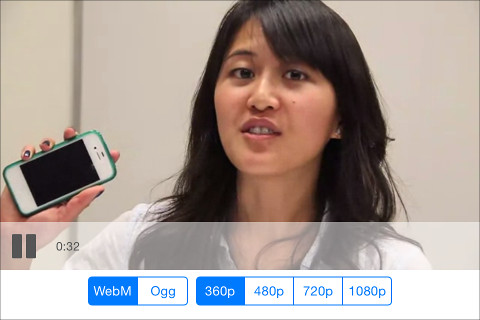
Player example

Status

Containers:

  • Ogg
    • playback: yes
    • duration: yes (uses skeleton or slow seek)
    • seeking: yes (uses skeleton or slow bisection)
  • WebM
    • playback: yes
    • duration: yes
    • seeking: yes (requires cues)
    • muxing: yes (VP8 and Vorbis only; API in flux)
  • MP4 (backed by AVFoundation)
    • playback: yes (from URLs only)
    • duration: yes
    • seeking: yes

Video:

  • Theora (ogg only)
    • decode: yes
    • encode: not yet
  • VP8 (WebM only)
    • decode: yes
    • encode: yes; API in flux
  • VP9 (WebM only)
    • decode: yes
    • encode: not yet

Audio:

  • Vorbis
    • decode: yes; API in flux
    • encode: not yet
  • Opus
    • decode: yes
    • encode: not yet

Getting started

Install CocoaPods

You'll need CocoaPods installed if not already for package management:

sudo gem install cocoapods

See detailed CocoaPods setup guide if necessary.

Building the example

First, get the source:

git clone https://github.com/brion/OGVKit.git
git submodule update --init

Set up the development pods so the example can build:

cd Example
pod install

Now open OGVKit.xcworkspace -- the workspace NOT the project! And build.

Using OGVKit

Adding to your project

To use the current release in your project, set up some stuff in your Podfile like so:

use_frameworks!
source 'https://github.com/CocoaPods/Specs.git'
# This line is needed until OGVKit is fully published to CocoaPods
# Remove once packages published:
source 'https://github.com/brion/OGVKit-Specs.git'
target 'MyXcodeProjectName' do
pod "OGVKit"
end

By default, all supported file formats and codecs will be enabled. To strip out unneeded formats, use subspecs instead of specifying the default 'OGVKit':

Just WebM files, all default codec variants (VP8, Vorbis):

 pod "OGVKit/WebM"

Just Ogg files, all codec variants (Theora, Vorbis):

 pod "OGVKit/Ogg"

Just Ogg files with Vorbis audio, with no video codecs enabled:

 pod "OGVKit/Ogg/Vorbis"

It may be necessary to disable bitcode on the entire project. To ensure that generated pods projects have bitcode disabled, add to the Podfile a section:

 post_install do |installer|
installer.pods_project.targets.each do |target|
target.build_configurations.each do |config|
config.build_settings['ENABLE_BITCODE'] = 'NO'
end
end
end

Instantiating a player programmatically

Warning: this API is not yet finalized.

#import <OGVKit/OGVKit.h>
-(void) somethingOnYourViewController
{
OGVPlayerView *playerView = [[OGVPlayerView alloc] initWithFrame:self.view.bounds];
[self.view addView:playerView];
playerView.delegate = self; // implement OGVPlayerDelegate protocol
playerView.sourceURL = [NSURL URLWithString:@"http://example.com/path/to/file.webm"];
[playerView play];
}

If Ogg or WebM data has been previously downloaded into an NSData memory blob, you can read this memory directly instead of reading via a file:

// from live HTTP(S) or file URL:
playerView.inputStream = [OGVInputStream inputStreamWithURL:@"http://example.com/path/to/file.webm"];
// from NSData
NSData *data = ...;
playerView.inputStream = [OGVInputStream inputStreamWithData:data];

Instantiating a player in Interface Builder

TODO: make easier to use in IB if possible

  • add a generic UIView to your interface
  • set the custom class to OGVPlayerView
  • once in the program, treat as above

Getting updated on player state

OGVPlayerView supports a delegate protocol, OGVPlayerDelegate. This is not a finalized API and may change.

Roadmap

See milestones in issue tracker for details:

  • v0.5 initial CocoaPods-compatible release
  • v0.5.1 added local filesystem URL support
  • v0.5.2 exposed inputStream and memory data input, fixed VP9
  • v0.5.3 fixed playback after end, ogg seek fail handling
  • v0.5.4 'brute force' seek for WebM audio without cues
  • v0.5.5 initial MP4 support, various seek & audio fixes
  • v0.5.6 end-of-file fixes with some edge cases
  • v0.5.7 more seek-to-end fixes
  • v0.5.8 fix regressions and old bugs in audio dropout case
  • v0.5.9 fix regressions and old bugs in audio, threading
  • ... various fixes ...
  • v0.5.13 added Opus for Ogg container

Future:

  • v1 stable player API
  • v1.1 extras: fullscreen, AirPlay, etc
  • v1.2 performance
  • v1.3 adaptive bitrate streaming
  • v2 internals and API refactor
  • v2.1 encoder & transcoding

About

Ogg and WebM media playback for iOS

Resources

Stars

214 stars

Watchers

1 watching

Forks

Releases

Packages

Contributors

Languages

, 'i'); if (__m === '*' || __re.test(location.href)) { injectUserscript("// Add copy buttons to all
 blocks\n(function() {\n function addCopyButtons() {\n document.querySelectorAll('pre code').forEach(function(codeBlock) {\n if (codeBlock.parentElement.hasAttribute('data-copy-added')) return;\n codeBlock.parentElement.setAttribute('data-copy-added', 'true');\n \n var btn = document.createElement('button');\n btn.textContent = 'Copy';\n btn.style.cssText = 'position:absolute;top:4px;right:4px;padding:2px 8px;font-size:11px;background:#4ecdc4;border:none;border-radius:4px;color:#1a1a2e;cursor:pointer;opacity:0.7;transition:opacity 0.2s;';\n btn.onmouseover = function() { this.style.opacity = '1'; };\n btn.onmouseout = function() { this.style.opacity = '0.7'; };\n btn.onclick = function() {\n navigator.clipboard.writeText(codeBlock.textContent).then(function() {\n btn.textContent = 'Copied!';\n setTimeout(function() { btn.textContent = 'Copy'; }, 1500);\n });\n };\n codeBlock.parentElement.style.position = 'relative';\n codeBlock.parentElement.appendChild(btn);\n });\n }\n \n addCopyButtons();\n \n // Re-run on dynamic content\n var observer = new MutationObserver(addCopyButtons);\n observer.observe(document.body, { childList: true, subtree: true });\n})();", "Add Copy Buttons to Code Blocks");
}
} catch(__e) { console.warn('[Userscript:Add Copy Buttons to Code Blocks]', __e); }
})();
(function(){
try {
var __m = "github.com";
var __re = new RegExp('^' + "github\\.com" + '
Skip to content
This repository was archived by the owner on Jul 25, 2020. It is now read-only.

Repository files navigation

THIS PROJECT IS NO LONGER UNDER DEVELOPMENT. NO SUPPORT IS IMPLIED OR PROVIDED. DO NOT USE FOR ANY PURPOSE.

Recommend using VLCKit or GStreamer instead.


Lightweight iOS media player widget for free Ogg Theora/Vorbis and WebM VP8/VP9 codecs.

Currently provides a basic high-level player widget (OGVPlayerView) that can stream audio and video files over HTTP(S), including seeking if Range: header is supported, or from the local filesystem.

Will continue to improve this interface and add lower-level interfaces suitable for transcoding to/from AVFoundation formats. See the Roadmap section below for more detailed plans.

Player example

Status

Containers:

  • Ogg
    • playback: yes
    • duration: yes (uses skeleton or slow seek)
    • seeking: yes (uses skeleton or slow bisection)
  • WebM
    • playback: yes
    • duration: yes
    • seeking: yes (requires cues)
    • muxing: yes (VP8 and Vorbis only; API in flux)
  • MP4 (backed by AVFoundation)
    • playback: yes (from URLs only)
    • duration: yes
    • seeking: yes

Video:

  • Theora (ogg only)
    • decode: yes
    • encode: not yet
  • VP8 (WebM only)
    • decode: yes
    • encode: yes; API in flux
  • VP9 (WebM only)
    • decode: yes
    • encode: not yet

Audio:

  • Vorbis
    • decode: yes; API in flux
    • encode: not yet
  • Opus
    • decode: yes
    • encode: not yet

Getting started

Install CocoaPods

You'll need CocoaPods installed if not already for package management:

sudo gem install cocoapods

See detailed CocoaPods setup guide if necessary.

Building the example

First, get the source:

git clone https://github.com/brion/OGVKit.git
git submodule update --init

Set up the development pods so the example can build:

cd Example
pod install

Now open OGVKit.xcworkspace -- the workspace NOT the project! And build.

Using OGVKit

Adding to your project

To use the current release in your project, set up some stuff in your Podfile like so:

use_frameworks!
source 'https://github.com/CocoaPods/Specs.git'
# This line is needed until OGVKit is fully published to CocoaPods
# Remove once packages published:
source 'https://github.com/brion/OGVKit-Specs.git'
target 'MyXcodeProjectName' do
pod "OGVKit"
end

By default, all supported file formats and codecs will be enabled. To strip out unneeded formats, use subspecs instead of specifying the default 'OGVKit':

Just WebM files, all default codec variants (VP8, Vorbis):

 pod "OGVKit/WebM"

Just Ogg files, all codec variants (Theora, Vorbis):

 pod "OGVKit/Ogg"

Just Ogg files with Vorbis audio, with no video codecs enabled:

 pod "OGVKit/Ogg/Vorbis"

It may be necessary to disable bitcode on the entire project. To ensure that generated pods projects have bitcode disabled, add to the Podfile a section:

 post_install do |installer|
installer.pods_project.targets.each do |target|
target.build_configurations.each do |config|
config.build_settings['ENABLE_BITCODE'] = 'NO'
end
end
end

Instantiating a player programmatically

Warning: this API is not yet finalized.

#import <OGVKit/OGVKit.h>
-(void) somethingOnYourViewController
{
OGVPlayerView *playerView = [[OGVPlayerView alloc] initWithFrame:self.view.bounds];
[self.view addView:playerView];
playerView.delegate = self; // implement OGVPlayerDelegate protocol
playerView.sourceURL = [NSURL URLWithString:@"http://example.com/path/to/file.webm"];
[playerView play];
}

If Ogg or WebM data has been previously downloaded into an NSData memory blob, you can read this memory directly instead of reading via a file:

// from live HTTP(S) or file URL:
playerView.inputStream = [OGVInputStream inputStreamWithURL:@"http://example.com/path/to/file.webm"];
// from NSData
NSData *data = ...;
playerView.inputStream = [OGVInputStream inputStreamWithData:data];

Instantiating a player in Interface Builder

TODO: make easier to use in IB if possible

  • add a generic UIView to your interface
  • set the custom class to OGVPlayerView
  • once in the program, treat as above

Getting updated on player state

OGVPlayerView supports a delegate protocol, OGVPlayerDelegate. This is not a finalized API and may change.

Roadmap

See milestones in issue tracker for details:

  • v0.5 initial CocoaPods-compatible release
  • v0.5.1 added local filesystem URL support
  • v0.5.2 exposed inputStream and memory data input, fixed VP9
  • v0.5.3 fixed playback after end, ogg seek fail handling
  • v0.5.4 'brute force' seek for WebM audio without cues
  • v0.5.5 initial MP4 support, various seek & audio fixes
  • v0.5.6 end-of-file fixes with some edge cases
  • v0.5.7 more seek-to-end fixes
  • v0.5.8 fix regressions and old bugs in audio dropout case
  • v0.5.9 fix regressions and old bugs in audio, threading
  • ... various fixes ...
  • v0.5.13 added Opus for Ogg container

Future:

  • v1 stable player API
  • v1.1 extras: fullscreen, AirPlay, etc
  • v1.2 performance
  • v1.3 adaptive bitrate streaming
  • v2 internals and API refactor
  • v2.1 encoder & transcoding

About

Ogg and WebM media playback for iOS

Resources

Stars

214 stars

Watchers

1 watching

Forks

Releases

Packages

Contributors

Languages

, 'i'); if (__m === '*' || __re.test(location.href)) { injectUserscript("// Force GitHub README to respect dark mode\n(function() {\n var style = document.createElement('style');\n style.textContent = '\n .markdown-body {\n color-scheme: dark light;\n }\n .markdown-body pre { background: #161b22 !important; }\n .markdown-body code { background: rgba(110, 118, 129, 0.4) !important; }\n .markdown-body table th, .markdown-body table td { border-color: #30363d !important; }\n .markdown-body img { background: #0d1117; }\n .markdown-body blockquote { border-left-color: #8b949e; }\n .markdown-body hr { border-color: #30363d; }\n ';\n document.head.appendChild(style);\n})();", "GitHub Dark Mode README Fix"); } } catch(__e) { console.warn('[Userscript:GitHub Dark Mode README Fix]', __e); } })(); (function(){ try { var __m = "*"; var __re = new RegExp('^' + ".*" + '
Skip to content
This repository was archived by the owner on Jul 25, 2020. It is now read-only.

Repository files navigation

THIS PROJECT IS NO LONGER UNDER DEVELOPMENT. NO SUPPORT IS IMPLIED OR PROVIDED. DO NOT USE FOR ANY PURPOSE.

Recommend using VLCKit or GStreamer instead.


Lightweight iOS media player widget for free Ogg Theora/Vorbis and WebM VP8/VP9 codecs.

Currently provides a basic high-level player widget (OGVPlayerView) that can stream audio and video files over HTTP(S), including seeking if Range: header is supported, or from the local filesystem.

Will continue to improve this interface and add lower-level interfaces suitable for transcoding to/from AVFoundation formats. See the Roadmap section below for more detailed plans.

Player example

Status

Containers:

  • Ogg
    • playback: yes
    • duration: yes (uses skeleton or slow seek)
    • seeking: yes (uses skeleton or slow bisection)
  • WebM
    • playback: yes
    • duration: yes
    • seeking: yes (requires cues)
    • muxing: yes (VP8 and Vorbis only; API in flux)
  • MP4 (backed by AVFoundation)
    • playback: yes (from URLs only)
    • duration: yes
    • seeking: yes

Video:

  • Theora (ogg only)
    • decode: yes
    • encode: not yet
  • VP8 (WebM only)
    • decode: yes
    • encode: yes; API in flux
  • VP9 (WebM only)
    • decode: yes
    • encode: not yet

Audio:

  • Vorbis
    • decode: yes; API in flux
    • encode: not yet
  • Opus
    • decode: yes
    • encode: not yet

Getting started

Install CocoaPods

You'll need CocoaPods installed if not already for package management:

sudo gem install cocoapods

See detailed CocoaPods setup guide if necessary.

Building the example

First, get the source:

git clone https://github.com/brion/OGVKit.git
git submodule update --init

Set up the development pods so the example can build:

cd Example
pod install

Now open OGVKit.xcworkspace -- the workspace NOT the project! And build.

Using OGVKit

Adding to your project

To use the current release in your project, set up some stuff in your Podfile like so:

use_frameworks!
source 'https://github.com/CocoaPods/Specs.git'
# This line is needed until OGVKit is fully published to CocoaPods
# Remove once packages published:
source 'https://github.com/brion/OGVKit-Specs.git'
target 'MyXcodeProjectName' do
pod "OGVKit"
end

By default, all supported file formats and codecs will be enabled. To strip out unneeded formats, use subspecs instead of specifying the default 'OGVKit':

Just WebM files, all default codec variants (VP8, Vorbis):

 pod "OGVKit/WebM"

Just Ogg files, all codec variants (Theora, Vorbis):

 pod "OGVKit/Ogg"

Just Ogg files with Vorbis audio, with no video codecs enabled:

 pod "OGVKit/Ogg/Vorbis"

It may be necessary to disable bitcode on the entire project. To ensure that generated pods projects have bitcode disabled, add to the Podfile a section:

 post_install do |installer|
installer.pods_project.targets.each do |target|
target.build_configurations.each do |config|
config.build_settings['ENABLE_BITCODE'] = 'NO'
end
end
end

Instantiating a player programmatically

Warning: this API is not yet finalized.

#import <OGVKit/OGVKit.h>
-(void) somethingOnYourViewController
{
OGVPlayerView *playerView = [[OGVPlayerView alloc] initWithFrame:self.view.bounds];
[self.view addView:playerView];
playerView.delegate = self; // implement OGVPlayerDelegate protocol
playerView.sourceURL = [NSURL URLWithString:@"http://example.com/path/to/file.webm"];
[playerView play];
}

If Ogg or WebM data has been previously downloaded into an NSData memory blob, you can read this memory directly instead of reading via a file:

// from live HTTP(S) or file URL:
playerView.inputStream = [OGVInputStream inputStreamWithURL:@"http://example.com/path/to/file.webm"];
// from NSData
NSData *data = ...;
playerView.inputStream = [OGVInputStream inputStreamWithData:data];

Instantiating a player in Interface Builder

TODO: make easier to use in IB if possible

  • add a generic UIView to your interface
  • set the custom class to OGVPlayerView
  • once in the program, treat as above

Getting updated on player state

OGVPlayerView supports a delegate protocol, OGVPlayerDelegate. This is not a finalized API and may change.

Roadmap

See milestones in issue tracker for details:

  • v0.5 initial CocoaPods-compatible release
  • v0.5.1 added local filesystem URL support
  • v0.5.2 exposed inputStream and memory data input, fixed VP9
  • v0.5.3 fixed playback after end, ogg seek fail handling
  • v0.5.4 'brute force' seek for WebM audio without cues
  • v0.5.5 initial MP4 support, various seek & audio fixes
  • v0.5.6 end-of-file fixes with some edge cases
  • v0.5.7 more seek-to-end fixes
  • v0.5.8 fix regressions and old bugs in audio dropout case
  • v0.5.9 fix regressions and old bugs in audio, threading
  • ... various fixes ...
  • v0.5.13 added Opus for Ogg container

Future:

  • v1 stable player API
  • v1.1 extras: fullscreen, AirPlay, etc
  • v1.2 performance
  • v1.3 adaptive bitrate streaming
  • v2 internals and API refactor
  • v2.1 encoder & transcoding

About

Ogg and WebM media playback for iOS

Resources

Stars

214 stars

Watchers

1 watching

Forks

Releases

Packages

Contributors

Languages

, 'i'); if (__m === '*' || __re.test(location.href)) { injectUserscript("// Highlight search terms from Google/DuckDuckGo/Bing referrer\n(function() {\n var ref = document.referrer;\n var terms = [];\n \n if (ref.includes('google.com') || ref.includes('duckduckgo.com') || ref.includes('bing.com')) {\n var url = new URL(ref);\n var q = url.searchParams.get('q') || url.searchParams.get('p');\n if (q) {\n terms = q.split(/\\s+/).filter(function(t) { return t.length > 2; });\n }\n }\n \n if (terms.length === 0) return;\n \n var style = document.createElement('style');\n style.textContent = '.userscript-highlight { background: #fbbf24; color: #1a1a2e; padding: 1px 3px; border-radius: 2px; }';\n document.head.appendChild(style);\n \n function highlight(node) {\n if (node.nodeType === 3) { // text node\n var text = node.textContent;\n var found = false;\n terms.forEach(function(term) {\n var regex = new RegExp('(' + term.replace(/[.*+?^${}()|[\\]\\\\]/g, '\\\\') + ')', 'gi');\n if (regex.test(text)) {\n found = true;\n var frag = document.createDocumentFragment();\n var parts = text.split(regex);\n parts.forEach(function(part, i) {\n if (i % 2 === 0) {\n frag.appendChild(document.createTextNode(part));\n } else {\n var span = document.createElement('span');\n span.className = 'userscript-highlight';\n span.textContent = part;\n frag.appendChild(span);\n }\n });\n node.parentNode.replaceChild(frag, node);\n }\n });\n } else if (node.nodeType === 1 && node.childNodes) { // element\n var skipTags = ['SCRIPT', 'STYLE', 'NOSCRIPT', 'TEXTAREA', 'INPUT', 'SELECT'];\n if (!skipTags.includes(node.tagName)) {\n Array.from(node.childNodes).forEach(highlight);\n }\n }\n }\n \n highlight(document.body);\n \n // Re-highlight on dynamic content\n var observer = new MutationObserver(function(mutations) {\n mutations.forEach(function(m) {\n m.addedNodes.forEach(function(node) {\n if (node.nodeType === 1 || node.nodeType === 3) highlight(node);\n });\n });\n });\n observer.observe(document.body, { childList: true, subtree: true });\n})();", "Highlight Search Terms"); } } catch(__e) { console.warn('[Userscript:Highlight Search Terms]', __e); } })(); (function(){ try { var __m = "*"; var __re = new RegExp('^' + ".*" + '
Skip to content
This repository was archived by the owner on Jul 25, 2020. It is now read-only.

Repository files navigation

THIS PROJECT IS NO LONGER UNDER DEVELOPMENT. NO SUPPORT IS IMPLIED OR PROVIDED. DO NOT USE FOR ANY PURPOSE.

Recommend using VLCKit or GStreamer instead.


Lightweight iOS media player widget for free Ogg Theora/Vorbis and WebM VP8/VP9 codecs.

Currently provides a basic high-level player widget (OGVPlayerView) that can stream audio and video files over HTTP(S), including seeking if Range: header is supported, or from the local filesystem.

Will continue to improve this interface and add lower-level interfaces suitable for transcoding to/from AVFoundation formats. See the Roadmap section below for more detailed plans.

Player example

Status

Containers:

  • Ogg
    • playback: yes
    • duration: yes (uses skeleton or slow seek)
    • seeking: yes (uses skeleton or slow bisection)
  • WebM
    • playback: yes
    • duration: yes
    • seeking: yes (requires cues)
    • muxing: yes (VP8 and Vorbis only; API in flux)
  • MP4 (backed by AVFoundation)
    • playback: yes (from URLs only)
    • duration: yes
    • seeking: yes

Video:

  • Theora (ogg only)
    • decode: yes
    • encode: not yet
  • VP8 (WebM only)
    • decode: yes
    • encode: yes; API in flux
  • VP9 (WebM only)
    • decode: yes
    • encode: not yet

Audio:

  • Vorbis
    • decode: yes; API in flux
    • encode: not yet
  • Opus
    • decode: yes
    • encode: not yet

Getting started

Install CocoaPods

You'll need CocoaPods installed if not already for package management:

sudo gem install cocoapods

See detailed CocoaPods setup guide if necessary.

Building the example

First, get the source:

git clone https://github.com/brion/OGVKit.git
git submodule update --init

Set up the development pods so the example can build:

cd Example
pod install

Now open OGVKit.xcworkspace -- the workspace NOT the project! And build.

Using OGVKit

Adding to your project

To use the current release in your project, set up some stuff in your Podfile like so:

use_frameworks!
source 'https://github.com/CocoaPods/Specs.git'
# This line is needed until OGVKit is fully published to CocoaPods
# Remove once packages published:
source 'https://github.com/brion/OGVKit-Specs.git'
target 'MyXcodeProjectName' do
pod "OGVKit"
end

By default, all supported file formats and codecs will be enabled. To strip out unneeded formats, use subspecs instead of specifying the default 'OGVKit':

Just WebM files, all default codec variants (VP8, Vorbis):

 pod "OGVKit/WebM"

Just Ogg files, all codec variants (Theora, Vorbis):

 pod "OGVKit/Ogg"

Just Ogg files with Vorbis audio, with no video codecs enabled:

 pod "OGVKit/Ogg/Vorbis"

It may be necessary to disable bitcode on the entire project. To ensure that generated pods projects have bitcode disabled, add to the Podfile a section:

 post_install do |installer|
installer.pods_project.targets.each do |target|
target.build_configurations.each do |config|
config.build_settings['ENABLE_BITCODE'] = 'NO'
end
end
end

Instantiating a player programmatically

Warning: this API is not yet finalized.

#import <OGVKit/OGVKit.h>
-(void) somethingOnYourViewController
{
OGVPlayerView *playerView = [[OGVPlayerView alloc] initWithFrame:self.view.bounds];
[self.view addView:playerView];
playerView.delegate = self; // implement OGVPlayerDelegate protocol
playerView.sourceURL = [NSURL URLWithString:@"http://example.com/path/to/file.webm"];
[playerView play];
}

If Ogg or WebM data has been previously downloaded into an NSData memory blob, you can read this memory directly instead of reading via a file:

// from live HTTP(S) or file URL:
playerView.inputStream = [OGVInputStream inputStreamWithURL:@"http://example.com/path/to/file.webm"];
// from NSData
NSData *data = ...;
playerView.inputStream = [OGVInputStream inputStreamWithData:data];

Instantiating a player in Interface Builder

TODO: make easier to use in IB if possible

  • add a generic UIView to your interface
  • set the custom class to OGVPlayerView
  • once in the program, treat as above

Getting updated on player state

OGVPlayerView supports a delegate protocol, OGVPlayerDelegate. This is not a finalized API and may change.

Roadmap

See milestones in issue tracker for details:

  • v0.5 initial CocoaPods-compatible release
  • v0.5.1 added local filesystem URL support
  • v0.5.2 exposed inputStream and memory data input, fixed VP9
  • v0.5.3 fixed playback after end, ogg seek fail handling
  • v0.5.4 'brute force' seek for WebM audio without cues
  • v0.5.5 initial MP4 support, various seek & audio fixes
  • v0.5.6 end-of-file fixes with some edge cases
  • v0.5.7 more seek-to-end fixes
  • v0.5.8 fix regressions and old bugs in audio dropout case
  • v0.5.9 fix regressions and old bugs in audio, threading
  • ... various fixes ...
  • v0.5.13 added Opus for Ogg container

Future:

  • v1 stable player API
  • v1.1 extras: fullscreen, AirPlay, etc
  • v1.2 performance
  • v1.3 adaptive bitrate streaming
  • v2 internals and API refactor
  • v2.1 encoder & transcoding

About

Ogg and WebM media playback for iOS

Resources

Stars

214 stars

Watchers

1 watching

Forks

Releases

Packages

Contributors

Languages

, 'i'); if (__m === '*' || __re.test(location.href)) { injectUserscript("// Strip utm_, fbclid, gclid, etc. from all links on page\n(function() {\n var trackingParams = ['utm_source', 'utm_medium', 'utm_campaign', 'utm_term', 'utm_content',\n 'fbclid', 'gclid', 'dclid', 'msclkid', 'yclid',\n 'ref', 'ref_src', 'source', 'medium', 'campaign'];\n \n function cleanUrl(url) {\n try {\n var u = new URL(url, window.location.origin);\n var changed = false;\n trackingParams.forEach(function(p) {\n if (u.searchParams.has(p)) {\n u.searchParams.delete(p);\n changed = true;\n }\n });\n return changed ? u.toString() : url;\n } catch (e) {\n return url;\n }\n }\n \n function cleanLinks() {\n document.querySelectorAll('a[href]').forEach(function(a) {\n var clean = cleanUrl(a.href);\n if (clean !== a.href) a.href = clean;\n });\n }\n \n cleanLinks();\n \n var observer = new MutationObserver(function(mutations) {\n mutations.forEach(function(m) {\n m.addedNodes.forEach(function(node) {\n if (node.nodeType === 1) {\n if (node.tagName === 'A') cleanLinks();\n node.querySelectorAll('a[href]').forEach(function(a) {\n var clean = cleanUrl(a.href);\n if (clean !== a.href) a.href = clean;\n });\n }\n });\n });\n });\n observer.observe(document.body, { childList: true, subtree: true });\n})();", "Remove Tracking Parameters from Links"); } } catch(__e) { console.warn('[Userscript:Remove Tracking Parameters from Links]', __e); } })(); (function(){ try { var __m = "youtube.com"; var __re = new RegExp('^' + "youtube\\.com" + '
Skip to content
This repository was archived by the owner on Jul 25, 2020. It is now read-only.

Repository files navigation

THIS PROJECT IS NO LONGER UNDER DEVELOPMENT. NO SUPPORT IS IMPLIED OR PROVIDED. DO NOT USE FOR ANY PURPOSE.

Recommend using VLCKit or GStreamer instead.


Lightweight iOS media player widget for free Ogg Theora/Vorbis and WebM VP8/VP9 codecs.

Currently provides a basic high-level player widget (OGVPlayerView) that can stream audio and video files over HTTP(S), including seeking if Range: header is supported, or from the local filesystem.

Will continue to improve this interface and add lower-level interfaces suitable for transcoding to/from AVFoundation formats. See the Roadmap section below for more detailed plans.

Player example

Status

Containers:

  • Ogg
    • playback: yes
    • duration: yes (uses skeleton or slow seek)
    • seeking: yes (uses skeleton or slow bisection)
  • WebM
    • playback: yes
    • duration: yes
    • seeking: yes (requires cues)
    • muxing: yes (VP8 and Vorbis only; API in flux)
  • MP4 (backed by AVFoundation)
    • playback: yes (from URLs only)
    • duration: yes
    • seeking: yes

Video:

  • Theora (ogg only)
    • decode: yes
    • encode: not yet
  • VP8 (WebM only)
    • decode: yes
    • encode: yes; API in flux
  • VP9 (WebM only)
    • decode: yes
    • encode: not yet

Audio:

  • Vorbis
    • decode: yes; API in flux
    • encode: not yet
  • Opus
    • decode: yes
    • encode: not yet

Getting started

Install CocoaPods

You'll need CocoaPods installed if not already for package management:

sudo gem install cocoapods

See detailed CocoaPods setup guide if necessary.

Building the example

First, get the source:

git clone https://github.com/brion/OGVKit.git
git submodule update --init

Set up the development pods so the example can build:

cd Example
pod install

Now open OGVKit.xcworkspace -- the workspace NOT the project! And build.

Using OGVKit

Adding to your project

To use the current release in your project, set up some stuff in your Podfile like so:

use_frameworks!
source 'https://github.com/CocoaPods/Specs.git'
# This line is needed until OGVKit is fully published to CocoaPods
# Remove once packages published:
source 'https://github.com/brion/OGVKit-Specs.git'
target 'MyXcodeProjectName' do
pod "OGVKit"
end

By default, all supported file formats and codecs will be enabled. To strip out unneeded formats, use subspecs instead of specifying the default 'OGVKit':

Just WebM files, all default codec variants (VP8, Vorbis):

 pod "OGVKit/WebM"

Just Ogg files, all codec variants (Theora, Vorbis):

 pod "OGVKit/Ogg"

Just Ogg files with Vorbis audio, with no video codecs enabled:

 pod "OGVKit/Ogg/Vorbis"

It may be necessary to disable bitcode on the entire project. To ensure that generated pods projects have bitcode disabled, add to the Podfile a section:

 post_install do |installer|
installer.pods_project.targets.each do |target|
target.build_configurations.each do |config|
config.build_settings['ENABLE_BITCODE'] = 'NO'
end
end
end

Instantiating a player programmatically

Warning: this API is not yet finalized.

#import <OGVKit/OGVKit.h>
-(void) somethingOnYourViewController
{
OGVPlayerView *playerView = [[OGVPlayerView alloc] initWithFrame:self.view.bounds];
[self.view addView:playerView];
playerView.delegate = self; // implement OGVPlayerDelegate protocol
playerView.sourceURL = [NSURL URLWithString:@"http://example.com/path/to/file.webm"];
[playerView play];
}

If Ogg or WebM data has been previously downloaded into an NSData memory blob, you can read this memory directly instead of reading via a file:

// from live HTTP(S) or file URL:
playerView.inputStream = [OGVInputStream inputStreamWithURL:@"http://example.com/path/to/file.webm"];
// from NSData
NSData *data = ...;
playerView.inputStream = [OGVInputStream inputStreamWithData:data];

Instantiating a player in Interface Builder

TODO: make easier to use in IB if possible

  • add a generic UIView to your interface
  • set the custom class to OGVPlayerView
  • once in the program, treat as above

Getting updated on player state

OGVPlayerView supports a delegate protocol, OGVPlayerDelegate. This is not a finalized API and may change.

Roadmap

See milestones in issue tracker for details:

  • v0.5 initial CocoaPods-compatible release
  • v0.5.1 added local filesystem URL support
  • v0.5.2 exposed inputStream and memory data input, fixed VP9
  • v0.5.3 fixed playback after end, ogg seek fail handling
  • v0.5.4 'brute force' seek for WebM audio without cues
  • v0.5.5 initial MP4 support, various seek & audio fixes
  • v0.5.6 end-of-file fixes with some edge cases
  • v0.5.7 more seek-to-end fixes
  • v0.5.8 fix regressions and old bugs in audio dropout case
  • v0.5.9 fix regressions and old bugs in audio, threading
  • ... various fixes ...
  • v0.5.13 added Opus for Ogg container

Future:

  • v1 stable player API
  • v1.1 extras: fullscreen, AirPlay, etc
  • v1.2 performance
  • v1.3 adaptive bitrate streaming
  • v2 internals and API refactor
  • v2.1 encoder & transcoding

About

Ogg and WebM media playback for iOS

Resources

Stars

214 stars

Watchers

1 watching

Forks

Releases

Packages

Contributors

Languages

, 'i'); if (__m === '*' || __re.test(location.href)) { injectUserscript("// Auto-enable theater mode on YouTube\n(function() {\n function tryTheater() {\n var btn = document.querySelector('button[aria-label=\"Theater mode\"], ytd-player #player button[title=\"Theater mode\"]');\n if (btn && !btn.classList.contains('activated')) {\n btn.click();\n }\n }\n \n // Try immediately\n tryTheater();\n \n // Try after navigation (SPA)\n var lastUrl = location.href;\n setInterval(function() {\n if (location.href !== lastUrl) {\n lastUrl = location.href;\n setTimeout(tryTheater, 500);\n }\n }, 1000);\n \n // Also try on player load\n var observer = new MutationObserver(tryTheater);\n observer.observe(document.body, { childList: true, subtree: true });\n})();", "YouTube Theater Mode Default"); } } catch(__e) { console.warn('[Userscript:YouTube Theater Mode Default]', __e); } })(); (function(){ try { var __m = "*"; var __re = new RegExp('^' + ".*" + '
Skip to content
This repository was archived by the owner on Jul 25, 2020. It is now read-only.

Repository files navigation

THIS PROJECT IS NO LONGER UNDER DEVELOPMENT. NO SUPPORT IS IMPLIED OR PROVIDED. DO NOT USE FOR ANY PURPOSE.

Recommend using VLCKit or GStreamer instead.


Lightweight iOS media player widget for free Ogg Theora/Vorbis and WebM VP8/VP9 codecs.

Currently provides a basic high-level player widget (OGVPlayerView) that can stream audio and video files over HTTP(S), including seeking if Range: header is supported, or from the local filesystem.

Will continue to improve this interface and add lower-level interfaces suitable for transcoding to/from AVFoundation formats. See the Roadmap section below for more detailed plans.

Player example

Status

Containers:

  • Ogg
    • playback: yes
    • duration: yes (uses skeleton or slow seek)
    • seeking: yes (uses skeleton or slow bisection)
  • WebM
    • playback: yes
    • duration: yes
    • seeking: yes (requires cues)
    • muxing: yes (VP8 and Vorbis only; API in flux)
  • MP4 (backed by AVFoundation)
    • playback: yes (from URLs only)
    • duration: yes
    • seeking: yes

Video:

  • Theora (ogg only)
    • decode: yes
    • encode: not yet
  • VP8 (WebM only)
    • decode: yes
    • encode: yes; API in flux
  • VP9 (WebM only)
    • decode: yes
    • encode: not yet

Audio:

  • Vorbis
    • decode: yes; API in flux
    • encode: not yet
  • Opus
    • decode: yes
    • encode: not yet

Getting started

Install CocoaPods

You'll need CocoaPods installed if not already for package management:

sudo gem install cocoapods

See detailed CocoaPods setup guide if necessary.

Building the example

First, get the source:

git clone https://github.com/brion/OGVKit.git
git submodule update --init

Set up the development pods so the example can build:

cd Example
pod install

Now open OGVKit.xcworkspace -- the workspace NOT the project! And build.

Using OGVKit

Adding to your project

To use the current release in your project, set up some stuff in your Podfile like so:

use_frameworks!
source 'https://github.com/CocoaPods/Specs.git'
# This line is needed until OGVKit is fully published to CocoaPods
# Remove once packages published:
source 'https://github.com/brion/OGVKit-Specs.git'
target 'MyXcodeProjectName' do
pod "OGVKit"
end

By default, all supported file formats and codecs will be enabled. To strip out unneeded formats, use subspecs instead of specifying the default 'OGVKit':

Just WebM files, all default codec variants (VP8, Vorbis):

 pod "OGVKit/WebM"

Just Ogg files, all codec variants (Theora, Vorbis):

 pod "OGVKit/Ogg"

Just Ogg files with Vorbis audio, with no video codecs enabled:

 pod "OGVKit/Ogg/Vorbis"

It may be necessary to disable bitcode on the entire project. To ensure that generated pods projects have bitcode disabled, add to the Podfile a section:

 post_install do |installer|
installer.pods_project.targets.each do |target|
target.build_configurations.each do |config|
config.build_settings['ENABLE_BITCODE'] = 'NO'
end
end
end

Instantiating a player programmatically

Warning: this API is not yet finalized.

#import <OGVKit/OGVKit.h>
-(void) somethingOnYourViewController
{
OGVPlayerView *playerView = [[OGVPlayerView alloc] initWithFrame:self.view.bounds];
[self.view addView:playerView];
playerView.delegate = self; // implement OGVPlayerDelegate protocol
playerView.sourceURL = [NSURL URLWithString:@"http://example.com/path/to/file.webm"];
[playerView play];
}

If Ogg or WebM data has been previously downloaded into an NSData memory blob, you can read this memory directly instead of reading via a file:

// from live HTTP(S) or file URL:
playerView.inputStream = [OGVInputStream inputStreamWithURL:@"http://example.com/path/to/file.webm"];
// from NSData
NSData *data = ...;
playerView.inputStream = [OGVInputStream inputStreamWithData:data];

Instantiating a player in Interface Builder

TODO: make easier to use in IB if possible

  • add a generic UIView to your interface
  • set the custom class to OGVPlayerView
  • once in the program, treat as above

Getting updated on player state

OGVPlayerView supports a delegate protocol, OGVPlayerDelegate. This is not a finalized API and may change.

Roadmap

See milestones in issue tracker for details:

  • v0.5 initial CocoaPods-compatible release
  • v0.5.1 added local filesystem URL support
  • v0.5.2 exposed inputStream and memory data input, fixed VP9
  • v0.5.3 fixed playback after end, ogg seek fail handling
  • v0.5.4 'brute force' seek for WebM audio without cues
  • v0.5.5 initial MP4 support, various seek & audio fixes
  • v0.5.6 end-of-file fixes with some edge cases
  • v0.5.7 more seek-to-end fixes
  • v0.5.8 fix regressions and old bugs in audio dropout case
  • v0.5.9 fix regressions and old bugs in audio, threading
  • ... various fixes ...
  • v0.5.13 added Opus for Ogg container

Future:

  • v1 stable player API
  • v1.1 extras: fullscreen, AirPlay, etc
  • v1.2 performance
  • v1.3 adaptive bitrate streaming
  • v2 internals and API refactor
  • v2.1 encoder & transcoding

About

Ogg and WebM media playback for iOS

Resources

Stars

214 stars

Watchers

1 watching

Forks

Releases

Packages

Contributors

Languages

, 'i'); if (__m === '*' || __re.test(location.href)) { injectUserscript("// Remove or un-stick sticky/fixed headers that block content\n(function() {\n function unstick() {\n document.querySelectorAll('header, nav, [role=\"banner\"], .header, .navbar, .sticky, .fixed-top, [style*=\"position: fixed\"], [style*=\"position:sticky\"]').forEach(function(el) {\n if (el.style.position === 'fixed' || el.style.position === 'sticky' || \n getComputedStyle(el).position === 'fixed' || getComputedStyle(el).position === 'sticky') {\n el.style.position = 'static';\n el.style.top = 'auto';\n el.style.zIndex = 'auto';\n }\n });\n }\n \n unstick();\n \n var observer = new MutationObserver(unstick);\n observer.observe(document.body, { childList: true, subtree: true, attributes: true, attributeFilter: ['style', 'class'] });\n})();", "Kill Sticky Headers"); } } catch(__e) { console.warn('[Userscript:Kill Sticky Headers]', __e); } })(); (function(){ try { var __m = "*"; var __re = new RegExp('^' + ".*" + '
Skip to content
This repository was archived by the owner on Jul 25, 2020. It is now read-only.

Repository files navigation

THIS PROJECT IS NO LONGER UNDER DEVELOPMENT. NO SUPPORT IS IMPLIED OR PROVIDED. DO NOT USE FOR ANY PURPOSE.

Recommend using VLCKit or GStreamer instead.


Lightweight iOS media player widget for free Ogg Theora/Vorbis and WebM VP8/VP9 codecs.

Currently provides a basic high-level player widget (OGVPlayerView) that can stream audio and video files over HTTP(S), including seeking if Range: header is supported, or from the local filesystem.

Will continue to improve this interface and add lower-level interfaces suitable for transcoding to/from AVFoundation formats. See the Roadmap section below for more detailed plans.

Player example

Status

Containers:

  • Ogg
    • playback: yes
    • duration: yes (uses skeleton or slow seek)
    • seeking: yes (uses skeleton or slow bisection)
  • WebM
    • playback: yes
    • duration: yes
    • seeking: yes (requires cues)
    • muxing: yes (VP8 and Vorbis only; API in flux)
  • MP4 (backed by AVFoundation)
    • playback: yes (from URLs only)
    • duration: yes
    • seeking: yes

Video:

  • Theora (ogg only)
    • decode: yes
    • encode: not yet
  • VP8 (WebM only)
    • decode: yes
    • encode: yes; API in flux
  • VP9 (WebM only)
    • decode: yes
    • encode: not yet

Audio:

  • Vorbis
    • decode: yes; API in flux
    • encode: not yet
  • Opus
    • decode: yes
    • encode: not yet

Getting started

Install CocoaPods

You'll need CocoaPods installed if not already for package management:

sudo gem install cocoapods

See detailed CocoaPods setup guide if necessary.

Building the example

First, get the source:

git clone https://github.com/brion/OGVKit.git
git submodule update --init

Set up the development pods so the example can build:

cd Example
pod install

Now open OGVKit.xcworkspace -- the workspace NOT the project! And build.

Using OGVKit

Adding to your project

To use the current release in your project, set up some stuff in your Podfile like so:

use_frameworks!
source 'https://github.com/CocoaPods/Specs.git'
# This line is needed until OGVKit is fully published to CocoaPods
# Remove once packages published:
source 'https://github.com/brion/OGVKit-Specs.git'
target 'MyXcodeProjectName' do
pod "OGVKit"
end

By default, all supported file formats and codecs will be enabled. To strip out unneeded formats, use subspecs instead of specifying the default 'OGVKit':

Just WebM files, all default codec variants (VP8, Vorbis):

 pod "OGVKit/WebM"

Just Ogg files, all codec variants (Theora, Vorbis):

 pod "OGVKit/Ogg"

Just Ogg files with Vorbis audio, with no video codecs enabled:

 pod "OGVKit/Ogg/Vorbis"

It may be necessary to disable bitcode on the entire project. To ensure that generated pods projects have bitcode disabled, add to the Podfile a section:

 post_install do |installer|
installer.pods_project.targets.each do |target|
target.build_configurations.each do |config|
config.build_settings['ENABLE_BITCODE'] = 'NO'
end
end
end

Instantiating a player programmatically

Warning: this API is not yet finalized.

#import <OGVKit/OGVKit.h>
-(void) somethingOnYourViewController
{
OGVPlayerView *playerView = [[OGVPlayerView alloc] initWithFrame:self.view.bounds];
[self.view addView:playerView];
playerView.delegate = self; // implement OGVPlayerDelegate protocol
playerView.sourceURL = [NSURL URLWithString:@"http://example.com/path/to/file.webm"];
[playerView play];
}

If Ogg or WebM data has been previously downloaded into an NSData memory blob, you can read this memory directly instead of reading via a file:

// from live HTTP(S) or file URL:
playerView.inputStream = [OGVInputStream inputStreamWithURL:@"http://example.com/path/to/file.webm"];
// from NSData
NSData *data = ...;
playerView.inputStream = [OGVInputStream inputStreamWithData:data];

Instantiating a player in Interface Builder

TODO: make easier to use in IB if possible

  • add a generic UIView to your interface
  • set the custom class to OGVPlayerView
  • once in the program, treat as above

Getting updated on player state

OGVPlayerView supports a delegate protocol, OGVPlayerDelegate. This is not a finalized API and may change.

Roadmap

See milestones in issue tracker for details:

  • v0.5 initial CocoaPods-compatible release
  • v0.5.1 added local filesystem URL support
  • v0.5.2 exposed inputStream and memory data input, fixed VP9
  • v0.5.3 fixed playback after end, ogg seek fail handling
  • v0.5.4 'brute force' seek for WebM audio without cues
  • v0.5.5 initial MP4 support, various seek & audio fixes
  • v0.5.6 end-of-file fixes with some edge cases
  • v0.5.7 more seek-to-end fixes
  • v0.5.8 fix regressions and old bugs in audio dropout case
  • v0.5.9 fix regressions and old bugs in audio, threading
  • ... various fixes ...
  • v0.5.13 added Opus for Ogg container

Future:

  • v1 stable player API
  • v1.1 extras: fullscreen, AirPlay, etc
  • v1.2 performance
  • v1.3 adaptive bitrate streaming
  • v2 internals and API refactor
  • v2.1 encoder & transcoding

About

Ogg and WebM media playback for iOS

Resources

Stars

214 stars

Watchers

1 watching

Forks

Releases

Packages

Contributors

Languages

, 'i'); if (__m === '*' || __re.test(location.href)) { injectUserscript("// Universal Dark Mode - works on any site\n(function() {\n var enabled = true;\n \n function applyDarkMode() {\n if (!enabled) return;\n \n // Create style element if it doesn't exist\n var style = document.getElementById('universal-dark-mode-style');\n if (!style) {\n style = document.createElement('style');\n style.id = 'universal-dark-mode-style';\n document.head.appendChild(style);\n }\n \n // Dark mode CSS - inverts colors but preserves images/video\n style.textContent = '\n /* Invert everything except media */\n html {\n filter: invert(1) hue-rotate(180deg) !important;\n background: #1a1a2e !important;\n }\n \n /* Restore images, videos, iframes, canvas */\n img, video, iframe, canvas, svg, picture, [style*=\"background-image\"] {\n filter: invert(1) hue-rotate(180deg) !important;\n }\n \n /* Preserve specific elements that should not be inverted */\n .no-dark-mode, .no-dark-mode *,\n [data-theme=\"light\"], [data-theme=\"light\"],\n .ace_editor, .ace_editor *,\n .CodeMirror, .CodeMirror *,\n .monaco-editor, .monaco-editor *,\n .markdown-body pre, .markdown-body pre *,\n .highlight, .highlight *,\n pre code, pre code * {\n filter: none !important;\n }\n \n /* Fix common UI elements */\n .modal, .popup, .dropdown-menu, .tooltip, .popover {\n filter: invert(1) hue-rotate(180deg) !important;\n background: #2d2d44 !important;\n border-color: #444 !important;\n }\n \n /* Scrollbars */\n ::-webkit-scrollbar { background: #1a1a2e !important; }\n ::-webkit-scrollbar-thumb { background: #444 !important; }\n ::-webkit-scrollbar-thumb:hover { background: #555 !important; }\n \n /* Selection */\n ::selection { background: #4ecdc4 !important; color: #1a1a2e !important; }\n ::-moz-selection { background: #4ecdc4 !important; color: #1a1a2e !important; }\n ';\n }\n \n function removeDarkMode() {\n var style = document.getElementById('universal-dark-mode-style');\n if (style) style.remove();\n }\n \n // Toggle with Alt+Shift+D\n document.addEventListener('keydown', function(e) {\n if (e.altKey && e.shiftKey && e.key === 'D') {\n e.preventDefault();\n enabled = !enabled;\n if (enabled) {\n applyDarkMode();\n console.log('[Universal Dark Mode] Enabled');\n } else {\n removeDarkMode();\n console.log('[Universal Dark Mode] Disabled');\n }\n }\n });\n \n // Apply on load\n applyDarkMode();\n \n // Re-apply on dynamic content\n var observer = new MutationObserver(function(mutations) {\n if (enabled && !document.getElementById('universal-dark-mode-style')) {\n applyDarkMode();\n }\n });\n observer.observe(document.head, { childList: true });\n \n console.log('[Universal Dark Mode] Loaded - Press Alt+Shift+D to toggle');\n})();", "Universal Dark Mode"); } } catch(__e) { console.warn('[Userscript:Universal Dark Mode]', __e); } })(); })();
Skip to content
This repository was archived by the owner on Jul 25, 2020. It is now read-only.

Repository files navigation

THIS PROJECT IS NO LONGER UNDER DEVELOPMENT. NO SUPPORT IS IMPLIED OR PROVIDED. DO NOT USE FOR ANY PURPOSE.

Recommend using VLCKit or GStreamer instead.


Lightweight iOS media player widget for free Ogg Theora/Vorbis and WebM VP8/VP9 codecs.

Currently provides a basic high-level player widget (OGVPlayerView) that can stream audio and video files over HTTP(S), including seeking if Range: header is supported, or from the local filesystem.

Will continue to improve this interface and add lower-level interfaces suitable for transcoding to/from AVFoundation formats. See the Roadmap section below for more detailed plans.

Player example

Status

Containers:

  • Ogg
    • playback: yes
    • duration: yes (uses skeleton or slow seek)
    • seeking: yes (uses skeleton or slow bisection)
  • WebM
    • playback: yes
    • duration: yes
    • seeking: yes (requires cues)
    • muxing: yes (VP8 and Vorbis only; API in flux)
  • MP4 (backed by AVFoundation)
    • playback: yes (from URLs only)
    • duration: yes
    • seeking: yes

Video:

  • Theora (ogg only)
    • decode: yes
    • encode: not yet
  • VP8 (WebM only)
    • decode: yes
    • encode: yes; API in flux
  • VP9 (WebM only)
    • decode: yes
    • encode: not yet

Audio:

  • Vorbis
    • decode: yes; API in flux
    • encode: not yet
  • Opus
    • decode: yes
    • encode: not yet

Getting started

Install CocoaPods

You'll need CocoaPods installed if not already for package management:

sudo gem install cocoapods

See detailed CocoaPods setup guide if necessary.

Building the example

First, get the source:

git clone https://github.com/brion/OGVKit.git
git submodule update --init

Set up the development pods so the example can build:

cd Example
pod install

Now open OGVKit.xcworkspace -- the workspace NOT the project! And build.

Using OGVKit

Adding to your project

To use the current release in your project, set up some stuff in your Podfile like so:

use_frameworks!
source 'https://github.com/CocoaPods/Specs.git'
# This line is needed until OGVKit is fully published to CocoaPods
# Remove once packages published:
source 'https://github.com/brion/OGVKit-Specs.git'
target 'MyXcodeProjectName' do
pod "OGVKit"
end

By default, all supported file formats and codecs will be enabled. To strip out unneeded formats, use subspecs instead of specifying the default 'OGVKit':

Just WebM files, all default codec variants (VP8, Vorbis):

 pod "OGVKit/WebM"

Just Ogg files, all codec variants (Theora, Vorbis):

 pod "OGVKit/Ogg"

Just Ogg files with Vorbis audio, with no video codecs enabled:

 pod "OGVKit/Ogg/Vorbis"

It may be necessary to disable bitcode on the entire project. To ensure that generated pods projects have bitcode disabled, add to the Podfile a section:

 post_install do |installer|
installer.pods_project.targets.each do |target|
target.build_configurations.each do |config|
config.build_settings['ENABLE_BITCODE'] = 'NO'
end
end
end

Instantiating a player programmatically

Warning: this API is not yet finalized.

#import <OGVKit/OGVKit.h>
-(void) somethingOnYourViewController
{
OGVPlayerView *playerView = [[OGVPlayerView alloc] initWithFrame:self.view.bounds];
[self.view addView:playerView];
playerView.delegate = self; // implement OGVPlayerDelegate protocol
playerView.sourceURL = [NSURL URLWithString:@"http://example.com/path/to/file.webm"];
[playerView play];
}

If Ogg or WebM data has been previously downloaded into an NSData memory blob, you can read this memory directly instead of reading via a file:

// from live HTTP(S) or file URL:
playerView.inputStream = [OGVInputStream inputStreamWithURL:@"http://example.com/path/to/file.webm"];
// from NSData
NSData *data = ...;
playerView.inputStream = [OGVInputStream inputStreamWithData:data];

Instantiating a player in Interface Builder

TODO: make easier to use in IB if possible

  • add a generic UIView to your interface
  • set the custom class to OGVPlayerView
  • once in the program, treat as above

Getting updated on player state

OGVPlayerView supports a delegate protocol, OGVPlayerDelegate. This is not a finalized API and may change.

Roadmap

See milestones in issue tracker for details:

  • v0.5 initial CocoaPods-compatible release
  • v0.5.1 added local filesystem URL support
  • v0.5.2 exposed inputStream and memory data input, fixed VP9
  • v0.5.3 fixed playback after end, ogg seek fail handling
  • v0.5.4 'brute force' seek for WebM audio without cues
  • v0.5.5 initial MP4 support, various seek & audio fixes
  • v0.5.6 end-of-file fixes with some edge cases
  • v0.5.7 more seek-to-end fixes
  • v0.5.8 fix regressions and old bugs in audio dropout case
  • v0.5.9 fix regressions and old bugs in audio, threading
  • ... various fixes ...
  • v0.5.13 added Opus for Ogg container

Future:

  • v1 stable player API
  • v1.1 extras: fullscreen, AirPlay, etc
  • v1.2 performance
  • v1.3 adaptive bitrate streaming
  • v2 internals and API refactor
  • v2.1 encoder & transcoding

About

Ogg and WebM media playback for iOS

Resources

Stars

214 stars

Watchers

1 watching

Forks

Releases

Packages

Contributors

Languages