


Simple multi-select component for react-native (Select2 for react-native).

$ npm install react-native-multiple-select --saveor use yarn
$ yarn add react-native-multiple-selectNote: Ensure to add and configure react-native-vector-icons to your project before using this package.
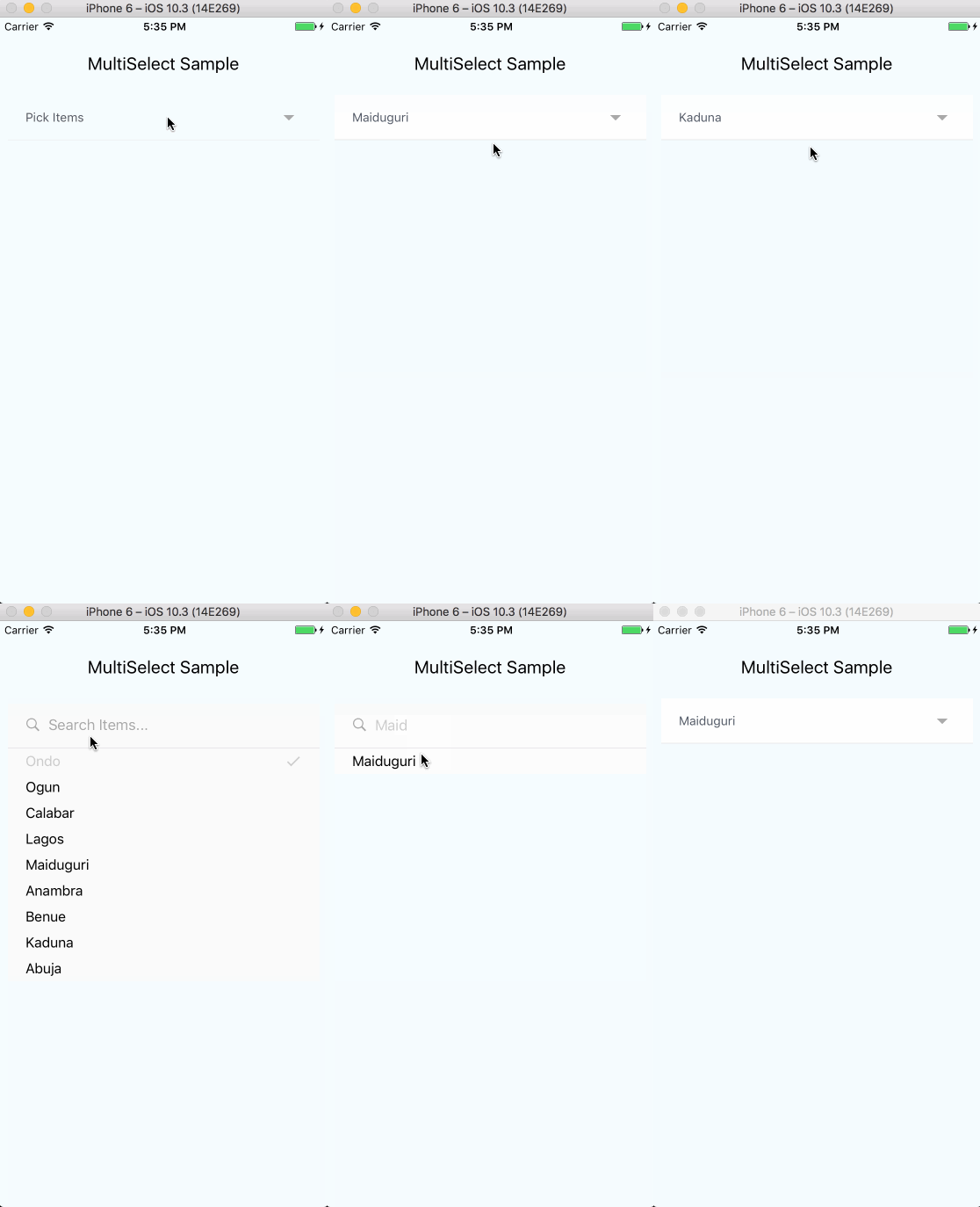
You can clone and try out the sample app.
The snippet below shows how the component can be used
// import componentimportReact,{Component}from'react';import{View}from'react-native';importMultiSelectfrom'react-native-multiple-select';letclassMultiSelectExampleextendsComponent{this.state={
selectedItems =[];};this.items=[{id: '92iijs7yta',name: 'Ondo',},{id: 'a0s0a8ssbsd',name: 'Ogun',},{id: '16hbajsabsd',name: 'Calabar',},{id: 'nahs75a5sg',name: 'Lagos',},{id: '667atsas',name: 'Maiduguri',},{id: 'hsyasajs',name: 'Anambra',},{id: 'djsjudksjd',name: 'Benue',},{id: 'sdhyaysdj',name: 'Kaduna',},{id: 'suudydjsjd',name: 'Abuja',}];onSelectedItemsChange=selectedItems=>{this.setState({ selectedItems });};render(){<Viewstyle={{flex: 1}}><MultiSelectitems={items}uniqueKey="id"onSelectedItemsChange={this.onSelectedItemsChange}selectedItems={this.state.selectedItems}selectText="Pick Items"searchInputPlaceholderText="Search Items..."altFontFamily="ProximaNova-Light"tagRemoveIconColor="#CCC"tagBorderColor="#CCC"tagTextColor="#CCC"selectedItemTextColor="#CCC"selectedItemIconColor="#CCC"itemTextColor="#000"searchInputStyle={{color: '#CCC'}}submitButtonColor="#CCC"submitButtonText="Submit"/></View>}}
The component takes 3 compulsory props - items, uniqueKey and selectedItemsChange. Other props are optional. The table below explains more.
| Prop | Required | Purpose |
|---|---|---|
| items | Yes | (Array, control prop) List of items to display in the multi-select component. JavaScript Array of objects. Each object must contain a name and unique identifier (Check sample above) |
| selectedItems | No | (Array, control prop) List of selected items keys . JavaScript Array of strings, that can be instantiated with the component |
| uniqueKey | Yes | (String) Unique identifier that is part of each item's properties. Used internally as means of identifying each item (Check sample below) |
| textColor | No | (String) Color for selected item name displayed as label for multiselect |
| fontSize | No | (Number) Font size for selected item name displayed as label for multiselect |
| fixedHeight | No | (Boolean) Defaults to false. Specifies if select dropdown take height of content or a fixed height with a scrollBar (There is an issue with this behavior when component is nested in a ScrollView in which scroll event will only be dispatched to parent ScrollView and select component won't be scrollable). See this issue for more info. |
| single | No | (Boolean) Toggles select component between single option and multi option |
| onSelectedItemsChange | Yes | (Function) JavaScript function passed in as an argument. The function is to be defined with an argument (selectedItems). Triggered when Submit button is clicked (for multi select) or item is clicked (for single select). (Check sample above) |
| selectText | No | (String) Text displayed in main component |
| searchInputPlaceholderText | No | (String) Placeholder text displayed in multi-select filter input |
| fontFamily | No | (String) Custom font family to be used in component (affects all text except searchInputPlaceholderText described above) |
| altFontFamily | No | (String) Font family for searchInputPlaceholderText |
| tagRemoveIconColor | No | (String) Color to be used for the remove icon in selected items list |
| tagBorderColor | No | (String) Border color for each selected item |
| tagTextColor | No | (String) Text color for selected items list |
| selectedItemFontFamily | No | (String) Font family for each selected item in multi-select drop-down |
| selectedItemTextColor | No | (String) Text color for each selected item in multi-select drop-down |
| selectedItemIconColor | No | (String) Color for selected check icon for each selected item in multi-select drop-down |
| itemFontFamily | No | (String) Font family for each non-selected item in multi-select drop-down |
| itemTextColor | No | (String) Text color for each non-selected item in multi-select drop-down |
| searchInputStyle | No | (Object) Style object for multi-select input element |
| hideSubmitButton | No | (Boolean) Defaults to false. Hide submit button from dropdown, and rather use arrow-button in search field" |
| submitButtonColor | No | (String) Background color for submit button |
| submitButtonText | No | (String) Text displayed on submit button |
When using the
singleprop,selectedItemsshould still be passed in as an array of selected items keys. Also, when an item is selected in the single mode, the selected item is returned as an array of string.The
itemsprops must be passed as an array of objects with a compulsorynamekey present in each object as the name key is used to display the items in the options component.
To use, add ref to MultiSelect component in parent component, then call method against reference. i.e.
<MultiSelectref={c=>this._multiSelect=c}.../>
clearSelectedCategories = () =>{this._multiSelect.removeAllItems();};
Contributions are welcome and will be fully credited.
Contributions are accepted via Pull Requests on Github.
Document any change in behaviour - Make sure the
README.mdand any other relevant documentation are kept up-to-date.Consider our release cycle - We try to follow SemVer v2.0.0. Randomly breaking public APIs is not an option.
Create feature branches - Don't ask us to pull from your master branch.
One pull request per feature - If you want to do more than one thing, send multiple pull requests.
Send coherent history - Make sure each individual commit in your pull request is meaningful. If you had to make multiple intermediate commits while developing, please squash them before submitting.
Check issues for current issues.
The MIT License (MIT). Please see LICENSE for more information.