This is a InterSystems IRIS client that does auto-completion and syntax highlighting.
Based on pgcli
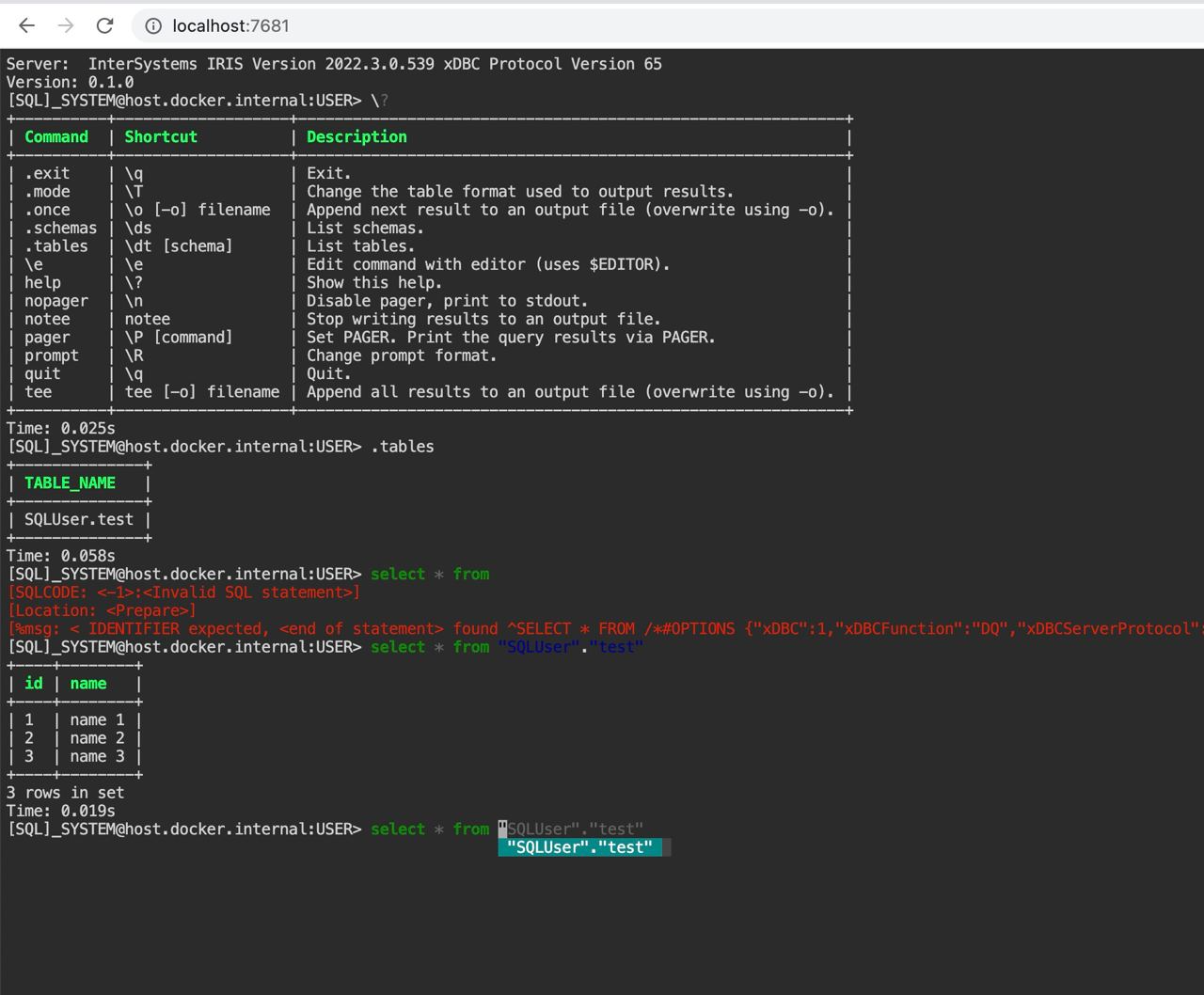
With Python
pip install -U irissqlcliOr with homebrew
brew tap caretdev/tap
brew install irissqlcli$ irissqlcli [uri]
or
$ irissqlcli iris://[user[:password]@][netloc][:port][/namespace]
or
$ irissqlcli iris+emb://[/namespace]
Examples:
$ irissqlcli iris://_SYSTEM:SYS@localhost:1972/USER
$ irissqlcli iris+emb:///
For more details:
$ irissqlcli --help
Usage: irissqlcli [OPTIONS] [URI] [USERNAME]
Options:
-h, --host TEXT Host address of the IRIS instance.
-p, --port INTEGER Port number at which the IRIS instance is listening.
-U, --username TEXT Username to connect to the IRIS instance.
-u, --user TEXT Username to connect to the IRIS instance.
-W, --password Force password prompt.
-v, --version Version of irissqlcli.
-n, --nspace TEXT namespace name to connect to.
-q, --quiet Quiet mode, skip intro on startup and goodbye on
exit.
-l, --logfile FILENAME Log every query and its results to a file.
--irissqlclirc FILE Location of irissqlclirc file.
--auto-vertical-output Automatically switch to vertical output mode if the
result is wider than the terminal width.
--row-limit INTEGER Set threshold for row limit prompt. Use 0 to disable
prompt.
-t, --table Display batch output in table format.
--csv Display batch output in CSV format.
--warn / --no-warn Warn before running a destructive query.
-e, --execute TEXT Execute command and quit.
--help Show this message and exit.
irissqlcli also supports environment variables for login options (e.g. IRIS_HOSTNAME, IRIS_PORT, IRIS_NAMESPACE, IRIS_USERNAME, IRIS_PASSWORD).
The irissqlcli is written using prompt_toolkit_.
Auto-completes as you type for SQL keywords as well as tables and columns in the database.
Syntax highlighting using Pygments.
Smart-completion (enabled by default) will suggest context-sensitive completion.
SELECT * FROM <tab>will only show table names.SELECT * FROM users WHERE <tab>will only show column names.
Pretty prints tabular data.
A config file is automatically created at ~/.config/irissqlcli/config at first launch.
See the file itself for a description of all available options.
irisqlcli can be run from within Docker. This can be useful to try irissqlcli without installing it, or any dependencies, system-wide.
To create a container from the image:
$ docker run --rm -ti caretdev/irissqlcli irissqlcli <ARGS>
To access InterSystems IRIS databases listening on localhost, make sure to run the docker in "host net mode". E.g. to access a database called "foo" on the IRIS server running on localhost:1972 (the standard port):
$ docker run --rm -ti --net host caretdev/irissqlcli irissqlcli iris://_SYSTEM:SYS@localhost:1972/USER
or without `host net mode`
$ docker run --rm -ti caretdev/irissqlcli irissqlcli iris://_SYSTEM:SYS@host.docker.internal:1972/USER
irisqlcli can be run from within IPython console. When working on a query, it may be useful to drop into a irissqlcli session without leaving the IPython console, iterate on a query, then quit irissqlcli to find the query results in your IPython workspace.
Assuming you have IPython installed:
$ pip install sqlalchemy~=1.4.0 ipython-sql sqlalchemy-iris
After that, run ipython and load the irissqlcli.magic extension:
$ ipython
In [1]: %load_ext irissqlcli.magic
or $ ipython --ext irissqlcli.magic
Connect to a database:
In [2]: %irissqlcli iris://_SYSTEM:SYS@localhost:1972/USER
self.dialect <class 'sqlalchemy_iris.iris.IRISDialect_iris'>
sqlalchemy.MetaData <class 'sqlalchemy.sql.schema.MetaData'>
Server: InterSystems IRIS Version 2022.2.0.368 xDBC Protocol Version 65
Version: 0.1.0
[SQL]_SYSTEM@localhost:USER> select top 10 table_schema,table_name from information_schema.tables
+--------------------+----------------+
| TABLE_SCHEMA | TABLE_NAME |
+--------------------+----------------+
| %CSP_Util | CSPLogEvent |
| %CSP_Util | Performance |
| %Calendar | Hijri |
| %Compiler_Informix | ConversionRule |
| %Compiler_Informix | ImportedObject |
| %Compiler_Informix | Symbol |
| %Compiler_LG | WrapperPropDef |
| %Compiler_TSQL | sysSymbol |
| %DeepSee | IDList |
| %DeepSee | TempSourceId |
+--------------------+----------------+
10 rows in set
Time: 0.074s
[SQL]_SYSTEM@localhost:USER>
Exit out of irissqlcli session with Ctrl + D and find the query results:
[SQL]_SYSTEM@localhost:USER> Goodbye!
Done.
Out[2]: [('%DocDB', 'Database'),
('%ExtentMgr', 'GUID'),
('%ExtentMgr', 'GlobalRegistry'),
('%ExtentMgr_Catalog', 'Extent'),
('%ExtentMgr_Catalog', 'Index'),
('%ExtentMgr_Catalog', 'Property'),
('%ExtentMgr_Catalog', 'ShardIdRanges'),
('%SYS_Maint', 'Bitmap'),
('%SYS_Maint', 'BitmapResults'),
('%SYS_Maint', 'Bitmap_Message')]
The results are available in special local variable _, and can be assigned to a variable of your
choice:
In [3]: my_result = _