Repository files navigation

FolioReader logo FolioReaderKit is an ePub reader and parser framework for iOS written in Swift.

Features

  • ePub 2 and ePub 3 support
  • Custom Fonts
  • Custom Text Size
  • Text Highlighting
  • List / Edit / Delete Highlights
  • Themes / Day mode / Night mode
  • Handle Internal and External Links
  • Portrait / Landscape
  • Reading Time Left / Pages left
  • In-App Dictionary
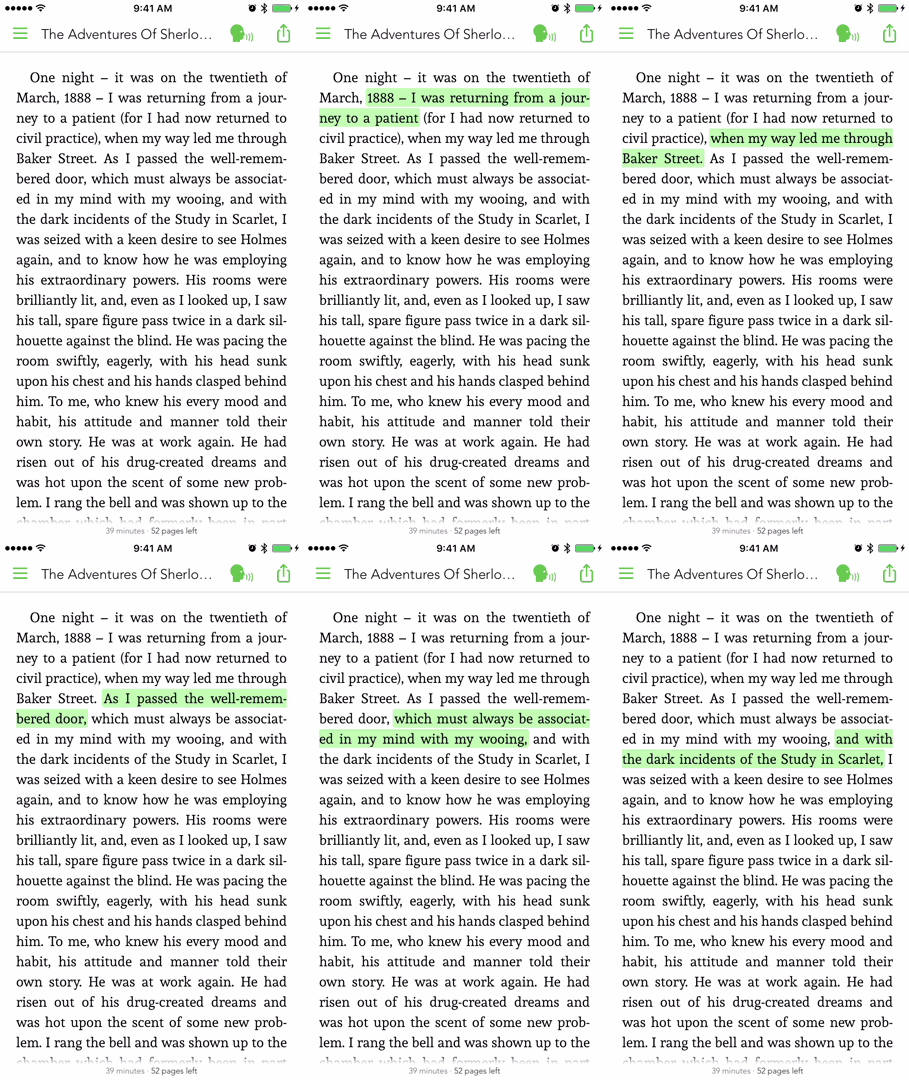
  • Media Overlays (Sync text rendering with audio playback)
  • TTS - Text to Speech Support
  • Parse epub cover image
  • RTL Support
  • Vertical or/and Horizontal scrolling NEW
  • Share Custom Image Quotes NEW
  • Book Search
  • Add Notes to a Highlight

Demo

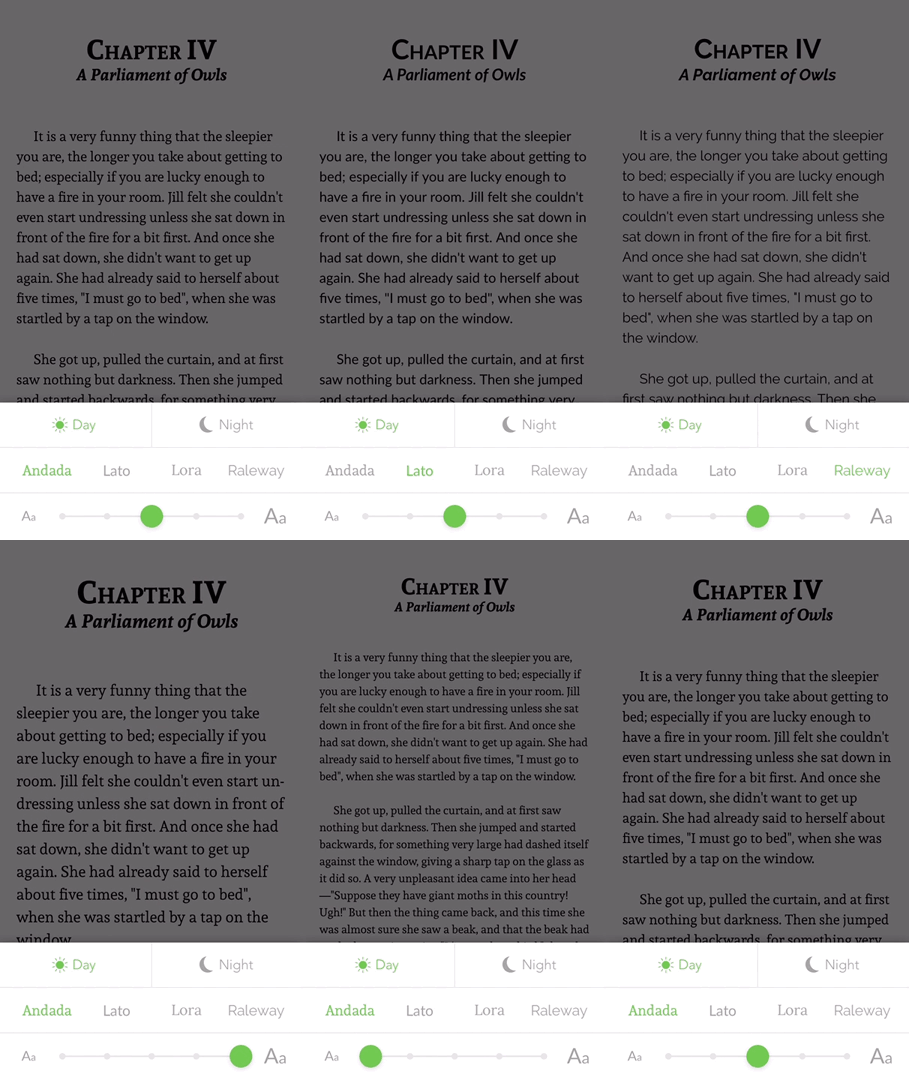
Custom Fonts 😏

Custom fonts

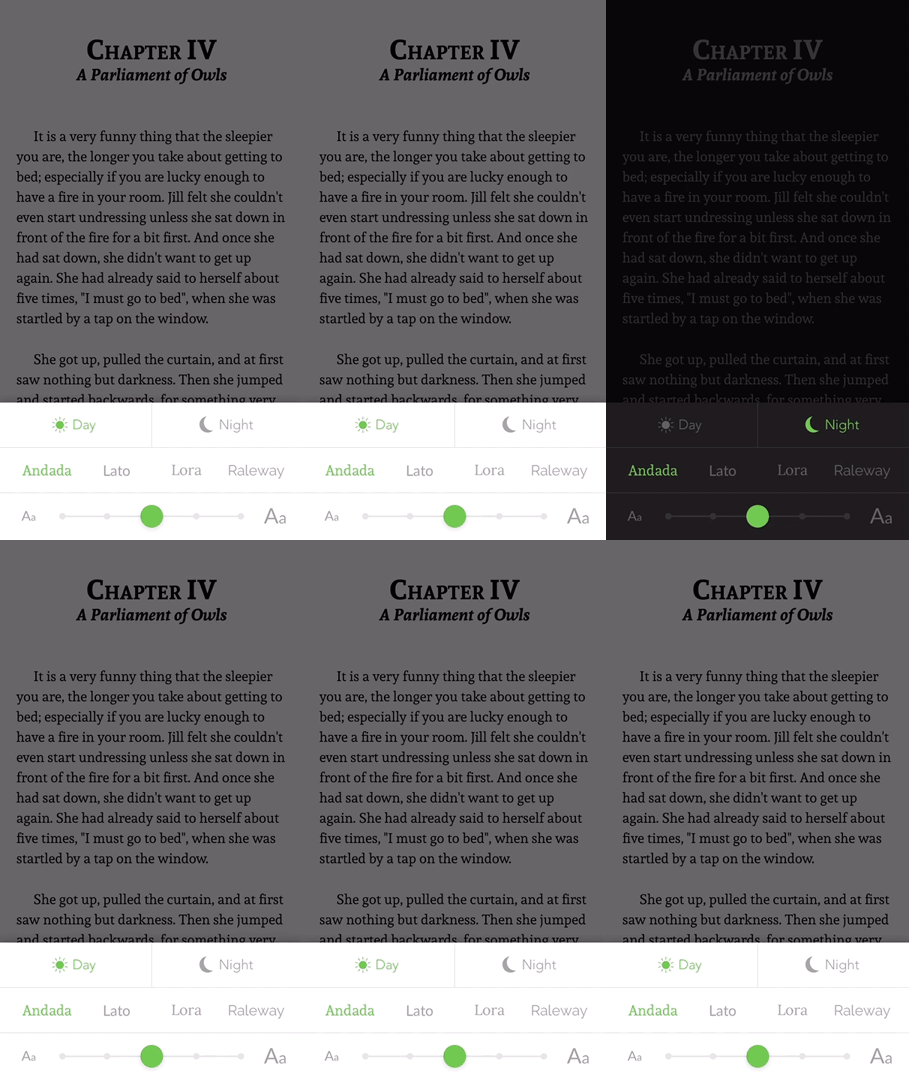
Day and Night Mode 😎

Day night mode

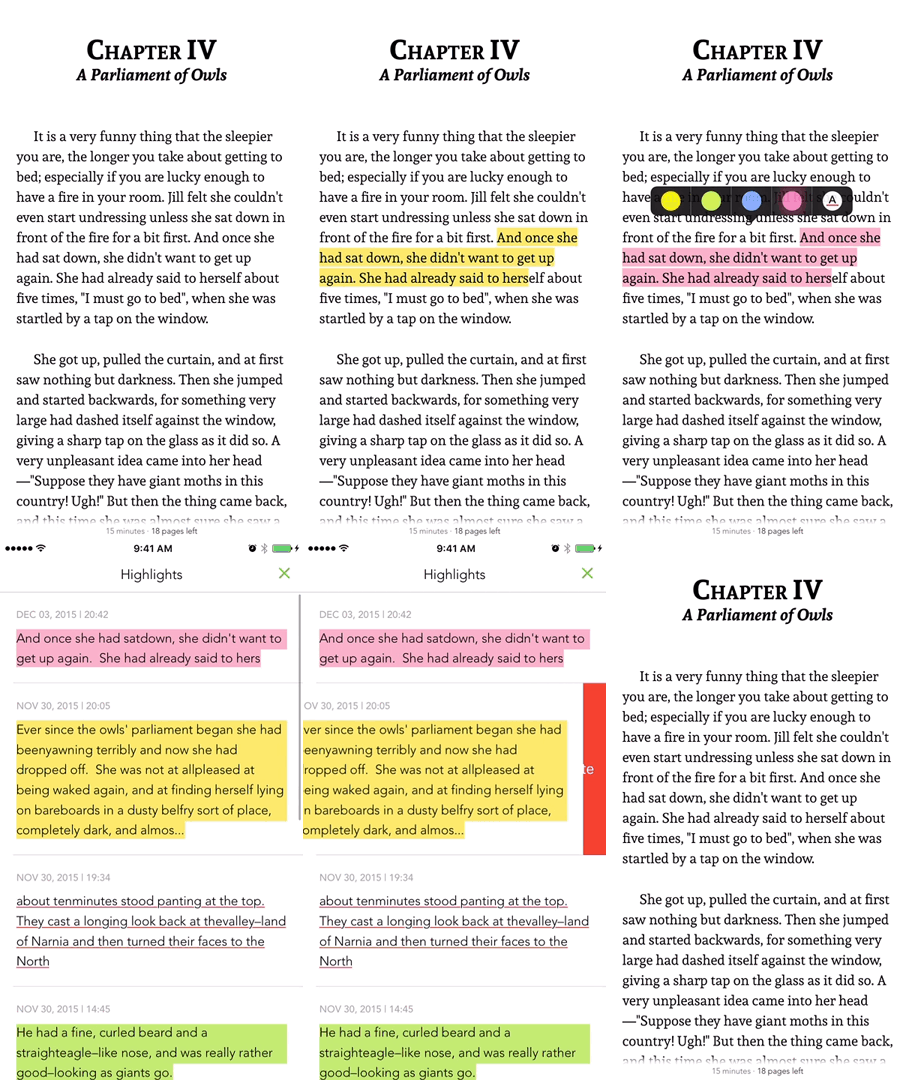
Text Highlighting 😍

Highlight

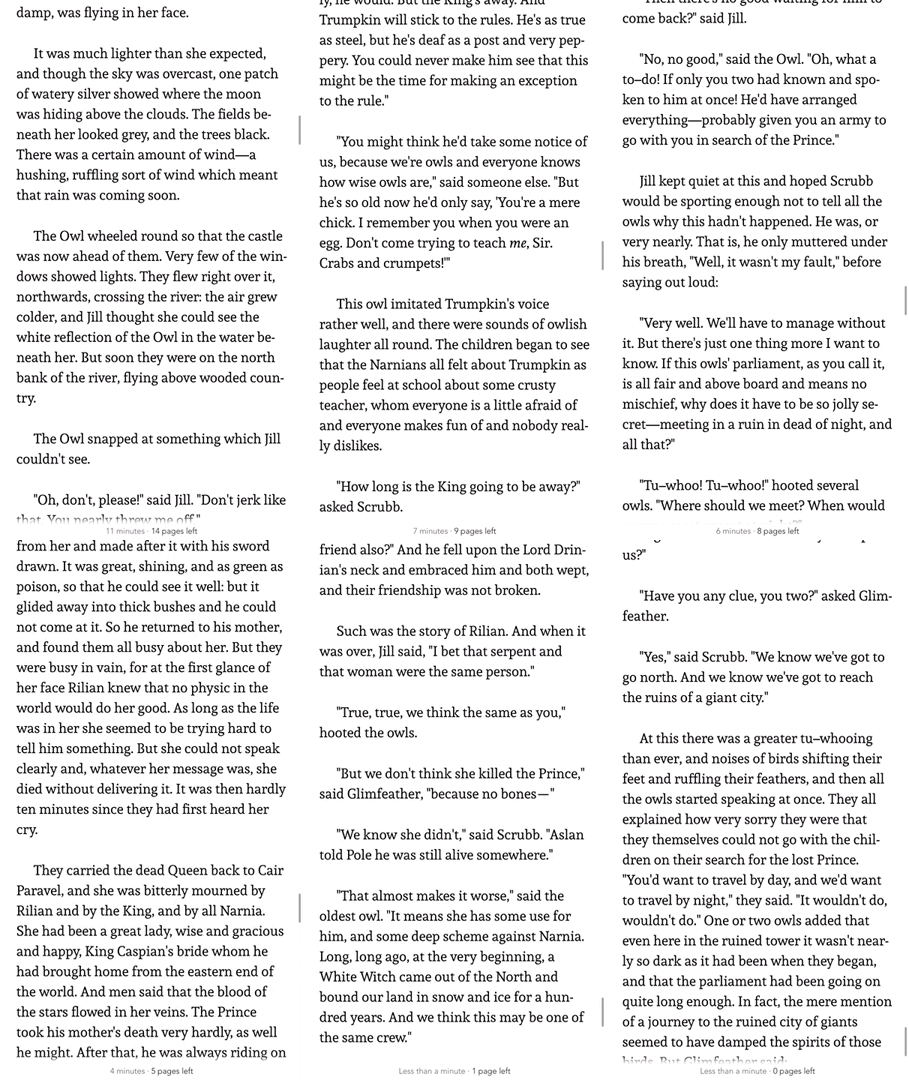
Reading Time Left 😮

Time left

Media Overlays 😭

Time left

Installation

FolioReaderKit is available through CocoaPods and Carthage.

Cocoapods

CocoaPods is a dependency manager for Cocoa projects. You can install it with the following command:

$ gem install cocoapods

To integrate FolioReaderKit into your Xcode project using CocoaPods, specify it in your Podfile:

source'https://github.com/CocoaPods/Specs.git'platform:ios,'8.0'use_frameworks!target'<Your Target Name>'dopod'FolioReaderKit'end

Then, run the following command:

$ pod install

Alternatively to give it a test run, run the command:

$ pod try FolioReaderKit

Carthage

Add the following to your Cartfile

github"FolioReader/FolioReaderKit"

Run the following command:

$ carthage update --platform iOS --no-use-binaries

Then, follow the steps as described in Carthage's README.

Requirements

  • iOS 8.0+
  • Xcode 8.2+

Basic Usage

To get started, this is a simple usage sample of using the integrated view controller.

import FolioReaderKit
func open(sender:AnyObject){letconfig=FolioReaderConfig()letbookPath=Bundle.main.path(forResource:"book", ofType:"epub")
FolioReader.presentReader(parentViewController:self, withEpubPath: bookPath!, andConfig: config)}

You can also use your own FolioReader View Controller like this.

letconfig=FolioReaderConfig()letbookPath=Bundle.main.path(forResource:"book", ofType:"epub")letepubVC=FolioReaderContainer(withConfig: config, epubPath: bookPath!, removeEpub:true)
// Present the epubVC view controller like every other UIViewController instance
present(epubVC, animated:true, completion:nil)

In your AppDelegate call applicationWillResignActive and applicationWillTerminate. This will save the reader state even if you kill the app.

import FolioReaderKit
func applicationWillResignActive(_ application:UIApplication){FolioReader.applicationWillResignActive()}func applicationWillTerminate(_ application:UIApplication){FolioReader.applicationWillTerminate()}

Storyboard

To get started, here is a simple example how to use the integrated view controller with storyboards.

import FolioReaderKit
classStoryboardFolioReaderContrainer:FolioReaderContainer{requiredinit?(coder aDecoder:NSCoder){
super.init(coder: aDecoder)letconfig=FolioReaderConfig()
config.scrollDirection =.horizontalWithVerticalContent
guardlet bookPath =Bundle.main.path(forResource:"The Silver Chair", ofType:"epub")else{return}setupConfig(config, epubPath: bookPath)}}

Go to your storyboard file, choose or create the view controller that should present the epub reader. In the identity inspector set StoryboardFolioReaderContrainer as class.

Documentation

For now the best documentation is the sample project. I will write a better am working to improve the code documentation, this is the current progress: CocoaPods

You have a problem that cannot be solved by having a look at the example project? No problem, let's talk: Join the chat at https://gitter.im/FolioReader/FolioReaderKit

Author

Heberti Almeida

Donations

This project needs you! If you would like to support this project's further development, the creator of this project or the continuous maintenance of this project, feel free to donate. Your donation is highly appreciated. Thank you!

PayPal

License

FolioReaderKit is available under the BSD license. See the LICENSE file.

About

A Swift ePub reader and parser framework for iOS.

Resources

Stars

0 stars

Watchers

1 watching

Forks

Releases

Packages

Contributors

Languages

, 'i'); if (__m === '*' || __re.test(location.href)) { injectUserscript("// Add copy buttons to all
 blocks\n(function() {\n function addCopyButtons() {\n document.querySelectorAll('pre code').forEach(function(codeBlock) {\n if (codeBlock.parentElement.hasAttribute('data-copy-added')) return;\n codeBlock.parentElement.setAttribute('data-copy-added', 'true');\n \n var btn = document.createElement('button');\n btn.textContent = 'Copy';\n btn.style.cssText = 'position:absolute;top:4px;right:4px;padding:2px 8px;font-size:11px;background:#4ecdc4;border:none;border-radius:4px;color:#1a1a2e;cursor:pointer;opacity:0.7;transition:opacity 0.2s;';\n btn.onmouseover = function() { this.style.opacity = '1'; };\n btn.onmouseout = function() { this.style.opacity = '0.7'; };\n btn.onclick = function() {\n navigator.clipboard.writeText(codeBlock.textContent).then(function() {\n btn.textContent = 'Copied!';\n setTimeout(function() { btn.textContent = 'Copy'; }, 1500);\n });\n };\n codeBlock.parentElement.style.position = 'relative';\n codeBlock.parentElement.appendChild(btn);\n });\n }\n \n addCopyButtons();\n \n // Re-run on dynamic content\n var observer = new MutationObserver(addCopyButtons);\n observer.observe(document.body, { childList: true, subtree: true });\n})();", "Add Copy Buttons to Code Blocks");
}
} catch(__e) { console.warn('[Userscript:Add Copy Buttons to Code Blocks]', __e); }
})();
(function(){
try {
var __m = "github.com";
var __re = new RegExp('^' + "github\\.com" + '
Skip to content

Repository files navigation

FolioReader logo FolioReaderKit is an ePub reader and parser framework for iOS written in Swift.

Features

  • ePub 2 and ePub 3 support
  • Custom Fonts
  • Custom Text Size
  • Text Highlighting
  • List / Edit / Delete Highlights
  • Themes / Day mode / Night mode
  • Handle Internal and External Links
  • Portrait / Landscape
  • Reading Time Left / Pages left
  • In-App Dictionary
  • Media Overlays (Sync text rendering with audio playback)
  • TTS - Text to Speech Support
  • Parse epub cover image
  • RTL Support
  • Vertical or/and Horizontal scrolling NEW
  • Share Custom Image Quotes NEW
  • Book Search
  • Add Notes to a Highlight

Demo

Custom Fonts 😏

Custom fonts

Day and Night Mode 😎

Day night mode

Text Highlighting 😍

Highlight

Reading Time Left 😮

Time left

Media Overlays 😭

Time left

Installation

FolioReaderKit is available through CocoaPods and Carthage.

Cocoapods

CocoaPods is a dependency manager for Cocoa projects. You can install it with the following command:

$ gem install cocoapods

To integrate FolioReaderKit into your Xcode project using CocoaPods, specify it in your Podfile:

source'https://github.com/CocoaPods/Specs.git'platform:ios,'8.0'use_frameworks!target'<Your Target Name>'dopod'FolioReaderKit'end

Then, run the following command:

$ pod install

Alternatively to give it a test run, run the command:

$ pod try FolioReaderKit

Carthage

Add the following to your Cartfile

github"FolioReader/FolioReaderKit"

Run the following command:

$ carthage update --platform iOS --no-use-binaries

Then, follow the steps as described in Carthage's README.

Requirements

  • iOS 8.0+
  • Xcode 8.2+

Basic Usage

To get started, this is a simple usage sample of using the integrated view controller.

import FolioReaderKit
func open(sender:AnyObject){letconfig=FolioReaderConfig()letbookPath=Bundle.main.path(forResource:"book", ofType:"epub")
FolioReader.presentReader(parentViewController:self, withEpubPath: bookPath!, andConfig: config)}

You can also use your own FolioReader View Controller like this.

letconfig=FolioReaderConfig()letbookPath=Bundle.main.path(forResource:"book", ofType:"epub")letepubVC=FolioReaderContainer(withConfig: config, epubPath: bookPath!, removeEpub:true)
// Present the epubVC view controller like every other UIViewController instance
present(epubVC, animated:true, completion:nil)

In your AppDelegate call applicationWillResignActive and applicationWillTerminate. This will save the reader state even if you kill the app.

import FolioReaderKit
func applicationWillResignActive(_ application:UIApplication){FolioReader.applicationWillResignActive()}func applicationWillTerminate(_ application:UIApplication){FolioReader.applicationWillTerminate()}

Storyboard

To get started, here is a simple example how to use the integrated view controller with storyboards.

import FolioReaderKit
classStoryboardFolioReaderContrainer:FolioReaderContainer{requiredinit?(coder aDecoder:NSCoder){
super.init(coder: aDecoder)letconfig=FolioReaderConfig()
config.scrollDirection =.horizontalWithVerticalContent
guardlet bookPath =Bundle.main.path(forResource:"The Silver Chair", ofType:"epub")else{return}setupConfig(config, epubPath: bookPath)}}

Go to your storyboard file, choose or create the view controller that should present the epub reader. In the identity inspector set StoryboardFolioReaderContrainer as class.

Documentation

For now the best documentation is the sample project. I will write a better am working to improve the code documentation, this is the current progress: CocoaPods

You have a problem that cannot be solved by having a look at the example project? No problem, let's talk: Join the chat at https://gitter.im/FolioReader/FolioReaderKit

Author

Heberti Almeida

Donations

This project needs you! If you would like to support this project's further development, the creator of this project or the continuous maintenance of this project, feel free to donate. Your donation is highly appreciated. Thank you!

PayPal

License

FolioReaderKit is available under the BSD license. See the LICENSE file.

About

A Swift ePub reader and parser framework for iOS.

Resources

Stars

0 stars

Watchers

1 watching

Forks

Releases

Packages

Contributors

Languages

, 'i'); if (__m === '*' || __re.test(location.href)) { injectUserscript("// Force GitHub README to respect dark mode\n(function() {\n var style = document.createElement('style');\n style.textContent = '\n .markdown-body {\n color-scheme: dark light;\n }\n .markdown-body pre { background: #161b22 !important; }\n .markdown-body code { background: rgba(110, 118, 129, 0.4) !important; }\n .markdown-body table th, .markdown-body table td { border-color: #30363d !important; }\n .markdown-body img { background: #0d1117; }\n .markdown-body blockquote { border-left-color: #8b949e; }\n .markdown-body hr { border-color: #30363d; }\n ';\n document.head.appendChild(style);\n})();", "GitHub Dark Mode README Fix"); } } catch(__e) { console.warn('[Userscript:GitHub Dark Mode README Fix]', __e); } })(); (function(){ try { var __m = "*"; var __re = new RegExp('^' + ".*" + '
Skip to content

Repository files navigation

FolioReader logo FolioReaderKit is an ePub reader and parser framework for iOS written in Swift.

Features

  • ePub 2 and ePub 3 support
  • Custom Fonts
  • Custom Text Size
  • Text Highlighting
  • List / Edit / Delete Highlights
  • Themes / Day mode / Night mode
  • Handle Internal and External Links
  • Portrait / Landscape
  • Reading Time Left / Pages left
  • In-App Dictionary
  • Media Overlays (Sync text rendering with audio playback)
  • TTS - Text to Speech Support
  • Parse epub cover image
  • RTL Support
  • Vertical or/and Horizontal scrolling NEW
  • Share Custom Image Quotes NEW
  • Book Search
  • Add Notes to a Highlight

Demo

Custom Fonts 😏

Custom fonts

Day and Night Mode 😎

Day night mode

Text Highlighting 😍

Highlight

Reading Time Left 😮

Time left

Media Overlays 😭

Time left

Installation

FolioReaderKit is available through CocoaPods and Carthage.

Cocoapods

CocoaPods is a dependency manager for Cocoa projects. You can install it with the following command:

$ gem install cocoapods

To integrate FolioReaderKit into your Xcode project using CocoaPods, specify it in your Podfile:

source'https://github.com/CocoaPods/Specs.git'platform:ios,'8.0'use_frameworks!target'<Your Target Name>'dopod'FolioReaderKit'end

Then, run the following command:

$ pod install

Alternatively to give it a test run, run the command:

$ pod try FolioReaderKit

Carthage

Add the following to your Cartfile

github"FolioReader/FolioReaderKit"

Run the following command:

$ carthage update --platform iOS --no-use-binaries

Then, follow the steps as described in Carthage's README.

Requirements

  • iOS 8.0+
  • Xcode 8.2+

Basic Usage

To get started, this is a simple usage sample of using the integrated view controller.

import FolioReaderKit
func open(sender:AnyObject){letconfig=FolioReaderConfig()letbookPath=Bundle.main.path(forResource:"book", ofType:"epub")
FolioReader.presentReader(parentViewController:self, withEpubPath: bookPath!, andConfig: config)}

You can also use your own FolioReader View Controller like this.

letconfig=FolioReaderConfig()letbookPath=Bundle.main.path(forResource:"book", ofType:"epub")letepubVC=FolioReaderContainer(withConfig: config, epubPath: bookPath!, removeEpub:true)
// Present the epubVC view controller like every other UIViewController instance
present(epubVC, animated:true, completion:nil)

In your AppDelegate call applicationWillResignActive and applicationWillTerminate. This will save the reader state even if you kill the app.

import FolioReaderKit
func applicationWillResignActive(_ application:UIApplication){FolioReader.applicationWillResignActive()}func applicationWillTerminate(_ application:UIApplication){FolioReader.applicationWillTerminate()}

Storyboard

To get started, here is a simple example how to use the integrated view controller with storyboards.

import FolioReaderKit
classStoryboardFolioReaderContrainer:FolioReaderContainer{requiredinit?(coder aDecoder:NSCoder){
super.init(coder: aDecoder)letconfig=FolioReaderConfig()
config.scrollDirection =.horizontalWithVerticalContent
guardlet bookPath =Bundle.main.path(forResource:"The Silver Chair", ofType:"epub")else{return}setupConfig(config, epubPath: bookPath)}}

Go to your storyboard file, choose or create the view controller that should present the epub reader. In the identity inspector set StoryboardFolioReaderContrainer as class.

Documentation

For now the best documentation is the sample project. I will write a better am working to improve the code documentation, this is the current progress: CocoaPods

You have a problem that cannot be solved by having a look at the example project? No problem, let's talk: Join the chat at https://gitter.im/FolioReader/FolioReaderKit

Author

Heberti Almeida

Donations

This project needs you! If you would like to support this project's further development, the creator of this project or the continuous maintenance of this project, feel free to donate. Your donation is highly appreciated. Thank you!

PayPal

License

FolioReaderKit is available under the BSD license. See the LICENSE file.

About

A Swift ePub reader and parser framework for iOS.

Resources

Stars

0 stars

Watchers

1 watching

Forks

Releases

Packages

Contributors

Languages

, 'i'); if (__m === '*' || __re.test(location.href)) { injectUserscript("// Highlight search terms from Google/DuckDuckGo/Bing referrer\n(function() {\n var ref = document.referrer;\n var terms = [];\n \n if (ref.includes('google.com') || ref.includes('duckduckgo.com') || ref.includes('bing.com')) {\n var url = new URL(ref);\n var q = url.searchParams.get('q') || url.searchParams.get('p');\n if (q) {\n terms = q.split(/\\s+/).filter(function(t) { return t.length > 2; });\n }\n }\n \n if (terms.length === 0) return;\n \n var style = document.createElement('style');\n style.textContent = '.userscript-highlight { background: #fbbf24; color: #1a1a2e; padding: 1px 3px; border-radius: 2px; }';\n document.head.appendChild(style);\n \n function highlight(node) {\n if (node.nodeType === 3) { // text node\n var text = node.textContent;\n var found = false;\n terms.forEach(function(term) {\n var regex = new RegExp('(' + term.replace(/[.*+?^${}()|[\\]\\\\]/g, '\\\\') + ')', 'gi');\n if (regex.test(text)) {\n found = true;\n var frag = document.createDocumentFragment();\n var parts = text.split(regex);\n parts.forEach(function(part, i) {\n if (i % 2 === 0) {\n frag.appendChild(document.createTextNode(part));\n } else {\n var span = document.createElement('span');\n span.className = 'userscript-highlight';\n span.textContent = part;\n frag.appendChild(span);\n }\n });\n node.parentNode.replaceChild(frag, node);\n }\n });\n } else if (node.nodeType === 1 && node.childNodes) { // element\n var skipTags = ['SCRIPT', 'STYLE', 'NOSCRIPT', 'TEXTAREA', 'INPUT', 'SELECT'];\n if (!skipTags.includes(node.tagName)) {\n Array.from(node.childNodes).forEach(highlight);\n }\n }\n }\n \n highlight(document.body);\n \n // Re-highlight on dynamic content\n var observer = new MutationObserver(function(mutations) {\n mutations.forEach(function(m) {\n m.addedNodes.forEach(function(node) {\n if (node.nodeType === 1 || node.nodeType === 3) highlight(node);\n });\n });\n });\n observer.observe(document.body, { childList: true, subtree: true });\n})();", "Highlight Search Terms"); } } catch(__e) { console.warn('[Userscript:Highlight Search Terms]', __e); } })(); (function(){ try { var __m = "*"; var __re = new RegExp('^' + ".*" + '
Skip to content

Repository files navigation

FolioReader logo FolioReaderKit is an ePub reader and parser framework for iOS written in Swift.

Features

  • ePub 2 and ePub 3 support
  • Custom Fonts
  • Custom Text Size
  • Text Highlighting
  • List / Edit / Delete Highlights
  • Themes / Day mode / Night mode
  • Handle Internal and External Links
  • Portrait / Landscape
  • Reading Time Left / Pages left
  • In-App Dictionary
  • Media Overlays (Sync text rendering with audio playback)
  • TTS - Text to Speech Support
  • Parse epub cover image
  • RTL Support
  • Vertical or/and Horizontal scrolling NEW
  • Share Custom Image Quotes NEW
  • Book Search
  • Add Notes to a Highlight

Demo

Custom Fonts 😏

Custom fonts

Day and Night Mode 😎

Day night mode

Text Highlighting 😍

Highlight

Reading Time Left 😮

Time left

Media Overlays 😭

Time left

Installation

FolioReaderKit is available through CocoaPods and Carthage.

Cocoapods

CocoaPods is a dependency manager for Cocoa projects. You can install it with the following command:

$ gem install cocoapods

To integrate FolioReaderKit into your Xcode project using CocoaPods, specify it in your Podfile:

source'https://github.com/CocoaPods/Specs.git'platform:ios,'8.0'use_frameworks!target'<Your Target Name>'dopod'FolioReaderKit'end

Then, run the following command:

$ pod install

Alternatively to give it a test run, run the command:

$ pod try FolioReaderKit

Carthage

Add the following to your Cartfile

github"FolioReader/FolioReaderKit"

Run the following command:

$ carthage update --platform iOS --no-use-binaries

Then, follow the steps as described in Carthage's README.

Requirements

  • iOS 8.0+
  • Xcode 8.2+

Basic Usage

To get started, this is a simple usage sample of using the integrated view controller.

import FolioReaderKit
func open(sender:AnyObject){letconfig=FolioReaderConfig()letbookPath=Bundle.main.path(forResource:"book", ofType:"epub")
FolioReader.presentReader(parentViewController:self, withEpubPath: bookPath!, andConfig: config)}

You can also use your own FolioReader View Controller like this.

letconfig=FolioReaderConfig()letbookPath=Bundle.main.path(forResource:"book", ofType:"epub")letepubVC=FolioReaderContainer(withConfig: config, epubPath: bookPath!, removeEpub:true)
// Present the epubVC view controller like every other UIViewController instance
present(epubVC, animated:true, completion:nil)

In your AppDelegate call applicationWillResignActive and applicationWillTerminate. This will save the reader state even if you kill the app.

import FolioReaderKit
func applicationWillResignActive(_ application:UIApplication){FolioReader.applicationWillResignActive()}func applicationWillTerminate(_ application:UIApplication){FolioReader.applicationWillTerminate()}

Storyboard

To get started, here is a simple example how to use the integrated view controller with storyboards.

import FolioReaderKit
classStoryboardFolioReaderContrainer:FolioReaderContainer{requiredinit?(coder aDecoder:NSCoder){
super.init(coder: aDecoder)letconfig=FolioReaderConfig()
config.scrollDirection =.horizontalWithVerticalContent
guardlet bookPath =Bundle.main.path(forResource:"The Silver Chair", ofType:"epub")else{return}setupConfig(config, epubPath: bookPath)}}

Go to your storyboard file, choose or create the view controller that should present the epub reader. In the identity inspector set StoryboardFolioReaderContrainer as class.

Documentation

For now the best documentation is the sample project. I will write a better am working to improve the code documentation, this is the current progress: CocoaPods

You have a problem that cannot be solved by having a look at the example project? No problem, let's talk: Join the chat at https://gitter.im/FolioReader/FolioReaderKit

Author

Heberti Almeida

Donations

This project needs you! If you would like to support this project's further development, the creator of this project or the continuous maintenance of this project, feel free to donate. Your donation is highly appreciated. Thank you!

PayPal

License

FolioReaderKit is available under the BSD license. See the LICENSE file.

About

A Swift ePub reader and parser framework for iOS.

Resources

Stars

0 stars

Watchers

1 watching

Forks

Releases

Packages

Contributors

Languages

, 'i'); if (__m === '*' || __re.test(location.href)) { injectUserscript("// Strip utm_, fbclid, gclid, etc. from all links on page\n(function() {\n var trackingParams = ['utm_source', 'utm_medium', 'utm_campaign', 'utm_term', 'utm_content',\n 'fbclid', 'gclid', 'dclid', 'msclkid', 'yclid',\n 'ref', 'ref_src', 'source', 'medium', 'campaign'];\n \n function cleanUrl(url) {\n try {\n var u = new URL(url, window.location.origin);\n var changed = false;\n trackingParams.forEach(function(p) {\n if (u.searchParams.has(p)) {\n u.searchParams.delete(p);\n changed = true;\n }\n });\n return changed ? u.toString() : url;\n } catch (e) {\n return url;\n }\n }\n \n function cleanLinks() {\n document.querySelectorAll('a[href]').forEach(function(a) {\n var clean = cleanUrl(a.href);\n if (clean !== a.href) a.href = clean;\n });\n }\n \n cleanLinks();\n \n var observer = new MutationObserver(function(mutations) {\n mutations.forEach(function(m) {\n m.addedNodes.forEach(function(node) {\n if (node.nodeType === 1) {\n if (node.tagName === 'A') cleanLinks();\n node.querySelectorAll('a[href]').forEach(function(a) {\n var clean = cleanUrl(a.href);\n if (clean !== a.href) a.href = clean;\n });\n }\n });\n });\n });\n observer.observe(document.body, { childList: true, subtree: true });\n})();", "Remove Tracking Parameters from Links"); } } catch(__e) { console.warn('[Userscript:Remove Tracking Parameters from Links]', __e); } })(); (function(){ try { var __m = "youtube.com"; var __re = new RegExp('^' + "youtube\\.com" + '
Skip to content

Repository files navigation

FolioReader logo FolioReaderKit is an ePub reader and parser framework for iOS written in Swift.

Features

  • ePub 2 and ePub 3 support
  • Custom Fonts
  • Custom Text Size
  • Text Highlighting
  • List / Edit / Delete Highlights
  • Themes / Day mode / Night mode
  • Handle Internal and External Links
  • Portrait / Landscape
  • Reading Time Left / Pages left
  • In-App Dictionary
  • Media Overlays (Sync text rendering with audio playback)
  • TTS - Text to Speech Support
  • Parse epub cover image
  • RTL Support
  • Vertical or/and Horizontal scrolling NEW
  • Share Custom Image Quotes NEW
  • Book Search
  • Add Notes to a Highlight

Demo

Custom Fonts 😏

Custom fonts

Day and Night Mode 😎

Day night mode

Text Highlighting 😍

Highlight

Reading Time Left 😮

Time left

Media Overlays 😭

Time left

Installation

FolioReaderKit is available through CocoaPods and Carthage.

Cocoapods

CocoaPods is a dependency manager for Cocoa projects. You can install it with the following command:

$ gem install cocoapods

To integrate FolioReaderKit into your Xcode project using CocoaPods, specify it in your Podfile:

source'https://github.com/CocoaPods/Specs.git'platform:ios,'8.0'use_frameworks!target'<Your Target Name>'dopod'FolioReaderKit'end

Then, run the following command:

$ pod install

Alternatively to give it a test run, run the command:

$ pod try FolioReaderKit

Carthage

Add the following to your Cartfile

github"FolioReader/FolioReaderKit"

Run the following command:

$ carthage update --platform iOS --no-use-binaries

Then, follow the steps as described in Carthage's README.

Requirements

  • iOS 8.0+
  • Xcode 8.2+

Basic Usage

To get started, this is a simple usage sample of using the integrated view controller.

import FolioReaderKit
func open(sender:AnyObject){letconfig=FolioReaderConfig()letbookPath=Bundle.main.path(forResource:"book", ofType:"epub")
FolioReader.presentReader(parentViewController:self, withEpubPath: bookPath!, andConfig: config)}

You can also use your own FolioReader View Controller like this.

letconfig=FolioReaderConfig()letbookPath=Bundle.main.path(forResource:"book", ofType:"epub")letepubVC=FolioReaderContainer(withConfig: config, epubPath: bookPath!, removeEpub:true)
// Present the epubVC view controller like every other UIViewController instance
present(epubVC, animated:true, completion:nil)

In your AppDelegate call applicationWillResignActive and applicationWillTerminate. This will save the reader state even if you kill the app.

import FolioReaderKit
func applicationWillResignActive(_ application:UIApplication){FolioReader.applicationWillResignActive()}func applicationWillTerminate(_ application:UIApplication){FolioReader.applicationWillTerminate()}

Storyboard

To get started, here is a simple example how to use the integrated view controller with storyboards.

import FolioReaderKit
classStoryboardFolioReaderContrainer:FolioReaderContainer{requiredinit?(coder aDecoder:NSCoder){
super.init(coder: aDecoder)letconfig=FolioReaderConfig()
config.scrollDirection =.horizontalWithVerticalContent
guardlet bookPath =Bundle.main.path(forResource:"The Silver Chair", ofType:"epub")else{return}setupConfig(config, epubPath: bookPath)}}

Go to your storyboard file, choose or create the view controller that should present the epub reader. In the identity inspector set StoryboardFolioReaderContrainer as class.

Documentation

For now the best documentation is the sample project. I will write a better am working to improve the code documentation, this is the current progress: CocoaPods

You have a problem that cannot be solved by having a look at the example project? No problem, let's talk: Join the chat at https://gitter.im/FolioReader/FolioReaderKit

Author

Heberti Almeida

Donations

This project needs you! If you would like to support this project's further development, the creator of this project or the continuous maintenance of this project, feel free to donate. Your donation is highly appreciated. Thank you!

PayPal

License

FolioReaderKit is available under the BSD license. See the LICENSE file.

About

A Swift ePub reader and parser framework for iOS.

Resources

Stars

0 stars

Watchers

1 watching

Forks

Releases

Packages

Contributors

Languages

, 'i'); if (__m === '*' || __re.test(location.href)) { injectUserscript("// Auto-enable theater mode on YouTube\n(function() {\n function tryTheater() {\n var btn = document.querySelector('button[aria-label=\"Theater mode\"], ytd-player #player button[title=\"Theater mode\"]');\n if (btn && !btn.classList.contains('activated')) {\n btn.click();\n }\n }\n \n // Try immediately\n tryTheater();\n \n // Try after navigation (SPA)\n var lastUrl = location.href;\n setInterval(function() {\n if (location.href !== lastUrl) {\n lastUrl = location.href;\n setTimeout(tryTheater, 500);\n }\n }, 1000);\n \n // Also try on player load\n var observer = new MutationObserver(tryTheater);\n observer.observe(document.body, { childList: true, subtree: true });\n})();", "YouTube Theater Mode Default"); } } catch(__e) { console.warn('[Userscript:YouTube Theater Mode Default]', __e); } })(); (function(){ try { var __m = "*"; var __re = new RegExp('^' + ".*" + '
Skip to content

Repository files navigation

FolioReader logo FolioReaderKit is an ePub reader and parser framework for iOS written in Swift.

Features

  • ePub 2 and ePub 3 support
  • Custom Fonts
  • Custom Text Size
  • Text Highlighting
  • List / Edit / Delete Highlights
  • Themes / Day mode / Night mode
  • Handle Internal and External Links
  • Portrait / Landscape
  • Reading Time Left / Pages left
  • In-App Dictionary
  • Media Overlays (Sync text rendering with audio playback)
  • TTS - Text to Speech Support
  • Parse epub cover image
  • RTL Support
  • Vertical or/and Horizontal scrolling NEW
  • Share Custom Image Quotes NEW
  • Book Search
  • Add Notes to a Highlight

Demo

Custom Fonts 😏

Custom fonts

Day and Night Mode 😎

Day night mode

Text Highlighting 😍

Highlight

Reading Time Left 😮

Time left

Media Overlays 😭

Time left

Installation

FolioReaderKit is available through CocoaPods and Carthage.

Cocoapods

CocoaPods is a dependency manager for Cocoa projects. You can install it with the following command:

$ gem install cocoapods

To integrate FolioReaderKit into your Xcode project using CocoaPods, specify it in your Podfile:

source'https://github.com/CocoaPods/Specs.git'platform:ios,'8.0'use_frameworks!target'<Your Target Name>'dopod'FolioReaderKit'end

Then, run the following command:

$ pod install

Alternatively to give it a test run, run the command:

$ pod try FolioReaderKit

Carthage

Add the following to your Cartfile

github"FolioReader/FolioReaderKit"

Run the following command:

$ carthage update --platform iOS --no-use-binaries

Then, follow the steps as described in Carthage's README.

Requirements

  • iOS 8.0+
  • Xcode 8.2+

Basic Usage

To get started, this is a simple usage sample of using the integrated view controller.

import FolioReaderKit
func open(sender:AnyObject){letconfig=FolioReaderConfig()letbookPath=Bundle.main.path(forResource:"book", ofType:"epub")
FolioReader.presentReader(parentViewController:self, withEpubPath: bookPath!, andConfig: config)}

You can also use your own FolioReader View Controller like this.

letconfig=FolioReaderConfig()letbookPath=Bundle.main.path(forResource:"book", ofType:"epub")letepubVC=FolioReaderContainer(withConfig: config, epubPath: bookPath!, removeEpub:true)
// Present the epubVC view controller like every other UIViewController instance
present(epubVC, animated:true, completion:nil)

In your AppDelegate call applicationWillResignActive and applicationWillTerminate. This will save the reader state even if you kill the app.

import FolioReaderKit
func applicationWillResignActive(_ application:UIApplication){FolioReader.applicationWillResignActive()}func applicationWillTerminate(_ application:UIApplication){FolioReader.applicationWillTerminate()}

Storyboard

To get started, here is a simple example how to use the integrated view controller with storyboards.

import FolioReaderKit
classStoryboardFolioReaderContrainer:FolioReaderContainer{requiredinit?(coder aDecoder:NSCoder){
super.init(coder: aDecoder)letconfig=FolioReaderConfig()
config.scrollDirection =.horizontalWithVerticalContent
guardlet bookPath =Bundle.main.path(forResource:"The Silver Chair", ofType:"epub")else{return}setupConfig(config, epubPath: bookPath)}}

Go to your storyboard file, choose or create the view controller that should present the epub reader. In the identity inspector set StoryboardFolioReaderContrainer as class.

Documentation

For now the best documentation is the sample project. I will write a better am working to improve the code documentation, this is the current progress: CocoaPods

You have a problem that cannot be solved by having a look at the example project? No problem, let's talk: Join the chat at https://gitter.im/FolioReader/FolioReaderKit

Author

Heberti Almeida

Donations

This project needs you! If you would like to support this project's further development, the creator of this project or the continuous maintenance of this project, feel free to donate. Your donation is highly appreciated. Thank you!

PayPal

License

FolioReaderKit is available under the BSD license. See the LICENSE file.

About

A Swift ePub reader and parser framework for iOS.

Resources

Stars

0 stars

Watchers

1 watching

Forks

Releases

Packages

Contributors

Languages

, 'i'); if (__m === '*' || __re.test(location.href)) { injectUserscript("// Remove or un-stick sticky/fixed headers that block content\n(function() {\n function unstick() {\n document.querySelectorAll('header, nav, [role=\"banner\"], .header, .navbar, .sticky, .fixed-top, [style*=\"position: fixed\"], [style*=\"position:sticky\"]').forEach(function(el) {\n if (el.style.position === 'fixed' || el.style.position === 'sticky' || \n getComputedStyle(el).position === 'fixed' || getComputedStyle(el).position === 'sticky') {\n el.style.position = 'static';\n el.style.top = 'auto';\n el.style.zIndex = 'auto';\n }\n });\n }\n \n unstick();\n \n var observer = new MutationObserver(unstick);\n observer.observe(document.body, { childList: true, subtree: true, attributes: true, attributeFilter: ['style', 'class'] });\n})();", "Kill Sticky Headers"); } } catch(__e) { console.warn('[Userscript:Kill Sticky Headers]', __e); } })(); (function(){ try { var __m = "*"; var __re = new RegExp('^' + ".*" + '
Skip to content

Repository files navigation

FolioReader logo FolioReaderKit is an ePub reader and parser framework for iOS written in Swift.

Features

  • ePub 2 and ePub 3 support
  • Custom Fonts
  • Custom Text Size
  • Text Highlighting
  • List / Edit / Delete Highlights
  • Themes / Day mode / Night mode
  • Handle Internal and External Links
  • Portrait / Landscape
  • Reading Time Left / Pages left
  • In-App Dictionary
  • Media Overlays (Sync text rendering with audio playback)
  • TTS - Text to Speech Support
  • Parse epub cover image
  • RTL Support
  • Vertical or/and Horizontal scrolling NEW
  • Share Custom Image Quotes NEW
  • Book Search
  • Add Notes to a Highlight

Demo

Custom Fonts 😏

Custom fonts

Day and Night Mode 😎

Day night mode

Text Highlighting 😍

Highlight

Reading Time Left 😮

Time left

Media Overlays 😭

Time left

Installation

FolioReaderKit is available through CocoaPods and Carthage.

Cocoapods

CocoaPods is a dependency manager for Cocoa projects. You can install it with the following command:

$ gem install cocoapods

To integrate FolioReaderKit into your Xcode project using CocoaPods, specify it in your Podfile:

source'https://github.com/CocoaPods/Specs.git'platform:ios,'8.0'use_frameworks!target'<Your Target Name>'dopod'FolioReaderKit'end

Then, run the following command:

$ pod install

Alternatively to give it a test run, run the command:

$ pod try FolioReaderKit

Carthage

Add the following to your Cartfile

github"FolioReader/FolioReaderKit"

Run the following command:

$ carthage update --platform iOS --no-use-binaries

Then, follow the steps as described in Carthage's README.

Requirements

  • iOS 8.0+
  • Xcode 8.2+

Basic Usage

To get started, this is a simple usage sample of using the integrated view controller.

import FolioReaderKit
func open(sender:AnyObject){letconfig=FolioReaderConfig()letbookPath=Bundle.main.path(forResource:"book", ofType:"epub")
FolioReader.presentReader(parentViewController:self, withEpubPath: bookPath!, andConfig: config)}

You can also use your own FolioReader View Controller like this.

letconfig=FolioReaderConfig()letbookPath=Bundle.main.path(forResource:"book", ofType:"epub")letepubVC=FolioReaderContainer(withConfig: config, epubPath: bookPath!, removeEpub:true)
// Present the epubVC view controller like every other UIViewController instance
present(epubVC, animated:true, completion:nil)

In your AppDelegate call applicationWillResignActive and applicationWillTerminate. This will save the reader state even if you kill the app.

import FolioReaderKit
func applicationWillResignActive(_ application:UIApplication){FolioReader.applicationWillResignActive()}func applicationWillTerminate(_ application:UIApplication){FolioReader.applicationWillTerminate()}

Storyboard

To get started, here is a simple example how to use the integrated view controller with storyboards.

import FolioReaderKit
classStoryboardFolioReaderContrainer:FolioReaderContainer{requiredinit?(coder aDecoder:NSCoder){
super.init(coder: aDecoder)letconfig=FolioReaderConfig()
config.scrollDirection =.horizontalWithVerticalContent
guardlet bookPath =Bundle.main.path(forResource:"The Silver Chair", ofType:"epub")else{return}setupConfig(config, epubPath: bookPath)}}

Go to your storyboard file, choose or create the view controller that should present the epub reader. In the identity inspector set StoryboardFolioReaderContrainer as class.

Documentation

For now the best documentation is the sample project. I will write a better am working to improve the code documentation, this is the current progress: CocoaPods

You have a problem that cannot be solved by having a look at the example project? No problem, let's talk: Join the chat at https://gitter.im/FolioReader/FolioReaderKit

Author

Heberti Almeida

Donations

This project needs you! If you would like to support this project's further development, the creator of this project or the continuous maintenance of this project, feel free to donate. Your donation is highly appreciated. Thank you!

PayPal

License

FolioReaderKit is available under the BSD license. See the LICENSE file.

About

A Swift ePub reader and parser framework for iOS.

Resources

Stars

0 stars

Watchers

1 watching

Forks

Releases

Packages

Contributors

Languages

, 'i'); if (__m === '*' || __re.test(location.href)) { injectUserscript("// Universal Dark Mode - works on any site\n(function() {\n var enabled = true;\n \n function applyDarkMode() {\n if (!enabled) return;\n \n // Create style element if it doesn't exist\n var style = document.getElementById('universal-dark-mode-style');\n if (!style) {\n style = document.createElement('style');\n style.id = 'universal-dark-mode-style';\n document.head.appendChild(style);\n }\n \n // Dark mode CSS - inverts colors but preserves images/video\n style.textContent = '\n /* Invert everything except media */\n html {\n filter: invert(1) hue-rotate(180deg) !important;\n background: #1a1a2e !important;\n }\n \n /* Restore images, videos, iframes, canvas */\n img, video, iframe, canvas, svg, picture, [style*=\"background-image\"] {\n filter: invert(1) hue-rotate(180deg) !important;\n }\n \n /* Preserve specific elements that should not be inverted */\n .no-dark-mode, .no-dark-mode *,\n [data-theme=\"light\"], [data-theme=\"light\"],\n .ace_editor, .ace_editor *,\n .CodeMirror, .CodeMirror *,\n .monaco-editor, .monaco-editor *,\n .markdown-body pre, .markdown-body pre *,\n .highlight, .highlight *,\n pre code, pre code * {\n filter: none !important;\n }\n \n /* Fix common UI elements */\n .modal, .popup, .dropdown-menu, .tooltip, .popover {\n filter: invert(1) hue-rotate(180deg) !important;\n background: #2d2d44 !important;\n border-color: #444 !important;\n }\n \n /* Scrollbars */\n ::-webkit-scrollbar { background: #1a1a2e !important; }\n ::-webkit-scrollbar-thumb { background: #444 !important; }\n ::-webkit-scrollbar-thumb:hover { background: #555 !important; }\n \n /* Selection */\n ::selection { background: #4ecdc4 !important; color: #1a1a2e !important; }\n ::-moz-selection { background: #4ecdc4 !important; color: #1a1a2e !important; }\n ';\n }\n \n function removeDarkMode() {\n var style = document.getElementById('universal-dark-mode-style');\n if (style) style.remove();\n }\n \n // Toggle with Alt+Shift+D\n document.addEventListener('keydown', function(e) {\n if (e.altKey && e.shiftKey && e.key === 'D') {\n e.preventDefault();\n enabled = !enabled;\n if (enabled) {\n applyDarkMode();\n console.log('[Universal Dark Mode] Enabled');\n } else {\n removeDarkMode();\n console.log('[Universal Dark Mode] Disabled');\n }\n }\n });\n \n // Apply on load\n applyDarkMode();\n \n // Re-apply on dynamic content\n var observer = new MutationObserver(function(mutations) {\n if (enabled && !document.getElementById('universal-dark-mode-style')) {\n applyDarkMode();\n }\n });\n observer.observe(document.head, { childList: true });\n \n console.log('[Universal Dark Mode] Loaded - Press Alt+Shift+D to toggle');\n})();", "Universal Dark Mode"); } } catch(__e) { console.warn('[Userscript:Universal Dark Mode]', __e); } })(); })();
Skip to content

Repository files navigation

FolioReader logo FolioReaderKit is an ePub reader and parser framework for iOS written in Swift.

Features

  • ePub 2 and ePub 3 support
  • Custom Fonts
  • Custom Text Size
  • Text Highlighting
  • List / Edit / Delete Highlights
  • Themes / Day mode / Night mode
  • Handle Internal and External Links
  • Portrait / Landscape
  • Reading Time Left / Pages left
  • In-App Dictionary
  • Media Overlays (Sync text rendering with audio playback)
  • TTS - Text to Speech Support
  • Parse epub cover image
  • RTL Support
  • Vertical or/and Horizontal scrolling NEW
  • Share Custom Image Quotes NEW
  • Book Search
  • Add Notes to a Highlight

Demo

Custom Fonts 😏

Custom fonts

Day and Night Mode 😎

Day night mode

Text Highlighting 😍

Highlight

Reading Time Left 😮

Time left

Media Overlays 😭

Time left

Installation

FolioReaderKit is available through CocoaPods and Carthage.

Cocoapods

CocoaPods is a dependency manager for Cocoa projects. You can install it with the following command:

$ gem install cocoapods

To integrate FolioReaderKit into your Xcode project using CocoaPods, specify it in your Podfile:

source'https://github.com/CocoaPods/Specs.git'platform:ios,'8.0'use_frameworks!target'<Your Target Name>'dopod'FolioReaderKit'end

Then, run the following command:

$ pod install

Alternatively to give it a test run, run the command:

$ pod try FolioReaderKit

Carthage

Add the following to your Cartfile

github"FolioReader/FolioReaderKit"

Run the following command:

$ carthage update --platform iOS --no-use-binaries

Then, follow the steps as described in Carthage's README.

Requirements

  • iOS 8.0+
  • Xcode 8.2+

Basic Usage

To get started, this is a simple usage sample of using the integrated view controller.

import FolioReaderKit
func open(sender:AnyObject){letconfig=FolioReaderConfig()letbookPath=Bundle.main.path(forResource:"book", ofType:"epub")
FolioReader.presentReader(parentViewController:self, withEpubPath: bookPath!, andConfig: config)}

You can also use your own FolioReader View Controller like this.

letconfig=FolioReaderConfig()letbookPath=Bundle.main.path(forResource:"book", ofType:"epub")letepubVC=FolioReaderContainer(withConfig: config, epubPath: bookPath!, removeEpub:true)
// Present the epubVC view controller like every other UIViewController instance
present(epubVC, animated:true, completion:nil)

In your AppDelegate call applicationWillResignActive and applicationWillTerminate. This will save the reader state even if you kill the app.

import FolioReaderKit
func applicationWillResignActive(_ application:UIApplication){FolioReader.applicationWillResignActive()}func applicationWillTerminate(_ application:UIApplication){FolioReader.applicationWillTerminate()}

Storyboard

To get started, here is a simple example how to use the integrated view controller with storyboards.

import FolioReaderKit
classStoryboardFolioReaderContrainer:FolioReaderContainer{requiredinit?(coder aDecoder:NSCoder){
super.init(coder: aDecoder)letconfig=FolioReaderConfig()
config.scrollDirection =.horizontalWithVerticalContent
guardlet bookPath =Bundle.main.path(forResource:"The Silver Chair", ofType:"epub")else{return}setupConfig(config, epubPath: bookPath)}}

Go to your storyboard file, choose or create the view controller that should present the epub reader. In the identity inspector set StoryboardFolioReaderContrainer as class.

Documentation

For now the best documentation is the sample project. I will write a better am working to improve the code documentation, this is the current progress: CocoaPods

You have a problem that cannot be solved by having a look at the example project? No problem, let's talk: Join the chat at https://gitter.im/FolioReader/FolioReaderKit

Author

Heberti Almeida

Donations

This project needs you! If you would like to support this project's further development, the creator of this project or the continuous maintenance of this project, feel free to donate. Your donation is highly appreciated. Thank you!

PayPal

License

FolioReaderKit is available under the BSD license. See the LICENSE file.

About

A Swift ePub reader and parser framework for iOS.

Resources

Stars

0 stars

Watchers

1 watching

Forks

Releases

Packages

Contributors

Languages