


Adds filetype glyphs (icons) to other vim plugins such as NERDTree, vim-airline, and lightline.vim.
» Vote for upcoming features or suggest new ones

| Current open polls: Vote for upcoming features or suggest new ones: | vote |
|---|---|
| » Rename project: vim-webdevicons to vim-devicons? | ☑ |
| » support ctrlp.vim? | ☑ |
| » support unite.vim? | ☑ |
| » Something else? (Open an issue) | ☑ |
- Install the plugin per your usual method (» More details... «)
- Download and install a patched font (or patch your own):
- Set font (» More details... «)
- a. If using vim: Set your terminal emulator font
- b. If using gvim: Set
guifontin yourvimrc
After installing the patched font and setting the vim font just open NERDTree or look at airline (statusline or tabline).
NOTE: if you don't
guifontset and are not running gvim you will need to set the terminal font.NOTE: for NERDTree support, you must configure vim to load NERDTree before vim-webdevicons loads.
NOTE: for vim-airline support, you must configure vim to load vim-airline before vim-webdevicons loads.
NOTE: for better nerdtree-git-plugin support, you should configure vim to load nerdtree-git-plugin before vim-webdevicons loads.
Encoding must be set to UTF-8 for the glyphs to show
setencoding=utf8
The ONLY other configuration needed should be setting the font vim uses to a patched font.
Already patched fonts and the font patcher script are provided at: nerd-filetype-glyphs-fonts-patcher
It works without configuration ONLY when used with a patched font provided in
the separate repository above. Install the font and add it to your vimrc or
gvimrc:
Linux
setguifont=<FONT_NAME><FONT_SIZE>OS X and Windows
setguifont=<FONT_NAME>:h<FONT_SIZE>e.g.
Linux
setguifont=Droid\ Sans\ Mono\ for\ Powerline\ Plus\ Nerd\ File\ Types\ 11OS X and Windows
setguifont=Droid\ Sans\ Mono\ for\ Powerline\ Plus\ Nerd\ File\ Types:h11You basically have to put any font you would like to use into the ~/.fonts folder. For example:
cd~/.fonts && curl -fLo DroidSansMonoForPowerlinePlusNerdFileTypes.otf https://raw.githubusercontent.com/ryanoasis/nerd-filetype-glyphs-fonts-patcher/master/patched-fonts/Droid%20Sans%20Mono%20for%20Powerline%20Plus%20Nerd%20File%20Types.otfYou can find more fonts under my patched fonts repo.
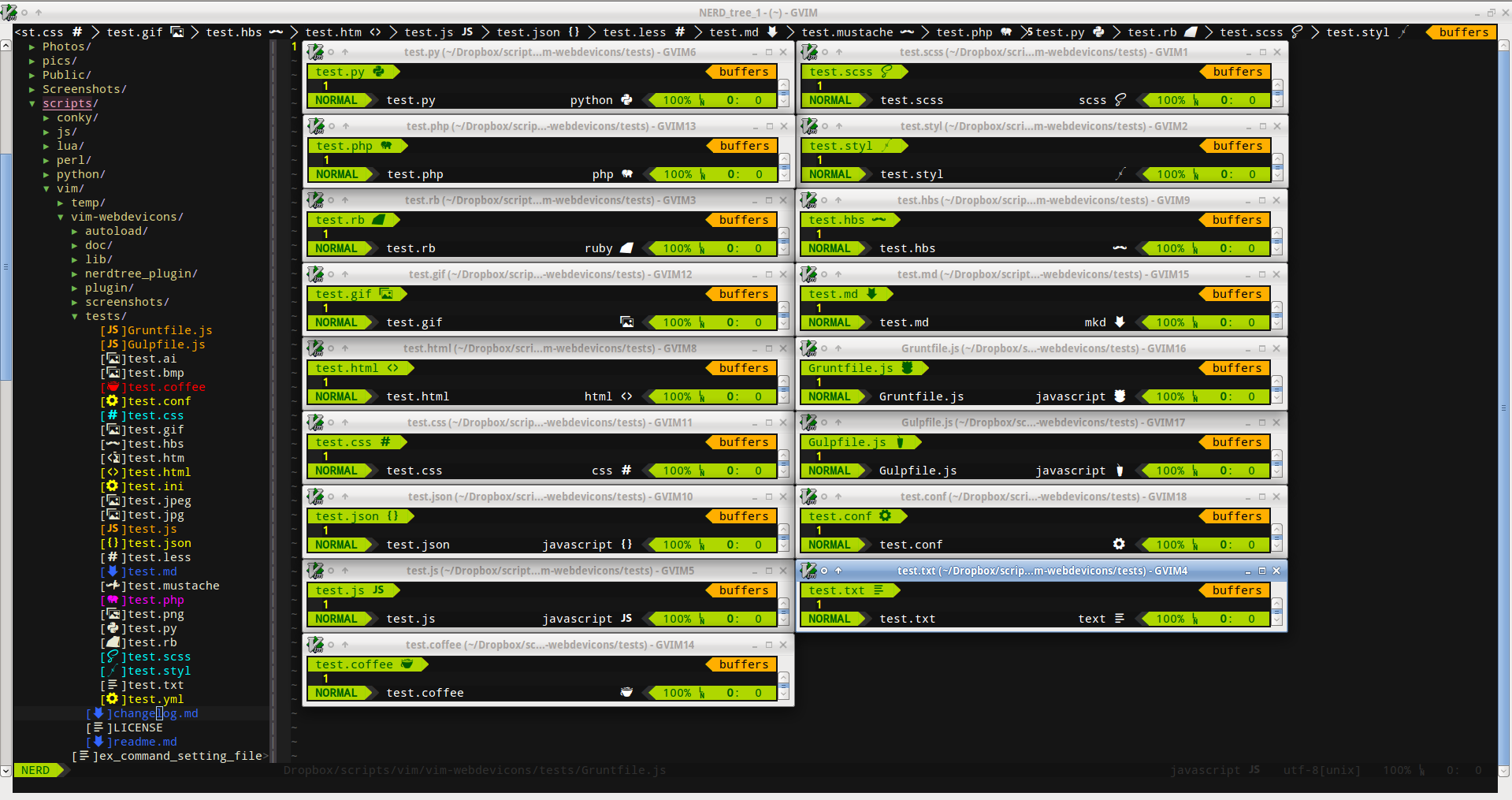
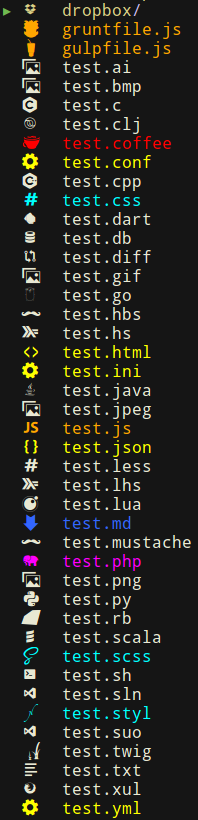
| section | preview |
|---|---|
| statusline |  |
| tabline |  |
| tabline |  |
| fileformats symbols | 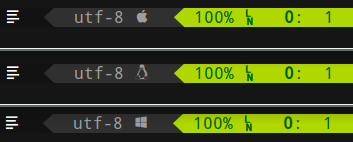 |
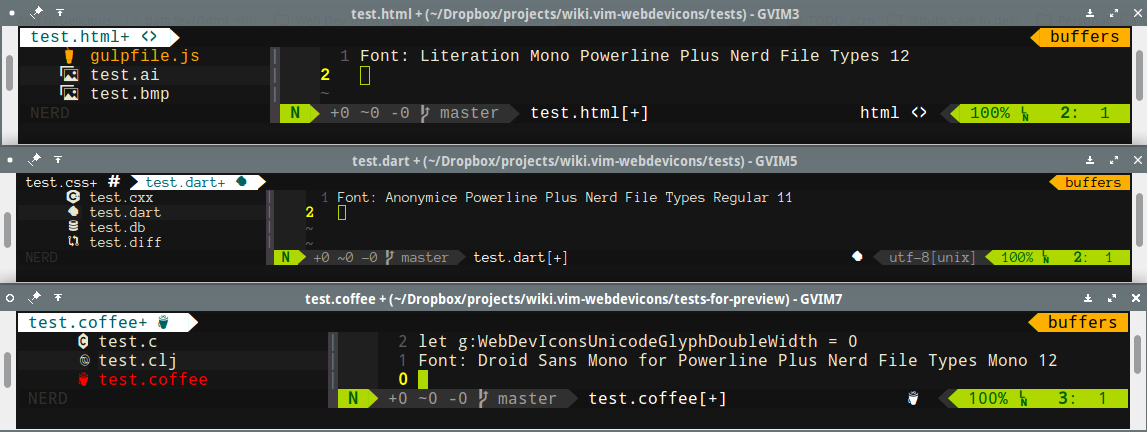


- gnome terminal

- Urxvt terminal


Help wanted: ryanoasis#32

- show developer file type glyphs from a font in various vim plugins, currently supports:
- NERDTree
- vim-airline (statusline and tabline)
- lightline.vim (statusline)
- see: lightline for setup
- Adds a global config map of characters to file extensions (or entire filenames)
- customizable and extendable filetype detections
- ability to override predefined dictionary variable
- if you are unhappy with the default glyph used you can choose your own
- supports a range of file type extensions by default:
styl, scss, htm, html, css, less, md, json, js, rb, php, py, pyc, pyd, pyo, coffee, mustache, hbs, conf, ini, yml, jpg, jpeg, bmp, png, gif, ai, twig, cpp, c++, cc, cp, cxx, cpp, c, hs, lhs, lua, sh, diff, clj, dart, db, go, scala, sln, suo, xul
- supports full filename matches, by default:
gruntfile.coffee, gruntfile.js, gruntfile.ls, gulpfile.coffee, gulpfile.js, gulpfile.ls, dropbox
- font patcher (nerd-filetype-glyphs-fonts-patcher)
- requires: python2, python-fontforge package
- example usage
./font-patcher unpatched-sample-fonts/Droid\ Sans\ Mono\ for\ Powerline.otf
by default you should not NEED to configure anything to get the basics working
- NOTE: You NEED to use one of the patched font provided or patch your own (nerd-filetype-glyphs-fonts-patcher) unless you want to configure the filetype to glyph mappings yourself for your current font
these options can be defined in your
vimrcorgvimrcthe following options are provided however for overriding
enable/disable loading the plugin (default 1)
letg:webdevicons_enable=1- enable/disable adding the flags to NERDTree (default 1)
letg:webdevicons_enable_nerdtree=1- enable/disable adding to vim-airline's tabline (default 1)
letg:webdevicons_enable_airline_tabline=1- enable/disable adding to vim-airline's statusline (default 1)
letg:webdevicons_enable_airline_statusline=1- turn on/off file node glyph decorations (not particularly useful)
letg:WebDevIconsUnicodeDecorateFileNodes=1- whether or not font is using double-width glyphs (default 1, set to 0 for single character width glyphs)
- note: does not actually switch the font or try to use the correct font, just adds a space to account for a double width glyph, you have to set the correct double width glyph font in your terminal or
guifont
- note: does not actually switch the font or try to use the correct font, just adds a space to account for a double width glyph, you have to set the correct double width glyph font in your terminal or
letg:WebDevIconsUnicodeGlyphDoubleWidth=1- whether or not to show the nerdtree brackets around flags (default 1)
letg:webdevicons_conceal_nerdtree_brackets=1- the amount of space to use after the glyph character (default ' ')
letg:WebDevIconsNerdTreeAfterGlyphPadding=''ƛis used as an example below, substitute for the glyph you actually want to usechange the default character when no match found
letg:WebDevIconsUnicodeDecorateFileNodesDefaultSymbol='ƛ'- enable folder/directory glyph flag (disabled by default with 0)
letg:WebDevIconsUnicodeDecorateFolderNodes=1- enable custom folder/directory glyph exact matching (enabled by default when g:WebDevIconsUnicodeDecorateFolderNodes is set to 1)
let WebDevIconsUnicodeDecorateFolderNodesExactMatches =1- change the default folder/directory glyph/icon
letg:WebDevIconsUnicodeDecorateFolderNodeDefaultSymbol='ƛ'- change the default dictionary mappings for file extension matches
letg:WebDevIconsUnicodeDecorateFileNodesExtensionSymbols= {}" neededletg:WebDevIconsUnicodeDecorateFileNodesExtensionSymbols['js'] ='ƛ'- change the default dictionary mappings for exact file node matches
letg:WebDevIconsUnicodeDecorateFileNodesExactSymbols= {}" neededletg:WebDevIconsUnicodeDecorateFileNodesExactSymbols['MyReallyCoolFile.okay'] ='ƛ'- add or override individual additional filetypes
letg:WebDevIconsUnicodeDecorateFileNodesExtensionSymbols= {}" neededletg:WebDevIconsUnicodeDecorateFileNodesExtensionSymbols['myext'] ='ƛ'This plugin follows the standard runtime path structure, and as such it can be installed with a variety of plugin managers:
git clone https://github.com/ryanoasis/vim-webdevicons ~/.vim/bundle/vim-webdeviconsAdd to vimrc:
NeoBundle 'ryanoasis/vim-webdevicons'And install it:
:so~/.vimrc
:NeoBundleInstall
Add to vimrc:
Plugin'ryanoasis/vim-webdevicons'
And install it:
:so~/.vimrc
:PluginInstall`
manual
copy all of the files into your
~/.vimdirectory
To add the appropriate icon to lightline, call the function WebDevIconsGetFileTypeSymbol() and/or WebDevIconsGetFileFormatSymbol() in your .vimrc. For example, you could set your sections to:
letg:lightline= {
\ 'component_function': {
\ 'filetype': 'MyFiletype',
\ 'fileformat': 'MyFileformat',
\ }
\ }
function!MyFiletype()
returnwinwidth(0) > 70 ? (strlen(&filetype) ? &filetype . '' . WebDevIconsGetFileTypeSymbol() : 'no ft') : ''endfunctionfunction!MyFileformat()
returnwinwidth(0) > 70 ? (&fileformat . '' . WebDevIconsGetFileFormatSymbol()) : ''endfunction- more filetypes to support
make sure it works properly and does not conflict with nerdtree-git-plugin- customize filetype icon colors
- more customization options in general
- more specific FAQ and Troubleshooting help
I don't want to use any of the fonts provided, I want to use font ABC
try the font patcher: nerd-filetype-glyphs-fonts-patcher
see font configuration above for more details
It isn't working
Are you using the patched font provided in the separate repo (nerd-filetype-glyphs-fonts-patcher) or are you patching your own?
NOTE: if running vim and no font set it will default to the terminal font that is set
check what the vim/gvim font is set to, from ex mode:
:setguifont?
check if the plugin is loaded (should give '1'), from ex mode:
:echo loaded_webdeviconscheck if the plugin is enabled (should give '1'), from ex mode:
:echog:webdevicons_enable
check if the plugin is enabled for NERDTree (should give '1'), from ex mode:
- this should NOT need to be set under normal circumstances
:echog:webdevicons_enable_nerdtree
check if you are able to see the characters, from ex mode:
:echog:WebDevIconsUnicodeDecorateFileNodesDefaultSymbol
if all this looks correct you may try this to see if any files show flags
- last resort, see if you can even set the default symbol and have it display anywhere (NERDTree, vim-airline's statusline, vim-airlines's tabline), from ex mode:
:letg:WebDevIconsUnicodeDecorateFileNodesDefaultSymbol='x'
How did you get color matching based on file type in nerdtree?
my current settings are from: preservim/nerdtree#201 (comment)
" NERDTress File highlightingfunction!NERDTreeHighlightFile(extension, fg, bg, guifg, guibg)
exec'autocmd FileType nerdtree highlight ' . a:extension .' ctermbg='. a:bg .' ctermfg='. a:fg .' guibg='. a:guibg .' guifg='. a:guifgexec'autocmd FileType nerdtree syn match ' . a:extension .' #^\s\+.*'. a:extension .'$#'endfunctioncallNERDTreeHighlightFile('jade', 'green', 'none', 'green', '#151515')
callNERDTreeHighlightFile('ini', 'yellow', 'none', 'yellow', '#151515')
callNERDTreeHighlightFile('md', 'blue', 'none', '#3366FF', '#151515')
callNERDTreeHighlightFile('yml', 'yellow', 'none', 'yellow', '#151515')
callNERDTreeHighlightFile('config', 'yellow', 'none', 'yellow', '#151515')
callNERDTreeHighlightFile('conf', 'yellow', 'none', 'yellow', '#151515')
callNERDTreeHighlightFile('json', 'yellow', 'none', 'yellow', '#151515')
callNERDTreeHighlightFile('html', 'yellow', 'none', 'yellow', '#151515')
callNERDTreeHighlightFile('styl', 'cyan', 'none', 'cyan', '#151515')
callNERDTreeHighlightFile('css', 'cyan', 'none', 'cyan', '#151515')
callNERDTreeHighlightFile('coffee', 'Red', 'none', 'red', '#151515')
callNERDTreeHighlightFile('js', 'Red', 'none', '#ffa500', '#151515')
callNERDTreeHighlightFile('php', 'Magenta', 'none', '#ff00ff', '#151515')
Note: If the colors still are not highlighting, try invoking such as:
autocmd VimEnter * call NERDTreeHighlightFile('jade', 'green', 'none', 'green', '#151515')
Best ways to contribute
- Star it on GitHub - if you use it and like it please at least star it :)
- Promote
- Open issues/tickets
- Submit fixes and/or improvements with Pull Requests
Like the project? Please support to ensure continued development going forward:
Contributions and pull requests are welcome.
No real formal process has been setup - just stick to general good conventions for now.
After seeing the awesome theme for Atom (seti-ui) and the awesome plugins work done for NERDTree and vim-airline and wanting something like this for Vim I decided to create my first plugin.
- vim-airline
- nerdtree
- nerdtree-git-plugin
- seti-ui
- devicons by Theodore Vorillas
- benatespina development.svg.icons
- Steve Losh

See LICENSE