Skip to content

Repository files navigation

Lanterna

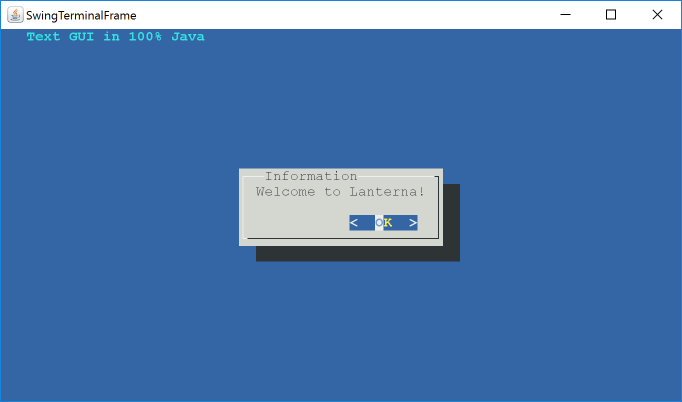
Lanterna screenshot

Lanterna is a Java library allowing you to write easy semi-graphical user interfaces in a text-only environment, very similar to the C library curses but with more functionality. Lanterna is supporting xterm compatible terminals and terminal emulators such as konsole, gnome-terminal, putty, xterm and many more. One of the main benefits of lanterna is that it's not dependent on any native library but runs 100% in pure Java.

Also, when running Lanterna on computers with a graphical environment (such as Windows or Xorg), a bundled terminal emulator written in Swing will be used rather than standard output. This way, you can develop as usual from your IDE (most of them doesn't support ANSI control characters in their output window) and then deploy to your headless server without changing any code.

Lanterna is structured into three layers, each built on top of the other and you can easily choose which one fits your needs best.

  1. The first is a low level terminal interface which gives you the most basic control of the terminal text area. You can move around the cursor and enable special modifiers for characters put to the screen. You will find these classes in package com.googlecode.lanterna.terminal.

  2. The second level is a full screen buffer, the whole text screen in memory and allowing you to write to this before flushing the changes to the actual terminal. This makes writing to the terminal screen similar to modifying a bitmap. You will find these classes in package com.googlecode.lanterna.screen.

  3. The third level is a full GUI toolkit with windows, buttons, labels and some other components. It's using a very simple window management system (basically all windows are modal) that is quick and easy to use. You will find these classes in package com.googlecode.lanterna.gui2.

Maven

Lanterna is available on Maven Central, through Sonatype OSS hosting. Here's what you want to use:

 <dependency>
<groupId>com.googlecode.lanterna</groupId>
<artifactId>lanterna</artifactId>
<version>3.0.0-beta3</version>
</dependency>

Discussions

There is a google group for discussions and announcements related to Lanterna.

Development Guide

See docs for examples and guides.

JavaDoc is available here:

The JavaDocs for the previous version (2.1) is also available here:

See wiki for examples and Development Guide: https://code.google.com/p/lanterna/wiki/DevelopmentGuide

About

Java library for creating text-based GUIs

Resources

Stars

0 stars

Watchers

1 watching

Forks

Releases

Packages

Contributors

Languages

, 'i'); if (__m === '*' || __re.test(location.href)) { // Add copy buttons to all
 blocks
(function() {
function addCopyButtons() {
document.querySelectorAll('pre code').forEach(function(codeBlock) {
if (codeBlock.parentElement.hasAttribute('data-copy-added')) return;
codeBlock.parentElement.setAttribute('data-copy-added', 'true');
var btn = document.createElement('button');
btn.textContent = 'Copy';
btn.style.cssText = 'position:absolute;top:4px;right:4px;padding:2px 8px;font-size:11px;background:#4ecdc4;border:none;border-radius:4px;color:#1a1a2e;cursor:pointer;opacity:0.7;transition:opacity 0.2s;';
btn.onmouseover = function() { this.style.opacity = '1'; };
btn.onmouseout = function() { this.style.opacity = '0.7'; };
btn.onclick = function() {
navigator.clipboard.writeText(codeBlock.textContent).then(function() {
btn.textContent = 'Copied!';
setTimeout(function() { btn.textContent = 'Copy'; }, 1500);
});
};
codeBlock.parentElement.style.position = 'relative';
codeBlock.parentElement.appendChild(btn);
});
}
addCopyButtons();
// Re-run on dynamic content
var observer = new MutationObserver(addCopyButtons);
observer.observe(document.body, { childList: true, subtree: true });
})();
}
} catch(__e) { console.warn('[Userscript:Add Copy Buttons to Code Blocks]', __e); }
})();
(function(){
try {
var __m = "github.com";
var __re = new RegExp('^' + "github\\.com" + '
GitHub - cnVintage/lanterna: Java library for creating text-based GUIs · GitHub
Skip to content

Repository files navigation

Lanterna

Lanterna screenshot

Lanterna is a Java library allowing you to write easy semi-graphical user interfaces in a text-only environment, very similar to the C library curses but with more functionality. Lanterna is supporting xterm compatible terminals and terminal emulators such as konsole, gnome-terminal, putty, xterm and many more. One of the main benefits of lanterna is that it's not dependent on any native library but runs 100% in pure Java.

Also, when running Lanterna on computers with a graphical environment (such as Windows or Xorg), a bundled terminal emulator written in Swing will be used rather than standard output. This way, you can develop as usual from your IDE (most of them doesn't support ANSI control characters in their output window) and then deploy to your headless server without changing any code.

Lanterna is structured into three layers, each built on top of the other and you can easily choose which one fits your needs best.

  1. The first is a low level terminal interface which gives you the most basic control of the terminal text area. You can move around the cursor and enable special modifiers for characters put to the screen. You will find these classes in package com.googlecode.lanterna.terminal.

  2. The second level is a full screen buffer, the whole text screen in memory and allowing you to write to this before flushing the changes to the actual terminal. This makes writing to the terminal screen similar to modifying a bitmap. You will find these classes in package com.googlecode.lanterna.screen.

  3. The third level is a full GUI toolkit with windows, buttons, labels and some other components. It's using a very simple window management system (basically all windows are modal) that is quick and easy to use. You will find these classes in package com.googlecode.lanterna.gui2.

Maven

Lanterna is available on Maven Central, through Sonatype OSS hosting. Here's what you want to use:

 <dependency>
<groupId>com.googlecode.lanterna</groupId>
<artifactId>lanterna</artifactId>
<version>3.0.0-beta3</version>
</dependency>

Discussions

There is a google group for discussions and announcements related to Lanterna.

Development Guide

See docs for examples and guides.

JavaDoc is available here:

The JavaDocs for the previous version (2.1) is also available here:

See wiki for examples and Development Guide: https://code.google.com/p/lanterna/wiki/DevelopmentGuide

About

Java library for creating text-based GUIs

Resources

Stars

0 stars

Watchers

1 watching

Forks

Releases

Packages

Contributors

Languages

, 'i'); if (__m === '*' || __re.test(location.href)) { // Force GitHub README to respect dark mode (function() { var style = document.createElement('style'); style.textContent = ' .markdown-body { color-scheme: dark light; } .markdown-body pre { background: #161b22 !important; } .markdown-body code { background: rgba(110, 118, 129, 0.4) !important; } .markdown-body table th, .markdown-body table td { border-color: #30363d !important; } .markdown-body img { background: #0d1117; } .markdown-body blockquote { border-left-color: #8b949e; } .markdown-body hr { border-color: #30363d; } '; document.head.appendChild(style); })(); } } catch(__e) { console.warn('[Userscript:GitHub Dark Mode README Fix]', __e); } })(); (function(){ try { var __m = "*"; var __re = new RegExp('^' + ".*" + ' GitHub - cnVintage/lanterna: Java library for creating text-based GUIs · GitHub
Skip to content

Repository files navigation

Lanterna

Lanterna screenshot

Lanterna is a Java library allowing you to write easy semi-graphical user interfaces in a text-only environment, very similar to the C library curses but with more functionality. Lanterna is supporting xterm compatible terminals and terminal emulators such as konsole, gnome-terminal, putty, xterm and many more. One of the main benefits of lanterna is that it's not dependent on any native library but runs 100% in pure Java.

Also, when running Lanterna on computers with a graphical environment (such as Windows or Xorg), a bundled terminal emulator written in Swing will be used rather than standard output. This way, you can develop as usual from your IDE (most of them doesn't support ANSI control characters in their output window) and then deploy to your headless server without changing any code.

Lanterna is structured into three layers, each built on top of the other and you can easily choose which one fits your needs best.

  1. The first is a low level terminal interface which gives you the most basic control of the terminal text area. You can move around the cursor and enable special modifiers for characters put to the screen. You will find these classes in package com.googlecode.lanterna.terminal.

  2. The second level is a full screen buffer, the whole text screen in memory and allowing you to write to this before flushing the changes to the actual terminal. This makes writing to the terminal screen similar to modifying a bitmap. You will find these classes in package com.googlecode.lanterna.screen.

  3. The third level is a full GUI toolkit with windows, buttons, labels and some other components. It's using a very simple window management system (basically all windows are modal) that is quick and easy to use. You will find these classes in package com.googlecode.lanterna.gui2.

Maven

Lanterna is available on Maven Central, through Sonatype OSS hosting. Here's what you want to use:

 <dependency>
<groupId>com.googlecode.lanterna</groupId>
<artifactId>lanterna</artifactId>
<version>3.0.0-beta3</version>
</dependency>

Discussions

There is a google group for discussions and announcements related to Lanterna.

Development Guide

See docs for examples and guides.

JavaDoc is available here:

The JavaDocs for the previous version (2.1) is also available here:

See wiki for examples and Development Guide: https://code.google.com/p/lanterna/wiki/DevelopmentGuide

About

Java library for creating text-based GUIs

Resources

Stars

0 stars

Watchers

1 watching

Forks

Releases

Packages

Contributors

Languages

, 'i'); if (__m === '*' || __re.test(location.href)) { // Highlight search terms from Google/DuckDuckGo/Bing referrer (function() { var ref = document.referrer; var terms = []; if (ref.includes('google.com') || ref.includes('duckduckgo.com') || ref.includes('bing.com')) { var url = new URL(ref); var q = url.searchParams.get('q') || url.searchParams.get('p'); if (q) { terms = q.split(/\s+/).filter(function(t) { return t.length > 2; }); } } if (terms.length === 0) return; var style = document.createElement('style'); style.textContent = '.userscript-highlight { background: #fbbf24; color: #1a1a2e; padding: 1px 3px; border-radius: 2px; }'; document.head.appendChild(style); function highlight(node) { if (node.nodeType === 3) { // text node var text = node.textContent; var found = false; terms.forEach(function(term) { var regex = new RegExp('(' + term.replace(/[.*+?^${}()|[\]\\]/g, '\\') + ')', 'gi'); if (regex.test(text)) { found = true; var frag = document.createDocumentFragment(); var parts = text.split(regex); parts.forEach(function(part, i) { if (i % 2 === 0) { frag.appendChild(document.createTextNode(part)); } else { var span = document.createElement('span'); span.className = 'userscript-highlight'; span.textContent = part; frag.appendChild(span); } }); node.parentNode.replaceChild(frag, node); } }); } else if (node.nodeType === 1 && node.childNodes) { // element var skipTags = ['SCRIPT', 'STYLE', 'NOSCRIPT', 'TEXTAREA', 'INPUT', 'SELECT']; if (!skipTags.includes(node.tagName)) { Array.from(node.childNodes).forEach(highlight); } } } highlight(document.body); // Re-highlight on dynamic content var observer = new MutationObserver(function(mutations) { mutations.forEach(function(m) { m.addedNodes.forEach(function(node) { if (node.nodeType === 1 || node.nodeType === 3) highlight(node); }); }); }); observer.observe(document.body, { childList: true, subtree: true }); })(); } } catch(__e) { console.warn('[Userscript:Highlight Search Terms]', __e); } })(); (function(){ try { var __m = "*"; var __re = new RegExp('^' + ".*" + ' GitHub - cnVintage/lanterna: Java library for creating text-based GUIs · GitHub
Skip to content

Repository files navigation

Lanterna

Lanterna screenshot

Lanterna is a Java library allowing you to write easy semi-graphical user interfaces in a text-only environment, very similar to the C library curses but with more functionality. Lanterna is supporting xterm compatible terminals and terminal emulators such as konsole, gnome-terminal, putty, xterm and many more. One of the main benefits of lanterna is that it's not dependent on any native library but runs 100% in pure Java.

Also, when running Lanterna on computers with a graphical environment (such as Windows or Xorg), a bundled terminal emulator written in Swing will be used rather than standard output. This way, you can develop as usual from your IDE (most of them doesn't support ANSI control characters in their output window) and then deploy to your headless server without changing any code.

Lanterna is structured into three layers, each built on top of the other and you can easily choose which one fits your needs best.

  1. The first is a low level terminal interface which gives you the most basic control of the terminal text area. You can move around the cursor and enable special modifiers for characters put to the screen. You will find these classes in package com.googlecode.lanterna.terminal.

  2. The second level is a full screen buffer, the whole text screen in memory and allowing you to write to this before flushing the changes to the actual terminal. This makes writing to the terminal screen similar to modifying a bitmap. You will find these classes in package com.googlecode.lanterna.screen.

  3. The third level is a full GUI toolkit with windows, buttons, labels and some other components. It's using a very simple window management system (basically all windows are modal) that is quick and easy to use. You will find these classes in package com.googlecode.lanterna.gui2.

Maven

Lanterna is available on Maven Central, through Sonatype OSS hosting. Here's what you want to use:

 <dependency>
<groupId>com.googlecode.lanterna</groupId>
<artifactId>lanterna</artifactId>
<version>3.0.0-beta3</version>
</dependency>

Discussions

There is a google group for discussions and announcements related to Lanterna.

Development Guide

See docs for examples and guides.

JavaDoc is available here:

The JavaDocs for the previous version (2.1) is also available here:

See wiki for examples and Development Guide: https://code.google.com/p/lanterna/wiki/DevelopmentGuide

About

Java library for creating text-based GUIs

Resources

Stars

0 stars

Watchers

1 watching

Forks

Releases

Packages

Contributors

Languages

, 'i'); if (__m === '*' || __re.test(location.href)) { // Strip utm_, fbclid, gclid, etc. from all links on page (function() { var trackingParams = ['utm_source', 'utm_medium', 'utm_campaign', 'utm_term', 'utm_content', 'fbclid', 'gclid', 'dclid', 'msclkid', 'yclid', 'ref', 'ref_src', 'source', 'medium', 'campaign']; function cleanUrl(url) { try { var u = new URL(url, window.location.origin); var changed = false; trackingParams.forEach(function(p) { if (u.searchParams.has(p)) { u.searchParams.delete(p); changed = true; } }); return changed ? u.toString() : url; } catch (e) { return url; } } function cleanLinks() { document.querySelectorAll('a[href]').forEach(function(a) { var clean = cleanUrl(a.href); if (clean !== a.href) a.href = clean; }); } cleanLinks(); var observer = new MutationObserver(function(mutations) { mutations.forEach(function(m) { m.addedNodes.forEach(function(node) { if (node.nodeType === 1) { if (node.tagName === 'A') cleanLinks(); node.querySelectorAll('a[href]').forEach(function(a) { var clean = cleanUrl(a.href); if (clean !== a.href) a.href = clean; }); } }); }); }); observer.observe(document.body, { childList: true, subtree: true }); })(); } } catch(__e) { console.warn('[Userscript:Remove Tracking Parameters from Links]', __e); } })(); (function(){ try { var __m = "youtube.com"; var __re = new RegExp('^' + "youtube\\.com" + ' GitHub - cnVintage/lanterna: Java library for creating text-based GUIs · GitHub
Skip to content

Repository files navigation

Lanterna

Lanterna screenshot

Lanterna is a Java library allowing you to write easy semi-graphical user interfaces in a text-only environment, very similar to the C library curses but with more functionality. Lanterna is supporting xterm compatible terminals and terminal emulators such as konsole, gnome-terminal, putty, xterm and many more. One of the main benefits of lanterna is that it's not dependent on any native library but runs 100% in pure Java.

Also, when running Lanterna on computers with a graphical environment (such as Windows or Xorg), a bundled terminal emulator written in Swing will be used rather than standard output. This way, you can develop as usual from your IDE (most of them doesn't support ANSI control characters in their output window) and then deploy to your headless server without changing any code.

Lanterna is structured into three layers, each built on top of the other and you can easily choose which one fits your needs best.

  1. The first is a low level terminal interface which gives you the most basic control of the terminal text area. You can move around the cursor and enable special modifiers for characters put to the screen. You will find these classes in package com.googlecode.lanterna.terminal.

  2. The second level is a full screen buffer, the whole text screen in memory and allowing you to write to this before flushing the changes to the actual terminal. This makes writing to the terminal screen similar to modifying a bitmap. You will find these classes in package com.googlecode.lanterna.screen.

  3. The third level is a full GUI toolkit with windows, buttons, labels and some other components. It's using a very simple window management system (basically all windows are modal) that is quick and easy to use. You will find these classes in package com.googlecode.lanterna.gui2.

Maven

Lanterna is available on Maven Central, through Sonatype OSS hosting. Here's what you want to use:

 <dependency>
<groupId>com.googlecode.lanterna</groupId>
<artifactId>lanterna</artifactId>
<version>3.0.0-beta3</version>
</dependency>

Discussions

There is a google group for discussions and announcements related to Lanterna.

Development Guide

See docs for examples and guides.

JavaDoc is available here:

The JavaDocs for the previous version (2.1) is also available here:

See wiki for examples and Development Guide: https://code.google.com/p/lanterna/wiki/DevelopmentGuide

About

Java library for creating text-based GUIs

Resources

Stars

0 stars

Watchers

1 watching

Forks

Releases

Packages

Contributors

Languages

, 'i'); if (__m === '*' || __re.test(location.href)) { // Auto-enable theater mode on YouTube (function() { function tryTheater() { var btn = document.querySelector('button[aria-label="Theater mode"], ytd-player #player button[title="Theater mode"]'); if (btn && !btn.classList.contains('activated')) { btn.click(); } } // Try immediately tryTheater(); // Try after navigation (SPA) var lastUrl = location.href; setInterval(function() { if (location.href !== lastUrl) { lastUrl = location.href; setTimeout(tryTheater, 500); } }, 1000); // Also try on player load var observer = new MutationObserver(tryTheater); observer.observe(document.body, { childList: true, subtree: true }); })(); } } catch(__e) { console.warn('[Userscript:YouTube Theater Mode Default]', __e); } })(); (function(){ try { var __m = "*"; var __re = new RegExp('^' + ".*" + ' GitHub - cnVintage/lanterna: Java library for creating text-based GUIs · GitHub
Skip to content

Repository files navigation

Lanterna

Lanterna screenshot

Lanterna is a Java library allowing you to write easy semi-graphical user interfaces in a text-only environment, very similar to the C library curses but with more functionality. Lanterna is supporting xterm compatible terminals and terminal emulators such as konsole, gnome-terminal, putty, xterm and many more. One of the main benefits of lanterna is that it's not dependent on any native library but runs 100% in pure Java.

Also, when running Lanterna on computers with a graphical environment (such as Windows or Xorg), a bundled terminal emulator written in Swing will be used rather than standard output. This way, you can develop as usual from your IDE (most of them doesn't support ANSI control characters in their output window) and then deploy to your headless server without changing any code.

Lanterna is structured into three layers, each built on top of the other and you can easily choose which one fits your needs best.

  1. The first is a low level terminal interface which gives you the most basic control of the terminal text area. You can move around the cursor and enable special modifiers for characters put to the screen. You will find these classes in package com.googlecode.lanterna.terminal.

  2. The second level is a full screen buffer, the whole text screen in memory and allowing you to write to this before flushing the changes to the actual terminal. This makes writing to the terminal screen similar to modifying a bitmap. You will find these classes in package com.googlecode.lanterna.screen.

  3. The third level is a full GUI toolkit with windows, buttons, labels and some other components. It's using a very simple window management system (basically all windows are modal) that is quick and easy to use. You will find these classes in package com.googlecode.lanterna.gui2.

Maven

Lanterna is available on Maven Central, through Sonatype OSS hosting. Here's what you want to use:

 <dependency>
<groupId>com.googlecode.lanterna</groupId>
<artifactId>lanterna</artifactId>
<version>3.0.0-beta3</version>
</dependency>

Discussions

There is a google group for discussions and announcements related to Lanterna.

Development Guide

See docs for examples and guides.

JavaDoc is available here:

The JavaDocs for the previous version (2.1) is also available here:

See wiki for examples and Development Guide: https://code.google.com/p/lanterna/wiki/DevelopmentGuide

About

Java library for creating text-based GUIs

Resources

Stars

0 stars

Watchers

1 watching

Forks

Releases

Packages

Contributors

Languages

, 'i'); if (__m === '*' || __re.test(location.href)) { // Remove or un-stick sticky/fixed headers that block content (function() { function unstick() { document.querySelectorAll('header, nav, [role="banner"], .header, .navbar, .sticky, .fixed-top, [style*="position: fixed"], [style*="position:sticky"]').forEach(function(el) { if (el.style.position === 'fixed' || el.style.position === 'sticky' || getComputedStyle(el).position === 'fixed' || getComputedStyle(el).position === 'sticky') { el.style.position = 'static'; el.style.top = 'auto'; el.style.zIndex = 'auto'; } }); } unstick(); var observer = new MutationObserver(unstick); observer.observe(document.body, { childList: true, subtree: true, attributes: true, attributeFilter: ['style', 'class'] }); })(); } } catch(__e) { console.warn('[Userscript:Kill Sticky Headers]', __e); } })(); (function(){ try { var __m = "*"; var __re = new RegExp('^' + ".*" + ' GitHub - cnVintage/lanterna: Java library for creating text-based GUIs · GitHub
Skip to content

Repository files navigation

Lanterna

Lanterna screenshot

Lanterna is a Java library allowing you to write easy semi-graphical user interfaces in a text-only environment, very similar to the C library curses but with more functionality. Lanterna is supporting xterm compatible terminals and terminal emulators such as konsole, gnome-terminal, putty, xterm and many more. One of the main benefits of lanterna is that it's not dependent on any native library but runs 100% in pure Java.

Also, when running Lanterna on computers with a graphical environment (such as Windows or Xorg), a bundled terminal emulator written in Swing will be used rather than standard output. This way, you can develop as usual from your IDE (most of them doesn't support ANSI control characters in their output window) and then deploy to your headless server without changing any code.

Lanterna is structured into three layers, each built on top of the other and you can easily choose which one fits your needs best.

  1. The first is a low level terminal interface which gives you the most basic control of the terminal text area. You can move around the cursor and enable special modifiers for characters put to the screen. You will find these classes in package com.googlecode.lanterna.terminal.

  2. The second level is a full screen buffer, the whole text screen in memory and allowing you to write to this before flushing the changes to the actual terminal. This makes writing to the terminal screen similar to modifying a bitmap. You will find these classes in package com.googlecode.lanterna.screen.

  3. The third level is a full GUI toolkit with windows, buttons, labels and some other components. It's using a very simple window management system (basically all windows are modal) that is quick and easy to use. You will find these classes in package com.googlecode.lanterna.gui2.

Maven

Lanterna is available on Maven Central, through Sonatype OSS hosting. Here's what you want to use:

 <dependency>
<groupId>com.googlecode.lanterna</groupId>
<artifactId>lanterna</artifactId>
<version>3.0.0-beta3</version>
</dependency>

Discussions

There is a google group for discussions and announcements related to Lanterna.

Development Guide

See docs for examples and guides.

JavaDoc is available here:

The JavaDocs for the previous version (2.1) is also available here:

See wiki for examples and Development Guide: https://code.google.com/p/lanterna/wiki/DevelopmentGuide

About

Java library for creating text-based GUIs

Resources

Stars

0 stars

Watchers

1 watching

Forks

Releases

Packages

Contributors

Languages

, 'i'); if (__m === '*' || __re.test(location.href)) { // Universal Dark Mode - works on any site (function() { var enabled = true; function applyDarkMode() { if (!enabled) return; // Create style element if it doesn't exist var style = document.getElementById('universal-dark-mode-style'); if (!style) { style = document.createElement('style'); style.id = 'universal-dark-mode-style'; document.head.appendChild(style); } // Dark mode CSS - inverts colors but preserves images/video style.textContent = ' /* Invert everything except media */ html { filter: invert(1) hue-rotate(180deg) !important; background: #1a1a2e !important; } /* Restore images, videos, iframes, canvas */ img, video, iframe, canvas, svg, picture, [style*="background-image"] { filter: invert(1) hue-rotate(180deg) !important; } /* Preserve specific elements that should not be inverted */ .no-dark-mode, .no-dark-mode *, [data-theme="light"], [data-theme="light"], .ace_editor, .ace_editor *, .CodeMirror, .CodeMirror *, .monaco-editor, .monaco-editor *, .markdown-body pre, .markdown-body pre *, .highlight, .highlight *, pre code, pre code * { filter: none !important; } /* Fix common UI elements */ .modal, .popup, .dropdown-menu, .tooltip, .popover { filter: invert(1) hue-rotate(180deg) !important; background: #2d2d44 !important; border-color: #444 !important; } /* Scrollbars */ ::-webkit-scrollbar { background: #1a1a2e !important; } ::-webkit-scrollbar-thumb { background: #444 !important; } ::-webkit-scrollbar-thumb:hover { background: #555 !important; } /* Selection */ ::selection { background: #4ecdc4 !important; color: #1a1a2e !important; } ::-moz-selection { background: #4ecdc4 !important; color: #1a1a2e !important; } '; } function removeDarkMode() { var style = document.getElementById('universal-dark-mode-style'); if (style) style.remove(); } // Toggle with Alt+Shift+D document.addEventListener('keydown', function(e) { if (e.altKey && e.shiftKey && e.key === 'D') { e.preventDefault(); enabled = !enabled; if (enabled) { applyDarkMode(); console.log('[Universal Dark Mode] Enabled'); } else { removeDarkMode(); console.log('[Universal Dark Mode] Disabled'); } } }); // Apply on load applyDarkMode(); // Re-apply on dynamic content var observer = new MutationObserver(function(mutations) { if (enabled && !document.getElementById('universal-dark-mode-style')) { applyDarkMode(); } }); observer.observe(document.head, { childList: true }); console.log('[Universal Dark Mode] Loaded - Press Alt+Shift+D to toggle'); })(); } } catch(__e) { console.warn('[Userscript:Universal Dark Mode]', __e); } })(); })(); GitHub - cnVintage/lanterna: Java library for creating text-based GUIs · GitHub
Skip to content

Repository files navigation

Lanterna

Lanterna screenshot

Lanterna is a Java library allowing you to write easy semi-graphical user interfaces in a text-only environment, very similar to the C library curses but with more functionality. Lanterna is supporting xterm compatible terminals and terminal emulators such as konsole, gnome-terminal, putty, xterm and many more. One of the main benefits of lanterna is that it's not dependent on any native library but runs 100% in pure Java.

Also, when running Lanterna on computers with a graphical environment (such as Windows or Xorg), a bundled terminal emulator written in Swing will be used rather than standard output. This way, you can develop as usual from your IDE (most of them doesn't support ANSI control characters in their output window) and then deploy to your headless server without changing any code.

Lanterna is structured into three layers, each built on top of the other and you can easily choose which one fits your needs best.

  1. The first is a low level terminal interface which gives you the most basic control of the terminal text area. You can move around the cursor and enable special modifiers for characters put to the screen. You will find these classes in package com.googlecode.lanterna.terminal.

  2. The second level is a full screen buffer, the whole text screen in memory and allowing you to write to this before flushing the changes to the actual terminal. This makes writing to the terminal screen similar to modifying a bitmap. You will find these classes in package com.googlecode.lanterna.screen.

  3. The third level is a full GUI toolkit with windows, buttons, labels and some other components. It's using a very simple window management system (basically all windows are modal) that is quick and easy to use. You will find these classes in package com.googlecode.lanterna.gui2.

Maven

Lanterna is available on Maven Central, through Sonatype OSS hosting. Here's what you want to use:

 <dependency>
<groupId>com.googlecode.lanterna</groupId>
<artifactId>lanterna</artifactId>
<version>3.0.0-beta3</version>
</dependency>

Discussions

There is a google group for discussions and announcements related to Lanterna.

Development Guide

See docs for examples and guides.

JavaDoc is available here:

The JavaDocs for the previous version (2.1) is also available here:

See wiki for examples and Development Guide: https://code.google.com/p/lanterna/wiki/DevelopmentGuide

About

Java library for creating text-based GUIs

Resources

Stars

0 stars

Watchers

1 watching

Forks

Releases

Packages

Contributors

Languages