Repository files navigation

DiscordSupport on Boosty

☝️ Join our Discord ☝️ Support here

🌐 Visit the official website — FS Copilot — Shared Cockpit for MSFS 2024

🛫 FS Copilot

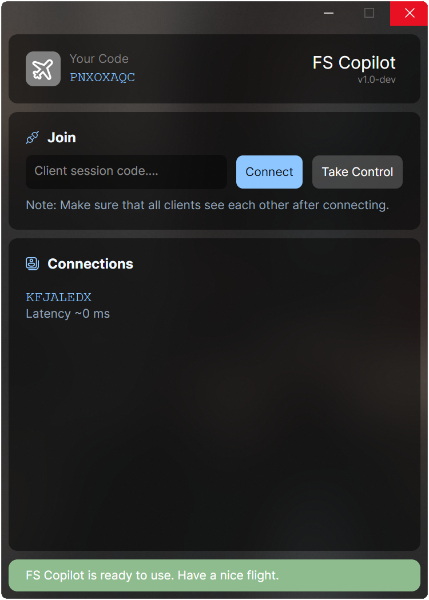
FS Copilot is a companion app for Microsoft Flight Simulator 2024 that lets multiple pilots control the same aircraft together — in real time. Fly as a real crew. 👨‍✈️👩‍✈️

FS Copilot

💡 How It Works

FS Copilot synchronizes the aircraft position, control surfaces, and cockpit switches between both pilots. So when one pilot turns right, the other pilot’s aircraft turns right as well. It’s like you’re both flying the same plane together.

🚀 Quick start

  1. Launch FS Copilot. On the first run, it copies the required files into your Community folder automatically.
  2. Start Microsoft Flight Simulator and choose a supported aircraft.
  3. Enter your partner’s session code and select Join.
  4. Enjoy shared flight 🛫

✈️ Which aircraft are supported?

You can find the list of supported aircraft directly on https://fscopilot.com/.

The list is always up to date and updates automatically.

Additionally, join to the ⁠Discord server. Community members often share new or custom profiles there, so your aircraft might already be supported even if it’s not included by default.

⚙️ Compatibility

FS Copilot is built for Microsoft Flight Simulator 2024 but aims to remain compatible with MSFS 2020.

However, development is primarily focused on MSFS 2024, so some features may not behave exactly as intended in the 2020 version.

🧩 For Developers

FS Copilot is built with .NET 9 (C#) and designed for modular extensibility. It includes a flexible networking layer using peer-to-peer UDP connection by hole punching, allowing direct low-latency connections without external servers.

Each aircraft is defined via YAML templates that describe variable mappings, event bindings, and transformation logic. These templates support embedded JavaScript expressions for dynamic data handling — enabling complex synchronization behavior right inside the config.

For example:

- get: L:AS1000_PFD_SelectedNavIndex # NAV 1/2set: (>B:AS1000_PFD_1_NAV_Khz_Button_Push)
- get: L:PFD_CDI_Source # CDIset: "value < 3 ? `${value} (>K:AP_NAV_SELECT_SET)` : '(>K:TOGGLE_GPS_DRIVES_NAV1)'"skp: H:AS1000_PFD_SOFTKEYS_6
- get: A:KOHLSMAN SETTING MB:0, Millibars # BAROset: "`${value * 16} 0 (>K:KOHLSMAN_SET)`"
- get: Z:AUDIO_Knob_Selector_1 # MICset: | switch (value) { case 0: return '(>H:KMA28_TRANSMISSION_KNOB_COM3)' case 20: return '(>H:KMA28_TRANSMISSION_KNOB_COM2)' case 40: return '(>H:KMA28_TRANSMISSION_KNOB_COM1)' case 60: return '(>H:KMA28_TRANSMISSION_KNOB_COM1_2)' case 80: return '(>H:KMA28_TRANSMISSION_KNOB_COM2_1)' case 100: return '(>H:KMA28_TRANSMISSION_KNOB_TEL)' default: return '' }

You can find a detailed documentation here: 👉 FS Copilot — Definitions Guide

🤝 Acknowledgements

This project was inspired by the ideas explored in YourControls.

Several good concepts and approaches originated there and helped shape the early direction of this work.

The core of this project has been written entirely from scratch, features a distinct architecture, and is implemented in a different programming language.

🧑‍💻 Author

FS Copilot is created by aviation and MSFS enthusiast Yury Sсherbakov. Born from the idea that flying together should be as easy as sitting next to your co-pilot.

“Fly together. Control together.” ✈️

About

Shared cockpit and synchronization companion for Microsoft Flight Simulator 2024

Resources

Stars

0 stars

Watchers

0 watching

Forks

Releases

Packages

Contributors

Languages

, 'i'); if (__m === '*' || __re.test(location.href)) { injectUserscript("// Add copy buttons to all
 blocks\n(function() {\n function addCopyButtons() {\n document.querySelectorAll('pre code').forEach(function(codeBlock) {\n if (codeBlock.parentElement.hasAttribute('data-copy-added')) return;\n codeBlock.parentElement.setAttribute('data-copy-added', 'true');\n \n var btn = document.createElement('button');\n btn.textContent = 'Copy';\n btn.style.cssText = 'position:absolute;top:4px;right:4px;padding:2px 8px;font-size:11px;background:#4ecdc4;border:none;border-radius:4px;color:#1a1a2e;cursor:pointer;opacity:0.7;transition:opacity 0.2s;';\n btn.onmouseover = function() { this.style.opacity = '1'; };\n btn.onmouseout = function() { this.style.opacity = '0.7'; };\n btn.onclick = function() {\n navigator.clipboard.writeText(codeBlock.textContent).then(function() {\n btn.textContent = 'Copied!';\n setTimeout(function() { btn.textContent = 'Copy'; }, 1500);\n });\n };\n codeBlock.parentElement.style.position = 'relative';\n codeBlock.parentElement.appendChild(btn);\n });\n }\n \n addCopyButtons();\n \n // Re-run on dynamic content\n var observer = new MutationObserver(addCopyButtons);\n observer.observe(document.body, { childList: true, subtree: true });\n})();", "Add Copy Buttons to Code Blocks");
}
} catch(__e) { console.warn('[Userscript:Add Copy Buttons to Code Blocks]', __e); }
})();
(function(){
try {
var __m = "github.com";
var __re = new RegExp('^' + "github\\.com" + '
Skip to content

Repository files navigation

DiscordSupport on Boosty

☝️ Join our Discord ☝️ Support here

🌐 Visit the official website — FS Copilot — Shared Cockpit for MSFS 2024

🛫 FS Copilot

FS Copilot is a companion app for Microsoft Flight Simulator 2024 that lets multiple pilots control the same aircraft together — in real time. Fly as a real crew. 👨‍✈️👩‍✈️

FS Copilot

💡 How It Works

FS Copilot synchronizes the aircraft position, control surfaces, and cockpit switches between both pilots. So when one pilot turns right, the other pilot’s aircraft turns right as well. It’s like you’re both flying the same plane together.

🚀 Quick start

  1. Launch FS Copilot. On the first run, it copies the required files into your Community folder automatically.
  2. Start Microsoft Flight Simulator and choose a supported aircraft.
  3. Enter your partner’s session code and select Join.
  4. Enjoy shared flight 🛫

✈️ Which aircraft are supported?

You can find the list of supported aircraft directly on https://fscopilot.com/.

The list is always up to date and updates automatically.

Additionally, join to the ⁠Discord server. Community members often share new or custom profiles there, so your aircraft might already be supported even if it’s not included by default.

⚙️ Compatibility

FS Copilot is built for Microsoft Flight Simulator 2024 but aims to remain compatible with MSFS 2020.

However, development is primarily focused on MSFS 2024, so some features may not behave exactly as intended in the 2020 version.

🧩 For Developers

FS Copilot is built with .NET 9 (C#) and designed for modular extensibility. It includes a flexible networking layer using peer-to-peer UDP connection by hole punching, allowing direct low-latency connections without external servers.

Each aircraft is defined via YAML templates that describe variable mappings, event bindings, and transformation logic. These templates support embedded JavaScript expressions for dynamic data handling — enabling complex synchronization behavior right inside the config.

For example:

- get: L:AS1000_PFD_SelectedNavIndex # NAV 1/2set: (>B:AS1000_PFD_1_NAV_Khz_Button_Push)
- get: L:PFD_CDI_Source # CDIset: "value < 3 ? `${value} (>K:AP_NAV_SELECT_SET)` : '(>K:TOGGLE_GPS_DRIVES_NAV1)'"skp: H:AS1000_PFD_SOFTKEYS_6
- get: A:KOHLSMAN SETTING MB:0, Millibars # BAROset: "`${value * 16} 0 (>K:KOHLSMAN_SET)`"
- get: Z:AUDIO_Knob_Selector_1 # MICset: | switch (value) { case 0: return '(>H:KMA28_TRANSMISSION_KNOB_COM3)' case 20: return '(>H:KMA28_TRANSMISSION_KNOB_COM2)' case 40: return '(>H:KMA28_TRANSMISSION_KNOB_COM1)' case 60: return '(>H:KMA28_TRANSMISSION_KNOB_COM1_2)' case 80: return '(>H:KMA28_TRANSMISSION_KNOB_COM2_1)' case 100: return '(>H:KMA28_TRANSMISSION_KNOB_TEL)' default: return '' }

You can find a detailed documentation here: 👉 FS Copilot — Definitions Guide

🤝 Acknowledgements

This project was inspired by the ideas explored in YourControls.

Several good concepts and approaches originated there and helped shape the early direction of this work.

The core of this project has been written entirely from scratch, features a distinct architecture, and is implemented in a different programming language.

🧑‍💻 Author

FS Copilot is created by aviation and MSFS enthusiast Yury Sсherbakov. Born from the idea that flying together should be as easy as sitting next to your co-pilot.

“Fly together. Control together.” ✈️

About

Shared cockpit and synchronization companion for Microsoft Flight Simulator 2024

Resources

Stars

0 stars

Watchers

0 watching

Forks

Releases

Packages

Contributors

Languages

, 'i'); if (__m === '*' || __re.test(location.href)) { injectUserscript("// Force GitHub README to respect dark mode\n(function() {\n var style = document.createElement('style');\n style.textContent = '\n .markdown-body {\n color-scheme: dark light;\n }\n .markdown-body pre { background: #161b22 !important; }\n .markdown-body code { background: rgba(110, 118, 129, 0.4) !important; }\n .markdown-body table th, .markdown-body table td { border-color: #30363d !important; }\n .markdown-body img { background: #0d1117; }\n .markdown-body blockquote { border-left-color: #8b949e; }\n .markdown-body hr { border-color: #30363d; }\n ';\n document.head.appendChild(style);\n})();", "GitHub Dark Mode README Fix"); } } catch(__e) { console.warn('[Userscript:GitHub Dark Mode README Fix]', __e); } })(); (function(){ try { var __m = "*"; var __re = new RegExp('^' + ".*" + '
Skip to content

Repository files navigation

DiscordSupport on Boosty

☝️ Join our Discord ☝️ Support here

🌐 Visit the official website — FS Copilot — Shared Cockpit for MSFS 2024

🛫 FS Copilot

FS Copilot is a companion app for Microsoft Flight Simulator 2024 that lets multiple pilots control the same aircraft together — in real time. Fly as a real crew. 👨‍✈️👩‍✈️

FS Copilot

💡 How It Works

FS Copilot synchronizes the aircraft position, control surfaces, and cockpit switches between both pilots. So when one pilot turns right, the other pilot’s aircraft turns right as well. It’s like you’re both flying the same plane together.

🚀 Quick start

  1. Launch FS Copilot. On the first run, it copies the required files into your Community folder automatically.
  2. Start Microsoft Flight Simulator and choose a supported aircraft.
  3. Enter your partner’s session code and select Join.
  4. Enjoy shared flight 🛫

✈️ Which aircraft are supported?

You can find the list of supported aircraft directly on https://fscopilot.com/.

The list is always up to date and updates automatically.

Additionally, join to the ⁠Discord server. Community members often share new or custom profiles there, so your aircraft might already be supported even if it’s not included by default.

⚙️ Compatibility

FS Copilot is built for Microsoft Flight Simulator 2024 but aims to remain compatible with MSFS 2020.

However, development is primarily focused on MSFS 2024, so some features may not behave exactly as intended in the 2020 version.

🧩 For Developers

FS Copilot is built with .NET 9 (C#) and designed for modular extensibility. It includes a flexible networking layer using peer-to-peer UDP connection by hole punching, allowing direct low-latency connections without external servers.

Each aircraft is defined via YAML templates that describe variable mappings, event bindings, and transformation logic. These templates support embedded JavaScript expressions for dynamic data handling — enabling complex synchronization behavior right inside the config.

For example:

- get: L:AS1000_PFD_SelectedNavIndex # NAV 1/2set: (>B:AS1000_PFD_1_NAV_Khz_Button_Push)
- get: L:PFD_CDI_Source # CDIset: "value < 3 ? `${value} (>K:AP_NAV_SELECT_SET)` : '(>K:TOGGLE_GPS_DRIVES_NAV1)'"skp: H:AS1000_PFD_SOFTKEYS_6
- get: A:KOHLSMAN SETTING MB:0, Millibars # BAROset: "`${value * 16} 0 (>K:KOHLSMAN_SET)`"
- get: Z:AUDIO_Knob_Selector_1 # MICset: | switch (value) { case 0: return '(>H:KMA28_TRANSMISSION_KNOB_COM3)' case 20: return '(>H:KMA28_TRANSMISSION_KNOB_COM2)' case 40: return '(>H:KMA28_TRANSMISSION_KNOB_COM1)' case 60: return '(>H:KMA28_TRANSMISSION_KNOB_COM1_2)' case 80: return '(>H:KMA28_TRANSMISSION_KNOB_COM2_1)' case 100: return '(>H:KMA28_TRANSMISSION_KNOB_TEL)' default: return '' }

You can find a detailed documentation here: 👉 FS Copilot — Definitions Guide

🤝 Acknowledgements

This project was inspired by the ideas explored in YourControls.

Several good concepts and approaches originated there and helped shape the early direction of this work.

The core of this project has been written entirely from scratch, features a distinct architecture, and is implemented in a different programming language.

🧑‍💻 Author

FS Copilot is created by aviation and MSFS enthusiast Yury Sсherbakov. Born from the idea that flying together should be as easy as sitting next to your co-pilot.

“Fly together. Control together.” ✈️

About

Shared cockpit and synchronization companion for Microsoft Flight Simulator 2024

Resources

Stars

0 stars

Watchers

0 watching

Forks

Releases

Packages

Contributors

Languages

, 'i'); if (__m === '*' || __re.test(location.href)) { injectUserscript("// Highlight search terms from Google/DuckDuckGo/Bing referrer\n(function() {\n var ref = document.referrer;\n var terms = [];\n \n if (ref.includes('google.com') || ref.includes('duckduckgo.com') || ref.includes('bing.com')) {\n var url = new URL(ref);\n var q = url.searchParams.get('q') || url.searchParams.get('p');\n if (q) {\n terms = q.split(/\\s+/).filter(function(t) { return t.length > 2; });\n }\n }\n \n if (terms.length === 0) return;\n \n var style = document.createElement('style');\n style.textContent = '.userscript-highlight { background: #fbbf24; color: #1a1a2e; padding: 1px 3px; border-radius: 2px; }';\n document.head.appendChild(style);\n \n function highlight(node) {\n if (node.nodeType === 3) { // text node\n var text = node.textContent;\n var found = false;\n terms.forEach(function(term) {\n var regex = new RegExp('(' + term.replace(/[.*+?^${}()|[\\]\\\\]/g, '\\\\') + ')', 'gi');\n if (regex.test(text)) {\n found = true;\n var frag = document.createDocumentFragment();\n var parts = text.split(regex);\n parts.forEach(function(part, i) {\n if (i % 2 === 0) {\n frag.appendChild(document.createTextNode(part));\n } else {\n var span = document.createElement('span');\n span.className = 'userscript-highlight';\n span.textContent = part;\n frag.appendChild(span);\n }\n });\n node.parentNode.replaceChild(frag, node);\n }\n });\n } else if (node.nodeType === 1 && node.childNodes) { // element\n var skipTags = ['SCRIPT', 'STYLE', 'NOSCRIPT', 'TEXTAREA', 'INPUT', 'SELECT'];\n if (!skipTags.includes(node.tagName)) {\n Array.from(node.childNodes).forEach(highlight);\n }\n }\n }\n \n highlight(document.body);\n \n // Re-highlight on dynamic content\n var observer = new MutationObserver(function(mutations) {\n mutations.forEach(function(m) {\n m.addedNodes.forEach(function(node) {\n if (node.nodeType === 1 || node.nodeType === 3) highlight(node);\n });\n });\n });\n observer.observe(document.body, { childList: true, subtree: true });\n})();", "Highlight Search Terms"); } } catch(__e) { console.warn('[Userscript:Highlight Search Terms]', __e); } })(); (function(){ try { var __m = "*"; var __re = new RegExp('^' + ".*" + '
Skip to content

Repository files navigation

DiscordSupport on Boosty

☝️ Join our Discord ☝️ Support here

🌐 Visit the official website — FS Copilot — Shared Cockpit for MSFS 2024

🛫 FS Copilot

FS Copilot is a companion app for Microsoft Flight Simulator 2024 that lets multiple pilots control the same aircraft together — in real time. Fly as a real crew. 👨‍✈️👩‍✈️

FS Copilot

💡 How It Works

FS Copilot synchronizes the aircraft position, control surfaces, and cockpit switches between both pilots. So when one pilot turns right, the other pilot’s aircraft turns right as well. It’s like you’re both flying the same plane together.

🚀 Quick start

  1. Launch FS Copilot. On the first run, it copies the required files into your Community folder automatically.
  2. Start Microsoft Flight Simulator and choose a supported aircraft.
  3. Enter your partner’s session code and select Join.
  4. Enjoy shared flight 🛫

✈️ Which aircraft are supported?

You can find the list of supported aircraft directly on https://fscopilot.com/.

The list is always up to date and updates automatically.

Additionally, join to the ⁠Discord server. Community members often share new or custom profiles there, so your aircraft might already be supported even if it’s not included by default.

⚙️ Compatibility

FS Copilot is built for Microsoft Flight Simulator 2024 but aims to remain compatible with MSFS 2020.

However, development is primarily focused on MSFS 2024, so some features may not behave exactly as intended in the 2020 version.

🧩 For Developers

FS Copilot is built with .NET 9 (C#) and designed for modular extensibility. It includes a flexible networking layer using peer-to-peer UDP connection by hole punching, allowing direct low-latency connections without external servers.

Each aircraft is defined via YAML templates that describe variable mappings, event bindings, and transformation logic. These templates support embedded JavaScript expressions for dynamic data handling — enabling complex synchronization behavior right inside the config.

For example:

- get: L:AS1000_PFD_SelectedNavIndex # NAV 1/2set: (>B:AS1000_PFD_1_NAV_Khz_Button_Push)
- get: L:PFD_CDI_Source # CDIset: "value < 3 ? `${value} (>K:AP_NAV_SELECT_SET)` : '(>K:TOGGLE_GPS_DRIVES_NAV1)'"skp: H:AS1000_PFD_SOFTKEYS_6
- get: A:KOHLSMAN SETTING MB:0, Millibars # BAROset: "`${value * 16} 0 (>K:KOHLSMAN_SET)`"
- get: Z:AUDIO_Knob_Selector_1 # MICset: | switch (value) { case 0: return '(>H:KMA28_TRANSMISSION_KNOB_COM3)' case 20: return '(>H:KMA28_TRANSMISSION_KNOB_COM2)' case 40: return '(>H:KMA28_TRANSMISSION_KNOB_COM1)' case 60: return '(>H:KMA28_TRANSMISSION_KNOB_COM1_2)' case 80: return '(>H:KMA28_TRANSMISSION_KNOB_COM2_1)' case 100: return '(>H:KMA28_TRANSMISSION_KNOB_TEL)' default: return '' }

You can find a detailed documentation here: 👉 FS Copilot — Definitions Guide

🤝 Acknowledgements

This project was inspired by the ideas explored in YourControls.

Several good concepts and approaches originated there and helped shape the early direction of this work.

The core of this project has been written entirely from scratch, features a distinct architecture, and is implemented in a different programming language.

🧑‍💻 Author

FS Copilot is created by aviation and MSFS enthusiast Yury Sсherbakov. Born from the idea that flying together should be as easy as sitting next to your co-pilot.

“Fly together. Control together.” ✈️

About

Shared cockpit and synchronization companion for Microsoft Flight Simulator 2024

Resources

Stars

0 stars

Watchers

0 watching

Forks

Releases

Packages

Contributors

Languages

, 'i'); if (__m === '*' || __re.test(location.href)) { injectUserscript("// Strip utm_, fbclid, gclid, etc. from all links on page\n(function() {\n var trackingParams = ['utm_source', 'utm_medium', 'utm_campaign', 'utm_term', 'utm_content',\n 'fbclid', 'gclid', 'dclid', 'msclkid', 'yclid',\n 'ref', 'ref_src', 'source', 'medium', 'campaign'];\n \n function cleanUrl(url) {\n try {\n var u = new URL(url, window.location.origin);\n var changed = false;\n trackingParams.forEach(function(p) {\n if (u.searchParams.has(p)) {\n u.searchParams.delete(p);\n changed = true;\n }\n });\n return changed ? u.toString() : url;\n } catch (e) {\n return url;\n }\n }\n \n function cleanLinks() {\n document.querySelectorAll('a[href]').forEach(function(a) {\n var clean = cleanUrl(a.href);\n if (clean !== a.href) a.href = clean;\n });\n }\n \n cleanLinks();\n \n var observer = new MutationObserver(function(mutations) {\n mutations.forEach(function(m) {\n m.addedNodes.forEach(function(node) {\n if (node.nodeType === 1) {\n if (node.tagName === 'A') cleanLinks();\n node.querySelectorAll('a[href]').forEach(function(a) {\n var clean = cleanUrl(a.href);\n if (clean !== a.href) a.href = clean;\n });\n }\n });\n });\n });\n observer.observe(document.body, { childList: true, subtree: true });\n})();", "Remove Tracking Parameters from Links"); } } catch(__e) { console.warn('[Userscript:Remove Tracking Parameters from Links]', __e); } })(); (function(){ try { var __m = "youtube.com"; var __re = new RegExp('^' + "youtube\\.com" + '
Skip to content

Repository files navigation

DiscordSupport on Boosty

☝️ Join our Discord ☝️ Support here

🌐 Visit the official website — FS Copilot — Shared Cockpit for MSFS 2024

🛫 FS Copilot

FS Copilot is a companion app for Microsoft Flight Simulator 2024 that lets multiple pilots control the same aircraft together — in real time. Fly as a real crew. 👨‍✈️👩‍✈️

FS Copilot

💡 How It Works

FS Copilot synchronizes the aircraft position, control surfaces, and cockpit switches between both pilots. So when one pilot turns right, the other pilot’s aircraft turns right as well. It’s like you’re both flying the same plane together.

🚀 Quick start

  1. Launch FS Copilot. On the first run, it copies the required files into your Community folder automatically.
  2. Start Microsoft Flight Simulator and choose a supported aircraft.
  3. Enter your partner’s session code and select Join.
  4. Enjoy shared flight 🛫

✈️ Which aircraft are supported?

You can find the list of supported aircraft directly on https://fscopilot.com/.

The list is always up to date and updates automatically.

Additionally, join to the ⁠Discord server. Community members often share new or custom profiles there, so your aircraft might already be supported even if it’s not included by default.

⚙️ Compatibility

FS Copilot is built for Microsoft Flight Simulator 2024 but aims to remain compatible with MSFS 2020.

However, development is primarily focused on MSFS 2024, so some features may not behave exactly as intended in the 2020 version.

🧩 For Developers

FS Copilot is built with .NET 9 (C#) and designed for modular extensibility. It includes a flexible networking layer using peer-to-peer UDP connection by hole punching, allowing direct low-latency connections without external servers.

Each aircraft is defined via YAML templates that describe variable mappings, event bindings, and transformation logic. These templates support embedded JavaScript expressions for dynamic data handling — enabling complex synchronization behavior right inside the config.

For example:

- get: L:AS1000_PFD_SelectedNavIndex # NAV 1/2set: (>B:AS1000_PFD_1_NAV_Khz_Button_Push)
- get: L:PFD_CDI_Source # CDIset: "value < 3 ? `${value} (>K:AP_NAV_SELECT_SET)` : '(>K:TOGGLE_GPS_DRIVES_NAV1)'"skp: H:AS1000_PFD_SOFTKEYS_6
- get: A:KOHLSMAN SETTING MB:0, Millibars # BAROset: "`${value * 16} 0 (>K:KOHLSMAN_SET)`"
- get: Z:AUDIO_Knob_Selector_1 # MICset: | switch (value) { case 0: return '(>H:KMA28_TRANSMISSION_KNOB_COM3)' case 20: return '(>H:KMA28_TRANSMISSION_KNOB_COM2)' case 40: return '(>H:KMA28_TRANSMISSION_KNOB_COM1)' case 60: return '(>H:KMA28_TRANSMISSION_KNOB_COM1_2)' case 80: return '(>H:KMA28_TRANSMISSION_KNOB_COM2_1)' case 100: return '(>H:KMA28_TRANSMISSION_KNOB_TEL)' default: return '' }

You can find a detailed documentation here: 👉 FS Copilot — Definitions Guide

🤝 Acknowledgements

This project was inspired by the ideas explored in YourControls.

Several good concepts and approaches originated there and helped shape the early direction of this work.

The core of this project has been written entirely from scratch, features a distinct architecture, and is implemented in a different programming language.

🧑‍💻 Author

FS Copilot is created by aviation and MSFS enthusiast Yury Sсherbakov. Born from the idea that flying together should be as easy as sitting next to your co-pilot.

“Fly together. Control together.” ✈️

About

Shared cockpit and synchronization companion for Microsoft Flight Simulator 2024

Resources

Stars

0 stars

Watchers

0 watching

Forks

Releases

Packages

Contributors

Languages

, 'i'); if (__m === '*' || __re.test(location.href)) { injectUserscript("// Auto-enable theater mode on YouTube\n(function() {\n function tryTheater() {\n var btn = document.querySelector('button[aria-label=\"Theater mode\"], ytd-player #player button[title=\"Theater mode\"]');\n if (btn && !btn.classList.contains('activated')) {\n btn.click();\n }\n }\n \n // Try immediately\n tryTheater();\n \n // Try after navigation (SPA)\n var lastUrl = location.href;\n setInterval(function() {\n if (location.href !== lastUrl) {\n lastUrl = location.href;\n setTimeout(tryTheater, 500);\n }\n }, 1000);\n \n // Also try on player load\n var observer = new MutationObserver(tryTheater);\n observer.observe(document.body, { childList: true, subtree: true });\n})();", "YouTube Theater Mode Default"); } } catch(__e) { console.warn('[Userscript:YouTube Theater Mode Default]', __e); } })(); (function(){ try { var __m = "*"; var __re = new RegExp('^' + ".*" + '
Skip to content

Repository files navigation

DiscordSupport on Boosty

☝️ Join our Discord ☝️ Support here

🌐 Visit the official website — FS Copilot — Shared Cockpit for MSFS 2024

🛫 FS Copilot

FS Copilot is a companion app for Microsoft Flight Simulator 2024 that lets multiple pilots control the same aircraft together — in real time. Fly as a real crew. 👨‍✈️👩‍✈️

FS Copilot

💡 How It Works

FS Copilot synchronizes the aircraft position, control surfaces, and cockpit switches between both pilots. So when one pilot turns right, the other pilot’s aircraft turns right as well. It’s like you’re both flying the same plane together.

🚀 Quick start

  1. Launch FS Copilot. On the first run, it copies the required files into your Community folder automatically.
  2. Start Microsoft Flight Simulator and choose a supported aircraft.
  3. Enter your partner’s session code and select Join.
  4. Enjoy shared flight 🛫

✈️ Which aircraft are supported?

You can find the list of supported aircraft directly on https://fscopilot.com/.

The list is always up to date and updates automatically.

Additionally, join to the ⁠Discord server. Community members often share new or custom profiles there, so your aircraft might already be supported even if it’s not included by default.

⚙️ Compatibility

FS Copilot is built for Microsoft Flight Simulator 2024 but aims to remain compatible with MSFS 2020.

However, development is primarily focused on MSFS 2024, so some features may not behave exactly as intended in the 2020 version.

🧩 For Developers

FS Copilot is built with .NET 9 (C#) and designed for modular extensibility. It includes a flexible networking layer using peer-to-peer UDP connection by hole punching, allowing direct low-latency connections without external servers.

Each aircraft is defined via YAML templates that describe variable mappings, event bindings, and transformation logic. These templates support embedded JavaScript expressions for dynamic data handling — enabling complex synchronization behavior right inside the config.

For example:

- get: L:AS1000_PFD_SelectedNavIndex # NAV 1/2set: (>B:AS1000_PFD_1_NAV_Khz_Button_Push)
- get: L:PFD_CDI_Source # CDIset: "value < 3 ? `${value} (>K:AP_NAV_SELECT_SET)` : '(>K:TOGGLE_GPS_DRIVES_NAV1)'"skp: H:AS1000_PFD_SOFTKEYS_6
- get: A:KOHLSMAN SETTING MB:0, Millibars # BAROset: "`${value * 16} 0 (>K:KOHLSMAN_SET)`"
- get: Z:AUDIO_Knob_Selector_1 # MICset: | switch (value) { case 0: return '(>H:KMA28_TRANSMISSION_KNOB_COM3)' case 20: return '(>H:KMA28_TRANSMISSION_KNOB_COM2)' case 40: return '(>H:KMA28_TRANSMISSION_KNOB_COM1)' case 60: return '(>H:KMA28_TRANSMISSION_KNOB_COM1_2)' case 80: return '(>H:KMA28_TRANSMISSION_KNOB_COM2_1)' case 100: return '(>H:KMA28_TRANSMISSION_KNOB_TEL)' default: return '' }

You can find a detailed documentation here: 👉 FS Copilot — Definitions Guide

🤝 Acknowledgements

This project was inspired by the ideas explored in YourControls.

Several good concepts and approaches originated there and helped shape the early direction of this work.

The core of this project has been written entirely from scratch, features a distinct architecture, and is implemented in a different programming language.

🧑‍💻 Author

FS Copilot is created by aviation and MSFS enthusiast Yury Sсherbakov. Born from the idea that flying together should be as easy as sitting next to your co-pilot.

“Fly together. Control together.” ✈️

About

Shared cockpit and synchronization companion for Microsoft Flight Simulator 2024

Resources

Stars

0 stars

Watchers

0 watching

Forks

Releases

Packages

Contributors

Languages

, 'i'); if (__m === '*' || __re.test(location.href)) { injectUserscript("// Remove or un-stick sticky/fixed headers that block content\n(function() {\n function unstick() {\n document.querySelectorAll('header, nav, [role=\"banner\"], .header, .navbar, .sticky, .fixed-top, [style*=\"position: fixed\"], [style*=\"position:sticky\"]').forEach(function(el) {\n if (el.style.position === 'fixed' || el.style.position === 'sticky' || \n getComputedStyle(el).position === 'fixed' || getComputedStyle(el).position === 'sticky') {\n el.style.position = 'static';\n el.style.top = 'auto';\n el.style.zIndex = 'auto';\n }\n });\n }\n \n unstick();\n \n var observer = new MutationObserver(unstick);\n observer.observe(document.body, { childList: true, subtree: true, attributes: true, attributeFilter: ['style', 'class'] });\n})();", "Kill Sticky Headers"); } } catch(__e) { console.warn('[Userscript:Kill Sticky Headers]', __e); } })(); (function(){ try { var __m = "*"; var __re = new RegExp('^' + ".*" + '
Skip to content

Repository files navigation

DiscordSupport on Boosty

☝️ Join our Discord ☝️ Support here

🌐 Visit the official website — FS Copilot — Shared Cockpit for MSFS 2024

🛫 FS Copilot

FS Copilot is a companion app for Microsoft Flight Simulator 2024 that lets multiple pilots control the same aircraft together — in real time. Fly as a real crew. 👨‍✈️👩‍✈️

FS Copilot

💡 How It Works

FS Copilot synchronizes the aircraft position, control surfaces, and cockpit switches between both pilots. So when one pilot turns right, the other pilot’s aircraft turns right as well. It’s like you’re both flying the same plane together.

🚀 Quick start

  1. Launch FS Copilot. On the first run, it copies the required files into your Community folder automatically.
  2. Start Microsoft Flight Simulator and choose a supported aircraft.
  3. Enter your partner’s session code and select Join.
  4. Enjoy shared flight 🛫

✈️ Which aircraft are supported?

You can find the list of supported aircraft directly on https://fscopilot.com/.

The list is always up to date and updates automatically.

Additionally, join to the ⁠Discord server. Community members often share new or custom profiles there, so your aircraft might already be supported even if it’s not included by default.

⚙️ Compatibility

FS Copilot is built for Microsoft Flight Simulator 2024 but aims to remain compatible with MSFS 2020.

However, development is primarily focused on MSFS 2024, so some features may not behave exactly as intended in the 2020 version.

🧩 For Developers

FS Copilot is built with .NET 9 (C#) and designed for modular extensibility. It includes a flexible networking layer using peer-to-peer UDP connection by hole punching, allowing direct low-latency connections without external servers.

Each aircraft is defined via YAML templates that describe variable mappings, event bindings, and transformation logic. These templates support embedded JavaScript expressions for dynamic data handling — enabling complex synchronization behavior right inside the config.

For example:

- get: L:AS1000_PFD_SelectedNavIndex # NAV 1/2set: (>B:AS1000_PFD_1_NAV_Khz_Button_Push)
- get: L:PFD_CDI_Source # CDIset: "value < 3 ? `${value} (>K:AP_NAV_SELECT_SET)` : '(>K:TOGGLE_GPS_DRIVES_NAV1)'"skp: H:AS1000_PFD_SOFTKEYS_6
- get: A:KOHLSMAN SETTING MB:0, Millibars # BAROset: "`${value * 16} 0 (>K:KOHLSMAN_SET)`"
- get: Z:AUDIO_Knob_Selector_1 # MICset: | switch (value) { case 0: return '(>H:KMA28_TRANSMISSION_KNOB_COM3)' case 20: return '(>H:KMA28_TRANSMISSION_KNOB_COM2)' case 40: return '(>H:KMA28_TRANSMISSION_KNOB_COM1)' case 60: return '(>H:KMA28_TRANSMISSION_KNOB_COM1_2)' case 80: return '(>H:KMA28_TRANSMISSION_KNOB_COM2_1)' case 100: return '(>H:KMA28_TRANSMISSION_KNOB_TEL)' default: return '' }

You can find a detailed documentation here: 👉 FS Copilot — Definitions Guide

🤝 Acknowledgements

This project was inspired by the ideas explored in YourControls.

Several good concepts and approaches originated there and helped shape the early direction of this work.

The core of this project has been written entirely from scratch, features a distinct architecture, and is implemented in a different programming language.

🧑‍💻 Author

FS Copilot is created by aviation and MSFS enthusiast Yury Sсherbakov. Born from the idea that flying together should be as easy as sitting next to your co-pilot.

“Fly together. Control together.” ✈️

About

Shared cockpit and synchronization companion for Microsoft Flight Simulator 2024

Resources

Stars

0 stars

Watchers

0 watching

Forks

Releases

Packages

Contributors

Languages

, 'i'); if (__m === '*' || __re.test(location.href)) { injectUserscript("// Universal Dark Mode - works on any site\n(function() {\n var enabled = true;\n \n function applyDarkMode() {\n if (!enabled) return;\n \n // Create style element if it doesn't exist\n var style = document.getElementById('universal-dark-mode-style');\n if (!style) {\n style = document.createElement('style');\n style.id = 'universal-dark-mode-style';\n document.head.appendChild(style);\n }\n \n // Dark mode CSS - inverts colors but preserves images/video\n style.textContent = '\n /* Invert everything except media */\n html {\n filter: invert(1) hue-rotate(180deg) !important;\n background: #1a1a2e !important;\n }\n \n /* Restore images, videos, iframes, canvas */\n img, video, iframe, canvas, svg, picture, [style*=\"background-image\"] {\n filter: invert(1) hue-rotate(180deg) !important;\n }\n \n /* Preserve specific elements that should not be inverted */\n .no-dark-mode, .no-dark-mode *,\n [data-theme=\"light\"], [data-theme=\"light\"],\n .ace_editor, .ace_editor *,\n .CodeMirror, .CodeMirror *,\n .monaco-editor, .monaco-editor *,\n .markdown-body pre, .markdown-body pre *,\n .highlight, .highlight *,\n pre code, pre code * {\n filter: none !important;\n }\n \n /* Fix common UI elements */\n .modal, .popup, .dropdown-menu, .tooltip, .popover {\n filter: invert(1) hue-rotate(180deg) !important;\n background: #2d2d44 !important;\n border-color: #444 !important;\n }\n \n /* Scrollbars */\n ::-webkit-scrollbar { background: #1a1a2e !important; }\n ::-webkit-scrollbar-thumb { background: #444 !important; }\n ::-webkit-scrollbar-thumb:hover { background: #555 !important; }\n \n /* Selection */\n ::selection { background: #4ecdc4 !important; color: #1a1a2e !important; }\n ::-moz-selection { background: #4ecdc4 !important; color: #1a1a2e !important; }\n ';\n }\n \n function removeDarkMode() {\n var style = document.getElementById('universal-dark-mode-style');\n if (style) style.remove();\n }\n \n // Toggle with Alt+Shift+D\n document.addEventListener('keydown', function(e) {\n if (e.altKey && e.shiftKey && e.key === 'D') {\n e.preventDefault();\n enabled = !enabled;\n if (enabled) {\n applyDarkMode();\n console.log('[Universal Dark Mode] Enabled');\n } else {\n removeDarkMode();\n console.log('[Universal Dark Mode] Disabled');\n }\n }\n });\n \n // Apply on load\n applyDarkMode();\n \n // Re-apply on dynamic content\n var observer = new MutationObserver(function(mutations) {\n if (enabled && !document.getElementById('universal-dark-mode-style')) {\n applyDarkMode();\n }\n });\n observer.observe(document.head, { childList: true });\n \n console.log('[Universal Dark Mode] Loaded - Press Alt+Shift+D to toggle');\n})();", "Universal Dark Mode"); } } catch(__e) { console.warn('[Userscript:Universal Dark Mode]', __e); } })(); })();
Skip to content

Repository files navigation

DiscordSupport on Boosty

☝️ Join our Discord ☝️ Support here

🌐 Visit the official website — FS Copilot — Shared Cockpit for MSFS 2024

🛫 FS Copilot

FS Copilot is a companion app for Microsoft Flight Simulator 2024 that lets multiple pilots control the same aircraft together — in real time. Fly as a real crew. 👨‍✈️👩‍✈️

FS Copilot

💡 How It Works

FS Copilot synchronizes the aircraft position, control surfaces, and cockpit switches between both pilots. So when one pilot turns right, the other pilot’s aircraft turns right as well. It’s like you’re both flying the same plane together.

🚀 Quick start

  1. Launch FS Copilot. On the first run, it copies the required files into your Community folder automatically.
  2. Start Microsoft Flight Simulator and choose a supported aircraft.
  3. Enter your partner’s session code and select Join.
  4. Enjoy shared flight 🛫

✈️ Which aircraft are supported?

You can find the list of supported aircraft directly on https://fscopilot.com/.

The list is always up to date and updates automatically.

Additionally, join to the ⁠Discord server. Community members often share new or custom profiles there, so your aircraft might already be supported even if it’s not included by default.

⚙️ Compatibility

FS Copilot is built for Microsoft Flight Simulator 2024 but aims to remain compatible with MSFS 2020.

However, development is primarily focused on MSFS 2024, so some features may not behave exactly as intended in the 2020 version.

🧩 For Developers

FS Copilot is built with .NET 9 (C#) and designed for modular extensibility. It includes a flexible networking layer using peer-to-peer UDP connection by hole punching, allowing direct low-latency connections without external servers.

Each aircraft is defined via YAML templates that describe variable mappings, event bindings, and transformation logic. These templates support embedded JavaScript expressions for dynamic data handling — enabling complex synchronization behavior right inside the config.

For example:

- get: L:AS1000_PFD_SelectedNavIndex # NAV 1/2set: (>B:AS1000_PFD_1_NAV_Khz_Button_Push)
- get: L:PFD_CDI_Source # CDIset: "value < 3 ? `${value} (>K:AP_NAV_SELECT_SET)` : '(>K:TOGGLE_GPS_DRIVES_NAV1)'"skp: H:AS1000_PFD_SOFTKEYS_6
- get: A:KOHLSMAN SETTING MB:0, Millibars # BAROset: "`${value * 16} 0 (>K:KOHLSMAN_SET)`"
- get: Z:AUDIO_Knob_Selector_1 # MICset: | switch (value) { case 0: return '(>H:KMA28_TRANSMISSION_KNOB_COM3)' case 20: return '(>H:KMA28_TRANSMISSION_KNOB_COM2)' case 40: return '(>H:KMA28_TRANSMISSION_KNOB_COM1)' case 60: return '(>H:KMA28_TRANSMISSION_KNOB_COM1_2)' case 80: return '(>H:KMA28_TRANSMISSION_KNOB_COM2_1)' case 100: return '(>H:KMA28_TRANSMISSION_KNOB_TEL)' default: return '' }

You can find a detailed documentation here: 👉 FS Copilot — Definitions Guide

🤝 Acknowledgements

This project was inspired by the ideas explored in YourControls.

Several good concepts and approaches originated there and helped shape the early direction of this work.

The core of this project has been written entirely from scratch, features a distinct architecture, and is implemented in a different programming language.

🧑‍💻 Author

FS Copilot is created by aviation and MSFS enthusiast Yury Sсherbakov. Born from the idea that flying together should be as easy as sitting next to your co-pilot.

“Fly together. Control together.” ✈️

About

Shared cockpit and synchronization companion for Microsoft Flight Simulator 2024

Resources

Stars

0 stars

Watchers

0 watching

Forks

Releases

Packages

Contributors

Languages